

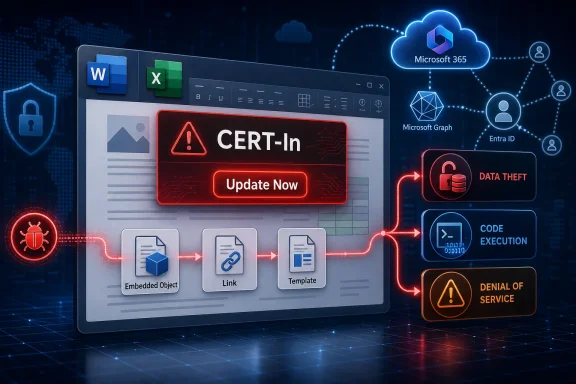
India’s Computer Emergency Response Team has warned that vulnerabilities in Microsoft Office could expose affected users to arbitrary code execution, information theft, denial of service, and cloud-service disruption, while Microsoft has already released updates for the Office apps and users are being urged to install them now. The advisory is not just another routine “update your software” notice. It lands at a moment when Office is no longer a tidy desktop productivity suite, but a sprawling identity-connected, cloud-backed, AI-assisted work surface. That makes the old Office security story — malicious files, macro lures, and delayed patching — more consequential than it used to be.
For two decades, Microsoft Office has occupied a strange place in enterprise security. It is both mundane and dangerous: the software people open all day without thinking, and the software attackers can assume will exist inside almost every organization worth targeting. Word, Excel, PowerPoint, Outlook, and the Microsoft 365 app sit directly on the line between human trust and machine execution.
CERT-In’s latest warning matters because it reminds users that Office vulnerabilities are rarely abstract. A flaw in how Office validates input, handles permissions, processes commands, or authenticates access can become a practical attack path very quickly. The payload may arrive as a document, a crafted message, a malicious embedded object, or a cloud-connected workflow that does not look like a traditional attachment at all.
Microsoft has acknowledged the issue and released an update, which means this is no longer a waiting game for a vendor fix. The question is whether users and administrators will actually get the patched bits onto devices before attackers operationalize the window between disclosure and deployment. In Office security, that window has historically been one of the most dangerous places to stand.
The consumer version of the guidance is simple: open an Office app, go to Account, choose Update Options, and click Update Now. The enterprise version is more complicated. It involves update channels, compatibility testing, change windows, device health reporting, and the uncomfortable reality that many endpoints still fall through the cracks of otherwise mature patch-management programs.
Input validation flaws are especially important in Office because the suite consumes complex content. Documents are not plain sheets of text anymore. They can include embedded media, scripts, objects, links, templates, cloud references, add-ins, comments, metadata, and integrations with other Microsoft 365 services. Every parser and handler in that chain is a potential interpretation engine, and attackers like interpretation engines because they often contain assumptions.
Authentication and authorization weaknesses are the other half of the problem. Modern Office lives inside Microsoft accounts, Entra ID tenants, SharePoint libraries, OneDrive sync roots, Teams conversations, and Microsoft Graph-backed permissions. A flaw that lets a user or process see more than it should is not merely a local application bug. It can become a data-governance failure across a tenant.
Command-handling flaws complete the picture. If user-controlled content can influence a command path, invoke unintended behavior, or escape an expected processing context, the risk shifts from “bad document” to “code execution” or “service disruption.” That is why advisories often read like worst-case scenarios: arbitrary code execution, sensitive information disclosure, denial of service, and cloud-service impact. They are not always describing a single guaranteed outcome; they are describing what becomes plausible when trust boundaries collapse.
That shift changes the risk calculus. A vulnerability in the Office app can still compromise a workstation, but the workstation may hold synced files, cached credentials, tokens, browser sessions, and access to shared libraries. A user’s Office session may be the bridge between local execution and organizational data. In a Microsoft 365 environment, that bridge is heavily traveled.
This is why the mention of cloud-service disruption in the advisory should not be waved away. Office today depends on services that coordinate autosave, collaboration, identity checks, policy enforcement, document classification, and content retrieval. If a vulnerability affects how the client or service handles malformed input, policy checks, or command flows, the blast radius can extend beyond one user staring at a broken Word document.
Administrators already understand this intuitively. The hard part is that the patching model often still treats Office as a client application while the business treats it as infrastructure. If Word, Excel, Outlook, and the Microsoft 365 app stop working, many organizations do not merely lose productivity; they lose the basic interface through which work is assigned, approved, discussed, audited, and archived.
That does not mean Copilot is inherently unsafe. It does mean that the security model must be more disciplined than the old “do not open suspicious attachments” playbook. AI assistants create new places where input, authorization, retrieval, and action meet. Those are exactly the categories named in the CERT-In warning: validation, authentication, authorization, and command handling.
The phrase prompt injection has become fashionable, sometimes too fashionable, but the underlying issue is real. Any system that reads untrusted content and then uses it to guide behavior has to distinguish between content to be summarized and instructions to be followed. Humans are bad at that distinction under pressure; software is bad at it unless designed with strict boundaries. When the assistant has access to files, emails, chats, meetings, and enterprise connectors, the difference matters.
Microsoft’s public positioning around Copilot emphasizes enterprise security, permissions inheritance, compliance controls, and tenant boundaries. Those claims are not meaningless; they are central to why businesses choose Microsoft 365 Copilot over consumer AI tools. But every reported flaw that touches data handling, policy enforcement, or command execution chips away at the assumption that the productivity suite’s security boundary is already settled.
Consumer users are usually told to click Update Now. That advice is correct as far as it goes. In Word, Excel, PowerPoint, or another Office app, users can open File, choose Account or Office Account, select Update Options, and then run Update Now. If updates have been disabled, they may need to enable them first.
In managed environments, the better answer is verification rather than assumption. Admins should confirm the deployed build numbers, check whether devices are receiving updates from the expected channel, and identify machines that have not contacted management services recently. The most exposed endpoint is often not the one that failed a patch; it is the one nobody realized was no longer participating in the patch process.
There is also the matter of Office LTSC, perpetual-license Office, and older deployments that do not behave like evergreen Microsoft 365 Apps installations. Some organizations still run legacy Office versions because of macros, add-ins, line-of-business dependencies, or licensing inertia. Those environments require special attention because the user-facing “Update Now” workflow may not map to the actual patching mechanism in use.
Office is especially attractive during that middle period because exploitation often rides on user behavior. A targeted email, a shared document, a fake invoice, a malicious template, or a poisoned collaboration link can turn a known vulnerability into an initial foothold. Even when exploitation requires interaction, Office provides the attacker with a rich menu of plausible interactions.
The defensive temptation is to treat this as a narrow patching chore. Install the update, close the ticket, move on. But a serious Office vulnerability should also trigger a quick review of attachment controls, macro policy, Protected View behavior, add-in governance, email filtering, and endpoint detection coverage. Patching closes the known hole; layered controls reduce the damage if another hole is nearby.
That matters because Office vulnerabilities rarely arrive alone in real campaigns. Attackers chain them with credential theft, social engineering, living-off-the-land tools, cloud mailbox rules, OAuth abuse, and persistence mechanisms that survive the original exploit. By the time a defender sees the first alert, the malicious document may be the least interesting part of the intrusion.
For individual Windows users, the advice is blunt: update Office now, especially if you open documents from email, messaging apps, shared drives, or the web. The risk is not limited to people who knowingly download suspicious files. Modern document attacks often hide inside workflows that look ordinary because ordinary workflows are exactly where Office lives.
Users should also be wary of files that ask them to enable content, disable protections, sign in again, install add-ins, or move documents out of protected locations. Not every exploit needs those steps, but many attacks still rely on persuasion layered over a technical weakness. The safest Office install is not only patched; it is also configured to mistrust unsolicited active content.
Windows enthusiasts sometimes focus heavily on the operating system and overlook Office as part of the same attack surface. That separation no longer makes sense. On a typical PC, Office apps touch identity, local storage, browser sessions, cloud sync, printing, scripting, and collaboration tools. If Windows is the house, Office is one of the busiest doors.
Start with update compliance, but do not stop there. Microsoft 365 Apps for enterprise should be monitored through the organization’s chosen management stack, whether that is Intune, Configuration Manager, third-party tooling, or a hybrid approach. Devices that are out of policy, off-network, stale, or user-managed deserve immediate scrutiny.
Next comes permission sprawl. Copilot has made this issue more visible, but it predates AI by years. If users have access to overshared SharePoint sites, forgotten Teams files, broad OneDrive links, or legacy document libraries, any tool that faithfully honors those permissions can still surface data the business did not intend to be broadly discoverable. A vulnerability is bad; a vulnerability sitting on top of sloppy authorization is worse.
Email and document ingress controls also deserve renewed attention. Safe Links, Safe Attachments, sandboxing, content disarm and reconstruction, macro restrictions, and attachment detonation are not glamorous, but they are practical compensating controls. They buy time when a patch is rolling out and reduce reliance on every user making the right choice under pressure.
That sequence is backwards. Copilot and similar systems need named security ownership because they sit at the intersection of identity, content, compliance, and automation. The owner does not need to be anti-AI; they need to be responsible for defining what the assistant can access, what it can do, how it is monitored, and what happens when it behaves unexpectedly.
This is especially important because AI vulnerabilities can look different from classic software bugs. A failed authorization check may appear as an over-helpful answer. A command-handling problem may emerge through an agent workflow. A data-loss issue may be buried inside a summary that should never have included restricted content. Traditional logs and alerts may not tell the full story unless the organization has deliberately instrumented the AI layer.
Microsoft’s strongest argument for Copilot in the enterprise is that it operates inside existing Microsoft 365 security and compliance boundaries. That argument depends on those boundaries being clean, current, and enforceable. If an organization has weak labels, stale groups, permissive sharing, and inconsistent conditional access, Copilot will not magically fix the foundation; it may reveal how fragile the foundation already was.
The important distinction is between severity and exploitability. An advisory may list severe possible outcomes without confirming that every affected user is being actively attacked. Conversely, a lower-profile flaw can become urgent if attackers discover a reliable exploit path. Defenders should avoid both complacency and melodrama.
In this case, the practical response is clear because Microsoft has released an update. Users should install it, administrators should verify deployment, and organizations should review the surrounding controls that make Office exploitation harder. The lack of drama in that recommendation should not be mistaken for a lack of urgency.
Security teams should also communicate clearly with users. “Update Office because CERT-In says vulnerabilities could allow code execution or data theft” is more persuasive than “please install updates.” People are more likely to tolerate interruption when they understand the risk in plain language. Office is too central to work for vague patch notices to be effective.
Microsoft’s Office empire has survived decades of attacks because it is indispensable, constantly patched, and deeply defended — but also because attackers keep finding value in the places where documents, identity, automation, and trust collide. The latest CERT-In warning should push users to update today, but it should push IT leaders to think beyond today’s patch. The future of Office security will not be won by pretending the suite is just a collection of desktop apps; it will be won by treating it as a cloud-connected operating layer for work, with all the scrutiny that role deserves.
 Office Is Still the Attack Surface Everyone Has Installed
For two decades, Microsoft Office has occupied a strange place in enterprise security. It is both mundane and dangerous: the software people open all day without thinking, and the software attackers can assume will exist inside almost every organization worth targeting. Word, Excel, PowerPoint, Outlook, and the Microsoft 365 app sit directly on the line between human trust and machine execution.CERT-In’s latest warning matters because it reminds users that Office vulnerabilities are rarely abstract. A flaw in how Office validates input, handles permissions, processes commands, or authenticates access can become a practical attack path very quickly. The payload may arrive as a document, a crafted message, a malicious embedded object, or a cloud-connected workflow that does not look like a traditional attachment at all.
Microsoft has acknowledged the issue and released an update, which means this is no longer a waiting game for a vendor fix. The question is whether users and administrators will actually get the patched bits onto devices before attackers operationalize the window between disclosure and deployment. In Office security, that window has historically been one of the most dangerous places to stand.
The consumer version of the guidance is simple: open an Office app, go to Account, choose Update Options, and click Update Now. The enterprise version is more complicated. It involves update channels, compatibility testing, change windows, device health reporting, and the uncomfortable reality that many endpoints still fall through the cracks of otherwise mature patch-management programs.
CERT-In’s Warning Is Really About Trust Boundaries
The language in the advisory is familiar to security teams: input validation problems, authentication weakness, authorization issues, and command-handling flaws. Those phrases can sound dry, but they describe the places where software decides whether a thing is data, an instruction, a user, a privilege, or a threat. When those boundaries fail, attackers do not need magic; they need a path the product mistakenly treats as legitimate.Input validation flaws are especially important in Office because the suite consumes complex content. Documents are not plain sheets of text anymore. They can include embedded media, scripts, objects, links, templates, cloud references, add-ins, comments, metadata, and integrations with other Microsoft 365 services. Every parser and handler in that chain is a potential interpretation engine, and attackers like interpretation engines because they often contain assumptions.
Authentication and authorization weaknesses are the other half of the problem. Modern Office lives inside Microsoft accounts, Entra ID tenants, SharePoint libraries, OneDrive sync roots, Teams conversations, and Microsoft Graph-backed permissions. A flaw that lets a user or process see more than it should is not merely a local application bug. It can become a data-governance failure across a tenant.
Command-handling flaws complete the picture. If user-controlled content can influence a command path, invoke unintended behavior, or escape an expected processing context, the risk shifts from “bad document” to “code execution” or “service disruption.” That is why advisories often read like worst-case scenarios: arbitrary code execution, sensitive information disclosure, denial of service, and cloud-service impact. They are not always describing a single guaranteed outcome; they are describing what becomes plausible when trust boundaries collapse.
The Desktop Suite Has Become a Cloud Client
There was a time when patching Office meant fixing a desktop application that opened files from disk or email. That world still exists, but it is no longer the whole story. Microsoft Office is now a front end to cloud identity, collaborative storage, compliance labels, enterprise search, add-ins, and AI features. The Office app is less a standalone program than a privileged client in a much larger productivity fabric.That shift changes the risk calculus. A vulnerability in the Office app can still compromise a workstation, but the workstation may hold synced files, cached credentials, tokens, browser sessions, and access to shared libraries. A user’s Office session may be the bridge between local execution and organizational data. In a Microsoft 365 environment, that bridge is heavily traveled.
This is why the mention of cloud-service disruption in the advisory should not be waved away. Office today depends on services that coordinate autosave, collaboration, identity checks, policy enforcement, document classification, and content retrieval. If a vulnerability affects how the client or service handles malformed input, policy checks, or command flows, the blast radius can extend beyond one user staring at a broken Word document.
Administrators already understand this intuitively. The hard part is that the patching model often still treats Office as a client application while the business treats it as infrastructure. If Word, Excel, Outlook, and the Microsoft 365 app stop working, many organizations do not merely lose productivity; they lose the basic interface through which work is assigned, approved, discussed, audited, and archived.
The Copilot Connection Makes the Timing Harder to Ignore
The latest Office warning follows related CERT-In concern around Microsoft 365 Copilot vulnerabilities, and that sequence is important. Copilot is not simply a chatbot bolted onto Office. It is an orchestration layer that can reason over user-accessible organizational data, draw context from Microsoft Graph, and surface answers inside the same productivity environment where users already trust Microsoft-branded output.That does not mean Copilot is inherently unsafe. It does mean that the security model must be more disciplined than the old “do not open suspicious attachments” playbook. AI assistants create new places where input, authorization, retrieval, and action meet. Those are exactly the categories named in the CERT-In warning: validation, authentication, authorization, and command handling.
The phrase prompt injection has become fashionable, sometimes too fashionable, but the underlying issue is real. Any system that reads untrusted content and then uses it to guide behavior has to distinguish between content to be summarized and instructions to be followed. Humans are bad at that distinction under pressure; software is bad at it unless designed with strict boundaries. When the assistant has access to files, emails, chats, meetings, and enterprise connectors, the difference matters.
Microsoft’s public positioning around Copilot emphasizes enterprise security, permissions inheritance, compliance controls, and tenant boundaries. Those claims are not meaningless; they are central to why businesses choose Microsoft 365 Copilot over consumer AI tools. But every reported flaw that touches data handling, policy enforcement, or command execution chips away at the assumption that the productivity suite’s security boundary is already settled.
Patch Tuesday Is Not Enough When Office Updates Move on Their Own Clock
Many Windows administrators live by Patch Tuesday, but Office has always had a slightly different rhythm. Microsoft 365 Apps update through channels, policies, content delivery networks, and management tooling that may or may not align neatly with monthly operating-system patch cycles. That flexibility is useful, but it can also create ambiguity: when someone says “Office is patched,” which device, which app, which channel, and which build do they mean?Consumer users are usually told to click Update Now. That advice is correct as far as it goes. In Word, Excel, PowerPoint, or another Office app, users can open File, choose Account or Office Account, select Update Options, and then run Update Now. If updates have been disabled, they may need to enable them first.
In managed environments, the better answer is verification rather than assumption. Admins should confirm the deployed build numbers, check whether devices are receiving updates from the expected channel, and identify machines that have not contacted management services recently. The most exposed endpoint is often not the one that failed a patch; it is the one nobody realized was no longer participating in the patch process.
There is also the matter of Office LTSC, perpetual-license Office, and older deployments that do not behave like evergreen Microsoft 365 Apps installations. Some organizations still run legacy Office versions because of macros, add-ins, line-of-business dependencies, or licensing inertia. Those environments require special attention because the user-facing “Update Now” workflow may not map to the actual patching mechanism in use.
The Real Risk Is the Gap Between Available and Installed
Microsoft releasing a fix is the beginning of remediation, not the end of it. Security advisories routinely compress the timeline into two neat events: vulnerability disclosed, update released. Attackers operate in the messier middle, where defenders are reading bulletins, vendors are pushing packages, administrators are testing, users are postponing restarts, and unmanaged devices are quietly staying vulnerable.Office is especially attractive during that middle period because exploitation often rides on user behavior. A targeted email, a shared document, a fake invoice, a malicious template, or a poisoned collaboration link can turn a known vulnerability into an initial foothold. Even when exploitation requires interaction, Office provides the attacker with a rich menu of plausible interactions.
The defensive temptation is to treat this as a narrow patching chore. Install the update, close the ticket, move on. But a serious Office vulnerability should also trigger a quick review of attachment controls, macro policy, Protected View behavior, add-in governance, email filtering, and endpoint detection coverage. Patching closes the known hole; layered controls reduce the damage if another hole is nearby.
That matters because Office vulnerabilities rarely arrive alone in real campaigns. Attackers chain them with credential theft, social engineering, living-off-the-land tools, cloud mailbox rules, OAuth abuse, and persistence mechanisms that survive the original exploit. By the time a defender sees the first alert, the malicious document may be the least interesting part of the intrusion.
Windows Users Should Treat Office Updates as Security Updates, Not Feature Updates
Microsoft has trained many users to think of Office updates as feature churn. New icons appear, menus move, Copilot buttons arrive, collaboration features change, and some users reasonably conclude that updates are something to delay until they have time for disruption. That habit is dangerous when the same update channel also carries critical security fixes.For individual Windows users, the advice is blunt: update Office now, especially if you open documents from email, messaging apps, shared drives, or the web. The risk is not limited to people who knowingly download suspicious files. Modern document attacks often hide inside workflows that look ordinary because ordinary workflows are exactly where Office lives.
Users should also be wary of files that ask them to enable content, disable protections, sign in again, install add-ins, or move documents out of protected locations. Not every exploit needs those steps, but many attacks still rely on persuasion layered over a technical weakness. The safest Office install is not only patched; it is also configured to mistrust unsolicited active content.
Windows enthusiasts sometimes focus heavily on the operating system and overlook Office as part of the same attack surface. That separation no longer makes sense. On a typical PC, Office apps touch identity, local storage, browser sessions, cloud sync, printing, scripting, and collaboration tools. If Windows is the house, Office is one of the busiest doors.
Enterprise IT Has to Audit the Microsoft 365 Blast Radius
For sysadmins and security teams, the CERT-In advisory should prompt a broader Microsoft 365 hygiene check. The concern is not just whether Word and Excel are updated on laptops. It is whether the organization understands how Office clients, cloud services, identity controls, and data permissions intersect when something goes wrong.Start with update compliance, but do not stop there. Microsoft 365 Apps for enterprise should be monitored through the organization’s chosen management stack, whether that is Intune, Configuration Manager, third-party tooling, or a hybrid approach. Devices that are out of policy, off-network, stale, or user-managed deserve immediate scrutiny.
Next comes permission sprawl. Copilot has made this issue more visible, but it predates AI by years. If users have access to overshared SharePoint sites, forgotten Teams files, broad OneDrive links, or legacy document libraries, any tool that faithfully honors those permissions can still surface data the business did not intend to be broadly discoverable. A vulnerability is bad; a vulnerability sitting on top of sloppy authorization is worse.
Email and document ingress controls also deserve renewed attention. Safe Links, Safe Attachments, sandboxing, content disarm and reconstruction, macro restrictions, and attachment detonation are not glamorous, but they are practical compensating controls. They buy time when a patch is rolling out and reduce reliance on every user making the right choice under pressure.
The AI Layer Needs Its Own Security Owner
The related Microsoft 365 Copilot concerns point to a governance gap many organizations are only beginning to confront. AI features in productivity suites are often introduced as productivity enhancements, evaluated by business units, and licensed through Microsoft 365 procurement motions. Security teams then inherit the operational risk after the assistant is already available to pilot groups.That sequence is backwards. Copilot and similar systems need named security ownership because they sit at the intersection of identity, content, compliance, and automation. The owner does not need to be anti-AI; they need to be responsible for defining what the assistant can access, what it can do, how it is monitored, and what happens when it behaves unexpectedly.
This is especially important because AI vulnerabilities can look different from classic software bugs. A failed authorization check may appear as an over-helpful answer. A command-handling problem may emerge through an agent workflow. A data-loss issue may be buried inside a summary that should never have included restricted content. Traditional logs and alerts may not tell the full story unless the organization has deliberately instrumented the AI layer.
Microsoft’s strongest argument for Copilot in the enterprise is that it operates inside existing Microsoft 365 security and compliance boundaries. That argument depends on those boundaries being clean, current, and enforceable. If an organization has weak labels, stale groups, permissive sharing, and inconsistent conditional access, Copilot will not magically fix the foundation; it may reveal how fragile the foundation already was.
Government Advisories Are Warning Systems, Not Panic Buttons
CERT-In advisories often get translated into alarmist headlines, but their best use is operational discipline. The agency’s role is to flag risk, identify affected products, describe potential impact, and point users toward remediation. That is not panic. It is the security ecosystem doing what it is supposed to do.The important distinction is between severity and exploitability. An advisory may list severe possible outcomes without confirming that every affected user is being actively attacked. Conversely, a lower-profile flaw can become urgent if attackers discover a reliable exploit path. Defenders should avoid both complacency and melodrama.
In this case, the practical response is clear because Microsoft has released an update. Users should install it, administrators should verify deployment, and organizations should review the surrounding controls that make Office exploitation harder. The lack of drama in that recommendation should not be mistaken for a lack of urgency.
Security teams should also communicate clearly with users. “Update Office because CERT-In says vulnerabilities could allow code execution or data theft” is more persuasive than “please install updates.” People are more likely to tolerate interruption when they understand the risk in plain language. Office is too central to work for vague patch notices to be effective.
The Lesson for Windows Shops Is Written in the Update Button
This incident’s most useful lesson is not that Microsoft Office has vulnerabilities. Everyone in IT already knows that. The lesson is that Office security now spans the desktop, the cloud, and AI-assisted workflows, so remediation has to be measured across all three.- Users should update Microsoft Office apps immediately through the built-in Update Options menu or their organization’s managed software-update process.
- Administrators should verify Office build compliance rather than assuming Microsoft 365 Apps have updated everywhere.
- Organizations using Microsoft 365 Copilot should review permissions, sensitivity labels, DLP policies, and audit coverage before treating AI output as safely governed.
- Security teams should harden document and email handling controls because Office vulnerabilities are often exploited through routine business workflows.
- Legacy Office deployments, disabled updates, stale endpoints, and unmanaged devices should be treated as priority exceptions, not background inventory noise.
Microsoft’s Office empire has survived decades of attacks because it is indispensable, constantly patched, and deeply defended — but also because attackers keep finding value in the places where documents, identity, automation, and trust collide. The latest CERT-In warning should push users to update today, but it should push IT leaders to think beyond today’s patch. The future of Office security will not be won by pretending the suite is just a collection of desktop apps; it will be won by treating it as a cloud-connected operating layer for work, with all the scrutiny that role deserves.
References
- Primary source: Deccan Herald
Published: 2026-06-03T08:12:13.834743
Microsoft Office: CERT-In flags flaw risking remote code execution
CERT-In: India's cyber agency has flagged a high-severity Microsoft Office flaw that could enable remote code execution, unauthorised access and system compromise. Users should install the latest security update to reduce malware and data theft risks.www.deccanherald.com - Related coverage: techcrunch.com
Microsoft says hackers are exploiting critical zero-day bugs to target Windows and Office users | TechCrunch
Critical security flaws targeting Windows and Office users allow hackers to take complete control of a victim's computer by clicking a malicious link or opening a file. Patch now.techcrunch.com - Official source: learn.microsoft.com
Security for Microsoft 365 Copilot | Microsoft Learn
Learn how Microsoft secures Microsoft 365 Copilot and how Copilot inherits Microsoft 365 security, compliance, and privacy protections.learn.microsoft.com - Related coverage: pcworld.com
Microsoft's May updates patch 120 security flaws in Windows and Office | PCWorld
This month's Patch Tuesday addressed 120 vulnerabilities across Windows, Office, and cloud services, including critical issues in Word.www.pcworld.com - Related coverage: techradar.com
Microsoft admits an Office bug exposed confidential user emails to Copilot | TechRadar
Copilot was ignoring 'confidential' email flagswww.techradar.com - Related coverage: isec.news
Microsoft issues emergency patch for Office zero-day CVE-2026-21509 – iSec News
Microsoft issued out-of-band patches for Office zero-day CVE-2026-21509, rated 7.8. Service-side protection covers newer builds and a registry workaround is provided for older Office versions. Federal agencies must remediate by February 16, 2026.www.isec.news
- Related coverage: cert.europa.eu
- Related coverage: cert-mu.govmu.org
- Related coverage: kb.cert.org
CERT Coordination Center
The Vulnerability Notes Database provides information about software vulnerabilities.www.kb.cert.org
- Related coverage: cert-in.org.in
Vulnerability
www.cert-in.org.in
- Official source: techcommunity.microsoft.com
Addressing Exchange Server May 2026 vulnerability CVE-2026-42897 | Microsoft Community Hub
We wanted to tell you how to address the Exchange Server May 2026 vulnerability CVE-2026-42897. techcommunity.microsoft.com
- Related coverage: cert.ssi.gouv.fr
Multiples vulnérabilités dans Microsoft Office - CERT-FR
 www.cert.ssi.gouv.fr
- Related coverage: techrepublic.com
Microsoft Issues Emergency Patch for Active Office Zero-Day
Microsoft released an emergency Office patch to fix an actively exploited zero-day flaw that lets attackers bypass security via malicious files.www.techrepublic.com
- Related coverage: ap7i.com
ap7i.com | Microsoft's May 2026 Patch Tuesday: 120 Flaws, No Zero-Days
Microsoft’s May Patch Tuesday addresses 120 vulnerabilities and contains no zero-days — the first such month since June 2024. Among the Critical fixes are three RCEs at CVSS 9.8 or higher: Netlogon, Windows DNS Client, and Microsoft Dynamics 365. The Secure Boot certificate deadline is 45...ap7i.com - Related coverage: cert.gov.vu
Advisory 118 CVE 2026 21509 Microsoft Office Security Feature Bypass Vulnerability
PDF documentcert.gov.vu
- Related coverage: cybersecurity.nusummit.com
Abstract purple and blue textured background.
Abstract purple and blue textured background.cybersecurity.nusummit.com
