

Google published Chrome 150.0.7871.46/.47 for Windows and macOS on June 30, 2026, fixing CVE-2026-13933, a medium-severity Passwords component flaw that could expose sensitive process-memory information after a renderer compromise. The National Vulnerability Database later tied the issue to Chrome versions before 150.0.7871.47, while CISA’s ADP enrichment assigned it a 5.3 CVSS 3.1 score. The headline is not that Chrome’s password manager suddenly became a standalone remote compromise vector. The headline is that, once the browser’s renderer is already lost, the walls around credential-adjacent memory still matter — and this patch is one more reminder that browser security is now a chain-of-containment business.
CVE-2026-13933 lives in the uncomfortable part of the browser: not the network stack, not JavaScript execution, not an obvious sandbox escape, but the Passwords component. According to NVD’s entry, the bug involved “insufficient policy enforcement” and could let a remote attacker who had already compromised the renderer process obtain potentially sensitive information from process memory using a crafted HTML page.
That phrasing is doing a lot of work. It does not say an attacker can simply visit a website and dump your saved passwords. It says the attacker must first compromise the renderer process, which is the browser process responsible for handling web content inside Chrome’s multi-process architecture.
But that condition should not make administrators shrug. Browser exploitation in 2026 is rarely a single clean bug marching straight from webpage to full machine compromise. It is a chain: a rendering flaw, a type confusion, an out-of-bounds read, an info leak, a sandbox escape, a policy bypass, and sometimes a credential or token theft opportunity stitched together by the attacker.
CVE-2026-13933 looks like one of those chain-strengthening bugs. On its own, CISA’s ADP vector rates the attack complexity as high and requires user interaction. In a real-world exploit chain, however, the “user interaction” may be nothing more exotic than landing on a hostile page after clicking a link.
That is precisely why this one deserves attention. A Chrome update with hundreds of fixes is not simply a patch bundle; it is a map of where modern browser attack surface has spread. In the same release notes, Google listed critical issues across Extensions, GPU, ANGLE, Dawn, WebUSB, Chromoting, Views, Bluetooth, Skia, Ozone, and other components. Passwords is just one tile in a much larger mosaic.
For Windows users, Chrome is often treated as an application. For attackers, it is a platform. It brokers identity, sessions, sync, extensions, downloads, payments, enterprise policies, local integrations, and increasingly AI-adjacent browser surfaces.
That makes a Passwords bug more than a password-manager bug. It is a flaw in one of the browser’s trust boundaries — the place where hostile web content is supposed to be kept far away from credential-related data, even when other parts of the browser are under stress.
But renderer compromise is not science fiction. It is one of the standard first moves in browser exploitation. Chrome’s security model assumes renderers are dangerous by design because they parse, execute, and display untrusted web content all day long.
The job of the rest of the browser is to make sure that a compromised renderer cannot easily reach secrets, privileged browser services, files, devices, or other tabs. When a Passwords policy enforcement bug lets that compromised renderer obtain sensitive memory information, the vulnerability becomes a containment failure.
That distinction matters for risk triage. This is not the same as a drive-by password theft bug. It is also not harmless. It belongs in the category of vulnerabilities that make a bad day worse: once the attacker gets one foot inside, a weak internal policy boundary may help them turn code execution into useful intelligence.
That boundary is difficult to defend because the password manager has to sit near both trusted and untrusted worlds. It must observe web forms without blindly trusting them. It must decide when an origin is eligible for autofill. It must protect secrets while interacting with pages designed by anyone on the internet.
“Insufficient policy enforcement” is a dry weakness label, but in this area it usually means the browser failed to apply a rule consistently enough. The NVD entry maps the weakness to CWE-284, improper access control, which is broad but directionally useful: some component was able to access something it should not have been able to access under the intended policy model.
The uncomfortable lesson is that password safety is not just about encryption at rest or whether your Google account sync is protected by two-factor authentication. It is also about the runtime behavior of a browser under active attack.
Based on the NVD change history, the relevant CPE is present:
There is a nuance here for administrators: Google’s release note lists Windows and Mac as 150.0.7871.46/.47, while NVD describes the fixed threshold as 150.0.7871.47. That can create inventory friction if your fleet reports one of the paired builds. Security teams should follow vendor release metadata and scanner guidance, but the safest operational target is simple: get managed Chrome installations to the current Chrome 150 Stable build or later, rather than trying to lawyer the final digit.
This is also where CPE-based vulnerability management shows its age. CPE is useful for broad matching, but Chrome’s rapid-release model, staggered rollout, platform-specific build numbers, and Extended Stable behavior can make “affected” less crisp than administrators want it to be.
For WindowsForum readers, Edge is the obvious question. Microsoft’s browser is Chromium-based, deeply integrated into Windows, and common in managed fleets that also run Chrome. A vulnerability in Chromium’s Passwords component should prompt administrators to check Edge release notes and update status rather than assuming Chrome’s fix automatically means Edge is fixed on the same day.
This is especially important in enterprises where Chrome and Edge coexist. Users may treat them as interchangeable. Attackers do not. If one Chromium browser is patched and another lags behind, the weaker browser becomes the path of least resistance.
The right administrative habit is not “patch Chrome.” It is “patch the Chromium estate.” That means Chrome Stable, Chrome Extended Stable where used, Edge Stable and Extended Stable, and any less-visible Chromium derivatives installed by developers, power users, or third-party applications.
That creates a rich policy problem. A browser must decide not only whether data is encrypted, but when it is reachable, which process may ask for it, what origin is associated with the request, and whether a renderer-provided signal should be believed. Any weakness in those decisions can become exploitable in combination with a renderer bug.
The CVE description says the attacker could obtain potentially sensitive information from process memory. That is deliberately imprecise, and Google has restricted access to the underlying Chromium issue. Restriction is normal while users are still patching, especially when bug details could help attackers build working exploits.
The lack of public technical detail should not be mistaken for lack of importance. In browser security, the difference between “known exploitable” and “useful to exploit developers” can be thin. Information leaks are prized because they may reveal pointers, secrets, tokens, or state that makes the next stage of an exploit more reliable.
That is a coherent score. The vulnerability is not being described as an arbitrary-code-execution flaw by itself. It does not directly modify data or crash systems. It is about confidentiality after a prior renderer compromise.
But patching priority should not be based on the base score alone. Security teams should consider exploit chain value, component sensitivity, and deployment ease. Chrome updates are generally low-friction compared with operating system upgrades, and the cost of being behind on browser security accumulates quickly.
The practical policy should be boring: treat medium Chrome vulnerabilities in credential-adjacent components as expedited browser patches, not as end-of-month leftovers. If your organization already has an emergency process only for critical CVEs, this is the kind of bug that should at least trigger accelerated verification.
Google’s own enterprise update guidance has long distinguished Stable, Extended Stable, Beta, Dev, and Canary channels. That model helps organizations avoid surprise feature churn, but security fixes still need to land promptly. Extended Stable is not an excuse to let a browser drift into known-vulnerable territory.
Inventory is the hard part. Administrators need to know which machines have Chrome installed, which channel they are on, which version is actually running, and whether users have relaunched after the update staged. A patched binary that has not restarted is not a patched browsing session.
On Windows, that means endpoint management data must be reconciled with browser reality. Intune, Configuration Manager, third-party RMM tools, EDR software inventory, and Chrome Browser Cloud Management can all tell part of the story. None should be blindly trusted without checking whether update compliance includes process restart.
For a vulnerability like CVE-2026-13933, that delay matters. The update can be downloaded, staged, and waiting, while the active vulnerable browser process continues handling hostile web content. Administrators who report “Chrome is updated” based only on installed version metadata may miss the running-process problem.
This is particularly common on developer workstations, shared kiosks, call-center desktops, and systems used for SaaS-heavy workflows. The browser becomes the workplace, and restarting it feels like interrupting the workday.
Organizations should normalize browser restarts the way they normalized OS patch reboots. That may mean user prompts, forced relaunch windows, or policy-driven restart deadlines. It is irritating, but less irritating than explaining why a known browser flaw remained exploitable after the patch had technically arrived.
That sprawl changes how defenders should think. There is no single “browser vulnerability” category anymore. There are GPU bugs, WebUSB bugs, extension bugs, password bugs, AI-surface bugs, media bugs, and policy bugs, each with different exploitability and enterprise impact.
CVE-2026-13933 sits in the policy category, and policy bugs are easy to underappreciate. Memory corruption sounds dramatic. Policy enforcement sounds bureaucratic. But many of the most consequential security failures are cases where code does exactly what it was written to do — just for an actor that should never have been allowed to ask.
That is why the phrase policy enforcement deserves attention. It is the security model made executable. When it fails, the browser’s internal contract between trusted and untrusted components begins to fray.
A memory disclosure bug in a credential-adjacent component therefore has value even if it does not hand over a neat list of usernames and passwords. Sensitive memory can include state that helps an attacker understand the browser profile, defeat mitigations, or move from one exploit stage to another.
This is one reason password managers remain both useful and controversial inside browsers. They reduce password reuse and phishing exposure, but they also concentrate identity workflows inside the most attacked desktop application. Dedicated password managers are not magic either, but they can reduce some coupling between web content and credential storage.
For enterprises, the answer is not necessarily to ban browser password managers across the board. The answer is to understand what credential material lives in the browser profile, enforce strong device and account protections, and treat browser compromise as an identity incident, not merely an endpoint incident.
In the gap between vendor release, CVE publication, NVD enrichment, scanner plugin updates, and fleet remediation, defenders can get conflicting views of exposure. One dashboard may show no score because NVD has not completed its assessment. Another may show the CISA ADP score. Another may flag only 150.0.7871.46 but not 150.0.7871.47, or vice versa.
This is why browser patch management cannot be delegated entirely to CVE ingestion. CVEs are necessary, but Chrome release notes are often the first operational signal. If Google says a Stable update contains hundreds of security fixes, that is enough to begin rollout validation before every database has converged.
Security teams should also be careful with “no known exploitation” language. CISA’s SSVC data for this CVE lists exploitation as none, which is good news. It is not a promise of future safety, and it is not proof that exploit developers will ignore the bug after patch diffing begins.
For managed environments, the fix is still ordinary but must be verified. Check Chrome channel, installed version, running version, restart state, and policy delays. If Chrome is packaged outside Google’s updater, confirm that your package source has actually moved beyond the affected build.
The same review should extend to Chromium-based browsers beyond Google Chrome. If Edge or another Chromium derivative is present, confirm vendor-specific updates rather than assuming shared upstream code means shared patch timing.
Most importantly, do not let the “medium” label lull the organization into postponement. This flaw touches browser-contained sensitive information after renderer compromise. In an exploit chain, that is exactly the kind of supporting weakness attackers like.
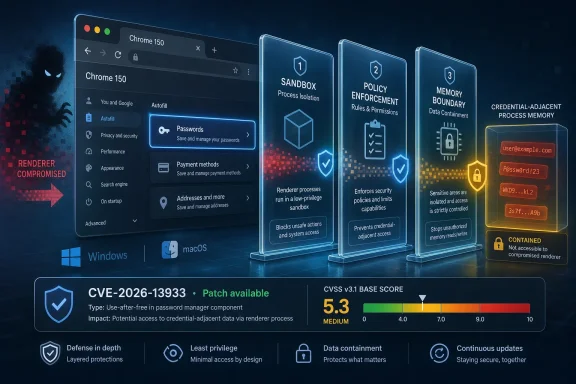 A Medium Bug With a High-Value Neighborhood
CVE-2026-13933 lives in the uncomfortable part of the browser: not the network stack, not JavaScript execution, not an obvious sandbox escape, but the Passwords component. According to NVD’s entry, the bug involved “insufficient policy enforcement” and could let a remote attacker who had already compromised the renderer process obtain potentially sensitive information from process memory using a crafted HTML page.That phrasing is doing a lot of work. It does not say an attacker can simply visit a website and dump your saved passwords. It says the attacker must first compromise the renderer process, which is the browser process responsible for handling web content inside Chrome’s multi-process architecture.
But that condition should not make administrators shrug. Browser exploitation in 2026 is rarely a single clean bug marching straight from webpage to full machine compromise. It is a chain: a rendering flaw, a type confusion, an out-of-bounds read, an info leak, a sandbox escape, a policy bypass, and sometimes a credential or token theft opportunity stitched together by the attacker.
CVE-2026-13933 looks like one of those chain-strengthening bugs. On its own, CISA’s ADP vector rates the attack complexity as high and requires user interaction. In a real-world exploit chain, however, the “user interaction” may be nothing more exotic than landing on a hostile page after clicking a link.
Chrome 150 Was Not a Routine Dot Release
Google’s Chrome Releases blog said the June 30 Stable Channel update promoted Chrome 150 to stable for Windows, Mac, and Linux, with Windows and Mac moving to 150.0.7871.46/.47 and Linux to 150.0.7871.46. The same Google post says the release includes 433 security fixes, a number large enough to make any individual medium-severity CVE disappear into the noise.That is precisely why this one deserves attention. A Chrome update with hundreds of fixes is not simply a patch bundle; it is a map of where modern browser attack surface has spread. In the same release notes, Google listed critical issues across Extensions, GPU, ANGLE, Dawn, WebUSB, Chromoting, Views, Bluetooth, Skia, Ozone, and other components. Passwords is just one tile in a much larger mosaic.
For Windows users, Chrome is often treated as an application. For attackers, it is a platform. It brokers identity, sessions, sync, extensions, downloads, payments, enterprise policies, local integrations, and increasingly AI-adjacent browser surfaces.
That makes a Passwords bug more than a password-manager bug. It is a flaw in one of the browser’s trust boundaries — the place where hostile web content is supposed to be kept far away from credential-related data, even when other parts of the browser are under stress.
The Renderer Compromise Requirement Is a Guardrail, Not a Get-Out-of-Patching Card
The most important phrase in the CVE description is “who had compromised the renderer process.” That prerequisite substantially narrows the immediate risk, and it explains why Chromium labels the issue medium rather than critical. A remote attacker needs more than ordinary web access; they need a foothold inside the renderer.But renderer compromise is not science fiction. It is one of the standard first moves in browser exploitation. Chrome’s security model assumes renderers are dangerous by design because they parse, execute, and display untrusted web content all day long.
The job of the rest of the browser is to make sure that a compromised renderer cannot easily reach secrets, privileged browser services, files, devices, or other tabs. When a Passwords policy enforcement bug lets that compromised renderer obtain sensitive memory information, the vulnerability becomes a containment failure.
That distinction matters for risk triage. This is not the same as a drive-by password theft bug. It is also not harmless. It belongs in the category of vulnerabilities that make a bad day worse: once the attacker gets one foot inside, a weak internal policy boundary may help them turn code execution into useful intelligence.
Password Managers Are Security Boundaries Whether Vendors Like Saying So or Not
Browser makers often describe built-in password managers as convenience and safety features: they generate strong passwords, warn about reused credentials, and reduce phishing exposure by binding autofill behavior to origins. All of that is true. But the moment a browser stores, retrieves, syncs, autofills, or mediates credentials, it also becomes a security boundary.That boundary is difficult to defend because the password manager has to sit near both trusted and untrusted worlds. It must observe web forms without blindly trusting them. It must decide when an origin is eligible for autofill. It must protect secrets while interacting with pages designed by anyone on the internet.
“Insufficient policy enforcement” is a dry weakness label, but in this area it usually means the browser failed to apply a rule consistently enough. The NVD entry maps the weakness to CWE-284, improper access control, which is broad but directionally useful: some component was able to access something it should not have been able to access under the intended policy model.
The uncomfortable lesson is that password safety is not just about encryption at rest or whether your Google account sync is protected by two-factor authentication. It is also about the runtime behavior of a browser under active attack.
The CPE Confusion Is Mostly a Presentation Problem
The user-facing NVD text asks whether a CPE is missing, while the change history says NIST added a Chrome CPE configuration for versions up to, but excluding, 150.0.7871.47. That can look contradictory if the page’s “Known Affected Software Configurations” panel is slow to load, blocked by scripting, or not yet fully rendered in a given view.Based on the NVD change history, the relevant CPE is present:
cpe:2.3:a:google:chrome:*:*:*:*:*:*:*:* with affected versions before 150.0.7871.47. In practical terms, vulnerability scanners should be looking for Google Chrome builds older than 150.0.7871.47 on affected desktop platforms.There is a nuance here for administrators: Google’s release note lists Windows and Mac as 150.0.7871.46/.47, while NVD describes the fixed threshold as 150.0.7871.47. That can create inventory friction if your fleet reports one of the paired builds. Security teams should follow vendor release metadata and scanner guidance, but the safest operational target is simple: get managed Chrome installations to the current Chrome 150 Stable build or later, rather than trying to lawyer the final digit.
This is also where CPE-based vulnerability management shows its age. CPE is useful for broad matching, but Chrome’s rapid-release model, staggered rollout, platform-specific build numbers, and Extended Stable behavior can make “affected” less crisp than administrators want it to be.
Microsoft Edge and Other Chromium Browsers Cannot Ignore the Blast Radius
Chrome CVEs often become Chromium ecosystem problems, but not always with identical timing or identical exposure. Microsoft Edge, Brave, Vivaldi, Opera, and other Chromium-based browsers inherit large portions of the Chromium codebase, yet each vendor ships its own release cadence, feature flags, password-management changes, and enterprise policy surface.For WindowsForum readers, Edge is the obvious question. Microsoft’s browser is Chromium-based, deeply integrated into Windows, and common in managed fleets that also run Chrome. A vulnerability in Chromium’s Passwords component should prompt administrators to check Edge release notes and update status rather than assuming Chrome’s fix automatically means Edge is fixed on the same day.
This is especially important in enterprises where Chrome and Edge coexist. Users may treat them as interchangeable. Attackers do not. If one Chromium browser is patched and another lags behind, the weaker browser becomes the path of least resistance.
The right administrative habit is not “patch Chrome.” It is “patch the Chromium estate.” That means Chrome Stable, Chrome Extended Stable where used, Edge Stable and Extended Stable, and any less-visible Chromium derivatives installed by developers, power users, or third-party applications.
The Passwords Component Is a Bigger Target Than the Name Suggests
A casual reading of “Passwords” invites a narrow mental model: saved logins and autofill. In practice, browser credential handling touches a much broader set of identity workflows. It interacts with origin checks, form classification, account sync, local profile storage, password generation, leak detection, and UI prompts that users have been trained to trust.That creates a rich policy problem. A browser must decide not only whether data is encrypted, but when it is reachable, which process may ask for it, what origin is associated with the request, and whether a renderer-provided signal should be believed. Any weakness in those decisions can become exploitable in combination with a renderer bug.
The CVE description says the attacker could obtain potentially sensitive information from process memory. That is deliberately imprecise, and Google has restricted access to the underlying Chromium issue. Restriction is normal while users are still patching, especially when bug details could help attackers build working exploits.
The lack of public technical detail should not be mistaken for lack of importance. In browser security, the difference between “known exploitable” and “useful to exploit developers” can be thin. Information leaks are prized because they may reveal pointers, secrets, tokens, or state that makes the next stage of an exploit more reliable.
Medium Severity Still Deserves Fast Deployment
CISA’s ADP score of 5.3 puts CVE-2026-13933 in the medium range. The vector says network attack vector, high attack complexity, no privileges required, user interaction required, unchanged scope, high confidentiality impact, and no integrity or availability impact.That is a coherent score. The vulnerability is not being described as an arbitrary-code-execution flaw by itself. It does not directly modify data or crash systems. It is about confidentiality after a prior renderer compromise.
But patching priority should not be based on the base score alone. Security teams should consider exploit chain value, component sensitivity, and deployment ease. Chrome updates are generally low-friction compared with operating system upgrades, and the cost of being behind on browser security accumulates quickly.
The practical policy should be boring: treat medium Chrome vulnerabilities in credential-adjacent components as expedited browser patches, not as end-of-month leftovers. If your organization already has an emergency process only for critical CVEs, this is the kind of bug that should at least trigger accelerated verification.
Windows Administrators Need to Look Past the Browser UI
The consumer advice is easy: open Chrome’s About page and let it update. The enterprise version is messier. Managed Chrome can be pinned, delayed, routed through update policies, packaged through software distribution tools, or trapped behind maintenance windows designed for slower-moving desktop software.Google’s own enterprise update guidance has long distinguished Stable, Extended Stable, Beta, Dev, and Canary channels. That model helps organizations avoid surprise feature churn, but security fixes still need to land promptly. Extended Stable is not an excuse to let a browser drift into known-vulnerable territory.
Inventory is the hard part. Administrators need to know which machines have Chrome installed, which channel they are on, which version is actually running, and whether users have relaunched after the update staged. A patched binary that has not restarted is not a patched browsing session.
On Windows, that means endpoint management data must be reconciled with browser reality. Intune, Configuration Manager, third-party RMM tools, EDR software inventory, and Chrome Browser Cloud Management can all tell part of the story. None should be blindly trusted without checking whether update compliance includes process restart.
The Relaunch Problem Is Still the Soft Underbelly of Browser Patching
Chrome’s auto-update model is one of the great security improvements of the modern web. It also has a stubborn human dependency: the browser often needs to restart to complete the update. Users with dozens of tabs and long-lived sessions may defer that restart for days.For a vulnerability like CVE-2026-13933, that delay matters. The update can be downloaded, staged, and waiting, while the active vulnerable browser process continues handling hostile web content. Administrators who report “Chrome is updated” based only on installed version metadata may miss the running-process problem.
This is particularly common on developer workstations, shared kiosks, call-center desktops, and systems used for SaaS-heavy workflows. The browser becomes the workplace, and restarting it feels like interrupting the workday.
Organizations should normalize browser restarts the way they normalized OS patch reboots. That may mean user prompts, forced relaunch windows, or policy-driven restart deadlines. It is irritating, but less irritating than explaining why a known browser flaw remained exploitable after the patch had technically arrived.
The Bigger Chrome 150 Story Is Attack Surface Sprawl
Chrome 150’s 433 security fixes are striking not only because of the count, but because of their spread. The release notes cover graphics layers, device APIs, extensions, remote access, browser UI, rendering libraries, and platform-specific components. A browser is now closer to a miniature operating system than a document viewer.That sprawl changes how defenders should think. There is no single “browser vulnerability” category anymore. There are GPU bugs, WebUSB bugs, extension bugs, password bugs, AI-surface bugs, media bugs, and policy bugs, each with different exploitability and enterprise impact.
CVE-2026-13933 sits in the policy category, and policy bugs are easy to underappreciate. Memory corruption sounds dramatic. Policy enforcement sounds bureaucratic. But many of the most consequential security failures are cases where code does exactly what it was written to do — just for an actor that should never have been allowed to ask.
That is why the phrase policy enforcement deserves attention. It is the security model made executable. When it fails, the browser’s internal contract between trusted and untrusted components begins to fray.
Credential Risk Has Moved From Theft to Session Continuity
Years ago, the nightmare scenario was simple password theft: malware grabs a saved password database, cracks or decrypts it, and uses the credentials elsewhere. That risk still exists, but the modern browser identity problem is broader. Attackers often want active sessions, tokens, cookies, profile state, autofill data, and enough environmental detail to bypass suspicion.A memory disclosure bug in a credential-adjacent component therefore has value even if it does not hand over a neat list of usernames and passwords. Sensitive memory can include state that helps an attacker understand the browser profile, defeat mitigations, or move from one exploit stage to another.
This is one reason password managers remain both useful and controversial inside browsers. They reduce password reuse and phishing exposure, but they also concentrate identity workflows inside the most attacked desktop application. Dedicated password managers are not magic either, but they can reduce some coupling between web content and credential storage.
For enterprises, the answer is not necessarily to ban browser password managers across the board. The answer is to understand what credential material lives in the browser profile, enforce strong device and account protections, and treat browser compromise as an identity incident, not merely an endpoint incident.
Scanner Output Will Lag the Operational Reality
NVD published the CVE on June 30 and last modified it on July 1, according to the entry. CISA’s ADP enrichment added the CVSS vector, CWE mapping, and SSVC data, while NIST’s change history added the CPE configuration and references. That is a fast turnaround, but it still trails Google’s release process and enterprise rollout behavior.In the gap between vendor release, CVE publication, NVD enrichment, scanner plugin updates, and fleet remediation, defenders can get conflicting views of exposure. One dashboard may show no score because NVD has not completed its assessment. Another may show the CISA ADP score. Another may flag only 150.0.7871.46 but not 150.0.7871.47, or vice versa.
This is why browser patch management cannot be delegated entirely to CVE ingestion. CVEs are necessary, but Chrome release notes are often the first operational signal. If Google says a Stable update contains hundreds of security fixes, that is enough to begin rollout validation before every database has converged.
Security teams should also be careful with “no known exploitation” language. CISA’s SSVC data for this CVE lists exploitation as none, which is good news. It is not a promise of future safety, and it is not proof that exploit developers will ignore the bug after patch diffing begins.
The Practical Fix Is Simple, Which Makes Delay Harder to Defend
For individual users, the remediation path is ordinary: update Chrome to 150.0.7871.47 or later, then relaunch the browser. On Windows, that usually means opening the Chrome menu, going to Help, selecting About Google Chrome, allowing the update to complete, and restarting.For managed environments, the fix is still ordinary but must be verified. Check Chrome channel, installed version, running version, restart state, and policy delays. If Chrome is packaged outside Google’s updater, confirm that your package source has actually moved beyond the affected build.
The same review should extend to Chromium-based browsers beyond Google Chrome. If Edge or another Chromium derivative is present, confirm vendor-specific updates rather than assuming shared upstream code means shared patch timing.
Most importantly, do not let the “medium” label lull the organization into postponement. This flaw touches browser-contained sensitive information after renderer compromise. In an exploit chain, that is exactly the kind of supporting weakness attackers like.
The Patch Tells Administrators Where to Tighten the Browser Estate
The operational lesson from CVE-2026-13933 is not complicated, but it is broader than one CVE. Chrome 150 is a reminder that browser security is now identity security, application security, endpoint security, and SaaS access control in one package.- Chrome installations before 150.0.7871.47 should be treated as exposed to CVE-2026-13933, based on NVD’s affected-version configuration.
- The vulnerability requires a prior renderer compromise, but that prerequisite fits naturally into modern browser exploit chains.
- The Passwords component makes the confidentiality impact more sensitive than a generic medium-severity label may suggest.
- The NVD CPE appears in the change history even if the page’s affected-configuration panel does not render clearly in every view.
- Administrators should verify Chromium-based browsers beyond Chrome, especially Microsoft Edge in Windows fleets.
- Patch compliance should include browser relaunch status, because a staged update does not protect an already-running vulnerable session.
References
- Primary source: NVD / Chromium
Published: 2026-07-03T07:00:42-07:00
NVD - CVE-2026-13933
 nvd.nist.gov
- Security advisory: MSRC
Published: 2026-07-03T07:00:42-07:00
Original feed URL
Security Update Guide - Microsoft Security Response Center
 msrc.microsoft.com
