

Google is testing a Chrome Canary settings shortcut that opens the Google Account page for managing connections between Search AI Mode and Workspace content, giving users a more visible route to review whether Google’s search services can access personal information held in apps such as Gmail and Drive. The addition, first reported by Windows Report, does not grant Chrome a new ability to read those files. It exposes an account-level permission that already exists, and that distinction is precisely why the small interface change matters.
Chrome is becoming the control surface for an expanding stack of Google AI services, but the browser does not necessarily own the data flows those controls describe. By placing a link inside “AI in Chrome,” Google makes an important permission easier to find while also revealing how difficult its product boundaries have become to explain.
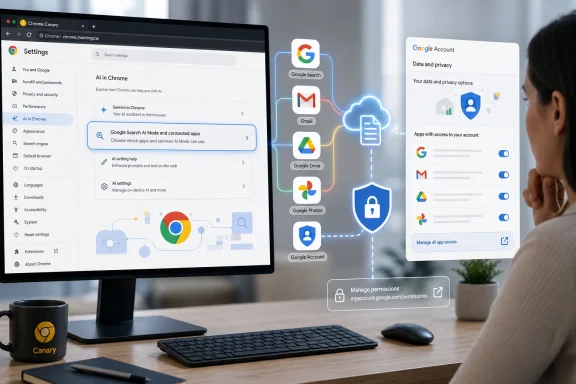
The experimental entry appears in Chrome Canary under “AI in Chrome” as “Google Search AI Mode and connected apps.” Its accompanying description tells users that they can manage the connection between Search services and Google Workspace apps such as Google Drive.
Selecting the row does not open a native Chrome permission panel. It sends the user to Google’s Connected content apps page, where the connection is managed through the signed-in Google Account. That page can also expose other Search connections, including Google Photos, even though Chrome’s label focuses on AI Mode and Workspace.
The implementation therefore amounts to a linkout: a browser setting that directs users to a separate service’s controls. According to the Chromium change identified by Windows Report, the work was filed as “[aim-drive] – Create a settings linkout for users to manage AIM consent.” The patch adds the strings and mappings needed to display the row within Chrome’s AI settings.
A Chromium code comment says the feature controls whether the Google Search AI Mode Workspace link is shown and describes the switch as a kill switch. That wording is significant, but it applies to the visibility of the link rather than the underlying Workspace connection. Google can remotely suppress or withdraw the shortcut without necessarily changing the account permission itself.
Nothing in the reported change suggests that enabling the Chrome row connects Workspace, expands AI Mode’s authorization, or transfers consent from one service to another. The browser is surfacing the doorway; Google Search still owns the room behind it.
That may sound like a minor architectural distinction. For users trying to answer the basic question “What can this AI see?”, it is the difference between understanding a permission and merely recognizing a product name.
The company’s trajectory is clear. Chrome is no longer treated only as a neutral renderer that happens to use Google Search by default; it is increasingly the distribution layer for Google’s conversational search experience. AI Mode can accept richer prompts, divide a question into subtopics, search across them, and continue the interaction through follow-up questions.
That makes Chrome the logical place to expose related controls. A user who encounters AI Mode through the address bar is more likely to look in Chrome settings than to know that the relevant consent lives under Search personalization in a Google Account.
The new shortcut reduces that discovery problem. It places the permission near the feature that appears to use it, even if the browser itself is not the service processing Workspace data. In usability terms, that is an improvement.
It is also evidence of accumulated complexity. AI Mode is a Search product, reached through Chrome, authenticated by a Google Account, personalized through Connected content apps, and influenced by additional settings in Gmail and Search services. One feature can consequently be governed by controls scattered across several products whose names and responsibilities overlap.
A direct link cannot remove that complexity, but it can keep users from having to reconstruct Google’s organization chart before revoking access. The challenge is ensuring that the label accurately describes the scope of what waits on the other side.
Google currently defines those services to include Search, AI Mode, Discover, Maps, Shopping, Flights, Hotels, Translate, and News. The Connected content apps permission is therefore not necessarily a narrow pipe running from Drive into one chatbot interface. It can be an account-level connection serving a family of Google products.
This difference is easy to miss because AI Mode is the most visible reason to enable the connection. Google markets the feature through examples in which Search draws on an email itinerary, a purchase receipt, or a photo library to produce recommendations tailored to the user. The immediate experience is conversational, but the consent framework sits above that conversation.
Chrome’s concise settings copy cannot reproduce an entire privacy notice. It should nevertheless avoid implying that the connection is contained inside the browser or restricted to a single AI Mode button.
The current official help material adds another wrinkle. Google says Workspace connectivity begins with Gmail, with other sources such as Calendar and Drive arriving later or being incorporated as availability expands. Yet the experimental Chrome description reportedly names Drive as its example.
That may mean the Chrome string is being prepared for a rollout in which Drive support is expected to be active. It may also be generic, forward-looking wording added before product availability is consistent across accounts and regions. Canary experiments routinely arrive ahead of complete launches, so the appearance of “Drive” should not be read as proof that every eligible user can already ask AI Mode to search all Drive content.
This is where a simple shortcut risks doing too much rhetorical work. The row needs to be understandable at a glance, but a phrase such as “AI Mode and connected apps” can compress differences among product availability, account eligibility, content sources, and downstream data handling.
The value proposition is straightforward. A generic search engine knows what is on the public web and what a user explicitly types into a prompt. A personalized search assistant can additionally know where the user is flying, which restaurants they have booked, what products they bought, and which people or places recur in their photo library.
Google calls this broader approach Personal Intelligence. When announcing its expansion to AI Mode in January 2026, the company illustrated it with recommendations informed by Gmail reservations, shopping records, and Google Photos memories. The pitch is that users should not have to restate the details of their lives whenever they ask for advice.
That can produce meaningfully better answers. “Find a coat for my trip” becomes a richer request when the system can infer the destination and travel date from an email, identify favored brands from purchases, and account for personal style. The same context can help build an itinerary around an existing hotel reservation or suggest activities that match a family’s previous trips.
But the usefulness comes from collapsing boundaries that previously constrained Search. The service is no longer limited to retrieving information the user knows to request. It can derive context from private material, combine facts across sources, and decide which personal details are relevant to the question.
Those decisions can be wrong. Google acknowledges that Personal Intelligence may connect unrelated information or misunderstand context, leaving the user to correct the answer through follow-up prompts or feedback. A recommendation system that mistakes an old reservation for an upcoming trip is inconvenient; one that mistakes someone else’s correspondence, medical document, or financial record for the user’s current intent can be much more sensitive.
The permission therefore deserves more than a buried switch. It governs a transition from public-web search to a system capable of reasoning across parts of a user’s private archive.
That “directly” matters. Google also explains that prompts, responses, summaries, excerpts, generated material, and inferences produced from relevant personal content may be used to improve its services, including through generative-AI training. In some cases, when a relevant email or file is brief, the resulting excerpt or summary may effectively encompass most or all of it.
Google further says that a subset of processed interactions may be examined by trained human reviewers or service providers for debugging, safety, and product improvement. It says it takes steps to disassociate reviewed interactions from the user’s account and reduce personal information before review, except where abuse or harm requires different handling.
The company’s advice is unusually direct: users should not connect content apps containing personal or confidential information they would not want used for model improvement or seen by a reviewer. That warning should shape how the new Chrome shortcut is understood.
The setting is not merely about whether AI Mode may retrieve a document to answer one question. It is part of a data-processing arrangement involving retrieval, inference, response generation, service history, potential model improvement, and limited review.
Disconnecting an app also does not necessarily erase information already retained in Search Services History. Google says users must separately manage or delete that history if they want to address data previously recorded there. Revoking the source connection and deleting the resulting activity are distinct actions.
This is a familiar pattern in cloud software: permission, retention, and training are controlled separately. A user can turn off future access while leaving previous interactions in history, or delete history while retaining the ability to generate new personalized interactions.
Chrome’s shortcut improves access to the first of those controls. It does not, on the available evidence, consolidate the others.
If the row works as reported, selecting it opens an external Google Account page. Changes made there should follow the account across supported devices and interfaces because the permission belongs to Search services, not to one Chrome installation.
Conversely, removing or hiding the shortcut in Chrome would not necessarily disconnect anything. The Chromium kill switch described in the code governs whether the link appears in AI settings. It does not appear to govern whether Search remains connected to Workspace.
This separation has practical consequences. A person could enable the content connection while using Search on one device, later encounter AI Mode in Chrome on another, and reasonably believe the browser has acquired a new local permission. In reality, Chrome may simply be reflecting an account decision made elsewhere.
Multiple-profile systems complicate the picture further. Windows users routinely maintain a work Chrome profile, a personal Chrome profile, several Google Account sessions, and perhaps Microsoft Entra or local Windows identities on the same machine. The browser profile that displays the setting, the Google Account that owns the connection, and the Workspace account containing the data may not always be obvious at a glance.
The correct mental model is account-centric: the shortcut leads to the connection settings for the relevant signed-in Google identity. Users should verify which account is active before connecting, disconnecting, or inspecting content-app access.
Google could make this safer by showing the account identity prominently beside the settings row or before leaving Chrome. Without that context, “Manage” can become a dangerous verb on shared PCs and densely populated browser profiles.
The Chromium kill switch reinforces that provisional status. Google can use such controls to limit exposure, run staged experiments, remove a problematic interface, or coordinate the browser entry with the server-side availability of Connected content apps.
The final wording may change. The location within “AI in Chrome” may change. Google could decide to expose additional links for Search history, personalization, training-related controls, or individual content sources—or it could withdraw the row entirely.
Still, code added to Canary is useful evidence of product direction. Google sees enough friction around AI Mode consent to justify placing an account-management route inside Chrome’s own AI section. The company is acknowledging, at least implicitly, that users associate the browser’s AI entry points with the data those experiences consume.
That acknowledgement should set a higher bar than a redirect. If Chrome is going to serve as the front door for AI Mode, it should eventually show enough status information to tell the user whether a connection is active, which account owns it, and what categories of content are in scope.
A bare link is better than no route at all. A live permission summary would be better than a bare link.
That distinction matters for Windows administrators. A label containing “Google Workspace” may sound like an enterprise management feature, but Workspace is also Google’s umbrella name for consumer-facing apps such as Gmail, Calendar, and Drive. The presence of the term does not mean an organization’s Chrome policies or Workspace administrator controls have been unified.
Google separately provides enterprise policy controls for AI Mode entry points in Chrome. Its AIModeSettings policy governs Google AI Mode integrations in the address bar and New Tab page search box, allowing managed organizations to determine how those interfaces appear or operate.
That policy should not be assumed to control Connected content apps, Personal Intelligence, Search Services History, or every way a user can reach AI Mode outside Chrome. Browser interface policy and account data consent solve different problems.
For an administrator, disabling an AI Mode button may reduce access from managed Chrome without revoking an account connection created elsewhere. Likewise, disconnecting Workspace content from Search does not necessarily remove the browser’s AI Mode entry points. A complete deployment policy must consider both the user interface and the service behind it.
This fragmentation is not unique to Google. Microsoft administrators confront similar boundaries among Edge, Copilot, Microsoft 365, Entra identities, tenant controls, and consumer accounts. The AI assistant appears in one product while its permissions, retention rules, and connected data live in another.
The broader lesson is that browsers are becoming orchestration layers for cloud AI rather than self-contained applications. Traditional browser policies—extensions, downloads, safe browsing, password management, and default search—are no longer enough to describe the risk surface.
Organizations will increasingly need inventories that answer three separate questions: where an AI entry point appears, which identity can activate it, and which repositories it can reach. Chrome’s new row addresses the second and third questions for consumers only indirectly.
Yet discoverability is only one component of meaningful consent. A control must also explain its scope, identify the active account, describe the content sources involved, and distinguish future access from information already retained.
The phrase “Manage the connection between Search services and Google Workspace apps, like Google Drive” is more accurate than saying Chrome itself accesses Drive. It still leaves unanswered whether “Search services” means only the AI Mode experience in front of the user or Google’s wider collection of search-related products.
It also does not capture the lifecycle of generated inferences. Users tend to think in terms of source files: an email is either accessible or inaccessible. AI systems introduce another category consisting of summaries, excerpts, extracted facts, recommendations, and interaction records derived from those files.
Once generated and stored in service history, those derivatives may persist separately from the connection that enabled their creation. Disconnecting Drive can stop future retrieval without retroactively removing an AI Mode conversation based on a Drive document.
An effective settings design should make those relationships visible without forcing users through multiple help-center articles. Google already has the underlying controls; its task is to present them as one coherent privacy journey rather than a chain of loosely related pages.
The Canary shortcut is a first attempt at that journey. It should not be mistaken for its completion.
That shifts the role of stored information. A flight receipt in Gmail is no longer only an archived message. It becomes a potential input to restaurant recommendations, weather advice, shopping suggestions, maps results, and travel planning.
A photograph is no longer solely an image the user chose to preserve. It can become evidence of preferred foods, frequent companions, visited locations, clothing tastes, or recurring activities. Even when the inference is harmless, the user may not have anticipated that the item would be repurposed this way.
Drive raises the stakes because it is often the miscellaneous drawer of digital life. Personal accounts can contain tax forms, résumés, contracts, school records, scans, private journals, medical paperwork, exported chats, and folders shared by other people.
An AI service does not need unrestricted browsing through every file to create sensitivity. Retrieval of a small number of highly relevant documents can be enough to reveal consequential facts, and an incorrect relevance judgment can surface information in an unexpected context.
Google says users remain in control because the content-app connection is optional. That is true in the formal sense. The practical quality of that choice depends on whether users understand that “better personalization” means authorizing a system to turn dormant private records into active search context.
Chrome can help make that bargain legible. A visible settings row is useful, but it should eventually communicate status and scope before the user reaches the external account page.
The limiting factor is no longer simply model capability. General-purpose models can answer broad questions, but they cannot reliably answer “What should I prepare for tomorrow’s meeting?” without access to the user’s calendar, correspondence, documents, and organizational context.
Connections supply that missing context. They also create switching costs: an assistant that understands years of mail, files, purchases, and photographs can feel substantially more useful than one starting from an empty prompt.
Google has a structural advantage because it already hosts many of those repositories and operates the browser and search engine through which users encounter the assistant. It can make the connection appear almost frictionless.
That integration also concentrates responsibility. Google cannot credibly treat Chrome, Search, Workspace, Photos, and the Google Account as isolated products when their data and interfaces are deliberately being combined into a single AI experience.
The new shortcut is a small example of the company accepting that responsibility. It connects one interface to one relevant control. The next step is to make the entire system understandable enough that convenience does not depend on ambiguity.
Chrome is becoming the control surface for an expanding stack of Google AI services, but the browser does not necessarily own the data flows those controls describe. By placing a link inside “AI in Chrome,” Google makes an important permission easier to find while also revealing how difficult its product boundaries have become to explain.
 A Settings Row Exposes a Much Larger Data Relationship
The experimental entry appears in Chrome Canary under “AI in Chrome” as “Google Search AI Mode and connected apps.” Its accompanying description tells users that they can manage the connection between Search services and Google Workspace apps such as Google Drive.Selecting the row does not open a native Chrome permission panel. It sends the user to Google’s Connected content apps page, where the connection is managed through the signed-in Google Account. That page can also expose other Search connections, including Google Photos, even though Chrome’s label focuses on AI Mode and Workspace.
The implementation therefore amounts to a linkout: a browser setting that directs users to a separate service’s controls. According to the Chromium change identified by Windows Report, the work was filed as “[aim-drive] – Create a settings linkout for users to manage AIM consent.” The patch adds the strings and mappings needed to display the row within Chrome’s AI settings.
A Chromium code comment says the feature controls whether the Google Search AI Mode Workspace link is shown and describes the switch as a kill switch. That wording is significant, but it applies to the visibility of the link rather than the underlying Workspace connection. Google can remotely suppress or withdraw the shortcut without necessarily changing the account permission itself.
Nothing in the reported change suggests that enabling the Chrome row connects Workspace, expands AI Mode’s authorization, or transfers consent from one service to another. The browser is surfacing the doorway; Google Search still owns the room behind it.
That may sound like a minor architectural distinction. For users trying to answer the basic question “What can this AI see?”, it is the difference between understanding a permission and merely recognizing a product name.
Chrome Is Becoming Google AI’s Front Desk
Google has spent the past year moving AI Mode closer to the beginning of a browsing session. It has tested and released entry points in the New Tab page, the address bar, contextual panels, and menus for attaching tabs, files, and images. In April 2026, Google described a broader Chrome integration intended to let users work with AI Mode without repeatedly switching between Search and the pages they were researching.The company’s trajectory is clear. Chrome is no longer treated only as a neutral renderer that happens to use Google Search by default; it is increasingly the distribution layer for Google’s conversational search experience. AI Mode can accept richer prompts, divide a question into subtopics, search across them, and continue the interaction through follow-up questions.
That makes Chrome the logical place to expose related controls. A user who encounters AI Mode through the address bar is more likely to look in Chrome settings than to know that the relevant consent lives under Search personalization in a Google Account.
The new shortcut reduces that discovery problem. It places the permission near the feature that appears to use it, even if the browser itself is not the service processing Workspace data. In usability terms, that is an improvement.
It is also evidence of accumulated complexity. AI Mode is a Search product, reached through Chrome, authenticated by a Google Account, personalized through Connected content apps, and influenced by additional settings in Gmail and Search services. One feature can consequently be governed by controls scattered across several products whose names and responsibilities overlap.
A direct link cannot remove that complexity, but it can keep users from having to reconstruct Google’s organization chart before revoking access. The challenge is ensuring that the label accurately describes the scope of what waits on the other side.
“AI Mode and Workspace” Is a Convenient but Incomplete Label
Chrome’s proposed wording frames the destination as a connection between Google Search AI Mode and Workspace apps. Google’s own help documentation describes something broader: connecting a content app can permit Search services to access it, not AI Mode alone.Google currently defines those services to include Search, AI Mode, Discover, Maps, Shopping, Flights, Hotels, Translate, and News. The Connected content apps permission is therefore not necessarily a narrow pipe running from Drive into one chatbot interface. It can be an account-level connection serving a family of Google products.
This difference is easy to miss because AI Mode is the most visible reason to enable the connection. Google markets the feature through examples in which Search draws on an email itinerary, a purchase receipt, or a photo library to produce recommendations tailored to the user. The immediate experience is conversational, but the consent framework sits above that conversation.
Chrome’s concise settings copy cannot reproduce an entire privacy notice. It should nevertheless avoid implying that the connection is contained inside the browser or restricted to a single AI Mode button.
The current official help material adds another wrinkle. Google says Workspace connectivity begins with Gmail, with other sources such as Calendar and Drive arriving later or being incorporated as availability expands. Yet the experimental Chrome description reportedly names Drive as its example.
That may mean the Chrome string is being prepared for a rollout in which Drive support is expected to be active. It may also be generic, forward-looking wording added before product availability is consistent across accounts and regions. Canary experiments routinely arrive ahead of complete launches, so the appearance of “Drive” should not be read as proof that every eligible user can already ask AI Mode to search all Drive content.
This is where a simple shortcut risks doing too much rhetorical work. The row needs to be understandable at a glance, but a phrase such as “AI Mode and connected apps” can compress differences among product availability, account eligibility, content sources, and downstream data handling.
The Permission Is Optional, but Its Consequences Are Not Trivial
Google describes Connected content apps as an opt-in capability. Users can use AI Mode without connecting Workspace or Photos, and they can disconnect those apps later through their account settings.The value proposition is straightforward. A generic search engine knows what is on the public web and what a user explicitly types into a prompt. A personalized search assistant can additionally know where the user is flying, which restaurants they have booked, what products they bought, and which people or places recur in their photo library.
Google calls this broader approach Personal Intelligence. When announcing its expansion to AI Mode in January 2026, the company illustrated it with recommendations informed by Gmail reservations, shopping records, and Google Photos memories. The pitch is that users should not have to restate the details of their lives whenever they ask for advice.
That can produce meaningfully better answers. “Find a coat for my trip” becomes a richer request when the system can infer the destination and travel date from an email, identify favored brands from purchases, and account for personal style. The same context can help build an itinerary around an existing hotel reservation or suggest activities that match a family’s previous trips.
But the usefulness comes from collapsing boundaries that previously constrained Search. The service is no longer limited to retrieving information the user knows to request. It can derive context from private material, combine facts across sources, and decide which personal details are relevant to the question.
Those decisions can be wrong. Google acknowledges that Personal Intelligence may connect unrelated information or misunderstand context, leaving the user to correct the answer through follow-up prompts or feedback. A recommendation system that mistakes an old reservation for an upcoming trip is inconvenient; one that mistakes someone else’s correspondence, medical document, or financial record for the user’s current intent can be much more sensitive.
The permission therefore deserves more than a buried switch. It governs a transition from public-web search to a system capable of reasoning across parts of a user’s private archive.
Google’s Help Page Carries the Warning the Chrome Row Cannot
Google’s Connected content apps documentation is more candid than the reassuring simplicity of a settings link. The company says it does not train generative AI models directly on an entire Gmail inbox, Drive account, Calendar, or the underlying images and audio in Google Photos.That “directly” matters. Google also explains that prompts, responses, summaries, excerpts, generated material, and inferences produced from relevant personal content may be used to improve its services, including through generative-AI training. In some cases, when a relevant email or file is brief, the resulting excerpt or summary may effectively encompass most or all of it.
Google further says that a subset of processed interactions may be examined by trained human reviewers or service providers for debugging, safety, and product improvement. It says it takes steps to disassociate reviewed interactions from the user’s account and reduce personal information before review, except where abuse or harm requires different handling.
The company’s advice is unusually direct: users should not connect content apps containing personal or confidential information they would not want used for model improvement or seen by a reviewer. That warning should shape how the new Chrome shortcut is understood.
The setting is not merely about whether AI Mode may retrieve a document to answer one question. It is part of a data-processing arrangement involving retrieval, inference, response generation, service history, potential model improvement, and limited review.
Disconnecting an app also does not necessarily erase information already retained in Search Services History. Google says users must separately manage or delete that history if they want to address data previously recorded there. Revoking the source connection and deleting the resulting activity are distinct actions.
This is a familiar pattern in cloud software: permission, retention, and training are controlled separately. A user can turn off future access while leaving previous interactions in history, or delete history while retaining the ability to generate new personalized interactions.
Chrome’s shortcut improves access to the first of those controls. It does not, on the available evidence, consolidate the others.
The Browser Setting Is a Map, Not a Master Switch
The location of the shortcut could lead some users to assume that Chrome is offering a browser-level off switch. It is not.If the row works as reported, selecting it opens an external Google Account page. Changes made there should follow the account across supported devices and interfaces because the permission belongs to Search services, not to one Chrome installation.
Conversely, removing or hiding the shortcut in Chrome would not necessarily disconnect anything. The Chromium kill switch described in the code governs whether the link appears in AI settings. It does not appear to govern whether Search remains connected to Workspace.
This separation has practical consequences. A person could enable the content connection while using Search on one device, later encounter AI Mode in Chrome on another, and reasonably believe the browser has acquired a new local permission. In reality, Chrome may simply be reflecting an account decision made elsewhere.
Multiple-profile systems complicate the picture further. Windows users routinely maintain a work Chrome profile, a personal Chrome profile, several Google Account sessions, and perhaps Microsoft Entra or local Windows identities on the same machine. The browser profile that displays the setting, the Google Account that owns the connection, and the Workspace account containing the data may not always be obvious at a glance.
The correct mental model is account-centric: the shortcut leads to the connection settings for the relevant signed-in Google identity. Users should verify which account is active before connecting, disconnecting, or inspecting content-app access.
Google could make this safer by showing the account identity prominently beside the settings row or before leaving Chrome. Without that context, “Manage” can become a dangerous verb on shared PCs and densely populated browser profiles.
Canary Availability Means the Design Is Still Negotiable
Chrome Canary is Google’s earliest public release channel and is built to expose incomplete features, experiments, and code that may change before reaching ordinary users. Its presence there is evidence of active development, not a promise of stable-channel deployment.The Chromium kill switch reinforces that provisional status. Google can use such controls to limit exposure, run staged experiments, remove a problematic interface, or coordinate the browser entry with the server-side availability of Connected content apps.
The final wording may change. The location within “AI in Chrome” may change. Google could decide to expose additional links for Search history, personalization, training-related controls, or individual content sources—or it could withdraw the row entirely.
Still, code added to Canary is useful evidence of product direction. Google sees enough friction around AI Mode consent to justify placing an account-management route inside Chrome’s own AI section. The company is acknowledging, at least implicitly, that users associate the browser’s AI entry points with the data those experiences consume.
That acknowledgement should set a higher bar than a redirect. If Chrome is going to serve as the front door for AI Mode, it should eventually show enough status information to tell the user whether a connection is active, which account owns it, and what categories of content are in scope.
A bare link is better than no route at all. A live permission summary would be better than a bare link.
Enterprise Administrators Face a Different Control Plane
The reported feature primarily concerns personal Google Account connections. Google’s January announcement for Personal Intelligence initially described the experiment as available to eligible Google AI Pro and Ultra subscribers using personal accounts, rather than Workspace business, enterprise, or education identities.That distinction matters for Windows administrators. A label containing “Google Workspace” may sound like an enterprise management feature, but Workspace is also Google’s umbrella name for consumer-facing apps such as Gmail, Calendar, and Drive. The presence of the term does not mean an organization’s Chrome policies or Workspace administrator controls have been unified.
Google separately provides enterprise policy controls for AI Mode entry points in Chrome. Its AIModeSettings policy governs Google AI Mode integrations in the address bar and New Tab page search box, allowing managed organizations to determine how those interfaces appear or operate.
That policy should not be assumed to control Connected content apps, Personal Intelligence, Search Services History, or every way a user can reach AI Mode outside Chrome. Browser interface policy and account data consent solve different problems.
For an administrator, disabling an AI Mode button may reduce access from managed Chrome without revoking an account connection created elsewhere. Likewise, disconnecting Workspace content from Search does not necessarily remove the browser’s AI Mode entry points. A complete deployment policy must consider both the user interface and the service behind it.
This fragmentation is not unique to Google. Microsoft administrators confront similar boundaries among Edge, Copilot, Microsoft 365, Entra identities, tenant controls, and consumer accounts. The AI assistant appears in one product while its permissions, retention rules, and connected data live in another.
The broader lesson is that browsers are becoming orchestration layers for cloud AI rather than self-contained applications. Traditional browser policies—extensions, downloads, safe browsing, password management, and default search—are no longer enough to describe the risk surface.
Organizations will increasingly need inventories that answer three separate questions: where an AI entry point appears, which identity can activate it, and which repositories it can reach. Chrome’s new row addresses the second and third questions for consumers only indirectly.
Better Visibility Does Not Equal Informed Consent
Google deserves credit for making a relevant control easier to discover. Permission systems fail when users cannot find the switch after saying yes, and routing AI Mode users from Chrome to the correct account page is a practical improvement.Yet discoverability is only one component of meaningful consent. A control must also explain its scope, identify the active account, describe the content sources involved, and distinguish future access from information already retained.
The phrase “Manage the connection between Search services and Google Workspace apps, like Google Drive” is more accurate than saying Chrome itself accesses Drive. It still leaves unanswered whether “Search services” means only the AI Mode experience in front of the user or Google’s wider collection of search-related products.
It also does not capture the lifecycle of generated inferences. Users tend to think in terms of source files: an email is either accessible or inaccessible. AI systems introduce another category consisting of summaries, excerpts, extracted facts, recommendations, and interaction records derived from those files.
Once generated and stored in service history, those derivatives may persist separately from the connection that enabled their creation. Disconnecting Drive can stop future retrieval without retroactively removing an AI Mode conversation based on a Drive document.
An effective settings design should make those relationships visible without forcing users through multiple help-center articles. Google already has the underlying controls; its task is to present them as one coherent privacy journey rather than a chain of loosely related pages.
The Canary shortcut is a first attempt at that journey. It should not be mistaken for its completion.
Personal Search Turns Old Files into Active Context
The strategic importance of the change lies in what Google wants Search to become. Conventional search starts with an explicit query and returns material judged relevant to it. Personal Intelligence starts with both the query and a latent profile assembled from private context.That shifts the role of stored information. A flight receipt in Gmail is no longer only an archived message. It becomes a potential input to restaurant recommendations, weather advice, shopping suggestions, maps results, and travel planning.
A photograph is no longer solely an image the user chose to preserve. It can become evidence of preferred foods, frequent companions, visited locations, clothing tastes, or recurring activities. Even when the inference is harmless, the user may not have anticipated that the item would be repurposed this way.
Drive raises the stakes because it is often the miscellaneous drawer of digital life. Personal accounts can contain tax forms, résumés, contracts, school records, scans, private journals, medical paperwork, exported chats, and folders shared by other people.
An AI service does not need unrestricted browsing through every file to create sensitivity. Retrieval of a small number of highly relevant documents can be enough to reveal consequential facts, and an incorrect relevance judgment can surface information in an unexpected context.
Google says users remain in control because the content-app connection is optional. That is true in the formal sense. The practical quality of that choice depends on whether users understand that “better personalization” means authorizing a system to turn dormant private records into active search context.
Chrome can help make that bargain legible. A visible settings row is useful, but it should eventually communicate status and scope before the user reaches the external account page.
Competition Is Driving Browsers Toward Connected Memory
Google’s move fits an industry-wide race to make AI assistants more useful by granting them access to private data. Microsoft is connecting Copilot experiences to Microsoft 365 content, while other AI platforms offer connectors for cloud storage, calendars, email, code repositories, and workplace knowledge systems.The limiting factor is no longer simply model capability. General-purpose models can answer broad questions, but they cannot reliably answer “What should I prepare for tomorrow’s meeting?” without access to the user’s calendar, correspondence, documents, and organizational context.
Connections supply that missing context. They also create switching costs: an assistant that understands years of mail, files, purchases, and photographs can feel substantially more useful than one starting from an empty prompt.
Google has a structural advantage because it already hosts many of those repositories and operates the browser and search engine through which users encounter the assistant. It can make the connection appear almost frictionless.
That integration also concentrates responsibility. Google cannot credibly treat Chrome, Search, Workspace, Photos, and the Google Account as isolated products when their data and interfaces are deliberately being combined into a single AI experience.
The new shortcut is a small example of the company accepting that responsibility. It connects one interface to one relevant control. The next step is to make the entire system understandable enough that convenience does not depend on ambiguity.
The Canary Shortcut Leaves Five Things Worth Checking
For now, the experimental row is best treated as an early privacy-navigation feature rather than a new Chrome AI capability. Users and administrators evaluating it should keep the underlying service boundaries in view.- The Chrome Canary option opens an existing Google Account management page and does not itself give Chrome access to Workspace files.
- The connection belongs to Google Search services and may cover more than the AI Mode interface named in Chrome.
- Google says content-app connections are optional, and AI Mode remains usable without connecting Workspace or Google Photos.
- Disconnecting an app may stop future access but does not automatically erase related information already stored in Search Services History.
- The reported Drive wording may anticipate a broader rollout, because availability can differ by account, region, subscription, and content source.
- Enterprise Chrome policies controlling AI Mode entry points should not be assumed to revoke account-level connected-app permissions.
References
- Primary source: Windows Report
Published: 2026-07-11T13:10:12.414686
Chrome tests a shortcut to manage Google Search AI Mode Workspace connections
Chrome Canary adds a new Google Search AI Mode and connected apps shortcut in AI Settings, making it easier to manage Workspace connection permissions. windowsreport.com
- Official source: support.google.com

Connect your Google content apps to get a Search experience that's tailored to you - Computer - Google Search Help
Important: We’re currently updating settings for Google Search services, which include Search, Maps, Shopping, Flights, Hotels, Translate and News. The settings described in this article are being
support.google.com
- Official source: google.com
AI in Chrome: help right where you need it
Explore the next generation of AI in Chrome, with features in privacy and security, performance, productivity, and accessibility with generative AI to make it easier and more efficient to browse. www.google.com
- Related coverage: blog.google
Google upgrades AI Mode in the Chrome browser
Today’s upgrades for AI Mode in Chrome transform how you interact with the webblog.google - Official source: knowledge.workspace.google.com
Control Workspace Intelligence for generative AI features | Google Workspace Help
 knowledge.workspace.google.com
- Related coverage: search.google
The Google app for desktop
Explore new ways to search. Download the Google app for desktop to use Lens, get AI-powered responses faster, search across your computer and Google Drive, and more with a simple keyboard shortcut.search.google
- Official source: 9to5google.com
Google tests sending Chrome users straight into AI Mode
Google is testing new behavior in Chrome that sends users straight into AI Mode, bypassing normal Search results.9to5google.com - Related coverage: chromeenterprise.google
AIModeSettings: Settings for Google's AI Mode integrations in the address bar and New Tab page search box. | Chrome Enterprise
This policy controls Google's AI Mode integrations in the address bar and the New Tab page search box. To access this feature, Google must be set as the user's default search engine. 0 = The feature will be available to users. 1 = The feature will not be available to users. If the policy is...chromeenterprise.google - Related coverage: ai.google
Building Personal Intelligence: a step towards truly personal AI
An overview of Personal Intelligence at Googleai.google
- Official source: services.google.com
- Related coverage: androidcentral.com
Google Chrome tests another massive change to Search that puts AI in front | Android Central
The company's really pushing the limits of its search experience.www.androidcentral.com - Related coverage: techradar.com
You can now turn off the Google Chrome AI model behind the scam detection tool – Google confirms AI model was hosted on your device | TechRadar
Chrome now allows you to disable an on-device AI model for scam detectionwww.techradar.com - Related coverage: tomsguide.com
Chrome’s upgraded AI Mode just got its very own shortcut button —here's what that means for you | Tom's Guide
Google just added a handy new AI Mode button to Chrome on iOS and Android.www.tomsguide.com
