

Google said on June 6, 2026, that a Chrome Canary setting routing normal address-bar searches into Google Search’s AI Mode appeared by mistake, after reports suggested the company was testing a path to make AI Mode the default search destination in Chrome. The denial matters because the accidental flag looked less like a novelty experiment than a preview of where browser search may be headed. Google may not be flipping the switch today, but the episode shows how close the old search box now sits to a very different contract with the web. For Windows users, Chrome admins, publishers, and anyone who treats the browser address bar as neutral infrastructure, that is the real story.
The reported Chrome Canary flag was called “Fulfill Searchbox Queries in AI Mode,” and its description was unusually blunt. It said normal searchbox queries in the omnibox and realbox would be redirected to AI Mode threads across Mac, Windows, Linux, and ChromeOS. That is not a vague “AI enhancement” label or a background ranking experiment; it is a direct change to the destination of a user’s search intent.
Google’s Rajan Patel, vice president of engineering for Search, moved quickly to say the setting appeared in Canary by error. His message was categorical: Google is not planning to make AI Mode the default for Chrome searches. That statement should be taken seriously, both because it came from the right part of the company and because Canary builds routinely expose half-built plumbing that never ships.
But the skepticism around this incident is not irrational. Google has spent the past two years moving generative AI from the periphery of Search into the center of the experience. AI Overviews now sit above traditional results for many queries, AI Mode has become a prominent tab and follow-up interface, and Google used I/O 2026 to pitch a rebuilt search box as the most significant change to that interface in more than 25 years.
So the important distinction is not whether Google was secretly about to make AI Mode the default next Tuesday. The important distinction is between product intent and technical proximity. Even if the exposed flag was an accident, it demonstrated that Chrome and Search are already being wired in a way that could make an AI-first search path a configurable browser behavior.
For Windows users, that means the familiar Chrome omnibox is no longer just a URL field with a search fallback. It is becoming a routing layer between multiple Google answer systems. The question is not simply “what does Chrome search?” but “which Google interface gets first claim on the query?”
That design gave Google an enormous advantage. A default search engine choice in Chrome is not a decorative preference; it is the commercial and informational mouth of the browser. On Windows, where Chrome remains deeply entrenched despite Microsoft’s persistent Edge promotions, the address bar is often the first step in troubleshooting, shopping, research, navigation, and workplace discovery.
That is why a hidden Canary flag matters even if it never ships. The omnibox is not just a convenience feature. It is the behavioral shortcut through which billions of search sessions begin, and small changes to its default routing can reshape what users see, what publishers receive, and how much friction separates a question from an answer.
The old bargain was easy to understand. Type a query, get a search results page, evaluate links, click onward. Google has been complicating that bargain for years with featured snippets, knowledge panels, shopping boxes, maps packs, and AI Overviews, but the results page still largely functioned as a directory with increasingly prominent answers baked in.
AI Mode changes the nature of the session. It encourages longer, conversational prompts, follow-ups, and synthesized responses. A user is not merely searching the web; the user is entering a thread with Google’s model as mediator. If that becomes the first stop from the browser bar, the web does not disappear, but it becomes more downstream.
The problem is that Canary is also where Google’s architectural thinking becomes visible. Browser makers do not add platform-wide flags for impossible futures. Even abandoned experiments can reveal what the product organization is willing to test, what internal APIs exist, and what teams are trying to integrate.
That is especially true when the flag touches the omnibox and realbox. The omnibox is the address bar; the realbox is the search field shown on Chrome’s New Tab Page. Together, they represent the two most common ways Chrome users initiate a search without first visiting Google.com. A setting affecting both is not a cosmetic tweak hidden in a corner of the UI.
The reported settings page offering Default, Enable, and Disable only added to the sense that this was more than a stray string. It suggested a user-facing or test-facing toggle that could be turned on for a session, a cohort, or an experiment. Google’s explanation may still be true: the flag may have surfaced by accident, with no current plan to graduate it. But the implementation path looked real enough to spook people because it mapped onto Google’s public strategy.
Enterprise administrators understand this pattern better than casual users do. A feature can be “not planned” as a default and still arrive later as an optional experiment, managed setting, regional test, account-level preference, or opt-in preview. The road from hidden flag to mass behavior is rarely straight, but it often starts with exactly this kind of plumbing.
Traditional search is imperfect, gamed, commercialized, and often frustrating. Still, it presents a ranked contest among sources. Users can compare headlines, domains, dates, and snippets. They can open several tabs, judge credibility, and decide whether Google’s ranking seems trustworthy.
AI Mode compresses that process into an answer-shaped interface. The user’s attention moves from source selection to response evaluation. The model may cite or surface sources, but it frames the issue first. That framing is convenient when the answer is mundane and risky when the topic is technical, medical, financial, political, or simply ambiguous.
For Windows users and IT pros, the risks are familiar. A synthesized troubleshooting answer can be excellent, but it can also confidently omit a version-specific caveat, recommend a stale command, flatten a complex security setting, or blur the difference between Windows 11 Home, Pro, Enterprise, and Server environments. In blue-link search, a sysadmin might notice that a result comes from an old forum thread or an outdated vendor doc. In an AI-first thread, the model’s prose can make age and provenance less visible.
This is why default routing matters. Optional AI Mode is a tool. Default AI Mode is an editorial layer placed before the web. Google says it is not making that change in Chrome searches, but the anxiety around the Canary flag reflects a rational fear that optional tools have a way of becoming defaults once usage metrics, ad products, and product narratives align.
That framing helps explain why a Chrome flag tied to AI Mode felt plausible. If Search is moving toward agents, threads, summaries, and generated interfaces, the browser’s input field becomes the obvious front door. Why ask users to type in Chrome, land on a classic results page, then choose AI Mode, when the company’s strategic product is the AI layer?
Because defaults are political, that is why. Google’s business depends on Search, but Search also depends on trust, habit, and regulatory tolerance. Moving the Chrome address bar directly into AI Mode would not be a mere interface preference. It would strengthen Google’s role as the interpreter of the open web at the exact moment publishers, rivals, advertisers, and regulators are already questioning how much traffic AI answers will absorb.
The safer path is incremental. Keep classic search as the visible default. Put AI Overviews near the top. Add the AI Mode tab. Make follow-ups easy. Redesign the search box to invite longer prompts. Let users acclimate to the idea that Google can answer, not just retrieve. Then study where behavior goes.
That is why Patel’s denial and the broader AI push can both be true. Google may have no plan to make AI Mode the default for Chrome searches in the immediate sense. It may also be building a Search experience where the distinction between “normal search” and “AI Mode” becomes less important over time.
That does not make Google uniquely villainous. It makes Google a participant in the same platform contest that Microsoft, Apple, OpenAI, Perplexity, and others are fighting. The browser, the operating system, the search engine, and the AI assistant are converging into one interface category: the place where the user asks for something.
The tension is sharper on Windows because Windows is the most contested desktop platform. Microsoft wants Edge and Copilot to be native defaults. Google wants Chrome and Search to remain the user’s chosen defaults. Enterprises want policy control and predictable behavior. Users want the address bar to do what it did yesterday unless they deliberately changed it.
Chrome’s historical advantage on Windows has been that it felt like a cleaner escape hatch from platform steering. If Microsoft pushed too hard inside Windows, many users opened Chrome and went back to Google. But if Chrome itself becomes more assertive in routing users into Google’s AI interface, that escape hatch starts to feel like another managed funnel.
The practical result is that IT departments will need to treat browser AI features the way they treat password managers, sync, extensions, telemetry, and safe browsing controls. They are not mere UI flourishes. They affect data exposure, user training, compliance assumptions, and the reproducibility of support workflows.
Google argues that AI experiences can send valuable traffic and help users ask more complex questions. That may be true for some verticals and some query types. But the incentive structure changes when the answer surface becomes the destination. A user who gets a synthesized explanation, a few cited links, and follow-up prompts may not behave like a user scanning ten blue links.
Technical communities have particular reason to worry. Forums such as WindowsForum.com, Stack Overflow-style archives, vendor support boards, and niche blogs contain the messy, lived-in evidence that solves real computing problems. The correct answer to a Windows error code often lives in a thread where someone tried three wrong fixes before discovering the driver, update, registry key, or hardware quirk that mattered.
AI systems can summarize that knowledge beautifully, but summarization can also strip away context. It may flatten “this worked for me on Windows 11 24H2 with this Realtek driver” into “update your audio driver.” It may miss that the accepted answer was later contradicted. It may cite a page while absorbing the user’s attention that once would have become a visit, a reply, or a new contribution.
That is the publisher’s nightmare: not simply lost clicks, but a weakening of the feedback loops that keep the web useful. If users stop visiting the underlying communities, the raw material for future answers becomes thinner. AI search then risks feeding on a commons it has made less rewarding to maintain.
If users move from keyword-style searches to conversational planning sessions, ads can become more contextual, more personalized, and potentially more embedded in the flow of decision-making. A query for “best laptop for college under $900” is already valuable. A multi-turn AI Mode thread that narrows budget, major, portability, preferred retailers, and software needs may be even more valuable.
That is one reason people react strongly to any hint that Chrome might route searches directly to AI Mode. It is not just about whether users prefer chat-like answers. It is about whether Google can move commercial discovery into a more controlled environment where the company mediates not only ranking but the conversation that defines the purchase.
There are legitimate product benefits here. A good AI search session could reduce junk SEO, compare options more intelligently, and help users avoid opening a dozen low-quality affiliate pages. For complex consumer choices, conversational refinement may be better than repeatedly rewriting keywords.
But when the same company controls the browser, the dominant search engine, the AI answer layer, the ad marketplace, and the measurement stack, default changes deserve scrutiny. Even an accidental Canary flag becomes news because it points at a future in which the most valuable query real estate on the web is no longer a page of results, but a model-mediated session.
That matters for Chrome because the browser address bar has trained users to be casual. People type fragments, questions, internal hostnames by mistake, error messages, copied log excerpts, and half-formed thoughts into it. If the destination shifts from classic search results to an AI thread, the user may be sharing more context with a system designed to continue the conversation.
Again, Google says it is not making AI Mode the default for Chrome searches. But admins should assume browser vendors will keep looking for ways to make AI assistance feel native. That requires policies that distinguish between search suggestions, AI summaries, enterprise data protection, browser history, account personalization, and model training or retention settings.
For regulated environments, the difference between a search query and an AI prompt is not semantic. It can affect data classification. A help desk technician pasting an event log into a search box is one thing; pasting it into a conversational AI system that may preserve thread context or use cloud processing is another. The interface may look similar, but the governance implications are different.
This is where consumer defaults and enterprise defaults should diverge. Consumers may accept convenience first and adjust later. Enterprises need the reverse: disabled or constrained AI routing until policy, documentation, auditability, and user education catch up.
Google’s challenge is that AI Mode is both a feature and a competing interface philosophy. The company wants users to experience Search as more capable, more conversational, and more agentic. But Search’s credibility was built partly on the idea that Google pointed outward. The more Google answers inward, the more it must persuade users that the answer layer is not quietly replacing the web with Google’s version of it.
Patel’s denial helps in the short term because it reassures users that the classic Chrome search path is not being abruptly replaced. But the denial does not settle the broader question of how Google will balance AI Mode, AI Overviews, organic links, ads, and publisher traffic over the next few years. That balance is the actual product fight.
The company may find that forcing AI Mode would be counterproductive. Many users still want quick navigation, fresh links, image results, forums, shopping pages, maps, and source diversity. An AI thread is not always the best interface for “download Chrome offline installer,” “Windows 11 ISO,” “Dell BIOS update,” or “nearest FedEx closing time.” Sometimes search is not a conversation; it is a jump.
The best version of Google’s AI search future would respect that distinction. It would infer when synthesis helps, preserve clear access to classic results, make source provenance obvious, and give users and administrators explicit control. The worst version would treat every query as raw material for a captive AI session because engagement graphs say the numbers look good.
For IT administrators, though, this is a useful warning shot. Browser AI features are moving quickly enough that policy review should not wait until a default changes in the stable channel. Organizations should inventory which browsers are allowed, which channels are installed, whether Canary or Dev builds exist on managed machines, and how search and AI settings are governed.
Chrome Enterprise policies will matter here, as will Microsoft Edge policies for organizations living in mixed-browser reality. If users can enable experimental AI routing on unmanaged browsers, help desk behavior and data handling can drift without anyone formally approving a new tool. Shadow AI does not always arrive as a standalone app; sometimes it arrives as a checkbox in a browser people already trust.
The communication piece is just as important. Users need plain-language guidance about when it is acceptable to use AI search for troubleshooting, what kinds of internal data should never be pasted into public AI tools, and how to verify model-generated technical instructions against vendor documentation. The goal is not to scare people away from AI search. The goal is to stop convenience from becoming accidental disclosure or bad remediation.
This is also a moment for admins to re-examine browser channel hygiene. Canary is useful for developers and testers, but it is not appropriate as a daily driver in most managed environments. Experimental flags can expose users to behavior that looks official but is not supported, documented, or stable.
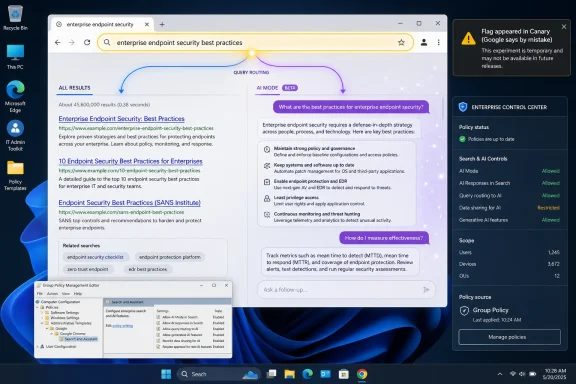 Google Denies the Switch, but the Flag Said the Quiet Part Out Loud
The reported Chrome Canary flag was called “Fulfill Searchbox Queries in AI Mode,” and its description was unusually blunt. It said normal searchbox queries in the omnibox and realbox would be redirected to AI Mode threads across Mac, Windows, Linux, and ChromeOS. That is not a vague “AI enhancement” label or a background ranking experiment; it is a direct change to the destination of a user’s search intent.Google’s Rajan Patel, vice president of engineering for Search, moved quickly to say the setting appeared in Canary by error. His message was categorical: Google is not planning to make AI Mode the default for Chrome searches. That statement should be taken seriously, both because it came from the right part of the company and because Canary builds routinely expose half-built plumbing that never ships.
But the skepticism around this incident is not irrational. Google has spent the past two years moving generative AI from the periphery of Search into the center of the experience. AI Overviews now sit above traditional results for many queries, AI Mode has become a prominent tab and follow-up interface, and Google used I/O 2026 to pitch a rebuilt search box as the most significant change to that interface in more than 25 years.
So the important distinction is not whether Google was secretly about to make AI Mode the default next Tuesday. The important distinction is between product intent and technical proximity. Even if the exposed flag was an accident, it demonstrated that Chrome and Search are already being wired in a way that could make an AI-first search path a configurable browser behavior.
For Windows users, that means the familiar Chrome omnibox is no longer just a URL field with a search fallback. It is becoming a routing layer between multiple Google answer systems. The question is not simply “what does Chrome search?” but “which Google interface gets first claim on the query?”
The Omnibox Has Always Been More Powerful Than It Looks
The Chrome omnibox is one of the most successful interface consolidations in modern computing. It collapsed URLs, search queries, history matching, site shortcuts, suggestions, and browser actions into one line of text. Users learned that if they did not know where something lived, they could type it there and let the browser sort out the rest.That design gave Google an enormous advantage. A default search engine choice in Chrome is not a decorative preference; it is the commercial and informational mouth of the browser. On Windows, where Chrome remains deeply entrenched despite Microsoft’s persistent Edge promotions, the address bar is often the first step in troubleshooting, shopping, research, navigation, and workplace discovery.
That is why a hidden Canary flag matters even if it never ships. The omnibox is not just a convenience feature. It is the behavioral shortcut through which billions of search sessions begin, and small changes to its default routing can reshape what users see, what publishers receive, and how much friction separates a question from an answer.
The old bargain was easy to understand. Type a query, get a search results page, evaluate links, click onward. Google has been complicating that bargain for years with featured snippets, knowledge panels, shopping boxes, maps packs, and AI Overviews, but the results page still largely functioned as a directory with increasingly prominent answers baked in.
AI Mode changes the nature of the session. It encourages longer, conversational prompts, follow-ups, and synthesized responses. A user is not merely searching the web; the user is entering a thread with Google’s model as mediator. If that becomes the first stop from the browser bar, the web does not disappear, but it becomes more downstream.
Canary Is a Lab, Not a Promise — and That Is Exactly Why IT Pays Attention
Chrome Canary exists to break things before most users see them. It is where flags appear, disappear, mutate, and occasionally surface in a state that seems more meaningful than it is. Anyone who has followed Chromium development knows that a flag in Canary is not a launch plan.The problem is that Canary is also where Google’s architectural thinking becomes visible. Browser makers do not add platform-wide flags for impossible futures. Even abandoned experiments can reveal what the product organization is willing to test, what internal APIs exist, and what teams are trying to integrate.
That is especially true when the flag touches the omnibox and realbox. The omnibox is the address bar; the realbox is the search field shown on Chrome’s New Tab Page. Together, they represent the two most common ways Chrome users initiate a search without first visiting Google.com. A setting affecting both is not a cosmetic tweak hidden in a corner of the UI.
The reported settings page offering Default, Enable, and Disable only added to the sense that this was more than a stray string. It suggested a user-facing or test-facing toggle that could be turned on for a session, a cohort, or an experiment. Google’s explanation may still be true: the flag may have surfaced by accident, with no current plan to graduate it. But the implementation path looked real enough to spook people because it mapped onto Google’s public strategy.
Enterprise administrators understand this pattern better than casual users do. A feature can be “not planned” as a default and still arrive later as an optional experiment, managed setting, regional test, account-level preference, or opt-in preview. The road from hidden flag to mass behavior is rarely straight, but it often starts with exactly this kind of plumbing.
AI Mode Is Not Just Search With a Larger Text Box
Google’s defense of its AI push often leans on continuity. Search has always evolved; users ask harder questions; AI helps organize information; links still exist. Those points are not wrong, but they understate the shift in power that occurs when search becomes a conversational answer engine.Traditional search is imperfect, gamed, commercialized, and often frustrating. Still, it presents a ranked contest among sources. Users can compare headlines, domains, dates, and snippets. They can open several tabs, judge credibility, and decide whether Google’s ranking seems trustworthy.
AI Mode compresses that process into an answer-shaped interface. The user’s attention moves from source selection to response evaluation. The model may cite or surface sources, but it frames the issue first. That framing is convenient when the answer is mundane and risky when the topic is technical, medical, financial, political, or simply ambiguous.
For Windows users and IT pros, the risks are familiar. A synthesized troubleshooting answer can be excellent, but it can also confidently omit a version-specific caveat, recommend a stale command, flatten a complex security setting, or blur the difference between Windows 11 Home, Pro, Enterprise, and Server environments. In blue-link search, a sysadmin might notice that a result comes from an old forum thread or an outdated vendor doc. In an AI-first thread, the model’s prose can make age and provenance less visible.
This is why default routing matters. Optional AI Mode is a tool. Default AI Mode is an editorial layer placed before the web. Google says it is not making that change in Chrome searches, but the anxiety around the Canary flag reflects a rational fear that optional tools have a way of becoming defaults once usage metrics, ad products, and product narratives align.
Google’s Search Box Is Becoming an Agent Launcher
At I/O 2026, Google framed its Search changes around a more intelligent, capable search box. The company described the upgrade in sweeping terms, emphasizing longer conversational queries, multimodal inputs, and AI-powered experiences that can do more than return a page of links. The message was clear: the search box is no longer only a query field. It is a launchpad for AI workflows.That framing helps explain why a Chrome flag tied to AI Mode felt plausible. If Search is moving toward agents, threads, summaries, and generated interfaces, the browser’s input field becomes the obvious front door. Why ask users to type in Chrome, land on a classic results page, then choose AI Mode, when the company’s strategic product is the AI layer?
Because defaults are political, that is why. Google’s business depends on Search, but Search also depends on trust, habit, and regulatory tolerance. Moving the Chrome address bar directly into AI Mode would not be a mere interface preference. It would strengthen Google’s role as the interpreter of the open web at the exact moment publishers, rivals, advertisers, and regulators are already questioning how much traffic AI answers will absorb.
The safer path is incremental. Keep classic search as the visible default. Put AI Overviews near the top. Add the AI Mode tab. Make follow-ups easy. Redesign the search box to invite longer prompts. Let users acclimate to the idea that Google can answer, not just retrieve. Then study where behavior goes.
That is why Patel’s denial and the broader AI push can both be true. Google may have no plan to make AI Mode the default for Chrome searches in the immediate sense. It may also be building a Search experience where the distinction between “normal search” and “AI Mode” becomes less important over time.
Microsoft Has Already Shown the Playbook on Windows
Windows users have seen this movie from the other side of the aisle. Microsoft has spent years weaving Bing, Edge, Copilot, and web search into Windows surfaces that used to feel local or neutral. The Start menu, taskbar search, Edge sidebar, Windows Copilot, and Microsoft 365 integrations all reflect the same industry instinct: whoever owns the input box owns the next action.That does not make Google uniquely villainous. It makes Google a participant in the same platform contest that Microsoft, Apple, OpenAI, Perplexity, and others are fighting. The browser, the operating system, the search engine, and the AI assistant are converging into one interface category: the place where the user asks for something.
The tension is sharper on Windows because Windows is the most contested desktop platform. Microsoft wants Edge and Copilot to be native defaults. Google wants Chrome and Search to remain the user’s chosen defaults. Enterprises want policy control and predictable behavior. Users want the address bar to do what it did yesterday unless they deliberately changed it.
Chrome’s historical advantage on Windows has been that it felt like a cleaner escape hatch from platform steering. If Microsoft pushed too hard inside Windows, many users opened Chrome and went back to Google. But if Chrome itself becomes more assertive in routing users into Google’s AI interface, that escape hatch starts to feel like another managed funnel.
The practical result is that IT departments will need to treat browser AI features the way they treat password managers, sync, extensions, telemetry, and safe browsing controls. They are not mere UI flourishes. They affect data exposure, user training, compliance assumptions, and the reproducibility of support workflows.
Publishers Are Right to Hear a Warning Siren
The publisher panic around AI search is sometimes dismissed as nostalgia for an older web, but the economics are brutally concrete. Search traffic is a major discovery channel for news sites, forums, documentation pages, software blogs, and independent technical writers. If more queries are satisfied inside Google’s generated interface, fewer users may click through to the pages that made the answer possible.Google argues that AI experiences can send valuable traffic and help users ask more complex questions. That may be true for some verticals and some query types. But the incentive structure changes when the answer surface becomes the destination. A user who gets a synthesized explanation, a few cited links, and follow-up prompts may not behave like a user scanning ten blue links.
Technical communities have particular reason to worry. Forums such as WindowsForum.com, Stack Overflow-style archives, vendor support boards, and niche blogs contain the messy, lived-in evidence that solves real computing problems. The correct answer to a Windows error code often lives in a thread where someone tried three wrong fixes before discovering the driver, update, registry key, or hardware quirk that mattered.
AI systems can summarize that knowledge beautifully, but summarization can also strip away context. It may flatten “this worked for me on Windows 11 24H2 with this Realtek driver” into “update your audio driver.” It may miss that the accepted answer was later contradicted. It may cite a page while absorbing the user’s attention that once would have become a visit, a reply, or a new contribution.
That is the publisher’s nightmare: not simply lost clicks, but a weakening of the feedback loops that keep the web useful. If users stop visiting the underlying communities, the raw material for future answers becomes thinner. AI search then risks feeding on a commons it has made less rewarding to maintain.
Advertisers Will Follow the Default, Wherever It Lands
Search defaults do not only shape information access. They shape advertising markets. Google’s classic search results page is one of the most profitable commercial interfaces ever built because it captures intent at the moment a user expresses it. AI Mode does not eliminate that intent; it reorganizes it.If users move from keyword-style searches to conversational planning sessions, ads can become more contextual, more personalized, and potentially more embedded in the flow of decision-making. A query for “best laptop for college under $900” is already valuable. A multi-turn AI Mode thread that narrows budget, major, portability, preferred retailers, and software needs may be even more valuable.
That is one reason people react strongly to any hint that Chrome might route searches directly to AI Mode. It is not just about whether users prefer chat-like answers. It is about whether Google can move commercial discovery into a more controlled environment where the company mediates not only ranking but the conversation that defines the purchase.
There are legitimate product benefits here. A good AI search session could reduce junk SEO, compare options more intelligently, and help users avoid opening a dozen low-quality affiliate pages. For complex consumer choices, conversational refinement may be better than repeatedly rewriting keywords.
But when the same company controls the browser, the dominant search engine, the AI answer layer, the ad marketplace, and the measurement stack, default changes deserve scrutiny. Even an accidental Canary flag becomes news because it points at a future in which the most valuable query real estate on the web is no longer a page of results, but a model-mediated session.
The Privacy Question Moves From Queries to Conversations
A normal web search can be revealing. A conversation with an AI search mode can be far more revealing. Users do not merely type keywords; they explain goals, constraints, preferences, symptoms, locations, budgets, family details, workplace needs, and sometimes confidential context.That matters for Chrome because the browser address bar has trained users to be casual. People type fragments, questions, internal hostnames by mistake, error messages, copied log excerpts, and half-formed thoughts into it. If the destination shifts from classic search results to an AI thread, the user may be sharing more context with a system designed to continue the conversation.
Again, Google says it is not making AI Mode the default for Chrome searches. But admins should assume browser vendors will keep looking for ways to make AI assistance feel native. That requires policies that distinguish between search suggestions, AI summaries, enterprise data protection, browser history, account personalization, and model training or retention settings.
For regulated environments, the difference between a search query and an AI prompt is not semantic. It can affect data classification. A help desk technician pasting an event log into a search box is one thing; pasting it into a conversational AI system that may preserve thread context or use cloud processing is another. The interface may look similar, but the governance implications are different.
This is where consumer defaults and enterprise defaults should diverge. Consumers may accept convenience first and adjust later. Enterprises need the reverse: disabled or constrained AI routing until policy, documentation, auditability, and user education catch up.
The Real Default Is User Expectation
The phrase “default search” sounds like a settings-page issue, but defaults are also mental models. Users expect the address bar to behave predictably. If they type “Windows 11 printer sharing error 0x0000011b,” they expect a results page, not necessarily a chatbot thread. If the behavior changes, even in a way some users like, it changes the implied contract.Google’s challenge is that AI Mode is both a feature and a competing interface philosophy. The company wants users to experience Search as more capable, more conversational, and more agentic. But Search’s credibility was built partly on the idea that Google pointed outward. The more Google answers inward, the more it must persuade users that the answer layer is not quietly replacing the web with Google’s version of it.
Patel’s denial helps in the short term because it reassures users that the classic Chrome search path is not being abruptly replaced. But the denial does not settle the broader question of how Google will balance AI Mode, AI Overviews, organic links, ads, and publisher traffic over the next few years. That balance is the actual product fight.
The company may find that forcing AI Mode would be counterproductive. Many users still want quick navigation, fresh links, image results, forums, shopping pages, maps, and source diversity. An AI thread is not always the best interface for “download Chrome offline installer,” “Windows 11 ISO,” “Dell BIOS update,” or “nearest FedEx closing time.” Sometimes search is not a conversation; it is a jump.
The best version of Google’s AI search future would respect that distinction. It would infer when synthesis helps, preserve clear access to classic results, make source provenance obvious, and give users and administrators explicit control. The worst version would treat every query as raw material for a captive AI session because engagement graphs say the numbers look good.
Chrome Admins Should Treat This as a Preview, Not a False Alarm
The immediate action item for most users is simple: do nothing dramatic. A Canary flag appeared, Google said it was an error, and stable Chrome has not suddenly turned the address bar into AI Mode. Panic uninstallations are not a strategy.For IT administrators, though, this is a useful warning shot. Browser AI features are moving quickly enough that policy review should not wait until a default changes in the stable channel. Organizations should inventory which browsers are allowed, which channels are installed, whether Canary or Dev builds exist on managed machines, and how search and AI settings are governed.
Chrome Enterprise policies will matter here, as will Microsoft Edge policies for organizations living in mixed-browser reality. If users can enable experimental AI routing on unmanaged browsers, help desk behavior and data handling can drift without anyone formally approving a new tool. Shadow AI does not always arrive as a standalone app; sometimes it arrives as a checkbox in a browser people already trust.
The communication piece is just as important. Users need plain-language guidance about when it is acceptable to use AI search for troubleshooting, what kinds of internal data should never be pasted into public AI tools, and how to verify model-generated technical instructions against vendor documentation. The goal is not to scare people away from AI search. The goal is to stop convenience from becoming accidental disclosure or bad remediation.
This is also a moment for admins to re-examine browser channel hygiene. Canary is useful for developers and testers, but it is not appropriate as a daily driver in most managed environments. Experimental flags can expose users to behavior that looks official but is not supported, documented, or stable.
The Canary Accident Leaves Chrome Users With a Clearer Map
The most useful way to read this episode is not as a scandal, but as a map of where the industry is going. Google denied an immediate default change, yet the architecture, incentives, and public product direction all point toward deeper AI mediation inside Search and Chrome.- Google says the Chrome Canary AI Mode routing flag appeared by mistake, and it says it has no plan to make AI Mode the default for Chrome searches.
- The exposed flag still showed that Chrome can be wired to send ordinary omnibox and New Tab Page searches into AI Mode threads.
- AI Mode is materially different from classic search because it turns a query into a conversational, synthesized session rather than primarily a ranked list of sources.
- Windows users should watch browser AI defaults as closely as they watch operating system AI features, because the browser address bar is now a major AI entry point.
- IT administrators should review browser channels, enterprise policies, and user guidance before AI search behavior changes arrive in stable products.
- Publishers and technical communities should treat AI-first search as a traffic and attribution issue, not merely a user-interface redesign.
References
- Primary source: PCMag
Published: 2026-06-06T19:50:09.644208
Google: No Plans to Make AI Mode the Default for Search in Chrome | PCMag
A Google exec says a Chrome feature that would allow users to route all their search queries directly to AI Mode was added to a Canary build in 'error.'www.pcmag.com - Related coverage: theweek.com
- Related coverage: techspot.com
Google tests making AI Mode the default in Search, then says it was an error | TechSpot
As spotted by Windows Report, a flag in the new Chrome Canary release called Fulfill Searchbox Queries in AI Mode appeared to confirm people's worst fears.www.techspot.com - Related coverage: techrepublic.com
Google Gives Search Its Biggest AI Overhaul in 25 Years
Google is redesigning Search with AI agents, conversational queries, custom tools, and booking features, raising new questions about web traffic.www.techrepublic.com
- Official source: 9to5google.com
Google gets ‘intelligent’ Search box redesign, mini apps
Google Search received big updates at I/O 2026. For starters, AI Mode is now powered by Gemini 3.5 Flash globally...9to5google.com - Related coverage: gadgets360.com
Google I/O 2026: Google Revamps Search Experience With AI Agents, Multi-Modal Queries | Technology News
During the keynote of the annual developer conference, Google announced a major overhaul of its Search experience, calling it the biggest change to the Search box in over 25 years.www.gadgets360.com
- Related coverage: techcrunch.com
Google Search as you know it is over | TechCrunch
Google is transforming Search from a list of links into an AI-powered experience filled with conversational answers, autonomous agents, and interactive interfaces — a shift that could further reduce traffic to publishers across the web.techcrunch.com - Related coverage: tomsguide.com
Google Search just got the biggest makeover in nearly 30 years — here's the upgrades | Tom's Guide
Google Search is getting its biggest overhaul in decades with AI agents, multimodal search, generative UI, and custom mini apps.www.tomsguide.com - Related coverage: androidcentral.com
Google is giving Search its biggest overhaul in 25 years | Android Central
Google just ripped out its old search box and replaced it with AI agents that work 24/7.www.androidcentral.com - Related coverage: piunikaweb.com
Google claims a Chrome flag defaulting to AI Mode was just an "error"
Google Search VP Rajan Patel denied plans to replace standard Chrome search with AI Mode after a highly polished testing flag sparked an internet panic. piunikaweb.com
- Related coverage: searchenginejournal.com
Google's New Search Box Hands Queries To AI Agents, I/O Reveals
Google made Gemini 3.5 Flash the default model in AI Mode, redesigned the Search box, and announced Search agents coming this summer.www.searchenginejournal.com - Related coverage: campaignlive.com
Google rolls out ‘biggest upgrade’ to search in 25 years | Campaign US
Google’s update will see the search box transformed into a dynamically expanding, AI-powered conversational hub, ushering in the zero-click era.. From Campaign USwww.campaignlive.com - Related coverage: digitalapplied.com
Google I/O 2026: The Complete AI Announcement Guide
Every AI announcement from Google I/O 2026 keynote — Gemini 3.5, Antigravity 2.0, Gemini Spark, Omni, Search overhaul, Universal Cart, and more.www.digitalapplied.com - Related coverage: engadget.com
Google Experiments With Sending Chrome Searches Straight To AI
Google seems to be testing a new feature that will take you to AI Mode by default when you do a search in Chrome.www.engadget.com - Related coverage: techradar.com
'This new search box does not mean that you'll only get AI responses': Google's Search makeover incorporates yet more AI, but Google promises to leave room for classic results | TechRadar
A big shift, but with some wiggle roomwww.techradar.com - Related coverage: itpro.com
Google adds AI to the search box | IT Pro
Major changes for how Google's search functions with the integration of AI toolswww.itpro.com - Related coverage: pcgamer.com
'AI Mode has been a revelation, our biggest upgrade to Search ever. People love it,' says Google CEO | PC Gamer
But I still think there's an AI industry bubble that could burst.www.pcgamer.com - Related coverage: techxplore.com
