

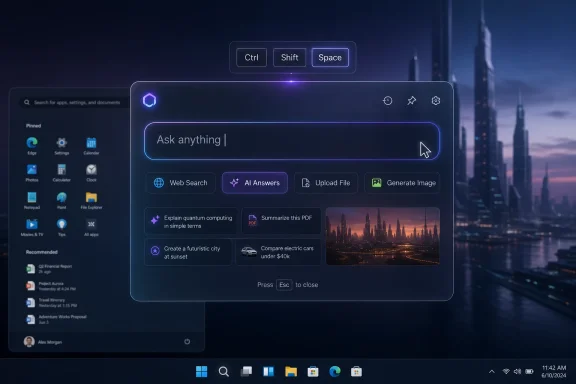
Google is testing a floating Chrome search interface called Everywhere Omnibox in Chrome Canary, reportedly under the internal codename Project Loom, that can be summoned on Windows with Ctrl+Shift+Space and used for web search, AI Mode-style answers, file uploads, and image generation without first opening a normal browser window. That does not mean Google is “taking over” Windows 11, but it does mean the browser wars are moving onto the desktop itself. The old fight was about which app opened links; the new fight is about which company owns the first text box you reach for.
The interesting part of Everywhere Omnibox is not that Google has built another search bar. The company has been refining the omnibox for more than a decade, and Chrome’s address field is already one of the most valuable pieces of user interface real estate in consumer computing. What is new is the attempt to detach that input box from Chrome’s frame and let it behave like a system-level command surface.
According to Windows Report, the feature is currently buried behind experimental Chrome Canary flags, which is exactly where half-formed ideas go before they either become products or disappear into Chromium archaeology. In the build described, the floating bar appears centered on the desktop and can be triggered with Ctrl+Shift+Space on Windows and Linux, or Cmd+Shift+Space on macOS. That shortcut choice is not subtle; it evokes the muscle memory of launcher tools and Spotlight-style system search rather than the behavior of a normal browser.
This is why the “delete Chrome?” framing is both overcooked and accidentally revealing. Nobody needs to uninstall Chrome because Chrome may gain a floating search box. But if Google can make Chrome feel less like an app and more like a layer that follows the user around Windows, then Chrome becomes harder to think of as just one browser among many.
The browser has always wanted to be the operating system. Everywhere Omnibox is simply a more honest expression of that ambition.
Google’s pitch, if this feature survives, is that the search box should not wait inside Chrome. It should be available at the moment of intent, before the user has decided whether the next action is a search, a question, an upload, a document analysis task, or an image-generation prompt. That is a much bigger claim than “we made Chrome faster to open.”
The model here is less like the old Google Toolbar and more like a command palette. Developers know this pattern from Visual Studio Code and other modern productivity tools: press a shortcut, type what you want, and let the software infer whether you are navigating, invoking a command, or asking for help. Consumer operating systems have been drifting in the same direction for years, but AI gives vendors a new excuse to collapse search, assistance, and creation into one field.
That collapse is convenient when it works. It is also strategically potent. The company that controls the default command surface can shape where queries go, which AI model answers them, which file types can be submitted, and which services are treated as “native” rather than external.
Still, dismissing it as “just a search bar” misses the point. Desktop computing is increasingly defined by overlays: Copilot panels, widgets, browser sidebars, notification drawers, launcher palettes, game bars, meeting assistants, password managers, and screenshot tools all compete to float above the work you are actually doing. The winner is not necessarily the deepest platform owner; it is the interface that users invoke reflexively.
That is where Google has an advantage Microsoft should not ignore. On Windows, Microsoft owns the taskbar, Start menu, and built-in search, but Google owns an enormous amount of user habit. For many people, “search” still means Google, even when the Windows search box or Edge address bar is physically closer.
Everywhere Omnibox tries to convert that brand habit into desktop muscle memory. If users learn that Ctrl+Shift+Space brings up Google’s AI-enabled field from anywhere, Windows Search becomes less of a destination and more of a fallback.
That history matters because it shows the desktop search grab is not new. Microsoft has repeatedly tried to pull web search, Bing, Edge, and later Copilot closer to the Windows surface. It has tested taskbar search changes, pushed web results into Windows Search, experimented with Copilot-first interfaces, and repeatedly nudged users toward its own browser and services.
Google’s experiment is therefore not a violation of some pristine Windows ideal. It is a competitive response to a Windows environment Microsoft has already made more web-shaped and assistant-shaped. If Redmond can attach Bing and Copilot to Windows affordances, Mountain View can try to attach Google Search and Gemini-like interactions to Chrome affordances.
The difference is psychological. When Microsoft puts search into Windows, users see it as part of the OS, even if they resent the Bing routing. When Google puts search over Windows, users may see it as an app reaching beyond its lane. The product behavior may be similar; the politics of platform ownership are not.
This is the larger industry move. Search used to be a routing mechanism: type a query, receive links, choose a destination. AI search aspires to be an answer mechanism: type a task, receive a synthesized response, maybe never leave the interface. Add file uploads and image generation, and the box becomes not just a search engine but a lightweight productivity environment.
That should make Windows users both interested and wary. A floating AI field that can accept documents and images could be genuinely useful for quick summarization, translation, troubleshooting, or visual lookup. It could also become another place where sensitive work material is casually dropped into a cloud service because the interface made it feel frictionless.
Enterprise admins will recognize the pattern. The danger is rarely that a vendor ships one obviously malicious feature. The danger is that convenience gradually normalizes data flows that security teams did not explicitly approve.
That means nobody should make procurement decisions, browser policy changes, or uninstall plans based on Everywhere Omnibox today. It is a signal, not a shipping commitment. The feature described by Windows Report may be a prototype for Chrome, a testbed for AI Mode, a cross-platform launcher experiment, or simply a design study that never survives internal review.
But prototypes still matter because they reveal where a company thinks the interface is going. Google is not short of places to put AI. It can put AI in Search, Gmail, Docs, Android, Gemini apps, Chrome side panels, and the new-tab page. Testing a desktop-level omnibox suggests Google sees value in intercepting user intent before it lands in any particular app.
That is the same strategic terrain Microsoft is contesting with Copilot. The desktop is becoming less a workspace and more a battleground of prompt boxes.
Chrome already has a reputation for being more than a browser in practice. It installs background services, syncs identity across devices, manages passwords, handles notifications, runs web apps, and often becomes the default PDF viewer, link handler, and authentication path for users who never intended to build their workflow around it. Many of those behaviors are useful. Together, they make Chrome feel like a platform.
A floating AI search box would push that platform identity further. If it is opt-in, easy to disable, transparent about data handling, and respectful of Windows defaults, it could become a genuinely handy power-user feature. If it is pushed through prompts, bundled onboarding, or ambiguous “try this new way to search” nudges, it will feed the same resentment Microsoft has earned with some of its own Edge and Bing promotions.
The lesson from Windows users is consistent: people tolerate powerful integrations when they choose them. They revolt when they feel enrolled.
Those answers matter more than the animation or shortcut. A floating AI bar that can accept documents is a governance issue the moment it appears on a corporate desktop. If users can drop a contract, spreadsheet, screenshot, or source file into the interface, administrators need to know what happens next and whether organizational data is retained, used for model improvement, or routed through consumer-grade services.
Google has enterprise versions of many services, and Chrome is already widely managed in business environments. That gives the company a path to do this responsibly. But the consumerization of AI has outpaced policy in many organizations, and every new frictionless input surface increases the chance of accidental leakage.
This is where Microsoft has a home-field advantage. Windows admins already expect to manage Windows features through Group Policy, Intune, and enterprise controls. Google can compete, but it will have to prove Everywhere Omnibox is not just clever for consumers but governable for fleets.
That change in user behavior is subtle but important. When a tool is always available, lightweight, and framed as “ask anything,” the boundary between public search and private work becomes easy to cross. The product may include warnings, settings, and account controls, but interface design can overpower caution.
This is not unique to Google. Microsoft Copilot, OpenAI’s desktop apps, Apple Intelligence features, and third-party AI assistants all face the same issue. The more AI moves from websites into operating-system-like surfaces, the more privacy depends on default settings and administrative controls rather than user discipline.
For WindowsForum readers, the practical stance is neither panic nor complacency. Treat any floating AI input as a networked service until proven otherwise. If it can analyze a file, assume that file leaves the local machine unless the vendor clearly documents a local-only path.
That distinction matters. A system search tool can index local files, launch apps, calculate, define, and route queries while remaining part of the operating system’s permission model. A browser-provided overlay has to earn similar trust without actually being the OS. It may feel native, but it is still an application extending itself across the desktop.
At the same time, the Spotlight comparison is useful because it captures what users actually want. They do not want to think about whether the next action belongs in a browser, a chatbot, a file search tool, or a launcher. They want one quick invocation that gets them moving.
The company that solves that cleanly on Windows will have leverage. Microsoft should own that experience by virtue of owning Windows. The fact that Google sees an opening says something uncomfortable about Windows Search.
That is the space Google is probing. If Windows Search were universally beloved, a Chrome floating search bar would feel redundant. Instead, many Windows users already maintain separate tools for local files, web search, app launching, clipboard history, and AI chat. The desktop is fragmented enough that another contender can plausibly promise simplification.
Microsoft’s Copilot push complicates this further. Copilot could be the unifying command layer for Windows, but Microsoft has repeatedly struggled with the product’s identity: sidebar, app, taskbar button, web wrapper, assistant, settings helper, enterprise agent. Users notice when the conceptual model keeps changing.
Google’s advantage is focus. Chrome users understand the omnibox. Extending that idea outward may be easier to explain than yet another reincarnation of Copilot.
Browsers are now trying to become the place where work begins rather than merely where web pages appear. Edge has Copilot and Bing integration. Chrome has Google Search, Gemini-adjacent features, and now this reported Everywhere Omnibox experiment. Arc, Brave, Opera, and others have all made their own bets on AI summaries, command interfaces, or alternative search flows.
That shift changes what “default browser” means. If AI answers increasingly appear before a conventional web page loads, then the decisive interface may not be the browser window at all. It may be the pre-browser prompt: the shortcut, search box, sidebar, launcher, or overlay that captures the first sentence.
This is why regulators will eventually pay attention. Defaults were already contentious when they determined which browser opened a link. They become more consequential when they determine which AI system interprets a user’s request, which sources are summarized, and which commercial ecosystem receives the interaction data.
Everywhere Omnibox is a small feature in technical terms. Strategically, it points toward a much larger fight over the operating system’s front door.
The worst version will be exactly what Windows users dread: another persistent search surface, another shortcut conflict, another cloud AI funnel, and another argument about whether an app is overstepping its boundaries. Google has enough experience with Chrome backlash to know the difference. Whether it can resist the temptation to maximize usage is another matter.
For Microsoft, the response should not be to block or shame Google. It should be to make Windows Search and Copilot coherent enough that users do not feel the need to outsource the desktop’s command layer to Chrome. The best defense against a rival launcher is a first-party experience that is fast, predictable, private where possible, and respectful of defaults.
That remains the central weakness in Microsoft’s position. Windows has the privileged surface, but Google has the cleaner user habit. If the next computing interface is a prompt box, the company that wins may be the one users trust to answer before they even think about which app they are in.
 Google Wants Chrome to Escape the Browser Window
The interesting part of Everywhere Omnibox is not that Google has built another search bar. The company has been refining the omnibox for more than a decade, and Chrome’s address field is already one of the most valuable pieces of user interface real estate in consumer computing. What is new is the attempt to detach that input box from Chrome’s frame and let it behave like a system-level command surface.According to Windows Report, the feature is currently buried behind experimental Chrome Canary flags, which is exactly where half-formed ideas go before they either become products or disappear into Chromium archaeology. In the build described, the floating bar appears centered on the desktop and can be triggered with Ctrl+Shift+Space on Windows and Linux, or Cmd+Shift+Space on macOS. That shortcut choice is not subtle; it evokes the muscle memory of launcher tools and Spotlight-style system search rather than the behavior of a normal browser.
This is why the “delete Chrome?” framing is both overcooked and accidentally revealing. Nobody needs to uninstall Chrome because Chrome may gain a floating search box. But if Google can make Chrome feel less like an app and more like a layer that follows the user around Windows, then Chrome becomes harder to think of as just one browser among many.
The browser has always wanted to be the operating system. Everywhere Omnibox is simply a more honest expression of that ambition.
The Search Box Is Becoming the New Start Menu
Windows users already live among too many launchers. There is the Start menu, Windows Search, the taskbar search box, PowerToys Run, Copilot, browser address bars, third-party tools such as Everything, and whatever internal portal an employer has decided is now the “front door” to work. The desktop is not short of places to type; it is short of trust in which one will do the least annoying thing.Google’s pitch, if this feature survives, is that the search box should not wait inside Chrome. It should be available at the moment of intent, before the user has decided whether the next action is a search, a question, an upload, a document analysis task, or an image-generation prompt. That is a much bigger claim than “we made Chrome faster to open.”
The model here is less like the old Google Toolbar and more like a command palette. Developers know this pattern from Visual Studio Code and other modern productivity tools: press a shortcut, type what you want, and let the software infer whether you are navigating, invoking a command, or asking for help. Consumer operating systems have been drifting in the same direction for years, but AI gives vendors a new excuse to collapse search, assistance, and creation into one field.
That collapse is convenient when it works. It is also strategically potent. The company that controls the default command surface can shape where queries go, which AI model answers them, which file types can be submitted, and which services are treated as “native” rather than external.
This Is Not a Windows Takeover, but It Is a Land Grab
The phrase “Google could take over your Windows 11 PC” is more tabloid than technical. Chrome cannot become the Windows shell merely by adding a floating search UI, and there is no evidence from the current reporting that Google is bypassing Windows security boundaries or replacing system components. This is an app-level experiment, not a hostile operating-system coup.Still, dismissing it as “just a search bar” misses the point. Desktop computing is increasingly defined by overlays: Copilot panels, widgets, browser sidebars, notification drawers, launcher palettes, game bars, meeting assistants, password managers, and screenshot tools all compete to float above the work you are actually doing. The winner is not necessarily the deepest platform owner; it is the interface that users invoke reflexively.
That is where Google has an advantage Microsoft should not ignore. On Windows, Microsoft owns the taskbar, Start menu, and built-in search, but Google owns an enormous amount of user habit. For many people, “search” still means Google, even when the Windows search box or Edge address bar is physically closer.
Everywhere Omnibox tries to convert that brand habit into desktop muscle memory. If users learn that Ctrl+Shift+Space brings up Google’s AI-enabled field from anywhere, Windows Search becomes less of a destination and more of a fallback.
Microsoft Already Built the Precedent It May Now Regret
Microsoft cannot plausibly complain about the concept. Edge has had desktop search bar and Edge Bar experiments for years, including a floating search interface that lets users search the web without opening a full browser window. Microsoft’s own documentation describes Edge Search Bar as a way to search directly from the desktop, with quick access and visual search features.That history matters because it shows the desktop search grab is not new. Microsoft has repeatedly tried to pull web search, Bing, Edge, and later Copilot closer to the Windows surface. It has tested taskbar search changes, pushed web results into Windows Search, experimented with Copilot-first interfaces, and repeatedly nudged users toward its own browser and services.
Google’s experiment is therefore not a violation of some pristine Windows ideal. It is a competitive response to a Windows environment Microsoft has already made more web-shaped and assistant-shaped. If Redmond can attach Bing and Copilot to Windows affordances, Mountain View can try to attach Google Search and Gemini-like interactions to Chrome affordances.
The difference is psychological. When Microsoft puts search into Windows, users see it as part of the OS, even if they resent the Bing routing. When Google puts search over Windows, users may see it as an app reaching beyond its lane. The product behavior may be similar; the politics of platform ownership are not.
AI Turns a Shortcut Into a Funnel
The most consequential reported detail is the placeholder: “Ask anything.” That phrase signals that Everywhere Omnibox is not merely a quicker way to type a Google query. It is meant to be a universal prompt field, the place where Google can blur the line between search engine, chatbot, file analyzer, and creative tool.This is the larger industry move. Search used to be a routing mechanism: type a query, receive links, choose a destination. AI search aspires to be an answer mechanism: type a task, receive a synthesized response, maybe never leave the interface. Add file uploads and image generation, and the box becomes not just a search engine but a lightweight productivity environment.
That should make Windows users both interested and wary. A floating AI field that can accept documents and images could be genuinely useful for quick summarization, translation, troubleshooting, or visual lookup. It could also become another place where sensitive work material is casually dropped into a cloud service because the interface made it feel frictionless.
Enterprise admins will recognize the pattern. The danger is rarely that a vendor ships one obviously malicious feature. The danger is that convenience gradually normalizes data flows that security teams did not explicitly approve.
Chrome Canary Is Not a Product Roadmap
The boring caveat is also the important one: Chrome Canary is where experiments live. Features behind flags can change names, lose capabilities, ship only in some markets, or vanish entirely. Google tests aggressively, and Chromium contains countless traces of product ideas that never became mainstream Chrome behavior.That means nobody should make procurement decisions, browser policy changes, or uninstall plans based on Everywhere Omnibox today. It is a signal, not a shipping commitment. The feature described by Windows Report may be a prototype for Chrome, a testbed for AI Mode, a cross-platform launcher experiment, or simply a design study that never survives internal review.
But prototypes still matter because they reveal where a company thinks the interface is going. Google is not short of places to put AI. It can put AI in Search, Gmail, Docs, Android, Gemini apps, Chrome side panels, and the new-tab page. Testing a desktop-level omnibox suggests Google sees value in intercepting user intent before it lands in any particular app.
That is the same strategic terrain Microsoft is contesting with Copilot. The desktop is becoming less a workspace and more a battleground of prompt boxes.
The Real Risk Is Another Default Nobody Asked For
For Windows enthusiasts, the immediate question is not whether Everywhere Omnibox is technically impressive. It is whether Google will respect user choice if the feature ships. A manually enabled launcher is one thing; a persistent overlay, startup item, or nagging promotional surface is another.Chrome already has a reputation for being more than a browser in practice. It installs background services, syncs identity across devices, manages passwords, handles notifications, runs web apps, and often becomes the default PDF viewer, link handler, and authentication path for users who never intended to build their workflow around it. Many of those behaviors are useful. Together, they make Chrome feel like a platform.
A floating AI search box would push that platform identity further. If it is opt-in, easy to disable, transparent about data handling, and respectful of Windows defaults, it could become a genuinely handy power-user feature. If it is pushed through prompts, bundled onboarding, or ambiguous “try this new way to search” nudges, it will feed the same resentment Microsoft has earned with some of its own Edge and Bing promotions.
The lesson from Windows users is consistent: people tolerate powerful integrations when they choose them. They revolt when they feel enrolled.
IT Departments Will See Policy Before Productivity
Consumer coverage will focus on the convenience of asking Google questions from anywhere. IT departments will focus on manageability. Can the feature be disabled through enterprise policy? Does it honor Chrome’s existing AI and search controls? Are uploads governed by the same data protections as other Google services? Does it appear in managed Chrome profiles? Does it launch at startup?Those answers matter more than the animation or shortcut. A floating AI bar that can accept documents is a governance issue the moment it appears on a corporate desktop. If users can drop a contract, spreadsheet, screenshot, or source file into the interface, administrators need to know what happens next and whether organizational data is retained, used for model improvement, or routed through consumer-grade services.
Google has enterprise versions of many services, and Chrome is already widely managed in business environments. That gives the company a path to do this responsibly. But the consumerization of AI has outpaced policy in many organizations, and every new frictionless input surface increases the chance of accidental leakage.
This is where Microsoft has a home-field advantage. Windows admins already expect to manage Windows features through Group Policy, Intune, and enterprise controls. Google can compete, but it will have to prove Everywhere Omnibox is not just clever for consumers but governable for fleets.
The Privacy Question Is Not Abstract
The privacy concern is not simply that Google is involved. It is that the design invites broad, ambiguous input. A conventional search box usually receives search terms. An AI prompt box receives questions, pasted emails, meeting notes, screenshots, images, PDFs, code snippets, and sometimes things users would never have uploaded if the interface had felt more formal.That change in user behavior is subtle but important. When a tool is always available, lightweight, and framed as “ask anything,” the boundary between public search and private work becomes easy to cross. The product may include warnings, settings, and account controls, but interface design can overpower caution.
This is not unique to Google. Microsoft Copilot, OpenAI’s desktop apps, Apple Intelligence features, and third-party AI assistants all face the same issue. The more AI moves from websites into operating-system-like surfaces, the more privacy depends on default settings and administrative controls rather than user discipline.
For WindowsForum readers, the practical stance is neither panic nor complacency. Treat any floating AI input as a networked service until proven otherwise. If it can analyze a file, assume that file leaves the local machine unless the vendor clearly documents a local-only path.
Apple’s Spotlight Is the Wrong Comparison and the Right One
The obvious comparison is Apple Spotlight, because Spotlight is the canonical “press a shortcut and search from anywhere” feature for many users. But the analogy only goes so far. Spotlight began as a local search and launcher tool integrated into macOS; Google’s version, as reported, is tied to Chrome and Google’s cloud services.That distinction matters. A system search tool can index local files, launch apps, calculate, define, and route queries while remaining part of the operating system’s permission model. A browser-provided overlay has to earn similar trust without actually being the OS. It may feel native, but it is still an application extending itself across the desktop.
At the same time, the Spotlight comparison is useful because it captures what users actually want. They do not want to think about whether the next action belongs in a browser, a chatbot, a file search tool, or a launcher. They want one quick invocation that gets them moving.
The company that solves that cleanly on Windows will have leverage. Microsoft should own that experience by virtue of owning Windows. The fact that Google sees an opening says something uncomfortable about Windows Search.
Windows Search Left the Door Open
Windows Search has improved over the years, but it remains a confused product. It is part local file indexer, part settings finder, part app launcher, part Bing front end, and part advertising surface depending on the build, region, account state, and Microsoft’s latest priorities. Power users often replace it not because they hate Microsoft, but because they do not trust Windows Search to be fast, predictable, and quiet.That is the space Google is probing. If Windows Search were universally beloved, a Chrome floating search bar would feel redundant. Instead, many Windows users already maintain separate tools for local files, web search, app launching, clipboard history, and AI chat. The desktop is fragmented enough that another contender can plausibly promise simplification.
Microsoft’s Copilot push complicates this further. Copilot could be the unifying command layer for Windows, but Microsoft has repeatedly struggled with the product’s identity: sidebar, app, taskbar button, web wrapper, assistant, settings helper, enterprise agent. Users notice when the conceptual model keeps changing.
Google’s advantage is focus. Chrome users understand the omnibox. Extending that idea outward may be easier to explain than yet another reincarnation of Copilot.
The Browser War Has Become a Prompt War
The original browser war was about rendering engines, standards, and distribution. The second browser war was about performance, extensions, sync, and defaults. The current one is about AI surfaces and user intent.Browsers are now trying to become the place where work begins rather than merely where web pages appear. Edge has Copilot and Bing integration. Chrome has Google Search, Gemini-adjacent features, and now this reported Everywhere Omnibox experiment. Arc, Brave, Opera, and others have all made their own bets on AI summaries, command interfaces, or alternative search flows.
That shift changes what “default browser” means. If AI answers increasingly appear before a conventional web page loads, then the decisive interface may not be the browser window at all. It may be the pre-browser prompt: the shortcut, search box, sidebar, launcher, or overlay that captures the first sentence.
This is why regulators will eventually pay attention. Defaults were already contentious when they determined which browser opened a link. They become more consequential when they determine which AI system interprets a user’s request, which sources are summarized, and which commercial ecosystem receives the interaction data.
Everywhere Omnibox is a small feature in technical terms. Strategically, it points toward a much larger fight over the operating system’s front door.
The Chrome Shortcut That Should Make Microsoft Uncomfortable
If Google ships Everywhere Omnibox broadly, the best version of the product will be boringly respectful. It will be opt-in, managed by policy, transparent about AI processing, and easy to summon or dismiss. It will not pretend to be Windows Search, and it will not wedge itself into startup flows without permission.The worst version will be exactly what Windows users dread: another persistent search surface, another shortcut conflict, another cloud AI funnel, and another argument about whether an app is overstepping its boundaries. Google has enough experience with Chrome backlash to know the difference. Whether it can resist the temptation to maximize usage is another matter.
For Microsoft, the response should not be to block or shame Google. It should be to make Windows Search and Copilot coherent enough that users do not feel the need to outsource the desktop’s command layer to Chrome. The best defense against a rival launcher is a first-party experience that is fast, predictable, private where possible, and respectful of defaults.
That remains the central weakness in Microsoft’s position. Windows has the privileged surface, but Google has the cleaner user habit. If the next computing interface is a prompt box, the company that wins may be the one users trust to answer before they even think about which app they are in.
The Practical Reading for WindowsForum Readers
The story is not that Chrome users must delete anything today. The story is that Google is testing whether Chrome’s most important interface can leave the browser window and compete directly with Windows-level search and AI entry points. That is worth watching because it affects defaults, privacy, productivity, and enterprise control in ways that go beyond browser preference.- Everywhere Omnibox is currently an experimental Chrome Canary feature, not a guaranteed stable Chrome release.
- The reported Windows shortcut is Ctrl+Shift+Space, placing the feature in the same mental category as launchers and command palettes.
- The interface reportedly combines web search, AI-style answers, file uploads, and image-generation options in a single floating window.
- Microsoft has already normalized similar desktop search experiments through Edge and Windows, so Google is entering a contested space rather than inventing one.
- The biggest unresolved issues are not visual design but consent, data handling, enterprise policy, and whether users can easily disable the feature.
- Windows users should judge the feature by how transparently it behaves, not by whether it carries a Google or Microsoft logo.
References
- Primary source: GB News
Published: 2026-06-07T17:33:08.043949
Time to delete Chrome? Google could take over your Windows 11 PC with its new AI-powered search bar
The new feature promises to be a serious time-saverwww.gbnews.com - Official source: microsoft.com

Search the Web from Your Desktop with the Edge Search Bar | Microsoft Edge
Use the Edge search bar to look up information directly from your desktop—just click, type, and get answers fast without opening a new window or tab.
www.microsoft.com
- Related coverage: windowsreport.com
Chrome Tests a Floating AI Mode Search Bar for Desktop
Chrome is testing Everywhere Omnibox, a floating AI Mode search bar for desktop Chrome. We enabled it in Canary and confirmed it launches with Ctrl+Shift+Space on Windows. windowsreport.com
- Official source: learn.microsoft.com
Disable Microsoft Edge Desktop Search Bar in Windows 10 - Microsoft Q&A
There's now a new desktop search bar included with the Microsoft Edge 111 version and above in Windows 10. You can use the search bar to search the web and launch you favorite sies directly from the desktop. The search box provides search (powered by…learn.microsoft.com - Official source: techcommunity.microsoft.com

Separate Search Bar in Edge | Microsoft Community Hub
Hello allI am still waiting for a separate search bar in the header of Edge, like in Firefox.So I need two separate bars, an address-bar and an search-bar...
techcommunity.microsoft.com
- Related coverage: pcworld.com
Experimental Windows 11 build plops a search box on your desktop | PCWorld
Microsoft's latest Windows 11 Insider build adds something that we haven't seen since the days of Windows 7: a free-floating search bar that spans the top of your desktop.www.pcworld.com
- Related coverage: windowscentral.com
Microsoft Edge might get a separate search bar | Windows Central
Microsoft is about to add a separate search bar in Edge to enhance the browsing experience for users.www.windowscentral.com - Official source: support.microsoft.com
Streamline access to your favorite sites and apps with Sidebar in Microsoft Edge | Microsoft Support
Learn how to move your Microsoft Edge sidebar to your Windows 10 desktop to access apps and sites from anywhere on your device.support.microsoft.com - Related coverage: geekrewind.com
How to Manage Microsoft Edge Desktop Search Bar in Windows 11 | Geek Rewind
Easily manage the Microsoft Edge search bar in Windows 11 for quick web access, customizable placement, and seamless browsing experience.geekrewind.com - Related coverage: techradar.com
Windows 11 could get a change to help banish Edge and Bing - but don't get your hopes up too high | TechRadar
Search box tweak might be in the works - and it'd be a hugely popular movewww.techradar.com - Related coverage: files-backend.assets.thrillshare.com
