

Google is developing a built-in Chrome voice typing feature that has been spotted on Windows 11, where early builds expose a “Start dictation” command in text fields but do not yet complete the speech-to-text flow. The important part is not that Chrome may soon let users talk into a box. It is that Google appears to be pulling dictation closer to the browser itself, rather than leaving it entirely to Windows, ChromeOS, Google Docs, extensions, or the Web Speech API. If this ships broadly, Chrome will become not just the place where web text is entered, but one of the systems deciding how voice becomes text on the modern PC.
Windows 11 already has voice typing. Press Windows + H, place the cursor in almost any editable field, and Microsoft’s dictation toolbar appears. For many users, that is the end of the story: the operating system owns the keyboard, the microphone, and the accessibility layer, while browsers simply receive the resulting text.
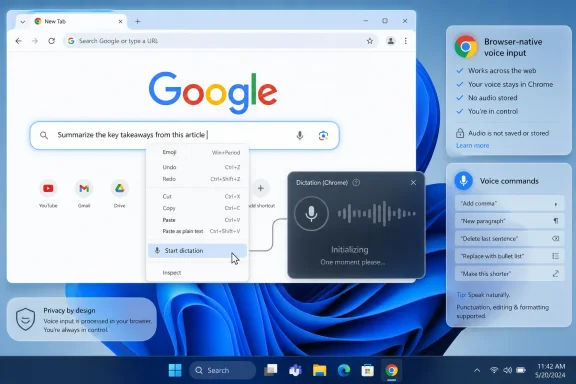
Chrome’s apparent new approach complicates that neat division. According to the Windows Report testing, Chrome now exposes a “Start dictation” entry when right-clicking in a text field on Windows 11, but the feature currently stalls at an “Initializing” state. That is the unmistakable smell of unfinished code: visible enough to prove intent, incomplete enough to make any feature prediction risky.
The interesting signal comes from the surrounding Chromium work. A plain shortcut into Windows voice typing would be useful but not especially strategic. A Chrome-specific dictation bubble, waveform animation, and voice-driven editing commands suggest Google is building an interface layer of its own.
That distinction matters. A browser-native dictation experience could behave consistently across websites, survive differences between web apps, and eventually travel across platforms. It could also create another point of overlap between Chrome, Windows, Edge, Google Docs, ChromeOS, and the accessibility tools users already rely on.
That is why this Chrome experiment is more consequential than it first appears. The web is now full of text boxes pretending to be applications: Slack-style chat panes, customer relationship management notes, webmail composers, Markdown editors, AI prompt boxes, admin dashboards, and browser-based IDEs. Dictation inside one office app is a feature. Dictation at the browser input layer is infrastructure.
Chrome already sits between users and a large share of their daily writing. If Google adds a first-party dictation affordance directly to editable fields, it reduces the need for site-by-site support. The user no longer needs a web app to build a microphone button, and the app no longer needs to explain why its dictation works differently from every other app’s.
That is the productivity pitch. The strategic pitch is larger: Google gets to make speech input feel like a Chrome capability rather than a Windows capability, even when Chrome is running on Microsoft’s operating system.
That model is not glamorous, but it is coherent. IT administrators know where to look for privacy controls. Accessibility documentation can point to Windows settings. Users learn one shortcut and apply it across browsers and apps.
Chrome, by contrast, lives in a more awkward space on Windows. It can use what the operating system provides, but Google has incentives to avoid making Chrome feel like a thin shell around Windows features. If Chrome voice typing becomes a distinct feature with its own UI, command model, and possibly cross-platform behavior, it will be because Google wants a browser experience it can shape independent of Microsoft’s operating-system roadmap.
There is a risk in that. Users do not want three dictation systems competing for the microphone: Windows voice typing, Chrome voice typing, and a website’s own voice input tool. The moment a feature like this ships, Google has to make it feel obvious which layer is in control.
Putting dictation in the right-click menu says voice input is not merely an accessibility toggle hidden in settings. It says voice typing is an editing operation, adjacent to paste, spellcheck, emoji, writing tools, translation, and autofill. In that framing, speech is another way of entering and manipulating text, not a special mode that users must prepare for.
The reported work on a dictation bubble and waveform animation points in the same direction. A visible bubble gives users feedback that the browser is listening. A waveform reassures them that sound is being detected. Voice editing commands would move the feature beyond transcription into something more like hands-free composition.
That last point is critical. Simple dictation turns speech into words. Useful dictation lets users correct, delete, punctuate, move, and revise without constantly returning to the keyboard. The difference between those two experiences is the difference between a demo and a daily tool.
But accessibility features become platform priorities when they also serve the broader market. Voice typing is faster than keyboard input for many rough drafts. It is useful when a user is standing, cooking, repairing something, holding a child, wearing a brace, or simply tired of typing into yet another web form.
That broader convenience case is why Chrome integration could matter. The less friction dictation has, the more likely users are to try it. A right-click command inside the field where the user already is may be more discoverable than a system keyboard shortcut they never learned.
The challenge is trust. A microphone feature in a browser has to be unusually clear about when it is listening, where audio is processed, and which service is doing the transcription. Users are already conditioned to distrust surprise microphone prompts. Chrome cannot afford to make dictation feel like another invisible data path.
A Chrome-native feature raises a different set of questions. Would Chrome use a Google speech service, a local engine where available, a Chromium API, platform-specific services, or some combination depending on operating system? Would enterprise policies expose controls for administrators? Would microphone permissions be granted per site, per browser feature, or through a global Chrome setting?
Those details are not cosmetic. In managed environments, dictation can implicate data handling policies, regulated information, call-center scripts, medical notes, legal drafts, source code, credentials, and internal incident reports. “It types what you say” is not a sufficient security description for an enterprise feature.
Google will also have to separate browser dictation from website microphone permissions in a way ordinary users can understand. If a web app asks for microphone access, that is one trust relationship. If Chrome itself listens in order to insert text into the page, that is another. The interface needs to make the difference visible.
But dictation is not a normal browser feature. Microphone handling, speech services, privacy prompts, accessibility APIs, text insertion, input method editors, punctuation, language models, and command grammars all vary across platforms. A feature that feels natural on Windows may feel redundant on ChromeOS, awkward on macOS, and uneven on Linux.
ChromeOS already has its own dictation feature, including keyboard shortcuts and voice commands. macOS has system dictation. Windows has Windows + H. Linux has a more fragmented speech-to-text landscape. A universal Chrome dictation layer may be attractive precisely because the underlying platforms are inconsistent, but that also means Google must decide when to integrate and when to override.
The best version of this feature would feel native everywhere without becoming identical everywhere. The worst version would be another half-platform abstraction that works well on Google-controlled surfaces and unpredictably elsewhere.
ChromeOS documentation already describes a model where spoken commands can insert text, add punctuation, and perform editing actions. If Google brings a similar command grammar to Chrome fields, the browser could become much more capable in long-form web writing. That matters for Gmail, CMS editors, support consoles, web-based office suites, AI chat interfaces, and enterprise portals.
The hard part is avoiding false positives. If a user says “delete that” while drafting a sentence about a button labeled Delete, the system needs to know whether those words are content or command. Good dictation tools solve this through modes, pauses, confirmation patterns, or context. Bad ones make users afraid to speak naturally.
This is where a Chrome bubble could become more than decoration. It could show whether Chrome is hearing text, interpreting a command, waiting, or paused. In speech interfaces, feedback is not polish; it is the control surface.
Voice typing fits that drift. It turns Chrome into an input method, not merely an application. The browser would not just display the box where text goes; it would help generate, correct, and possibly format the text before the website ever processes it.
That is powerful and uncomfortable. The more browsers mediate input, the more they can improve user experience across the messy web. But the same mediation gives browser vendors enormous influence over how people write, search, prompt, and communicate.
Microsoft is already pursuing that logic through Edge, Copilot, Windows voice access, and system-level speech features. Google is pursuing it through Chrome, Workspace, Android, ChromeOS, and its own AI stack. A Chrome dictation feature on Windows 11 is a small product experiment inside a much larger contest over who owns the user’s first draft.
Chrome already has a mature enterprise policy ecosystem, and ChromeOS has a policy for enabling or disabling dictation at the accessibility level. If browser-level dictation ships on desktop Chrome, administrators should expect policy questions to follow quickly. A voice typing feature that cannot be centrally controlled will be a harder sell in regulated workplaces.
There is also a support burden. Help desks will need to distinguish between Windows dictation, Chrome dictation, Google Docs voice typing, website-specific microphone features, and third-party extensions. “Voice typing does not work” will no longer be a single troubleshooting path.
The irony is that the better Chrome’s feature becomes, the more it will need old-fashioned enterprise plumbing. A slick waveform is nice. A clear admin story is what gets a feature tolerated on managed PCs.
That uncertainty should shape expectations. This is not a feature users should plan around today. It is not evidence that Chrome stable will imminently replace Windows + H. It is a sign that Google is experimenting with a deeper speech input layer inside Chrome.
The distinction is especially important because Chromium contains code for multiple products and platforms. ChromeOS dictation work, accessibility infrastructure, and desktop Chrome experiments can share concepts without implying a finished consumer feature is around the corner. A bubble in code review is not the same thing as a bubble in stable Chrome.
Still, unfinished features matter because they reveal where platform vendors see gaps. Google clearly knows that text entry on the web is no longer solved by the keyboard alone. Whether this specific implementation ships soon or later, Chrome is being prepared for a more voice-driven browser interface.
Microsoft has the keyboard shortcut. Google may have the browser context menu. Websites have their own microphone buttons. Extensions offer floating bubbles and specialized workflows. AI writing tools increasingly blur dictation, rewriting, summarization, and composition into one interface.
Default behavior wins because most users do not compare input systems. They use the one that appears at the moment of need. If Chrome puts “Start dictation” directly under the cursor, it may capture users who never learned Windows + H and never opened Google Docs’ Tools menu.
That is why this small menu item deserves more attention than a typical experimental flag. Input habits are sticky. If Chrome teaches users that voice typing belongs to the browser, Microsoft’s systemwide advantage becomes less absolute.
The eventual choice may come down to context. Windows voice typing is likely to remain better when a user wants one shortcut across the whole PC. Chrome dictation could become better when the task is deeply web-based and benefits from browser-aware editing commands.
That split would not be a failure. It would mirror the way screenshots, password managers, translation, and PDF tools now exist at multiple layers. Users do not care which layer is philosophically correct; they care which one is closest, fastest, and least surprising.
 Chrome Wants the Microphone Before Windows Gets the Last Word
Windows 11 already has voice typing. Press Windows + H, place the cursor in almost any editable field, and Microsoft’s dictation toolbar appears. For many users, that is the end of the story: the operating system owns the keyboard, the microphone, and the accessibility layer, while browsers simply receive the resulting text.Chrome’s apparent new approach complicates that neat division. According to the Windows Report testing, Chrome now exposes a “Start dictation” entry when right-clicking in a text field on Windows 11, but the feature currently stalls at an “Initializing” state. That is the unmistakable smell of unfinished code: visible enough to prove intent, incomplete enough to make any feature prediction risky.
The interesting signal comes from the surrounding Chromium work. A plain shortcut into Windows voice typing would be useful but not especially strategic. A Chrome-specific dictation bubble, waveform animation, and voice-driven editing commands suggest Google is building an interface layer of its own.
That distinction matters. A browser-native dictation experience could behave consistently across websites, survive differences between web apps, and eventually travel across platforms. It could also create another point of overlap between Chrome, Windows, Edge, Google Docs, ChromeOS, and the accessibility tools users already rely on.
This Is Not Just Google Docs Voice Typing Escaping the Document
Google has offered voice typing in Google Docs for years, and many people first encountered browser-based dictation through that menu item. But Docs voice typing is tied to a document editor and a Google productivity workflow. It is not the same as right-clicking a random web form, support ticket, search box, CMS field, chat window, or forum reply and asking the browser to take dictation there.That is why this Chrome experiment is more consequential than it first appears. The web is now full of text boxes pretending to be applications: Slack-style chat panes, customer relationship management notes, webmail composers, Markdown editors, AI prompt boxes, admin dashboards, and browser-based IDEs. Dictation inside one office app is a feature. Dictation at the browser input layer is infrastructure.
Chrome already sits between users and a large share of their daily writing. If Google adds a first-party dictation affordance directly to editable fields, it reduces the need for site-by-site support. The user no longer needs a web app to build a microphone button, and the app no longer needs to explain why its dictation works differently from every other app’s.
That is the productivity pitch. The strategic pitch is larger: Google gets to make speech input feel like a Chrome capability rather than a Windows capability, even when Chrome is running on Microsoft’s operating system.
Microsoft Edge Has the Simpler Story, Because Windows Already Does the Work
Edge’s advantage on Windows has always been boring in the most useful way. It can lean on Windows voice typing because Edge is Microsoft’s browser running on Microsoft’s platform. The user presses Windows + H, Windows handles the speech service, and Edge receives text like any other application.That model is not glamorous, but it is coherent. IT administrators know where to look for privacy controls. Accessibility documentation can point to Windows settings. Users learn one shortcut and apply it across browsers and apps.
Chrome, by contrast, lives in a more awkward space on Windows. It can use what the operating system provides, but Google has incentives to avoid making Chrome feel like a thin shell around Windows features. If Chrome voice typing becomes a distinct feature with its own UI, command model, and possibly cross-platform behavior, it will be because Google wants a browser experience it can shape independent of Microsoft’s operating-system roadmap.
There is a risk in that. Users do not want three dictation systems competing for the microphone: Windows voice typing, Chrome voice typing, and a website’s own voice input tool. The moment a feature like this ships, Google has to make it feel obvious which layer is in control.
The Right-Click Menu Is a Small Door Into a Much Bigger UI Fight
The early Windows 11 behavior described so far is almost comically modest: click in a text field, right-click, choose “Start dictation,” watch Chrome initialize, and then, at least for now, watch it fail to progress. But context menus have a way of revealing product philosophy. They show what a company thinks belongs close to the user’s hand.Putting dictation in the right-click menu says voice input is not merely an accessibility toggle hidden in settings. It says voice typing is an editing operation, adjacent to paste, spellcheck, emoji, writing tools, translation, and autofill. In that framing, speech is another way of entering and manipulating text, not a special mode that users must prepare for.
The reported work on a dictation bubble and waveform animation points in the same direction. A visible bubble gives users feedback that the browser is listening. A waveform reassures them that sound is being detected. Voice editing commands would move the feature beyond transcription into something more like hands-free composition.
That last point is critical. Simple dictation turns speech into words. Useful dictation lets users correct, delete, punctuate, move, and revise without constantly returning to the keyboard. The difference between those two experiences is the difference between a demo and a daily tool.
Accessibility Is the Moral Case, but Convenience Is What Makes It Ship
Voice typing is often framed as an accessibility feature, and rightly so. For users with mobility impairments, repetitive strain injuries, temporary injuries, dyslexia, fatigue, or limited keyboard access, dictation can be the difference between participating online and being locked out of routine work. ChromeOS already treats dictation as an accessibility feature with system-level commands and editable-field awareness.But accessibility features become platform priorities when they also serve the broader market. Voice typing is faster than keyboard input for many rough drafts. It is useful when a user is standing, cooking, repairing something, holding a child, wearing a brace, or simply tired of typing into yet another web form.
That broader convenience case is why Chrome integration could matter. The less friction dictation has, the more likely users are to try it. A right-click command inside the field where the user already is may be more discoverable than a system keyboard shortcut they never learned.
The challenge is trust. A microphone feature in a browser has to be unusually clear about when it is listening, where audio is processed, and which service is doing the transcription. Users are already conditioned to distrust surprise microphone prompts. Chrome cannot afford to make dictation feel like another invisible data path.
Privacy Settings Are Where the Feature Could Get Messy
On Windows 11, Microsoft’s voice typing depends on Windows speech and privacy controls, including online speech recognition. That creates a familiar bargain: enable Microsoft’s speech service, and Windows can transcribe across apps. Disable it, and the system feature is constrained or unavailable.A Chrome-native feature raises a different set of questions. Would Chrome use a Google speech service, a local engine where available, a Chromium API, platform-specific services, or some combination depending on operating system? Would enterprise policies expose controls for administrators? Would microphone permissions be granted per site, per browser feature, or through a global Chrome setting?
Those details are not cosmetic. In managed environments, dictation can implicate data handling policies, regulated information, call-center scripts, medical notes, legal drafts, source code, credentials, and internal incident reports. “It types what you say” is not a sufficient security description for an enterprise feature.
Google will also have to separate browser dictation from website microphone permissions in a way ordinary users can understand. If a web app asks for microphone access, that is one trust relationship. If Chrome itself listens in order to insert text into the page, that is another. The interface needs to make the difference visible.
The Cross-Platform Promise Is Also the Cross-Platform Trap
The reported flag is expected to be relevant beyond Windows, with references to Windows, Mac, Linux, and ChromeOS. That ambition makes sense. Chrome is most valuable to Google when it behaves like a platform that floats above operating systems.But dictation is not a normal browser feature. Microphone handling, speech services, privacy prompts, accessibility APIs, text insertion, input method editors, punctuation, language models, and command grammars all vary across platforms. A feature that feels natural on Windows may feel redundant on ChromeOS, awkward on macOS, and uneven on Linux.
ChromeOS already has its own dictation feature, including keyboard shortcuts and voice commands. macOS has system dictation. Windows has Windows + H. Linux has a more fragmented speech-to-text landscape. A universal Chrome dictation layer may be attractive precisely because the underlying platforms are inconsistent, but that also means Google must decide when to integrate and when to override.
The best version of this feature would feel native everywhere without becoming identical everywhere. The worst version would be another half-platform abstraction that works well on Google-controlled surfaces and unpredictably elsewhere.
Voice Commands Are Where Chrome Could Move Past Windows + H
The reported support for voice-driven text editing commands is the part that deserves the most attention. Dictation without editing commands is useful for short input: search terms, chat replies, notes, and simple forms. Dictation with editing commands starts to compete with the keyboard as a composition tool.ChromeOS documentation already describes a model where spoken commands can insert text, add punctuation, and perform editing actions. If Google brings a similar command grammar to Chrome fields, the browser could become much more capable in long-form web writing. That matters for Gmail, CMS editors, support consoles, web-based office suites, AI chat interfaces, and enterprise portals.
The hard part is avoiding false positives. If a user says “delete that” while drafting a sentence about a button labeled Delete, the system needs to know whether those words are content or command. Good dictation tools solve this through modes, pauses, confirmation patterns, or context. Bad ones make users afraid to speak naturally.
This is where a Chrome bubble could become more than decoration. It could show whether Chrome is hearing text, interpreting a command, waiting, or paused. In speech interfaces, feedback is not polish; it is the control surface.
The Browser Is Becoming the New Input Method
For years, browsers competed on rendering speed, standards support, battery life, extension ecosystems, privacy defaults, and enterprise manageability. More recently, the battle has moved up the stack. Browsers now offer password managers, translation, shopping tools, PDF editing, tab search, AI summarization, writing assistance, and security warnings that behave less like web plumbing and more like operating-system services.Voice typing fits that drift. It turns Chrome into an input method, not merely an application. The browser would not just display the box where text goes; it would help generate, correct, and possibly format the text before the website ever processes it.
That is powerful and uncomfortable. The more browsers mediate input, the more they can improve user experience across the messy web. But the same mediation gives browser vendors enormous influence over how people write, search, prompt, and communicate.
Microsoft is already pursuing that logic through Edge, Copilot, Windows voice access, and system-level speech features. Google is pursuing it through Chrome, Workspace, Android, ChromeOS, and its own AI stack. A Chrome dictation feature on Windows 11 is a small product experiment inside a much larger contest over who owns the user’s first draft.
IT Departments Will Care Less About the Bubble Than the Policy
For home users, the visible question will be simple: does it work, and is it better than pressing Windows + H? For administrators, the visible UI is almost beside the point. They will want to know whether the feature can be disabled, audited, configured, or restricted by policy.Chrome already has a mature enterprise policy ecosystem, and ChromeOS has a policy for enabling or disabling dictation at the accessibility level. If browser-level dictation ships on desktop Chrome, administrators should expect policy questions to follow quickly. A voice typing feature that cannot be centrally controlled will be a harder sell in regulated workplaces.
There is also a support burden. Help desks will need to distinguish between Windows dictation, Chrome dictation, Google Docs voice typing, website-specific microphone features, and third-party extensions. “Voice typing does not work” will no longer be a single troubleshooting path.
The irony is that the better Chrome’s feature becomes, the more it will need old-fashioned enterprise plumbing. A slick waveform is nice. A clear admin story is what gets a feature tolerated on managed PCs.
Early Code Is Not a Product Announcement
It is tempting to treat every Chromium change as a roadmap entry, but that is not how browser development works. Features appear behind flags, break, change scope, get renamed, move platforms, or disappear entirely. The current Windows 11 behavior reportedly does not get past initialization, and Google has not announced a release date.That uncertainty should shape expectations. This is not a feature users should plan around today. It is not evidence that Chrome stable will imminently replace Windows + H. It is a sign that Google is experimenting with a deeper speech input layer inside Chrome.
The distinction is especially important because Chromium contains code for multiple products and platforms. ChromeOS dictation work, accessibility infrastructure, and desktop Chrome experiments can share concepts without implying a finished consumer feature is around the corner. A bubble in code review is not the same thing as a bubble in stable Chrome.
Still, unfinished features matter because they reveal where platform vendors see gaps. Google clearly knows that text entry on the web is no longer solved by the keyboard alone. Whether this specific implementation ships soon or later, Chrome is being prepared for a more voice-driven browser interface.
The Dictation Race Is Really About Default Behavior
If Chrome voice typing becomes good enough, the competitive question will not be whether users can dictate in Windows. They already can. The question will be which dictation path becomes the default habit.Microsoft has the keyboard shortcut. Google may have the browser context menu. Websites have their own microphone buttons. Extensions offer floating bubbles and specialized workflows. AI writing tools increasingly blur dictation, rewriting, summarization, and composition into one interface.
Default behavior wins because most users do not compare input systems. They use the one that appears at the moment of need. If Chrome puts “Start dictation” directly under the cursor, it may capture users who never learned Windows + H and never opened Google Docs’ Tools menu.
That is why this small menu item deserves more attention than a typical experimental flag. Input habits are sticky. If Chrome teaches users that voice typing belongs to the browser, Microsoft’s systemwide advantage becomes less absolute.
The Windows 11 User’s Practical Read on Chrome Dictation
For now, Windows 11 users should treat Chrome voice typing as a development signal rather than a usable feature. The existing Windows voice typing shortcut remains the practical option for systemwide dictation in Chrome, Edge, and other desktop apps. Google Docs voice typing remains its own separate tool inside Google’s editor.The eventual choice may come down to context. Windows voice typing is likely to remain better when a user wants one shortcut across the whole PC. Chrome dictation could become better when the task is deeply web-based and benefits from browser-aware editing commands.
That split would not be a failure. It would mirror the way screenshots, password managers, translation, and PDF tools now exist at multiple layers. Users do not care which layer is philosophically correct; they care which one is closest, fastest, and least surprising.
The Microphone Button Is Small, but the Platform Bet Is Not
Chrome’s unfinished voice typing work points toward a web where speech input is ordinary, field-level, and browser-mediated rather than confined to office suites or operating-system shortcuts. The concrete facts are still limited, but the product direction is clear enough to matter.- Chrome has been spotted exposing a “Start dictation” command in text fields on Windows 11, but the feature is not yet functional in ordinary testing.
- Google appears to be working on more than a shortcut to Windows voice typing, including a dedicated dictation bubble, waveform feedback, and voice editing commands.
- The feature is separate from Google Docs voice typing and is aimed at browser text fields more broadly.
- Windows 11 users already have systemwide voice typing through Windows + H, so Chrome will need to justify its own interface with better discoverability, consistency, or editing features.
- Privacy controls, enterprise policies, and microphone transparency will determine whether the feature is trusted outside casual consumer use.
- There is no announced release date, and early Chromium work should be read as directionally important rather than guaranteed shipping behavior.
References
- Primary source: Windows Report
Published: 2026-07-03T05:10:28.794172
Google Chrome may soon add a built‑in voice typing feature on Windows 11
Google Chrome is developing a voice typing and dictation feature for Windows 11 that lets users speak into a microphone to enter text instead of typing with a keyboard. windowsreport.com
- Official source: chromewebstore.google.com
- Related coverage: lkforge.com
Voice Typing Not Working in Chrome? 7 Fixes (2026)
Voice typing or dictation not working in Chrome? Fix microphone permissions, the right browser, no-speech and network errors, and OS privacy settings — step by step.lkforge.com - Related coverage: chromeenterprise.google
DictationEnabled: Enable the dictation accessibility feature | Chrome Enterprise
Enable the dictation accessibility feature. If this policy is set to enabled, the dictation will always be enabled. If this policy is set to disabled, the dictation will always be disabled. If you set this policy, users cannot change or override it. If this policy is left unset, the dictation is...chromeenterprise.google - Official source: support.google.com

Type text with your voice - Chromebook Help
You can speak to enter text in most places you type. You can even add common punctuation when you say "comma," "period," "question mark," "exclamation mark," or "exclamation point." Important: Sp
support.google.com
- Related coverage: cyberly.org
How To Use Voice Typing On ChromeOS - Cyberly
Reading Time: 3 minutesVoice typing, also known as speech-to-text, is an increasingly popular feature that allows users to dictate text using their voice instead of typing on a keyboard. On ChromeOS, voice typing offers a convenient and accessible way to input text quickly, especially for those...www.cyberly.org
- Related coverage: whisperclip.com
- Related coverage: chromeunboxed.com
Chrome OS Dictation Goes Live In The Canary Channel
In early December of last year, Chrome Story uncovered work being done on a system-wide dictation feature for Chrome OS. Six months later we’ve seen neither hide nor hair of the addition that honestly, had us pretty excited. Until today.chromeunboxed.com - Official source: learn.microsoft.com
Voice Typing is Rewording - Microsoft Q&A
Several issues have appeared recently in voice typing, and they all seem related and have started occurring since Jan 2026. This is Windows Voice Typing in all apps. Notepad, Edge, Chrome, Word etc. The voice typing starts OK with Ctrl+H Then starts OK,…learn.microsoft.com - Related coverage: community.acer.com
How to Type Text with Voice Commands on Chromebook - Acer Community
Acer Chromebooks include a dictation accessibility feature that allows dictate text into electronic documents. Your Chromebook will use the built-in microphone to convert your spoken words into text and place the text into any application you have open. This feature can be useful if you are...community.acer.com - Related coverage: resources.finalsite.net
