

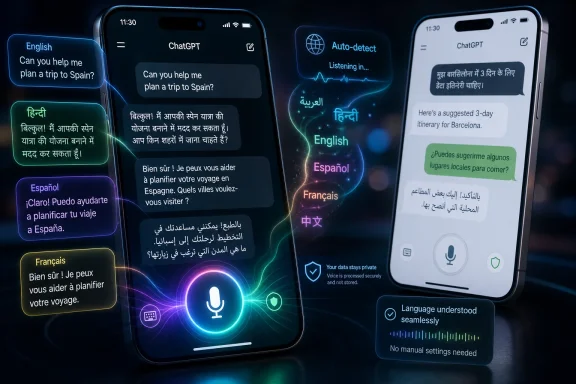
OpenAI has updated ChatGPT’s mobile microphone input on Android and iOS to support multilingual dictation across more than 70 languages, letting users speak naturally across language boundaries without manually changing the app’s speech language setting. The change sounds small because it lives behind a microphone icon, not a new model picker. But for many people who actually use ChatGPT on a phone, this is the sort of fix that matters more than another benchmark chart. It attacks one of voice AI’s oldest problems: the assumption that humans speak in one language at a time.
The modern AI assistant has always promised a natural interface, but mobile voice input has often behaved like a form with a microphone attached. Speak English, and it works. Switch into Hindi, Spanish, Arabic, French, or a regional language mid-thought, and the experience can collapse into corrections, settings changes, or mangled transcription.
That is not how multilingual users communicate. In much of the world, language switching is not a novelty; it is the normal rhythm of school, work, family, and the internet. A student may ask a question in English, explain the context in Tamil, and drop technical terms back into English because that is how the material was taught.
The update reportedly expands ChatGPT’s microphone input to more than 70 languages and allows mixed-language dictation in a single flow. Just as important, it moves language selection away from the user’s checklist and into the system’s automatic recognition layer. The less a person has to prepare the interface before speaking, the closer the product gets to the conversational ideal AI companies keep advertising.
OpenAI’s own voice documentation already distinguishes between voice conversations and dictation-style input, and it notes that users can set a preferred speech language when automatic detection gets it wrong. That caveat still matters. Automatic language detection is not magic, and it will be weakest where accents, noise, code-switching, and lower-resource languages collide. But making auto-detect the center of gravity is the right design move.
Speech recognition has historically treated language as a session-level choice. You set English, or Spanish, or Japanese, and the system listens through that filter. That model is tidy for software and clumsy for humans.
ChatGPT’s new microphone behavior appears to treat language as something that can shift inside the utterance itself. That is a much harder product problem, because the system must decide not only what phonemes it heard, but which linguistic context best explains them. In mixed speech, a word that sounds like noise in one language may be perfectly ordinary in another.
This is why the update is more than localization. Localization says the same product works in more markets. Multilingual dictation says the product understands that the same user may live in several linguistic worlds at once.
For WindowsForum readers, the parallel is familiar. Windows has supported many languages for decades, but anyone who has managed multilingual keyboard layouts, input methods, speech packs, and regional formats knows that support is not the same thing as fluidity. The history of computing is full of features that technically work once the user has correctly configured them. The breakthrough comes when configuration stops interrupting the task.
Typing encourages compression. Users trim context, omit nuance, and format their thoughts for the keyboard. Speaking encourages narration. A person can explain the situation, correct themselves, and pile on detail without feeling the same mechanical cost.
That difference matters for ChatGPT because better prompts usually produce better answers. If multilingual users previously had to stop and switch language settings, they were not merely losing seconds. They were losing continuity of thought. They were being asked to become operators of the interface at the exact moment the interface was supposed to disappear.
Continuous dictation also pushes ChatGPT closer to the workflow territory occupied by note-taking apps, voice memos, messaging tools, and productivity assistants. A user drafting a message to a colleague, brainstorming an essay, summarizing a meeting, or capturing an idea on a commute can speak in the language mix that comes naturally. That is the difference between a feature that demos well and one that becomes habit.
This is especially important on phones. Desktop AI use still leans toward deliberate sessions: open a tab, paste text, write a prompt, edit the output. Mobile AI use is more opportunistic. It happens while walking, cooking, waiting, commuting, or switching between apps. In those settings, a microphone that understands the user’s actual speech pattern is not a bonus. It is the interface.
Code-switching is common in multilingual communities because language carries context. A technical phrase may live in English because that is how the person learned it. A family instruction may arrive in Arabic or Tagalog because that is the emotional register of the conversation. A joke may only work in a regional language. A professional request may shift back into English because the final output must be sent to a manager or client.
Traditional dictation systems struggle here because they often commit too early to one language model. Once the system believes it is hearing English, it may force non-English words into English-looking nonsense. Once it believes it is hearing another language, English product names, acronyms, and technical vocabulary may get distorted.
ChatGPT’s updated microphone input is notable because the product’s value depends on preserving meaning, not merely producing a transcript. If the transcription layer gets the user’s mixed-language prompt wrong, the model’s answer starts from bad evidence. Garbage in, polished garbage out.
That is why this is a foundational usability upgrade. It sits below the glamorous layer of reasoning and generation, but it determines whether the system hears the user in the first place. In AI, the input layer is destiny.
Apple and Google have the operating-system advantage. Their keyboards, permission models, and system-level dictation features can appear almost anywhere text can be entered. OpenAI, by contrast, has to win inside its own app unless it builds deeper platform integrations or finds other ways to make ChatGPT the user’s preferred voice capture tool.
That makes the ChatGPT microphone unusually important. It cannot merely match the platform keyboard; it has to be better enough that users choose to start in ChatGPT. Multilingual dictation is one way to create that gap, especially if the app can combine accurate transcription with immediate AI transformation.
The real workflow is not “turn my speech into text.” It is “turn this messy spoken thought into a useful thing.” A multilingual user might dictate a half-English, half-Hindi explanation and ask ChatGPT to turn it into a polished English email. Another might speak in Spanish and English while asking for a concise study note. A small-business owner might dictate in Arabic with English product terms and request a customer-ready reply.
That is where ChatGPT has an advantage over ordinary dictation. The system can capture, normalize, translate, summarize, reformat, and respond. But none of that matters if users first have to babysit the microphone.
For non-English speakers, English-first AI products impose a cognitive tax. Users may know what they want to say but spend extra effort translating their thought into the language the machine handles best. For multilingual speakers, that tax shows up as hesitation: deciding which language to use, whether the system will understand, and whether a correction will be more work than typing.
Better multilingual dictation lowers that tax. It lets users approach ChatGPT through speech patterns that feel less artificial. That is not only a comfort feature; it changes who can use the product effectively.
There is also a literacy dimension. In many regions, users may be more comfortable speaking a language than writing it, especially when scripts, keyboards, and autocorrect support lag behind everyday speech. A microphone that can handle spoken language well can make AI tools available to people who would otherwise avoid long typed prompts.
That does not make ChatGPT a universal equalizer. Speech recognition quality varies by language, accent, device microphone, background noise, and training data. Lower-resource languages are still likely to trail high-resource ones. But every reduction in setup friction helps move the product from “available” to usable.
OpenAI’s help materials describe how voice conversations can create transcripts and, depending on the mode and settings, how audio and video clips are retained or excluded from training unless users opt in. Those distinctions are important, but they are also complicated. Most ordinary users do not think in terms of retention windows, workspace policies, and training toggles when they tap a microphone.
For IT admins and security-minded users, the practical advice is unchanged: treat voice input as content submission. If you would not paste confidential material into a cloud AI chat, do not casually dictate it either. The ease of speech can make oversharing feel natural.
Enterprise and education environments will need clearer policies as voice becomes more useful. A multilingual dictation feature may be excellent for productivity and inclusion, but it can also capture sensitive information faster than typing. Admins should assume that better UX increases usage, and increased usage increases governance needs.
This is the uncomfortable bargain of voice AI. The feature becomes valuable precisely because it disappears into daily behavior. The less it feels like data entry, the easier it is to forget that data is being entered.
A reliable multilingual microphone will not make ChatGPT think harder. It will not solve hallucinations, security risks, or the economics of model training. It will not turn a phone into a universal interpreter in every noisy café on Earth.
What it does is remove a recurring annoyance from a high-frequency interaction. That is how mature software gets better. Not every improvement is a moonshot; some are the elimination of one more needless click, one more settings panel, one more moment when the user has to adapt to the machine.
OpenAI has spent the past few years pushing ChatGPT from a text box into a multimodal assistant. Voice, vision, files, memory, custom GPTs, and mobile integrations all point toward the same product ambition: make the assistant ambient enough to be used throughout the day. But ambient products are judged by their interruptions. If the assistant makes a multilingual user stop and declare a language before speaking, the illusion breaks.
This update repairs part of that illusion. It makes ChatGPT feel less like an English-first chatbot with international features and more like a mobile assistant designed for a multilingual planet.
Windows has excellent pieces of the puzzle: dictation, accessibility tools, language packs, captions, translation features, and enterprise management. But pieces are not the same as a coherent AI-native voice workflow. The lesson from ChatGPT’s mobile microphone is that users do not want to manage speech technology. They want to speak, be understood, and get useful output.
That matters in Microsoft 365 as much as it does in ChatGPT. A bilingual worker should be able to dictate notes into OneNote, summarize them in Word, turn them into an Outlook message, and preserve the intent across language switches. A Teams user should be able to move between languages in a meeting without the transcript becoming a comedy routine. A Windows user should not need to think like a regional settings administrator to get good voice input.
The risk for Microsoft is that AI input habits form elsewhere. If users learn that ChatGPT is the place where messy speech becomes clean output, they may route more work through ChatGPT even when the final destination is Office, Teams, or Windows. Input layers are sticky because they sit at the beginning of the workflow.
For Windows enthusiasts and IT pros, this is why a mobile ChatGPT dictation update deserves attention. It is not just a phone feature. It is a signpost for where everyday computing interfaces are going.
The strongest AI products will not merely translate menus and documentation. They will understand mixed inputs, culturally specific phrasing, regional vocabulary, and the practical messiness of communication. That is much harder than adding another language option to a dropdown.
OpenAI’s microphone upgrade is a step in that direction because it addresses a behavior that is common but historically underserved. Many multilingual users have learned to work around software limitations by simplifying themselves for the machine. They type in one language, speak in another, translate mentally, or avoid voice input altogether.
The better path is for the machine to handle the mess. That does not mean every transcription will be perfect. It means the default posture of the product changes from “tell me which language you are using” to “start speaking, and I will try to keep up.”
That shift is subtle, but it is philosophically important. It moves AI interaction away from rigid command modes and toward negotiated understanding. For a technology industry obsessed with agents, autonomy, and natural interfaces, that is exactly the direction the input layer needs to go.
 OpenAI Fixes the Friction Hidden in Plain Sight
The modern AI assistant has always promised a natural interface, but mobile voice input has often behaved like a form with a microphone attached. Speak English, and it works. Switch into Hindi, Spanish, Arabic, French, or a regional language mid-thought, and the experience can collapse into corrections, settings changes, or mangled transcription.That is not how multilingual users communicate. In much of the world, language switching is not a novelty; it is the normal rhythm of school, work, family, and the internet. A student may ask a question in English, explain the context in Tamil, and drop technical terms back into English because that is how the material was taught.
The update reportedly expands ChatGPT’s microphone input to more than 70 languages and allows mixed-language dictation in a single flow. Just as important, it moves language selection away from the user’s checklist and into the system’s automatic recognition layer. The less a person has to prepare the interface before speaking, the closer the product gets to the conversational ideal AI companies keep advertising.
OpenAI’s own voice documentation already distinguishes between voice conversations and dictation-style input, and it notes that users can set a preferred speech language when automatic detection gets it wrong. That caveat still matters. Automatic language detection is not magic, and it will be weakest where accents, noise, code-switching, and lower-resource languages collide. But making auto-detect the center of gravity is the right design move.
The Real Upgrade Is Not the Number of Languages
The “70+ languages” figure is the headline, but the more interesting part is the disappearance of the language switch. Support lists are useful for marketing and procurement. They tell users whether their language is theoretically covered, but they do not tell us whether the product respects how people actually speak.Speech recognition has historically treated language as a session-level choice. You set English, or Spanish, or Japanese, and the system listens through that filter. That model is tidy for software and clumsy for humans.
ChatGPT’s new microphone behavior appears to treat language as something that can shift inside the utterance itself. That is a much harder product problem, because the system must decide not only what phonemes it heard, but which linguistic context best explains them. In mixed speech, a word that sounds like noise in one language may be perfectly ordinary in another.
This is why the update is more than localization. Localization says the same product works in more markets. Multilingual dictation says the product understands that the same user may live in several linguistic worlds at once.
For WindowsForum readers, the parallel is familiar. Windows has supported many languages for decades, but anyone who has managed multilingual keyboard layouts, input methods, speech packs, and regional formats knows that support is not the same thing as fluidity. The history of computing is full of features that technically work once the user has correctly configured them. The breakthrough comes when configuration stops interrupting the task.
Voice Input Finally Becomes a First-Class Prompt Surface
The mobile microphone is not just an accessibility affordance or a convenience for people who dislike typing. In an AI product, voice input is a prompt surface. It changes what people ask, how much context they provide, and whether they use the system in moments when typing is too slow or socially awkward.Typing encourages compression. Users trim context, omit nuance, and format their thoughts for the keyboard. Speaking encourages narration. A person can explain the situation, correct themselves, and pile on detail without feeling the same mechanical cost.
That difference matters for ChatGPT because better prompts usually produce better answers. If multilingual users previously had to stop and switch language settings, they were not merely losing seconds. They were losing continuity of thought. They were being asked to become operators of the interface at the exact moment the interface was supposed to disappear.
Continuous dictation also pushes ChatGPT closer to the workflow territory occupied by note-taking apps, voice memos, messaging tools, and productivity assistants. A user drafting a message to a colleague, brainstorming an essay, summarizing a meeting, or capturing an idea on a commute can speak in the language mix that comes naturally. That is the difference between a feature that demos well and one that becomes habit.
This is especially important on phones. Desktop AI use still leans toward deliberate sessions: open a tab, paste text, write a prompt, edit the output. Mobile AI use is more opportunistic. It happens while walking, cooking, waiting, commuting, or switching between apps. In those settings, a microphone that understands the user’s actual speech pattern is not a bonus. It is the interface.
Code-Switching Was the Test AI Assistants Kept Failing
The tech industry often talks about multilingual support as if languages are separate boxes on a product matrix. English gets a checkmark. Spanish gets a checkmark. Hindi gets a checkmark. But millions of people do not speak in product matrices.Code-switching is common in multilingual communities because language carries context. A technical phrase may live in English because that is how the person learned it. A family instruction may arrive in Arabic or Tagalog because that is the emotional register of the conversation. A joke may only work in a regional language. A professional request may shift back into English because the final output must be sent to a manager or client.
Traditional dictation systems struggle here because they often commit too early to one language model. Once the system believes it is hearing English, it may force non-English words into English-looking nonsense. Once it believes it is hearing another language, English product names, acronyms, and technical vocabulary may get distorted.
ChatGPT’s updated microphone input is notable because the product’s value depends on preserving meaning, not merely producing a transcript. If the transcription layer gets the user’s mixed-language prompt wrong, the model’s answer starts from bad evidence. Garbage in, polished garbage out.
That is why this is a foundational usability upgrade. It sits below the glamorous layer of reasoning and generation, but it determines whether the system hears the user in the first place. In AI, the input layer is destiny.
The Competitive Pressure Is Coming From the Keyboard
OpenAI is not operating in a vacuum. Apple, Google, Microsoft, Samsung, and a rising class of AI dictation startups all understand that speech-to-text is becoming a strategic layer of mobile computing. Whoever owns the easiest way to turn speech into structured text gets a privileged position in messaging, search, productivity, and AI assistance.Apple and Google have the operating-system advantage. Their keyboards, permission models, and system-level dictation features can appear almost anywhere text can be entered. OpenAI, by contrast, has to win inside its own app unless it builds deeper platform integrations or finds other ways to make ChatGPT the user’s preferred voice capture tool.
That makes the ChatGPT microphone unusually important. It cannot merely match the platform keyboard; it has to be better enough that users choose to start in ChatGPT. Multilingual dictation is one way to create that gap, especially if the app can combine accurate transcription with immediate AI transformation.
The real workflow is not “turn my speech into text.” It is “turn this messy spoken thought into a useful thing.” A multilingual user might dictate a half-English, half-Hindi explanation and ask ChatGPT to turn it into a polished English email. Another might speak in Spanish and English while asking for a concise study note. A small-business owner might dictate in Arabic with English product terms and request a customer-ready reply.
That is where ChatGPT has an advantage over ordinary dictation. The system can capture, normalize, translate, summarize, reformat, and respond. But none of that matters if users first have to babysit the microphone.
Accessibility Is Broader Than Disability Settings
Voice input is often filed under accessibility, and it certainly matters for users who cannot comfortably type. But the accessibility impact here is broader. Language itself can be an access barrier.For non-English speakers, English-first AI products impose a cognitive tax. Users may know what they want to say but spend extra effort translating their thought into the language the machine handles best. For multilingual speakers, that tax shows up as hesitation: deciding which language to use, whether the system will understand, and whether a correction will be more work than typing.
Better multilingual dictation lowers that tax. It lets users approach ChatGPT through speech patterns that feel less artificial. That is not only a comfort feature; it changes who can use the product effectively.
There is also a literacy dimension. In many regions, users may be more comfortable speaking a language than writing it, especially when scripts, keyboards, and autocorrect support lag behind everyday speech. A microphone that can handle spoken language well can make AI tools available to people who would otherwise avoid long typed prompts.
That does not make ChatGPT a universal equalizer. Speech recognition quality varies by language, accent, device microphone, background noise, and training data. Lower-resource languages are still likely to trail high-resource ones. But every reduction in setup friction helps move the product from “available” to usable.
The Privacy Trade-Off Still Follows the Microphone
A better microphone experience also means more people may use the microphone more often, and that makes privacy more than a footnote. Voice is intimate data. It can contain background conversations, names, locations, health information, workplace details, and emotional tone that text does not fully capture.OpenAI’s help materials describe how voice conversations can create transcripts and, depending on the mode and settings, how audio and video clips are retained or excluded from training unless users opt in. Those distinctions are important, but they are also complicated. Most ordinary users do not think in terms of retention windows, workspace policies, and training toggles when they tap a microphone.
For IT admins and security-minded users, the practical advice is unchanged: treat voice input as content submission. If you would not paste confidential material into a cloud AI chat, do not casually dictate it either. The ease of speech can make oversharing feel natural.
Enterprise and education environments will need clearer policies as voice becomes more useful. A multilingual dictation feature may be excellent for productivity and inclusion, but it can also capture sensitive information faster than typing. Admins should assume that better UX increases usage, and increased usage increases governance needs.
This is the uncomfortable bargain of voice AI. The feature becomes valuable precisely because it disappears into daily behavior. The less it feels like data entry, the easier it is to forget that data is being entered.
The Quiet Rollout Says Something About AI Maturity
It is telling that this update did not arrive as a giant keynote moment. The AI industry still loves spectacle: new models, cinematic demos, leaderboard claims, and sweeping promises about agents. But the products that survive are built from quieter improvements like this one.A reliable multilingual microphone will not make ChatGPT think harder. It will not solve hallucinations, security risks, or the economics of model training. It will not turn a phone into a universal interpreter in every noisy café on Earth.
What it does is remove a recurring annoyance from a high-frequency interaction. That is how mature software gets better. Not every improvement is a moonshot; some are the elimination of one more needless click, one more settings panel, one more moment when the user has to adapt to the machine.
OpenAI has spent the past few years pushing ChatGPT from a text box into a multimodal assistant. Voice, vision, files, memory, custom GPTs, and mobile integrations all point toward the same product ambition: make the assistant ambient enough to be used throughout the day. But ambient products are judged by their interruptions. If the assistant makes a multilingual user stop and declare a language before speaking, the illusion breaks.
This update repairs part of that illusion. It makes ChatGPT feel less like an English-first chatbot with international features and more like a mobile assistant designed for a multilingual planet.
Microsoft Should Be Watching the Input Layer
This is an OpenAI story, but it has obvious implications for Microsoft. ChatGPT and Copilot are different products, but the companies’ AI strategies are deeply intertwined, and Microsoft has its own long-running ambitions around Windows, Office, Teams, and cross-device productivity. If voice becomes a serious input layer for AI, Microsoft cannot afford for it to remain an afterthought.Windows has excellent pieces of the puzzle: dictation, accessibility tools, language packs, captions, translation features, and enterprise management. But pieces are not the same as a coherent AI-native voice workflow. The lesson from ChatGPT’s mobile microphone is that users do not want to manage speech technology. They want to speak, be understood, and get useful output.
That matters in Microsoft 365 as much as it does in ChatGPT. A bilingual worker should be able to dictate notes into OneNote, summarize them in Word, turn them into an Outlook message, and preserve the intent across language switches. A Teams user should be able to move between languages in a meeting without the transcript becoming a comedy routine. A Windows user should not need to think like a regional settings administrator to get good voice input.
The risk for Microsoft is that AI input habits form elsewhere. If users learn that ChatGPT is the place where messy speech becomes clean output, they may route more work through ChatGPT even when the final destination is Office, Teams, or Windows. Input layers are sticky because they sit at the beginning of the workflow.
For Windows enthusiasts and IT pros, this is why a mobile ChatGPT dictation update deserves attention. It is not just a phone feature. It is a signpost for where everyday computing interfaces are going.
The Multilingual Internet Was Always the Real Market
English dominated the early web, the developer ecosystem, and much of the AI training conversation, but it does not dominate human speech. The next wave of AI adoption will depend heavily on whether tools work for people who are not monolingual English speakers and do not want to behave like them for the convenience of software.The strongest AI products will not merely translate menus and documentation. They will understand mixed inputs, culturally specific phrasing, regional vocabulary, and the practical messiness of communication. That is much harder than adding another language option to a dropdown.
OpenAI’s microphone upgrade is a step in that direction because it addresses a behavior that is common but historically underserved. Many multilingual users have learned to work around software limitations by simplifying themselves for the machine. They type in one language, speak in another, translate mentally, or avoid voice input altogether.
The better path is for the machine to handle the mess. That does not mean every transcription will be perfect. It means the default posture of the product changes from “tell me which language you are using” to “start speaking, and I will try to keep up.”
That shift is subtle, but it is philosophically important. It moves AI interaction away from rigid command modes and toward negotiated understanding. For a technology industry obsessed with agents, autonomy, and natural interfaces, that is exactly the direction the input layer needs to go.
The Small Microphone Button Now Carries a Global Product Strategy
The most concrete lesson from this update is that AI usability is increasingly about the path into the model, not just the model itself. A better input layer expands the range of people, places, and moments where ChatGPT can be useful. For multilingual users, the microphone is no longer just a shortcut to typing; it is a test of whether the product respects their normal way of communicating.- ChatGPT’s updated mobile microphone input reportedly supports more than 70 languages across Android and iOS.
- The feature is designed to let users mix languages naturally during dictation rather than manually switching speech settings before each prompt.
- Automatic language recognition reduces friction, but users may still need to set a preferred language when detection is unreliable.
- The biggest impact is likely to be felt by multilingual speakers who code-switch in daily life, including students, professionals, creators, and non-English-first users.
- Better voice input also raises the importance of privacy and workplace policy, because easier dictation usually means more spoken data entering cloud AI systems.
- Microsoft, Apple, Google, and AI dictation startups all have reason to treat multilingual speech input as a strategic interface layer, not a minor accessibility feature.
References
- Primary source: nokiapoweruser.com
Published: 2026-06-21T08:50:11.561927
ChatGPT Voice Input Now Supports 70+ Languages - NPowerUser
ChatGPT's voice input now supports 70+ languages, multilingual speech, and automatic language detection on Android . - Read in Google AI News on NPowerUser nokiapoweruser.com
- Official source: help.openai.com
Voice Mode FAQ | OpenAI Help Center
Your guide to voice chats with ChatGPT, from setting up and using the voice mode to understanding its capabilities and limitations. help.openai.com
- Related coverage: makeuseof.com
Did You Know You Can Speak to ChatGPT?
Why waste time typing your ChatGPT prompts when you can use your voice instead? We'll show you how to do it. www.makeuseof.com
- Related coverage: ailynx.ru
ChatGPT теперь поддерживает голосовой ввод на 70+ языках
Обновление ChatGPT и запуск моделей GPT-Realtime расширяют возможности голосового взаимодействия и мгновенного перевода для пользователей и разработчиков.ailynx.ru
- Related coverage: support.recolx.ai
Supported Transcription Languages – Recolx
To help you evaluate speech-to-text performance for your target language, please refer to the official supported languages list...support.recolx.ai
