

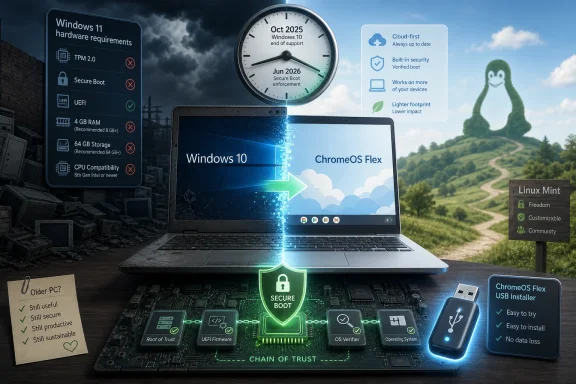
Google is pitching ChromeOS Flex as a free way for Windows 10 users to keep aging PCs useful after Microsoft’s October 2025 support cutoff, as Secure Boot certificate changes beginning in June 2026 add another deadline for unsupported machines. The pitch is simple: do not replace the hardware if the workload has already moved to the browser. But the real story is not that Google has discovered a charity lane into the PC market. It is that Microsoft’s Windows 11 hardware line has created an opening for every operating system that can plausibly say, your old laptop still has a job.
The post-Windows 10 scramble was always going to produce a secondhand operating-system market. Microsoft’s own message has been orderly and unsurprising: Windows 10 reached end of support on October 14, 2025, Windows 11 is the supported path forward, and users who cannot or will not move can enroll in Extended Security Updates for a limited reprieve. That is the clean version, the version that fits a lifecycle slide.
The messy version is sitting in drawers, cupboards, school offices, spare bedrooms, charity shops, and small businesses that bought perfectly adequate Windows 10 machines before Windows 11’s stricter requirements arrived. Many of those PCs are not broken. They are merely on the wrong side of a support policy that ties modern Windows not just to performance, but to firmware, security hardware, and platform assumptions Microsoft is no longer willing to treat as optional.
Google’s ChromeOS Flex offer lands precisely in that gap. It does not promise to make an old PC into a modern Windows workstation. It promises to make it into something else: a browser-first, cloud-managed, low-maintenance machine that can handle email, documents, video calls, web apps, and the everyday chores that now define a large share of personal computing.
That distinction matters. ChromeOS Flex is not a Windows rescue disc. It is a bet that many users were never deeply attached to Windows as an operating system in the first place. They were attached to the laptop, the keyboard, the screen, the files they needed to reach, and the browser tabs where their work now lives.
Microsoft has said most supported Windows devices will receive updated Secure Boot certificates through Windows Update, though some systems may require firmware or OEM involvement. The catch is in the word supported. A Windows 11 system in good order should be carried forward. A Windows 10 system enrolled in Extended Security Updates has a path. An abandoned Windows 10 installation outside that channel is a different proposition.
This is where the ordinary “old operating system” story becomes a more serious security story. Running an unsupported OS has always meant missing monthly patches for newly disclosed vulnerabilities. But Secure Boot adds a more fundamental layer: the chain of trust that helps protect the pre-OS environment, bootloaders, and certain classes of low-level compromise.
The nuance is important. The arrival of June 2026 does not mean every non-enrolled Windows 10 PC instantly turns into a pumpkin. Existing signatures and firmware behavior are more complicated than that, and Microsoft’s transition is staged rather than theatrical. But for users outside the update stream, the message is still stark: the platform’s trust model is moving on without them.
That is what makes Google’s campaign more than opportunistic advertising. It is not merely saying “our OS is lighter.” It is saying “our OS is still maintained on hardware Microsoft is prepared to leave behind.” In 2026, that is a much sharper argument than it would have been in 2019.
This is the part of the story that frustrates traditional PC users. A Windows machine is a general-purpose computer with decades of software inheritance behind it. ChromeOS Flex deliberately gives up much of that inheritance. It does not run classic Windows applications natively. It does not turn the laptop into a gaming rig. It does not offer every feature available on a factory Chromebook, and Google Play Android app support is not part of the Flex proposition.
But for a large slice of the market, the “missing” features are theoretical. The retired laptop in the kitchen is not running AutoCAD. The school spare is not hosting a DAW. The family travel laptop may not need anything more than a browser, a password manager, a webcam that works, and enough battery life to survive the sofa.
That is why ChromeOS Flex can feel faster on old hardware. It is not magic; it is a smaller job description. The operating system is asking less of the CPU, less of the storage device, and often less of the user. Fewer background services, fewer legacy components, and fewer local applications mean a machine that felt exhausted under Windows can seem strangely young again.
But “free” is never the whole price in platform shifts. A ChromeOS Flex conversion moves the user deeper into Google’s account system, update cadence, browser model, management stack, and cloud assumptions. That may be exactly what some users want. It may also be a poor fit for people who need local-first workflows, specialized peripherals, offline resilience, or software that expects Windows.
There is also a support boundary. Google maintains a certified models list for ChromeOS Flex, and that list matters. A laptop outside it may work perfectly, partially, or not at all. Wi-Fi, Bluetooth, touchpads, webcams, sleep behavior, graphics acceleration, and firmware quirks can make the difference between a delightful resurrection and an afternoon of troubleshooting.
This is the part consumer advice often compresses into a cheery installation guide. Yes, the USB installer route is accessible. Yes, many users can try ChromeOS Flex before committing to installation. But converting a PC is still an operating-system replacement, and the user should treat it with the seriousness that implies: back up files, verify account access, test hardware, and understand that returning to Windows may require installation media and license recovery.
Google’s bet is that many users will accept those trade-offs because the alternative is worse. A machine that is unsupported, sluggish, and increasingly risky online is not preserving freedom. It is preserving the appearance of familiarity while the underlying safety net rots away.
Mint’s familiar desktop layout, application menu, update manager, and conservative defaults make it less shocking to someone leaving Windows than many more ideologically pure Linux environments. It can run well on older hardware, supports a large software catalog, and gives users a more traditional local-computing model than ChromeOS Flex. If ChromeOS Flex says the browser is enough, Mint says the old PC can remain a PC.
That difference is not cosmetic. Linux Mint can run local applications such as LibreOffice, image editors, development tools, media players, and a universe of open-source utilities. It can be a better fit for users who need local file management, offline productivity, or more control over the machine. It also avoids replacing one corporate desktop landlord with another.
But Mint asks more of the user. Hardware support is often excellent, but not guaranteed. Some commercial applications remain Windows-only. Certain printers, fingerprint readers, docking stations, and oddball Wi-Fi adapters can still make Linux adoption feel like a negotiation with the device’s past. And while Mint is friendly by Linux standards, it still expects a user to accept a different software ecosystem and a different troubleshooting culture.
That makes the choice less about which free OS is “best” and more about what kind of computer the old Windows 10 device should become. ChromeOS Flex is strongest when the answer is a managed, browser-centric appliance. Linux Mint is strongest when the answer is a lightweight, general-purpose desktop that preserves more of the PC’s traditional flexibility.
That is why Windows 11 can feel modern in one pane and ancient in another. A rounded Settings page may sit a few clicks away from Control Panel remnants that look like they wandered in from a different century. Critics see that as incoherence, and sometimes it is. But enterprises often see it as continuity, and continuity is what allowed Windows to dominate business computing for decades.
The problem is that continuity has limits when security baselines change. Windows 11’s hardware requirements were Microsoft’s declaration that the next era of Windows would be built around assumptions such as TPM availability, newer CPUs, virtualization-based security, and firmer firmware trust. Users can debate the exact cutoff lines, and many have. But Microsoft’s direction is not ambiguous.
That puts Microsoft in a bind. Its greatest strength is compatibility with the past, yet its security strategy depends on refusing to carry too much of that past indefinitely. The company can support old application models while still drawing a hard line around old hardware. To users with excluded PCs, that distinction may feel academic.
Google and Linux distributions do not need to defeat Windows 11 on a new premium laptop to benefit from that tension. They only need to be credible on the machines Windows 11 does not want.
ChromeOS Flex has an enterprise angle because Google can pitch centralized management, reduced attack surface, and rapid deployment for fleets that live mostly in SaaS. A call center terminal, kiosk-like device, shared training laptop, or cloud-app endpoint may not need Windows if the business process has already moved to the browser. In those cases, converting hardware can postpone capital spending without pretending Windows 10 is still a safe long-term base.
Linux has a different enterprise story. It can be attractive for technical teams, developers, labs, education, and specialized use cases where local control matters. But it is less likely to be adopted casually across a nontechnical workforce unless the organization already has Linux management skills and support processes. Free software can become expensive when every help-desk script has to be rewritten.
The key enterprise lesson is that “old PC” is not a category. A five-year-old laptop with a decent SSD and 16GB of RAM may be a superb Linux or ChromeOS Flex candidate. A bargain basement machine with a failing battery, weak Wi-Fi, and a cracked hinge is not an environmental win just because it boots. Hardware triage still matters.
Administrators also have to separate device life extension from compliance. A converted machine may be safer than abandoned Windows 10, but it still needs asset tracking, patch monitoring, identity controls, data-loss policies, and a disposal plan. The operating system can change the risk profile. It does not abolish risk.
That is a hard message for consumers because it makes hardware ownership feel conditional. The machine is physically yours, but its safe participation in the network depends on firmware, certificates, updates, app ecosystems, and vendor timelines. When those timelines end, the device becomes a negotiation between capability and exposure.
Google’s answer is to change the software layer and keep the network trust flowing through ChromeOS Flex. Linux’s answer is to join a different maintenance ecosystem. Microsoft’s answer is to move to Windows 11 or enroll in ESU where available. The worst answer is inertia: continuing to use unsupported Windows 10 for sensitive browsing, banking, email, and password-protected services because nothing obvious has broken yet.
The PC industry has spent years selling sustainability through recycled packaging, repairability claims, and energy-efficiency improvements. The Windows 10 cliff makes the software side of sustainability impossible to ignore. A laptop that cannot receive a supported OS is effectively being retired by policy, not by physics.
That is why these free alternatives are not fringe curiosities anymore. They are pressure valves for a market that produced hundreds of millions of Windows 10 machines and then moved the official Windows path beyond many of them.
The bigger choice is about identity. A ChromeOS Flex machine is best for someone who can live in the browser and accept Google’s model of computing. A Linux Mint machine is best for someone who wants a familiar desktop without Windows, and who is willing to learn a little when something does not behave exactly as it did before.
Neither option should be romanticized. ChromeOS Flex can be too limited. Linux can be too fiddly. Windows 11 may still be the correct answer for users who rely on Windows software and have compatible hardware. ESU may be the least disruptive bridge for those who need one more year before replacing a device.
But the existence of trade-offs does not weaken the case for action. It strengthens it. The end of Windows 10 support was never going to be solved by a single answer because the Windows 10 installed base was never a single kind of user.
Source: Forbes ‘Faster, Free’—Google Offers Windows Users A PC Upgrade
 Google Finds Its Opening in Microsoft’s Hardware Deadline
The post-Windows 10 scramble was always going to produce a secondhand operating-system market. Microsoft’s own message has been orderly and unsurprising: Windows 10 reached end of support on October 14, 2025, Windows 11 is the supported path forward, and users who cannot or will not move can enroll in Extended Security Updates for a limited reprieve. That is the clean version, the version that fits a lifecycle slide.The messy version is sitting in drawers, cupboards, school offices, spare bedrooms, charity shops, and small businesses that bought perfectly adequate Windows 10 machines before Windows 11’s stricter requirements arrived. Many of those PCs are not broken. They are merely on the wrong side of a support policy that ties modern Windows not just to performance, but to firmware, security hardware, and platform assumptions Microsoft is no longer willing to treat as optional.
Google’s ChromeOS Flex offer lands precisely in that gap. It does not promise to make an old PC into a modern Windows workstation. It promises to make it into something else: a browser-first, cloud-managed, low-maintenance machine that can handle email, documents, video calls, web apps, and the everyday chores that now define a large share of personal computing.
That distinction matters. ChromeOS Flex is not a Windows rescue disc. It is a bet that many users were never deeply attached to Windows as an operating system in the first place. They were attached to the laptop, the keyboard, the screen, the files they needed to reach, and the browser tabs where their work now lives.
The Secure Boot Clock Turns Support Policy Into Security Policy
The timing is uncomfortable for Microsoft because the Windows 10 support deadline is now being followed by a deeper platform deadline. Secure Boot certificates first issued in the Windows 8 era are beginning to age out in 2026, forcing a refresh of the trust infrastructure that verifies boot components before Windows loads. For ordinary users, that sounds like plumbing. For administrators, it is the foundation under the plumbing.Microsoft has said most supported Windows devices will receive updated Secure Boot certificates through Windows Update, though some systems may require firmware or OEM involvement. The catch is in the word supported. A Windows 11 system in good order should be carried forward. A Windows 10 system enrolled in Extended Security Updates has a path. An abandoned Windows 10 installation outside that channel is a different proposition.
This is where the ordinary “old operating system” story becomes a more serious security story. Running an unsupported OS has always meant missing monthly patches for newly disclosed vulnerabilities. But Secure Boot adds a more fundamental layer: the chain of trust that helps protect the pre-OS environment, bootloaders, and certain classes of low-level compromise.
The nuance is important. The arrival of June 2026 does not mean every non-enrolled Windows 10 PC instantly turns into a pumpkin. Existing signatures and firmware behavior are more complicated than that, and Microsoft’s transition is staged rather than theatrical. But for users outside the update stream, the message is still stark: the platform’s trust model is moving on without them.
That is what makes Google’s campaign more than opportunistic advertising. It is not merely saying “our OS is lighter.” It is saying “our OS is still maintained on hardware Microsoft is prepared to leave behind.” In 2026, that is a much sharper argument than it would have been in 2019.
ChromeOS Flex Is Not a New PC, and That Is the Point
ChromeOS Flex is best understood as a narrowing of the PC, not an upgrade in the traditional sense. It strips the machine down to a web-centric operating model where the browser is the primary application environment, updates are automatic, and local complexity is reduced. If your old laptop wheezes under Windows but mostly serves as a portal to Gmail, Outlook on the web, Google Docs, Microsoft 365, banking, streaming, school portals, and web conferencing, that narrowing may feel like liberation.This is the part of the story that frustrates traditional PC users. A Windows machine is a general-purpose computer with decades of software inheritance behind it. ChromeOS Flex deliberately gives up much of that inheritance. It does not run classic Windows applications natively. It does not turn the laptop into a gaming rig. It does not offer every feature available on a factory Chromebook, and Google Play Android app support is not part of the Flex proposition.
But for a large slice of the market, the “missing” features are theoretical. The retired laptop in the kitchen is not running AutoCAD. The school spare is not hosting a DAW. The family travel laptop may not need anything more than a browser, a password manager, a webcam that works, and enough battery life to survive the sofa.
That is why ChromeOS Flex can feel faster on old hardware. It is not magic; it is a smaller job description. The operating system is asking less of the CPU, less of the storage device, and often less of the user. Fewer background services, fewer legacy components, and fewer local applications mean a machine that felt exhausted under Windows can seem strangely young again.
The Free Upgrade Comes With a New Landlord
Google’s language around ChromeOS Flex leans hard into sustainability and thrift, and there is truth in both. Extending the life of usable hardware is better than sending it prematurely into the e-waste stream. A free operating system can be a real financial relief for households, schools, nonprofits, and small organizations that cannot casually replace fleets of aging laptops.But “free” is never the whole price in platform shifts. A ChromeOS Flex conversion moves the user deeper into Google’s account system, update cadence, browser model, management stack, and cloud assumptions. That may be exactly what some users want. It may also be a poor fit for people who need local-first workflows, specialized peripherals, offline resilience, or software that expects Windows.
There is also a support boundary. Google maintains a certified models list for ChromeOS Flex, and that list matters. A laptop outside it may work perfectly, partially, or not at all. Wi-Fi, Bluetooth, touchpads, webcams, sleep behavior, graphics acceleration, and firmware quirks can make the difference between a delightful resurrection and an afternoon of troubleshooting.
This is the part consumer advice often compresses into a cheery installation guide. Yes, the USB installer route is accessible. Yes, many users can try ChromeOS Flex before committing to installation. But converting a PC is still an operating-system replacement, and the user should treat it with the seriousness that implies: back up files, verify account access, test hardware, and understand that returning to Windows may require installation media and license recovery.
Google’s bet is that many users will accept those trade-offs because the alternative is worse. A machine that is unsupported, sluggish, and increasingly risky online is not preserving freedom. It is preserving the appearance of familiarity while the underlying safety net rots away.
Linux Mint Makes the Same Argument With a Different Philosophy
The other free path now being pushed into the Windows 10 afterlife is Linux, and Linux Mint is the distribution most likely to be recommended to ordinary Windows refugees. That is not because it is the only good option. It is because Mint has spent years polishing the thing Linux advocates used to underestimate: the first hour.Mint’s familiar desktop layout, application menu, update manager, and conservative defaults make it less shocking to someone leaving Windows than many more ideologically pure Linux environments. It can run well on older hardware, supports a large software catalog, and gives users a more traditional local-computing model than ChromeOS Flex. If ChromeOS Flex says the browser is enough, Mint says the old PC can remain a PC.
That difference is not cosmetic. Linux Mint can run local applications such as LibreOffice, image editors, development tools, media players, and a universe of open-source utilities. It can be a better fit for users who need local file management, offline productivity, or more control over the machine. It also avoids replacing one corporate desktop landlord with another.
But Mint asks more of the user. Hardware support is often excellent, but not guaranteed. Some commercial applications remain Windows-only. Certain printers, fingerprint readers, docking stations, and oddball Wi-Fi adapters can still make Linux adoption feel like a negotiation with the device’s past. And while Mint is friendly by Linux standards, it still expects a user to accept a different software ecosystem and a different troubleshooting culture.
That makes the choice less about which free OS is “best” and more about what kind of computer the old Windows 10 device should become. ChromeOS Flex is strongest when the answer is a managed, browser-centric appliance. Linux Mint is strongest when the answer is a lightweight, general-purpose desktop that preserves more of the PC’s traditional flexibility.
Microsoft’s Legacy Problem Is Also Its Moat
There is an irony in watching Microsoft push users off Windows 10 while still celebrating the durability of Windows’ older foundations. Win32 remains central to Windows’ value because an immense amount of software, hardware integration, enterprise tooling, and user habit depends on it. The old code is not just baggage. It is the ecosystem.That is why Windows 11 can feel modern in one pane and ancient in another. A rounded Settings page may sit a few clicks away from Control Panel remnants that look like they wandered in from a different century. Critics see that as incoherence, and sometimes it is. But enterprises often see it as continuity, and continuity is what allowed Windows to dominate business computing for decades.
The problem is that continuity has limits when security baselines change. Windows 11’s hardware requirements were Microsoft’s declaration that the next era of Windows would be built around assumptions such as TPM availability, newer CPUs, virtualization-based security, and firmer firmware trust. Users can debate the exact cutoff lines, and many have. But Microsoft’s direction is not ambiguous.
That puts Microsoft in a bind. Its greatest strength is compatibility with the past, yet its security strategy depends on refusing to carry too much of that past indefinitely. The company can support old application models while still drawing a hard line around old hardware. To users with excluded PCs, that distinction may feel academic.
Google and Linux distributions do not need to defeat Windows 11 on a new premium laptop to benefit from that tension. They only need to be credible on the machines Windows 11 does not want.
The Enterprise Story Is Less Romantic Than the E-Waste Story
For home users, the old-PC revival story is appealingly concrete: save money, reduce waste, get a usable laptop. For enterprise IT, the calculation is colder. Unsupported Windows 10 devices are not sentimental objects. They are risk-bearing endpoints.ChromeOS Flex has an enterprise angle because Google can pitch centralized management, reduced attack surface, and rapid deployment for fleets that live mostly in SaaS. A call center terminal, kiosk-like device, shared training laptop, or cloud-app endpoint may not need Windows if the business process has already moved to the browser. In those cases, converting hardware can postpone capital spending without pretending Windows 10 is still a safe long-term base.
Linux has a different enterprise story. It can be attractive for technical teams, developers, labs, education, and specialized use cases where local control matters. But it is less likely to be adopted casually across a nontechnical workforce unless the organization already has Linux management skills and support processes. Free software can become expensive when every help-desk script has to be rewritten.
The key enterprise lesson is that “old PC” is not a category. A five-year-old laptop with a decent SSD and 16GB of RAM may be a superb Linux or ChromeOS Flex candidate. A bargain basement machine with a failing battery, weak Wi-Fi, and a cracked hinge is not an environmental win just because it boots. Hardware triage still matters.
Administrators also have to separate device life extension from compliance. A converted machine may be safer than abandoned Windows 10, but it still needs asset tracking, patch monitoring, identity controls, data-loss policies, and a disposal plan. The operating system can change the risk profile. It does not abolish risk.
The Consumer PC Market Is Being Split by Trust
The Windows 10 afterlife reveals a broader shift in personal computing. Performance used to be the main reason old PCs were retired. Now trust is just as important. A laptop can be fast enough and still be unacceptable because it no longer receives the updates that make it defensible on the modern internet.That is a hard message for consumers because it makes hardware ownership feel conditional. The machine is physically yours, but its safe participation in the network depends on firmware, certificates, updates, app ecosystems, and vendor timelines. When those timelines end, the device becomes a negotiation between capability and exposure.
Google’s answer is to change the software layer and keep the network trust flowing through ChromeOS Flex. Linux’s answer is to join a different maintenance ecosystem. Microsoft’s answer is to move to Windows 11 or enroll in ESU where available. The worst answer is inertia: continuing to use unsupported Windows 10 for sensitive browsing, banking, email, and password-protected services because nothing obvious has broken yet.
The PC industry has spent years selling sustainability through recycled packaging, repairability claims, and energy-efficiency improvements. The Windows 10 cliff makes the software side of sustainability impossible to ignore. A laptop that cannot receive a supported OS is effectively being retired by policy, not by physics.
That is why these free alternatives are not fringe curiosities anymore. They are pressure valves for a market that produced hundreds of millions of Windows 10 machines and then moved the official Windows path beyond many of them.
The Old Laptop’s Second Life Has Rules
The practical advice is less glamorous than the marketing. Before installing anything, users should back up local files, confirm they can sign in to their important accounts, check whether their device appears on Google’s ChromeOS Flex certified list if they are considering Google’s path, and test the live USB environment where possible. If Linux Mint is the plan, they should similarly test Wi-Fi, audio, sleep, display brightness, external monitors, and printers before wiping the drive.The bigger choice is about identity. A ChromeOS Flex machine is best for someone who can live in the browser and accept Google’s model of computing. A Linux Mint machine is best for someone who wants a familiar desktop without Windows, and who is willing to learn a little when something does not behave exactly as it did before.
Neither option should be romanticized. ChromeOS Flex can be too limited. Linux can be too fiddly. Windows 11 may still be the correct answer for users who rely on Windows software and have compatible hardware. ESU may be the least disruptive bridge for those who need one more year before replacing a device.
But the existence of trade-offs does not weaken the case for action. It strengthens it. The end of Windows 10 support was never going to be solved by a single answer because the Windows 10 installed base was never a single kind of user.
The Cheapest Upgrade Is the One That Matches the Work
The most useful way to think about the next few months is not as a contest between Microsoft, Google, and Linux. It is as a sorting exercise for hardware that has outlived one official lifecycle but not necessarily its usefulness. The right answer depends on what the machine actually does, not what logo appears on the lid.- A Windows 10 PC that qualifies for Windows 11 and runs well should usually move to Windows 11 rather than become a science project.
- A Windows 10 PC that cannot move to Windows 11 but still needs Windows applications should be enrolled in Extended Security Updates while its owner plans a replacement.
- A lightly used laptop whose work happens almost entirely in the browser is a strong candidate for ChromeOS Flex, especially if its hardware is certified or tests cleanly from USB.
- A capable older PC whose owner wants local applications, offline productivity, and more control is often a better candidate for Linux Mint than for ChromeOS Flex.
- A device with failing storage, a swollen battery, broken networking, or unreliable firmware should not be rescued merely because a free operating system exists.
Source: Forbes ‘Faster, Free’—Google Offers Windows Users A PC Upgrade
