

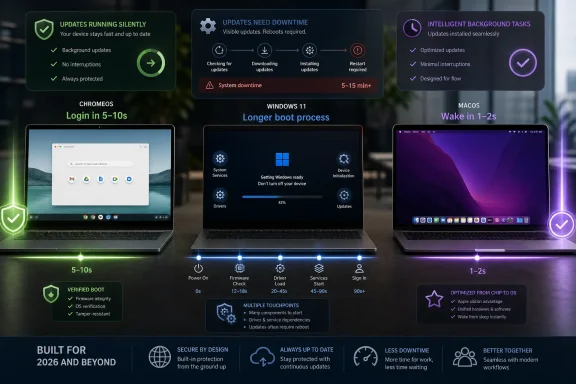
ChromeOS remains the fastest mainstream laptop operating system to reach a login screen in 2026, with reported cold-boot times of roughly 5 to 10 seconds versus about 15 to 25 seconds for modern MacBooks and 20 to 40 seconds for typical Windows 11 laptops. That is the simple benchmark answer, but it is not the whole story. Boot speed has become a proxy for something larger: how much complexity each platform asks users and administrators to carry before the workday even begins.
The Chromebook’s boot-time advantage is not magic silicon or marketing varnish. It is the result of a system designed around a narrower contract: boot quickly, verify the operating system, land the user in a browser-first environment, and keep the messy parts of maintenance mostly out of sight.
That contract makes ChromeOS look almost unfair in cold-boot comparisons. A clean Chromebook commonly reaches the login screen in 5 to 10 seconds, while Windows 11 machines often sit in the 20-to-40-second range and Apple Silicon MacBooks usually land somewhere between the two. Resume from sleep compresses the spread, but the hierarchy remains familiar: Chromebooks and MacBooks feel nearly instant, while Windows depends heavily on firmware, drivers, power settings, and whatever the vendor installed before shipping the laptop.
The caveat is important. “Windows 11 laptop” is not one thing. It can mean a $299 Celeron notebook with a bargain SSD, a business-class ThinkPad, a gaming laptop with aggressive firmware checks, or a workstation-class machine carrying encryption, endpoint security, VPN hooks, and management agents. macOS is much easier to benchmark cleanly because Apple controls the hardware stack, and ChromeOS is easier still because Google limits the platform’s shape.
That is why boot statistics should be read less as a stopwatch contest and more as evidence of design philosophy. ChromeOS wins because it has fewer jobs at startup. Windows loses time because it is asked to be everything to everyone, including the legacy enterprise desktop that refuses to die.
That distinction matters to administrators because users do not experience laboratory Windows. They experience Windows as shipped by OEMs, hardened by IT, patched by Microsoft, watched by security agents, and modified by every productivity tool with the confidence to add a startup service. The first 30 seconds of a Windows workday are a crowded negotiation between firmware, kernel, drivers, services, authentication, telemetry, endpoint detection, OneDrive, Teams, VPN clients, and whatever the organization forgot it deployed in 2022.
ChromeOS avoids much of that by refusing to become a general-purpose legacy desktop. Its boot path is built around verified boot, a small system image, and an update model that swaps partitions rather than dragging users through long, visible servicing rituals. That does not make ChromeOS more powerful; it makes it more opinionated.
MacBooks sit in the middle for a different reason. Apple controls the hardware and software platform tightly, which keeps boot and resume behavior predictable. But macOS is still a full desktop operating system with heavyweight local applications, developer tooling, media workflows, background indexing, and a broader local computing model than ChromeOS.
The lesson is uncomfortable for Windows loyalists but useful for WindowsForum readers: Windows is not slow because Microsoft forgot that boot speed matters. Windows is slower because its greatest selling point — compatibility with nearly everything — is also a performance tax collected at startup.
Microsoft has improved Windows servicing over the years, and Windows 11 is less chaotic than the worst days of Windows 10 feature upgrades. Even so, the Windows update experience remains one of the platform’s most visible sources of friction. It is not merely that updates can take longer; it is that they can appear at the worst possible moment, consume CPU and disk, demand restarts, and leave users staring at percentages when they intended to open a laptop and work.
ChromeOS makes a different bet. Updates download silently, install to an inactive system partition, and become active after reboot. The user does not need to understand that mechanism, which is precisely the point. A Chromebook reboot after an update feels like a normal reboot with a little extra housekeeping.
macOS again lands between these worlds. Apple’s updates are usually more predictable than Windows updates, but they are still visible, scheduled events that can take several minutes or longer depending on the release. For individual users that may be fine. For fleets, classrooms, kiosks, and shift-based work, those minutes become operational drag.
This is where the “120x to 180x” comparison between ChromeOS update downtime and Windows update downtime is rhetorically dramatic but directionally useful. Exact multiples vary by hardware, patch size, network state, and management policy. The broader point survives the scrutiny: ChromeOS treats updates as background infrastructure, while Windows still too often makes updates a foreground event.
Reported clean-install idle RAM figures put ChromeOS around 1.0 to 1.5 GB, Windows 11 around 2.5 to 3.2 GB, and macOS on Apple Silicon roughly around 2.0 to 2.5 GB. Those numbers should not be treated as immutable laws; background services, browser tabs, sync clients, security software, and vendor utilities change the picture quickly. But the baseline tells a familiar story.
On an 8 GB laptop, Windows 11 has enough room to breathe. On a 4 GB laptop, every extra background process matters. That is why the cheapest Windows machines often age poorly: the OS footprint, browser appetite, antivirus activity, and update workload collide with limited memory and low-end storage.
ChromeOS was built to survive that environment. It does not make 4 GB of RAM luxurious, especially now that modern web apps can be enormous, but it gives the user more of the machine before the first tab opens. In education, frontline work, and light office deployments, that difference matters more than benchmark purists like to admit.
Apple avoids the worst of this by refusing to sell truly low-end hardware in the same way PC OEMs do. The MacBook comparison is therefore less about minimum viability and more about polish. Apple’s machines resume beautifully and manage memory aggressively, but they also start from a higher price floor and a more controlled hardware base.
WebXPRT-style testing on the same machine has shown Firefox, Chrome, and Edge clustering tightly enough that most users would not feel the difference in ordinary web work. The larger performance gap comes before the browser benchmark begins: boot, login, update behavior, background load, and idle memory.
That distinction is important because it keeps the Chromebook argument honest. ChromeOS does not make a slow web app magically efficient. If your workload is a bloated SaaS dashboard, a giant spreadsheet in the browser, or a video meeting running alongside 20 tabs, hardware still matters. A low-end Chromebook can still choke.
But the Chromebook often gets to the starting line cleaner. It has fewer resident services, fewer vendor utilities, fewer legacy assumptions, and a lower idle footprint. In daily use, that can feel like application performance even when the browser engine is not dramatically faster.
For Windows users, the practical implication is not “switch operating systems and everything becomes instant.” It is that the first layer of performance tuning remains brutally mundane: remove junk startup apps, control endpoint agents, keep firmware current, use fast storage, buy enough RAM, and stop pretending a bargain laptop can carry an enterprise image gracefully.
The important point is not that Windows alone was “bad” or that Microsoft caused the incident. The faulty update came from CrowdStrike, and Microsoft was clear that it was not a Microsoft security incident. The deeper issue is that kernel-level security software on Windows can become a single point of failure at spectacular scale.
ChromeOS did not participate in that failure path. Its security model, verified boot process, partition structure, and limits on third-party kernel-level interference make that class of outage less likely. That does not mean ChromeOS is invulnerable. It means the platform’s design removes some of the sharpest knives from the room.
This is where boot-time statistics become security statistics. A system that verifies itself at startup and can roll back or recover from a corrupted system partition is not just faster; it is more predictable. For IT, predictability is a security feature because it narrows the number of ways a device can fail before the user even logs in.
Windows, to its credit, is changing under pressure. Microsoft has spent years hardening driver requirements, pushing virtualization-based security, tightening update controls, and rethinking parts of the endpoint security model after CrowdStrike. But Windows has to reform without breaking the vast ecosystem that made it dominant in the first place. That is slow work by definition.
Chromebooks benefit from a relatively simple recovery story. Verified boot checks system integrity, and ChromeOS can fall back to a known-good state more cleanly than a traditional desktop OS. That is a major reason schools and managed fleets embraced the platform: when a device misbehaves, the fix is often powerwash, replace, or re-enroll rather than a long forensic adventure.
Windows has more recovery options, but more options often mean more complexity. Safe Mode, recovery environments, restore points, BitLocker recovery keys, driver rollback, startup repair, in-place upgrade, Autopilot reset, and bare-metal imaging all have their place. They also require knowledge, process, and time.
macOS occupies a more premium version of the middle. Apple’s hardware integration reduces variability, and modern Macs are generally excellent at sleep, wake, and update consistency. But macOS is still less disposable operationally than ChromeOS in large fleets, and Apple’s management model is its own discipline rather than a frictionless escape hatch.
For an individual buyer, reliability may mean “my laptop opens instantly and does not ruin my morning.” For IT, reliability means thousands of devices behaving the same way on a Monday after Patch Tuesday, an IdP change, a browser update, and a security policy revision. ChromeOS was built for that kind of sameness. Windows was built to accommodate difference, and difference is expensive.
That is why the Chromebook-versus-MacBook-versus-Windows debate becomes silly when reduced to one winner. These platforms are not interchangeable shells around the same work. They express different assumptions about where applications live, how devices are managed, how much local execution matters, and who gets to modify the system.
ChromeOS says the browser is the center, identity is the anchor, and the device should be close to stateless. macOS says the local machine is a polished creative and productivity workstation inside Apple’s controlled ecosystem. Windows says the PC remains the universal endpoint, even if universality means carrying decades of baggage.
For IT leaders, the smart question is not which OS has the fastest cold boot. It is which OS has the fewest unacceptable compromises for a given workforce. In a browser-first organization, ChromeOS boot speed is part of a broader administrative win. In a Microsoft 365-heavy but legacy-dependent enterprise, Windows remains hard to dislodge. In executive, creative, and developer circles, MacBooks justify themselves with hardware quality, battery life, UNIX foundations, and user preference.
The strongest case for ChromeOS is therefore not that it beats Windows by 15 or 30 seconds at startup. The strongest case is that it turns the endpoint into something closer to infrastructure: replaceable, recoverable, and boring. In IT, boring is often the highest compliment.
That segmentation is already visible in purchasing behavior. Schools choose Chromebooks because management and repair economics matter as much as performance. Enterprises keep Windows because application compatibility and established management stacks are difficult to abandon. Developers and creative teams often choose MacBooks because Apple Silicon changed the performance-per-watt discussion in ways Windows OEMs are still chasing unevenly.
The mistake is using one benchmark to answer every procurement question. Boot time is a real productivity factor, but it is not the only one. Application compatibility, identity integration, security tooling, lifecycle policy, repairability, user training, residual value, and vendor leverage all matter.
Still, boot time has symbolic power because it is the first performance benchmark every user runs every day. Nobody needs a testing lab to know whether a laptop feels ready or reluctant. The machine either opens into work or makes the user wait.
That daily perception shapes platform loyalty more than vendors admit. A Windows laptop that boots slowly and then spends five more minutes thrashing through startup tasks feels old even when the CPU is modern. A Chromebook that reaches the browser in seconds feels efficient even when the hardware is modest. A MacBook that wakes before the lid is fully open feels premium before the user launches a single app.
That means fewer unnecessary startup services, stronger pressure on OEM preload habits, cleaner update orchestration, better driver isolation, and a security model that reduces the blast radius of third-party failures. It also means administrators need to stop blaming “Windows” for every slow boot while shipping bloated images and unmanaged startup sprawl.
The best Windows fleets already understand this. They use modern provisioning instead of ancient gold images, limit startup agents, standardize hardware, monitor boot performance, and treat endpoint software as a performance budget rather than a free-for-all. Under those conditions, Windows 11 can be respectable.
But respectable is not the same as invisible. ChromeOS has made the maintenance layer disappear for a large class of users, and that changes expectations. Once people learn that updates do not have to hijack the morning and boot does not have to be a ritual, patience for heavier platforms declines.
Apple benefits from the same expectation shift, though from the premium end. MacBooks do not usually beat Chromebooks on cold boot, but they often match or exceed them in perceived wake quality while offering a far broader local computing environment. That leaves Windows squeezed from both sides: ChromeOS below it on simplicity, macOS above it on polish.
 The Fastest Boot Is Also the Narrowest Promise
The Chromebook’s boot-time advantage is not magic silicon or marketing varnish. It is the result of a system designed around a narrower contract: boot quickly, verify the operating system, land the user in a browser-first environment, and keep the messy parts of maintenance mostly out of sight.That contract makes ChromeOS look almost unfair in cold-boot comparisons. A clean Chromebook commonly reaches the login screen in 5 to 10 seconds, while Windows 11 machines often sit in the 20-to-40-second range and Apple Silicon MacBooks usually land somewhere between the two. Resume from sleep compresses the spread, but the hierarchy remains familiar: Chromebooks and MacBooks feel nearly instant, while Windows depends heavily on firmware, drivers, power settings, and whatever the vendor installed before shipping the laptop.
The caveat is important. “Windows 11 laptop” is not one thing. It can mean a $299 Celeron notebook with a bargain SSD, a business-class ThinkPad, a gaming laptop with aggressive firmware checks, or a workstation-class machine carrying encryption, endpoint security, VPN hooks, and management agents. macOS is much easier to benchmark cleanly because Apple controls the hardware stack, and ChromeOS is easier still because Google limits the platform’s shape.
That is why boot statistics should be read less as a stopwatch contest and more as evidence of design philosophy. ChromeOS wins because it has fewer jobs at startup. Windows loses time because it is asked to be everything to everyone, including the legacy enterprise desktop that refuses to die.
Windows Still Pays Interest on Its Backward Compatibility Debt
Windows boot time is not simply a Microsoft problem. It is the bill for decades of hardware freedom, backwards compatibility, third-party drivers, preloaded services, registry history, firmware variation, and enterprise security tooling. A fresh Windows 11 image on a fast NVMe drive can be quick; a real-world managed Windows laptop after six months in the field often is not.That distinction matters to administrators because users do not experience laboratory Windows. They experience Windows as shipped by OEMs, hardened by IT, patched by Microsoft, watched by security agents, and modified by every productivity tool with the confidence to add a startup service. The first 30 seconds of a Windows workday are a crowded negotiation between firmware, kernel, drivers, services, authentication, telemetry, endpoint detection, OneDrive, Teams, VPN clients, and whatever the organization forgot it deployed in 2022.
ChromeOS avoids much of that by refusing to become a general-purpose legacy desktop. Its boot path is built around verified boot, a small system image, and an update model that swaps partitions rather than dragging users through long, visible servicing rituals. That does not make ChromeOS more powerful; it makes it more opinionated.
MacBooks sit in the middle for a different reason. Apple controls the hardware and software platform tightly, which keeps boot and resume behavior predictable. But macOS is still a full desktop operating system with heavyweight local applications, developer tooling, media workflows, background indexing, and a broader local computing model than ChromeOS.
The lesson is uncomfortable for Windows loyalists but useful for WindowsForum readers: Windows is not slow because Microsoft forgot that boot speed matters. Windows is slower because its greatest selling point — compatibility with nearly everything — is also a performance tax collected at startup.
The Update Screen Is Where the Benchmark Becomes Personal
Cold boot time is the number everyone quotes, but update delay is the number users remember. A Chromebook that applies an update in roughly 10 seconds at the next restart creates a very different relationship with maintenance than a Windows laptop that can spend 20 minutes or more installing, configuring, restarting, and cleaning up cumulative updates.Microsoft has improved Windows servicing over the years, and Windows 11 is less chaotic than the worst days of Windows 10 feature upgrades. Even so, the Windows update experience remains one of the platform’s most visible sources of friction. It is not merely that updates can take longer; it is that they can appear at the worst possible moment, consume CPU and disk, demand restarts, and leave users staring at percentages when they intended to open a laptop and work.
ChromeOS makes a different bet. Updates download silently, install to an inactive system partition, and become active after reboot. The user does not need to understand that mechanism, which is precisely the point. A Chromebook reboot after an update feels like a normal reboot with a little extra housekeeping.
macOS again lands between these worlds. Apple’s updates are usually more predictable than Windows updates, but they are still visible, scheduled events that can take several minutes or longer depending on the release. For individual users that may be fine. For fleets, classrooms, kiosks, and shift-based work, those minutes become operational drag.
This is where the “120x to 180x” comparison between ChromeOS update downtime and Windows update downtime is rhetorically dramatic but directionally useful. Exact multiples vary by hardware, patch size, network state, and management policy. The broader point survives the scrutiny: ChromeOS treats updates as background infrastructure, while Windows still too often makes updates a foreground event.
RAM Footprint Explains Why Cheap Hardware Feels Different
Boot speed is tied closely to memory pressure. An operating system that idles lightly has less to load, less to restore, and more room for user work once the desktop appears. That is one reason ChromeOS can feel surprisingly responsive on low-cost hardware that would make Windows 11 feel cramped.Reported clean-install idle RAM figures put ChromeOS around 1.0 to 1.5 GB, Windows 11 around 2.5 to 3.2 GB, and macOS on Apple Silicon roughly around 2.0 to 2.5 GB. Those numbers should not be treated as immutable laws; background services, browser tabs, sync clients, security software, and vendor utilities change the picture quickly. But the baseline tells a familiar story.
On an 8 GB laptop, Windows 11 has enough room to breathe. On a 4 GB laptop, every extra background process matters. That is why the cheapest Windows machines often age poorly: the OS footprint, browser appetite, antivirus activity, and update workload collide with limited memory and low-end storage.
ChromeOS was built to survive that environment. It does not make 4 GB of RAM luxurious, especially now that modern web apps can be enormous, but it gives the user more of the machine before the first tab opens. In education, frontline work, and light office deployments, that difference matters more than benchmark purists like to admit.
Apple avoids the worst of this by refusing to sell truly low-end hardware in the same way PC OEMs do. The MacBook comparison is therefore less about minimum viability and more about polish. Apple’s machines resume beautifully and manage memory aggressively, but they also start from a higher price floor and a more controlled hardware base.
Browser Benchmarks Undercut the Simplest Chromebook Story
There is a tempting narrative that Chromebooks are faster because ChromeOS somehow makes the web itself faster. That is only partly true. When the hardware is fixed and the browser is the variable, modern browser performance tends to be much closer than platform marketing suggests.WebXPRT-style testing on the same machine has shown Firefox, Chrome, and Edge clustering tightly enough that most users would not feel the difference in ordinary web work. The larger performance gap comes before the browser benchmark begins: boot, login, update behavior, background load, and idle memory.
That distinction is important because it keeps the Chromebook argument honest. ChromeOS does not make a slow web app magically efficient. If your workload is a bloated SaaS dashboard, a giant spreadsheet in the browser, or a video meeting running alongside 20 tabs, hardware still matters. A low-end Chromebook can still choke.
But the Chromebook often gets to the starting line cleaner. It has fewer resident services, fewer vendor utilities, fewer legacy assumptions, and a lower idle footprint. In daily use, that can feel like application performance even when the browser engine is not dramatically faster.
For Windows users, the practical implication is not “switch operating systems and everything becomes instant.” It is that the first layer of performance tuning remains brutally mundane: remove junk startup apps, control endpoint agents, keep firmware current, use fast storage, buy enough RAM, and stop pretending a bargain laptop can carry an enterprise image gracefully.
The CrowdStrike Outage Turned Boot Architecture Into a Boardroom Issue
The July 2024 CrowdStrike outage did something benchmark charts rarely do: it made boot failure visible to executives, travelers, hospitals, banks, broadcasters, and ordinary people staring at blue screens in public places. Microsoft estimated that 8.5 million Windows devices were affected, less than one percent of all Windows machines but enough to expose how concentrated and fragile enterprise endpoint architecture had become.The important point is not that Windows alone was “bad” or that Microsoft caused the incident. The faulty update came from CrowdStrike, and Microsoft was clear that it was not a Microsoft security incident. The deeper issue is that kernel-level security software on Windows can become a single point of failure at spectacular scale.
ChromeOS did not participate in that failure path. Its security model, verified boot process, partition structure, and limits on third-party kernel-level interference make that class of outage less likely. That does not mean ChromeOS is invulnerable. It means the platform’s design removes some of the sharpest knives from the room.
This is where boot-time statistics become security statistics. A system that verifies itself at startup and can roll back or recover from a corrupted system partition is not just faster; it is more predictable. For IT, predictability is a security feature because it narrows the number of ways a device can fail before the user even logs in.
Windows, to its credit, is changing under pressure. Microsoft has spent years hardening driver requirements, pushing virtualization-based security, tightening update controls, and rethinking parts of the endpoint security model after CrowdStrike. But Windows has to reform without breaking the vast ecosystem that made it dominant in the first place. That is slow work by definition.
Reliability Is the Benchmark Users Notice After the Stopwatch Stops
Booting quickly is pleasant. Booting reliably is essential. A laptop that wakes instantly but fails under update pressure, battery drain, storage corruption, or endpoint software conflict is not a fast machine in any operational sense.Chromebooks benefit from a relatively simple recovery story. Verified boot checks system integrity, and ChromeOS can fall back to a known-good state more cleanly than a traditional desktop OS. That is a major reason schools and managed fleets embraced the platform: when a device misbehaves, the fix is often powerwash, replace, or re-enroll rather than a long forensic adventure.
Windows has more recovery options, but more options often mean more complexity. Safe Mode, recovery environments, restore points, BitLocker recovery keys, driver rollback, startup repair, in-place upgrade, Autopilot reset, and bare-metal imaging all have their place. They also require knowledge, process, and time.
macOS occupies a more premium version of the middle. Apple’s hardware integration reduces variability, and modern Macs are generally excellent at sleep, wake, and update consistency. But macOS is still less disposable operationally than ChromeOS in large fleets, and Apple’s management model is its own discipline rather than a frictionless escape hatch.
For an individual buyer, reliability may mean “my laptop opens instantly and does not ruin my morning.” For IT, reliability means thousands of devices behaving the same way on a Monday after Patch Tuesday, an IdP change, a browser update, and a security policy revision. ChromeOS was built for that kind of sameness. Windows was built to accommodate difference, and difference is expensive.
The Enterprise Choice Is Really About Control, Not Speed
The fastest laptop to boot is not automatically the best business laptop. A claims adjuster, nurse, student, warehouse worker, or call-center agent may be perfectly served by ChromeOS. A CAD engineer, data analyst, developer tied to local tooling, finance user with Excel macros, or admin living inside legacy Windows applications may not be.That is why the Chromebook-versus-MacBook-versus-Windows debate becomes silly when reduced to one winner. These platforms are not interchangeable shells around the same work. They express different assumptions about where applications live, how devices are managed, how much local execution matters, and who gets to modify the system.
ChromeOS says the browser is the center, identity is the anchor, and the device should be close to stateless. macOS says the local machine is a polished creative and productivity workstation inside Apple’s controlled ecosystem. Windows says the PC remains the universal endpoint, even if universality means carrying decades of baggage.
For IT leaders, the smart question is not which OS has the fastest cold boot. It is which OS has the fewest unacceptable compromises for a given workforce. In a browser-first organization, ChromeOS boot speed is part of a broader administrative win. In a Microsoft 365-heavy but legacy-dependent enterprise, Windows remains hard to dislodge. In executive, creative, and developer circles, MacBooks justify themselves with hardware quality, battery life, UNIX foundations, and user preference.
The strongest case for ChromeOS is therefore not that it beats Windows by 15 or 30 seconds at startup. The strongest case is that it turns the endpoint into something closer to infrastructure: replaceable, recoverable, and boring. In IT, boring is often the highest compliment.
The Numbers Favor ChromeOS, but the Fine Print Favors Segmentation
The 2026 boot-time comparison gives ChromeOS a clean win on raw startup metrics. But the fine print points toward a segmented future rather than a single-platform triumph. Chromebooks are best where the web is the platform, Macs are best where controlled premium hardware and local capability matter, and Windows is best where compatibility remains king.That segmentation is already visible in purchasing behavior. Schools choose Chromebooks because management and repair economics matter as much as performance. Enterprises keep Windows because application compatibility and established management stacks are difficult to abandon. Developers and creative teams often choose MacBooks because Apple Silicon changed the performance-per-watt discussion in ways Windows OEMs are still chasing unevenly.
The mistake is using one benchmark to answer every procurement question. Boot time is a real productivity factor, but it is not the only one. Application compatibility, identity integration, security tooling, lifecycle policy, repairability, user training, residual value, and vendor leverage all matter.
Still, boot time has symbolic power because it is the first performance benchmark every user runs every day. Nobody needs a testing lab to know whether a laptop feels ready or reluctant. The machine either opens into work or makes the user wait.
That daily perception shapes platform loyalty more than vendors admit. A Windows laptop that boots slowly and then spends five more minutes thrashing through startup tasks feels old even when the CPU is modern. A Chromebook that reaches the browser in seconds feels efficient even when the hardware is modest. A MacBook that wakes before the lid is fully open feels premium before the user launches a single app.
The Stopwatch Verdict Leaves Windows With Homework
The practical message for 2026 is not that everyone should buy a Chromebook. It is that Windows has allowed too many users to experience startup as an obstacle course, and ChromeOS has shown how powerful restraint can be. Microsoft cannot make Windows as narrow as ChromeOS without destroying the thing customers pay for, but it can keep chipping away at the avoidable parts of the delay.That means fewer unnecessary startup services, stronger pressure on OEM preload habits, cleaner update orchestration, better driver isolation, and a security model that reduces the blast radius of third-party failures. It also means administrators need to stop blaming “Windows” for every slow boot while shipping bloated images and unmanaged startup sprawl.
The best Windows fleets already understand this. They use modern provisioning instead of ancient gold images, limit startup agents, standardize hardware, monitor boot performance, and treat endpoint software as a performance budget rather than a free-for-all. Under those conditions, Windows 11 can be respectable.
But respectable is not the same as invisible. ChromeOS has made the maintenance layer disappear for a large class of users, and that changes expectations. Once people learn that updates do not have to hijack the morning and boot does not have to be a ritual, patience for heavier platforms declines.
Apple benefits from the same expectation shift, though from the premium end. MacBooks do not usually beat Chromebooks on cold boot, but they often match or exceed them in perceived wake quality while offering a far broader local computing environment. That leaves Windows squeezed from both sides: ChromeOS below it on simplicity, macOS above it on polish.
A Short List for Anyone Buying Laptops in 2026
The benchmark table is useful, but the buying decision should start with the work, not the logo on the lid. Boot speed matters most when devices are shared, restarted often, updated frequently, or deployed at scale.- ChromeOS is the clear boot-time leader, with cold starts commonly reported at 5 to 10 seconds and wake times that feel nearly instant.
- Windows 11 has the widest performance spread because hardware quality, firmware, OEM software, drivers, and enterprise agents can dramatically change startup behavior.
- MacBooks are not the fastest cold-boot machines in this comparison, but Apple Silicon systems remain highly competitive in resume behavior and perceived responsiveness.
- ChromeOS updates impose far less visible downtime than Windows updates, which is often more important to users than the initial cold-boot number.
- Low idle RAM gives Chromebooks an advantage on inexpensive hardware, while Windows 11 needs more memory and faster storage to feel equally comfortable.
- The CrowdStrike outage made clear that endpoint architecture and recovery design are now business-continuity issues, not merely technical preferences.
References
- Primary source: About Chromebooks
Published: 2026-06-25T19:19:26.610976
Chromebook vs MacBook and Windows Boot Time Statistics 2026: Performance Benchmark Data
ChromeOS delivers one of the fastest startup experiences, reaching the login screen in as little as 5 to 10 seconds. See how ChromeOS boot times compare with Windows 11 laptops and MacBooks.www.aboutchromebooks.com - Related coverage: techradar.com
The best Chromebook: top Chromebooks for every user | TechRadar
The best Chromebook can be a user-friendly alternative to a Windows laptop or MacBook.www.techradar.com - Related coverage: techcrunch.com
Microsoft says 8.5M Windows devices were affected by CrowdStrike outage | TechCrunch
Around 8.5 million devices — less than 1 percent of Windows machines globally — were affected by the recent CrowdStrike outage, according to a Microsofttechcrunch.com - Official source: support.google.com

Use or upgrade an old Chromebook - Chromebook Help
Older Chromebooks eventually stop receiving new software updates when hardware can no longer support the latest versions. Models released before 2021 or later will get updates for 10 years. F
support.google.com
- Related coverage: blog.google
Google extends automatic updates for Chromebooks
Chromebooks are getting 10 years of automatic updates, plus new features to help devices last longer.blog.google - Related coverage: slashgear.com
Google Promises 10 Years Of Automatic Updates For New Chromebooks
Google has plans to keep newer Chromebooks up and running for even longer - and it'll help make sure they get recycled properly when the end does arrive.www.slashgear.com
- Related coverage: time.com
How to Protect Yourself From Scams Amid CrowdStrike Outage
Here is how you can protect yourself from scammers who are capitalizing on the CrowdStrike Microsoft IT outage.time.com - Related coverage: aha.org
