
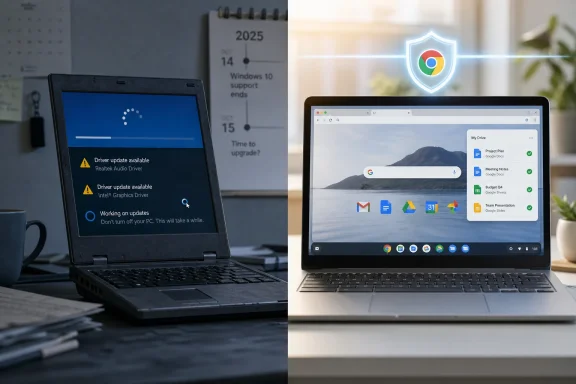
 The Chromebook Switch Is Really a Windows Verdict
The PCWorld piece lands because it says out loud what many long-time Windows users have learned to whisper: the operating system often feels like the work before the work. Booting, updating, troubleshooting, dismissing prompts, managing drivers, checking background tasks, and wondering why a machine is busy when the user is not — these are not dramatic failures. They are small taxes, paid daily.
That matters because Windows has historically won by being the place where everything runs. It was messy, but it was universal. You tolerated the sprawl because the reward was compatibility, games, hardware freedom, full desktop apps, and decades of accumulated workflows.
ChromeOS attacks that bargain from the opposite direction. It gives up some universality in exchange for a machine that wakes quickly, updates quietly, resists casual breakage, and assumes the browser is not a window inside the computer but the computer’s main stage. For users whose lives have already moved to Gmail, Google Docs, Slack, Teams in the browser, web banking, streaming, password managers, and cloud storage, that trade is no longer theoretical.
The PCWorld writer’s most telling admission is that the Windows PC still exists, but as a backup. That is the real inversion. Windows is no longer the daily driver in this story; it is the legacy appliance kept around for exceptions.
Microsoft Built the Universal PC, Then Made Universality Feel Heavy
Windows’ strength has always been its refusal to be narrow. It runs on desktops, laptops, gaming rigs, point-of-sale terminals, CAD workstations, corporate fleets, oddball peripherals, and bargain-bin hardware with drivers of uncertain origin. That breadth is why Windows became the default personal-computing layer for business and home users alike.
But breadth has a cost. Windows carries compatibility expectations that ChromeOS does not. It must support decades of Win32 software, enterprise management hooks, kernel-mode drivers, legacy devices, anti-cheat systems, printers, security agents, VPN clients, games, and an enormous ecosystem of third-party utilities that can help or harm the machine in equal measure.
That burden shows up in the user experience as friction. A Windows laptop may be vastly more capable than a Chromebook, but capability is not the same as calm. The machine that can theoretically do anything is also the machine more likely to demand care, intervention, and occasional diagnosis.
Microsoft has tried to modernize this without breaking the old world. Windows 11 tightened hardware requirements, pushed TPM-based security, refined the interface, and leaned harder into cloud identity. Yet for many users, those changes arrived alongside more visible promotion, more account nudges, more AI surfaces, and more anxiety about whether an existing Windows 10 PC was suddenly outside the blessed upgrade path.
The result is a strange kind of platform dissonance. Windows remains the richer operating system, but ChromeOS can feel richer in the one currency that casual users value most: not being interrupted.
ChromeOS Wins by Refusing to Become a Traditional PC
The Chromebook pitch used to sound almost apologetic. It was “just a browser,” which meant it was cheap, limited, and suitable mainly for schools or secondary machines. That critique was never entirely wrong, but it underestimated how much of personal computing would willingly become browser-shaped.
Today, “just a browser” can mean a full office suite, video calls, photo management, banking, tax preparation, remote desktops, streaming services, coding environments, social media, messaging, publishing tools, and a great deal of line-of-business software. The browser ate the PC from above, while Android apps filled in some of the consumer gaps from below.
ChromeOS benefits because Google did not try to make it a general-purpose Windows clone. Its security model, update model, and recovery model assume less user tinkering and more platform control. That can feel restrictive to enthusiasts, but liberating to people who do not want their computer to become a weekend project.
The PCWorld author’s description of instant startup and low-maintenance updates is not merely about speed. It is about trust. A computer that is ready when opened and largely handles its own upkeep becomes more like an appliance, and for a large slice of users, that is not an insult.
Windows enthusiasts often recoil at that word because appliances are closed, constrained, and less fun to modify. But most people do not want a hobby operating system. They want a keyboard, a screen, a browser, safe defaults, a battery that lasts, and a machine that does not mysteriously lose an afternoon.
Security Is the Chromebook’s Quiet Killer Feature
ChromeOS’ security advantage is not that it is magically invulnerable. No networked computer is. The advantage is that its architecture narrows the most common paths to disaster for ordinary users.
Verified Boot checks the system at startup. Sandboxing limits the blast radius of compromised processes. Automatic updates reduce the window in which known vulnerabilities remain exposed. The inability to casually run random Windows executables removes a vast category of drive-by user error. Powerwashing a Chromebook is also less psychologically catastrophic when most data already lives in the cloud.
Windows has improved enormously on security, and Windows 11’s hardware requirements were partly an attempt to raise the floor. Microsoft Defender is far better than the old stereotype of built-in antivirus. SmartScreen, virtualization-based security, secured-core PCs, and modern endpoint tools have changed the picture for managed environments.
But Windows still inherits the risk profile of being Windows. Attackers go where the users, privileges, and business value are. Decades of executable software, scripting environments, macros, installers, third-party drivers, and enterprise identity integrations make Windows the bigger target and the more complex surface to defend.
For IT professionals, this is not a moral judgment. It is a management calculation. ChromeOS can reduce the number of ways a user breaks the endpoint. Windows can run the specialized workload. The right answer depends on whether the user’s job needs local power or merely inherited it.
Updates Became the Place Where Trust Broke
The PCWorld complaint about Windows updates will sound familiar to anyone who has watched a laptop become unavailable at the exact moment it was needed. Microsoft has spent years improving update reliability, restart controls, active hours, rollback behavior, and administrative tooling. Yet the emotional memory of Windows Update remains unusually sticky.
Part of the problem is that Windows updates are not just browser updates or application patches. They can include drivers, cumulative OS fixes, servicing stack changes, feature updates, security mitigations, and firmware-adjacent dependencies. On a healthy, modern machine, the process is often fine. On a slightly older, heavily used, or vendor-customized PC, “often fine” is not the same as invisible.
ChromeOS updates feel different because the system is smaller, more controlled, and designed around background replacement. The model is closer to swapping the ground beneath the user than renovating the house while they are in the kitchen. Reboots still exist, but they are usually short and predictable.
This difference matters more in 2026 because computers are now expected to behave like phones. Users have been trained by mobile operating systems to expect silent patching, fast resumes, app-store delivery, and system recovery that does not require deep knowledge. Windows is still carrying the cultural expectations of the PC era; ChromeOS borrows from the phone era and applies it to a laptop.
That shift is bigger than Chromebooks. It is the same force behind iPads replacing casual laptops, managed app stores replacing installer hunts, and cloud workspaces replacing local line-of-business software. The operating system that asks fewer questions increasingly feels like the modern one.
The Windows 10 Deadline Gave Google an Opening
The timing of this debate is not accidental. Windows 10 support ended on October 14, 2025, forcing millions of users to decide whether to upgrade to Windows 11, buy new hardware, pay for extended updates where available, move to Linux, or ignore the risk. For users with perfectly serviceable PCs blocked by Windows 11 requirements, that moment made Microsoft’s platform strategy feel personal.
Chromebooks thrive in that atmosphere. They are inexpensive, simple to explain, and attractive to users who mostly live online. Google’s 10-year automatic update policy for many Chromebook models gives buyers a clearer runway than the early Chromebook era did, when support windows were a common complaint.
There is an irony here. One of the strongest arguments for Windows used to be that it extended the life of hardware because you could install it on almost anything. Now, some users see ChromeOS or ChromeOS Flex as the lighter path for older machines, while Windows 11 is associated with hardware gates and upgrade friction.
ChromeOS Flex complicates the story further. It can turn some old PCs and Macs into ChromeOS-like devices, but it does not offer the full Chromebook experience. Android app support and some hardware-backed security features differ, which means it is better understood as a rescue option than a perfect Chromebook substitute.
Still, the symbolic power is obvious. When an old Windows machine feels too slow or too unsupported, Google can present ChromeOS as a cleaner second life. That pitch is not aimed at the PC gamer or the CAD engineer. It is aimed at the person who just wants the laptop to stop making demands.
The App Gap Is Smaller, but It Still Decides the Case
The strongest argument against switching remains software. If your work depends on full desktop Microsoft Office features, Adobe Creative Cloud workflows, high-end audio tools, engineering software, local development stacks, Windows-only utilities, or in-house enterprise applications, a Chromebook may be an elegant dead end.
Web apps are dramatically better than they were a decade ago, but they are not always equivalent. Browser versions of desktop suites can omit advanced features, behave differently with complex files, or depend on connectivity in ways that matter during travel or field work. Android apps can help, but many are designed first for touch screens and phone layouts, not laptop productivity.
Linux support on ChromeOS adds another escape hatch for technical users, but it also undermines the simplicity argument. The more you rely on Linux containers, developer flags, sideloading, remote desktops, and compatibility workarounds, the less you are living the clean Chromebook dream. At that point, the question becomes whether you wanted ChromeOS or merely a lightweight Linux laptop with Google polish.
That does not make the platform weak. It makes it honest. ChromeOS is excellent when the user’s work fits its model and frustrating when the user keeps trying to smuggle a traditional workstation into a browser-first device.
Windows, by contrast, remains unmatched when the workload is unknown. If you are buying one machine for every possible contingency, Windows is still the safer bet. If you know exactly what you do every day and it lives in the cloud, the Chromebook can be the saner one.
Gaming Exposes the Limits of the Chromebook Fantasy
Gaming is where the Chromebook story becomes least persuasive. Cloud gaming can be impressive, and Android games are plentiful. But neither replaces a Windows gaming PC for players who care about local performance, modding, anti-cheat compatibility, broad storefront support, peripheral tuning, or owning the full stack from GPU driver to frame counter.
Steam for Chromebook once looked like a sign that ChromeOS might grow into a more credible local gaming platform. But the beta never turned Chromebooks into mainstream gaming laptops, and Google moved to end that experiment rather than graduate it into a broad consumer pillar. That leaves cloud streaming, Android titles, web games, and Linux tinkering as the practical routes.
For casual users, that may be enough. A Chromebook can be a perfectly adequate machine for Minecraft-adjacent school use, streaming games from another PC, playing mobile titles, or using services such as Xbox Cloud Gaming and GeForce Now where supported. But the phrase “you can game on it” is doing more work than it should.
Windows’ gaming position is not merely about compatibility. It is about the entire PC gaming economy: Steam, Epic, GOG, Battle.net, mods, graphics drivers, capture tools, Discord overlays, VR, high-refresh displays, and the hardware upgrade cycle. ChromeOS does not seriously challenge that.
This is why the PCWorld writer’s fallback Windows machine matters. Even people who love Chromebooks often keep another computer for the tasks ChromeOS does not want to own. That is not failure; it is market segmentation.
Administrators Should See a Fleet Strategy, Not a Culture War
For sysadmins, the Windows-versus-Chromebook debate is usually less emotional than it is for enthusiasts. The right endpoint is the one that best matches the user, risk model, support budget, application stack, and identity environment.
ChromeOS can be compelling in schools, call centers, front-line roles, kiosks, seasonal workforces, and organizations that have already moved most tools to SaaS. Fast enrollment, simple resets, centralized policy, and reduced malware exposure can lower support overhead. If a device is lost or broken, the user’s environment is easier to reconstruct.
Windows remains essential in mixed hardware environments, specialized software estates, regulated workflows with specific agents, and organizations with deep Microsoft management investments. Intune, Defender for Endpoint, Entra ID, Windows Autopatch, Group Policy legacies, and application packaging realities do not vanish because ChromeOS is cleaner.
The smartest IT shops will not treat Chromebooks as a religious conversion. They will treat them as another endpoint class. Some users need a managed Windows laptop. Some need a browser appliance with a keyboard. Some need a virtual desktop presented through a cheap local device. Some need a Mac. Uniformity is administratively comforting, but it can be expensive when the standard machine is overbuilt for the job.
This is where Microsoft’s challenge becomes subtle. Windows does not have to lose the workstation to lose influence at the edge. Every workload that moves from a Windows desktop app to a browser tab weakens the old lock-in. Every employee who can do the job on a Chromebook makes the Windows license less central to the workflow.
The Real Threat to Windows Is Not ChromeOS, but Indifference
It would be easy to overstate the Chromebook threat. Windows remains enormous, especially in business, gaming, software development, engineering, and legacy application environments. ChromeOS is not about to sweep away the PC as we know it.
But platform shifts rarely start by defeating the incumbent at its strongest point. They start by making the incumbent unnecessary for a growing number of ordinary tasks. The Chromebook does not have to be better than Windows at everything. It only has to be better at the daily routine of users who never wanted the complexity Windows offered.
That is why personal testimonials like PCWorld’s are more important than their anecdotal nature suggests. They reveal a change in what users perceive as valuable. In the 1990s and 2000s, a computer that could run more software was obviously better. In 2026, a computer that creates fewer interruptions may be better for millions of people.
Microsoft understands this, which is why Windows has been moving toward cloud identity, app-store delivery, web-backed services, and AI assistants. But it also has to preserve the old Windows promise: deep compatibility, local power, and ecosystem openness. The company is trying to make Windows feel simpler without making it less Windows.
Google has the easier story and the harder ceiling. ChromeOS is simple because it is narrower. The moment it tries to absorb all the use cases Windows handles, it risks becoming the thing its fans fled. The strategic discipline is knowing which users to serve and which ones to let go.
The PCWorld Switch Draws a Map Microsoft Should Study
The lesson of this Chromebook conversion is not that everyone should abandon Windows. It is that Windows’ default position now has to be earned user by user, workload by workload. For decades, the answer to “what laptop should I buy?” was implicitly a Windows laptop unless you had a reason to choose something else. Now, many users have to justify Windows.
That inversion is uncomfortable for Microsoft because the complaints are not exotic. They are boot time, update friction, perceived bloat, security anxiety, battery life, price, and the feeling that the operating system wants attention. These are basic experience complaints, not edge-case grievances from power users.
Windows 11 has made progress on many fronts, and modern premium Windows laptops can be excellent. But the broad Windows ecosystem includes cheap machines with poor vendor images, underpowered hardware, noisy trialware, inconsistent firmware, and users carrying habits from years of Windows maintenance. ChromeOS benefits from having less variation and fewer legacy expectations.
The PCWorld writer’s Google ecosystem point is also crucial. ChromeOS feels natural when Gmail, Calendar, Drive, Photos, Meet, Android, and Chrome already define the user’s digital life. Microsoft has its own version of this with Microsoft 365, OneDrive, Teams, Outlook, Edge, and Entra ID, but consumer affection for that stack is uneven. In business, Microsoft identity is gravity. At home, Google often owns the daily rhythm.
That split suggests the future is not one platform winning outright. It is a more fractured PC market where operating systems align with ecosystems, budgets, security models, and tolerance for complexity.
The Chromebook Case Gets Stronger When the PC Is Just a Portal
The most concrete way to evaluate the switch is not by comparing spec sheets. It is by asking whether the computer is a workstation or a portal. A workstation needs local horsepower, specialized software, hardware access, storage, drivers, and customization. A portal needs reliability, authentication, a good browser, a keyboard, a webcam, and enough performance to stay out of the way.
The PCWorld story is persuasive because the writer discovered he was mostly using a portal while maintaining a workstation. Once that became clear, the Chromebook was not a downgrade. It was a better-matched tool.
Here is the practical read for Windows users tempted by the same move:
- A Chromebook is most convincing when your daily work already happens in browser-based tools and cloud storage.
- Windows remains the safer choice when you depend on full desktop applications, specialized peripherals, local games, or niche utilities.
- ChromeOS’ security and update model reduces common maintenance headaches, but it does not eliminate the need for good passwords, MFA, and phishing awareness.
- Android app support can fill some gaps, but it should not be treated as a guaranteed replacement for mature desktop software.
- ChromeOS Flex can extend the life of some older hardware, but it is not identical to buying a supported Chromebook.
- The best migration test is to spend a week doing all essential work in Chrome and web apps on your current PC before buying anything.
The larger lesson is that the PC is no longer defined by the operating system alone. It is defined by where the work lives. If the work lives on the web, Windows becomes optional in a way it was not for most of the last three decades.
Microsoft’s problem is not that Chromebooks are about to conquer every desk; it is that they make Windows feel negotiable. For enthusiasts and professionals, Windows will remain indispensable where power, compatibility, and control matter. For everyone else, the next PC decision may begin with a quieter question: not “Can this run Windows?” but “Do I still need Windows at all?”
