

ChromeOS laptops generally consume less electricity than comparable Windows laptops in 2026, with recent ENERGY STAR listings showing some certified Chromebooks near 9–11 kWh per year while many Windows notebooks sit closer to 20–55 kWh depending on processor, display, and configuration. The headline is real, but the cleanest number is not the most important one. The power gap is less about magic silicon than about platform assumptions: ChromeOS is built to do less in the background, recover faster, and live comfortably on cheaper, lower-power hardware. Windows can match or beat Chromebook battery life at the premium end, but it usually has to bring newer chips, larger batteries, and higher prices to the fight.
The most useful way to compare ChromeOS and Windows power use is not to start with peak wattage. Peak numbers are dramatic, but most school and office laptops spend much of their lives doing mundane work: sitting idle, syncing files, waking from sleep, running browser tabs, checking policy, and waiting for the next meeting. That is where ChromeOS has traditionally had its advantage.
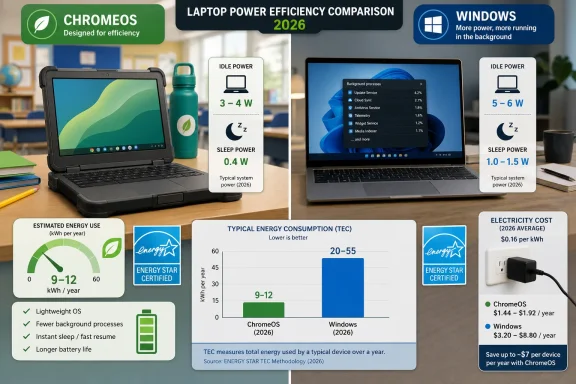
Recent ENERGY STAR data gives the comparison some hard edges. Lenovo’s 500e Chromebook Gen 4s, a low-cost education machine using Intel’s N250, is listed with short idle power around 3.4W, sleep around 0.4W, and annual TEC below 10 kWh. HP’s Fortis x360 11 G5 Chromebook, another school-oriented device, comes in at 3.8W short idle and 11 kWh annual TEC. Those are not exotic machines; they are the kind of rugged, plastic, fleet-friendly devices districts actually buy.
The broader laptop average is higher. EcoCostSavings’ survey of more than a thousand certified laptops put short idle around 5.91W, sleep around 0.78W, and off mode around 0.34W. That does not mean every Windows laptop wastes power, and it does not mean every Chromebook is saintly. It does mean ChromeOS devices tend to start from a lower baseline before the user has opened a single app.
This is the first uncomfortable truth for Windows fans: the desktop is not neutral. Every service, updater, widget framework, security layer, telemetry process, driver helper, and vendor utility adds a little friction. Individually, these costs look trivial. Across eight hours a day, 180 school days, or 5,000 managed endpoints, they stop being trivia.
That is why ENERGY STAR’s TEC figure matters. It is not perfect, but it gives buyers a more controlled way to compare certified systems across idle, sleep, and off states. On that basis, the most efficient Chromebooks now show annual energy use in the high single digits or low teens of kWh. Many mainstream Windows laptops land in the 20–55 kWh range, with higher-performance machines climbing beyond that.
The gap is smaller than the most aggressive marketing claims, but it is more defensible. Saying a Chromebook can use roughly half the annual electricity of a comparable Windows laptop is plausible when comparing low-cost education or administrative devices. Saying ChromeOS always uses 60 percent less power than Windows is too broad, because Windows hardware now spans everything from fanless Arm ultraportables to mobile workstations with discrete GPUs.
The better argument is narrower and stronger: at matched budget and fleet tiers, ChromeOS tends to win on energy because it is paired with lower-power processors, smaller displays, simpler storage, and a lighter operating environment. Windows can be efficient, but it is often asked to be more things to more people.
Chromebooks commonly cluster around 10–13 hours in general-purpose web and productivity testing, with premium or Arm-based models stretching further. Budget x86 Chromebooks can still fall into the 6–8 hour range, especially with dim batteries, cheap panels, or heavy browser workloads. ChromeOS is efficient, but it cannot repeal physics.
Windows laptops are more varied. Traditional Intel and AMD ultrabooks often live in the 7–10 hour zone in real-world mixed use, while gaming laptops and mobile workstations can burn through a battery far faster. Then came the Snapdragon X Elite generation, which proved Windows machines could deliver Chromebook-like or better endurance when hardware, firmware, and workload lined up properly.
That matters because it weakens the lazy version of the Chromebook argument. ChromeOS no longer owns battery life as a category. A ThinkPad T14s Gen 6 or Dell XPS 13 with Snapdragon hardware can run for extraordinary lengths of time in browser-heavy tests. The catch is that these machines sit in a different market from the $300–$500 Chromebooks that dominate schools and many frontline deployments.
So the battery story in 2026 is not “ChromeOS always lasts longer.” It is this: ChromeOS delivers good battery life cheaply and predictably, while Windows can deliver excellent battery life if buyers pay for the right silicon and accept the compatibility trade-offs that still come with Windows on Arm.
A modern Windows 11 system is doing more at rest than a typical Chromebook. Defender, SmartScreen, Windows Update, Copilot-era shell components, widgets, vendor control panels, Teams integrations, OneDrive sync, background app permissions, driver services, and enterprise management agents all compete for processor time. Most of these components are defensible individually. Together, they raise the floor.
ChromeOS takes the opposite bargain. It constrains the platform so the platform can stay predictable. The OS image is smaller, updates apply quickly, verified boot is central to the model, and user state is designed around cloud synchronization. It is not that ChromeOS has no background work; it is that Google has kept the surface area narrower.
This is why comparisons based only on processor TDP miss the point. Two laptops can share a similar low-power Intel chip and behave differently because the operating systems make different demands when “nothing” is happening. In power management, nothing is one of the hardest workloads to keep honest.
ChromeOS has a cleaner update model. Downloads happen in the background, the inactive system partition is updated, and the user typically completes the process with a quick reboot. The result is less visible disruption and less time spent in a hot, busy maintenance state.
Windows has improved, but its compatibility burden makes updates heavier. It must patch a sprawling platform while preserving legacy assumptions, driver models, enterprise controls, and an enormous hardware ecosystem. That is a remarkable engineering achievement, but it is not free.
For managed fleets, this matters in ways that do not show up in a single-device benchmark. If a thousand Windows laptops spend part of a day installing updates, rebooting, failing, retrying, and running post-update scans, that is labor and electricity. If a thousand Chromebooks complete updates with fewer user-visible steps, that is one reason IT departments describe them as cheaper to live with.
Using common U.S. electricity rates, a Chromebook drawing 15–30W during active use might cost roughly $7–$15 per year to run under an eight-hour daily-use model. A standard Windows laptop drawing 50–65W during active use might land closer to $25–$32. High-performance Windows systems can go well beyond that, especially if they carry discrete graphics or spend time under sustained load.
The ENERGY STAR TEC view produces smaller annual dollar figures because it models standardized usage patterns rather than assuming eight hours of active draw every day. But the relative story remains similar: efficient Chromebooks can sit below 10–12 kWh per year, while many Windows systems consume materially more. The absolute dollars per endpoint are modest; the fleet-level delta is not.
This is why power consumption belongs in procurement conversations, not just sustainability slide decks. Energy cost is one line. Charger replacement, battery degradation, cooling, help desk calls, classroom cart planning, and device downtime are adjacent lines. ChromeOS’ advantage is not merely that it draws fewer watts; it tends to simplify the operating environment around those watts.
Commissioned total-economic-impact studies are not neutral journalism. They model a composite organization, choose assumptions, and emphasize benefits the sponsor wants buyers to notice. That does not make them useless. It means IT leaders should treat them as scenario generators rather than scripture.
The strongest parts of the ChromeOS case are the ones that align with everyday administrative experience. Faster deployment is plausible. Reduced malware remediation is plausible. Fewer break/fix incidents in locked-down education fleets are plausible. Lower power use is plausible because independent ENERGY STAR listings point in the same direction.
The weaker move is to turn all of that into a universal ROI claim. A call center living in browser apps may see dramatic savings. An engineering firm using Windows-only desktop software will not. A district standardized on Google Workspace has a different power and support profile from a hospital tangled in legacy peripherals and compliance agents.
But the claim that ChromeOS has no meaningful security exposure is too neat. ChromeOS benefits from a smaller attack surface and a different model, but it is not vulnerability-free. Chrome browser vulnerabilities, Linux container issues, Android app risks, extension abuse, identity attacks, and cloud misconfiguration all remain relevant.
Windows, meanwhile, is attacked more because it is everywhere and because it remains central to business computing. Microsoft’s platform supports a vast legacy ecosystem, and that ecosystem expands both usefulness and risk. Defender and third-party endpoint tools consume power because the threat model demands constant attention.
The power takeaway is subtle: security architecture affects battery life. A platform designed to avoid persistent local complexity will usually consume less energy than one designed to defend a sprawling local software estate. That is not a moral victory. It is an architectural trade.
For Microsoft, Qualcomm, and OEMs, this was essential. If Windows had remained visibly behind Apple Silicon and ChromeOS in mobile efficiency, the platform would have looked increasingly old-fashioned. The best Snapdragon laptops now prove that Windows can be competitive when the hardware platform is tuned for endurance.
But the market segmentation still matters. Many of the longest-lasting Windows on Arm systems cost well above the median Chromebook. They also bring compatibility questions for specialized x86 software, drivers, VPN tools, and enterprise security stacks. For some users, emulation is fine. For others, it is a procurement blocker.
That leaves ChromeOS with a durable middle-ground advantage. It does not need to win the premium battery crown to win the fleet energy argument. It only needs to offer dependable all-day use at the price points where schools, nonprofits, kiosks, and frontline teams buy in volume.
A 14-inch Chromebook with a dim 1080p display and low-power Intel N-series chip will not behave like a premium OLED Chromebook Plus model. A Windows laptop with integrated graphics and a modern efficiency-focused processor will not behave like a gaming notebook. Even within the same product family, memory, storage, screen, and modem options can change power draw.
This is why ENERGY STAR TEC is useful but incomplete. It gives buyers a standardized baseline, not a lived guarantee. A fleet that spends six hours a day in Google Docs will look very different from one that spends six hours in Teams video calls with screen sharing and endpoint recording enabled.
Procurement teams should therefore treat power numbers as a filter, not a verdict. Start with TEC, check idle and sleep figures, examine battery-test data from independent reviews, and then pilot devices under the organization’s actual workload. The platform trend points toward ChromeOS efficiency, but the final answer lives in the workflow.
A Chromebook that uses less energy and wakes reliably is not just greener. It reduces cart congestion, cuts classroom interruptions, and makes it easier for teachers to assume every student has a working device. Those practical benefits explain why power efficiency has become part of the broader Chromebook adoption story.
Windows still has a role in schools, especially for career and technical education, testing environments, accessibility needs, and courses requiring desktop software. But for general instruction, the power-management bargain often favors ChromeOS. It does enough, for long enough, with less administrative ceremony.
Enterprises are more complicated. Some can move large groups of workers to browser-first environments. Others remain tied to Windows-native software, local device integrations, or specialized compliance tooling. For them, the energy savings may be real but secondary to application reality.
That is no longer good enough. A laptop is now part of a managed energy footprint, a security footprint, and an operational footprint. The device that looks cheap at purchase can become expensive if it needs larger chargers, more support, more frequent battery replacement, or more user downtime.
ChromeOS’ advantage is strongest where the workload is browser-centric, the device is managed at scale, and the buyer values predictable behavior over local flexibility. Windows’ advantage remains where application breadth, peripheral support, gaming, content creation, or deep enterprise integration matter more than a few kWh per year.
In other words, power consumption is not a separate category from platform strategy. It is platform strategy made measurable.
 The Cheapest Watt Is the One the Operating System Never Asks For
The most useful way to compare ChromeOS and Windows power use is not to start with peak wattage. Peak numbers are dramatic, but most school and office laptops spend much of their lives doing mundane work: sitting idle, syncing files, waking from sleep, running browser tabs, checking policy, and waiting for the next meeting. That is where ChromeOS has traditionally had its advantage.Recent ENERGY STAR data gives the comparison some hard edges. Lenovo’s 500e Chromebook Gen 4s, a low-cost education machine using Intel’s N250, is listed with short idle power around 3.4W, sleep around 0.4W, and annual TEC below 10 kWh. HP’s Fortis x360 11 G5 Chromebook, another school-oriented device, comes in at 3.8W short idle and 11 kWh annual TEC. Those are not exotic machines; they are the kind of rugged, plastic, fleet-friendly devices districts actually buy.
The broader laptop average is higher. EcoCostSavings’ survey of more than a thousand certified laptops put short idle around 5.91W, sleep around 0.78W, and off mode around 0.34W. That does not mean every Windows laptop wastes power, and it does not mean every Chromebook is saintly. It does mean ChromeOS devices tend to start from a lower baseline before the user has opened a single app.
This is the first uncomfortable truth for Windows fans: the desktop is not neutral. Every service, updater, widget framework, security layer, telemetry process, driver helper, and vendor utility adds a little friction. Individually, these costs look trivial. Across eight hours a day, 180 school days, or 5,000 managed endpoints, they stop being trivia.
ENERGY STAR Makes the Chromebook Lead Look Smaller, and More Credible
The biggest mistake in platform power debates is mixing numbers that do not belong together. A Chromebook sipping power at idle is not the same measurement as a gaming laptop drawing 150W under load. A battery rundown test is not the same thing as annual TEC. A USB-C wall meter during a Zoom call is useful, but it is not a standardized procurement metric.That is why ENERGY STAR’s TEC figure matters. It is not perfect, but it gives buyers a more controlled way to compare certified systems across idle, sleep, and off states. On that basis, the most efficient Chromebooks now show annual energy use in the high single digits or low teens of kWh. Many mainstream Windows laptops land in the 20–55 kWh range, with higher-performance machines climbing beyond that.
The gap is smaller than the most aggressive marketing claims, but it is more defensible. Saying a Chromebook can use roughly half the annual electricity of a comparable Windows laptop is plausible when comparing low-cost education or administrative devices. Saying ChromeOS always uses 60 percent less power than Windows is too broad, because Windows hardware now spans everything from fanless Arm ultraportables to mobile workstations with discrete GPUs.
The better argument is narrower and stronger: at matched budget and fleet tiers, ChromeOS tends to win on energy because it is paired with lower-power processors, smaller displays, simpler storage, and a lighter operating environment. Windows can be efficient, but it is often asked to be more things to more people.
Battery Life Is Where Users Notice the Policy Decision
Energy bills matter to CFOs and sustainability officers, but battery life is where the platform difference becomes personal. A classroom Chromebook that survives the school day without a cart is not just a nicer device; it changes classroom logistics. A field worker’s laptop that sleeps reliably and wakes instantly is not a spec-sheet victory; it is one fewer failure point.Chromebooks commonly cluster around 10–13 hours in general-purpose web and productivity testing, with premium or Arm-based models stretching further. Budget x86 Chromebooks can still fall into the 6–8 hour range, especially with dim batteries, cheap panels, or heavy browser workloads. ChromeOS is efficient, but it cannot repeal physics.
Windows laptops are more varied. Traditional Intel and AMD ultrabooks often live in the 7–10 hour zone in real-world mixed use, while gaming laptops and mobile workstations can burn through a battery far faster. Then came the Snapdragon X Elite generation, which proved Windows machines could deliver Chromebook-like or better endurance when hardware, firmware, and workload lined up properly.
That matters because it weakens the lazy version of the Chromebook argument. ChromeOS no longer owns battery life as a category. A ThinkPad T14s Gen 6 or Dell XPS 13 with Snapdragon hardware can run for extraordinary lengths of time in browser-heavy tests. The catch is that these machines sit in a different market from the $300–$500 Chromebooks that dominate schools and many frontline deployments.
So the battery story in 2026 is not “ChromeOS always lasts longer.” It is this: ChromeOS delivers good battery life cheaply and predictably, while Windows can deliver excellent battery life if buyers pay for the right silicon and accept the compatibility trade-offs that still come with Windows on Arm.
Windows Carries the Weight of Being Windows
Windows’ power problem is also its product strategy. Microsoft has spent decades making Windows the default environment for everything from accounting software and CAD tools to game launchers, VPN clients, endpoint agents, printer drivers, legacy line-of-business apps, and security suites. That breadth has value, and value has a power cost.A modern Windows 11 system is doing more at rest than a typical Chromebook. Defender, SmartScreen, Windows Update, Copilot-era shell components, widgets, vendor control panels, Teams integrations, OneDrive sync, background app permissions, driver services, and enterprise management agents all compete for processor time. Most of these components are defensible individually. Together, they raise the floor.
ChromeOS takes the opposite bargain. It constrains the platform so the platform can stay predictable. The OS image is smaller, updates apply quickly, verified boot is central to the model, and user state is designed around cloud synchronization. It is not that ChromeOS has no background work; it is that Google has kept the surface area narrower.
This is why comparisons based only on processor TDP miss the point. Two laptops can share a similar low-power Intel chip and behave differently because the operating systems make different demands when “nothing” is happening. In power management, nothing is one of the hardest workloads to keep honest.
Updates Are a Hidden Battery Test
Windows Update is not usually discussed as a power-consumption issue, but anyone who has watched a laptop chew through battery during a cumulative update knows better. Updates push CPU, storage, networking, and fans into higher activity states. They also keep machines awake when users expected them to be sleeping.ChromeOS has a cleaner update model. Downloads happen in the background, the inactive system partition is updated, and the user typically completes the process with a quick reboot. The result is less visible disruption and less time spent in a hot, busy maintenance state.
Windows has improved, but its compatibility burden makes updates heavier. It must patch a sprawling platform while preserving legacy assumptions, driver models, enterprise controls, and an enormous hardware ecosystem. That is a remarkable engineering achievement, but it is not free.
For managed fleets, this matters in ways that do not show up in a single-device benchmark. If a thousand Windows laptops spend part of a day installing updates, rebooting, failing, retrying, and running post-update scans, that is labor and electricity. If a thousand Chromebooks complete updates with fewer user-visible steps, that is one reason IT departments describe them as cheaper to live with.
The Fleet Math Turns Tiny Watts Into Real Budget Lines
A 2W idle difference sounds laughably small until it is multiplied by time and fleet size. One laptop idling a little higher is not a climate strategy. Five thousand devices doing it every school day becomes a measurable operating cost.Using common U.S. electricity rates, a Chromebook drawing 15–30W during active use might cost roughly $7–$15 per year to run under an eight-hour daily-use model. A standard Windows laptop drawing 50–65W during active use might land closer to $25–$32. High-performance Windows systems can go well beyond that, especially if they carry discrete graphics or spend time under sustained load.
The ENERGY STAR TEC view produces smaller annual dollar figures because it models standardized usage patterns rather than assuming eight hours of active draw every day. But the relative story remains similar: efficient Chromebooks can sit below 10–12 kWh per year, while many Windows systems consume materially more. The absolute dollars per endpoint are modest; the fleet-level delta is not.
This is why power consumption belongs in procurement conversations, not just sustainability slide decks. Energy cost is one line. Charger replacement, battery degradation, cooling, help desk calls, classroom cart planning, and device downtime are adjacent lines. ChromeOS’ advantage is not merely that it draws fewer watts; it tends to simplify the operating environment around those watts.
Google’s Enterprise Math Deserves Attention, Not Blind Trust
Google and Forrester’s ChromeOS economic studies have become part of the sales narrative, and the latest figures are eye-catching: multimillion-dollar modeled benefits, fast payback, fewer support calls, faster deployment, and improved user productivity. Those numbers should be read seriously but not swallowed whole.Commissioned total-economic-impact studies are not neutral journalism. They model a composite organization, choose assumptions, and emphasize benefits the sponsor wants buyers to notice. That does not make them useless. It means IT leaders should treat them as scenario generators rather than scripture.
The strongest parts of the ChromeOS case are the ones that align with everyday administrative experience. Faster deployment is plausible. Reduced malware remediation is plausible. Fewer break/fix incidents in locked-down education fleets are plausible. Lower power use is plausible because independent ENERGY STAR listings point in the same direction.
The weaker move is to turn all of that into a universal ROI claim. A call center living in browser apps may see dramatic savings. An engineering firm using Windows-only desktop software will not. A district standardized on Google Workspace has a different power and support profile from a hospital tangled in legacy peripherals and compliance agents.
The Security Argument Is Real, but It Should Not Be Oversold
ChromeOS’ security model contributes to its power profile. Verified boot, sandboxing, automatic updates, and a cloud-first user model reduce the need for some of the heavy endpoint security patterns common on Windows. Fewer resident agents can mean fewer background scans, fewer update engines, and fewer processes waking the CPU.But the claim that ChromeOS has no meaningful security exposure is too neat. ChromeOS benefits from a smaller attack surface and a different model, but it is not vulnerability-free. Chrome browser vulnerabilities, Linux container issues, Android app risks, extension abuse, identity attacks, and cloud misconfiguration all remain relevant.
Windows, meanwhile, is attacked more because it is everywhere and because it remains central to business computing. Microsoft’s platform supports a vast legacy ecosystem, and that ecosystem expands both usefulness and risk. Defender and third-party endpoint tools consume power because the threat model demands constant attention.
The power takeaway is subtle: security architecture affects battery life. A platform designed to avoid persistent local complexity will usually consume less energy than one designed to defend a sprawling local software estate. That is not a moral victory. It is an architectural trade.
Snapdragon Changed the Windows Story, but Not the Budget Story
The arrival of serious Windows on Arm laptops changed the platform debate more than many Chromebook advocates want to admit. Snapdragon X Elite machines showed that Windows could produce 15–20 hour battery results in premium ultraportables. That was not a rounding error; it was a strategic correction.For Microsoft, Qualcomm, and OEMs, this was essential. If Windows had remained visibly behind Apple Silicon and ChromeOS in mobile efficiency, the platform would have looked increasingly old-fashioned. The best Snapdragon laptops now prove that Windows can be competitive when the hardware platform is tuned for endurance.
But the market segmentation still matters. Many of the longest-lasting Windows on Arm systems cost well above the median Chromebook. They also bring compatibility questions for specialized x86 software, drivers, VPN tools, and enterprise security stacks. For some users, emulation is fine. For others, it is a procurement blocker.
That leaves ChromeOS with a durable middle-ground advantage. It does not need to win the premium battery crown to win the fleet energy argument. It only needs to offer dependable all-day use at the price points where schools, nonprofits, kiosks, and frontline teams buy in volume.
The Numbers Are Useful Only If Buyers Match the Workload
The worst version of the ChromeOS-versus-Windows debate treats the operating system as the only variable. It is not. Display size, panel technology, brightness, battery capacity, processor generation, firmware quality, Wi-Fi behavior, browser tab load, video conferencing, peripheral use, and management software can swamp platform averages.A 14-inch Chromebook with a dim 1080p display and low-power Intel N-series chip will not behave like a premium OLED Chromebook Plus model. A Windows laptop with integrated graphics and a modern efficiency-focused processor will not behave like a gaming notebook. Even within the same product family, memory, storage, screen, and modem options can change power draw.
This is why ENERGY STAR TEC is useful but incomplete. It gives buyers a standardized baseline, not a lived guarantee. A fleet that spends six hours a day in Google Docs will look very different from one that spends six hours in Teams video calls with screen sharing and endpoint recording enabled.
Procurement teams should therefore treat power numbers as a filter, not a verdict. Start with TEC, check idle and sleep figures, examine battery-test data from independent reviews, and then pilot devices under the organization’s actual workload. The platform trend points toward ChromeOS efficiency, but the final answer lives in the workflow.
Schools Feel the Difference Before Enterprises Admit It
Education is where ChromeOS’ power advantage is most visible because the constraints are unforgiving. Devices must be cheap, durable, easy to manage, and capable of surviving a school day. Charging infrastructure is shared, abuse is routine, and IT headcount is thin.A Chromebook that uses less energy and wakes reliably is not just greener. It reduces cart congestion, cuts classroom interruptions, and makes it easier for teachers to assume every student has a working device. Those practical benefits explain why power efficiency has become part of the broader Chromebook adoption story.
Windows still has a role in schools, especially for career and technical education, testing environments, accessibility needs, and courses requiring desktop software. But for general instruction, the power-management bargain often favors ChromeOS. It does enough, for long enough, with less administrative ceremony.
Enterprises are more complicated. Some can move large groups of workers to browser-first environments. Others remain tied to Windows-native software, local device integrations, or specialized compliance tooling. For them, the energy savings may be real but secondary to application reality.
The 2026 Buying Signal Is Hiding in the Idle State
The practical lesson from the 2026 data is not that every buyer should dump Windows. It is that idle power, sleep behavior, and annual TEC deserve a more prominent place in device selection. For years, laptop procurement has emphasized CPU class, RAM, storage, warranty, and price. Power behavior was reduced to a battery-life promise on a spec sheet.That is no longer good enough. A laptop is now part of a managed energy footprint, a security footprint, and an operational footprint. The device that looks cheap at purchase can become expensive if it needs larger chargers, more support, more frequent battery replacement, or more user downtime.
ChromeOS’ advantage is strongest where the workload is browser-centric, the device is managed at scale, and the buyer values predictable behavior over local flexibility. Windows’ advantage remains where application breadth, peripheral support, gaming, content creation, or deep enterprise integration matter more than a few kWh per year.
In other words, power consumption is not a separate category from platform strategy. It is platform strategy made measurable.
The Wattage Story Windows Buyers Should Not Ignore
The concrete takeaways from the 2026 comparison are less sensational than the marketing, but more useful for anyone buying hundreds or thousands of devices.- ChromeOS laptops generally start from a lower idle-power baseline, with recent certified education Chromebooks showing short idle around 3.4–3.8W.
- ENERGY STAR annual TEC figures make the Chromebook advantage credible, especially when comparing low-cost and fleet-oriented systems.
- Windows laptops vary far more widely, from efficient Arm ultraportables to high-performance machines that can consume several times more power under load.
- Snapdragon X Elite and newer efficiency-focused Windows systems have narrowed the battery-life gap at the premium end, but not at typical Chromebook fleet prices.
- The largest savings appear when lower power use is combined with faster deployment, fewer support incidents, simpler updates, and reduced device downtime.
- Buyers should test power behavior under their own workloads instead of treating platform averages as guarantees.
References
- Primary source: About Chromebooks
Published: 2026-06-02T19:10:07.527925
ChromeOS vs Windows Power Consumption Statistics 2026: Battery Life, Wattage, and Energy Cost Data
ENERGY STAR-certified Chromebooks are highly energy efficient, using as little as 9.9 kWh of electricity per year. In comparison, similar Windows laptops typically consume between 20 and 55 kWh annually.www.aboutchromebooks.com - Related coverage: notebookcheck.net
Intel empire strikes back with 21 hrs of battery life: Lenovo ThinkPad T14s Gen 6 laptop review - Notebookcheck Review
Notebookcheck reviews the Lenovo ThinkPad T14s Gen 6 Intel. This Lunar Lake laptop achieves over 21 hrs of battery life, while delivering the great ThinkPad quality we know and love. www.notebookcheck.net
- Related coverage: tomshardware.com
Lenovo touts 29-hour battery life for new ThinkPad T14s — laptop features Qualcomm Snapdragon X Elite CPU, 32GB LPDDR5x RAM, and 1TB SSD | Tom's Hardware
Device is starting to roll out in China priced from roughly $1,700.www.tomshardware.com - Related coverage: tei.forrester.com

The Total Economic Impact™ Of Google ChromeOS
Cost Savings And Business Benefits Enabled By ChromeOS
tei.forrester.com
- Related coverage: laptopmag.com
Wow! The Lenovo ThinkPad with 21 hours of battery life is $859 off for Black Friday | Laptop Mag
With over 21 hours of battery life, you can squeeze in over 2 workdays before needing a charger. This Lenovo ThinkPad T14s Gen 6 is a great Black Friday deal.www.laptopmag.com - Related coverage: tomsguide.com
The best laptops for battery life in 2026 — tested and rated | Tom's Guide
These are the longest-lasting laptops you can buy right nowwww.tomsguide.com
