

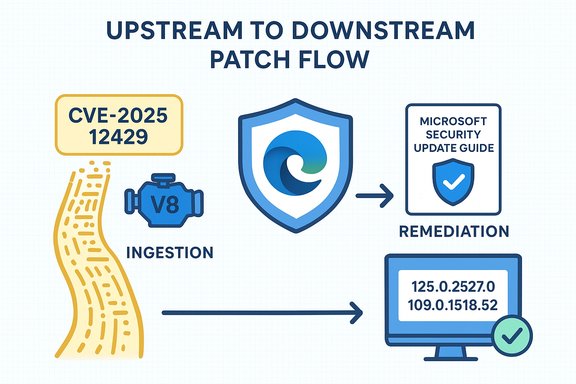
Chromium’s CVE-2025-12429 — described as an inappropriate implementation in V8 — appears in Microsoft’s Security Update Guide not because Microsoft introduced the bug, but because Microsoft Edge (Chromium‑based) consumes Chromium’s open‑source engine and the guide is the downstream signal that Edge builds have ingested the upstream fix and are therefore no longer vulnerable.
Chromium is an open‑source browser engine composed of multiple subsystems — Blink, V8, ANGLE, WebRTC and others — that power Google Chrome and many other browsers and embedded runtimes. When a vulnerability is discovered in Chromium or one of its components (V8 in this case), the fix is made upstream and then downstream consumers must ingest that upstream change, test it, and ship a patched build. Microsoft’s Security Update Guide (SUG) is the canonical place Microsoft uses to record CVEs that affect products it ships and to state whether a given Microsoft product is still vulnerable or has been remediated.
V8 is the JavaScript and WebAssembly engine that executes untrusted code delivered by webpages and web applications. Vulnerabilities in V8 — including logic/validation issues categorized as “inappropriate implementation” or memory‑safety problems such as type confusion — can be remotely exploitable simply by a user visiting a crafted page or opening malformed content. That remote trigger and the potential for code execution are the reason V8 bugs are treated as high priority across the ecosystem.
Every step in your remediation workflow should be based on the authoritative downstream statement for Microsoft Edge contained in the Security Update Guide and Edge release notes; confirming the exact version string on your endpoints (edge://version or edge://settings/help) is both straightforward and decisive.
Source: MSRC Security Update Guide - Microsoft Security Response Center
 Background
Chromium is an open‑source browser engine composed of multiple subsystems — Blink, V8, ANGLE, WebRTC and others — that power Google Chrome and many other browsers and embedded runtimes. When a vulnerability is discovered in Chromium or one of its components (V8 in this case), the fix is made upstream and then downstream consumers must ingest that upstream change, test it, and ship a patched build. Microsoft’s Security Update Guide (SUG) is the canonical place Microsoft uses to record CVEs that affect products it ships and to state whether a given Microsoft product is still vulnerable or has been remediated.V8 is the JavaScript and WebAssembly engine that executes untrusted code delivered by webpages and web applications. Vulnerabilities in V8 — including logic/validation issues categorized as “inappropriate implementation” or memory‑safety problems such as type confusion — can be remotely exploitable simply by a user visiting a crafted page or opening malformed content. That remote trigger and the potential for code execution are the reason V8 bugs are treated as high priority across the ecosystem.
Why the CVE shows up in Microsoft’s Security Update Guide
The ingestion lifecycle: upstream fix → downstream ship
- Chromium (upstream) receives the report, developers patch the code, and then Chromium/Chrome releases a fixed build.
- Downstream vendors — Microsoft Edge among them — consume Chromium’s commits, apply internal testing, build vendor packages, and then publish a vendor‑specific update.
- Microsoft records the Chromium‑assigned CVE in the Security Update Guide to show the status of that CVE as it relates to Microsoft products: whether Edge builds are still vulnerable, which Edge build includes the ingestion, and when customers can consider the issue remediated.
Practical interpretation
When the Security Update Guide lists a Chromium CVE, it effectively communicates two things:- The CVE originates in Chromium OSS and is relevant to products that embed Chromium (Edge, WebView2, many Electron apps).
- Microsoft has tracked the upstream fix and will indicate in the SUG when an Edge release includes the fix and is no longer vulnerable.
What “inappropriate implementation in V8” typically means
The phrase “inappropriate implementation” in public Chromium summaries usually points to a logic, validation, or enforcement error rather than a raw memory corruption (though it can still lead to security impact). In V8, such an issue may manifest as:- Incorrect validation of inputs or state transitions in APIs that implement JavaScript features.
- Inadequate bounds checks or policy enforcement in pathways that touch untrusted content.
- A logic error that allows an attacker to influence engine assumptions in ways that may be escalated into dangerous primitives.
How to see the browser version (step‑by‑step, all major platforms)
Confirming your browser’s version is the fastest, most reliable way to know whether your installation includes a particular upstream fix or remains in the vulnerable window. The instructions below cover Microsoft Edge and Google Chrome (desktop and mobile), plus quick notes on embedded Chromium instances (Electron, WebView2).Microsoft Edge (desktop: Windows, macOS, Linux)
- Open Microsoft Edge.
- Navigate to Help and feedback → About Microsoft Edge, or type edge://settings/help into the address bar and press Enter.
- The About page displays the full Edge version string and will automatically check for updates; if an update is available it downloads and prompts you to restart to complete installation. For a more detailed readout, type edge://version which shows the underlying Chromium revision used by that Edge build.
Google Chrome (desktop)
- Open Google Chrome.
- Menu → Help → About Google Chrome, or type chrome://settings/help into the address bar.
- Chrome’s About page shows the exact version and triggers an update check; chrome://version gives the complete build string and underlying revision.
Microsoft Edge (mobile: Android/iOS)
- Open Edge → Settings → About Microsoft Edge (or App Info in the OS). The app settings show the installed version; mobile clients typically rely on Play Store / App Store for updates.
Electron and embedded Chromium runtimes
- Many applications bundle Chromium as part of an Electron app or other embed. These engines don’t auto‑update with the browser; you must:
- Check the application’s About or Help → About menu for version details.
- Consult vendor release notes or vendor package manifests for embedded Chromium revision numbers.
- If the app is pinned to an older Chromium release, treat it as a separate patching task.
Enterprise verification (AD/Intune/SCCM/WSUS)
- Use your endpoint management system to inventory the installed browser versions across the fleet.
- Pull the Edge/Chrome version strings from telemetry and compare them to the patched build numbers published upstream or in Microsoft’s SUG.
- For WebView2 or other embedded runtimes, check kits deployed to endpoints and match their runtime manifests to vendor advisories.
How to interpret the version string and confirm the fix
A version string typically looks like: 140.0.7339.xxx. What matters is whether your installed build equals or exceeds the fixed build number published by Chromium or identified in Microsoft’s Security Update Guide.- If Chrome’s installed build is at or above the upstream patched Chrome/Chromium version, Chrome is protected.
- If Edge’s installed build is at or above the Edge build Microsoft lists as containing the Chromium ingestion, Edge is protected.
- Because Edge’s release numbering and Chromium’s numbering are related but not always identical, always confirm via the Security Update Guide entry and Edge release notes rather than assuming parity.
Recommended actions — individual users
- Update now: Open About in Edge or Chrome and allow the browser to download and install available updates. Relaunch the browser when prompted. This is the single most effective action.
- Enable automatic updates: Ensure browser auto‑update is allowed so future critical patches apply promptly.
- Patch all Chromium‑based browsers: Brave, Opera, Vivaldi and other derivatives all use Chromium and must be updated separately.
- Inventory embedded Chromium: Identify Electron apps, kiosk images, or third‑party tools that bundle Chromium and check their update policies. These are often overlooked and can remain vulnerable after desktop browsers are updated.
Recommended actions — enterprise and security teams
- Inventory
- Enumerate all endpoints and applications that run Chromium engines (Edge, Chrome, Electron apps, kiosk systems, headless services).
- Verify versions
- Collect the full version strings via management tooling and compare against Microsoft’s SUG entry and upstream Chromium release notes.
- Prioritize
- Prioritize patching for privileged users, internet‑facing machines, admin consoles and systems that process untrusted web content.
- Patch and report
- Deploy patched Edge/Chrome builds through SCCM/Intune/WSUS or your chosen patching system. Use the SUG and Edge release notes as the authoritative ingestion confirmation for Edge.
- Compensating controls
- If you cannot patch within your risk window, apply mitigations: restrict web access, block risky domains at the gateway, harden JavaScript execution policies or limit browsing privileges for high‑risk endpoints.
Detection and incident response considerations
- Telemetry to monitor
- Unexpected browser or renderer crashes, suspicious child processes, or unexplained memory corruption events can indicate exploitation attempts against V8.
- Forensic indicators
- Browser crash dumps, process memory snapshots, and network artifacts around the time of suspicious behavior can yield exploitable patterns and help differentiate exploitation from benign crashes.
- Treat V8 high‑severity bugs like a zero‑day
- Because V8 bugs can be remotely triggered by crafted web content, treat them as high‑impact incidents and escalate appropriately when unusual activity is detected.
Strengths and risks of the current vendor practice
Strengths
- Centralized downstream signal: Microsoft’s Security Update Guide provides an authoritative downstream statement for Microsoft Edge status, simplifying enterprise patch decisioning and compliance reporting.
- Upstream responsiveness: Chromium and Google’s release processes push fixes into Stable channels quickly when high‑impact bugs or active exploitation is confirmed, reducing exposure windows when vendors and users update promptly.
Risks and limitations
- Ingestion lag: Downstream vendors must test and integrate upstream fixes; that lag creates a window where upstream Chrome users may be protected while other Chromium consumers remain vulnerable.
- Embedded/pinned Chromium: Applications that bundle or pin Chromium versions do not necessarily receive browser updates and therefore can remain exploitable long after browsers are patched.
- Limited public technical details: Vendors sometimes withhold exploit mechanics until a majority of users are patched to reduce risk; while that is defensible, it leaves defenders with less technical telemetry to hunt for exploitation.
Quick troubleshooting: common questions admins ask
“My Edge About page says I’m up to date — how do I know it includes the Chromium fix?”
- Compare the Edge version shown on edge://settings/help or edge://version to the Microsoft Security Update Guide entry for the CVE and to Edge release notes that mention “incorporates the latest Security Updates of the Chromium project.” If the SUG/Edge release notes declare ingestion and your version is equal to or newer than the indicated Edge build, your Edge install contains the fix.
“Chrome is patched but Edge isn’t — what now?”
- Don’t assume protection. Confirm Edge’s ingestion via the SUG. If Edge remains unpatched, consider temporary mitigations (restrict browsing, isolate endpoints) until the Edge update is available and deployed.
“How do I check for Chromium versions in Electron apps?”
- Check the app’s About dialog or vendor release notes for the embedded Chromium revision. If the vendor doesn’t provide clear mapping, contact the vendor or inspect the bundled binaries/manifests on the host for the Chromium version. Treat pinned Electron apps as separate patch tasks.
Closing analysis and final takeaways
- The presence of CVE‑2025‑12429 in Microsoft’s Security Update Guide is a transparency and operational signal: Microsoft is documenting that an upstream Chromium V8 issue is relevant to Edge and is indicating when Edge builds are no longer vulnerable after ingestion and shipping. This helps enterprises make defensible patching decisions.
- For individuals, the fastest protection is to open Edge → About Microsoft Edge (edge://settings/help) or Chrome → About Google Chrome (chrome://settings/help) and apply updates immediately. For enterprise environments, inventory all Chromium instances (including embedded engines), verify version strings across endpoints, and use the Security Update Guide and vendor release notes as the authoritative downstream confirmation of remediation.
- Treat V8 vulnerabilities as high priority: their exploitability profile makes them capable of remote code execution through simple user interaction, and the ecosystem‑wide nature of Chromium means the problem spans many vendors and products. Rapid verification of version strings and coordinated patching remain the best defense.
Every step in your remediation workflow should be based on the authoritative downstream statement for Microsoft Edge contained in the Security Update Guide and Edge release notes; confirming the exact version string on your endpoints (edge://version or edge://settings/help) is both straightforward and decisive.
Source: MSRC Security Update Guide - Microsoft Security Response Center
