

Anthropic has merged Claude’s traditional chat interface and its agent-style Cowork workspace into a single home screen on the web and desktop apps, removing the former separation between asking questions and handing Claude a multi-step task. The change was announced by Anthropic on July 7, 2026, rather than in the July 18 Crypto Briefing report that summarized it.
Users now choose Chat or Cowork from the same starting point. Chat remains the conventional prompt-and-response experience. Cowork is the more consequential mode: it can work with selected files and tools, carry out multi-step assignments, and produce documents, spreadsheets, presentations, or other outputs for review.
Anthropic says projects and artifacts now live together across Chat and Cowork. That should make it easier to move from planning work in a conversation to assigning the work to an agent without changing tabs or rebuilding context.
The modes are still materially different. According to Anthropic’s product documentation, Chat cannot directly access local files, while Cowork can read, edit, and create files inside folders explicitly chosen by the user. The desktop app also gives Cowork access to local folders and applications that the web and mobile versions cannot reach.
That distinction matters on Windows. Claude’s desktop download is available for both standard Windows systems and Windows on Arm, and it is the version to use when a task needs access to files on the PC. Cowork’s browser and mobile experiences are in beta, but they let users start, monitor, redirect, and review cloud-run tasks when away from the desktop.
For individuals, that could mean delegating routine folder cleanup, report preparation, or research compilation. For IT teams, the feature deserves the same caution as any assistant granted access to local data, browser sessions, and connected SaaS services.
Anthropic says Cowork is limited to the folders and tools a user selects, and that deletion requires approval. Its documentation also says computer-use functions request permission before accessing an application and remain a research preview. Those safeguards do not remove the need for policy controls around sensitive data, shared folders, regulated documents, or accounts with broad connector permissions.
Enterprise administrators can disable Cowork and control access through role-based settings. There is a notable visibility limitation, however: Anthropic’s current product page says Cowork activity is not yet captured in audit logs or its Compliance API. Organizations that depend on those systems for monitoring and retention should treat that as a deployment constraint, not a footnote.
Windows users who want local-file automation should use the Claude desktop app and grant Cowork access only to folders appropriate for the task.
Users now choose Chat or Cowork from the same starting point. Chat remains the conventional prompt-and-response experience. Cowork is the more consequential mode: it can work with selected files and tools, carry out multi-step assignments, and produce documents, spreadsheets, presentations, or other outputs for review.
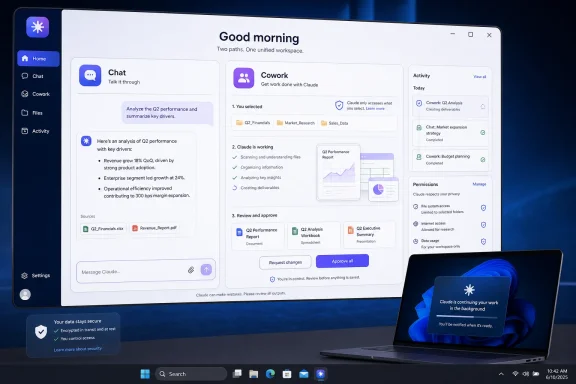 A unified interface, not a merged permission model
Anthropic says projects and artifacts now live together across Chat and Cowork. That should make it easier to move from planning work in a conversation to assigning the work to an agent without changing tabs or rebuilding context.The modes are still materially different. According to Anthropic’s product documentation, Chat cannot directly access local files, while Cowork can read, edit, and create files inside folders explicitly chosen by the user. The desktop app also gives Cowork access to local folders and applications that the web and mobile versions cannot reach.
That distinction matters on Windows. Claude’s desktop download is available for both standard Windows systems and Windows on Arm, and it is the version to use when a task needs access to files on the PC. Cowork’s browser and mobile experiences are in beta, but they let users start, monitor, redirect, and review cloud-run tasks when away from the desktop.
Background work raises the usual admin questions
The bigger functional shift is that Cowork tasks can continue after a laptop is closed. Anthropic says scheduled tasks can run with no device online, while questions requiring a human decision are pushed back to the user for approval. The company also says users can see files opened, tools used, and choices made during a task.For individuals, that could mean delegating routine folder cleanup, report preparation, or research compilation. For IT teams, the feature deserves the same caution as any assistant granted access to local data, browser sessions, and connected SaaS services.
Anthropic says Cowork is limited to the folders and tools a user selects, and that deletion requires approval. Its documentation also says computer-use functions request permission before accessing an application and remain a research preview. Those safeguards do not remove the need for policy controls around sensitive data, shared folders, regulated documents, or accounts with broad connector permissions.
Enterprise administrators can disable Cowork and control access through role-based settings. There is a notable visibility limitation, however: Anthropic’s current product page says Cowork activity is not yet captured in audit logs or its Compliance API. Organizations that depend on those systems for monitoring and retention should treat that as a deployment constraint, not a footnote.
Availability
Cowork is included with paid Claude plans, and its web and mobile versions are being rolled out in beta, according to Anthropic. Agentic Cowork tasks consume usage limits faster than ordinary chat.Windows users who want local-file automation should use the Claude desktop app and grant Cowork access only to folders appropriate for the task.
References
- Primary source: Crypto Briefing
Published: 2026-07-18T22:23:58+00:00
Anthropic merges Chat and Cowork modes into unified Claude interface
Anthropic merges Claude's Chat and Cowork modes into a unified interface with local file access and persistent memory, rolling out first to Max plan users.cryptobriefing.com - Official source: claude.com
Claude Cowork on web and mobile: hand off work anywhere | Claude by Anthropic
Claude Cowork from Anthropic is rolling out to web and mobile. Hand Claude a task, close the laptop, and the work keeps going, while every decision still comes to you.claude.com - Related coverage: macrumors.com
Claude Cowork Expands to iPhone and the Web
Anthropic today said it is bringing Claude Cowork to mobile and the web, with beta access rolling out to Max users first. Claude Cowork is a feature that lets Claude access local files and connected tools, then autonomously complete tasks on your behalf. Claude Cowork tasks can now be started...www.macrumors.com - Related coverage: engadget.com
Now You Can Direct Anthropic's Claude Cowork AI From Your Phone
Max subscribers get first access to Claude's new Cowork tool for your phone.www.engadget.com - Official source: anthropic.com
A new way to reflect on how you use Claude \ Anthropic
Introducing a new way to reflect on and refine how you use Claude. It lets you easily track and visualize how you use Claude, and decide whether that time aligns with your goals.www.anthropic.com - Official source: support.claude.com
Custom visuals in chat and Cowork | Claude Help Center
support.claude.com
