

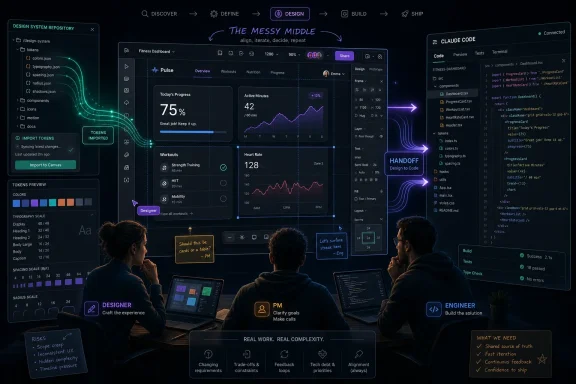
Anthropic’s June 2026 Claude Design update is rolling out in beta to paid Claude users with support for imported design systems, direct visual canvas editing, and handoff paths into Claude Code for turning AI-generated prototypes into working software. The move matters because it shifts Claude Design from a novelty generator into a workflow product. Anthropic is not merely asking designers to trust a prompt box; it is trying to make Claude live inside the messy middle where brand systems, component libraries, product managers, engineers, and deadlines collide.
The first wave of AI design tools mostly sold speed. Type a prompt, get a landing page. Describe an app, receive a dashboard. Ask for a pitch deck, get something that looks plausible enough for an internal meeting and suspiciously similar to every other AI-made mockup on the internet.
That was useful, but it was not the same as being production-adjacent. Professional design work is not a blank canvas exercise. It is a negotiation with existing components, accessibility rules, spacing scales, brand colors, type systems, product constraints, engineering debt, and the dozen unwritten preferences that make a company’s software look like itself.
Claude Design’s latest upgrade is important because it acknowledges that reality. Importing a design system is not just another checkbox feature. It is a concession that AI tools cannot win serious teams by producing pretty artifacts in isolation; they have to respect the systems teams already use.
That makes this update less about “AI replaces designers” and more about “AI finally meets the design system.” The distinction is not semantic. A tool that generates generic UI is a demo. A tool that can reason from a real component library starts to become infrastructure.
This is the problem that has haunted AI UI tools since their first viral demos. They can produce something impressive in thirty seconds, but professional teams often spend the next three days making it conform to reality. Buttons are almost right. Cards are close but not compliant. Typography looks good but violates the product’s system. The mockup is fast, but the cleanup bill arrives later.
Anthropic’s bet is that if Claude can begin from the organization’s own design language, it can cut down the most tedious part of the iteration cycle. The tool is not only generating a page; it is trying to generate a page in the dialect of that team. That matters for larger organizations because consistency is not decoration. It is how users learn software, how accessibility teams maintain standards, and how engineering teams avoid reinventing the same interface fragments across every project.
There is a deeper strategic play here as well. Once an AI system understands a company’s design system, every prompt becomes more valuable. “Create an onboarding flow” stops being an open-ended request and becomes a constrained task inside a known visual and technical universe. The better the system understands that universe, the less the user has to say.
That is the direction every serious AI productivity tool is moving: from general assistant to context-bound collaborator. The model alone is no longer the product. The product is the model plus the customer’s own context.
A prompt is excellent for intent. It is clumsy for precision. “Move that card slightly left, tighten the spacing, align this icon with the baseline, and make the hierarchy feel less top-heavy” is not impossible to describe, but it is absurd to describe repeatedly when the user can simply grab the thing and move it.
By adding WYSIWYG canvas editing, Anthropic is admitting that visual work remains visual. Designers do not want to litigate every pixel through a chat transcript. Developers do not want to regenerate an entire component tree because a heading needs a different weight. Product managers do not want to write prompt poetry to resize a pricing column.
This is not a weakness in Claude Design. It is a sign of maturation. The best AI interfaces are unlikely to be pure chat boxes. They will be hybrid environments where the model handles structure, variation, and transformation, while humans retain direct manipulation where judgment and precision matter.
The old dream was that AI would replace the tool. The more plausible version is that AI becomes a layer inside the tool, and the tool remains recognizably hands-on.
The canvas editor gives those judgments a place to operate. Instead of accepting Claude’s first draft or fighting it through increasingly elaborate prompts, users can intervene directly. They can adjust the output, then let Claude interpret the new state and continue from there.
That loop is more interesting than prompt-to-image or prompt-to-page generation. It treats the design as a living object rather than a one-off artifact. Claude proposes; the user edits; Claude updates; the user refines. The value is not that the machine gets everything right. The value is that the machine can keep up while the human steers.
For developers, this could also reduce one of the more awkward handoff problems in AI-generated front-end work. If the design canvas and implementation are meaningfully connected, visual edits are not just screenshots or comments. They become changes that can influence code.
That is where the Claude Code connection enters the story.
Every product organization knows this gap. A mockup is approved. Engineering implements it. The implementation differs because of component constraints, edge cases, timing, or ambiguous specs. Design reviews the result and files comments. Engineering revises. Meanwhile, the source of truth starts to blur.
AI could make that problem worse if it simply generates more artifacts. A hundred fast prototypes are not helpful if none of them map cleanly to production. Anthropic’s synchronization pitch is that Claude Design should not end at the mockup stage. It should connect to code, and code changes should remain aligned with the design surface.
If this works well, it changes the value proposition. Claude Design becomes less like a Canva-like creative surface and more like a front-end planning environment tied to implementation. That would make it relevant not only for designers but also for product engineers, founders, agencies, and internal tools teams.
The hard part will be trust. Developers will want to know what changes are being made, how components are selected, whether the generated code respects existing architecture, and whether the tool can avoid creating beautiful technical debt. A prototype that looks correct but pollutes a codebase is not acceleration. It is deferred cleanup with better marketing.
Figma begins from design collaboration and extends toward code and AI. Anthropic begins from an AI assistant and extends toward design and code. Those starting points matter. Figma’s strength is the shared visual workspace. Anthropic’s strength is the model’s ability to reason across text, images, code, and project context.
Claude Design is therefore not just competing for screen time inside the design department. It is competing for the boundary layer between design and development. That is a different market wedge. If a product manager can generate a prototype, a designer can refine it against the company’s system, and a developer can hand it to Claude Code for implementation support, Anthropic has created a workflow loop rather than a standalone editor.
That loop will still run into the gravity of existing tools. Teams have years of libraries, permissions, comments, version history, and design review rituals inside Figma and similar platforms. Switching costs are real. The likely near-term pattern is not wholesale replacement but selective adoption: Claude Design for first drafts, explorations, landing pages, prototype spikes, and design-to-code experiments.
But that is how many workflow tools start. They do not need to replace the incumbent on day one. They need to own a painful moment that the incumbent handles poorly.
For design, leverage comes from reducing translation costs. A user intent has to become a visual direction. A visual direction has to become a design artifact. A design artifact has to become code. Code has to survive review, testing, accessibility checks, and maintenance. Every handoff creates loss.
Claude Design’s update attacks several points in that chain. Design system import reduces the loss between brand standards and generated output. Visual editing reduces the loss between user taste and model interpretation. Claude Code synchronization reduces the loss between prototype and implementation.
That is why this update is more interesting than a simple feature drop. It reflects a strategic understanding that the future of AI software is not a better autocomplete box. It is a set of context-aware tools that compress the distance between intention and production.
The risk, of course, is that compression can hide complexity. A team may move faster while understanding less. A product manager may generate interfaces without appreciating accessibility implications. A developer may accept AI-generated code because it appears to match the canvas. A designer may inherit a flood of plausible drafts that still require careful judgment.
Speed is not automatically quality. It is only useful when paired with review.
Design systems often contain more than colors and buttons. They may reveal unreleased product direction, internal component architecture, naming conventions, and business priorities. Repositories can expose implementation details. Brand decks and prototypes can include confidential launch plans. An AI tool that ingests this context becomes part of the organization’s information governance surface.
That does not make Claude Design uniquely risky. The same concerns apply to every AI coding assistant, cloud design platform, and collaborative productivity tool. But the combination of design system import and code synchronization makes governance more urgent. The more useful the tool becomes, the more sensitive the context it needs.
Administrators will want clarity on retention, access controls, auditability, workspace boundaries, and enterprise defaults. They will also want to know whether design system setup is centrally governed or casually delegated. A sloppy design system import could create inconsistent outputs across a team; a sloppy permissions model could create a more serious problem.
This is where beta labels matter. Early access is exciting, but enterprise adoption will depend less on social media enthusiasm and more on boring controls. Boring controls are what let powerful tools become normal tools.
If anything, judgment becomes more visible. When generating ten variations is easy, choosing the right direction matters more. When a tool can apply a design system automatically, the quality of that system matters more. When product managers can create plausible prototypes without waiting for a designer, the designer’s role shifts toward critique, systems stewardship, user experience coherence, and deciding what should not be built.
That shift may be uncomfortable. It may also be overdue. Many senior designers already spend less time drawing individual rectangles and more time maintaining systems, shaping product strategy, and reviewing implementation. Claude Design’s update fits that reality better than the older prompt-only demo tools did.
Developers face a similar shift. The front-end engineer’s job is not merely translating pixels into code. It is building resilient interfaces that behave correctly under real data, real browsers, real accessibility requirements, real performance constraints, and real users doing strange things. AI can help with the translation layer, but it cannot eliminate the need for engineering ownership.
The teams that benefit most will be the teams that treat Claude Design as an accelerator for skilled people, not a substitute for them.
For developers working on Windows, Claude Code already fits into the terminal-centric trend that Microsoft has spent years cultivating with Windows Terminal, WSL, VS Code, GitHub tooling, and cloud development workflows. If Claude Design can hand off usable work to Claude Code, Windows developers may experience it as another layer in the AI-assisted toolchain rather than a separate design product.
There is also a Microsoft-adjacent competitive story. GitHub Copilot, Visual Studio Code extensions, Microsoft Designer, Power Platform, and Azure AI services all reflect the same broad industry motion: collapse the distance between idea and usable software. Anthropic’s design push is another sign that the next AI battleground is not the chatbot window. It is the workflow surface.
That should interest IT leaders because workflow surfaces become procurement decisions. Today’s beta experiment can become tomorrow’s sanctioned tool, shadow IT headache, or blocked application. The earlier administrators understand the direction of these products, the better prepared they are when teams start asking for access.
Users should expect friction. Imported design systems may need cleanup. Generated components may not perfectly match engineering expectations. Visual edits may not always translate cleanly into maintainable code. Claude Code handoffs may work best in certain stacks and struggle in others.
That does not make the update unimportant. Early versions of workflow-changing tools are often uneven. What matters is whether the product direction is right and whether the tool improves quickly based on real team usage.
Anthropic’s direction is credible because it aligns with actual pain. Teams do lose time moving from prototype to production. They do struggle to keep generated work consistent with design systems. They do need better collaboration between design and engineering. The question is execution, not relevance.
In that sense, the beta label is both a warning and an invitation. It tells teams not to bet their whole delivery process on Claude Design yet. It also gives Anthropic access to the messy feedback required to make the product serious.
Maintenance is where many AI tools lose their shine. A generated artifact is useful once. A generated artifact that stays connected to the system of record is useful repeatedly. Anthropic’s emphasis on imported systems and code synchronization suggests it understands this, but the burden of proof remains.
If Claude Design can update outputs when a design system changes, preserve intent through code revisions, and let teams review the differences clearly, it will become much more than a prototyping surface. It will become a kind of AI-assisted product memory. That is a powerful idea.
If it cannot, teams may still use it for early exploration but fall back to traditional tools for serious production work. That would not be failure, exactly. Even owning the ideation and prototype spike phase is valuable. But it would be a narrower victory than Anthropic appears to be chasing.
 Anthropic Wants Claude Design to Stop Looking Like a Toy
The first wave of AI design tools mostly sold speed. Type a prompt, get a landing page. Describe an app, receive a dashboard. Ask for a pitch deck, get something that looks plausible enough for an internal meeting and suspiciously similar to every other AI-made mockup on the internet.That was useful, but it was not the same as being production-adjacent. Professional design work is not a blank canvas exercise. It is a negotiation with existing components, accessibility rules, spacing scales, brand colors, type systems, product constraints, engineering debt, and the dozen unwritten preferences that make a company’s software look like itself.
Claude Design’s latest upgrade is important because it acknowledges that reality. Importing a design system is not just another checkbox feature. It is a concession that AI tools cannot win serious teams by producing pretty artifacts in isolation; they have to respect the systems teams already use.
That makes this update less about “AI replaces designers” and more about “AI finally meets the design system.” The distinction is not semantic. A tool that generates generic UI is a demo. A tool that can reason from a real component library starts to become infrastructure.
The Design System Is the Product Now
The most consequential part of the update is support for importing existing design systems from repositories, codebases, and brand materials. In practice, that means Claude Design can ingest the building blocks a team already uses: components, colors, typography, spacing, interaction patterns, and visual conventions. The promise is that a generated interface should no longer look like an attractive stranger wearing your company’s badge.This is the problem that has haunted AI UI tools since their first viral demos. They can produce something impressive in thirty seconds, but professional teams often spend the next three days making it conform to reality. Buttons are almost right. Cards are close but not compliant. Typography looks good but violates the product’s system. The mockup is fast, but the cleanup bill arrives later.
Anthropic’s bet is that if Claude can begin from the organization’s own design language, it can cut down the most tedious part of the iteration cycle. The tool is not only generating a page; it is trying to generate a page in the dialect of that team. That matters for larger organizations because consistency is not decoration. It is how users learn software, how accessibility teams maintain standards, and how engineering teams avoid reinventing the same interface fragments across every project.
There is a deeper strategic play here as well. Once an AI system understands a company’s design system, every prompt becomes more valuable. “Create an onboarding flow” stops being an open-ended request and becomes a constrained task inside a known visual and technical universe. The better the system understands that universe, the less the user has to say.
That is the direction every serious AI productivity tool is moving: from general assistant to context-bound collaborator. The model alone is no longer the product. The product is the model plus the customer’s own context.
WYSIWYG Editing Is a Retreat From Prompt-Only Purism
The visual editor may be the most user-facing change, but philosophically it is also the most revealing. Early generative tools often implied that prompting would become the universal interface. Designers, developers, marketers, and executives would simply describe what they wanted, and the machine would comply. Anyone who has tried to nudge a layout through natural language knows how quickly that fantasy collapses.A prompt is excellent for intent. It is clumsy for precision. “Move that card slightly left, tighten the spacing, align this icon with the baseline, and make the hierarchy feel less top-heavy” is not impossible to describe, but it is absurd to describe repeatedly when the user can simply grab the thing and move it.
By adding WYSIWYG canvas editing, Anthropic is admitting that visual work remains visual. Designers do not want to litigate every pixel through a chat transcript. Developers do not want to regenerate an entire component tree because a heading needs a different weight. Product managers do not want to write prompt poetry to resize a pricing column.
This is not a weakness in Claude Design. It is a sign of maturation. The best AI interfaces are unlikely to be pure chat boxes. They will be hybrid environments where the model handles structure, variation, and transformation, while humans retain direct manipulation where judgment and precision matter.
The old dream was that AI would replace the tool. The more plausible version is that AI becomes a layer inside the tool, and the tool remains recognizably hands-on.
The Canvas Is Where Taste Pushes Back
Designers have been understandably wary of AI systems that confuse output with taste. A model can generate options, but it does not know why a particular interface feels trustworthy, why a brand can tolerate one degree of playfulness but not three, or why a product team keeps returning to a specific spacing rhythm because it just works across the application. Those are human judgments, built from repetition, context, and taste.The canvas editor gives those judgments a place to operate. Instead of accepting Claude’s first draft or fighting it through increasingly elaborate prompts, users can intervene directly. They can adjust the output, then let Claude interpret the new state and continue from there.
That loop is more interesting than prompt-to-image or prompt-to-page generation. It treats the design as a living object rather than a one-off artifact. Claude proposes; the user edits; Claude updates; the user refines. The value is not that the machine gets everything right. The value is that the machine can keep up while the human steers.
For developers, this could also reduce one of the more awkward handoff problems in AI-generated front-end work. If the design canvas and implementation are meaningfully connected, visual edits are not just screenshots or comments. They become changes that can influence code.
That is where the Claude Code connection enters the story.
Claude Code Is the Other Half of the Pitch
Two-way synchronization with Claude Code is the part of the update that could matter most to engineering teams. Claude Design can create or refine a prototype, while Claude Code can work in the codebase. If those worlds stay connected, Anthropic is aiming at one of the oldest productivity drains in software: the gap between what is designed and what is shipped.Every product organization knows this gap. A mockup is approved. Engineering implements it. The implementation differs because of component constraints, edge cases, timing, or ambiguous specs. Design reviews the result and files comments. Engineering revises. Meanwhile, the source of truth starts to blur.
AI could make that problem worse if it simply generates more artifacts. A hundred fast prototypes are not helpful if none of them map cleanly to production. Anthropic’s synchronization pitch is that Claude Design should not end at the mockup stage. It should connect to code, and code changes should remain aligned with the design surface.
If this works well, it changes the value proposition. Claude Design becomes less like a Canva-like creative surface and more like a front-end planning environment tied to implementation. That would make it relevant not only for designers but also for product engineers, founders, agencies, and internal tools teams.
The hard part will be trust. Developers will want to know what changes are being made, how components are selected, whether the generated code respects existing architecture, and whether the tool can avoid creating beautiful technical debt. A prototype that looks correct but pollutes a codebase is not acceleration. It is deferred cleanup with better marketing.
The Figma Comparison Is Inevitable, But Incomplete
Any AI design product with a canvas will be compared to Figma. That is unavoidable. Figma owns the collaborative design mindshare, and its ecosystem has become deeply embedded across product teams. But Claude Design’s trajectory is not simply “Figma, but with a chatbot.”Figma begins from design collaboration and extends toward code and AI. Anthropic begins from an AI assistant and extends toward design and code. Those starting points matter. Figma’s strength is the shared visual workspace. Anthropic’s strength is the model’s ability to reason across text, images, code, and project context.
Claude Design is therefore not just competing for screen time inside the design department. It is competing for the boundary layer between design and development. That is a different market wedge. If a product manager can generate a prototype, a designer can refine it against the company’s system, and a developer can hand it to Claude Code for implementation support, Anthropic has created a workflow loop rather than a standalone editor.
That loop will still run into the gravity of existing tools. Teams have years of libraries, permissions, comments, version history, and design review rituals inside Figma and similar platforms. Switching costs are real. The likely near-term pattern is not wholesale replacement but selective adoption: Claude Design for first drafts, explorations, landing pages, prototype spikes, and design-to-code experiments.
But that is how many workflow tools start. They do not need to replace the incumbent on day one. They need to own a painful moment that the incumbent handles poorly.
AI Design Tools Are Moving From Mockups to Systems
The broader industry trend is clear: AI tools are leaving the “generate a thing” phase and entering the “operate inside a workflow” phase. The first phase produced spectacle. The second phase produces leverage.For design, leverage comes from reducing translation costs. A user intent has to become a visual direction. A visual direction has to become a design artifact. A design artifact has to become code. Code has to survive review, testing, accessibility checks, and maintenance. Every handoff creates loss.
Claude Design’s update attacks several points in that chain. Design system import reduces the loss between brand standards and generated output. Visual editing reduces the loss between user taste and model interpretation. Claude Code synchronization reduces the loss between prototype and implementation.
That is why this update is more interesting than a simple feature drop. It reflects a strategic understanding that the future of AI software is not a better autocomplete box. It is a set of context-aware tools that compress the distance between intention and production.
The risk, of course, is that compression can hide complexity. A team may move faster while understanding less. A product manager may generate interfaces without appreciating accessibility implications. A developer may accept AI-generated code because it appears to match the canvas. A designer may inherit a flood of plausible drafts that still require careful judgment.
Speed is not automatically quality. It is only useful when paired with review.
Enterprise Teams Will Care About Control Before Magic
For WindowsForum’s audience of IT pros, sysadmins, and technically minded readers, the most interesting question is not whether Claude Design can make a nice landing page. It is whether organizations can control the data, permissions, and workflow implications of a tool that touches brand assets, repositories, and potentially production-adjacent code.Design systems often contain more than colors and buttons. They may reveal unreleased product direction, internal component architecture, naming conventions, and business priorities. Repositories can expose implementation details. Brand decks and prototypes can include confidential launch plans. An AI tool that ingests this context becomes part of the organization’s information governance surface.
That does not make Claude Design uniquely risky. The same concerns apply to every AI coding assistant, cloud design platform, and collaborative productivity tool. But the combination of design system import and code synchronization makes governance more urgent. The more useful the tool becomes, the more sensitive the context it needs.
Administrators will want clarity on retention, access controls, auditability, workspace boundaries, and enterprise defaults. They will also want to know whether design system setup is centrally governed or casually delegated. A sloppy design system import could create inconsistent outputs across a team; a sloppy permissions model could create a more serious problem.
This is where beta labels matter. Early access is exciting, but enterprise adoption will depend less on social media enthusiasm and more on boring controls. Boring controls are what let powerful tools become normal tools.
Designers Are Not Being Replaced; Their Bottlenecks Are Being Repriced
The lazy version of the AI design story says designers are in trouble because machines can make screens. The more accurate version is that some parts of design work are being repriced. First drafts, layout variations, placeholder prototypes, and routine marketing assets are becoming cheaper to produce. That changes the economics of a design team, but it does not erase the need for design judgment.If anything, judgment becomes more visible. When generating ten variations is easy, choosing the right direction matters more. When a tool can apply a design system automatically, the quality of that system matters more. When product managers can create plausible prototypes without waiting for a designer, the designer’s role shifts toward critique, systems stewardship, user experience coherence, and deciding what should not be built.
That shift may be uncomfortable. It may also be overdue. Many senior designers already spend less time drawing individual rectangles and more time maintaining systems, shaping product strategy, and reviewing implementation. Claude Design’s update fits that reality better than the older prompt-only demo tools did.
Developers face a similar shift. The front-end engineer’s job is not merely translating pixels into code. It is building resilient interfaces that behave correctly under real data, real browsers, real accessibility requirements, real performance constraints, and real users doing strange things. AI can help with the translation layer, but it cannot eliminate the need for engineering ownership.
The teams that benefit most will be the teams that treat Claude Design as an accelerator for skilled people, not a substitute for them.
The Windows Angle Is the Workflow, Not the Branding
Claude Design is not a Windows feature, and Anthropic is not Microsoft. But the update still belongs in the orbit of Windows power users and IT professionals because modern Windows work is increasingly mediated through AI-assisted development, browser-based design tools, and cloud-connected productivity stacks. The desktop is no longer just the operating system; it is the command center for services that blur design, code, documents, and automation.For developers working on Windows, Claude Code already fits into the terminal-centric trend that Microsoft has spent years cultivating with Windows Terminal, WSL, VS Code, GitHub tooling, and cloud development workflows. If Claude Design can hand off usable work to Claude Code, Windows developers may experience it as another layer in the AI-assisted toolchain rather than a separate design product.
There is also a Microsoft-adjacent competitive story. GitHub Copilot, Visual Studio Code extensions, Microsoft Designer, Power Platform, and Azure AI services all reflect the same broad industry motion: collapse the distance between idea and usable software. Anthropic’s design push is another sign that the next AI battleground is not the chatbot window. It is the workflow surface.
That should interest IT leaders because workflow surfaces become procurement decisions. Today’s beta experiment can become tomorrow’s sanctioned tool, shadow IT headache, or blocked application. The earlier administrators understand the direction of these products, the better prepared they are when teams start asking for access.
The Beta Label Should Temper the Hype
The update is rolling out as a beta or research-preview-style experience rather than a finished enterprise standard, and that distinction matters. AI design systems are hard. Visual editing is hard. Code synchronization is very hard. Doing all three reliably across messy real-world teams is harder still.Users should expect friction. Imported design systems may need cleanup. Generated components may not perfectly match engineering expectations. Visual edits may not always translate cleanly into maintainable code. Claude Code handoffs may work best in certain stacks and struggle in others.
That does not make the update unimportant. Early versions of workflow-changing tools are often uneven. What matters is whether the product direction is right and whether the tool improves quickly based on real team usage.
Anthropic’s direction is credible because it aligns with actual pain. Teams do lose time moving from prototype to production. They do struggle to keep generated work consistent with design systems. They do need better collaboration between design and engineering. The question is execution, not relevance.
In that sense, the beta label is both a warning and an invitation. It tells teams not to bet their whole delivery process on Claude Design yet. It also gives Anthropic access to the messy feedback required to make the product serious.
The First Real Test Will Be Maintenance
AI demos love creation. Enterprises care about maintenance. The real test for Claude Design will not be whether it can generate an attractive onboarding flow in June 2026. The test will be whether that flow can evolve six months later when the design system changes, the component library is refactored, accessibility requirements tighten, and the product team changes its mind.Maintenance is where many AI tools lose their shine. A generated artifact is useful once. A generated artifact that stays connected to the system of record is useful repeatedly. Anthropic’s emphasis on imported systems and code synchronization suggests it understands this, but the burden of proof remains.
If Claude Design can update outputs when a design system changes, preserve intent through code revisions, and let teams review the differences clearly, it will become much more than a prototyping surface. It will become a kind of AI-assisted product memory. That is a powerful idea.
If it cannot, teams may still use it for early exploration but fall back to traditional tools for serious production work. That would not be failure, exactly. Even owning the ideation and prototype spike phase is valuable. But it would be a narrower victory than Anthropic appears to be chasing.
The Upgrade Makes Claude Design Harder to Dismiss
The practical lesson from this update is that AI design tooling is becoming less isolated and more operational. Claude Design is no longer just a place to ask for a pretty mockup. It is becoming a place where a team’s existing design language, visual edits, and implementation workflow can meet.- Claude Design’s most important upgrade is its ability to work from real design systems rather than generic visual guesses.
- The new visual canvas editor implicitly acknowledges that prompt-only design is too blunt for professional interface work.
- Claude Code synchronization is the feature that could make the product matter to engineering teams, not just designers.
- The beta status should make teams cautious about production reliance, especially where repositories and confidential design assets are involved.
- The bigger competitive fight is not over who can generate the best mockup, but who can own the design-to-code workflow.
- Designers and developers are likely to see the biggest benefit when they use Claude Design to accelerate iteration while keeping human review firmly in charge.
References
- Primary source: thewincentral.com
Published: 2026-06-17T09:20:28.931393
Claude Design Adds Real Editing and Claude Code Sync - WinCentral
Claude Design now supports visual editing, design system imports, and Claude Code sync. - Read in AI News on WinCentral thewincentral.com
- Related coverage: techcrunch.com
Anthropic launches Claude Design, a new product for creating quick visuals | TechCrunch
The company says Claude Design is intended to help people like founders and product managers without a design background share their ideas more easily.techcrunch.com - Official source: anthropic.com
Introducing Claude Design by Anthropic Labs \ Anthropic
Today, we’re launching Claude Design, a new Anthropic Labs product that lets you collaborate with Claude to create polished visual work like designs, prototypes, slides, one-pagers, and more.www.anthropic.com - Related coverage: gadgets360.com
- Related coverage: venturebeat.com
Anthropic just launched Claude Design, an AI tool that turns prompts into prototypes and challenges Figma | VentureBeat
Anthropic launched Claude Design, an AI tool that turns text prompts into interactive prototypes, alongside its most powerful public model, Claude Opus 4.7 — directly challenging Figma and signaling the company's shift from AI lab to full-stack product company.venturebeat.com - Official source: support.claude.com
Get started with Claude Design | Claude Help Center
support.claude.com
- Related coverage: doolpa.com
Anthropic Launches Claude Design on Opus 4.7 (April 2026) | Doolpa
Anthropic launched Claude Design on April 17, 2026 — a conversational visual tool on Opus 4.7 that ships prototypes, slides, and Canva exports to Pro/Max/Team.doolpa.com - Related coverage: idlen.io
Claude Design: Anthropic Launches Its Figma Rival Powered by Opus 4.7 | Idlen
On April 17, 2026, Anthropic launches Claude Design, a standalone AI tool that generates prototypes, slides, and mockups from a prompt. Figma drops 7%, Canva partnership announced. www.idlen.io
- Related coverage: geccohq.com
Claude Design brings AI prototyping to every desk | gecco
Anthropic launched Claude Design. One AI platform now handles text, code, knowledge work, and visual design. Here is what changed and how to start using it.www.geccohq.com - Related coverage: claudeforoperators.com
Claude Design | Claude for Operators
Create designs, prototypes, slides, and one-pagers from text descriptions. Powered by Opus 4.7 with native Canva integration. www.claudeforoperators.com
- Related coverage: remoteopenclaw.com
Claude Design: What Anthropic Actually Launched | Remote OpenClaw
Claude Design is Anthropic's new design workspace for websites, decks, and posters. Here is what launched in April 2026 and what the feature can export.www.remoteopenclaw.com - Related coverage: aurora-designs.ca
Claude Design: Anthropic's Answer to Lovable and v0, Explained — Aurora Designs
Claude Design turns prompts into prototypes, slides, and production-ready code. Here's what it does, how it compares to Lovable and v0, and who should use it.aurora-designs.ca - Related coverage: golem.de
- Related coverage: tomshardware.com
Claude Fable 5 brings Mythos to the masses — Anthropic's new frontier model is 'state-of-the-art on nearly all tested benchmarks' | Tom's Hardware
Queries regarding cybersecurity, biology and chemistry, and distillation will be redirected to the prior-gen Opus 4.8, howeverwww.tomshardware.com - Related coverage: techradar.com
'Claude can't replace taste or imagination, but it can open up new ways of working': Anthropic signs up Adobe, Blender and more to push Claude into creative work | TechRadar
Claude connectors are targeting the creative industrywww.techradar.com - Related coverage: tomsguide.com
Claude Opus 4.8 just launched — and Anthropic says it's far less likely to ‘fake’ answers | Tom's Guide
Anthropic just launched Claude Opus 4.8 with new reasoning controls, dynamic AI workflows and a major focus on reducing fake or overconfident AI answers.www.tomsguide.com - Related coverage: itpro.com
Anthropic just launched Claude Fable 5, its first Mythos-class AI model – but it has new safeguards to prevent misuse and will ‘fall back’ to Opus 4.8 for queries in ‘high risk’ topics | IT Pro
The launch of Claude Fable 5 marks the first public release of a Mythos-class AI modelwww.itpro.com - Related coverage: zeronoise.ai
- Official source: resources.anthropic.com
Claude Code Advanced Patterns: Subagents, MCP, and Scaling to Real Codebases
PDF documentresources.anthropic.com
