

Buy the $19.99 Claude AI for Microsoft Excel Mastery Bundle only if you want inexpensive, browser-based training and already understand that the purchase does not include Claude, Microsoft 365, or Anthropic’s Claude for Excel add-in. Skip it if you expect a ready-to-use AI assistant inside Excel, offline course files, multi-device access, or training that guarantees every advertised workflow is supported by Anthropic’s current add-in.
The advertised 79% discount—from $97 to $19.99—is the least important part of the decision. The storefront is selling five self-paced courses from ExpertEase Global, not software, an Excel license, or an entitlement to Anthropic’s paid service.
The bundle covers formulas, VLOOKUP, XLOOKUP, PivotTables, charts, dashboards, data analysis, and Claude-assisted spreadsheet work. It also advertises instruction on generating, explaining, and troubleshooting VBA code and macros.
That can be a reasonable syllabus for someone who wants to learn how to combine an AI chatbot with Excel. The distinction buyers must make is between learning about a workflow and receiving the products required to run that workflow.
The $19.99 purchase provides lifetime access to the course material after redemption. Access is delivered through a modern browser, limited to one device, and cannot be downloaded for offline viewing. The included credential is a certificate of completion, not a Microsoft, Anthropic, or independently administered professional certification.
The redemption condition is easy to overlook. Buyers must use the supplied code within 30 days of purchase, even though the resulting course access is described as lifetime access. Anyone buying speculatively for “someday” needs to redeem first rather than leaving the code in an inbox.
Nothing in the offer states that it includes a Claude subscription, Anthropic API usage, the Claude for Excel add-in, or Microsoft 365. Those are separate dependencies and potentially separate costs.
Windows users also need a subscription edition of Microsoft 365 Excel running build 16.0.13127.20296 or later. Perpetual-license copies of Excel 2016 and Excel 2019 are unsupported, creating a particularly relevant trap for Windows enthusiasts who intentionally remain on one-time-purchase Office releases.
That produces three separate layers that should not be confused:
WindowsForum has previously examined Claude for Excel as an embedded assistant for financial modeling, workbook analysis, and cell-level changes. Those capabilities are the product story surrounding Anthropic’s add-in; they should not be treated as benefits automatically conferred by this training purchase.
For individuals, the practical pre-purchase check is straightforward. Confirm that the Claude account is on an eligible plan, verify that Excel comes from a Microsoft 365 subscription, and check the installed Excel build before assuming the native workflow shown or discussed in a lesson will be available.
In Excel for Windows, the build can be checked under File > Account > About Excel. If the installation identifies itself as Excel 2016 or Excel 2019 under a perpetual or volume license, the current Claude for Excel requirements are not met regardless of how capable the PC may be.
Those statements are not necessarily irreconcilable, but they describe different workflows. A learner could ask Claude outside the add-in to write or review VBA, manually paste the result into Excel’s Visual Basic Editor, test it, and return errors to Claude for another attempt. The course may therefore teach Claude-assisted VBA without claiming that the Excel add-in can directly manipulate macro projects.
The problem is that “Claude for Excel” can sound like one unified feature set. Buyers may reasonably assume that an add-in discussed throughout the training can inspect, create, or repair VBA within the workbook. Anthropic’s published limitation says otherwise.
That matters operationally because manually exchanging code with a chatbot leaves the user responsible for every security and reliability decision. Generated VBA can delete data, alter files, send requests, or produce plausible-looking calculations that fail under edge conditions. A course can teach prompting patterns, but it cannot turn generated code into a trusted automation merely by awarding a completion certificate.
Anyone purchasing primarily for macro automation should therefore treat the bundle as instruction in an assisted copy, review, and test process, not proof of native macro support. The value depends on whether the learner already understands enough VBA and Excel behavior to validate the output.
The listing does not establish how device replacement is handled, so buyers should not assume that “one device” means one concurrent device with unlimited transfers. The verified terms only establish the device maximum, browser delivery, and lack of offline downloads.
For a casual learner who will complete the courses on one PC, those limits may be inconsequential. They are more important for consultants, traveling staff, shared IT labs, and administrators considering the bundle as team training.
The certificate also deserves proportionate expectations. It records completion of the courses, but the listing does not describe a proctored examination, Microsoft credential, Anthropic accreditation, or guaranteed employer recognition. Its practical value lies in documenting personal development rather than proving independently tested proficiency.
It may also suit experienced Excel users who understand the underlying functions but need examples of how to describe spreadsheet tasks to an AI system. For that audience, even a few reusable prompting patterns could justify the price without requiring every lesson to map perfectly onto Anthropic’s current add-in.
The weaker fit is a buyer searching for a turnkey productivity product. This purchase does not provide the paid Claude account, supported Excel license, or add-in entitlement needed to reproduce Anthropic’s complete Windows workflow. It also does not remove the need to review formulas, validate analysis, or test generated VBA.
IT departments should be especially cautious about buying the bundle as an informal deployment package. Training content does not settle tenant-level add-in policy, user licensing, workbook governance, data-handling requirements, or support ownership. Administrators should evaluate Claude for Excel independently before encouraging users to follow demonstrations against organizational spreadsheets.
The current add-in limitation around macros and VBA is also a reminder that course material and cloud products evolve at different speeds. Anthropic could expand the add-in later, while interface changes or new limitations could make parts of recorded instruction less exact. “Lifetime” access to a course is not the same as a lifetime guarantee that every product screen and capability will remain current.
The sensible verdict is to buy the bundle for education, not access. Its value rests on five low-cost courses and lifetime browser viewing; the supported Claude-for-Excel experience remains a separate combination of an eligible Claude plan, a compatible Microsoft 365 Excel installation, and realistic expectations about what the add-in can currently do.
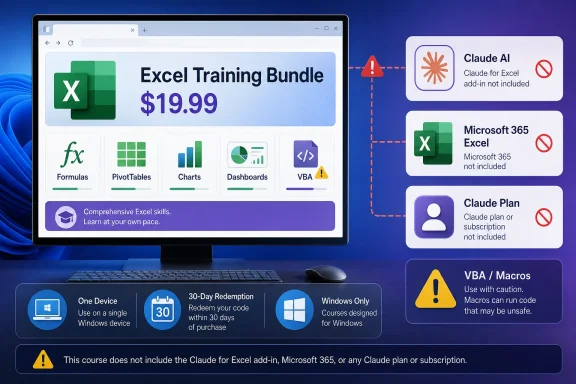
The advertised 79% discount—from $97 to $19.99—is the least important part of the decision. The storefront is selling five self-paced courses from ExpertEase Global, not software, an Excel license, or an entitlement to Anthropic’s paid service.
 The Checkout Buys Lessons, Not the Claude for Excel Workflow
The bundle covers formulas, VLOOKUP, XLOOKUP, PivotTables, charts, dashboards, data analysis, and Claude-assisted spreadsheet work. It also advertises instruction on generating, explaining, and troubleshooting VBA code and macros.That can be a reasonable syllabus for someone who wants to learn how to combine an AI chatbot with Excel. The distinction buyers must make is between learning about a workflow and receiving the products required to run that workflow.
The $19.99 purchase provides lifetime access to the course material after redemption. Access is delivered through a modern browser, limited to one device, and cannot be downloaded for offline viewing. The included credential is a certificate of completion, not a Microsoft, Anthropic, or independently administered professional certification.
The redemption condition is easy to overlook. Buyers must use the supplied code within 30 days of purchase, even though the resulting course access is described as lifetime access. Anyone buying speculatively for “someday” needs to redeem first rather than leaving the code in an inbox.
Nothing in the offer states that it includes a Claude subscription, Anthropic API usage, the Claude for Excel add-in, or Microsoft 365. Those are separate dependencies and potentially separate costs.
Anthropic’s Add-In Has Its Own Account and Excel Requirements
Anthropic’s support documentation says Claude for Excel is available with Claude Pro, Max, Team, and Enterprise plans. Buying the ExpertEase Global courses does not move a user onto any of those plans.Windows users also need a subscription edition of Microsoft 365 Excel running build 16.0.13127.20296 or later. Perpetual-license copies of Excel 2016 and Excel 2019 are unsupported, creating a particularly relevant trap for Windows enthusiasts who intentionally remain on one-time-purchase Office releases.
That produces three separate layers that should not be confused:
- The $19.99 bundle supplies browser-based educational content.
- A supported paid Claude plan supplies access to Anthropic’s consumer or organizational service.
- A Microsoft 365 subscription supplies a supported Windows version of Excel for the native add-in.
WindowsForum has previously examined Claude for Excel as an embedded assistant for financial modeling, workbook analysis, and cell-level changes. Those capabilities are the product story surrounding Anthropic’s add-in; they should not be treated as benefits automatically conferred by this training purchase.
For individuals, the practical pre-purchase check is straightforward. Confirm that the Claude account is on an eligible plan, verify that Excel comes from a Microsoft 365 subscription, and check the installed Excel build before assuming the native workflow shown or discussed in a lesson will be available.
In Excel for Windows, the build can be checked under File > Account > About Excel. If the installation identifies itself as Excel 2016 or Excel 2019 under a perpetual or volume license, the current Claude for Excel requirements are not met regardless of how capable the PC may be.
The VBA Promise Needs Careful Interpretation
The largest content-versus-product mismatch involves macros and Visual Basic for Applications. The bundle advertises VBA and macro assistance, including using Claude to generate, explain, and troubleshoot VBA code, while Anthropic states that Claude for Excel does not currently support macros or VBA as advanced in-add-in capabilities.Those statements are not necessarily irreconcilable, but they describe different workflows. A learner could ask Claude outside the add-in to write or review VBA, manually paste the result into Excel’s Visual Basic Editor, test it, and return errors to Claude for another attempt. The course may therefore teach Claude-assisted VBA without claiming that the Excel add-in can directly manipulate macro projects.
The problem is that “Claude for Excel” can sound like one unified feature set. Buyers may reasonably assume that an add-in discussed throughout the training can inspect, create, or repair VBA within the workbook. Anthropic’s published limitation says otherwise.
That matters operationally because manually exchanging code with a chatbot leaves the user responsible for every security and reliability decision. Generated VBA can delete data, alter files, send requests, or produce plausible-looking calculations that fail under edge conditions. A course can teach prompting patterns, but it cannot turn generated code into a trusted automation merely by awarding a completion certificate.
Anyone purchasing primarily for macro automation should therefore treat the bundle as instruction in an assisted copy, review, and test process, not proof of native macro support. The value depends on whether the learner already understands enough VBA and Excel behavior to validate the output.
The One-Device Rule Changes the “Lifetime” Calculation
Lifetime access sounds generous for a $19.99 purchase, but access terms shape its real usefulness. Browser-only viewing means lessons cannot be archived locally for travel, disaster recovery, or use in a disconnected lab. The one-device limit can also be restrictive for users who alternate between a work desktop, personal laptop, and tablet.The listing does not establish how device replacement is handled, so buyers should not assume that “one device” means one concurrent device with unlimited transfers. The verified terms only establish the device maximum, browser delivery, and lack of offline downloads.
For a casual learner who will complete the courses on one PC, those limits may be inconsequential. They are more important for consultants, traveling staff, shared IT labs, and administrators considering the bundle as team training.
The certificate also deserves proportionate expectations. It records completion of the courses, but the listing does not describe a proctored examination, Microsoft credential, Anthropic accreditation, or guaranteed employer recognition. Its practical value lies in documenting personal development rather than proving independently tested proficiency.
The Deal Works Best as a Low-Risk Skills Sampler
At $19.99, the bundle can make sense for Excel users who want a structured introduction rather than assembling disconnected tutorials. Five courses organized around formulas, lookup functions, PivotTables, charts, and Claude prompting could provide a useful path for someone who learns better from demonstrations than from product documentation.It may also suit experienced Excel users who understand the underlying functions but need examples of how to describe spreadsheet tasks to an AI system. For that audience, even a few reusable prompting patterns could justify the price without requiring every lesson to map perfectly onto Anthropic’s current add-in.
The weaker fit is a buyer searching for a turnkey productivity product. This purchase does not provide the paid Claude account, supported Excel license, or add-in entitlement needed to reproduce Anthropic’s complete Windows workflow. It also does not remove the need to review formulas, validate analysis, or test generated VBA.
IT departments should be especially cautious about buying the bundle as an informal deployment package. Training content does not settle tenant-level add-in policy, user licensing, workbook governance, data-handling requirements, or support ownership. Administrators should evaluate Claude for Excel independently before encouraging users to follow demonstrations against organizational spreadsheets.
The current add-in limitation around macros and VBA is also a reminder that course material and cloud products evolve at different speeds. Anthropic could expand the add-in later, while interface changes or new limitations could make parts of recorded instruction less exact. “Lifetime” access to a course is not the same as a lifetime guarantee that every product screen and capability will remain current.
The Buyer Checklist That Matters
Before paying, buyers should be able to answer yes to the conditions matching their intended use:- They understand that the purchase contains five online courses rather than Claude or Microsoft software.
- They can redeem the code within 30 days and are comfortable viewing the lessons in a browser on one device.
- They do not require downloadable videos or offline training access.
- They already have, or are willing to obtain, an eligible Claude plan if they want Anthropic’s native Excel add-in.
- They use Microsoft 365 Excel build 16.0.13127.20296 or later on Windows rather than perpetual-license Excel 2016 or 2019.
- They accept that VBA instruction may involve generating code with Claude and manually testing it because Claude for Excel does not currently support macros or VBA directly.
- They view the certificate as evidence of course completion rather than a vendor certification.
The sensible verdict is to buy the bundle for education, not access. Its value rests on five low-cost courses and lifetime browser viewing; the supported Claude-for-Excel experience remains a separate combination of an eligible Claude plan, a compatible Microsoft 365 Excel installation, and realistic expectations about what the add-in can currently do.
References
- Primary source: shop.talkingpointsmemo.com
Talking Points Memo Shop
Talking Points Memo Shop scours the web for the newest software, gadgets & web services. Explore our giveaways, bundles, Pay What You Want deals & more. shop.talkingpointsmemo.com
- Independent coverage: deals.teepr.com
Teepr Deals
Teepr Deals scours the web for the newest software, gadgets & web services. Explore our giveaways, bundles, Pay What You Want deals & more.deals.teepr.com
- Independent coverage: specials.9to5toys.com
Claude AI for Microsoft Excel Mastery Bundle | 9to5Toys Specials
<p>Learn how to use Claude AI to master Microsoft Excel. Create advanced formulas, automate tasks, analyze data, and build professional dashboards.</p>specials.9to5toys.com - Independent coverage: store.guff.com
Guff Store
Guff Store scours the web for the newest software, gadgets & web services. Explore our giveaways, bundles, Pay What You Want deals & more. store.guff.com
- Independent coverage: macheist.com
MacHeist
MacHeist scours the web for the newest software, gadgets & web services. Explore our giveaways, bundles, Pay What You Want deals & more. www.macheist.com
- Independent coverage: deals.appcoda.com
AppCoda Deals
AppCoda Deals scours the web for the newest software, gadgets & web services. Explore our giveaways, bundles, Pay What You Want deals & more. deals.appcoda.com
