

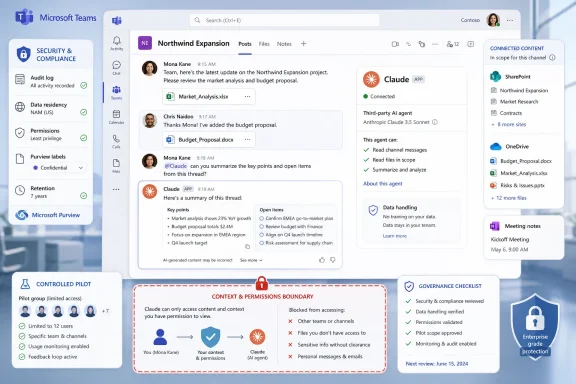
The practical meaning is straightforward: Claude Tag, already described in the source material as part of Anthropic’s collaboration push, may be moving from Slack into Microsoft’s core workplace environment. That would put a third-party AI assistant closer to the same daily workflows where Microsoft wants Copilot to be the default assistant. The strategic question is interesting, but the operational question is more urgent: who is allowed to add or mention AI agents in Teams, what data can those agents see, and how will their activity be audited?
For IT departments, this is less a novelty than a governance event. A channel-addressable AI assistant is different from a standalone chatbot because it can be introduced into shared workspaces, project discussions, and operational threads. That may be useful, but it also forces admins to decide whether collaboration history, channel membership, Microsoft 365 permissions, and AI-agent behavior now belong in the same risk review.
Anthropic Is Not Asking to Replace Teams. It Is Asking to Live Where Teams Already Won
The key to the reported Teams integration is that Anthropic is not trying to build another Teams. It is trying to make existing collaboration products into places where Claude can be invoked during work. That is a more realistic enterprise route than asking customers to migrate away from the communication platforms they already use.
The source material describes Slack as the first major Claude Tag surface and The Information’s July 1 report as pointing to Microsoft Teams as the next target. That sequence matters because Slack and Teams represent different parts of the collaboration market. Slack remains influential among product, engineering, startup, and high-velocity teams. Teams is embedded in many Microsoft 365 environments and is commonly governed through centralized IT policy.
If Claude Tag enters Teams as reported, the move would shift Anthropic’s collaboration push into Microsoft-standardized organizations where identity, compliance, files, meetings, and messaging are often administered as one estate. That makes this more consequential than a simple “Claude gets another app” update. It would place a rival AI assistant inside a Microsoft-controlled surface where Copilot is also expected to deliver value.
Microsoft can tolerate many third-party apps in Teams because Teams is designed to support an app ecosystem. The harder question is how Microsoft handles third-party AI agents that may compete for the same user habit as Copilot. A polling app, ticket connector, or alerting bot performs a narrow function. A general-purpose AI assistant that can summarize, draft, reason over work context, or help coordinate next steps creates a more direct comparison.
That is the tight thesis: the reported Claude Tag move is not about replacing Teams. It is about competing inside Teams.
Claude Tag Turns the Mention Into a Delegation Interface
The product idea behind Claude Tag is simple: workers already know how to mention a person in a channel. Anthropic is trying to turn that gesture into a way to bring Claude into a work conversation.
That matters because enterprise AI adoption is not only about model quality. It is also about friction. Employees may use a standalone chatbot for a draft, a summary, or a quick explanation, but deeper workplace adoption depends on whether the tool appears where the work is already happening. A channel or thread can contain the decision history, blockers, files, handoffs, and informal context that a blank chatbot window does not have.
The available source material supports the broad idea that Claude Tag is meant to participate in collaboration workflows, but Teams-specific behavior should not be assumed until Microsoft, Anthropic, or the original reporting describes it in detail. Admins should therefore avoid building policy around unverified assumptions such as persistent memory, background monitoring, or exact channel-access behavior unless those details are confirmed in deployment documentation.
The Teams report is still strategically significant because Microsoft Teams already contains a large share of enterprise work context: chats, channels, meetings, files, and collaboration artifacts connected to Microsoft 365. Microsoft has built Copilot around the value of that work context. Anthropic’s reported move would put Claude closer to the same environment.
The competitive pressure is not just about which model performs better in a benchmark. It is about which assistant gets invoked when a team needs help. If the habit becomes “ask Claude” in some channels and “ask Copilot” in others, the battle becomes a workflow-by-workflow contest rather than a single platform decision.
Microsoft’s Dilemma Is That Blocking Claude Could Make Teams Less Useful
If The Information’s report is correct, Microsoft’s decision to allow Claude Tag into Teams would be a platform-owner calculation. Keeping Teams useful as a collaboration hub may require allowing serious third-party AI tools, even when those tools compete with Microsoft’s own assistant strategy.
Enterprise customers often do not want a single-vendor AI mandate for every department. Engineering, legal, sales operations, support, finance, and security teams may have different requirements for reasoning quality, coding support, auditability, pricing, contractual terms, data handling, and workflow fit. A platform that allows only one assistant may look simpler from a procurement perspective but limiting to teams doing specialized work.
Microsoft’s strongest asset is the Microsoft 365 estate. Teams, Outlook, Word, Excel, SharePoint, OneDrive, Entra, Defender, Purview, Intune, and related services create a dense platform that many organizations are unlikely to replace quickly. If Microsoft keeps Teams closed to non-Microsoft AI assistants, customers can still use those assistants elsewhere, but the experience becomes fragmented. If Microsoft allows integrations, Teams remains the place where work happens even when some intelligence inside that workflow comes from a rival.
That does not mean Microsoft weakens itself automatically. It means Microsoft has to compete on usefulness inside its own product. Copilot still benefits from native Microsoft 365 integration, administrative familiarity, licensing channels, and Microsoft’s governance story. But user preference can be task-specific. A team may use Copilot for one workflow and Claude for another if both are available.
For admins, the lesson is not to pick a winner based on vendor narrative. The lesson is to measure actual usage, value, risk, and cost by workflow.
The Slack-to-Teams Path Shows Anthropic Is Building Distribution, Not Just Features
The reported sequence matters: Slack first, Teams next. Slack can help Anthropic reach teams that are already comfortable experimenting with AI-supported collaboration. Teams would extend that effort into organizations that are standardized on Microsoft 365 and governed more formally.
| Platform | Claude Tag status described in the source material | Strategic value for Anthropic | Direct platform tension |
|---|---|---|---|
| Salesforce’s Slack | Described as the first major Claude Tag collaboration surface | Early adoption in high-context team channels | Salesforce must balance Slack openness with its own AI ambitions |
| Microsoft Teams | Reported by The Information on July 1 as expected to be integrated | Access to Microsoft 365-centered workplace workflows | Microsoft may host a rival assistant inside a core Copilot environment |
The table understates how different the two environments can be. Slack workspaces often grow from team-level adoption and then move into enterprise governance. Teams often arrives through Microsoft 365 licensing and central administration. Anthropic needs both types of distribution if it wants Claude to become part of daily work rather than a separate destination.
The Slack integration made Claude Tag feel like a product. A Teams integration would make it feel more like a distribution strategy. Features can be copied. Distribution changes who sees the feature, who tries it, which departments normalize it, and which recurring workflows are rebuilt around it.
Context: reported company metrics, not established facts
The source material includes aggressive reported figures for Anthropic’s annual recurring revenue, valuation, margin improvement, profitability, and IPO plans. Those numbers should be treated as reported context from the article’s source material, not independently established facts here. They are relevant only in a forward-looking sense: if investors and customers expect Anthropic to justify a major enterprise valuation, the company has a strong incentive to embed Claude in recurring business workflows rather than rely only on standalone model access.
That context helps explain why Slack and Teams matter. A standalone AI subscription can be reduced, capped, or consolidated. An assistant that becomes part of support triage, project follow-up, internal documentation, engineering investigation, or operations coordination may be harder to remove. The business case becomes stronger when the tool is not just visited but repeatedly invoked during work.
Copilot’s Real Threat Is Not Replacement. It Is Usage Dilution.
The simple version of this story is “Claude versus Copilot.” The more useful version is “Claude inside the same workflow where Copilot expects to prove value.” In enterprise software, the threat is often not immediate replacement. It is dilution.
Microsoft can still sell Copilot licenses even if Claude Tag is available in Teams. Large customers may buy Copilot through enterprise agreements, bundle it into broader Microsoft 365 plans, or deploy it for meetings, drafting, summarization, and internal search. But if Claude becomes the preferred assistant for some teams or tasks, Copilot usage can be diluted even while the license remains assigned.
That distinction matters to admins and finance teams. A paid AI seat that users rarely touch becomes a cost problem. A third-party AI deployment that becomes habit-forming in engineering, support, or operations can justify its own budget line. The battle then moves from “which vendor has a license?” to “which vendor is trusted in the channel?”
Microsoft’s advantage is its native position in Microsoft 365. Copilot can be governed as part of Microsoft’s broader productivity and security stack, and many organizations will prefer that alignment. Anthropic’s advantage, according to the source material, is its push to make Claude appear as a collaborative assistant in the tools employees already use. If Claude Tag lands in Teams, those strengths would be tested in direct proximity.
That is why this should matter even to organizations that have already chosen Microsoft as their primary AI vendor. A platform decision does not automatically settle usage. Users route work to tools that feel fast, helpful, and available. If more than one assistant is present inside Teams, the switching cost may be as small as choosing whom to mention.
The Economics Behind Claude Tag Explain the Aggression
The source material reports improved inference economics for Anthropic, including margin gains and lower production costs. Those figures should be treated cautiously unless confirmed by primary company filings or official financial disclosures. Still, the underlying business logic is clear: embedded AI assistants can become expensive to operate if they are frequently invoked across long discussions and connected workflows, so improved unit economics would make aggressive distribution easier.
Inference economics are a hidden battlefield of enterprise AI. The customer sees a chat response, a channel mention, or an assistant completing a task. The vendor sees token usage, context windows, tool calls, retrieval systems, orchestration, infrastructure utilization, and support costs. If margins are thin, heavy adoption can become a burden. If margins improve, heavy adoption becomes a growth strategy.
A Claude Tag-style product could be more usage-intensive than a basic chatbot if customers use it to review threads, summarize decisions, draft responses, or coordinate follow-up work. The final cost profile will depend on the product’s actual Teams behavior, licensing model, context limits, and administrative controls. Those details should be verified when documentation becomes available.
Microsoft has its own infrastructure advantages through Azure, Microsoft 365, GitHub, Windows, Dynamics, security products, and developer tools. Anthropic’s AI business is more concentrated, which may make distribution partnerships more urgent. The reported Slack-to-Teams path fits that broader push: convert model reputation into recurring enterprise usage before customers consolidate around a small set of default assistants.
The risk is that embedded distribution raises scrutiny. The more often an AI assistant appears in channels, the more customers will ask about data boundaries, retention, logging, eDiscovery, security review, tenant controls, and employee training. Better economics may support growth, but governance will decide whether that growth survives procurement.
Admins Should Treat This as a New Class of Collaboration Principal
For Windows and Microsoft 365 administrators, the right mental model is not simply “another Teams app.” It is “a collaboration principal that may be invited into shared workspaces.” That distinction changes the rollout conversation.
Traditional Teams apps often have narrow functions. They create tickets, run polls, add tabs, notify channels, or connect specific SaaS tools. An AI assistant can be broader. It can interpret context, produce summaries, draft content, and influence decisions by how it frames information. Its permissions may be implemented through app permissions, but its effect can feel closer to adding a new participant to the team.
The first administrative question is scoping. Which users, groups, teams, channels, departments, or tenants should be allowed to use third-party AI assistants? The difference between an AI agent in a general project channel and one in an HR, legal, finance, security, incident-response, or M&A channel is material.
The second question is identity and attribution. Does the assistant appear as a Teams app, a bot, a user-like participant, or another object type? How are its messages, prompts, responses, and actions attributed? Can admins audit who invoked it, where it was used, and what content it produced? These are questions to answer from Microsoft and Anthropic documentation when the integration is available, not from assumptions.
The third question is data flow. If Claude reads a Teams thread or connected Microsoft 365 content, what data leaves the tenant, where is it processed, what is retained, and whether it is used for model improvement or service operation will depend on the final architecture, contract terms, license tier, and admin configuration. Admins should require a security and privacy review before broad rollout.
The fourth question is user training. Employees need clear rules for when to tag an AI assistant, what information should not be included, how to validate outputs, and who remains responsible for decisions made from AI-generated summaries. The risk is not just data leakage. It is operational overconfidence.
Action checklist for admins
Until Microsoft and Anthropic publish the final Teams-specific integration controls, treat this checklist as preparatory:
- Review Teams app governance in the Teams admin center. Check current org-wide app settings, app permission policies, app setup policies, and any custom app controls that determine which users can install, pin, or use Teams apps.
- Inventory existing Teams apps and bots. Identify current AI-related apps, productivity bots, meeting assistants, transcription tools, workflow connectors, and custom apps already present in the tenant.
- Create a pilot security group. Prepare a limited user group for any future Claude Tag evaluation rather than enabling access tenant-wide.
- Define permitted and restricted workspaces. Decide in advance whether third-party AI assistants may be used in general project teams, external collaboration teams, private channels, shared channels, HR, legal, finance, security, executive, or customer-data spaces.
- Review Microsoft Entra enterprise application controls. Confirm who can consent to applications, whether admin consent workflows are required, and how service principals and delegated permissions are reviewed.
- Prepare a Microsoft Purview review. Determine how retention, eDiscovery, audit, communication compliance, sensitivity labels, and data loss prevention policies should apply to AI-generated messages and prompts if those items are stored in Teams.
- Check SharePoint and OneDrive permission hygiene. Teams files are backed by SharePoint and OneDrive storage, so overshared sites, stale guests, and inherited permissions can become more consequential when AI tools summarize or reason over accessible content.
- Coordinate with Defender and security operations teams. Decide how Teams app activity, OAuth consent, suspicious app behavior, and data exfiltration signals will be monitored.
- Set pilot success metrics. Define what value would justify rollout: reduced support triage time, faster project summaries, better documentation, fewer meeting follow-up gaps, or improved engineering handoffs.
- Set cost and usage guardrails. Require budget ownership, usage reporting, and a review checkpoint before expanding from pilot to production.
- Publish user guidance before enablement. Tell employees what they may share, what they must not share, how to verify AI output, and when a human owner must approve final work.
The practical advice is deliberately conservative. Do not let the first deployment be a viral experiment in a sensitive channel. Start where the value is clear and the blast radius is manageable: internal documentation, non-sensitive project summarization, controlled support triage, or limited engineering workflows with defined data boundaries.
The Security Problem Is Context, Not Chat
Most AI governance debates still focus on prompts and outputs. Claude Tag pushes the more important issue into view: context. The assistant’s value increases when it sees more of the work, but so does the consequence of misconfiguration.
A single chatbot prompt can leak sensitive information. A channel-integrated assistant can normalize repeated disclosure because workers may stop thinking about the boundary between an internal conversation and an AI service. That is exactly why the product can be useful and exactly why administrators need to set rules before usage becomes routine.
Teams environments are complex because conversations often sit near SharePoint files, meeting artifacts, Planner tasks, Loop components, and Outlook-linked workflows. Even if an AI assistant only sees content it is permitted to see, permission hygiene in Microsoft 365 is often imperfect in real organizations. Overshared sites, stale guests, inherited permissions, abandoned teams, and legacy groups can all affect what information is practically available.
That is not an Anthropic-specific problem. It is the same broad challenge Microsoft customers face with Copilot: AI makes existing permission mistakes easier to surface and harder to ignore. The difference is that Copilot fits inside Microsoft’s native governance story, while Claude Tag would require customers to understand how a third-party service maps onto Microsoft’s tenant controls.
Security teams should also think about prompt injection and tool use. Any assistant that can read content and act on connected systems may be exposed to malicious or accidental instructions embedded in messages, documents, tickets, emails, logs, or copied customer text. Admins should evaluate whether the integration supports least privilege, user confirmation for sensitive actions, clear logging, and boundaries between reading, drafting, and taking action.
The security review should therefore focus less on whether the assistant is “smart” and more on how it is scoped. Which data can it access? Which users can invoke it? Which actions can it take? Which logs are retained? Which compliance tools can inspect the result? Which vendor terms govern the data? Those are the questions that determine whether the integration is manageable.
What Users Should Expect
For end users, the reported Teams integration would likely feel familiar if they already use AI in workplace chat. The appeal is simple: ask for help where the conversation is already happening. Instead of copying a thread into a separate AI tool, a user may be able to involve Claude directly in the shared workflow, depending on the final implementation.
The benefit could be speed. A project manager might ask for a summary of unresolved decisions. A support lead might ask for a first-pass triage plan. An engineer might ask for a clearer bug investigation outline. A team lead might ask for follow-up items after a long thread. These are the kinds of collaboration use cases that make channel-based AI attractive.
The risk is misplaced trust. AI-generated summaries can omit nuance, overstate certainty, or blend unrelated details. Drafted action items can sound authoritative even when they miss a stakeholder. A polished answer can hide a weak assumption. Users should treat AI output as a draft or assistant contribution, not as a system of record.
Organizations should also make clear that tagging an AI assistant is not the same as tagging a coworker. Users should assume that prompts, context, and outputs may be subject to company policy, vendor terms, audit rules, retention settings, and legal discovery depending on how the integration is configured. “It was just in chat” is not a sufficient governance model.
Timeline: From Collaboration App to AI Agent Surface
| Date or phase | Event described in the source material | Why it matters |
|---|---|---|
| Slack phase | Claude Tag is described as first appearing through Slack | Anthropic tests AI collaboration in an environment where channel-based work is already common |
| July 1 report | The Information reports that Claude Tag is expected to be integrated into Microsoft Teams | The assistant may move into Microsoft’s core collaboration surface |
| Admin preparation phase | Microsoft 365 and Teams admins review app, identity, data, and compliance controls | Organizations can decide pilot scope before broad user demand appears |
| Deployment phase, if released | Teams-specific documentation and controls become available | Admins can validate permissions, auditability, retention, and data handling before rollout |
| Longer-term phase | Users choose assistants by workflow value, not only by platform ownership | Copilot and Claude may compete task by task inside the same enterprise environment |
This timeline is intentionally cautious. The July 1 item is a report, not a complete deployment guide. The operational details that matter most to admins will depend on the final Teams app, Microsoft tenant controls, Anthropic’s enterprise terms, and any documentation published with the integration.
What Microsoft Needs to Prove
Microsoft does not need to block Claude to defend Copilot. It needs to prove that Copilot is useful enough to remain the preferred assistant for Microsoft 365 work.
That proof will come from practical outcomes: better meeting follow-ups, reliable summarization, accurate retrieval across tenant content, strong permission respect, useful drafting in Office apps, good admin controls, predictable licensing, and clear compliance alignment. Microsoft has advantages on many of those fronts because it owns the platform surface and the surrounding governance tools.
But platform ownership is not the same as user loyalty. If workers find another assistant better for coding help, reasoning through incidents, synthesizing messy threads, or producing clear plans, they may use it where allowed. In an AI interface, preference can become habit quickly because the interaction is conversational.
That is why the reported Claude Tag integration matters. It would bring the comparison closer to the user’s daily work. Instead of comparing Copilot and Claude in separate tabs, employees may compare them in adjacent workflows. The vendor that handles the valuable task earns the next invocation.
What Anthropic Needs to Prove
Anthropic, if the Teams integration arrives, has a different burden. It needs to prove not only that Claude is useful, but that Claude can be governed inside Microsoft-heavy enterprises.
That means clear answers on data handling, retention, admin control, auditability, user access, support boundaries, and contractual protections. It also means avoiding ambiguity about what Claude can see and what it does with the information. Enterprise buyers may tolerate experimentation, but they do not tolerate unclear data flows in sensitive collaboration systems.
Anthropic also needs to show that Claude Tag is more than a novelty. The first few uses of an AI assistant in a channel can feel impressive. Durable value requires repeatable workflows: consistent summaries, useful action tracking, reliable handoffs, strong integration with existing tools, and predictable behavior under policy constraints. If Claude Tag becomes just another bot that users try once and forget, the strategic story fades.
The opportunity is real because collaboration tools are where work context accumulates. The challenge is that context is exactly what security, compliance, and legal teams are paid to protect.
Bottom Line
The reported Claude Tag integration with Microsoft Teams is best understood as a distribution move with governance consequences. Anthropic wants Claude to be available inside the collaboration surfaces employees already use. Microsoft, if it allows that, preserves Teams as the workplace hub while accepting a direct comparison with Copilot inside its own environment.
For users, the appeal is convenience: bring AI into the conversation instead of moving the conversation into a separate AI tool. For admins, the issue is control: decide who can use it, where it can be used, what it can access, how activity is logged, and how outputs are retained or reviewed.
The right response is not alarmism. It is preparation. Review Teams app policies, Entra consent settings, Purview coverage, SharePoint permissions, pilot groups, and user guidance now. Then wait for the final Teams-specific documentation before making broad enablement decisions.
If Claude Tag arrives in Teams as reported, it will not settle the AI assistant race. It will make the race more visible. The next phase of enterprise AI will not be decided only by which vendor owns the platform. It will be decided by which assistant employees are allowed to use, which one they trust, and which one actually helps them get work done.