

ZDNET’s Lance Whitney says he replaced Copilot with Anthropic’s Claude in Word, Excel, and PowerPoint after testing Claude’s Microsoft 365 add-ins, which are available to paid Claude subscribers and can operate across multiple Office apps through Microsoft’s add-in framework. The story matters because it turns a familiar Office AI pitch inside out: the assistant does not have to be Microsoft’s assistant to live inside Microsoft’s apps. For Windows users and administrators, Claude’s arrival in the ribbon is less a novelty than a sign that the productivity suite is becoming an AI battleground. Copilot may still own the default position, but default is no longer the same thing as inevitable.
For the last few years, Microsoft has treated Copilot as the natural next layer of Microsoft 365. Word would draft, Excel would analyze, PowerPoint would assemble, Outlook would summarize, and Teams would preserve the institutional memory of the meeting nobody wanted to attend. The logic was simple: Microsoft owns the surface area, so Microsoft owns the assistant.
Claude complicates that story. Anthropic is not replacing Office, and it is not asking users to abandon the familiar document-spreadsheet-slide deck loop. It is doing something more strategically annoying for Microsoft: it is entering Office as a tenant and competing for the most valuable part of the experience, the moment when the user asks for help.
That is why Whitney’s ZDNET piece lands with more force than a routine how-to. His workflow is ordinary by design. He opens a Word document, asks for editing help, asks Excel for a chart, asks PowerPoint to improve a tired deck, and then asks Claude to carry information from one app to another. The conclusion is not that Claude is magic. It is that Copilot is no longer the only AI co-worker that feels native enough to be part of the Office day.
This is the software equivalent of a browser war inside the ribbon. Microsoft still controls the host environment, licensing gravity, admin tooling, and enterprise relationships. But Claude’s add-ins show that the assistant layer can become contestable even when the application layer is not.
The Office add-in model has always been a compromise. It lets third parties extend Microsoft apps without giving them full ownership of the interface. In the AI era, that compromise becomes powerful. A side pane that can read the active file, suggest edits, generate charts, and coordinate between open documents is not merely an accessory; it is a competing command layer.
Microsoft should be comfortable with this in theory. A vibrant add-in ecosystem makes Office more valuable, especially in organizations that need specialized tools. But AI assistants are not ordinary add-ins. They mediate intent. They decide what work gets done, how it gets phrased, which data gets summarized, and which workflow becomes the user’s habit.
That makes Claude’s add-in strategy a classic wedge. It does not need to defeat Copilot everywhere. It only needs to be good enough in a few daily workflows that users begin clicking the Claude icon instead of the Copilot one. Once that happens, the brand relationship shifts from “I use AI in Office” to “I use Claude in Office.”
The more interesting move is Claude’s ability to work across multiple Office applications. In the ZDNET test, Whitney asked Claude to create a Word document based on information from a PowerPoint presentation. Claude generated and formatted the document, moved the content across the app boundary, and added polish to the result. That is where the product begins to look less like a chatbot bolted onto Office and more like a workflow engine.
This is the old Microsoft Office promise in new form. For decades, Office’s strength has been the relationship between Word, Excel, PowerPoint, and Outlook. The spreadsheet becomes the chart, the chart becomes the slide, the slide becomes the memo, the memo becomes the email. The problem is that humans have traditionally had to do the connective labor.
Claude is trying to automate that connective tissue. If it can reliably turn a spreadsheet into a presentation, a presentation into a document, or an inbox thread into a project brief, the assistant becomes valuable not because it writes a better sentence but because it reduces the number of manual transfers between apps. That is a harder product to dismiss.
And yet, plenty of users remain underwhelmed. The criticism is often not that Copilot can do nothing; it is that Copilot too often does the wrong amount of something. It may produce generic prose, miss the nuance of a document, over-explain a simple task, or insert itself into the interface in ways that feel more like corporate strategy than user assistance.
Whitney’s account echoes that sentiment. He says he has generally avoided using AI in documents and files because he has been disappointed with Copilot’s results. That kind of user reaction is dangerous for Microsoft because it is not rooted in ideology. It is rooted in repetition. If an assistant fails a few mundane tasks, users stop asking.
Claude’s advantage, at least in this telling, is not that it has won some universal model benchmark. It is that it felt more careful. In PowerPoint, it questioned the vague phrase “spruce up,” assessed the content and visuals, asked how aggressive the redesign should be, explained its plan, and requested approval before making changes. That pacing may annoy users who want instant output, but it can also build confidence in contexts where a bad edit has a cost.
The best assistant is not always the fastest one. In office work, the assistant that pauses before changing your deck may be more valuable than the assistant that eagerly rewrites it.
That matters because editing is not only a correctness task. It is a taste task. A spellchecker finds mistakes. A grammar checker flags constructions. A useful editorial assistant understands whether a sentence is unclear, whether a phrase is overused, whether the tone drifts, and whether a change is worth making.
This is where Claude has built much of its reputation among writers, lawyers, analysts, and other document-heavy workers. Whether one prefers Claude or not, Anthropic has generally positioned the model as cautious, articulate, and strong with long-form text. Those traits map naturally onto Word. The assistant does not need to invent a new category; it needs to be a better editor than the tools people already tolerate.
Microsoft’s challenge is that Word users have decades of muscle memory around reviewing tracked changes, accepting suggestions, and preserving formatting. If Claude respects that ritual, it can feel like an enhancement rather than an intrusion. If Copilot feels like a marketing layer and Claude feels like an editor, the latter has a path into professional trust.
Whitney’s Excel test was modest: he opened a monthly budget spreadsheet and asked Claude to create a pie chart based on totals. Claude created the chart and added columns showing category and total. That is a small task, but it is exactly the kind of small task that determines whether users return.
The bigger question is whether Claude can sustain that reliability as spreadsheets become messier. Real workbooks contain hidden sheets, inconsistent labels, merged cells, stale formulas, manually pasted exports, and “temporary” tabs that have survived three fiscal years. The assistant that thrives in Excel must be able to ask clarifying questions rather than confidently summarize nonsense.
This is also where enterprise administrators will be skeptical. A chart generated from a family budget is one thing. A chart generated from revenue forecasts, compensation planning, clinical operations, or regulatory reporting is another. AI inside Excel will need auditability, permission discipline, and strong user review patterns before cautious organizations let it near consequential work.
Still, Claude does not need to solve all of Excel at once. If it can reliably perform bounded tasks — make this chart, explain this formula, summarize this table, identify outliers, produce a cleaner version of this worksheet — it earns a foothold. Most spreadsheet work is not heroic modeling. It is cleanup, translation, and presentation.
In the ZDNET test, Claude did not immediately redesign the presentation after receiving the request to “spruce up” the deck. It challenged the vagueness of the instruction, analyzed the structure and visuals, suggested that the content was solid but the design was flat, and asked whether the user wanted a light, medium, or heavy makeover. That interaction is more interesting than the final theme change.
Good slide work requires interpretation. A deck may need a new visual hierarchy, fewer words, better contrast, more consistent spacing, stronger section breaks, or a complete narrative rebuild. “Make it better” is not a design brief. Claude’s response recognized that.
This is where the assistant becomes almost consultative. It does not merely execute a command; it turns a lazy prompt into a decision. For users who lack design confidence, that may be exactly the point. The assistant supplies not only output but vocabulary: visual weight, structure, theme, audience, emphasis.
Microsoft has obvious strengths here, especially because PowerPoint’s own design tools and Copilot features can operate close to the document model. But if Claude can produce tasteful, reviewable changes without flattening the user’s intent, it becomes a credible alternative. In PowerPoint, users do not care which AI model made the deck less embarrassing. They care that the deck is less embarrassing.
Microsoft’s advantage is packaging. Copilot can be sold as part of a broader Microsoft 365 strategy, tied to existing identity, security, compliance, and administrative controls. The buyer may not love the price, but the purchase fits an existing vendor relationship. Claude, by contrast, may be a second AI bill unless the organization has already standardized on Anthropic through another channel.
That does not make Claude a nonstarter. Many enterprises already use multiple AI models, whether directly or through platforms that broker access to OpenAI, Anthropic, Google, and open-weight alternatives. The idea of a single corporate assistant is giving way to a more pragmatic model: different tools for different jobs, governed centrally where possible.
For smaller businesses and power users, the calculation is more personal. If Claude produces better drafts, cleaner edits, and more useful cross-app output, the extra subscription may be easy to justify. If it is merely “also good,” Copilot’s default position may win.
The important shift is that users can now make that comparison inside the same apps. They do not have to export a file, paste text into a browser, and reconstruct context. Claude is close enough to the work surface that its value can be judged in the workflow rather than in an abstract chatbot shootout.
But it also widens the governance perimeter. Every AI tool that can read documents, spreadsheets, slides, and email raises questions about data handling, retention, model routing, tenant boundaries, and user consent. The fact that Claude sits inside Office does not automatically make it equivalent to Copilot from a compliance perspective.
That distinction matters especially in regulated environments. Legal teams will want to know whether document content is processed by Anthropic, by a cloud platform hosting Claude, or through an enterprise gateway. Security teams will want to know which domains the add-ins contact, what telemetry is collected, and whether prompts or outputs are stored. Records managers will ask whether AI-generated edits create discoverable artifacts.
None of these questions are unique to Anthropic. They apply to Copilot, Gemini, ChatGPT, and every serious workplace AI product. But Claude’s arrival inside Microsoft 365 means administrators can no longer treat “Office AI” as synonymous with “Microsoft AI.” The application may be Microsoft’s, while the assistant may not be.
The practical response is not panic. It is policy. Organizations need clear rules about which add-ins are permitted, which data classes can be processed, whether AI output requires review, and how users should document AI assistance in high-stakes workflows.
That is why cross-app context is central to Claude’s Microsoft 365 play. A Word-only assistant is useful. An Excel-only assistant is useful. A PowerPoint-only assistant is useful. But an assistant that can move between all three begins to resemble a junior analyst, editor, and presentation specialist rolled into one.
Microsoft knows this better than anyone. Copilot’s strongest theoretical advantage is Microsoft Graph — the connective layer across files, meetings, messages, calendars, and organizational knowledge. In a fully realized Copilot environment, the assistant should know not only what is in the open document but also what project it belongs to, who commented on it, which meeting discussed it, and what the related spreadsheet says.
Claude’s add-ins do not erase that advantage. But they pressure it. If users find Claude more reliable in the immediate document loop, Microsoft’s deeper context may matter less for everyday tasks. An assistant with slightly less institutional memory but better judgment at the point of editing can still win the click.
The market may not settle on one assistant. It may settle on a hierarchy. Copilot could remain the enterprise-wide context layer, while Claude becomes the preferred writing and analysis assistant for certain users. Or Microsoft could improve Copilot’s tone, task handling, and model choice enough that third-party assistants remain niche. The outcome is still open.
Claude inside Microsoft 365 makes that reality visible to ordinary users. The comparison is no longer theoretical. If Claude edits a document better, users will notice. If Copilot summarizes a meeting better, users will notice. If one assistant hallucinates a spreadsheet insight and the other asks for clarification, users will notice that too.
This is healthy pressure. Microsoft’s early Copilot push sometimes carried the air of inevitability, as if the presence of the button would do much of the adoption work. But AI assistants are judged more harshly than traditional features because they ask for trust. A button can be ignored; a bad assistant can be resented.
Anthropic’s opportunity is to become the assistant people choose rather than the assistant they are assigned. That is a harder distribution problem but a cleaner product mandate. Claude has to be useful enough that users install it, sign in, and keep it open.
Microsoft’s opportunity is to learn from that pressure. If Copilot becomes more careful, more context-aware, less intrusive, and more transparent because third-party assistants are competing inside Office, users win. The worst outcome would be a locked-down AI monoculture that improves slowly because the default has no serious rival.
That will feel messy for a while. Users will compare answers. Administrators will restrict add-ins. Vendors will claim native integration, better reasoning, safer deployment, and superior enterprise controls. Underneath the marketing, the shift is straightforward: Office is no longer just a suite of applications. It is becoming a workbench where multiple AI systems compete to interpret the same files.
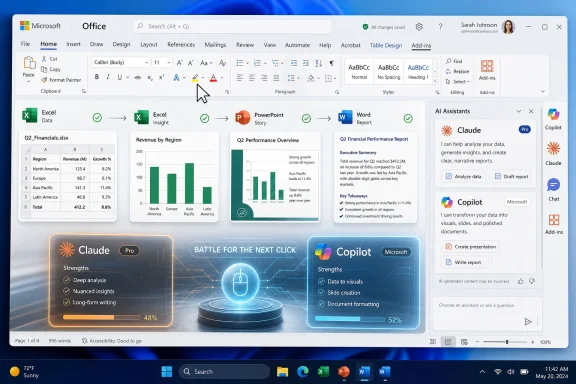 Microsoft’s Home-Field Advantage Is Starting to Look Less Absolute
For the last few years, Microsoft has treated Copilot as the natural next layer of Microsoft 365. Word would draft, Excel would analyze, PowerPoint would assemble, Outlook would summarize, and Teams would preserve the institutional memory of the meeting nobody wanted to attend. The logic was simple: Microsoft owns the surface area, so Microsoft owns the assistant.Claude complicates that story. Anthropic is not replacing Office, and it is not asking users to abandon the familiar document-spreadsheet-slide deck loop. It is doing something more strategically annoying for Microsoft: it is entering Office as a tenant and competing for the most valuable part of the experience, the moment when the user asks for help.
That is why Whitney’s ZDNET piece lands with more force than a routine how-to. His workflow is ordinary by design. He opens a Word document, asks for editing help, asks Excel for a chart, asks PowerPoint to improve a tired deck, and then asks Claude to carry information from one app to another. The conclusion is not that Claude is magic. It is that Copilot is no longer the only AI co-worker that feels native enough to be part of the Office day.
This is the software equivalent of a browser war inside the ribbon. Microsoft still controls the host environment, licensing gravity, admin tooling, and enterprise relationships. But Claude’s add-ins show that the assistant layer can become contestable even when the application layer is not.
The Add-In Is the Wedge, Not the Product
The most important detail in the ZDNET test is also the least glamorous: Claude arrives through Microsoft 365 add-ins. Users install Claude for Word, Excel, PowerPoint, and Outlook from Microsoft’s marketplace, sign in with a paid Claude account, and interact with the assistant from a side pane inside each app. That is not as deeply integrated as Copilot, but it is integrated enough to change behavior.The Office add-in model has always been a compromise. It lets third parties extend Microsoft apps without giving them full ownership of the interface. In the AI era, that compromise becomes powerful. A side pane that can read the active file, suggest edits, generate charts, and coordinate between open documents is not merely an accessory; it is a competing command layer.
Microsoft should be comfortable with this in theory. A vibrant add-in ecosystem makes Office more valuable, especially in organizations that need specialized tools. But AI assistants are not ordinary add-ins. They mediate intent. They decide what work gets done, how it gets phrased, which data gets summarized, and which workflow becomes the user’s habit.
That makes Claude’s add-in strategy a classic wedge. It does not need to defeat Copilot everywhere. It only needs to be good enough in a few daily workflows that users begin clicking the Claude icon instead of the Copilot one. Once that happens, the brand relationship shifts from “I use AI in Office” to “I use Claude in Office.”
Claude’s Pitch Is Cross-App Work, Not Just Better Chat
Whitney’s most telling example is not the Word copyedit or the Excel chart. Those are useful, but they are also table stakes. Copilot, ChatGPT, Gemini, and almost every office-oriented AI tool can plausibly claim some version of proofreading, summarization, chart creation, and slide generation.The more interesting move is Claude’s ability to work across multiple Office applications. In the ZDNET test, Whitney asked Claude to create a Word document based on information from a PowerPoint presentation. Claude generated and formatted the document, moved the content across the app boundary, and added polish to the result. That is where the product begins to look less like a chatbot bolted onto Office and more like a workflow engine.
This is the old Microsoft Office promise in new form. For decades, Office’s strength has been the relationship between Word, Excel, PowerPoint, and Outlook. The spreadsheet becomes the chart, the chart becomes the slide, the slide becomes the memo, the memo becomes the email. The problem is that humans have traditionally had to do the connective labor.
Claude is trying to automate that connective tissue. If it can reliably turn a spreadsheet into a presentation, a presentation into a document, or an inbox thread into a project brief, the assistant becomes valuable not because it writes a better sentence but because it reduces the number of manual transfers between apps. That is a harder product to dismiss.
Copilot’s Weakness Is Not Capability; It Is Trust at the Moment of Use
Copilot is not a weak product in the abstract. Microsoft has spent enormous sums embedding it across Windows, Microsoft 365, GitHub, Edge, and the broader enterprise stack. It benefits from Microsoft Graph, tenant-level context, compliance controls, and the sheer convenience of being present where work already happens.And yet, plenty of users remain underwhelmed. The criticism is often not that Copilot can do nothing; it is that Copilot too often does the wrong amount of something. It may produce generic prose, miss the nuance of a document, over-explain a simple task, or insert itself into the interface in ways that feel more like corporate strategy than user assistance.
Whitney’s account echoes that sentiment. He says he has generally avoided using AI in documents and files because he has been disappointed with Copilot’s results. That kind of user reaction is dangerous for Microsoft because it is not rooted in ideology. It is rooted in repetition. If an assistant fails a few mundane tasks, users stop asking.
Claude’s advantage, at least in this telling, is not that it has won some universal model benchmark. It is that it felt more careful. In PowerPoint, it questioned the vague phrase “spruce up,” assessed the content and visuals, asked how aggressive the redesign should be, explained its plan, and requested approval before making changes. That pacing may annoy users who want instant output, but it can also build confidence in contexts where a bad edit has a cost.
The best assistant is not always the fastest one. In office work, the assistant that pauses before changing your deck may be more valuable than the assistant that eagerly rewrites it.
Word Is Where AI Assistants Reveal Their Taste
The Word test in the ZDNET piece is deceptively simple. Whitney asked Claude to proofread and copyedit an article. Claude returned eight suggested corrections or changes, paired each with an explanation, and allowed the user to review them one at a time or apply them in bulk. According to the test, the suggestions were valid and included issues Word’s built-in editor missed.That matters because editing is not only a correctness task. It is a taste task. A spellchecker finds mistakes. A grammar checker flags constructions. A useful editorial assistant understands whether a sentence is unclear, whether a phrase is overused, whether the tone drifts, and whether a change is worth making.
This is where Claude has built much of its reputation among writers, lawyers, analysts, and other document-heavy workers. Whether one prefers Claude or not, Anthropic has generally positioned the model as cautious, articulate, and strong with long-form text. Those traits map naturally onto Word. The assistant does not need to invent a new category; it needs to be a better editor than the tools people already tolerate.
Microsoft’s challenge is that Word users have decades of muscle memory around reviewing tracked changes, accepting suggestions, and preserving formatting. If Claude respects that ritual, it can feel like an enhancement rather than an intrusion. If Copilot feels like a marketing layer and Claude feels like an editor, the latter has a path into professional trust.
Excel Remains the Hardest Place to Fake Competence
Excel is where AI demos often go to die. Natural-language spreadsheet analysis sounds wonderful until the assistant misreads a range, misunderstands a header, invents a trend, or generates a chart that looks plausible but answers the wrong question. In Word, a mediocre AI suggestion may be annoying. In Excel, a mediocre suggestion can be financially wrong.Whitney’s Excel test was modest: he opened a monthly budget spreadsheet and asked Claude to create a pie chart based on totals. Claude created the chart and added columns showing category and total. That is a small task, but it is exactly the kind of small task that determines whether users return.
The bigger question is whether Claude can sustain that reliability as spreadsheets become messier. Real workbooks contain hidden sheets, inconsistent labels, merged cells, stale formulas, manually pasted exports, and “temporary” tabs that have survived three fiscal years. The assistant that thrives in Excel must be able to ask clarifying questions rather than confidently summarize nonsense.
This is also where enterprise administrators will be skeptical. A chart generated from a family budget is one thing. A chart generated from revenue forecasts, compensation planning, clinical operations, or regulatory reporting is another. AI inside Excel will need auditability, permission discipline, and strong user review patterns before cautious organizations let it near consequential work.
Still, Claude does not need to solve all of Excel at once. If it can reliably perform bounded tasks — make this chart, explain this formula, summarize this table, identify outliers, produce a cleaner version of this worksheet — it earns a foothold. Most spreadsheet work is not heroic modeling. It is cleanup, translation, and presentation.
PowerPoint Is the Showcase Because Mediocrity Is So Visible
PowerPoint is the easiest Office app to mock and the hardest one to escape. Every organization claims to hate slide decks; every organization keeps producing them. That makes PowerPoint an ideal proving ground for AI assistants because the pain is common, visual, and repetitive.In the ZDNET test, Claude did not immediately redesign the presentation after receiving the request to “spruce up” the deck. It challenged the vagueness of the instruction, analyzed the structure and visuals, suggested that the content was solid but the design was flat, and asked whether the user wanted a light, medium, or heavy makeover. That interaction is more interesting than the final theme change.
Good slide work requires interpretation. A deck may need a new visual hierarchy, fewer words, better contrast, more consistent spacing, stronger section breaks, or a complete narrative rebuild. “Make it better” is not a design brief. Claude’s response recognized that.
This is where the assistant becomes almost consultative. It does not merely execute a command; it turns a lazy prompt into a decision. For users who lack design confidence, that may be exactly the point. The assistant supplies not only output but vocabulary: visual weight, structure, theme, audience, emphasis.
Microsoft has obvious strengths here, especially because PowerPoint’s own design tools and Copilot features can operate close to the document model. But if Claude can produce tasteful, reviewable changes without flattening the user’s intent, it becomes a credible alternative. In PowerPoint, users do not care which AI model made the deck less embarrassing. They care that the deck is less embarrassing.
The Subscription Math Is Where Enthusiasm Meets Procurement
There is a catch, and it is not subtle. Claude for Microsoft 365 requires a paid Claude plan, and users still need access to Microsoft 365. For individuals, that may be acceptable if they already pay for Claude Pro and Microsoft 365 Family or Personal. For organizations, it creates another licensing conversation in a budget already crowded with AI line items.Microsoft’s advantage is packaging. Copilot can be sold as part of a broader Microsoft 365 strategy, tied to existing identity, security, compliance, and administrative controls. The buyer may not love the price, but the purchase fits an existing vendor relationship. Claude, by contrast, may be a second AI bill unless the organization has already standardized on Anthropic through another channel.
That does not make Claude a nonstarter. Many enterprises already use multiple AI models, whether directly or through platforms that broker access to OpenAI, Anthropic, Google, and open-weight alternatives. The idea of a single corporate assistant is giving way to a more pragmatic model: different tools for different jobs, governed centrally where possible.
For smaller businesses and power users, the calculation is more personal. If Claude produces better drafts, cleaner edits, and more useful cross-app output, the extra subscription may be easy to justify. If it is merely “also good,” Copilot’s default position may win.
The important shift is that users can now make that comparison inside the same apps. They do not have to export a file, paste text into a browser, and reconstruct context. Claude is close enough to the work surface that its value can be judged in the workflow rather than in an abstract chatbot shootout.
Admins Will See Both an Opportunity and a Governance Problem
For IT administrators, Claude inside Office is both appealing and inconvenient. It gives users another capable AI option inside familiar applications, potentially reducing the unsafe habit of copying sensitive corporate content into random web chat sessions. A managed add-in can be deployed, restricted, monitored, or blocked through Microsoft 365 controls.But it also widens the governance perimeter. Every AI tool that can read documents, spreadsheets, slides, and email raises questions about data handling, retention, model routing, tenant boundaries, and user consent. The fact that Claude sits inside Office does not automatically make it equivalent to Copilot from a compliance perspective.
That distinction matters especially in regulated environments. Legal teams will want to know whether document content is processed by Anthropic, by a cloud platform hosting Claude, or through an enterprise gateway. Security teams will want to know which domains the add-ins contact, what telemetry is collected, and whether prompts or outputs are stored. Records managers will ask whether AI-generated edits create discoverable artifacts.
None of these questions are unique to Anthropic. They apply to Copilot, Gemini, ChatGPT, and every serious workplace AI product. But Claude’s arrival inside Microsoft 365 means administrators can no longer treat “Office AI” as synonymous with “Microsoft AI.” The application may be Microsoft’s, while the assistant may not be.
The practical response is not panic. It is policy. Organizations need clear rules about which add-ins are permitted, which data classes can be processed, whether AI output requires review, and how users should document AI assistance in high-stakes workflows.
The Real Competition Is Over Workflow Memory
The old software competition was about features. The new AI competition is about context. The assistant that understands the document, the spreadsheet, the slide deck, the inbox, and the user’s intent will be more useful than the assistant that merely has the better blank-page answer.That is why cross-app context is central to Claude’s Microsoft 365 play. A Word-only assistant is useful. An Excel-only assistant is useful. A PowerPoint-only assistant is useful. But an assistant that can move between all three begins to resemble a junior analyst, editor, and presentation specialist rolled into one.
Microsoft knows this better than anyone. Copilot’s strongest theoretical advantage is Microsoft Graph — the connective layer across files, meetings, messages, calendars, and organizational knowledge. In a fully realized Copilot environment, the assistant should know not only what is in the open document but also what project it belongs to, who commented on it, which meeting discussed it, and what the related spreadsheet says.
Claude’s add-ins do not erase that advantage. But they pressure it. If users find Claude more reliable in the immediate document loop, Microsoft’s deeper context may matter less for everyday tasks. An assistant with slightly less institutional memory but better judgment at the point of editing can still win the click.
The market may not settle on one assistant. It may settle on a hierarchy. Copilot could remain the enterprise-wide context layer, while Claude becomes the preferred writing and analysis assistant for certain users. Or Microsoft could improve Copilot’s tone, task handling, and model choice enough that third-party assistants remain niche. The outcome is still open.
This Is Also Microsoft’s Multi-Model Future Coming Home to Roost
Microsoft has already signaled that the future of Copilot is not exclusively tied to one model provider. The company’s relationship with OpenAI remains central, but Microsoft has also moved toward more model choice in certain Copilot experiences. That reflects a reality the rest of the industry has already accepted: no single model is best at everything, forever.Claude inside Microsoft 365 makes that reality visible to ordinary users. The comparison is no longer theoretical. If Claude edits a document better, users will notice. If Copilot summarizes a meeting better, users will notice. If one assistant hallucinates a spreadsheet insight and the other asks for clarification, users will notice that too.
This is healthy pressure. Microsoft’s early Copilot push sometimes carried the air of inevitability, as if the presence of the button would do much of the adoption work. But AI assistants are judged more harshly than traditional features because they ask for trust. A button can be ignored; a bad assistant can be resented.
Anthropic’s opportunity is to become the assistant people choose rather than the assistant they are assigned. That is a harder distribution problem but a cleaner product mandate. Claude has to be useful enough that users install it, sign in, and keep it open.
Microsoft’s opportunity is to learn from that pressure. If Copilot becomes more careful, more context-aware, less intrusive, and more transparent because third-party assistants are competing inside Office, users win. The worst outcome would be a locked-down AI monoculture that improves slowly because the default has no serious rival.
The Ribbon Is Now a Model Picker in Disguise
The practical lesson from Whitney’s test is not that everyone should immediately uninstall Copilot or crown Claude the new Office standard. It is that the AI layer in productivity software is becoming modular. The assistant you use in Word may not be the same one your colleague uses, and the best tool may depend on whether the task is editing, analysis, formatting, summarization, or cross-app synthesis.That will feel messy for a while. Users will compare answers. Administrators will restrict add-ins. Vendors will claim native integration, better reasoning, safer deployment, and superior enterprise controls. Underneath the marketing, the shift is straightforward: Office is no longer just a suite of applications. It is becoming a workbench where multiple AI systems compete to interpret the same files.
The Office AI Fight Has Finally Reached the User’s Desk
The most concrete takeaways are less about brand loyalty than workflow discipline. Claude’s Microsoft 365 add-ins are worth testing, but they should be tested against real documents, real spreadsheets, and real decks — not demo files designed to flatter the model.- Claude for Microsoft 365 is most compelling when it moves context between Word, Excel, and PowerPoint rather than merely answering isolated prompts.
- Copilot still has the advantage of Microsoft’s default placement, enterprise packaging, and deeper Microsoft 365 integration.
- Claude’s careful, permission-seeking behavior may appeal to users who want AI assistance without surrendering control of the document.
- Excel remains the highest-risk proving ground because plausible-looking AI output can still be analytically wrong.
- Administrators should treat third-party Office AI add-ins as governed software, not harmless productivity toys.
- The right comparison is not which assistant sounds smarter in chat, but which one produces better reviewed work inside the files people already use.
References
- Primary source: ZDNET
Published: Thu, 28 May 2026 13:10:00 GMT
Why I ditched Copilot for Claude in Word, Excel, and PowerPoint - and how you can, too
Need AI help in Microsoft 365, but don't love Copilot? Claude AI can help you create, edit, and analyze documents. Here's how.www.zdnet.com - Related coverage: windowscentral.com
Microsoft admits forcing the floating Copilot button on Office users was a mistake—but engagement went up anyway | Windows Central
After a wave of user backlash over "intrusive" design, Microsoft is rolling out a fix that allows Word and Excel users to move the AI assistant back to the ribbon.www.windowscentral.com - Official source: support.claude.com
Work across Microsoft 365 apps | Claude Help Center
support.claude.com
- Official source: claude.com
Claude for Microsoft 365 | Claude by Anthropic
Claude works inside Excel, PowerPoint, Word, and Outlook. Edit your files, carry context across all four apps, and stay in control of every change.claude.com - Related coverage: gadgets360.com
Anthropic’s Microsoft 365 Integration Expands With Claude for Excel, PowerPoint and Word | Technology News
Anthropic, on Thursday, announced the general availability of several of its Microsoft 365 add-ins.www.gadgets360.com - Related coverage: aicodex.to
Claude for Microsoft 365: Excel, PowerPoint, Word, and Outlook — AI Codex
On May 7, 2026 Anthropic shipped Claude as add-ins inside Excel, PowerPoint, and Word at general availability, with Outlook in public beta. The headline...www.aicodex.to
- Official source: learn.microsoft.com
Copilot in Microsoft 365 apps with Anthropic models | Microsoft Learn
Learn about the new toggle for Microsoft 365 apps for Anthropic in Europe.learn.microsoft.com - Related coverage: techradar.com
Anthropic is bringing Claude's AI power to Microsoft Word | TechRadar
Claude is getting another plug-in, this time for Wordwww.techradar.com - Related coverage: issuewire.com
- Official source: microsoft.com
</rdf:Alt> </dc:title> <dc:description> <rdf:Alt> <rdf:li xml:lang="x-default"/> </rdf:Alt> </dc:description> <dc:creator> <rdf:Seq> <rdf:li>Lukas V
</rdf:Alt> </dc:description> <dc:creator> <rdf:Seq> <rdf:li>Lukas Velushwww.microsoft.com
- Related coverage: mgmt675.kerryback.com
