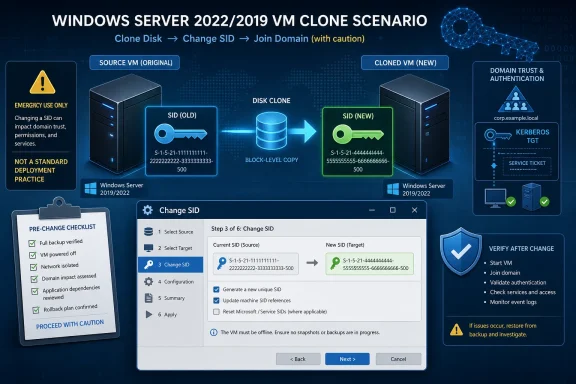
A first-person Gigwise post claims a consultant changed duplicate Windows Server 2019 and 2022 machine SIDs after cloning by using Wittytool Disk Clone instead of reinstalling or running Sysprep, but Microsoft’s documented support position still points administrators toward Sysprep for generalized Windows images. The interesting story is not that yet another utility says it can rewrite a SID. It is that a very old Windows deployment argument has resurfaced in a new disguise: whether “it worked for me” is enough when the machine is a server, the server is joined to a domain, and the outage window belongs to someone else.
The post reads like a familiar small-shop rescue tale. A base Windows Server 2022 installation is cloned for branch offices, the clones appear to collide in ways the administrator attributes to duplicate Security Identifiers, Sysprep is tried too late, NewSID is dismissed as retired, and a third-party cloning package allegedly fixes the problem in a single reboot. For anyone who has inherited a brittle image library, the emotional shape is believable.
But belief is not the same thing as deployment guidance. The practical lesson for Windows admins is more complicated: duplicate identity after cloning is real, Windows has several machine-specific identifiers besides the SID, and a third-party post-clone SID rewrite may solve one symptom while leaving the administrator outside Microsoft’s supported path.
Windows SIDs occupy a strange place in administrator folklore. They are both technically precise and culturally overloaded, a registry-deep identifier that has become shorthand for “this cloned machine is not unique enough.” That shorthand is useful in a crisis, but it also collapses several separate identity problems into one dramatic acronym.
A SID is how Windows represents a security principal: a user, group, computer account, or other identity that can be granted or denied access. Local accounts derive their SIDs from the local machine SID, which means two duplicated machines can theoretically produce matching local account SIDs. In a domain, however, domain accounts receive domain-issued SIDs, and the domain computer account has its own identity in Active Directory.
That distinction is why the “duplicate SID” debate has been so durable. Mark Russinovich’s retirement of NewSID in 2009 did not mean cloned Windows machines magically stopped needing preparation. It meant the industry had overstated the centrality of the machine SID itself, while understating the number of other identifiers and bits of state that make a Windows installation unique.
WSUS client IDs, CM client identities, machine certificates, domain computer accounts, activation state, application licensing fingerprints, scheduled task state, and agent registrations can all become part of the same mess. An admin sees duplicate behavior in a console and says “SID problem” because that is the inherited language of the trade. Sometimes the SID is implicated. Often it is merely standing at the scene of the crime.
That is why the Gigwise account lands with a mix of plausibility and danger. It describes a real operational class of problem, but it packages the fix around a single utility and a single identifier. That is a compelling story for a stressed admin on a Friday night. It is also exactly the kind of simplification that can turn a one-server cleanup into a fleet-wide support problem.
That is not the same as saying Sysprep is a pleasant tool to run on a fully configured production server. It is not. Sysprep is an image-preparation mechanism, not a magic eraser for every post-build identity mistake. Microsoft’s own documentation warns that generalizing a Windows Server installation with server roles already configured can leave those roles unable to function correctly after deployment.
That warning matters because the Gigwise post’s most believable section is the part where Sysprep breaks things. Running generalize after domain join, role installation, SQL Server configuration, and application deployment is a very different act from running it on a reference image before capture. If the administrator has already built a server into a unique production snowflake, Sysprep is no longer a clean deployment step; it is a disruptive reset with blast radius.
Still, the reason Microsoft keeps pointing to Sysprep is not corporate stubbornness. Sysprep is the supported boundary. It is the point at which Microsoft has designed, documented, and tested the identity reset process for deployment. When an admin skips that boundary and later uses a third-party tool to mutate low-level identity data, they may get a working server, but they have also changed the support conversation.
That distinction is not academic. In enterprise IT, the question is rarely “can I make the error go away?” The question is “can I explain this state to the vendor, the auditor, the next admin, and my own incident report six months from now?” A utility that produces a clean reboot and a new SID may pass the first test while failing the second.
The retirement did two things at once. It undercut the folk belief that every clone with a duplicate machine SID was inherently broken, and it reinforced Microsoft’s insistence that Sysprep—not ad hoc SID surgery—was the supported way to prepare cloned Windows systems. That left administrators in an awkward middle ground. Their real-world cloning issues did not disappear, but the most famous quick-fix tool did.
Modern SID changers inherit that ambiguity. They promise the operational convenience NewSID once represented, often with additional claims about registry hives, ACLs, profile references, and post-clone cleanup. Some may work in certain cases. Some may be careful. Some may be reckless. The problem is that “changed the SID and the server booted” is not a complete validation matrix.
A Windows Server is not just a SID-bearing object. It is a pile of assumptions: local security policy, service accounts, certificates, domain trust, update metadata, SQL bindings, application licensing, endpoint detection enrollment, backup agent identity, monitoring configuration, and sometimes a cluster, failover, or replication role layered on top. A tool that rewrites identity references must either understand those relationships or leave them untouched and hope they do not matter.
That is why the claim “without reinstalling” is both attractive and suspicious. Reinstalling is expensive because it forces you to rebuild identity cleanly. A post-clone mutation is cheap because it changes less. The hidden question is whether it changed enough—and whether it changed anything it should not have touched.
WindowsForum readers should treat that distinction seriously. The piece makes strong claims about updating registry hives, ACL entries, user profile references, and preserving domain trust and application state. Those are precisely the claims that require independent testing across roles, patch levels, domain configurations, and application stacks. A smooth result on three or four servers does not establish safety for a fleet.
The most useful part of the walkthrough is not the brand name. It is the sequence of mistakes. The administrator cloned a configured server, encountered uniqueness problems, tried to use Sysprep after the system had already become specialized, discovered that old NewSID-era habits no longer had a supported home, and then reached for an identity-changing tool because the cost of rebuilding was too high.
That is a recognizable operational failure pattern. It starts before the clone. The right point to make Windows unique is during image preparation or first boot, before the machine has joined the domain, enrolled in management, accepted workload-specific configuration, or started generating production data. Every step after that turns a clean deployment task into a recovery operation.
The post’s caveats also deserve more emphasis than the sales arc gives them. Backups are not optional. Domain controllers are not ordinary member servers. Activation may change. SQL Server and other applications may bind to names, certificates, service accounts, or installation state in ways that a SID changer cannot fully predict. “It rebooted” is not the same as “it is supportable.”
WSUS is a good example. Duplicate WSUS clients are frequently caused by duplicated client identifiers, not merely duplicated machine SIDs. If multiple machines report with the same update client identity, the console can appear to show one machine replacing another, or updates can become difficult to track. The fix often involves resetting the WSUS client ID and forcing detection, not changing the entire machine SID.
Configuration Manager and other management agents have their own identity models. Security products often register an endpoint ID. Backup tools may track machine identity. Monitoring platforms may bind to hostname, GUID, certificate, or agent token. A cloned server can therefore be “duplicate” in several consoles at once, each for a different reason.
Domain membership adds another layer. A domain-joined computer has a computer account, a password, secure channel state, DNS registrations, SPNs in some cases, and Group Policy processing history. If a clone is created from a domain-joined source and both machines exist simultaneously, the administrator can end up with trust failures or strange authentication behavior even when the local machine SID is not the only culprit.
This is why post-clone SID tools can be misleading. They may resolve one visible symptom while leaving other cloned identifiers untouched. Conversely, an administrator may attribute a fix to the SID change when the tool also changed other machine-specific state, reset certain values, or forced a reboot that caused services to re-register. The lesson is not that SID tools never help. It is that they are a narrow answer to a wider identity problem.
That is why Windows Server raises the stakes. A member file server may rely on local groups, NTFS ACLs, and domain-based access. An application server may use service accounts and local certificates. A SQL Server instance may have dependencies on hostnames, SPNs, local profiles, encrypted credentials, or machine keys. A domain controller is a different category entirely, because Active Directory has its own replication and identity semantics.
The Gigwise post sensibly flags domain controllers as special, but that warning should be printed in red. A cloned or identity-mutated DC is not a normal machine with a new sticker on it. Active Directory depends on durable identifiers, replication metadata, invocation IDs, and carefully managed promotion and demotion flows. If the server is or has been a domain controller, the fix should be planned around AD recovery practices, not a generic SID-change workflow.
Even member servers deserve caution. If a machine is already in production, changing low-level identity data can affect local ACLs, service permissions, scheduled tasks, application secrets, and local user profiles. A competent tool may attempt to rewrite references. The administrator still needs to verify that the server’s workloads behave correctly after the change.
That verification cannot stop at
But the same convenience can distort judgment. The easier it becomes to mutate a deployed server, the easier it becomes to excuse poor image hygiene. A shop that knows it can “fix the SID later” may stop treating Sysprep, templates, first-boot specialization, and deployment automation as mandatory controls. That is how emergency procedures become standard operating procedure.
The better lesson is to move uniqueness earlier, not to celebrate changing it later. If a tool can generate a new SID during the clone process, that is safer than trying to repair identity after the clone has joined the domain and started accumulating workload-specific state. Better still is a deployment pipeline that uses supported generalization and specialization steps, with documented handling for WSUS, management agents, certificates, and application enrollment.
There is also a procurement issue hiding here. Before adopting any third-party SID changer, IT teams should ask the unglamorous questions: Who supports it? What Windows Server builds has it been tested against? What exactly does it change? Can it produce logs? Does it understand domain controllers? Does it touch ACLs? Does it preserve EFS, certificates, DPAPI-protected secrets, and service credentials? What is the rollback plan if the machine boots but the workload does not?
A forum post can say “worked for me.” A production standard needs something closer to “works under these conditions, fails safely under these other conditions, and is not used outside this scope.” The difference is the line between craftsmanship and superstition.
A reference image should be boring. It should contain the operating system, baseline patches, perhaps core agents that are safe to generalize, and configuration that is explicitly designed to survive Sysprep. It should not already be a domain-joined branch server with roles, application state, SQL dependencies, and client-specific configuration. The more a reference image resembles production, the less reusable it becomes.
First boot should be where the machine becomes itself. That means unique hostname, domain join, computer account creation, certificate enrollment, management registration, WSUS or update policy initialization, monitoring enrollment, and role-specific configuration should happen after specialization. In mature environments, this is automated with deployment tools, scripts, configuration management, or infrastructure-as-code practices. In small shops, it may be a checklist, but it still needs to be a checklist.
Snapshots and backups then become safety controls rather than strategy. Taking a snapshot before identity surgery is wise, but it does not make the surgery inherently safe. A rollback can restore a broken server, but it cannot always erase the effects that a duplicate machine has already had in AD, WSUS, management consoles, or application backends. Prevention is cleaner than rollback.
For consultants and small IT teams, the practical compromise is simple: if you must clone, clone before identity. If you already cloned after identity, slow down before reaching for a one-click repair. Inventory what identifiers matter in that environment. Confirm whether the symptom is actually SID-related. Decide whether a supported Sysprep-based rebuild is painful but cleaner, or whether a third-party repair is justified by the business situation.
That does not make the choice meaningless. If an administrator uses a third-party SID changer on a configured server, the work should be documented as an exception, not normalized as the new golden path. The machine should be tested against the actual services it participates in, not merely inspected for a changed SID. The before-and-after state should be recorded, including domain membership, local administrators, service accounts, scheduled tasks, certificates, update reporting, security agent registration, application licensing, and backup identity.
The business owner or client should also understand the support trade-off. A server repaired outside Microsoft’s recommended imaging process may run perfectly for years. It may also become harder to troubleshoot when a later authentication, update, or application issue appears. That is not fearmongering; it is how support boundaries work.
There is a place for emergency tools. The Windows ecosystem has always had them, from registry editors to boot repair utilities to offline password resets and storage migration packages. The best administrators know when those tools are lifesavers and when they are technical debt with a progress bar.
The Gigwise post is valuable if read in that spirit. It is a case study in escaping a bad clone. It is not a license to build bad clones on purpose.
The post reads like a familiar small-shop rescue tale. A base Windows Server 2022 installation is cloned for branch offices, the clones appear to collide in ways the administrator attributes to duplicate Security Identifiers, Sysprep is tried too late, NewSID is dismissed as retired, and a third-party cloning package allegedly fixes the problem in a single reboot. For anyone who has inherited a brittle image library, the emotional shape is believable.
But belief is not the same thing as deployment guidance. The practical lesson for Windows admins is more complicated: duplicate identity after cloning is real, Windows has several machine-specific identifiers besides the SID, and a third-party post-clone SID rewrite may solve one symptom while leaving the administrator outside Microsoft’s supported path.
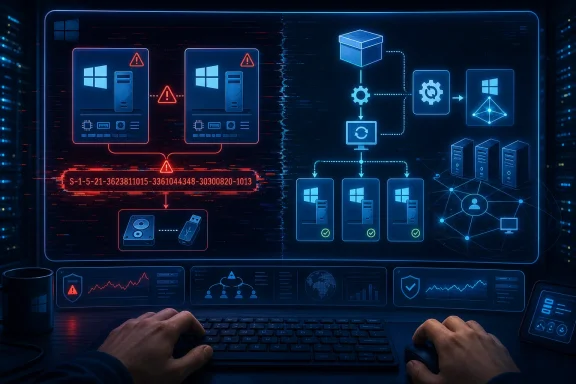 The SID Panic Never Really Went Away
Windows SIDs occupy a strange place in administrator folklore. They are both technically precise and culturally overloaded, a registry-deep identifier that has become shorthand for “this cloned machine is not unique enough.” That shorthand is useful in a crisis, but it also collapses several separate identity problems into one dramatic acronym.A SID is how Windows represents a security principal: a user, group, computer account, or other identity that can be granted or denied access. Local accounts derive their SIDs from the local machine SID, which means two duplicated machines can theoretically produce matching local account SIDs. In a domain, however, domain accounts receive domain-issued SIDs, and the domain computer account has its own identity in Active Directory.
That distinction is why the “duplicate SID” debate has been so durable. Mark Russinovich’s retirement of NewSID in 2009 did not mean cloned Windows machines magically stopped needing preparation. It meant the industry had overstated the centrality of the machine SID itself, while understating the number of other identifiers and bits of state that make a Windows installation unique.
WSUS client IDs, CM client identities, machine certificates, domain computer accounts, activation state, application licensing fingerprints, scheduled task state, and agent registrations can all become part of the same mess. An admin sees duplicate behavior in a console and says “SID problem” because that is the inherited language of the trade. Sometimes the SID is implicated. Often it is merely standing at the scene of the crime.
That is why the Gigwise account lands with a mix of plausibility and danger. It describes a real operational class of problem, but it packages the fix around a single utility and a single identifier. That is a compelling story for a stressed admin on a Friday night. It is also exactly the kind of simplification that can turn a one-server cleanup into a fleet-wide support problem.
Microsoft’s Supported Answer Remains Boring for a Reason
Microsoft’s position on Windows duplication has been consistent in the way enterprise administrators secretly want vendors to be: irritating, conservative, and clear. If you are cloning Windows installations for deployment, prepare the image with Sysprep. The generalize pass removes or resets machine-specific information, including the computer SID, and is intended to put the installation into a deployable state.That is not the same as saying Sysprep is a pleasant tool to run on a fully configured production server. It is not. Sysprep is an image-preparation mechanism, not a magic eraser for every post-build identity mistake. Microsoft’s own documentation warns that generalizing a Windows Server installation with server roles already configured can leave those roles unable to function correctly after deployment.
That warning matters because the Gigwise post’s most believable section is the part where Sysprep breaks things. Running generalize after domain join, role installation, SQL Server configuration, and application deployment is a very different act from running it on a reference image before capture. If the administrator has already built a server into a unique production snowflake, Sysprep is no longer a clean deployment step; it is a disruptive reset with blast radius.
Still, the reason Microsoft keeps pointing to Sysprep is not corporate stubbornness. Sysprep is the supported boundary. It is the point at which Microsoft has designed, documented, and tested the identity reset process for deployment. When an admin skips that boundary and later uses a third-party tool to mutate low-level identity data, they may get a working server, but they have also changed the support conversation.
That distinction is not academic. In enterprise IT, the question is rarely “can I make the error go away?” The question is “can I explain this state to the vendor, the auditor, the next admin, and my own incident report six months from now?” A utility that produces a clean reboot and a new SID may pass the first test while failing the second.
NewSID’s Retirement Still Haunts Every Modern SID Changer
NewSID is the ghost in this machine. For years, it was the obvious answer to duplicate-machine-SID anxiety: run the Sysinternals tool, rewrite the SID, move on. Then Russinovich retired it and argued that duplicate machine SIDs were not the general-purpose disaster many admins believed them to be.The retirement did two things at once. It undercut the folk belief that every clone with a duplicate machine SID was inherently broken, and it reinforced Microsoft’s insistence that Sysprep—not ad hoc SID surgery—was the supported way to prepare cloned Windows systems. That left administrators in an awkward middle ground. Their real-world cloning issues did not disappear, but the most famous quick-fix tool did.
Modern SID changers inherit that ambiguity. They promise the operational convenience NewSID once represented, often with additional claims about registry hives, ACLs, profile references, and post-clone cleanup. Some may work in certain cases. Some may be careful. Some may be reckless. The problem is that “changed the SID and the server booted” is not a complete validation matrix.
A Windows Server is not just a SID-bearing object. It is a pile of assumptions: local security policy, service accounts, certificates, domain trust, update metadata, SQL bindings, application licensing, endpoint detection enrollment, backup agent identity, monitoring configuration, and sometimes a cluster, failover, or replication role layered on top. A tool that rewrites identity references must either understand those relationships or leave them untouched and hope they do not matter.
That is why the claim “without reinstalling” is both attractive and suspicious. Reinstalling is expensive because it forces you to rebuild identity cleanly. A post-clone mutation is cheap because it changes less. The hidden question is whether it changed enough—and whether it changed anything it should not have touched.
The Gigwise Walkthrough Works Best as a Warning Label
The submitted article is framed as an honest walkthrough, but it also reads like a product success story. Wittytool Disk Clone appears not merely as one tool among several but as the instrument that turns a weekend outage into a six-minute reboot. That may reflect the author’s actual experience. It may also reflect the editorial shape of a sponsored or promotional technology post.WindowsForum readers should treat that distinction seriously. The piece makes strong claims about updating registry hives, ACL entries, user profile references, and preserving domain trust and application state. Those are precisely the claims that require independent testing across roles, patch levels, domain configurations, and application stacks. A smooth result on three or four servers does not establish safety for a fleet.
The most useful part of the walkthrough is not the brand name. It is the sequence of mistakes. The administrator cloned a configured server, encountered uniqueness problems, tried to use Sysprep after the system had already become specialized, discovered that old NewSID-era habits no longer had a supported home, and then reached for an identity-changing tool because the cost of rebuilding was too high.
That is a recognizable operational failure pattern. It starts before the clone. The right point to make Windows unique is during image preparation or first boot, before the machine has joined the domain, enrolled in management, accepted workload-specific configuration, or started generating production data. Every step after that turns a clean deployment task into a recovery operation.
The post’s caveats also deserve more emphasis than the sales arc gives them. Backups are not optional. Domain controllers are not ordinary member servers. Activation may change. SQL Server and other applications may bind to names, certificates, service accounts, or installation state in ways that a SID changer cannot fully predict. “It rebooted” is not the same as “it is supportable.”
The Real Problem Is Cloned State, Not Just Duplicate SIDs
Administrators love single-cause explanations because they make incidents feel solvable. Duplicate SID. Bad DNS. Broken GPO. Expired certificate. In reality, Windows identity failures after cloning are often a stack of duplicated state, and the SID is only the most famous layer.WSUS is a good example. Duplicate WSUS clients are frequently caused by duplicated client identifiers, not merely duplicated machine SIDs. If multiple machines report with the same update client identity, the console can appear to show one machine replacing another, or updates can become difficult to track. The fix often involves resetting the WSUS client ID and forcing detection, not changing the entire machine SID.
Configuration Manager and other management agents have their own identity models. Security products often register an endpoint ID. Backup tools may track machine identity. Monitoring platforms may bind to hostname, GUID, certificate, or agent token. A cloned server can therefore be “duplicate” in several consoles at once, each for a different reason.
Domain membership adds another layer. A domain-joined computer has a computer account, a password, secure channel state, DNS registrations, SPNs in some cases, and Group Policy processing history. If a clone is created from a domain-joined source and both machines exist simultaneously, the administrator can end up with trust failures or strange authentication behavior even when the local machine SID is not the only culprit.
This is why post-clone SID tools can be misleading. They may resolve one visible symptom while leaving other cloned identifiers untouched. Conversely, an administrator may attribute a fix to the SID change when the tool also changed other machine-specific state, reset certain values, or forced a reboot that caused services to re-register. The lesson is not that SID tools never help. It is that they are a narrow answer to a wider identity problem.
Servers Are Where “It Works on My Machine” Goes to Die
Client imaging mistakes are annoying. Server imaging mistakes become architecture. A cloned desktop with duplicate state may confuse WSUS or management inventory. A cloned server can carry that confusion into authentication, file permissions, application databases, scheduled tasks, and long-lived service identities.That is why Windows Server raises the stakes. A member file server may rely on local groups, NTFS ACLs, and domain-based access. An application server may use service accounts and local certificates. A SQL Server instance may have dependencies on hostnames, SPNs, local profiles, encrypted credentials, or machine keys. A domain controller is a different category entirely, because Active Directory has its own replication and identity semantics.
The Gigwise post sensibly flags domain controllers as special, but that warning should be printed in red. A cloned or identity-mutated DC is not a normal machine with a new sticker on it. Active Directory depends on durable identifiers, replication metadata, invocation IDs, and carefully managed promotion and demotion flows. If the server is or has been a domain controller, the fix should be planned around AD recovery practices, not a generic SID-change workflow.
Even member servers deserve caution. If a machine is already in production, changing low-level identity data can affect local ACLs, service permissions, scheduled tasks, application secrets, and local user profiles. A competent tool may attempt to rewrite references. The administrator still needs to verify that the server’s workloads behave correctly after the change.
That verification cannot stop at
whoami /user. A new SID prefix proves that something changed. It does not prove that file permissions, domain trust, update reporting, management enrollment, application licensing, and backup registration are all healthy. The more important test is whether the server behaves as a unique participant in every system that depends on it.The Temptation of the Six-Minute Fix Is Exactly the Risk
There is a reason the Wittytool story is appealing. It promises to convert a rebuild into a reboot. For a consultant with a client waiting on branch office servers, that is not a minor improvement. It is the difference between a contained maintenance window and an embarrassing reset of the project plan.But the same convenience can distort judgment. The easier it becomes to mutate a deployed server, the easier it becomes to excuse poor image hygiene. A shop that knows it can “fix the SID later” may stop treating Sysprep, templates, first-boot specialization, and deployment automation as mandatory controls. That is how emergency procedures become standard operating procedure.
The better lesson is to move uniqueness earlier, not to celebrate changing it later. If a tool can generate a new SID during the clone process, that is safer than trying to repair identity after the clone has joined the domain and started accumulating workload-specific state. Better still is a deployment pipeline that uses supported generalization and specialization steps, with documented handling for WSUS, management agents, certificates, and application enrollment.
There is also a procurement issue hiding here. Before adopting any third-party SID changer, IT teams should ask the unglamorous questions: Who supports it? What Windows Server builds has it been tested against? What exactly does it change? Can it produce logs? Does it understand domain controllers? Does it touch ACLs? Does it preserve EFS, certificates, DPAPI-protected secrets, and service credentials? What is the rollback plan if the machine boots but the workload does not?
A forum post can say “worked for me.” A production standard needs something closer to “works under these conditions, fails safely under these other conditions, and is not used outside this scope.” The difference is the line between craftsmanship and superstition.
The Better Runbook Starts Before the Clone Exists
The correct operational response to the Gigwise scenario is not to memorize a new button in a disk-cloning utility. It is to rebuild the cloning runbook so that a post-facto SID change becomes the exception. That starts with separating reference images from configured servers.A reference image should be boring. It should contain the operating system, baseline patches, perhaps core agents that are safe to generalize, and configuration that is explicitly designed to survive Sysprep. It should not already be a domain-joined branch server with roles, application state, SQL dependencies, and client-specific configuration. The more a reference image resembles production, the less reusable it becomes.
First boot should be where the machine becomes itself. That means unique hostname, domain join, computer account creation, certificate enrollment, management registration, WSUS or update policy initialization, monitoring enrollment, and role-specific configuration should happen after specialization. In mature environments, this is automated with deployment tools, scripts, configuration management, or infrastructure-as-code practices. In small shops, it may be a checklist, but it still needs to be a checklist.
Snapshots and backups then become safety controls rather than strategy. Taking a snapshot before identity surgery is wise, but it does not make the surgery inherently safe. A rollback can restore a broken server, but it cannot always erase the effects that a duplicate machine has already had in AD, WSUS, management consoles, or application backends. Prevention is cleaner than rollback.
For consultants and small IT teams, the practical compromise is simple: if you must clone, clone before identity. If you already cloned after identity, slow down before reaching for a one-click repair. Inventory what identifiers matter in that environment. Confirm whether the symptom is actually SID-related. Decide whether a supported Sysprep-based rebuild is painful but cleaner, or whether a third-party repair is justified by the business situation.
The Admin’s Shortcut Has to Survive Monday Morning
The uncomfortable truth is that many Windows environments are held together by pragmatic fixes that would make a vendor support engineer wince. Small businesses do not always have perfect reference images. Branch rollouts happen under time pressure. A consultant may reasonably choose the least-bad option when the alternative is a weekend rebuild and an angry client.That does not make the choice meaningless. If an administrator uses a third-party SID changer on a configured server, the work should be documented as an exception, not normalized as the new golden path. The machine should be tested against the actual services it participates in, not merely inspected for a changed SID. The before-and-after state should be recorded, including domain membership, local administrators, service accounts, scheduled tasks, certificates, update reporting, security agent registration, application licensing, and backup identity.
The business owner or client should also understand the support trade-off. A server repaired outside Microsoft’s recommended imaging process may run perfectly for years. It may also become harder to troubleshoot when a later authentication, update, or application issue appears. That is not fearmongering; it is how support boundaries work.
There is a place for emergency tools. The Windows ecosystem has always had them, from registry editors to boot repair utilities to offline password resets and storage migration packages. The best administrators know when those tools are lifesavers and when they are technical debt with a progress bar.
The Gigwise post is valuable if read in that spirit. It is a case study in escaping a bad clone. It is not a license to build bad clones on purpose.
The Branch-Office Clone Needs a Stricter Lesson
The most concrete takeaway from this episode is not that Wittytool Disk Clone is good or bad. It is that Windows identity is a deployment discipline, and SIDs are only one part of it. A clean clone strategy prevents far more pain than a clever post-clone repair can remove.- A Windows Server image should be generalized before it becomes a branch-office server, not after roles, domain membership, and application dependencies have been layered on top.
- Microsoft’s supported cloning story still centers on Sysprep, even though Sysprep can be destructive when used late in the lifecycle of a configured server.
- Duplicate behavior in WSUS, management tools, or domain operations may involve identifiers other than the machine SID, so administrators should diagnose the affected system rather than assume one acronym explains every symptom.
- Third-party SID changers may be useful as emergency tools, but they should be tested, documented, backed by snapshots or backups, and treated as exceptions to the normal deployment process.
- Domain controllers require a separate Active Directory-aware recovery plan, and generic SID-changing workflows should not be treated as safe for them.
- Verifying success means checking the server’s real workloads, management enrollment, update reporting, security agents, activation, and domain trust—not just confirming that a SID string changed.
References
- Primary source: GigWise
Published: 2026-05-23T16:17:07.621728
GigWise - Glam. Gossip. Groove.
www.gigwise.com - Official source: learn.microsoft.com
Disk duplication of Windows installations - Windows Server | Microsoft Learn
Describes the SID and supported methods for cloning or duplicating a Windows installation.learn.microsoft.com