

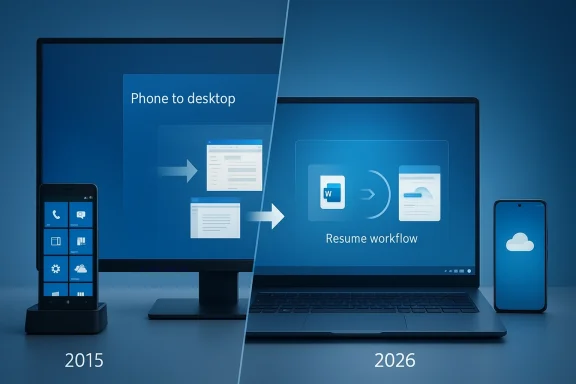
Microsoft’s Continuum was never just a clever demo; it was an early attempt to blur the line between phone and PC, and the renewed attention around it shows how far Windows has traveled since that idea first appeared. The forum material frames Continuum as a prescient prototype rather than a dead-end, arguing that modern cross-device experiences, Samsung DeX-style desktop modes, and Windows 11’s continuity features have made the old promise feel newly relevant . What once looked like an experiment constrained by weak mobile hardware and immature app ecosystems now reads like a preview of the platform convergence race that is still unfolding in 2026. That matters because the original Continuum story is no longer just about Windows Phone history; it is about the broader question of whether a pocket device can reliably act as a real computer.
When Microsoft introduced Continuum for phones, the company was reaching for a future in which the same device could power a phone UI on the go and a desktop-like workspace when docked. The premise was seductive because it promised fewer devices, fewer sync headaches, and a cleaner migration path between contexts. In theory, a user could move from messaging to spreadsheets without ever feeling like they had switched platforms. In practice, the experience depended on a stack of constraints that Windows Phone never solved well enough to turn the idea into a mass-market habit .
The historical problem was not that the vision was bad; it was that the ecosystem was not ready. App compatibility was thin, developer support was limited, and the hardware economics of the time did not deliver enough performance, battery life, or peripheral flexibility to make desktop mode feel natural. Continuum arrived before the market had normalized the idea that a phone might serve as a serious productivity endpoint. That timing mattered more than Microsoft fans liked to admit, because even strong concepts can die when the surrounding platform is too small to sustain them.
A decade later, the same core idea has resurfaced in more practical forms. Android phones, Samsung DeX, cloud-backed productivity apps, and better wireless connectivity have made “phone to desktop” behavior more normal than novel. The result is not a one-to-one revival of Continuum, but a broader shift in how people expect devices to behave. The forum discussion is persuasive precisely because it treats Continuum as a prototype of a category rather than a failed product in isolation .
Microsoft itself has also moved. Instead of betting on a proprietary mobile operating system, it now treats Windows 11 as the coordination layer and Android as the mobile companion. That is a much more realistic strategy, because Android has the reach, app depth, and vendor diversity that Windows Phone never achieved. In that sense, Continuum’s legacy is less about the phone that Microsoft lost and more about the continuity model it helped define.
At the time, the concept was visually memorable and strategically bold. Microsoft wanted Windows to feel like an operating model rather than a single-screen OS. That ambition matched the company’s broader attempt to preserve relevance as smartphones rose and traditional PCs seemed vulnerable. Continuum was therefore as much a defensive move as an innovative one.
The trouble was that the market wanted continuity without compromise. Users wanted phone portability, laptop ergonomics, and desktop app breadth all at once. Continuum could suggest that future, but it could not yet deliver it consistently enough. The result was a feature that was admired more than adopted.
That distinction matters because many technology narratives confuse “interesting” with “useful.” Continuum was interesting immediately. It became useful only later, when the rest of the industry had spent years catching up to the underlying idea.
Key reasons the concept mattered:
This is where the forum’s comparison to Samsung DeX becomes so important. DeX has proven that a phone-based desktop mode can be credible when the hardware, software, and accessory ecosystem cooperate. It does not need to replace a laptop for everyone to be valuable. It only needs to be good enough for the situations where convenience beats maximal performance.
Microsoft’s newer continuity work is also more modest and therefore more realistic. Rather than pretending a phone can fully replace a PC, Windows 11 features increasingly aim to move content and activity between devices. That is a smarter path because it acknowledges the limits of mobile hardware while still preserving the spirit of Continuum. The old dream survives, but in a form that is less dramatic and more durable.
It also aligns better with the cloud-first reality of modern software. If the document lives in OneDrive, the playlist is in Spotify, and the browser session is synced, the device becomes less important than the continuity layer. Continuum’s original promise survives, but the implementation model has changed.
Important shifts since the original Continuum era:
This is a pragmatic choice because Microsoft already dominates the desktop and productivity stack. It can shape user behavior by making Windows the best place to continue work started elsewhere. That is a different kind of ambition than mobile OS dominance, but it may be the more realistic one. The company does not need to win every device category if it can own the handoff between them.
The forum thread on Cross-Device Resume reinforces this logic by showing how Microsoft has evolved from a narrow OneDrive handoff into a broader continuity system that now includes richer app and workflow transitions . That evolution is important because it demonstrates that Microsoft learned the lesson Continuum taught: utility must feel native, not ceremonial. A feature only becomes sticky when it disappears into everyday use.
This approach also lets Microsoft avoid one of Continuum’s old traps: overpromising a universal computing future before the app ecosystem is ready. The company now prefers incremental continuity over revolutionary replacement. That may sound less glamorous, but it is far more likely to survive in the real world.
Even when the concept worked, it often worked in a constrained way. A polished demo is not the same as a daily workflow. Latency, app compatibility, and thermal throttling all made the experience feel like a compromise. Users were not wrong to notice that the desktop mode was thinner than the marketing implied.
The forum discussion around modern Windows-on-mobile experiments, including ARM-based and virtualized use cases, underlines that hardware still sets the boundaries of the experience . The lesson is timeless: software ambition rises or falls on the quality of the platform beneath it. If the chip, memory, and cooling budget are insufficient, the dream becomes a tradeoff list.
That mismatch made Continuum feel fragile. It was not enough for the phone to be fast for a minute. It had to stay responsive for hours. That is a much harder engineering problem, especially when battery and thermals are non-negotiable.
Hardware constraints that shaped the outcome:
Microsoft learned this lesson the hard way. Windows Phone never achieved the app depth needed to make Continuum feel complete. The user could admire the interface, but admiration does not equal productivity. The platform had to prove it could support daily essentials, and it never quite got there.
Today’s ecosystem is much healthier. Web apps are stronger, cloud apps are more responsive, and many workflows have been normalized around browser tabs rather than platform-specific binaries. That reduces the friction of moving between mobile and desktop. It also makes continuity features more valuable because they can hand off a browser state, a cloud document, or a streaming session without requiring deep OS integration.
This is why the newer Cross-Device Resume concept feels more natural than the old phone-to-PC dock-and-launch model. It is not asking the user to think about the machine. It is asking the user to continue the task. That is a much stronger product philosophy.
What app ecosystems determine:
The competitive question is not which company made the first clever demo. It is which one can make continuity feel invisible. Apple’s advantage has always been polish. Samsung’s advantage is the willingness to let a premium phone stretch into desktop territory. Microsoft’s advantage is that it owns the work software stack that many users already depend on every day.
That means Microsoft does not need to win by copying Apple or Samsung. It can win by making the Windows continuation path the most useful one for business and hybrid users. That is a narrower market than “everyone with a phone,” but it is still a huge market. And for Microsoft, huge enough is often the right target.
That is an important distinction. Continuity is not one feature. It is a product tone. Microsoft’s challenge is to create that tone across a fragmented hardware world. That is harder, but not impossible.
Competitive takeaways:
Consumers care too, but their calculus is more emotional. They want convenience, simplicity, and the sense that their devices are working together instead of competing for attention. A feature like Continuum can feel magical to consumers, but only if it is frictionless. Once setup gets complicated, enthusiasm drops quickly.
The forum’s broader Windows continuity coverage suggests that Microsoft is now better at targeting both audiences with different flavors of the same idea . The enterprise version is about managed workflows and app handoff. The consumer version is about not losing momentum. That split is healthy because the same feature does not need to solve the same problem for every user.
Consumers, by contrast, are more sensitive to setup pain and visible complexity. If a feature requires multiple permissions, pairing steps, or app-specific enrollment, it loses part of its appeal. That is why the best continuity tools feel almost automatic.
That is a healthier story. It lets Windows stay relevant without pretending the company can rebuild the mobile market from scratch. It also avoids the old mistake of forcing a product to carry a hardware dream that the market is not ready to support. The company now seems more willing to let continuity be a feature of the ecosystem rather than the entire ecosystem.
The user-facing result is smaller but smarter. Instead of asking users to dock a phone and pretend it is a PC, Microsoft is asking them to continue activity wherever they left off. That sounds less dramatic, but it is more aligned with how people actually work in 2026.
It also makes Microsoft’s work look more coherent. The company is no longer chasing a failed phone platform. It is building a continuity layer on top of the platform it still owns. That is what successful adaptation looks like.
The bigger question is how far the market is willing to go with the idea of the phone as an occasional PC. Hardware is good enough for many tasks now, but not every task. That means the future is likely to remain hybrid: the phone handles convenience, the PC handles depth, and the continuity layer bridges the gap.
The deeper lesson is that the best ideas often survive in altered form. Continuum did not win as a Windows Phone feature, but its core insight—compute should follow the user, not the device—has become one of the defining assumptions of modern Windows. That makes it less a relic than a foundation, and foundations matter long after the original building is gone.
Source: Numerama Windows 10 Continuum
 Background
When Microsoft introduced Continuum for phones, the company was reaching for a future in which the same device could power a phone UI on the go and a desktop-like workspace when docked. The premise was seductive because it promised fewer devices, fewer sync headaches, and a cleaner migration path between contexts. In theory, a user could move from messaging to spreadsheets without ever feeling like they had switched platforms. In practice, the experience depended on a stack of constraints that Windows Phone never solved well enough to turn the idea into a mass-market habit .The historical problem was not that the vision was bad; it was that the ecosystem was not ready. App compatibility was thin, developer support was limited, and the hardware economics of the time did not deliver enough performance, battery life, or peripheral flexibility to make desktop mode feel natural. Continuum arrived before the market had normalized the idea that a phone might serve as a serious productivity endpoint. That timing mattered more than Microsoft fans liked to admit, because even strong concepts can die when the surrounding platform is too small to sustain them.
A decade later, the same core idea has resurfaced in more practical forms. Android phones, Samsung DeX, cloud-backed productivity apps, and better wireless connectivity have made “phone to desktop” behavior more normal than novel. The result is not a one-to-one revival of Continuum, but a broader shift in how people expect devices to behave. The forum discussion is persuasive precisely because it treats Continuum as a prototype of a category rather than a failed product in isolation .
Microsoft itself has also moved. Instead of betting on a proprietary mobile operating system, it now treats Windows 11 as the coordination layer and Android as the mobile companion. That is a much more realistic strategy, because Android has the reach, app depth, and vendor diversity that Windows Phone never achieved. In that sense, Continuum’s legacy is less about the phone that Microsoft lost and more about the continuity model it helped define.
Why Continuum Mattered Then
Continuum mattered because it asked a simple but powerful question: what if a phone could become a desktop when the use case demanded it? That question still defines modern device convergence, even if the industry now answers it with more mature tools. The appeal was not raw power alone; it was the promise of contextual computing, where hardware adapts to the moment instead of forcing the user into one rigid workflow.At the time, the concept was visually memorable and strategically bold. Microsoft wanted Windows to feel like an operating model rather than a single-screen OS. That ambition matched the company’s broader attempt to preserve relevance as smartphones rose and traditional PCs seemed vulnerable. Continuum was therefore as much a defensive move as an innovative one.
The trouble was that the market wanted continuity without compromise. Users wanted phone portability, laptop ergonomics, and desktop app breadth all at once. Continuum could suggest that future, but it could not yet deliver it consistently enough. The result was a feature that was admired more than adopted.
The gap between vision and reality
The forum analysis captures a key truth: Continuum was prescient, but its timing was off . A feature can be ahead of its time in a way that is impressive and still commercially doomed. If the device cannot power external displays smoothly, if app support is too limited, or if the interface becomes awkward the moment real work begins, the concept remains a demo instead of a habit.That distinction matters because many technology narratives confuse “interesting” with “useful.” Continuum was interesting immediately. It became useful only later, when the rest of the industry had spent years catching up to the underlying idea.
Key reasons the concept mattered:
- It anticipated today’s phone-as-PC discussions.
- It treated mobility and productivity as a single workflow.
- It pushed Microsoft beyond the idea of one device per task.
- It helped normalize the expectation of context-aware interfaces.
- It revealed how much software ecosystems matter when hardware is already close enough.
What Changed by 2026
By 2026, the device landscape is dramatically different. Phones are far more powerful, battery life is better, wireless displays are more practical, and cloud apps reduce the need for local heavy lifting. That means the technical ceiling that once made Continuum feel fragile is higher now. More importantly, users have grown accustomed to switching among phone, tablet, laptop, and browser without treating each transition as a hard boundary.This is where the forum’s comparison to Samsung DeX becomes so important. DeX has proven that a phone-based desktop mode can be credible when the hardware, software, and accessory ecosystem cooperate. It does not need to replace a laptop for everyone to be valuable. It only needs to be good enough for the situations where convenience beats maximal performance.
Microsoft’s newer continuity work is also more modest and therefore more realistic. Rather than pretending a phone can fully replace a PC, Windows 11 features increasingly aim to move content and activity between devices. That is a smarter path because it acknowledges the limits of mobile hardware while still preserving the spirit of Continuum. The old dream survives, but in a form that is less dramatic and more durable.
From full desktop emulation to workflow continuity
The contemporary version of the idea is less about turning a phone into a desktop shell and more about moving the user’s work smoothly across devices. A file starts on mobile, continues on PC, and maybe returns to mobile later. That workflow-centric approach is easier to maintain and easier for users to understand.It also aligns better with the cloud-first reality of modern software. If the document lives in OneDrive, the playlist is in Spotify, and the browser session is synced, the device becomes less important than the continuity layer. Continuum’s original promise survives, but the implementation model has changed.
Important shifts since the original Continuum era:
- Mobile chips are far more capable.
- Cloud services reduce local dependency.
- App ecosystems are broader and more mature.
- Desktop modes now have better precedent.
- Users are more comfortable with hybrid workflows.
Microsoft’s Strategic Pivot
Microsoft’s true pivot was not just away from Windows Phone; it was toward cross-device orchestration. That is a much larger strategic move than it first appears. Instead of trying to own both sides of the phone-PC relationship, Microsoft now focuses on the PC side and lets Android fill the mobile role.This is a pragmatic choice because Microsoft already dominates the desktop and productivity stack. It can shape user behavior by making Windows the best place to continue work started elsewhere. That is a different kind of ambition than mobile OS dominance, but it may be the more realistic one. The company does not need to win every device category if it can own the handoff between them.
The forum thread on Cross-Device Resume reinforces this logic by showing how Microsoft has evolved from a narrow OneDrive handoff into a broader continuity system that now includes richer app and workflow transitions . That evolution is important because it demonstrates that Microsoft learned the lesson Continuum taught: utility must feel native, not ceremonial. A feature only becomes sticky when it disappears into everyday use.
The Android-first reality
Microsoft’s mobile strategy now depends heavily on Android, and that is not a failure—it is an acknowledgment of market reality. Android dominates mobile share, and Windows remains the desktop standard. The overlap is where Microsoft can still create leverage. That is why features like phone-to-PC resume matter more than a nostalgic attempt to relive Windows Phone.This approach also lets Microsoft avoid one of Continuum’s old traps: overpromising a universal computing future before the app ecosystem is ready. The company now prefers incremental continuity over revolutionary replacement. That may sound less glamorous, but it is far more likely to survive in the real world.
Why the pivot is strategically smarter
- It aligns with current market share.
- It reduces platform lock-in risk.
- It works with, rather than against, Android.
- It leverages Microsoft 365 and cloud identity.
- It avoids repeating the Windows Phone hardware problem.
The Hardware Problem Continuum Could Not Escape
The original Continuum story was as much about hardware as software. The phone had to drive an external display, manage peripherals, and keep performance stable enough to feel laptop-like. That is a heavy ask for a pocket device, especially in an era when mobile silicon had far less thermal headroom than it does now.Even when the concept worked, it often worked in a constrained way. A polished demo is not the same as a daily workflow. Latency, app compatibility, and thermal throttling all made the experience feel like a compromise. Users were not wrong to notice that the desktop mode was thinner than the marketing implied.
The forum discussion around modern Windows-on-mobile experiments, including ARM-based and virtualized use cases, underlines that hardware still sets the boundaries of the experience . The lesson is timeless: software ambition rises or falls on the quality of the platform beneath it. If the chip, memory, and cooling budget are insufficient, the dream becomes a tradeoff list.
Why mobile silicon was the old bottleneck
The biggest challenge was sustained workload behavior. Phones are designed to burst, not to sit under load for long periods. A desktop mode, by contrast, assumes continuous interaction, window management, and peripheral use. Those are fundamentally different usage patterns.That mismatch made Continuum feel fragile. It was not enough for the phone to be fast for a minute. It had to stay responsive for hours. That is a much harder engineering problem, especially when battery and thermals are non-negotiable.
Hardware constraints that shaped the outcome:
- Limited sustained performance.
- Thermal throttling under desktop load.
- Memory pressure from multitasking.
- Display output and accessory friction.
- Battery drain during docked use.
App Ecosystems Decide Everything
No convergence story succeeds without apps. This is one reason Continuum struggled while modern alternatives have found more traction. A desktop mode is only as valuable as the software that runs inside it. If the apps are missing or poorly adapted, the experience collapses into novelty.Microsoft learned this lesson the hard way. Windows Phone never achieved the app depth needed to make Continuum feel complete. The user could admire the interface, but admiration does not equal productivity. The platform had to prove it could support daily essentials, and it never quite got there.
Today’s ecosystem is much healthier. Web apps are stronger, cloud apps are more responsive, and many workflows have been normalized around browser tabs rather than platform-specific binaries. That reduces the friction of moving between mobile and desktop. It also makes continuity features more valuable because they can hand off a browser state, a cloud document, or a streaming session without requiring deep OS integration.
Why continuity is now easier to sell
In 2015, app continuity had to fight platform fragmentation. In 2026, it can ride on top of standardized services. That is a massive difference. A user who opens a spreadsheet in Microsoft 365 or resumes a playlist in Spotify already understands the logic of moving between endpoints.This is why the newer Cross-Device Resume concept feels more natural than the old phone-to-PC dock-and-launch model. It is not asking the user to think about the machine. It is asking the user to continue the task. That is a much stronger product philosophy.
What app ecosystems determine:
- Whether the workflow is actually useful.
- Whether users can trust the handoff.
- Whether the mode feels like a desktop or a toy.
- Whether developers see a reason to optimize.
- Whether the feature survives after the novelty fades.
Continuum and the Competition
Continuum also matters because it sits inside a larger competitive story. Apple has long owned the reputation for elegant handoff and device continuity. Samsung has demonstrated that Android-based desktop modes can be practical. Google has spent years improving cross-device experiences without fully committing to a phone-as-PC model. Microsoft sits in the middle, trying to exploit the intersection of productivity, identity, and cloud services.The competitive question is not which company made the first clever demo. It is which one can make continuity feel invisible. Apple’s advantage has always been polish. Samsung’s advantage is the willingness to let a premium phone stretch into desktop territory. Microsoft’s advantage is that it owns the work software stack that many users already depend on every day.
That means Microsoft does not need to win by copying Apple or Samsung. It can win by making the Windows continuation path the most useful one for business and hybrid users. That is a narrower market than “everyone with a phone,” but it is still a huge market. And for Microsoft, huge enough is often the right target.
Apple’s continuity as the benchmark
Apple remains the standard because its devices and services are controlled end to end. That makes the handoff feel seamless in a way that is very hard for more open ecosystems to match. But Microsoft does not need to become Apple; it needs to make Windows attractive enough to remain the default desktop companion.That is an important distinction. Continuity is not one feature. It is a product tone. Microsoft’s challenge is to create that tone across a fragmented hardware world. That is harder, but not impossible.
Competitive takeaways:
- Apple leads in polish and integration.
- Samsung leads in visible desktop-mode experimentation.
- Microsoft leads in productivity workflow continuity.
- Google influences the browser layer, even when not visible.
- The real competition is for habit formation, not headlines.
Enterprise vs Consumer Impact
The enterprise case for continuity is stronger than the consumer case, and that is one reason Microsoft keeps circling back to this theme. Businesses care about time, repeatability, and reducing context switches. If an employee can start work on a phone and finish it on a PC without manual friction, the value is obvious. It fits existing Microsoft 365 habits and aligns with the company’s strongest market position.Consumers care too, but their calculus is more emotional. They want convenience, simplicity, and the sense that their devices are working together instead of competing for attention. A feature like Continuum can feel magical to consumers, but only if it is frictionless. Once setup gets complicated, enthusiasm drops quickly.
The forum’s broader Windows continuity coverage suggests that Microsoft is now better at targeting both audiences with different flavors of the same idea . The enterprise version is about managed workflows and app handoff. The consumer version is about not losing momentum. That split is healthy because the same feature does not need to solve the same problem for every user.
Why businesses may value continuity more
Businesses buy time savings in bulk. They also buy supportability. If continuity reduces the number of steps between devices, it can reduce interruptions and help employees stay within approved tools. That is especially valuable in Microsoft-heavy environments where identity, documents, and collaboration already flow through the same stack.Consumers, by contrast, are more sensitive to setup pain and visible complexity. If a feature requires multiple permissions, pairing steps, or app-specific enrollment, it loses part of its appeal. That is why the best continuity tools feel almost automatic.
Continuum’s Legacy in Windows 11
The most important legacy of Continuum is that it proved the idea was worth pursuing, even if the original product failed. Its DNA is visible in modern cross-device resumes, cloud-synced workspaces, and the increasingly blurred line between local and remote computation. Microsoft has simply shifted from a phone-centric narrative to a platform-agnostic one.That is a healthier story. It lets Windows stay relevant without pretending the company can rebuild the mobile market from scratch. It also avoids the old mistake of forcing a product to carry a hardware dream that the market is not ready to support. The company now seems more willing to let continuity be a feature of the ecosystem rather than the entire ecosystem.
The user-facing result is smaller but smarter. Instead of asking users to dock a phone and pretend it is a PC, Microsoft is asking them to continue activity wherever they left off. That sounds less dramatic, but it is more aligned with how people actually work in 2026.
The old dream, reinterpreted
The dream of one device doing everything has not disappeared, but it has become more realistic. It now lives in handoffs, cloud state, synced apps, and browser-based work rather than full phone desktop emulation. That is a much more sustainable vision.It also makes Microsoft’s work look more coherent. The company is no longer chasing a failed phone platform. It is building a continuity layer on top of the platform it still owns. That is what successful adaptation looks like.
Strengths and Opportunities
The best thing about the Continuum story is that it now reads as a strategic seed rather than a historical mistake. Microsoft has more time, better hardware partners, and a stronger cloud foundation than it did when the original idea launched. That creates real room for the concept to mature in a way it never could on Windows Phone.- Better mobile hardware makes desktop-like workflows more plausible.
- Cloud app continuity reduces dependence on local phone software.
- Android ubiquity gives Microsoft a realistic mobile partner.
- Microsoft 365 integration makes the productivity story credible.
- Cross-device resume feels more natural than the old docked-shell model.
- Enterprise adoption can happen without consumer mass-market perfection.
- Workflow handoff is easier to sell than full platform replacement.
- Hybrid work keeps the demand for seamless transitions high.
Risks and Concerns
The biggest risk is that the industry learns the wrong lesson and overstates how much the original Continuum failed because the idea was weak. In reality, the idea was ahead of its infrastructure. That distinction matters. If companies keep trying to force phone-to-desktop convergence before the ecosystem is ready, they will keep reproducing the same disappointment.- Setup friction can still ruin the experience.
- App gaps remain a continuity killer.
- Thermal limits still matter on mobile hardware.
- User expectations can outrun actual capability.
- Vendor fragmentation complicates standards and support.
- Novelty fatigue can make demos look better than daily use.
- Privacy and account sync can become trust issues.
Looking Ahead
The next phase of this story will not be another bold “Windows Phone returns” moment. It will be quieter and more useful. Expect Microsoft to keep expanding cross-device workflows, especially where they connect the phone, browser, and Windows desktop through identity and cloud state. That is where the company can still create distinctive value without betting on a new handset platform.The bigger question is how far the market is willing to go with the idea of the phone as an occasional PC. Hardware is good enough for many tasks now, but not every task. That means the future is likely to remain hybrid: the phone handles convenience, the PC handles depth, and the continuity layer bridges the gap.
What to watch next
- Broader support for more apps and services in resume workflows.
- Better notifications and handoff cues on Windows 11.
- Stronger integration between mobile actions and desktop apps.
- More polished Android-to-PC continuity from Microsoft and partners.
- Continued experimentation with desktop modes from OEMs like Samsung.
The deeper lesson is that the best ideas often survive in altered form. Continuum did not win as a Windows Phone feature, but its core insight—compute should follow the user, not the device—has become one of the defining assumptions of modern Windows. That makes it less a relic than a foundation, and foundations matter long after the original building is gone.
Source: Numerama Windows 10 Continuum
