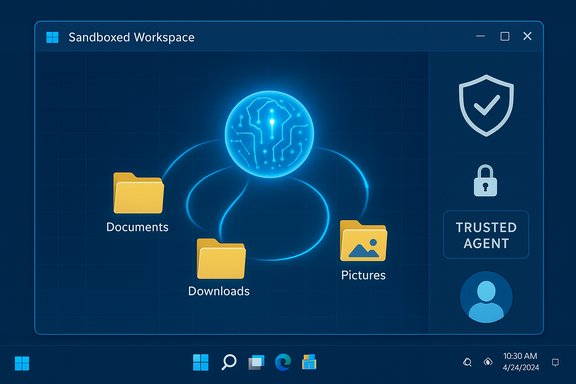
Microsoft’s latest Windows 11 preview introduces Copilot Actions — an agentic capability that can actually open apps, manipulate files, click UI elements and execute multi‑step workflows on your behalf — running inside a purpose‑built, visible “agent workspace” that Microsoft says is isolated, permissioned, and opt‑in.
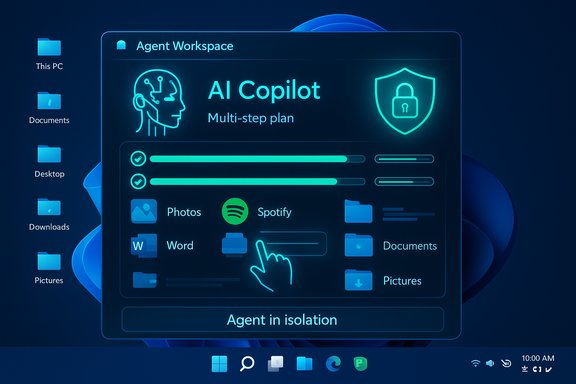
Windows has been moving from passive assistance to active automation for months: local semantic indexing, Copilot Vision (screen‑aware analysis), and Copilot integrations with Office and cloud connectors laid the groundwork for agents that don’t just advise but act. Copilot Actions represents the next stage: giving an AI the ability to perform desktop and web tasks end‑to‑end — for example, resizing photos in Photos, assembling playlists in Spotify, populating Office files, or completing multistep tasks that span multiple apps — while showing a step‑by‑step execution the user can observe and interrupt. Microsoft is previewing Copilot Actions to Windows Insiders via Copilot Labs; the company emphasizes that the experience is experimental, off by default, and gated behind new controls such as agent accounts, digitally signed agents, and a contained agent workspace. Reuters and The Verge reported the announcement alongside Microsoft’s own Windows Experience blog post, framing this as part of a broader push to embed AI deeply into Windows while trying to shape a trust and safety story for agentic automation.
Copilot Actions marks a clear inflection point in how Windows thinks about automation: the operating system is moving from a passive platform that runs human instructions to an environment where AI can act on outcomes directly — with visible, interruptible automation. The model is powerful, but it forces a renewed focus on backup, auditing, policy, and the basic engineering question of whether automation should click interfaces or call sanctioned APIs. Microsoft has outlined a careful, permissioned approach. The coming months of Insider testing and enterprise feedback will determine whether those safeguards are sufficient to make agentic automation a mainstream, safe part of Windows 11.
Source: pcworld.com Meet Copilot Actions, Windows 11's most revolutionary AI feature yet
 Background and overview
Windows has been moving from passive assistance to active automation for months: local semantic indexing, Copilot Vision (screen‑aware analysis), and Copilot integrations with Office and cloud connectors laid the groundwork for agents that don’t just advise but act. Copilot Actions represents the next stage: giving an AI the ability to perform desktop and web tasks end‑to‑end — for example, resizing photos in Photos, assembling playlists in Spotify, populating Office files, or completing multistep tasks that span multiple apps — while showing a step‑by‑step execution the user can observe and interrupt. Microsoft is previewing Copilot Actions to Windows Insiders via Copilot Labs; the company emphasizes that the experience is experimental, off by default, and gated behind new controls such as agent accounts, digitally signed agents, and a contained agent workspace. Reuters and The Verge reported the announcement alongside Microsoft’s own Windows Experience blog post, framing this as part of a broader push to embed AI deeply into Windows while trying to shape a trust and safety story for agentic automation. What Copilot Actions actually does
How agents operate (in practical terms)
- Agents can launch and interact with local desktop apps and web apps on your behalf, using click-and-type automation to complete tasks.
- They can access and operate on local files, initially scoped to known user folders (Documents, Desktop, Downloads, Pictures) unless you grant broader permission.
- Agents run in a separate agent workspace — effectively their own desktop — so they can operate in parallel with the human user while remaining visible and interruptible.
- Users can pause, take control, or stop an agent while it’s running; Microsoft also signals additional prompts for sensitive or high‑risk actions.
Technical foundations
Copilot Actions relies on several pieces of Microsoft’s AI stack already present in Windows:- Copilot app improvements (native integration and expanded capabilities).
- Local semantic indexing and optional on‑device models (leveraging NPUs in Copilot+ hardware for lower‑latency inference).
- Windows automation primitives and UI interaction APIs, plus an agent runtime that uses distinct agent accounts and signing to enforce policy and trust.
The security model Microsoft describes
Microsoft published a detailed blog post explaining the security posture for Copilot Actions that introduces four principal building blocks:- Agent accounts. Agents are provisioned into separate standard Windows accounts (not your user account) so policies can be applied specifically to agents and their activities can be distinguished from human actions on the device.
- Granular, limited permissions. Agents start with minimal privileges and only gain access to resources you explicitly authorize. During preview, access is limited to a defined set of known folders unless the user approves additional permissions. Standard Windows ACLs still apply.
- Agent workspace (runtime isolation). Agents run inside a contained desktop — a separate, observable workspace — which Microsoft calls a workspace built on recognized security boundaries. The workspace provides the agent its own desktop while limiting visibility of the user’s actual session. Microsoft says it will defend these boundaries according to its longstanding servicing criteria.
- Agent signing and trust. Agents need to be digitally signed so Windows can verify their provenance; this is intended to prevent malicious unsigned code from masquerading as an agent and allows certificate‑based revocation and AV-based blocking.
Why Copilot Actions is a break from previous Copilot behavior
Previously, Copilot largely suggested edits, generated content and performed cloud‑based actions that touched online services via APIs. Copilot Actions extends that to direct manipulation of the local desktop environment — invoking apps, clicking UI, changing local files — which introduces new trust, reliability, and safety challenges because the agent is exercising the same surface area as the human user. This is both the feature’s primary promise and its central risk vector.Strengths and clear benefits
Real productivity wins for repeatable tasks
- Automating repetitive, multi‑app workflows removes friction: batch image edits, content assembly across apps, email generation plus attachments, and desktop housekeeping become single‑instruction tasks.
- On‑device processing keeps data local when possible, reducing the need to move sensitive materials to cloud APIs.
- Visible, interruptible execution (the separate workspace and visual progress) preserves a degree of human oversight that pure cloud agents often lack.
Enterprise potential
- Enterprise admins can eventually manage agent behavior through Intune, Entra identity controls, and DLP policies, enabling conditional enabling or blocking of agent features in regulated environments.
- Agents running under distinct accounts open the door for distinct auditing and policy enforcement that’s more granular than the status quo.
Real and realistic risks
1) The action surface is risky
When an AI stops being a suggestion engine and starts making changes, mistakes become real-world problems: deleted or corrupted files, mis-sent emails, unintended configuration changes, or actions that bypass expected human review processes. The consequences are concrete and can be painful — especially in production or enterprise contexts. Microsoft’s containment mitigations reduce blast radius but don’t eliminate the possibility of destructive actions.2) UI automation is brittle
Automating a UI by simulating clicks and keystrokes is inherently more fragile than calling stable APIs. App updates, localization differences, or layout changes can break agent workflows or, worse, cause them to click the wrong control. That brittleness can lead to unpredictable results unless agents are backed by robust testing and well‑defined APIs.3) Privilege escalation and cross‑context exposure
Even with separate agent accounts, any mechanism that grants access to local files and apps increases the system’s attack surface. A compromised or maliciously designed agent that starts with limited permissions but exploits a vulnerability could attempt privilege escalation. Microsoft’s signing model, certificate verification, and standard Windows protections help here, but those are only as good as the signing process, update and revocation speed, and the system’s ability to detect runtime anomalies.4) Social and prompting risks (prompt injection)
Agents frequently parse and act on text and web content. Malicious website content or document payloads could attempt to manipulate an agent’s reasoning (prompt or cross‑prompt injection), causing it to take undesired actions unless the agent runtime sanitizes inputs and respects strict action gating. Microsoft acknowledges this class of threat and lists operational trust and privacy‑preserving design among its principles, but it remains an open‑ended engineering problem.5) Unclear recovery semantics
If an agent accidentally corrupts or deletes files, the user experience for recovery is not fully described. Microsoft says agents will show actions and ask for explicit confirmation for sensitive steps, but there’s no public guarantee of atomic transactions, automatic rollback, or comprehensive undo for every agentic operation. Users and enterprises should not assume auto‑recovery beyond normal Windows backup mechanisms.What Microsoft has not fully clarified (open questions)
- How agent workspaces differ from the existing Windows Sandbox and how resource isolation maps to virtualization boundaries is not entirely clear from the public documentation.
- Exactly which actions will always require explicit user approval versus which will be allowed by default after initial permissioning is not exhaustively enumerated.
- The process and criteria for agent signing, vetting, and revocation (for third‑party agents versus Microsoft‑published agents) has been described at a high level, but preview documentation lacks a step‑by‑step for enterprise validation and key management.
- The incident response and rollback story (how to recover from an agent‑caused failure) is underspecified.
Practical guidance: how to evaluate and use Copilot Actions safely
- Start in a test environment: enable Copilot Actions only on non‑production machines or in a sandboxed lab where you can observe behavior first‑hand.
- Keep backups current: use robust file backup/versioning (OneDrive versioning, VSS snapshots, or enterprise backup) before enabling agent actions that touch important data.
- Limit agent permissions: during preview, restrict agents to known folders only and grant additional access on a case‑by‑case basis.
- Require approval for sensitive actions: use Microsoft’s prompts and opt for workflows that ask for explicit human confirmation on destructive steps.
- Maintain agent signing policy: enforce certificate validation and only allow signed agents through group policy, SRP/AppLocker, or conditional access for enterprise deployments.
- Integrate with DLP and Intune: when available, connect agent policies to DLP and Intune to prevent exfiltration or unauthorized file changes.
- Monitor and audit: log agent actions, keep telemetry enabled for audit trails, and set up alerts for unusual agent behavior.
- Educate users: train staff on how to stop or take over an agent and how to spot abnormal agent activity.
- Test app UIs: for mission‑critical automations, prefer API‑based automations or automation targets with stable APIs; treat UI automation as brittle and design fallbacks.
- Maintain a rollback plan: know how to restore from backups and how to isolate an infected or misbehaving agent account quickly.
Enterprise considerations and compliance
Enterprises should treat Copilot Actions like any new privileged automation capability: it will require policy planning, integration into identity and access controls, and updates to incident response playbooks. Microsoft’s roadmap mentions Entra integration, Intune policy applicability, and DLP hooks — each of which is necessary for enterprise enablement — but many of these controls are still being developed or are in private preview. Large organizations should demand clear SLAs for agent signing, revocation, telemetry export, and forensics before broad enablement.How Copilot Actions stacks up to other agent efforts
Other companies — Google, OpenAI and Anthropic among them — have demonstrated agentic flows (browser agents, web‑based automations or API‑driven assistants) that complete tasks on behalf of users. Microsoft’s distinction is deeper OS integration: agents in Windows can interact with installed apps and local files, not just web APIs. That capability increases utility but also increases risk, because actions are taken inside users’ machines rather than behind cloud APIs where service semantics and audit trails are often clearer.Verdict: revolutionary — but handle with caution
Copilot Actions is the most consequential evolution of Copilot to date: it moves the product from a suggestion and generation layer into an agentic automation capability that can perform real desktop work. That makes the feature genuinely revolutionary for productivity automation on Windows 11. At the same time, it surfaces new, meaningful risks: brittle UI automation, potential destructive actions, attack surface expansion, and gaps in the recovery and enterprise control stories. Microsoft’s proposed mitigations — agent accounts, agent workspaces, signing, and permission gating — are pragmatic and necessary, but they are not a complete solution on day one. Pilot the technology conservatively: test in controlled environments, require robust backups, and wait for enterprise management hooks to mature before enabling agentic features broadly across business endpoints. For consumers, the feature is promising and can save time on repeatable tasks, but individuals should exercise the same caution: keep personal files backed up and only enable agent features when the benefits clearly outweigh the risks.What to watch next
- Staged release timeline: Copilot Actions is in Windows Insider Copilot Labs; wider availability will follow after telemetry and testing phases. Watch for official channel dates and documentation from Microsoft.
- Enterprise controls: expect Intune, Entra and DLP integrations to appear incrementally; those are critical for safe enterprise adoption.
- Signing and vetting details: concrete guidance on agent publishing, certificate lifecycle and revocation processes will determine how quickly third‑party agents can be trusted in enterprises.
- Recovery semantics and undo: enterprise buyers will push Microsoft to define atomic actions, transactional behavior, and formal rollback mechanisms for agentic operations.
Copilot Actions marks a clear inflection point in how Windows thinks about automation: the operating system is moving from a passive platform that runs human instructions to an environment where AI can act on outcomes directly — with visible, interruptible automation. The model is powerful, but it forces a renewed focus on backup, auditing, policy, and the basic engineering question of whether automation should click interfaces or call sanctioned APIs. Microsoft has outlined a careful, permissioned approach. The coming months of Insider testing and enterprise feedback will determine whether those safeguards are sufficient to make agentic automation a mainstream, safe part of Windows 11.
Source: pcworld.com Meet Copilot Actions, Windows 11's most revolutionary AI feature yet