

Microsoft’s recent Copilot+ conversation — and Paul Thurrott’s November 21 “Ask Paul” column — lay bare a pivotal tension at the center of Windows’ AI push: Microsoft wants every PC to become an AI PC, but it’s shipping premium, on-device Copilot+ features first to machines with dedicated NPUs, leaving many users confused about what they will (and won’t) get and when.
Microsoft’s Copilot program has evolved into two overlapping things: the broader Copilot umbrella of conversational AI services available across Windows and Microsoft 365, and Copilot+, a set of enhanced, on-device features that take advantage of hardware acceleration (principally NPUs) to run AI tasks locally for faster response, offline capability, and lower cloud costs. Paul Thurrott’s column summarized this split, noting Microsoft’s October language that “every PC will be an AI PC” while also pointing out Copilot+ remains a distinct, higher-tier experience tied to compatible hardware.
That distinction—software features that can either run in the cloud or locally on a device’s Neural Processing Unit (NPU)—is at the center of the confusion. Microsoft frames the big-picture vision as universal: conversational, natural-language interactions will become a standard way to use Windows. But the immediate, performant, offline experiences labeled Copilot+ are being delivered first on devices with the necessary silicon, notably Qualcomm’s Snapdragon X family, and later—according to rollout reports—on certain Intel and AMD platforms.
For Microsoft, NPUs unlock three practical advantages:
Conclusion
The Copilot story is about two parallel tracks: universal conversational AI powered by Microsoft’s cloud and premium Copilot+ experiences unlocked by on‑device NPUs. Paul Thurrott’s November 21 column helped clarify that distinction and reminded readers the marketing language sometimes outpaces technical reality. As Intel, AMD, Qualcomm, OEMs, and Microsoft continue to iterate, Windows users will see increasingly capable local AI — but for now, the experience you get depends on the silicon in your laptop and whether Microsoft and your OEM have enabled the local processing path. Keep systems updated, check your OEM’s Copilot+ claims, and treat the promise “every PC will be an AI PC” as a roadmap rather than an immediate guarantee.
Source: Thurrott.com Ask Paul: November 21
 Background / Overview
Microsoft’s Copilot program has evolved into two overlapping things: the broader Copilot umbrella of conversational AI services available across Windows and Microsoft 365, and Copilot+, a set of enhanced, on-device features that take advantage of hardware acceleration (principally NPUs) to run AI tasks locally for faster response, offline capability, and lower cloud costs. Paul Thurrott’s column summarized this split, noting Microsoft’s October language that “every PC will be an AI PC” while also pointing out Copilot+ remains a distinct, higher-tier experience tied to compatible hardware.That distinction—software features that can either run in the cloud or locally on a device’s Neural Processing Unit (NPU)—is at the center of the confusion. Microsoft frames the big-picture vision as universal: conversational, natural-language interactions will become a standard way to use Windows. But the immediate, performant, offline experiences labeled Copilot+ are being delivered first on devices with the necessary silicon, notably Qualcomm’s Snapdragon X family, and later—according to rollout reports—on certain Intel and AMD platforms.
What Paul Thurrott actually wrote (short, accurate summary)
- Paul observed that Copilot+ looks like a new Windows SKU in practice: a set of extra features tied to specific hardware capabilities rather than a universal upgrade to the entire Windows 11 base.
- He argued Microsoft’s “every PC will be an AI PC” phrase is aspirational and refers to broad Copilot functionality (cloud-backed conversational features) rather than the premium Copilot+ local features limited to NPU-equipped PCs.
- Paul noted early examples of feature parity choices: apps like Notepad are shipping AI writing tools that are cloud-based for most users but are being tested to run locally on Copilot+ machines, saving AI credits and subscription friction for those devices.
Why hardware matters: NPUs, latency, privacy, and cost
What an NPU does, in plain terms
An NPU (Neural Processing Unit) is a dedicated piece of silicon designed to accelerate machine‑learning workloads more efficiently than a general‑purpose CPU or GPU. NPUs handle model inference tasks using fewer watts and much lower latency, enabling features like real‑time transcription, image upscaling, and local LLM runs that otherwise would be slow or cloud-dependent.For Microsoft, NPUs unlock three practical advantages:
- Latency and responsiveness: local inference can be near-instant for interactive tasks.
- Offline capability and privacy: processing stays on-device when desired, reducing data sent to the cloud.
- Lower cloud cost and user friction: running locally avoids consuming cloud AI credits or requiring subscriptions for certain tasks.
Why Microsoft leaned on Snapdragon first
Qualcomm’s Snapdragon X series brought mature NPU designs to thin Windows laptops earlier than many PC makers, giving Microsoft a reliable hardware testbed for Copilot+ features. That’s why initial Copilot+ functionality was Snapdragon-heavy. The design tradeoffs — low power, NPU presence, and OEM reference designs — made Snapdragon a logical launch partner.The rollout reality: phased, hardware-aware, and messy
Snapshot of the public rollout timeline and changes
Public and community reporting shows a phased approach:- Initial Copilot+ features delivered first to Snapdragon-based devices through Insider channels and early updates.
- Microsoft signaled broader ambitions and an October claim that “every PC will be an AI PC,” which many read as conflicting with Copilot+ exclusivity; Paul and others clarified the distinction between cloud Copilot features and Copilot+ hardware accelerations.
- Industry and community trackers reported Microsoft expanding Copilot+ compatibility to certain Intel Core Ultra and AMD Ryzen AI platforms in subsequent builds and preview releases, bringing features such as live captions, real-time translation, and certain Photos app Super Resolution capabilities beyond Snapdragon.
What’s actually being expanded
Sources indicate Microsoft began to broaden Copilot+ feature support to Intel and AMD silicon families—with caveats: not every chip is equal, and OEM/driver support is often required. Announcements and Insider builds pointed to Intel Core Ultra (200V series) and AMD Ryzen AI (300 series) support appearing in later Windows 11 updates, while some China‑specific or language-limited features remained tied to certain silicon at first.Local vs cloud processing: the practical choices apps will offer
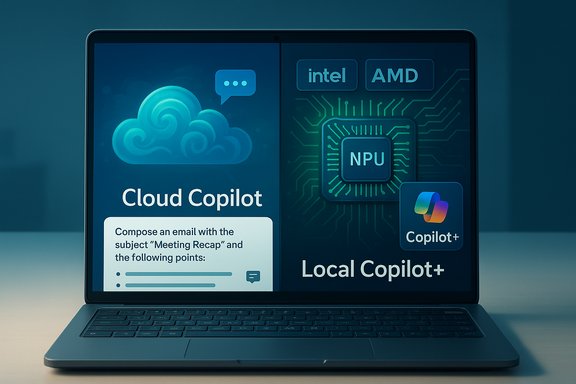
A key takeaway from Paul’s column and subsequent coverage: Microsoft intends many features to work on the cloud for the broad base of PCs while offering local paths when hardware allows. Expect apps to increasingly present a choice between:- Cloud processing: available to virtually any machine, scales easily, may consume AI credits, and often requires a Microsoft 365 or Copilot subscription.
- Local processing: limited to Copilot+ or hardware-compliant PCs, runs on the NPU, reduces costs and latency, and can preserve privacy by keeping data on-device.
Feature highlights and what’s been observed in the wild
- Recall (contextual memory): Designed to index and recall prior local activities. Initially sensitive and partially Cloud-backed, Microsoft adjusted defaults and controls after feedback. Copilot+ NPU-enabled devices can offer faster and local recall with more fine-grained privacy controls.
- Super Resolution (Photos app): High-quality image upscaling that leveraged NPUs for dramatic improvements was first available to Snapdragon Copilot+ Insiders and later slated for non‑Snapdragon Copilot+ devices as Microsoft broadened support. Expect staged rollouts and driver/OEM dependencies.
- Live captions and real‑time translation: Initially rolling out on Snapdragon devices, later expanded to Intel Core Ultra and AMD Ryzen AI chips in updated Windows 11 builds with language and device exceptions.
- Refine and writing tools across apps: Cloud-first, but local acceleration paths are being tested in apps like Notepad and in select Office scenarios.
Cross‑checking the claims: two independent confirmations
Major claims in Paul’s column can be cross-checked in community tracking and update summaries:- The Snapdragon-first Copilot+ launch and Copilot+ being a hardware‑enhanced subset of Copilot are reflected in initial rollout reporting and product documentation from community insiders.
- The broader expansion to Intel and AMD processors, and Microsoft’s staged rollout for features such as live translation and Super Resolution, shows up in separate update reports and community recaps that track specific Windows builds and OEM driver dependencies.
The strategic logic — why Microsoft took this path
- Control the user experience: Starting on validated partner hardware reduces variability when shipping complex local AI features. Qualcomm’s Snapdragon partners offered a consistent starting point.
- Incremental broadening: Moving from Snapdragon to Intel/AMD (and other NPU-enabled chips) lets Microsoft extend capabilities without breaking experiences for users on unsupported hardware. Insider builds are a practical mechanism for smoothing that transition.
- Platform economics: Local processing reduces Microsoft’s cloud costs for compute-heavy features if users adopt NPU-capable devices, while cloud options ensure accessibility for everyone. That hybrid approach is less risky commercially than forcing a full local-only model.
Risks, tradeoffs, and user impact
Fragmentation risk
The most immediate user-facing risk is feature fragmentation. When features are available only on Copilot+ devices, users will experience different Windows capabilities depending on hardware and OEM drivers, creating possible confusion and dissatisfaction among those on older or non-NPU machines. This is reminiscent of past Windows “editions” fragmentation (e.g., Media Center / Tablet PC Editions) that Paul referenced, and it may be temporary — but the user experience pain while it exists will be real.Privacy and control tradeoffs
Local NPUs can protect privacy by keeping processing on device, but mixed deployments—cloud for some tasks, local for others—introduce complexity in privacy communications, settings, and compliance for enterprise customers. Admins will need clear tools to manage where sensitive processing occurs.Upgrade cycle and e‑waste
Microsoft’s push toward NPU‑enabled experiences may accelerate hardware churn as consumers seek Copilot+ experiences. This has environmental and cost implications: not every user needs or should buy new hardware for incremental AI features. The potential for increasing the upgrade treadmill is a legitimate societal and economic concern.Cost and subscription complexity
Cloud Copilot features may consume AI credits or require Microsoft 365/Copilot subscriptions; local Copilot+ paths might avoid that but only for eligible devices. Users and organizations must weigh hardware costs versus ongoing subscription fees.Practical guidance: what Windows users should do now
- Check your device’s Copilot+ compliance: Look at your OEM’s spec sheet or Windows Update > Optional features for NPU/AI support claims. If your laptop is advertised as “Copilot+” or “AI-enabled,” it likely contains the supported silicon and OEM drivers.
- Keep drivers and Windows updated: Many Copilot+ capabilities depend on OEM or vendor NPU drivers that arrive via OEM channels or Windows Update. Enable “get updates as soon as available” if you want early access through Insider or Release Preview channels.
- Decide cloud vs local for privacy/cost: In apps that offer both cloud and local options, choose local processing when privacy or cost is a priority, and cloud when you need broader model capabilities or when local hardware lacks the necessary performance.
- For enterprises — plan governance: IT should prepare policies around Copilot data handling, whether on-device indexing (Recall) is permitted, and how to control or disable features that may index user activity. Microsoft’s toggles for turning features off by default are important — use them.
Developer and OEM implications
- OEMs: Expect continued pressure to include NPUs in higher-tier consumer and business devices. OEMs will also be responsible for driver maturity and OS integration to make Copilot+ experiences stable.
- Application developers: Apps will need to gracefully degrade between local and cloud inference paths, offering the same UX regardless of where the model runs. That requires careful design and testing across silicon families.
- Hardware vendors: Intel and AMD expansions show willingness to support NPU-like capabilities in their silicon roadmap; coordination between Microsoft and vendors will matter more than ever.
Three plausible futures for Copilot+ (ranked)
- Every PC becomes an AI PC over time: NPUs or equivalent accelerators become ubiquitous, and Copilot+ features are broadly available locally without meaningful fragmentation. This is Microsoft’s aspirational path.
- Persistent hybrid model: Copilot umbrella features remain universal via cloud, while Copilot+ continues as a premium, hardware-accelerated tier for devices with NPUs. Many users accept a hybrid world of on‑device and cloud processing.
- Reversion to cloud dominance: If hardware adoption stalls or costs outweigh benefits, Microsoft might favor cloud-first implementations, limiting the practical benefit of Copilot+ and encouraging cloud subscriptions. This is the least desirable from a latency and privacy perspective.
Final analysis — what matters to Windows users
Paul Thurrott’s column captured a straightforward truth: the rhetoric that “every PC will be an AI PC” describes a vision more than a product today, while Copilot+ represents the practical, hardware‑accelerated path that Microsoft is testing and expanding. For users, the important takeaways are:- Expect a hybrid world where conversational Copilot features are widely available via cloud, and premium on-device Copilot+ experiences require compatible hardware and driver support.
- Watch for staged rollouts: many features will first surface in Insider builds and then arrive broadly as OEM drivers and Windows updates catch up.
- Manage expectations and governance: enterprises and privacy‑conscious users should proactively configure Copilot/Recall controls and decide between local processing and cloud-based convenience.
Conclusion
The Copilot story is about two parallel tracks: universal conversational AI powered by Microsoft’s cloud and premium Copilot+ experiences unlocked by on‑device NPUs. Paul Thurrott’s November 21 column helped clarify that distinction and reminded readers the marketing language sometimes outpaces technical reality. As Intel, AMD, Qualcomm, OEMs, and Microsoft continue to iterate, Windows users will see increasingly capable local AI — but for now, the experience you get depends on the silicon in your laptop and whether Microsoft and your OEM have enabled the local processing path. Keep systems updated, check your OEM’s Copilot+ claims, and treat the promise “every PC will be an AI PC” as a roadmap rather than an immediate guarantee.
Source: Thurrott.com Ask Paul: November 21
