

Windows 11 version 25H2 is no longer a niche preview for enthusiasts or an IT pilot hidden behind policy rings. Microsoft’s own release-health pages now show that the update is being offered to all eligible Windows 11 devices on the consumer side, with the rollout expanding as systems are cleared for compatibility. For Home and Pro PCs still on 24H2, the move is effectively inevitable: once the device is deemed ready, Windows Update will deliver 25H2 automatically, though users can still choose when to restart or briefly defer installation.
The important part is not just that 25H2 is here, but how Microsoft is delivering it. This is a shared-servicing release that rides on the same codebase as 24H2, so the upgrade is enabled rather than rebuilt from scratch, which is why the change is fast and comparatively low-friction. That also explains why the update feels less like a dramatic version jump and more like a licensing and servicing transition, with Microsoft turning on dormant features and shifting the support clock forward to 2027 for Home and Pro editions.
The broader story here is that Microsoft has fully embraced a modern Windows cadence built around continuous feature delivery, controlled rollout, and enablement packages rather than old-fashioned blockbuster upgrade cycles. That strategy reduces download size, lowers migration friction, and lets Microsoft keep 24H2 and 25H2 largely in sync while still preserving a distinct support boundary. In practical terms, the version number matters most for lifecycle management, compliance, and feature gating, not for a radical redesign of the operating system.
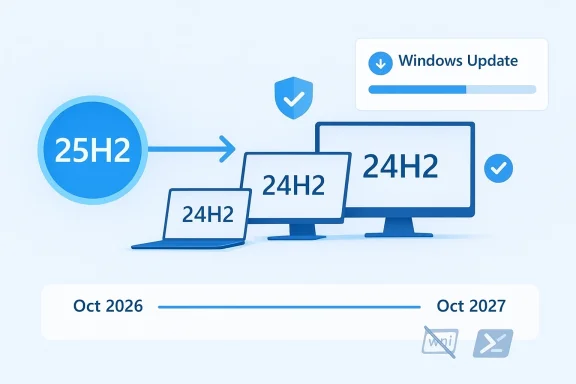
There is also a timing element that matters for consumers and IT teams alike. Windows 11 Home and Pro version 24H2 reaches end of servicing on October 13, 2026, while 25H2 runs through October 12, 2027, which gives Microsoft a clean path to move eligible systems forward before support pressure starts to bite. That means this rollout is not just a convenience update; it is also part of Microsoft’s support hygiene, keeping mainstream users on the newest supported line before older releases fall off the maintenance schedule.
For enterprises, the picture is a bit more nuanced. Microsoft has already framed 25H2 as a release that can be deployed through Windows Update, Windows Autopatch, Microsoft 365 admin center, and WSUS/Configuration Manager, but it has also warned admins to validate apps, devices, and infrastructure before broad deployment. In other words, the consumer experience is mostly automatic, while the enterprise experience remains deliberately managed and governed by policy, rings, and change windows.
The rollout model itself is familiar, and that familiarity is the point. Microsoft has long used phased availability to catch driver conflicts, application regressions, and device-specific anomalies before a feature update becomes universal, and 25H2 is following that playbook exactly. The update is available first to eligible 24H2 devices with the “Get the latest updates as soon as they’re available” toggle enabled, and only later broadens to the rest of the eligible base.
At the user level, the path is simple. If a Windows 11 Home or Pro PC is on 24H2, is eligible, and is not under IT management, Windows Update can offer 25H2 automatically as part of the staged rollout. Users can still pause, schedule, or delay the restart, but once the pause period expires, installation becomes compulsory to keep the device on the update train.
It also means the feature delta can be subtle. Many of the capabilities associated with 25H2 are shared with 24H2 through Microsoft’s continuous innovation approach, so the visible change may be minimal for ordinary users. That is not a bug; it is the architecture working as intended.
Key takeaways:
That matters because Windows support fatigue is real. Consumers rarely track version numbers unless the system starts nagging, but enterprise admins and enthusiasts know that staying one release behind can become a compliance and troubleshooting headache. A controlled push now is easier than a rushed migration later, and Microsoft appears to be using this window to reduce that risk.
There is a second support-related angle, too. Because 25H2 shares the same servicing branch as 24H2, Microsoft can keep feeding security and quality improvements across both lines during the transition period, which softens the blow for users who haven’t upgraded immediately. That shared base is part of what makes the Windows 11 24H2-to-25H2 jump look like an on-ramp rather than a cliff.
Highlights:
That said, consumers are not getting a zero-impact update. Microsoft has acknowledged the removal of older components such as PowerShell 2.0 and WMIC, which mostly affects legacy scripts, older admin workflows, and software that still depends on obsolete command-line tooling. For a home user, those removals may never be felt; for power users, they are a reminder that Microsoft is continuing to prune the oldest Windows-era machinery.
The slightly less ideal part is that some machines will see the update later than others. Safeguard holds are there for a reason, and they can pause delivery if Microsoft detects an app or driver incompatibility. That delay is annoying, but it is also one of the few protections that keeps Windows feature updates from becoming reckless.
Consumer implications:
The enterprise case also includes feature pruning and administrative simplification. Microsoft has highlighted improvements for IT pros, including easier removal of preinstalled Store apps on Enterprise and Education editions, which may sound minor but can matter a great deal in standardized images and tightly managed fleets. Less bloat in the baseline image can translate into cleaner provisioning, fewer first-run distractions, and better control over user experience.
The other strategic issue is hotpatch alignment. Microsoft has tied some update and hotpatch behaviors to baseline release cycles, so timing an upgrade can affect whether a device remains eligible for certain update flows during the current servicing window. In plain English, IT teams should treat the rollout calendar as part of patch governance, not as an afterthought.
Enterprise priorities:
This cleanup is consequential because old tools tend to survive in more places than people realize. They hide inside scheduled tasks, install scripts, monitoring probes, batch files, and vendor packages that were written years ago and never revisited. Once a feature update removes them, the cost of technical debt suddenly becomes visible.
There is also a security dimension. Legacy command shells and scripting engines are easier to misuse, harder to harden, and less aligned with contemporary management practices than newer tooling. Removing old components is one of the few cases where a version upgrade can improve security posture even if users never notice the change day to day.
Legacy cleanup notes:
The public reporting around Qualcomm’s Snapdragon X2 Series gives that split even more context. Microsoft’s lifecycle page shows 26H1 as a distinct release with a February 10, 2026 start date, and Microsoft has described it as support for new devices rather than a conventional consumer upgrade. That is a strong sign that the company is continuing to tune Windows for ARM-first hardware without forcing the installed base into the same cadence.
It also suggests that Microsoft expects ARM hardware to play a more meaningful role in the Windows ecosystem. Rather than making every Windows feature update double as a hardware reset, Microsoft is separating platform enablement from everyday servicing. That is a subtle but telling evolution in how Windows is being engineered and marketed.
Market signals:
It also helps Microsoft defend the credibility of its support lifecycle. If users see that version transitions are quick, predictable, and tied to clear end-of-support dates, then the platform looks more manageable for consumers and enterprises alike. That predictability matters in a market where device refresh cycles, security expectations, and software compatibility increasingly influence purchasing decisions.
That said, Microsoft still has the burden of ecosystem diversity. Unlike rivals with narrower device matrices, Windows has to handle an enormous range of drivers, peripherals, vendor utilities, and corporate imaging practices. The phased rollout is therefore not just a technical nicety; it is a necessity born from market complexity.
Competitive implications:
The opportunity is bigger than one version number. By keeping the 24H2 and 25H2 codebase aligned, Microsoft can ship innovation continuously, reduce update pain, and simplify the story for users who just want a secure, current PC. If that model holds, the OS becomes easier to support and easier to explain. That simplicity is valuable in both consumer and enterprise markets.
The second concern is legacy breakage. PowerShell 2.0 and WMIC removals are the sort of changes that affect a small number of systems very deeply, which is exactly the kind of issue that produces real operational pain in managed environments. If admins have not audited old scripts, the update can turn a quiet rollout into an avoidable incident.
For IT teams, the real work begins now, not later. Inventory legacy dependencies, validate image baselines, watch hotpatch timing, and make sure any dependency on WMIC or PowerShell 2.0 has already been removed or isolated. The cleanest Windows feature upgrades are the ones that were prepared for months in advance.
Source: Thurrott.com Windows 11 Version 25H2 is Now Being Pushed to All Eligible PCs
The important part is not just that 25H2 is here, but how Microsoft is delivering it. This is a shared-servicing release that rides on the same codebase as 24H2, so the upgrade is enabled rather than rebuilt from scratch, which is why the change is fast and comparatively low-friction. That also explains why the update feels less like a dramatic version jump and more like a licensing and servicing transition, with Microsoft turning on dormant features and shifting the support clock forward to 2027 for Home and Pro editions.
 Overview
The broader story here is that Microsoft has fully embraced a modern Windows cadence built around continuous feature delivery, controlled rollout, and enablement packages rather than old-fashioned blockbuster upgrade cycles. That strategy reduces download size, lowers migration friction, and lets Microsoft keep 24H2 and 25H2 largely in sync while still preserving a distinct support boundary. In practical terms, the version number matters most for lifecycle management, compliance, and feature gating, not for a radical redesign of the operating system.There is also a timing element that matters for consumers and IT teams alike. Windows 11 Home and Pro version 24H2 reaches end of servicing on October 13, 2026, while 25H2 runs through October 12, 2027, which gives Microsoft a clean path to move eligible systems forward before support pressure starts to bite. That means this rollout is not just a convenience update; it is also part of Microsoft’s support hygiene, keeping mainstream users on the newest supported line before older releases fall off the maintenance schedule.
For enterprises, the picture is a bit more nuanced. Microsoft has already framed 25H2 as a release that can be deployed through Windows Update, Windows Autopatch, Microsoft 365 admin center, and WSUS/Configuration Manager, but it has also warned admins to validate apps, devices, and infrastructure before broad deployment. In other words, the consumer experience is mostly automatic, while the enterprise experience remains deliberately managed and governed by policy, rings, and change windows.
The rollout model itself is familiar, and that familiarity is the point. Microsoft has long used phased availability to catch driver conflicts, application regressions, and device-specific anomalies before a feature update becomes universal, and 25H2 is following that playbook exactly. The update is available first to eligible 24H2 devices with the “Get the latest updates as soon as they’re available” toggle enabled, and only later broadens to the rest of the eligible base.
What Microsoft Is Actually Pushing
The phrase “pushed to all eligible PCs” can sound more dramatic than the underlying mechanism deserves. Microsoft is not forcing 25H2 onto every Windows 11 machine in one mass event; instead, it is broadening the rollout so that eligible non-managed Home and Pro devices on 24H2 eventually receive it when they clear compatibility checks. That distinction matters because it means safeguard holds can still block the update on machines with problematic drivers or applications.At the user level, the path is simple. If a Windows 11 Home or Pro PC is on 24H2, is eligible, and is not under IT management, Windows Update can offer 25H2 automatically as part of the staged rollout. Users can still pause, schedule, or delay the restart, but once the pause period expires, installation becomes compulsory to keep the device on the update train.
Why this rollout feels different
This version upgrade is especially quiet because the heavy lifting was already done in 24H2. Microsoft’s documentation says 25H2’s dormant features are activated by an enablement package, meaning the OS doesn’t need a full reimage-style upgrade. That keeps bandwidth usage low and shortens the install process, which is a big deal on home networks and for users who dislike long update windows.It also means the feature delta can be subtle. Many of the capabilities associated with 25H2 are shared with 24H2 through Microsoft’s continuous innovation approach, so the visible change may be minimal for ordinary users. That is not a bug; it is the architecture working as intended.
Key takeaways:
- 25H2 is being staged, not detonated.
- Eligible 24H2 systems are the first target.
- The enablement package keeps installation fast.
- Safeguard holds can still delay delivery.
- The support timeline, not the UI, is the real prize.
Why 24H2 Users Are Being Moved Now
Microsoft’s release lifecycle leaves little room for ambiguity. Once 25H2 is out, the company has a strong incentive to move the 24H2 home and pro base forward because support for 24H2 ends on October 13, 2026. The company is effectively preventing a future bottleneck where millions of systems would need to shift under time pressure all at once.That matters because Windows support fatigue is real. Consumers rarely track version numbers unless the system starts nagging, but enterprise admins and enthusiasts know that staying one release behind can become a compliance and troubleshooting headache. A controlled push now is easier than a rushed migration later, and Microsoft appears to be using this window to reduce that risk.
The support clock is the real story
Microsoft’s lifecycle pages show that Windows 11 Home and Pro version 25H2 extends support to October 12, 2027, while 24H2 ends in October 2026. That one-year delta is the practical reason Microsoft wants eligible systems to move now. The update is less about shiny features and more about resetting the servicing runway.There is a second support-related angle, too. Because 25H2 shares the same servicing branch as 24H2, Microsoft can keep feeding security and quality improvements across both lines during the transition period, which softens the blow for users who haven’t upgraded immediately. That shared base is part of what makes the Windows 11 24H2-to-25H2 jump look like an on-ramp rather than a cliff.
Highlights:
- 24H2’s support deadline is the forcing function.
- 25H2 buys Home and Pro users another year.
- Microsoft is preventing a last-minute migration stampede.
- Shared servicing lowers the friction of moving forward.
- The version number matters most for lifecycle compliance.
What Changes for Consumers
For most consumers, the most honest answer is: not much, at least not immediately. Because 25H2 is delivered as an enablement package on the same codebase as 24H2, the upgrade is designed to be quick and largely invisible. In everyday use, the better battery life from a driver update or the faster pace of cumulative improvements may be more noticeable than the version number itself.That said, consumers are not getting a zero-impact update. Microsoft has acknowledged the removal of older components such as PowerShell 2.0 and WMIC, which mostly affects legacy scripts, older admin workflows, and software that still depends on obsolete command-line tooling. For a home user, those removals may never be felt; for power users, they are a reminder that Microsoft is continuing to prune the oldest Windows-era machinery.
What ordinary users should expect
The best-case consumer outcome is simple. Windows installs 25H2 in the background, the machine restarts once, and the user keeps working with little visible change. In that sense, this is the ideal modern Windows upgrade: low drama, low bandwidth, and low interruption.The slightly less ideal part is that some machines will see the update later than others. Safeguard holds are there for a reason, and they can pause delivery if Microsoft detects an app or driver incompatibility. That delay is annoying, but it is also one of the few protections that keeps Windows feature updates from becoming reckless.
Consumer implications:
- Minimal visible change for most users.
- A faster install than a full feature upgrade.
- Older management tools are being removed.
- Some devices will be delayed by compatibility holds.
- Support longevity is the main benefit.
What Changes for Enterprises
Enterprise customers need to look at 25H2 differently because the upgrade is not just a maintenance event; it is a deployment decision. Microsoft makes 25H2 available through Windows Server Update Services, Configuration Manager, Windows Update client policies, Windows Autopatch, and the Microsoft 365 admin center, which means IT teams have multiple official paths to stage, validate, and roll out the release.The enterprise case also includes feature pruning and administrative simplification. Microsoft has highlighted improvements for IT pros, including easier removal of preinstalled Store apps on Enterprise and Education editions, which may sound minor but can matter a great deal in standardized images and tightly managed fleets. Less bloat in the baseline image can translate into cleaner provisioning, fewer first-run distractions, and better control over user experience.
Deployment strategy matters more than the version number
For organizations, the question is not “Should we upgrade?” but “When, in which rings, and with what fallback?” Because 25H2 and 24H2 share the same servicing branch, IT can treat the move as an enablement step rather than a destabilizing architectural jump. That can simplify testing, but it should not encourage complacency, because driver, application, and policy interactions are still very real.The other strategic issue is hotpatch alignment. Microsoft has tied some update and hotpatch behaviors to baseline release cycles, so timing an upgrade can affect whether a device remains eligible for certain update flows during the current servicing window. In plain English, IT teams should treat the rollout calendar as part of patch governance, not as an afterthought.
Enterprise priorities:
- Pilot before broad rollout.
- Validate business apps and line-of-business tooling.
- Check hotpatch implications and baseline timing.
- Use deployment rings to control exposure.
- Plan for legacy tool removal in scripts and automation.
The Legacy Feature Cleanup
The removal of PowerShell 2.0 and WMIC may sound like housekeeping, but it is actually a marker of how Microsoft wants Windows administration to evolve. Both tools lingered for years because enterprise environments are notoriously slow to retire old scripts and legacy dependencies. By forcing the issue, Microsoft is telling admins that the platform is no longer willing to carry these inherited liabilities indefinitely.This cleanup is consequential because old tools tend to survive in more places than people realize. They hide inside scheduled tasks, install scripts, monitoring probes, batch files, and vendor packages that were written years ago and never revisited. Once a feature update removes them, the cost of technical debt suddenly becomes visible.
Why Microsoft is pruning now
Microsoft’s guidance is clear: migrate PowerShell 2.0 dependencies to PowerShell 5.1 or PowerShell 7, and replace WMIC-based workflows with PowerShell or other supported programmatic interfaces. That advice reflects a broader platform philosophy that favors modern, auditable, and maintainable tooling over compatibility at any cost.There is also a security dimension. Legacy command shells and scripting engines are easier to misuse, harder to harden, and less aligned with contemporary management practices than newer tooling. Removing old components is one of the few cases where a version upgrade can improve security posture even if users never notice the change day to day.
Legacy cleanup notes:
- PowerShell 2.0 is being retired from the Windows 11 path.
- WMIC is gone from current Windows 11 installs by default.
- Automated deployment scripts may break if left unchanged.
- PowerShell and supported APIs are the preferred replacements.
- This is a technical debt correction as much as a feature change.
The 26H1 Factor
Microsoft does not talk about 26H1 as loudly as it discusses mainstream releases, but the documentation makes clear that it exists for a different purpose. It is scoped for new devices coming in early 2026 and is not intended as a general feature update for the installed base. That matters because it signals a bifurcation in the Windows roadmap: one line for existing PCs, another for next-generation ARM hardware.The public reporting around Qualcomm’s Snapdragon X2 Series gives that split even more context. Microsoft’s lifecycle page shows 26H1 as a distinct release with a February 10, 2026 start date, and Microsoft has described it as support for new devices rather than a conventional consumer upgrade. That is a strong sign that the company is continuing to tune Windows for ARM-first hardware without forcing the installed base into the same cadence.
Why this matters for the market
This is strategically important because it reduces noise around version numbering. If 26H1 is for incoming ARM devices and 25H2 is the general mainstream line, Microsoft can optimize both hardware and software roadmaps without confusing the broader Windows audience too much. The result is a more segmented Windows strategy, one that resembles modern smartphone platform planning more than traditional PC operating system releases.It also suggests that Microsoft expects ARM hardware to play a more meaningful role in the Windows ecosystem. Rather than making every Windows feature update double as a hardware reset, Microsoft is separating platform enablement from everyday servicing. That is a subtle but telling evolution in how Windows is being engineered and marketed.
Market signals:
- 26H1 is not the next mainstream upgrade for everyone.
- It appears aimed at new ARM-based systems.
- Microsoft is separating device generation from mass servicing.
- This supports a more hardware-specific Windows roadmap.
- The installed base stays on the 24H2/25H2 track.
Competitive and Industry Implications
The bigger competitive story is that Microsoft is proving Windows can now behave more like a continuously updated service than a disruptive upgrade cycle. That reduces one of the classic friction points that used to push users toward delaying upgrades, freezing on older releases, or avoiding Windows updates entirely. A smoother feature update is a competitive advantage, even when the visible features are modest.It also helps Microsoft defend the credibility of its support lifecycle. If users see that version transitions are quick, predictable, and tied to clear end-of-support dates, then the platform looks more manageable for consumers and enterprises alike. That predictability matters in a market where device refresh cycles, security expectations, and software compatibility increasingly influence purchasing decisions.
Why rivals should pay attention
Apple has long benefited from tightly controlled OS distribution and a single-vendor hardware-software story, while ChromeOS has emphasized low-friction updates from the start. Microsoft’s 25H2 strategy is an attempt to keep Windows in that same conversation by making upgrades feel routine rather than risky. If Windows updates become boring in the best possible way, Microsoft wins back trust.That said, Microsoft still has the burden of ecosystem diversity. Unlike rivals with narrower device matrices, Windows has to handle an enormous range of drivers, peripherals, vendor utilities, and corporate imaging practices. The phased rollout is therefore not just a technical nicety; it is a necessity born from market complexity.
Competitive implications:
- Windows upgrades are becoming less disruptive.
- Microsoft is strengthening lifecycle credibility.
- Compatibility management remains a Windows-only burden at scale.
- Rival platforms benefit from simpler hardware ecosystems.
- Microsoft’s rollout discipline is part of its competitive defense.
Strengths and Opportunities
The strongest argument for 25H2 is that it combines practicality with continuity. Users get a longer support window, IT teams get a manageable servicing event, and Microsoft gets another opportunity to normalize its modern Windows update model without asking people to learn a new upgrade workflow. That is not flashy, but it is strategically sound.The opportunity is bigger than one version number. By keeping the 24H2 and 25H2 codebase aligned, Microsoft can ship innovation continuously, reduce update pain, and simplify the story for users who just want a secure, current PC. If that model holds, the OS becomes easier to support and easier to explain. That simplicity is valuable in both consumer and enterprise markets.
- Longer support runway for Home and Pro users.
- Fast enablement-package install path.
- Lower bandwidth and downtime than a full feature upgrade.
- Better alignment with Microsoft’s continuous innovation model.
- Cleaner management for IT teams using modern servicing tools.
- A chance to retire outdated tooling and reduce technical debt.
- A smoother path to future ARM-focused releases.
Risks and Concerns
The biggest risk is complacency. Because 25H2 looks and feels so similar to 24H2, users may assume the upgrade is optional or harmless to defer, only to discover later that they are sitting on a shorter support runway than they expected. Microsoft’s staged approach helps, but it can also make the transition easy to ignore until it becomes urgent.The second concern is legacy breakage. PowerShell 2.0 and WMIC removals are the sort of changes that affect a small number of systems very deeply, which is exactly the kind of issue that produces real operational pain in managed environments. If admins have not audited old scripts, the update can turn a quiet rollout into an avoidable incident.
- Users may underestimate the importance of moving off 24H2.
- Legacy automation may break if it still relies on WMIC or PowerShell 2.0.
- Safeguard holds can create confusion about who gets the update and when.
- Version similarity may obscure the support deadline difference.
- Enterprises that rush deployment could trigger compatibility problems.
- ARM-specific roadmap changes could fragment expectations around future releases.
- Update timing could affect hotpatch behavior in managed fleets.
Looking Ahead
The next phase will be less about whether 25H2 exists and more about how completely it displaces 24H2 across consumer devices. Microsoft’s release-health pages suggest the answer will be a matter of time rather than debate, with availability widening as machines are cleared and the rollout matures. The practical question is whether the transition stays invisible enough that users do not notice it until they compare support dates.For IT teams, the real work begins now, not later. Inventory legacy dependencies, validate image baselines, watch hotpatch timing, and make sure any dependency on WMIC or PowerShell 2.0 has already been removed or isolated. The cleanest Windows feature upgrades are the ones that were prepared for months in advance.
- Watch how quickly 25H2 overtakes 24H2 on consumer PCs.
- Monitor whether safeguard holds shrink as compatibility testing progresses.
- Track enterprise adoption through WSUS, Configuration Manager, and Autopatch.
- Audit scripts and management tooling for legacy component dependencies.
- Keep an eye on 26H1 and ARM hardware messaging in early 2026.
Source: Thurrott.com Windows 11 Version 25H2 is Now Being Pushed to All Eligible PCs
Last edited:
