

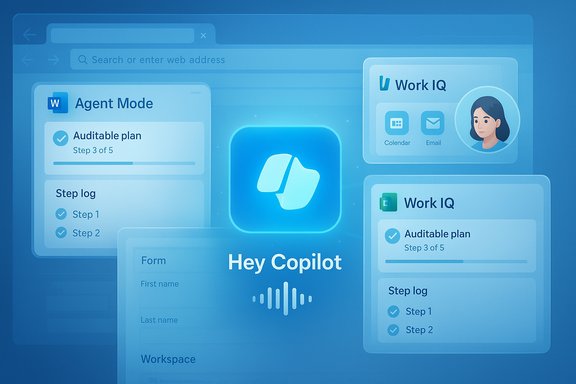
Microsoft’s Copilot moved from promising assistant to practical work partner at Ignite — and the changes are not incremental tweaks but a deliberate shift toward agentic, context-aware AI embedded across Windows, Edge, and Microsoft 365. The announcements—centered on Agent Mode, Work IQ, expanded Office agents, a voice-first mode with a visual avatar called Mico, and browser/desktop agent actions—reframe Copilot as an orchestrator that can research, act, and iterate on real work products while sitting directly inside the apps people use every day.
Background / Overview
Microsoft used Ignite to pull together many strands it has been testing for the past year: long-term memory, connectors to cloud accounts, on-device spotters for wake words, and permissioned agent workspaces. The company branded the integration layer behind those capabilities as Work IQ — an intelligence layer that learns your job, your company, and your files so Copilot can choose the right agent and the right model for the task. That framing turns Copilot from a reactive Q&A assistant into a proactive collaborator that can produce near-final deliverables for users and teams. This is not a single feature release but a multi-surface strategy that touches:- Windows (system-level voice, vision, and agent integrations),
- Edge (agentic browsing and Journeys),
- Microsoft 365 apps (Agent Mode in Word, Excel, PowerPoint; Office Agents in Copilot chat),
- Mobile (voice triage and inbox/calendar understanding),
- Enterprise controls (Agent 365, Entra Agent ID, audit, and DLP integrations).
What changed at Ignite — headline features
Agent Mode and Office Agents: AI that actually “does the work”
Microsoft introduced two complementary patterns:- Agent Mode (in-app): an embedded agent that plans multi-step work inside the Office canvas (Word, Excel, PowerPoint), shows an auditable plan, executes steps, and exposes intermediate artifacts for review. This is intended to reduce opacity by letting users inspect each action the agent took.
- Office Agents (in Copilot Chat): start in chat to research and assemble a near-final deliverable (presentation, report, spreadsheet) and then hand the artifact off to the native app with one click.
Voice Mode that actually works: “Hey, Copilot”
Copilot Voice adds an opt‑in wake-word experience — “Hey, Copilot” — that starts a floating voice UI and supports multi-turn audio sessions. Microsoft says the wake‑word detection runs locally as a small spotter to keep latency and privacy risks lower; heavier speech transcription and reasoning typically run in the cloud unless the device qualifies as a Copilot+ PC with an NPU that supports on‑device inference. Early demos showed Copilot pulling from emails, chats, files and calendar data to brief users by voice.Copilot Vision and Computer Use (Researcher) agent
Copilot Vision is screen-aware: with explicit, session-bound permission the assistant can analyze selected windows, perform OCR, extract tables into Excel, annotate UI elements, and guide users by pointing to where to click. Complementing that is the Researcher / Computer Use agent, which can navigate web pages, click links, and — when authorized — prompt you to sign in and gather data from accounts to complete a research task. Those browser and web actions are gated by permission flows and visible step logs.Work IQ: contextual understanding and model routing
Work IQ sits behind Copilot to map your calendar, email, files, habits, and organization context to the right agent and model. It enables things like routing sensitive tasks to enterprise-approved models, picking models tuned for code vs. document reasoning, and applying sensitivity labels and audit trails for agent activity. The platform also introduces agent governance features: an Agent Store, Copilot Studio for authoring agents, and Entra Agent ID for lifecycle and identity controls.Mico: an optional avatar and “Real Talk”
Microsoft added Mico, an animated, abstract avatar aimed at providing visual feedback during voice and tutoring flows. It’s optional, configurable, and even hides a Clippy easter-egg for nostalgia. Also introduced: Real Talk, a conversational mode that intentionally pushes back and surfaces reasoning instead of reflexive agreement — a usability control designed to combat sycophantic AI responses.Hands‑on signals: what the demos show (and what they don’t)
From brief to deliverable — the Office workflow
Demos showed natural-language briefs converted into:- Fully-built PowerPoint decks with speaker notes,
- Excel workbooks with formulas and validation steps,
- Word reports that include cited passages and editable sections.
Browser agents and the “computer use” capability
Edge’s Copilot Mode and the Researcher agent can consolidate tab content, create resumable Journeys for research, and trigger agentic actions on webpages (like filling forms or following links). These browser-driven agents are powerful for research-heavy tasks but raise obvious questions about session authentication, cross-site permissions, and auditing when the agent needs to click through protected pages. Microsoft frames Actions as experimental and permissioned, but the risk surface grows with greater agent autonomy.Voice-first productivity on mobile
Mobile Copilot is getting voice-based inbox triage, calendar catch-up, and one-tap summarize-and-reply options that make it plausible to “catch up” on a missed meeting or triage an inbox by talking to your phone. These mobile flows are positioned to ship first in preview and then broaden.Technical and hardware contours
Copilot+ PCs and on-device NPUs
Microsoft formalized a premium device class—Copilot+ PCs—defined by an on-device NPU baseline (commonly referenced around 40+ TOPS). The idea: run latency-sensitive spotters and small language models (SLMs) on device for better privacy and responsiveness, while routing heavy reasoning to cloud models when needed. Vendors and OEMs (Qualcomm, Intel, AMD) have devices that meet these targets, but independent benchmarking remains essential before treating marketing numbers as guarantees.Multi-model routing, model choice, and governance
Copilot’s backend is multi-model: Microsoft routes tasks to different model classes (its MAI family, OpenAI, Anthropic in some contexts) depending on the job. That gives enterprises the option to select models by policy or regulatory need and adds another layer of control for sensitive tasks. At scale, Work IQ decides which agent and which model to invoke, subject to admin policy and auditing.Industry context: a new model architecture contender — Mercury and diffusion LLMs
Microsoft’s product moves are occurring in a broader industry contest where inference efficiency matters. One striking external development is Inception Labs’ Mercury — a commercial diffusion-based language model (a dLLM) that claims major gains in inference speed and cost-efficiency by generating and refining tokens in parallel rather than sequentially. Inception says Mercury is up to 5–10x faster than leading small, speed-optimized models while matching their quality on many benchmarks; the company recently raised $50M and released a refreshed Mercury. Why this matters for Copilot and productivity assistants:- Real-time voice agents, coding assistants, and low-latency interactive tools benefit directly from faster inference.
- If diffusion LLMs deliver Pareto improvements in speed vs. cost, large deployments (edge or cloud) could become materially cheaper and more responsive.
- But diffusion approaches are early for text—benchmarks are promising yet mostly company-published or early third-party tests; independent validation at scale is still limited.
Practical implications for IT teams and power users
Benefits
- Faster, more complete deliverables. Agents can produce near-final documents, slides, and spreadsheets with less manual rework.
- Context-aware assistance. Work IQ lets Copilot ground outputs in your files, calendar, and corporate knowledge base — reducing repetitive briefings.
- Accessibility and voice-first workflows. “Hey, Copilot” and fluid dictation features expand accessibility for users with motor or visual impairments.
- Governance primitives. Entra Agent ID, Agent 365, and admin controls mean agents are discoverable, auditable, and can be policy-gated.
Risks and operational considerations
- Privacy and data residency. Connectors and long-term memory increase exposure surfaces. Organizations must audit which connectors are allowed, disable personal connectors on managed devices, and enforce retention policies.
- Agent autonomy and supply chain risk. Agents that click through web pages or sign into accounts increase attack surface and credential risk; fine-grained, revocable permissions and comprehensive logs are essential.
- Model and inference transparency. Multi-model routing can lead to inconsistent outputs across different model families; administrators should map model choices to compliance and explainability requirements.
- Over-reliance and validation complacency. The demos emphasize iteration and validation, but in production the temptation to accept agent outputs without human verification is real — especially for high-stakes finance, legal, or safety-critical content.
Recommended IT controls (practical)
- Require explicit tenant-level opt-in for connectors and long-term memory.
- Configure agent permission scopes to least privilege; require interactive confirmation for elevated ops (like signing into third-party accounts).
- Enable audit logs and retention for all agent activity; export logs to SIEM for anomaly detection.
- Define model routing policies: restrict certain workflows to enterprise-approved models and label anything routed to consumer models.
- Pilot Agent Mode with a controlled business unit and instrument error types before broad rollout.
User guidance: how to adopt safely and productively
- Turn on agents in stages: start with Copilot Chat and Office Agents for low-risk tasks (drafting, summarizing) before enabling in‑canvas Agent Mode for finance or operational work.
- Use the explain and step view features in Agent Mode to validate formulas, data links, and summarization sources before publishing.
- For individuals: keep Connector use conscious and opt-in — do not connect personal Google accounts to managed work devices.
- For power users: learn the “plan-and-review” workflow the agents present. Prompts like “build a monthly close report and show steps” produce more reliable artifacts than one-line requests.
Security and compliance: the governance checklist
- Map agent roles to Entra identities and treat agent activity as a first-class principal for auditing and policy enforcement.
- Apply DLP and sensitivity labels to any file export or sharing operation initiated by agents.
- Ensure agent connectors obey corporate auth flows (OAuth with conditional access, device compliance checks).
- Maintain a human-in-the-loop gating policy for high-risk operations (payments, personnel changes, legal submissions).
- Test revocation and emergency-stop workflows to ensure an agent’s permissions can be immediately disabled.
Strengths, limitations, and key risks — a balanced assessment
Strengths
- Coherent platform approach. Microsoft’s integrated stack — Work IQ, Office agents, Entra control plane — simplifies enterprise adoption compared to piecemeal third-party solutions.
- Actionable agents reduce repetitive work and accelerate outcomes when used with disciplined oversight.
- On-device/hybrid architecture (Copilot+ PCs) can improve latency and privacy for sensitive tasks.
Limitations and unknowns
- Vendor benchmarks vs. independent tests. Claims about speed, cost, and accuracy (including competing model architectures like diffusion dLLMs) are promising but require independent validation for enterprise procurement.
- Complexity of governance. The richer the agent capabilities, the greater the need for central policy, audit, and monitoring — which raises IT overhead during deployment.
- Usability edge cases. Agentic automation is brittle on messy web pages, inconsistent site layouts, or when authentication flows use CAPTCHAs or multi-factor prompts; expect iterative tuning.
Critical risks to watch
- Credential misuse if agents are permitted to reuse or store long-lived tokens.
- Regulatory exposures in sectors where data residency or model provenance is legally constrained.
- Automation drift where agents gradually take on more responsibilities than intended without IT noticing.
Where this fits in the broader AI landscape
Microsoft’s move to embed agentic capabilities across Windows and Office mirrors a broader industry trend: systems want to be both assistive and actionable. At the same time, the rise of new inference architectures (like dLLMs exemplified by Mercury) underscores why latency and cost efficiency are the battlegrounds for real-world adoption. Faster, cheaper inference could unlock richer local agents and better voice-first experiences — the precise scenarios Microsoft showcased at Ignite. But these innovations also accelerate the urgency of governance, explainability, and testing.Conclusion: a practical era for Copilot — but bring safety policies
Microsoft’s Ignite announcements mark a pragmatic step: Copilot is no longer just an experiment in generative chat — it’s being operationalized as a workspace intelligence layer that can research, act, and hand you near-complete work products. For organizations and power users the promise is clear: major reductions in repetitive work and faster time-to-deliverables. The caveats are equally clear: admin controls, auditability, human validation, and rigorous pilot testing must accompany any rollout.Adoption advice in one line: pilot Agent Mode on low-risk workflows, lock down connectors and permissions, monitor agent activity closely, and require visible step reviews before publishing outputs. The technology is powerful and useful, but it becomes safe and reliable only when matched with equally robust governance and validation practices.
Microsoft’s Copilot is evolving into what many enterprises said they wanted: an assistant that understands context, acts with constrained autonomy, and reports its work. That’s a promising direction — provided organizations treat agentic AI as what it is: an augmenting workforce that must be managed, audited, and continuously tested.
Source: The Neuron

 Watch: Hands on with Microsoft Copilot's new features