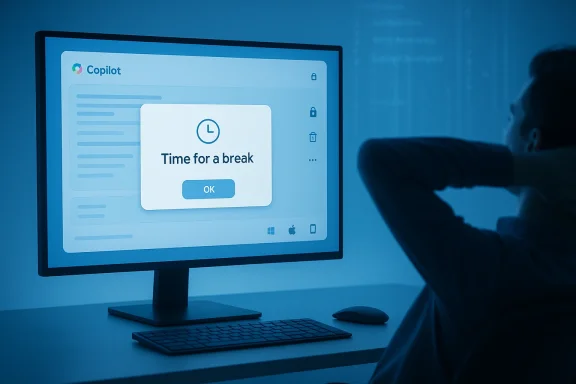
Microsoft's Copilot just did something quietly human: it popped up a gentle nudge asking its user to "Time for a break? Copilot is an AI, but you’re not. It might feel nice to take a breather." That small interaction—reported by Windows Latest after a user encountered the pop-up during a multi‑hour web session—does more than interrupt a chat window; it exposes how modern AI assistants are beginning to mediate not only work but the rhythms of human attention itself. )
This article takes that incident as the starting point for a deeper look at what Microsoft is rolling out in Copilot right now, how those changes work technically and behaviorally, and what users and IT teams should understand about privacy, governance, and digital‑wellbeing trade‑offs. I verify the major updates against Microsoft’s own release notes and independent reporting, flag the one‑off break reminder as anecdotal and not yet independently confirmed by Microsoft, and lay out practical steps you can take to control Copilot’s memory, notifications, and long‑input handling in corporate and personal environments.
Microsoft’s Copilot has evolved from a Windows sidebar curiosity into a cross‑platform assistant deeply integrated across web, desktop, macOS, and mobile clients. Over the past year the company has shifted from experimenting with many small AI widgets to consolidating functionality—memory, group sessions, exportable artifacts, and richer conversation controls—under the Copilot umbrella. Microsoft’s official release notes and message‑center posts document incremental changes to model selection, memory controls, and platform feature parity; independent outlets (The Verge, Digital Trends, Windows Latest) provide hands‑on reports that reveal how those features behave in practice.
At a glance, the recent Copilot headlines that matter to most users and admins are:
Key governance actions:
Design recommendations for responsible nudges:
Two final, practical points: first, treat the reported break reminder as an experiment or staged feature rather than a universal behavior—until Microsoft documents it, we should regard it as anecdotal. Second, if you manage Copilot at scale, treat the Memory and long‑input capabilities as first‑class governance concerns: update DLP rules, pilot Memory settings, and create training that explains what Copilot stores and how to delete it. Companies that get those controls right will get the productivity upside of Copilot without paying the hidden costs of data leakage, regulatory exposure, or eroded user trust.
Acknowledgement of verification: This feature report is grounded in hands‑on reporting by Windows Latest and concurrent coverage and documentation from Microsoft’s Copilot release notes and message‑center announcements; where a claim was supported only by a single hands‑on article (the break reminder), it is explicitly flagged as anecdotal and not yet corroborated by Microsoft’s public documentation.
Source: Windows Latest Microsoft Copilot now reminds you to take a break from AI because you're a human
This article takes that incident as the starting point for a deeper look at what Microsoft is rolling out in Copilot right now, how those changes work technically and behaviorally, and what users and IT teams should understand about privacy, governance, and digital‑wellbeing trade‑offs. I verify the major updates against Microsoft’s own release notes and independent reporting, flag the one‑off break reminder as anecdotal and not yet independently confirmed by Microsoft, and lay out practical steps you can take to control Copilot’s memory, notifications, and long‑input handling in corporate and personal environments.
 Background / Overview
Microsoft’s Copilot has evolved from a Windows sidebar curiosity into a cross‑platform assistant deeply integrated across web, desktop, macOS, and mobile clients. Over the past year the company has shifted from experimenting with many small AI widgets to consolidating functionality—memory, group sessions, exportable artifacts, and richer conversation controls—under the Copilot umbrella. Microsoft’s official release notes and message‑center posts document incremental changes to model selection, memory controls, and platform feature parity; independent outlets (The Verge, Digital Trends, Windows Latest) provide hands‑on reports that reveal how those features behave in practice. At a glance, the recent Copilot headlines that matter to most users and admins are:
- Anecdotal break reminders appearing inside the Copilot chat UI (reported by Windows Latest).
- Improved memory and personalization controls, now rolling out with clearer user settings and a staged general availability.
- Pinned chats and long‑paste support (observed handling of inputs beyond ~10,240 characters; oversized pastes become uploaded artifacts).
- Study & Learn features and Mico voice/avatar enhancements for tutoring and narrated learning experiences.
- Mac app parity and new export/connector options, narrowing platform gaps between Windows and macOS.
- Group chat summaries and Pages export, useful for turning messy threads into shareable artifacts.
The break reminder: what happened, and what we can verify
A close read of the incident
According to the Windows Latest reporter, while using the Copilot web chat for intermittent research over several hours, the interface surfaced a centered pop‑up reading: “Time for a break? Copilot is an AI, but you’re not. It might feel nice to take a breather.” The notification was dismissible and, crucially, did not appear to be a throttling message tied to any documented usage cap—after waiting five minutes the user continued querying Copilot without encountering a limit.What Microsoft has confirmed (a Microsoft’s official release notes and message‑center posts do not currently mention a “take a break” nudge as a named feature or safety policy. The company has publicly documented memory updates, model options, and client feature parity, but not a soft intervention to promote breaks.
- Given the absence of an official announcement, the only verifiable source for this specific break prompt is the Windows Latest firsthand report. That makes the claim anecdotal—plausible based on how other services behave, but not yet independently confirmed by Microsoft or observed in broader reporting. Treat this particular example as illustrative rather than definitive until Microsoft documents it or additional hands‑on coverage corroborates the behavior.
Why a break reminder is technically plausible
From an engineering perspective, it is trivial for a server‑driven UI to trigger a contextual reminder based on session metrics:- Copilot already collects session context (active tab, chat history, timestamps) to perform personalization and memory functions. Microsoft’s message‑center notes confirm Copilot uses chat history and improved settings to personalize responses. That same telemetry can drive simple heuristics like “active session > X minutes” or “frequent prompts over Y minutes” and surface a soft UI nudge.
- Many modern apps use identical signals to promote digital wellbeing: YouTube’s “Take a break” reminder and Apple’s Screen Time app are canonical precedents that show how services use continuous engagement metrics to trigger non‑intrusive nudges. Those systems are explicitly user‑configurable—YouTube requires you to opt into the reminder and Apple’s Screen Time provides robust controls for downtime and app limits. Copilot could implement a similar pattern.
Practical takeaway
- The break prompt is plausible and consistent with known telemetry Copilot collects, but it is not yet a documented feature of Copilot’s official release notes. Treat the report as a useful signal about product direction—Microsoft may be experimenting with digital‑wellness nudges—but don’t assume universal availability or a specific trigger threshold until more evidence appears.
The broader Copilot updates that we can verify
Microsoft and independent reporting confirm several concrete feature changes that materially affect workflows. Below I summarize each with verification and practical implications.1) Memory and personalization: clearer controls, staged rollout
- What changed: Microsoft updated Copilot’s memory subsystem to personalize conversational responses using prior chat history and introduced redesigned Memory controls in Settings to view, edit, and delete saved information. Public previews began in late 2025 and general availability rolled out in early 2026.
- Why it matters: Persistent memory turns Copilot from a stateless helper into a contextual assistant that can recall preferences, ongoing projects, and role‑based details—useful for continuity but sensitive from a privacy and compliance standpoint.
- Verification: Microsoft’s Message Center item MC1158329 documents the timeline and the controls, and contemporary press coverage confirms the feature behavior.
2) Pinned chats and improved exports
- What changed: Users can pin important conversations for quick access; Copilot also added richer export options to move content into Word, PowerPoint, Excel, PDF, or saved Pages for group summaries.
- Why it matters: Pinning reduces friction for repeat use cases (nutrition lookups, thesaurus queries, project threads). Exportability transforms ephemeral chat into an auditable artifact.
3) Handling of very long input blocks (~10,240 characters)
- What changed: Reporting and hands‑on testing show Copilot accepts very long pasted text (Windows Latest and other outlets observed a threshold around 10,240 characters). When an input exceeds inline handling, Copilot may automatically upload the content as a file and treat it as an artifact for summarization or analysis.
- Verification: Multiple outlets and community tests have reproduced this behavior. Microsoft’s release notes describe improved file‑upload handling and artifact exports, although they do not always publish exact character thresholds in every note—reporting is consistent that Copilot now manages significantly larger inputs than before. Treat the ~10,240 figure as empirically observed by reviewers and consistent across independent hands‑on coverage.
4) Study & Learn mode, Mico avatar and voice tutoring
- What changed: Copilot offers Study & Learn workflows that generate quizzes, flashcards, and read‑aloud lessons using the Mico voice/avatar. The Verge and Microsoft’s own blog pieces describe “Learn Live” tutoring capabilities and the Mico avatar designed for expressive, non‑photoreal interactions.
- Why it matters: Education and learning workflows are a strategic area where Copilot can increase session length and perceived value—but they also raise questions around pedagogical accuracy, source grounding, and the need for citation of facts.
5) Mac parity and cross‑platform feature convergence
- What changed: Copilot’s macOS client has received parity updates (Podcasts, Imagine image tools, Library, Connectors, Read Aloud, improved export) that bring it closer to the Windows experience. Microsoft release notes and the Copilot team blog detail the macOS availability and staged rollouts.
- Why it matters: Cross‑platform parity helps organizations standardize workflows across heterogeneous device fleets.
Why Microsoft might introduce a break nudge — motives and mechanics
There are several plausible reasons Microsoft could experiment with a “take a break” nudge inside Copilot:- Digital wellbeing and responsible AI optics. As AI assistants become more conversational and persistent, vendors face pressure to demonstrate human‑first design choices that protect user attention and mental health.
- Session quality optimization. Brief breaks often improve query quality and reduce nonsensical or hurried prompts; nudges could indirectly improve downstream model outputs.
- Retention and trust management. Gentle nudges framed as caring interventions can humanize a product and reduce backlash to “always‑on” AI—if done transparently.
- Regulatory and safety considerations. Regulators and enterprises increasingly expect software vendors to adopt reasonable guardrails around continuous monitoring—non‑intrusive nudges are an easy first step.
Privacy, telemetry, and governance: what admins must know
As Copilot gains memory, connectors, file exports, and session heuristics, administrators and privacy officers need to treat the service like any other enterprise‑grade platform: define policies, educate users, and monitor telemetry sources.Key governance actions:
- Review and configure Memory and personalization settings at the tenant level; Microsoft’s message center notes that Memory respects existing admin settings but provides new user controls that should be mapped to organizational policy.
- Implement Data Loss Prevention (DLP) and conditional access for connectors that feed external data into Copilot; connectors expand exposure surface across SharePoint, OneDrive, and third‑party systems.
- Treat exported artifacts and pinned chats as potential records under retention rules—exports to Word/PDF or Pages should be subject to eDiscovery and governance if they contain regulated data.
- Pilot rollouts in test tenants before enabling new features broadly; features are rolling out in waves and behavior can vary by region and ring. Microsoft’s guidance and community reporting both recommend staged testing.
Risks, limits, and the accuracy problem
Copilot is improving fast, but accuracy remains a material issue for many use cases:- Independent and academic audits of large assistants continue to find nontrivial rates of factual errors in summarization and medical or legal paraphrasing. Users should verify outputs in high‑stakes contexts. Community testing and a BBC study highlighted error rates in multiple assistants; Microsoft’s documentation does not claim perfect accuracy. Treat Copilot as an assistant, not an authority.
- Memory and personalization increase the risk of over‑trust—the assistant that “knows” you can sound authoritative even when wrong. The new Memory control UIs are a positive step, but organizations must train employees on memory hygiene (what you store in Copilot and why).
- Larger paste handling and automatic artifact uploads are helpful, but they also make it easier to submit sensitive documents to cloud processing. Review DLP and user education before allowing bulk pastes of PII or regulated data.
Practical checklist: what to do right now (users and admins)
For individual users- Review your Copilot Memory settings: see what Copilot remembers and delete sensitive entries you don’t want retained. Microsoft introduced new Memory controls in Settings; use them.
- If you see a break prompt and prefer not to be nudged, look for a notifications or wellbeing setting in the Copilot UI to opt out; if none exists, submit feedback through the app. (As of this writing the break notification is not a documented global setting.)
- When pasting long documents, expect Copilot to convert very large inputs into attachments—use that behavior to your advantage (keep the artifact for audits). But avoid pasting regulated content unless you’ve confirmed your tenant policy allows it.
- Inventory Copilot usage across your tenant:
- Which users have Memory enabled?
- Which connectors are active?
- Which data sources are accessible to Copilot?
- Configure governance:
- Apply conditional access and DLP policies to restrict uploads of PII or regulated files to Copilot endpoints.
- Document export retention and auditing rules for Copilot‑generated artifacts.
- Pilot memory and pinned chat features in a test group before broad deployment; roll features out to business units with appropriate training and playbooks. Microsoft’s rollout guidance and community experiences warn that behavior can vary by account and region.
- Communicate to staff:
- Explain what Copilot remembers and how to delete items.
- Provide examples of acceptable and unacceptable content for Copilot prompts.
The UX and ethics angle: nudging attention versus nudging behavior
There’s an important ethical dimension when an assistant intentionally intervenes in user attention. Past research on “digital nudges” shows mixed outcomes: a timely reminder can reduce excessive use for some people but becomes an annoyance or a source of guilt for others—something Apple’s Screen Time and YouTube’s opt‑in break reminders both demonstrate. Copilot’s potential break reminders should be designed with opt‑out options, clear telemetry explanations, and, ideally, user‑configurable thresholds to avoid paternalistic overreach.Design recommendations for responsible nudges:
- Make the nudge explicit about why it appeared (e.g., “You’ve been active for X hours; would you like a 5‑minute break?”).
- Provide quick actions (snooze, dismiss, set preferences).
- Log nudge encounters in a privacy‑safe way and surface them in audit trails only when necessary for compliance.
Conclusion
The small interaction reported by Windows Latest—the Copilot “Time for a break” pop‑up—is a telling signal. It reflects a product design space where AI assistants are moving beyond mere question‑answering into relationship management with users: helping remember, summarize, export, and now potentially protect attention. Many of the substantive updates that make Copilot more useful—Memory controls, pinned chats, large‑paste handling, Study & Learn modes, Mac parity, and group summaries—are documented by Microsoft and corroborated by hands‑on reporting. These changes make Copilot more capable and more intrusive at the same time, which elevates the need for clear governance, user education, and conservative defaults.Two final, practical points: first, treat the reported break reminder as an experiment or staged feature rather than a universal behavior—until Microsoft documents it, we should regard it as anecdotal. Second, if you manage Copilot at scale, treat the Memory and long‑input capabilities as first‑class governance concerns: update DLP rules, pilot Memory settings, and create training that explains what Copilot stores and how to delete it. Companies that get those controls right will get the productivity upside of Copilot without paying the hidden costs of data leakage, regulatory exposure, or eroded user trust.
Acknowledgement of verification: This feature report is grounded in hands‑on reporting by Windows Latest and concurrent coverage and documentation from Microsoft’s Copilot release notes and message‑center announcements; where a claim was supported only by a single hands‑on article (the break reminder), it is explicitly flagged as anecdotal and not yet corroborated by Microsoft’s public documentation.
Source: Windows Latest Microsoft Copilot now reminds you to take a break from AI because you're a human