

Microsoft is extending Copilot deeper into Word for iPhone and iPad, and the move says as much about the company’s mobile strategy as it does about generative AI. The new collaboration experience lets Microsoft 365 Insiders draft, revise, and refine document text through natural-language prompts inside Word for iOS, while keeping the user in control of when changes are actually committed. It is a practical step forward for on-the-go writing, but it also exposes the current limits of AI-assisted editing: the feature still depends on user-authored files, does not create images directly, and cannot handle comments cleanly in every scenario.
Microsoft has spent the past two years turning Copilot from a chat-style assistant into a workflow layer across Word, Excel, PowerPoint, Outlook, and the Microsoft 365 Copilot app. On mobile, that effort has been especially visible because phones and tablets force every product decision to justify itself in a very small space. Word for iOS is now one of the clearest examples of that evolution, with Microsoft’s own support material describing how Copilot can open documents, generate summaries, answer questions, and draft content directly inside the app. The latest Insider preview pushes that idea further by making AI less of a side panel and more of a collaborator.
That matters because Word has always been the most consequential Microsoft 365 app for enterprise writing. It is where policy documents, proposals, meeting notes, compliance drafts, and customer-facing text all come together. When Microsoft adds AI capabilities to Word, it is not just adding a convenience feature; it is changing the tempo of how many organizations create and review content. The mobile angle is important too, because more professionals now expect to begin work on an iPhone during transit, in meetings, or between other tasks, then finish on desktop later.
The feature described in the AIBase report aligns closely with Microsoft’s broader Copilot direction, even if the exact preview behavior should be read with caution until Microsoft publishes the formal rollout details. Microsoft’s support pages already explain that Copilot in Word for iOS can chat about documents, summarize them, and draft content from prompts. Microsoft Learn also frames Microsoft 365 Copilot as a productivity layer embedded in familiar apps, with an emphasis on secure access to organizational content and natural-language interaction. The new collaboration experience appears to be an extension of that architecture rather than a standalone experiment.
What makes this release noteworthy is not merely that Microsoft is bringing more AI to iOS. It is that the company is trying to make AI feel reversible, previewed, and less risky for everyday editing. That is an important distinction, because many workers are willing to ask an assistant to help draft something, but far fewer are comfortable with an assistant quietly changing the record without showing its work. Microsoft seems to understand that trust is the real product here.
Word on mobile used to be mostly a viewing and light-editing tool. That has changed dramatically as Microsoft has tried to make the iPhone and iPad feel like legitimate endpoints for knowledge work. Microsoft’s own support documentation now describes Copilot in Word for iPhone and iPad as a way to chat with documents, summarize them, and draft content from prompts, while also pointing out that licenses and eligibility matter. In other words, the mobile app is no longer a stripped-down companion; it is becoming a feature-complete entry point into the Microsoft 365 ecosystem.
The AIBase write-up adds a layer of detail that fits Microsoft’s general product pattern: prompt-first drafting, preview-before-apply behavior, and undo or version history as safety nets. Those are sensible design choices because they reduce the anxiety that can come with generative text systems. A user can ask for a paragraph, inspect the suggestion, then accept or discard it. That model is already familiar to anyone who has used editing assistance in email or document tools, but it becomes more important when the assistant is capable of substantial rewrites.
For enterprise users, that could mean more documents get started earlier and refined more often. For consumers, it could mean school essays, personal letters, and project plans become easier to shape between errands and commutes. The practical advantage is not that Copilot writes everything for you, but that it lowers the activation energy required to begin.
The company’s support documentation reinforces that broader pattern by describing prompt-driven drafting and chat interactions as user-initiated actions tied to document permissions. It is the difference between an assistant that suggests and an assistant that silently acts. In productivity software, that difference is everything.
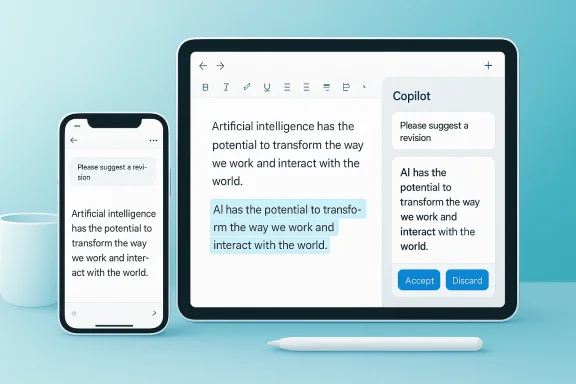
The collaboration element appears to be the more interesting part. Instead of immediately altering a shared document, Copilot first shows a preview of suggested changes in the chat window, and only after the user confirms does the content get applied. That keeps the interaction closer to a review workflow than to a blind auto-edit. It is a smart move, because editing is not just generation; it is judgment.
Microsoft is also nudging users toward prompt habits that improve results. The report notes tips such as using the “/” character to reference other content and relying on undo if the output is not what was intended. Those are small details, but they matter because they show Microsoft is teaching users how to work with AI instead of assuming the AI will be magically intuitive. That pedagogical layer is often overlooked, yet it is central to adoption.
That model also makes compliance teams happier. Previewed changes are easier to audit mentally, and users can often connect them to a known prompt or intention. The more deterministic the handoff, the easier it is to trust the system in business settings.
That design choice also broadens the audience. Experienced writers can use AI to accelerate repetitive work, while less experienced users can lean on it to produce a stronger first pass. In both cases, the interface tries to make the first step feel less intimidating.
The Word for iOS update also fits the company’s enterprise-first framing. Microsoft’s documentation emphasizes license eligibility, subscription requirements, and the role of work or school accounts for many Copilot capabilities. That tells us the company sees document generation not merely as a consumer novelty, but as a managed workplace capability with policy and security implications. The mobile form factor is an expansion of that controlled environment, not a departure from it.
At the same time, Microsoft has been increasingly willing to blur the line between consumer-style ease and enterprise-grade governance. That is a delicate balance. Users want the convenience of conversational AI, while IT administrators want the controls associated with identity, retention, sharing, and permissions. The new Word for iOS workflow appears designed to satisfy both camps by keeping the interaction lightweight while requiring explicit confirmation before changes land.
For Word, that makes Copilot less of a novelty and more of a productivity primitive. Once users expect this style of interaction on mobile, they will expect it elsewhere too. That can strengthen Microsoft’s ecosystem lock-in, but it also raises the bar for quality.
An internal memo can tolerate a rougher AI-assisted draft. A customer-facing policy, employment note, or legal summary cannot. Microsoft’s preview and undo model is meant to manage that tension, but the user still needs judgment. AI can accelerate the process; it cannot decide what should be said.
The inability to directly generate and insert images is another meaningful boundary. Visual content creation has become one of the most popular AI use cases, so the fact that users must still rely on Copilot Chat for images suggests the Word workflow is staying focused on text first. That may frustrate some users, but it also prevents the feature from becoming too crowded or unpredictable inside a mobile interface.
Then there is the comments issue, which may be the most annoying limitation of all for serious collaborative work. The report says the feature does not support adding or modifying comments, and that replacing content with anchored comments may inadvertently delete them. That kind of behavior can undermine confidence quickly, because comments are where many teams preserve context, disagreements, and review history.
Still, users are likely to notice where the boundaries are drawn. If the assistant can rewrite a paragraph but not respect every comment thread, some users will treat it as a drafting aid rather than a true collaboration partner. That distinction will shape adoption.
Microsoft will need to prove that it can preserve collaborative metadata as carefully as it preserves the text itself. Otherwise, users may keep Copilot away from heavily reviewed documents and reserve it for rough drafts only.
This matters especially in shared files. When multiple people rely on the same document, one person’s careless prompt can create a chain reaction of edits. Microsoft’s approach attempts to limit that risk by making the AI’s intervention visible and user-controlled. It is not foolproof, but it is far safer than “fire and forget” generation.
Microsoft’s broader Copilot messaging also emphasizes secure grounding and organizational access controls. Microsoft Learn describes Microsoft 365 Copilot as using content users already have access to, with security and privacy aligned to existing organizational policies. That framing suggests the company wants Copilot to feel like an extension of Microsoft 365 governance, not a bypass around it. The iOS Word implementation should be judged in that light.
This is especially valuable in mobile scenarios where users may be multitasking or working in less controlled environments. A hotel lobby, train ride, or airport gate is not the place where you want silent document mutations. The confirmation step makes the experience safer by design.
If Microsoft wants this feature to scale beyond enthusiasts, it must show that AI changes are traceable, reversible, and policy-aware. That is the standard now.
For individuals, this could mean using spare minutes more effectively. A user can capture a few ideas, ask Copilot to shape them into a draft, and then refine the result later on desktop. For teams, it could mean faster first-pass revisions before a meeting, during travel, or while waiting for additional inputs. The feature does not replace thoughtful editing, but it can make editing more reachable.
The workflow also creates a new kind of writing literacy. Users will need to learn how to prompt, how to inspect AI output, and how to decide what is ready to accept. That is a skill set in its own right, and it will likely become as normal as using track changes once did.
This is the right mindset for business writing. AI should reduce blank-page friction and repetitive rewriting, not erase accountability. The more Microsoft reinforces that message, the more likely organizations are to adopt the feature broadly.
The mobile story is not just about convenience. It is about keeping users inside Microsoft’s ecosystem even when they are away from their primary workstation. That is a powerful retention lever.
Google remains the other obvious comparison point. Google Docs has long been strong in collaboration, but Microsoft’s Copilot pitch is now less about raw co-editing and more about assisted creation inside the file itself. That difference matters because the market is moving from “who can share a document?” to “who can help me make the document better, faster?” If Microsoft sustains this momentum, it could widen the gap in enterprise AI productivity perception.
There is also a broader platform implication. The more Microsoft can make Copilot feel indispensable in Word, the more it can bundle AI value into Microsoft 365 subscriptions. That strengthens Microsoft’s pricing power and ecosystem gravity. It also raises competitive pressure on smaller AI-writing tools that rely on being the best place to draft text rather than the best place to manage files.
The challenge, of course, is expectations. When a company has that kind of reach, users quickly notice inconsistency, latency, or feature gaps. Microsoft will have to keep making the mobile experience feel coherent and reliable.
That is why this preview matters. It is not just a feature test; it is another step in Microsoft’s effort to make Copilot the default assistant for documents.
Good AI usage in Word is likely to look less like magic and more like collaboration. The user provides context, the model proposes text, the user checks and adjusts, and the document gradually improves. That loop is especially suitable for mobile because the cost of a short iterative exchange is lower than the cost of manually building a full section from scratch. It is incremental productivity, not automation theater.
Microsoft’s support documentation already suggests that Copilot in Word can answer questions about documents, summarize content, and generate drafts based on what the user provides. The new collaboration mode seems to extend the same philosophy into editing. That consistency should help users build habits around the tool rather than treating it as a separate novelty.
It also means Copilot can become a quiet productivity equalizer. People who are not naturally strong writers can get closer to a usable first draft more quickly, while strong writers can spend more time polishing ideas rather than assembling them from scratch.
The best AI workflows do not make mistakes impossible. They make mistakes recoverable.
That is where the real business value sits. Small daily time savings often matter more than dramatic one-time capabilities.
Microsoft will need to be careful about how much confidence it implies. If users assume the assistant understands context better than it actually does, they may overtrust its output. That is especially dangerous in shared business documents where one wrong rewrite can ripple outward.
That means education will matter as much as engineering. The safest AI system is one that users understand well enough to question.
The more interesting question is how far Microsoft wants to push AI collaboration inside documents. If Word for iOS becomes a place where users can draft, revise, summarize, and negotiate content with Copilot, then the app starts to resemble a miniature production studio for knowledge work. That would be a meaningful evolution, but it will require even stronger guardrails.
In the near term, the feature’s success will depend less on flashy demos than on whether it reliably helps users produce better drafts without breaking the collaborative habits they already trust. If Microsoft gets that balance right, Word on iOS could become one of the strongest examples of practical AI inside a mainstream productivity app.
Source: AIBase Microsoft Word for iOS Introduces AI Collaboration Features to Enhance Document Writing Efficiency
 Overview
Microsoft has spent the past two years turning Copilot from a chat-style assistant into a workflow layer across Word, Excel, PowerPoint, Outlook, and the Microsoft 365 Copilot app. On mobile, that effort has been especially visible because phones and tablets force every product decision to justify itself in a very small space. Word for iOS is now one of the clearest examples of that evolution, with Microsoft’s own support material describing how Copilot can open documents, generate summaries, answer questions, and draft content directly inside the app. The latest Insider preview pushes that idea further by making AI less of a side panel and more of a collaborator.That matters because Word has always been the most consequential Microsoft 365 app for enterprise writing. It is where policy documents, proposals, meeting notes, compliance drafts, and customer-facing text all come together. When Microsoft adds AI capabilities to Word, it is not just adding a convenience feature; it is changing the tempo of how many organizations create and review content. The mobile angle is important too, because more professionals now expect to begin work on an iPhone during transit, in meetings, or between other tasks, then finish on desktop later.
The feature described in the AIBase report aligns closely with Microsoft’s broader Copilot direction, even if the exact preview behavior should be read with caution until Microsoft publishes the formal rollout details. Microsoft’s support pages already explain that Copilot in Word for iOS can chat about documents, summarize them, and draft content from prompts. Microsoft Learn also frames Microsoft 365 Copilot as a productivity layer embedded in familiar apps, with an emphasis on secure access to organizational content and natural-language interaction. The new collaboration experience appears to be an extension of that architecture rather than a standalone experiment.
What makes this release noteworthy is not merely that Microsoft is bringing more AI to iOS. It is that the company is trying to make AI feel reversible, previewed, and less risky for everyday editing. That is an important distinction, because many workers are willing to ask an assistant to help draft something, but far fewer are comfortable with an assistant quietly changing the record without showing its work. Microsoft seems to understand that trust is the real product here.
Background
Microsoft’s Copilot strategy has gone through several phases. The earliest public pitch focused on drafting and summarization inside desktop Microsoft 365 apps, then expanded to mobile access through the Microsoft 365 Copilot app and Word’s mobile experiences. Over time, the company has also emphasized commercial data protection, permission-aware grounding, and document-aware answers, all of which are meant to reassure IT departments that AI is not bypassing policy. That history helps explain why the new iOS collaboration feature is gated behind Insider testing and why Microsoft is careful about how the user approves changes.Word on mobile used to be mostly a viewing and light-editing tool. That has changed dramatically as Microsoft has tried to make the iPhone and iPad feel like legitimate endpoints for knowledge work. Microsoft’s own support documentation now describes Copilot in Word for iPhone and iPad as a way to chat with documents, summarize them, and draft content from prompts, while also pointing out that licenses and eligibility matter. In other words, the mobile app is no longer a stripped-down companion; it is becoming a feature-complete entry point into the Microsoft 365 ecosystem.
The AIBase write-up adds a layer of detail that fits Microsoft’s general product pattern: prompt-first drafting, preview-before-apply behavior, and undo or version history as safety nets. Those are sensible design choices because they reduce the anxiety that can come with generative text systems. A user can ask for a paragraph, inspect the suggestion, then accept or discard it. That model is already familiar to anyone who has used editing assistance in email or document tools, but it becomes more important when the assistant is capable of substantial rewrites.
Why mobile collaboration matters
Mobile collaboration is not simply desktop collaboration in a smaller frame. On a phone, the tolerance for complicated workflows is lower, and the value of rapid iteration is higher. If Copilot can make a rough draft, tighten phrasing, or reorganize ideas from natural language, it can save meaningful time in moments when a full laptop workflow would be impractical.For enterprise users, that could mean more documents get started earlier and refined more often. For consumers, it could mean school essays, personal letters, and project plans become easier to shape between errands and commutes. The practical advantage is not that Copilot writes everything for you, but that it lowers the activation energy required to begin.
The trust layer is the real story
Microsoft has learned, as have most AI vendors, that generative output is easy; dependable workflow integration is hard. The preview/confirm model described in the report is a sign that the company is trying to preserve user agency. That is especially important in Word, where a mistaken rewrite can alter tone, meaning, or even legal significance.The company’s support documentation reinforces that broader pattern by describing prompt-driven drafting and chat interactions as user-initiated actions tied to document permissions. It is the difference between an assistant that suggests and an assistant that silently acts. In productivity software, that difference is everything.
What Microsoft Is Adding
The headline change is straightforward: Microsoft 365 Insiders testing Word for iOS can invoke Copilot in a document, enter a request in natural language, and receive drafted content or suggested edits. According to the description, this works in both new and existing documents, which is important because it makes the feature useful whether you are starting from scratch or improving something already underway. The practical effect is to turn the phone into a lighter version of a drafting workspace.The collaboration element appears to be the more interesting part. Instead of immediately altering a shared document, Copilot first shows a preview of suggested changes in the chat window, and only after the user confirms does the content get applied. That keeps the interaction closer to a review workflow than to a blind auto-edit. It is a smart move, because editing is not just generation; it is judgment.
Microsoft is also nudging users toward prompt habits that improve results. The report notes tips such as using the “/” character to reference other content and relying on undo if the output is not what was intended. Those are small details, but they matter because they show Microsoft is teaching users how to work with AI instead of assuming the AI will be magically intuitive. That pedagogical layer is often overlooked, yet it is central to adoption.
A preview-first design
The preview-first approach mirrors a broader industry shift toward human-in-the-loop AI. In document software, users want assistance, but they do not want the assistant to become the editor of record unless explicitly allowed. Showing suggested modifications before applying them reduces the chance of accidental damage and makes the AI feel more like a coauthor than a controller.That model also makes compliance teams happier. Previewed changes are easier to audit mentally, and users can often connect them to a known prompt or intention. The more deterministic the handoff, the easier it is to trust the system in business settings.
Why natural language lowers friction
The most valuable part of the update may simply be that users can talk to Word like a person. Instead of hunting through formatting menus or starting from a blank page, they can say what they want in plain English and let the system assemble a draft. This is particularly helpful for mobile, where typing long instructions is slower and more annoying than on desktop.That design choice also broadens the audience. Experienced writers can use AI to accelerate repetitive work, while less experienced users can lean on it to produce a stronger first pass. In both cases, the interface tries to make the first step feel less intimidating.
How It Fits Microsoft’s Broader Copilot Strategy
Microsoft has spent much of 2024 and 2025 normalizing the idea that Copilot belongs inside the apps people already use. The company’s support and Microsoft Learn materials repeatedly position Microsoft 365 Copilot as a productivity layer across Word, Excel, PowerPoint, Outlook, Teams, and the mobile app. That consistency matters because adoption tends to lag when AI is delivered as a separate destination rather than an integrated feature.The Word for iOS update also fits the company’s enterprise-first framing. Microsoft’s documentation emphasizes license eligibility, subscription requirements, and the role of work or school accounts for many Copilot capabilities. That tells us the company sees document generation not merely as a consumer novelty, but as a managed workplace capability with policy and security implications. The mobile form factor is an expansion of that controlled environment, not a departure from it.
At the same time, Microsoft has been increasingly willing to blur the line between consumer-style ease and enterprise-grade governance. That is a delicate balance. Users want the convenience of conversational AI, while IT administrators want the controls associated with identity, retention, sharing, and permissions. The new Word for iOS workflow appears designed to satisfy both camps by keeping the interaction lightweight while requiring explicit confirmation before changes land.
From assistant to workflow layer
This is a subtle but important shift. Early AI features were framed as “ask me anything” tools. Microsoft’s current approach is more ambitious: AI should help produce the artifact itself. That means turning a prompt into an outline, an outline into a draft, and a draft into something collaborators can refine.For Word, that makes Copilot less of a novelty and more of a productivity primitive. Once users expect this style of interaction on mobile, they will expect it elsewhere too. That can strengthen Microsoft’s ecosystem lock-in, but it also raises the bar for quality.
Enterprise and consumer tension
For enterprises, the upside is obvious: faster drafting, more consistent tone, and less time spent on boilerplate. For consumers, the gain is convenience, especially when writing on a small screen. But the same features can behave differently depending on the stakes of the document.An internal memo can tolerate a rougher AI-assisted draft. A customer-facing policy, employment note, or legal summary cannot. Microsoft’s preview and undo model is meant to manage that tension, but the user still needs judgment. AI can accelerate the process; it cannot decide what should be said.
The Limitations Matter More Than the Demo
Microsoft’s reported limitations are arguably as important as the feature itself. Copilot in this preview reportedly cannot create new documents on its own, meaning users still have to start the file manually or activate Copilot within an existing document. That may seem like a small restriction, but it reveals something important: Microsoft is keeping the tool bounded. The assistant is there to collaborate, not to independently initiate a document lifecycle.The inability to directly generate and insert images is another meaningful boundary. Visual content creation has become one of the most popular AI use cases, so the fact that users must still rely on Copilot Chat for images suggests the Word workflow is staying focused on text first. That may frustrate some users, but it also prevents the feature from becoming too crowded or unpredictable inside a mobile interface.
Then there is the comments issue, which may be the most annoying limitation of all for serious collaborative work. The report says the feature does not support adding or modifying comments, and that replacing content with anchored comments may inadvertently delete them. That kind of behavior can undermine confidence quickly, because comments are where many teams preserve context, disagreements, and review history.
Why limits can be healthy
In product design, constraints are not always weaknesses. They can keep a feature stable while Microsoft gathers telemetry and user feedback. By limiting the scope of Copilot’s behavior, Microsoft can control the quality of the experience and reduce the chance of disastrous edge cases.Still, users are likely to notice where the boundaries are drawn. If the assistant can rewrite a paragraph but not respect every comment thread, some users will treat it as a drafting aid rather than a true collaboration partner. That distinction will shape adoption.
The comment problem is a governance problem
Comments are not decorative; they are part of the decision trail. In many organizations, they carry meaning about approvals, revision requests, and accountability. If an AI feature can accidentally erase them, even occasionally, that is a governance issue rather than a minor UI bug.Microsoft will need to prove that it can preserve collaborative metadata as carefully as it preserves the text itself. Otherwise, users may keep Copilot away from heavily reviewed documents and reserve it for rough drafts only.
Security, Control, and Approval Flow
One of the most encouraging aspects of the feature is the explicit approval step before modifications are applied. That is a familiar pattern in secure productivity software, but it remains essential in AI-assisted editing because the output can be persuasive even when it is wrong. A preview gives users a chance to inspect tone, structure, and unintended meaning before the document changes.This matters especially in shared files. When multiple people rely on the same document, one person’s careless prompt can create a chain reaction of edits. Microsoft’s approach attempts to limit that risk by making the AI’s intervention visible and user-controlled. It is not foolproof, but it is far safer than “fire and forget” generation.
Microsoft’s broader Copilot messaging also emphasizes secure grounding and organizational access controls. Microsoft Learn describes Microsoft 365 Copilot as using content users already have access to, with security and privacy aligned to existing organizational policies. That framing suggests the company wants Copilot to feel like an extension of Microsoft 365 governance, not a bypass around it. The iOS Word implementation should be judged in that light.
Approval before action
The preview-confirm pattern is the right default for mobile collaboration. A quick scroll through the suggested modification gives the user enough information to spot obvious mistakes without forcing a full manual review of every character. It strikes a balance between speed and responsibility.This is especially valuable in mobile scenarios where users may be multitasking or working in less controlled environments. A hotel lobby, train ride, or airport gate is not the place where you want silent document mutations. The confirmation step makes the experience safer by design.
Enterprise security expectations
Business users will want stronger assurances than consumer users. They will ask whether edits are logged, whether prior versions can be recovered, and how the feature behaves when documents are shared across tenants or governed by retention policies. Microsoft’s current documentation implies that Copilot participates in the same broader Microsoft 365 permission structure, but the real-world edge cases will matter most.If Microsoft wants this feature to scale beyond enthusiasts, it must show that AI changes are traceable, reversible, and policy-aware. That is the standard now.
Impact on Writing Workflows
The most obvious benefit is speed, but the deeper benefit is momentum. Many documents stall because users do not know how to begin, how to rephrase a rough thought, or how to bridge between a note and a polished paragraph. Copilot can help close that gap. On mobile, where interruptions are constant and time windows are short, momentum is often more valuable than perfection.For individuals, this could mean using spare minutes more effectively. A user can capture a few ideas, ask Copilot to shape them into a draft, and then refine the result later on desktop. For teams, it could mean faster first-pass revisions before a meeting, during travel, or while waiting for additional inputs. The feature does not replace thoughtful editing, but it can make editing more reachable.
The workflow also creates a new kind of writing literacy. Users will need to learn how to prompt, how to inspect AI output, and how to decide what is ready to accept. That is a skill set in its own right, and it will likely become as normal as using track changes once did.
Better first drafts, not final authority
The best productivity software rarely removes human judgment; it relocates it. Copilot can produce a better draft faster, but people still need to own the message, audience, and intent. That keeps the tool useful across a wide range of roles without turning it into a source of uncontrolled prose.This is the right mindset for business writing. AI should reduce blank-page friction and repetitive rewriting, not erase accountability. The more Microsoft reinforces that message, the more likely organizations are to adopt the feature broadly.
A stronger mobile story for Microsoft 365
Microsoft has a clear interest in making the iPhone and iPad feel like first-class endpoints. If Word on iOS can handle meaningful drafting and editing tasks, then Microsoft 365 becomes more portable and sticky. That is strategically important because many competitors still struggle to deliver deep productivity features on mobile.The mobile story is not just about convenience. It is about keeping users inside Microsoft’s ecosystem even when they are away from their primary workstation. That is a powerful retention lever.
Competitive Implications
This release should also be read in competitive terms. Apple’s own productivity suite remains deeply integrated into iOS, but Microsoft has the advantage of a broader enterprise stack and more aggressive AI positioning. By embedding Copilot into Word for iOS, Microsoft is trying to make document work feel native on Apple hardware without surrendering the workflow layer to Apple or third-party assistants.Google remains the other obvious comparison point. Google Docs has long been strong in collaboration, but Microsoft’s Copilot pitch is now less about raw co-editing and more about assisted creation inside the file itself. That difference matters because the market is moving from “who can share a document?” to “who can help me make the document better, faster?” If Microsoft sustains this momentum, it could widen the gap in enterprise AI productivity perception.
There is also a broader platform implication. The more Microsoft can make Copilot feel indispensable in Word, the more it can bundle AI value into Microsoft 365 subscriptions. That strengthens Microsoft’s pricing power and ecosystem gravity. It also raises competitive pressure on smaller AI-writing tools that rely on being the best place to draft text rather than the best place to manage files.
Microsoft’s advantage is distribution
Microsoft does not need to convince users to install a brand-new productivity suite. It just has to make the existing one smarter. That distribution advantage is enormous. It means every useful Copilot improvement can be amplified across a vast installed base.The challenge, of course, is expectations. When a company has that kind of reach, users quickly notice inconsistency, latency, or feature gaps. Microsoft will have to keep making the mobile experience feel coherent and reliable.
Rivals will lean into specialization
Smaller competitors may respond by emphasizing niche strengths: creative writing, brand voice, legal drafting, or collaboration-specific controls. That is a rational strategy because general-purpose AI inside Word will not be the perfect tool for every job. But Microsoft does not need to be perfect in every niche to win broadly; it needs to be good enough for the majority of everyday office tasks.That is why this preview matters. It is not just a feature test; it is another step in Microsoft’s effort to make Copilot the default assistant for documents.
User Experience and Prompt Crafting
One of the underrated signals in this announcement is Microsoft’s emphasis on practical prompt tips. The company is not merely shipping a feature; it is shaping user behavior. Recommending slash commands for referencing content and encouraging undo if the output is not right tells users that working with Copilot is an iterative process, not a one-shot command. That framing will be important for adoption.Good AI usage in Word is likely to look less like magic and more like collaboration. The user provides context, the model proposes text, the user checks and adjusts, and the document gradually improves. That loop is especially suitable for mobile because the cost of a short iterative exchange is lower than the cost of manually building a full section from scratch. It is incremental productivity, not automation theater.
Microsoft’s support documentation already suggests that Copilot in Word can answer questions about documents, summarize content, and generate drafts based on what the user provides. The new collaboration mode seems to extend the same philosophy into editing. That consistency should help users build habits around the tool rather than treating it as a separate novelty.
Prompting becomes a workplace skill
The more organizations adopt Copilot, the more they will need to teach employees how to ask for useful output. Vague prompts produce vague drafts. Specific prompts with audience, tone, purpose, and structure usually do better. That means prompt literacy will matter for managers, trainers, and IT leaders alike.It also means Copilot can become a quiet productivity equalizer. People who are not naturally strong writers can get closer to a usable first draft more quickly, while strong writers can spend more time polishing ideas rather than assembling them from scratch.
Undo is part of the design
The report’s mention of undo and version history is important because it signals that Microsoft expects experimentation. Users are being encouraged to try, inspect, and back out if necessary. That is how confidence grows in AI features: not by promising perfection, but by making reversal easy.The best AI workflows do not make mistakes impossible. They make mistakes recoverable.
Strengths and Opportunities
Microsoft’s Word for iOS Copilot collaboration feature has several clear strengths, and they point toward a broader opportunity to make mobile document editing feel more intelligent without becoming fragile. The most promising part is that the feature is grounded in existing Word workflows rather than forcing users into a separate AI product. That should make adoption easier and training lighter.- Natural-language drafting reduces friction for users who hate starting from a blank page.
- Preview-before-apply protects trust and makes AI edits easier to review.
- Mobile-first usefulness fits real-world writing moments on phones and tablets.
- Version recovery and undo support experimentation without permanent risk.
- Enterprise alignment keeps the experience compatible with Microsoft 365 governance.
- Incremental workflow improvements can deliver value without forcing major behavior change.
- Cross-device continuity helps users begin on iOS and finish elsewhere.
The biggest opportunity is habit formation
If Microsoft can get users to rely on Copilot for first drafts, light rewrites, and quick refinements, it will have created a durable habit. Once that habit forms, the mobile app becomes more than a convenience layer. It becomes a regular part of how people create work.That is where the real business value sits. Small daily time savings often matter more than dramatic one-time capabilities.
Risks and Concerns
The same feature that makes Word more helpful also introduces new failure modes. AI-generated text can sound polished while still missing context, and mobile users may be more likely to accept suggestions quickly without a full review. That creates risk in any document where precision matters.Microsoft will need to be careful about how much confidence it implies. If users assume the assistant understands context better than it actually does, they may overtrust its output. That is especially dangerous in shared business documents where one wrong rewrite can ripple outward.
- Comment deletion or corruption could frustrate collaborative workflows.
- Overreliance on AI drafting may reduce careful human review.
- Mobile misuse could lead to accidental acceptance of poor edits.
- Feature limits may confuse users who expect full desktop parity.
- Security and compliance concerns will remain central in enterprise deployments.
- Prompt quality dependence means bad instructions can still produce bad outcomes.
- Language or locale gaps could limit usefulness for some global users.
The human factor is still the weak link
The core risk is not that Copilot will act autonomously; it is that users will misread its confidence. Generative text can appear authoritative even when it is shallow or incomplete. Microsoft can mitigate this with previews and controls, but the final judgment still belongs to the person holding the phone.That means education will matter as much as engineering. The safest AI system is one that users understand well enough to question.
Looking Ahead
The likely next phase is refinement. Microsoft will probably work on broader language support, smoother comment handling, stronger consistency across devices, and deeper integration between text drafting and other Copilot surfaces. If the company listens carefully to Insider feedback, it can turn this feature from a preview curiosity into a core part of the mobile Word experience.The more interesting question is how far Microsoft wants to push AI collaboration inside documents. If Word for iOS becomes a place where users can draft, revise, summarize, and negotiate content with Copilot, then the app starts to resemble a miniature production studio for knowledge work. That would be a meaningful evolution, but it will require even stronger guardrails.
What to watch next
- Comment preservation fixes and better handling of anchored annotations.
- Expansion beyond Insider testing to broader Microsoft 365 audiences.
- Language and locale growth for non-English users.
- Image and multimodal workflow improvements inside Word and Copilot Chat.
- Stronger enterprise admin controls for auditing and policy enforcement.
In the near term, the feature’s success will depend less on flashy demos than on whether it reliably helps users produce better drafts without breaking the collaborative habits they already trust. If Microsoft gets that balance right, Word on iOS could become one of the strongest examples of practical AI inside a mainstream productivity app.
Source: AIBase Microsoft Word for iOS Introduces AI Collaboration Features to Enhance Document Writing Efficiency
