

New Horizons’ decision to fold Microsoft Copilot training directly into its Microsoft Office curriculum marks a deliberate pivot from standalone AI workshops toward embedded, workflow-first learning — a move designed to turn corporate curiosity about generative AI into daily, measurable use inside the applications people already rely on.
For years vendors and training providers have treated AI as a discrete topic: separate bootcamps, vendor workshops, or leadership briefings. That pattern made sense when generative models were experimental and access was limited. Today, Microsoft has embedded Copilot capabilities across Word, Excel, PowerPoint, Teams, Outlook and other parts of Microsoft 365, and many organizations already have some form of Copilot Chat available to employees. The practical challenge now is adoption: access alone does not equal productive, responsible usage.
New Horizons — operating as part of the Educate 360 family — publicly announced on February 16, 2026 that it is embedding Copilot instruction into its Office courses, including Teams, Excel, Word and PowerPoint. The stated aim is straightforward: teach Copilot where work happens so learners practice AI-assisted tasks inside familiar workflows and with role-specific guidance. The company frames the effort as an attempt to move organizations from mere AI access to consistent day-to-day adoption.
This article examines what the announcement actually means for IT leaders and learning teams, breaks down the training approach, evaluates the business and technical implications, and provides a practical checklist for organizations considering a similar, embedded approach to AI upskilling.
However, two important caveats apply:
What differentiates providers will be:
But the quality and credibility of outcomes depend on implementation details that go beyond marketing copy. Effective programs require:
Embedding Copilot into everyday Microsoft Office learning is an important evolution in enterprise upskilling. It recognizes that the future of productivity is less about isolated AI seminars and more about practical, contextual competence — teaching people how to use AI responsibly while they do their real work. The pathway to success will be paved with careful alignment between training content, tenant capabilities, governance, and measurable business goals. Done right, this approach can accelerate adoption and reduce the operational friction that has historically kept promising technologies from becoming routine tools of the trade.
Source: National Today New Horizons Embeds Microsoft Copilot Training Into Office Courses - National Today
 Background / Overview
For years vendors and training providers have treated AI as a discrete topic: separate bootcamps, vendor workshops, or leadership briefings. That pattern made sense when generative models were experimental and access was limited. Today, Microsoft has embedded Copilot capabilities across Word, Excel, PowerPoint, Teams, Outlook and other parts of Microsoft 365, and many organizations already have some form of Copilot Chat available to employees. The practical challenge now is adoption: access alone does not equal productive, responsible usage.New Horizons — operating as part of the Educate 360 family — publicly announced on February 16, 2026 that it is embedding Copilot instruction into its Office courses, including Teams, Excel, Word and PowerPoint. The stated aim is straightforward: teach Copilot where work happens so learners practice AI-assisted tasks inside familiar workflows and with role-specific guidance. The company frames the effort as an attempt to move organizations from mere AI access to consistent day-to-day adoption.
This article examines what the announcement actually means for IT leaders and learning teams, breaks down the training approach, evaluates the business and technical implications, and provides a practical checklist for organizations considering a similar, embedded approach to AI upskilling.
What New Horizons announced — the essentials
- The update integrates Copilot-focused lessons into existing Microsoft Office courses rather than offering separate “AI 101” modules.
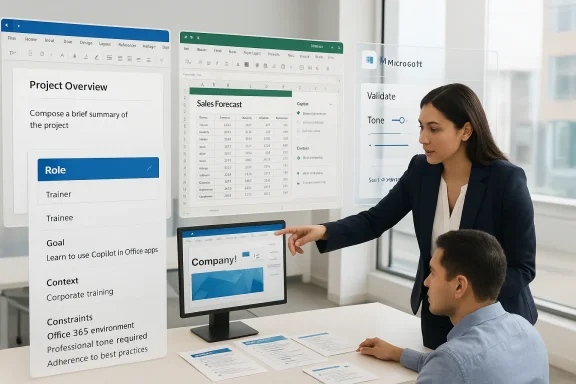
- Courses will cover how Copilot appears in Microsoft 365 apps, how Copilot Chat works, and practical prompting techniques using a Role, Goal, Context, Constraints framework.
- Emphasis is placed on responsible usage: validating outputs, confirming accuracy, and applying professional judgment on tone and content.
- The training is positioned to reduce reliance on one-off AI workshops by delivering scenario-based, in-app, role-specific learning.
- New Horizons and Educate 360 position the offering as part of a three-tier training model (Essential, Advanced, Premium) and include hands-on labs, quick-reference guides and instructor-led options.
Why embedding Copilot into Office training matters
People adopt tools they trust in familiar contexts
Learning in the app avoids the “transfer tax” that occurs when people learn about a tool in the abstract and then must remember to apply it later. Practicing Copilot inside Word while drafting a report, or inside Excel while analyzing a budget, shortens the pathway between learning and doing.Role-based learning closes the relevance gap
Generic AI workshops can feel disconnected for non-technical roles. Embedding Copilot instruction into role-specific Office training means content can be tailored to job needs: finance teams see practical Excel prompt patterns, marketing teams see copy generation and deck design workflows, and managers see how Copilot can accelerate meeting prep and summaries.Responsible AI becomes operational
Teaching validation, tone control, and when to escalate to human review as part of everyday tasks makes responsible AI practices tangible. If learners are trained to verify outputs at the moment they use Copilot — for example, checking data transformations in Excel or verifying facts in generated text — the risk of silent, unchecked errors drops.What the training claims to teach — a closer look
New Horizons’ announced curriculum centers on several concrete areas:- Where Copilot appears: Practical visibility of Copilot Chat and in-app side panels across Word, Excel, PowerPoint, Outlook and Teams.
- How Copilot works: Basic model behavior, grounding differences (Copilot Chat vs. Microsoft 365 Copilot) and limitations that learners must understand.
- Prompting frameworks: Role, Goal, Context, Constraints (a structured prompting heuristic) to help users craft clearer inputs and get repeatable results.
- Validation and tone control: Techniques for checking outputs, adjusting voice and format, and applying professional judgment.
- Hands-on practice and labs: Scenarios that let users try prompts and observe Copilot’s responses in a controlled environment.
How Copilot actually integrates into Microsoft 365 (what IT should know)
Understanding the difference between Copilot Chat and Microsoft 365 Copilot — and where those features are available — is critical to designing training and rollout plans.- Copilot Chat provides a chat-first experience and can be available more widely; it draws on web-grounded data and offers capabilities like agents and Copilot Pages. It is accessible via the Microsoft 365 Copilot app, web, and in some in-app side panes.
- Microsoft 365 Copilot (the paid, tenant-grounded service) augments Copilot Chat by grounding responses in organizational data — calendars, files, messages and the Microsoft Graph — and provides richer, in-app editing and business-context-aware functionality.
- Desktop integrations, side panes, and app-level differences mean that not every desktop or web deployment will expose the same Copilot features. Some desktop app features may also depend on Office update channels, Exchange Online mailboxes, and admin controls.
The promise: productivity gains — and the evidence gap
Vendors and training providers often cite productivity improvements when advocating for Copilot adoption. Microsoft and some enterprise customers have reported time savings in tasks like drafting emails, summarizing meetings, and analyzing data.However, two important caveats apply:
- Measured gains vary widely by role and use case. Routine content drafting and data summarization tend to show immediate benefits, while complex, judgment-heavy tasks show more mixed results.
- Access vs. paid subscription distinction. Many users now have access to Copilot Chat, but paid Microsoft 365 Copilot subscriptions (which provide deeper, tenant-grounded functionality) still represent a fraction of total M365 users. Training must therefore consider both the ubiquity of chat-based capabilities and the actual availability of advanced, paid features.
Real risks and governance concerns
Embedding Copilot into everyday workflows increases the surface area for both benefits and risk. Training that focuses solely on "how to get good outputs" without equally prioritizing governance will expose organizations to several avoidable hazards.Hallucinations and factual errors
Generative models can produce plausible-sounding but incorrect information. When Copilot drafts a financial summary or edits a legal clause, the downstream consequences can be material. Teaching learners to verify outputs and to tag AI-generated content is critical.Data leakage and privacy
Copilot can access and surface organizational data. Training must clarify what prompts are acceptable, how to avoid inadvertently exposing sensitive information, and where to escalate questions about data classification. Integration with device, network and tenant-level controls is essential.Compliance and auditability
Regulated industries require traceable, auditable workflows. Training should be paired with policy: when must a human sign-off occur, how to maintain provenance of AI-assisted outputs, and how to store or annotate AI-generated artifacts for compliance reviews.Overreliance and skill erosion
If employees come to rely on Copilot for routine decision-making without strengthening their domain judgment, their subject-matter expertise can atrophy. Training should aim to augment, not replace, professional expertise.Licensing and cost surprises
Because richer Copilot capabilities may require paid subscriptions or different licensing tiers, organizations that embed Copilot into training must align expectations with procurement. Teaching workflows that presuppose paid Copilot without confirming license coverage can lead to frustrated learners and surprise costs.Critical analysis: strengths and limits of New Horizons’ approach
Notable strengths
- Learning-in-context: Embedding Copilot into Office courses addresses the core behavioral gap between “knowing about” AI and “using it productively.”
- Role-based focus: Tailoring lessons to job personas increases relevance and uptake compared with generic AI bootcamps.
- Responsible-use emphasis: Including validation, tone, and judgment as core competencies helps make AI safe and accountable in everyday work.
- Scalable delivery options: A mix of instructor-led sessions, short labs, and on-demand modules supports diverse learning needs and reduces operational friction.
Potential limitations and open questions
- Vendor-native bias risk: Training offered by a provider that sells broader Copilot launch services can lean toward platform optimism; independent validation of outcomes is needed.
- Feature drift and training maintenance: Copilot features and availability are changing rapidly. Keeping curriculum current will be a continuous effort; static course materials risk becoming obsolete.
- License mismatch: If the training assumes paid Copilot functionality that learners do not actually have, the result is confusion and poor perceived value.
- Measurement clarity: The announcement outlines intentions but provides little public detail about concrete learning outcomes, assessment methods, or follow-up reinforcement strategies.
Practical recommendations for IT and training leaders
Below is a step-by-step operational checklist to accompany an embedded Copilot training rollout.- Inventory and map Copilot capabilities in your tenant
- Confirm which Copilot features (Copilot Chat vs. Microsoft 365 Copilot) are available by user group, app and platform.
- Identify update channel requirements for desktop apps and mailbox prerequisites for tenant-grounded features.
- Align training scenarios with actual features
- Build labs that match what learners will see in production; use sandbox tenants for advanced demonstrations if necessary.
- Avoid showing premium, tenant-grounded workflows to users who only have access to Copilot Chat.
- Define role-based learning outcomes
- For each persona (e.g., finance analyst, marketing specialist, manager), specify 2–3 tasks they should be able to perform with Copilot and how success will be measured.
- Pair training with governance and policy
- Create short policy modules explaining permissible prompt content, data handling rules and escalation paths.
- Add a “when not to use Copilot” checklist for sensitive or regulated decisions.
- Teach verification workflows, not just prompting
- Show practical verification techniques: cross-checking generated summaries with source documents, validating Excel transformations, and using Copilot’s suggested sources or trace outputs when available.
- Reinforce with microlearning and just-in-time assets
- Provide cheat sheets, in-app tips and short refresher videos that employees can access when they encounter a relevant task.
- Measure adoption and outcomes
- Track usage signals (with respect for privacy), completion of role-based modules, time-to-completion for key tasks and error rates before/after training.
- Use a control group where possible to separate training effects from mere tool access.
- Iterate and maintain content
- Review and refresh training quarterly to reflect product changes, new admin controls and updated Microsoft feature releases.
How to measure whether embedding Copilot training works
Good measurement starts with realistic expectations and concrete KPIs tied to business outcomes.- Adoption metrics
- Percentage of targeted users who actively use Copilot in a given month.
- Frequency of Copilot use for identified tasks (e.g., meeting summaries, draft emails).
- Productivity metrics
- Average time to complete common tasks before and after training (e.g., deck creation, first draft of reports).
- Reduction in routine manual steps replaced by Copilot-assisted workflows.
- Quality and safety metrics
- Number and severity of incidents attributable to AI-generated errors.
- Rate of human review for AI-assisted outputs in regulated processes.
- Learning effectiveness metrics
- Completion rates for role-specific modules.
- Practical assessments showing learners can perform at least X tasks unaided after Y training hours.
Governance and security: what training must include
Embedding Copilot into Office training is effective only when learners know the boundaries. Practical governance modules should include:- Classifying prompt content: what is safe to include (public product specs) and what is off-limits (customer PII, proprietary formulas).
- Prompt hygiene: never paste in entire private contracts or customer data unless the interaction is explicitly approved and monitored.
- Output annotation: best practices for indicating AI-assisted content in documents and versions.
- Escalation paths: when to involve legal, compliance or security teams for ambiguous or sensitive outputs.
- Admin controls overview: what tenant-level settings exist, who controls them, and how users can request changes.
The competitive landscape: what other vendors and partners are doing
The New Horizons move is not unique; many training providers and consultancies are pivoting to AI-embedded learning. Large systems integrators and Microsoft partners increasingly offer Copilot launch services that combine technical enablement, governance playbooks, and user adoption programs.What differentiates providers will be:
- Depth of content: Are the role paths actionable and scenario-based?
- Integration fidelity: Do labs reflect the exact tenant and license configurations learners will use?
- Outcome orientation: Are training engagements tied to business KPIs and supported by measurement?
- Independence: Is the training objectively discussing limitations and risks, or is it primarily sales enablement?
Final assessment: is embedded Copilot training the right move?
Embedding Copilot training into Office courses is a pragmatic, learner-centered response to the adoption problem. It lowers friction, increases relevance, and — if done correctly — builds responsible habits.But the quality and credibility of outcomes depend on implementation details that go beyond marketing copy. Effective programs require:
- Alignment with actual product capabilities in your environment.
- Strong governance modules and compliance integrations.
- Ongoing curriculum maintenance to keep pace with rapid product updates.
- Clear, measurable objectives and post-training reinforcement.
Practical next steps for organizations considering embedded Copilot training
- Start with a technical audit to map Copilot availability and feature parity across platforms and user groups.
- Pilot embedded training with a high-impact, measurable use case (e.g., finance reporting or sales proposal generation) and track outcomes.
- Require short governance modules as a precondition for advanced Copilot privileges.
- Build a cadence for curriculum refresh that mirrors Microsoft’s product update cycle.
- Demand outcome guarantees from training vendors: commit to measurable KPIs and require quarterly reviews.
Embedding Copilot into everyday Microsoft Office learning is an important evolution in enterprise upskilling. It recognizes that the future of productivity is less about isolated AI seminars and more about practical, contextual competence — teaching people how to use AI responsibly while they do their real work. The pathway to success will be paved with careful alignment between training content, tenant capabilities, governance, and measurable business goals. Done right, this approach can accelerate adoption and reduce the operational friction that has historically kept promising technologies from becoming routine tools of the trade.
Source: National Today New Horizons Embeds Microsoft Copilot Training Into Office Courses - National Today
