

Microsoft’s latest Copilot update is a clear product push: AI-generated answers that are explicitly grounded in the web, with more visible, clickable citations, an aggregated “Show all” sources pane, and a dedicated Search mode built directly into Copilot across web, mobile, and Edge—changes Microsoft says are intended to deliver faster answers while putting provenance and user control front and center.
Microsoft has been steadily evolving Copilot from a chat-first helper into an integrated, multimodal assistant that lives across Windows, Edge, and mobile. The Fall Release folds search improvements — notably citation-first generative answers and a standalone Search experience inside Copilot — into that broader strategy. These changes are pitched as part of a “human-centered AI” approach: give users concise intelligence while making it simple to verify where answers come from. This shift continues a multi-year trend of merging generative AI with traditional search: Copilot Search in Bing already combined summaries with links and source attributions, and Microsoft now brings that same blend more deeply into Copilot’s UI across platforms. Independent coverage shows the company is also extending agentic features in Edge (Copilot Mode, Actions, Journeys) and emphasizing opt‑in permissions for any feature that accesses local files, tabs, or personal content.
However, the quality of the experience will ultimately rest on three things:
Microsoft says the updates are live now across the Copilot web app, mobile apps, and Copilot in Edge; users can try searching inside Copilot and inspect the new citation and “Show all” experiences to form their own judgement about how well the system balances convenience with traceability. Conclusion: this is a meaningful step toward reconciling generative AI’s speed with the web’s need for verifiable sources—one that will require active user habits, enterprise governance, and third‑party scrutiny to be judged a lasting success.
Source: Microsoft Bringing the best of AI search to Copilot | Microsoft Copilot Blog
 Background / Overview
Microsoft has been steadily evolving Copilot from a chat-first helper into an integrated, multimodal assistant that lives across Windows, Edge, and mobile. The Fall Release folds search improvements — notably citation-first generative answers and a standalone Search experience inside Copilot — into that broader strategy. These changes are pitched as part of a “human-centered AI” approach: give users concise intelligence while making it simple to verify where answers come from. This shift continues a multi-year trend of merging generative AI with traditional search: Copilot Search in Bing already combined summaries with links and source attributions, and Microsoft now brings that same blend more deeply into Copilot’s UI across platforms. Independent coverage shows the company is also extending agentic features in Edge (Copilot Mode, Actions, Journeys) and emphasizing opt‑in permissions for any feature that accesses local files, tabs, or personal content. What Microsoft announced (the essentials)
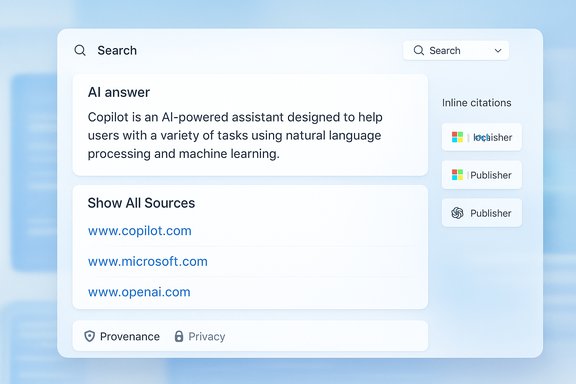
- More prominent, clickable citations inside Copilot responses so users can jump to the publisher content that informed a generated answer.
- Aggregated sources pane (“Show all”) that consolidates the list of links and related results used to produce a response. This is surfaced next to the answer for quick verification and deeper exploration.
- A dedicated Search experience inside Copilot that you switch to from a dropdown; it returns adaptive outputs (concise for simple queries, in-depth for complex ones) and richer references.
- Navigation links and direct-site shortcuts at the top of responses so one-click navigation behaves like familiar search links when appropriate.
- Availability: Microsoft says these updates are available in Copilot on copilot.com, iOS and Android apps, and within Edge’s Copilot Mode; rollout timing varies by region and platform.
Why this matters: the search problem Copilot aims to solve
Search has always been a compromise between speed and verification. Traditional search returns links that let users verify claims, but the user must do the synthesis work. Generative AI can synthesize and summarize but historically struggled to show provenance. The Copilot update addresses that tautology by combining both approaches:- Users get a distilled, actionable answer quickly.
- The same answer now links back to the underlying publisher sources so verification is immediate.
- A compact navigation layer lets users switch from summary to source swiftly, reducing friction for research, planning, or decision-making.
Technical verification and cross-checks
To ensure the announcement’s claims are accurate, these points were verified against multiple independent sources and Microsoft’s own product messaging:- Copilot responses now include more visible, clickable citations — confirmed on Microsoft’s Copilot blog and Bing’s Copilot Search posts describing in‑answer citations and a “see all links” experience.
- A dedicated “Search” mode inside Copilot is being added — Microsoft’s posts describe a dropdown in Copilot that switches to an enriched search view; independent reporting likewise references this new in‑Copilot search surface.
- Integration across platforms — Microsoft states the updates are available on copilot.com, iOS, Android, and within Edge’s Copilot Mode; platform‑specific writeups and early reviews show Edge’s Copilot Mode featuring agentic tab reasoning and the ability to call Copilot from the address bar.
- Permissioned, opt‑in access to local files and tabs — Microsoft repeatedly emphasizes consent flows when Copilot needs browser history, file access, or local vision; independent outlets and documentation show that features like Copilot Vision and Actions require explicit opt‑in.
What the new Copilot Search UX looks and feels like
The two-tiered answer pattern
- Top: a concise, AI-generated summary or answer tuned by Copilot’s reasoning.
- Bottom / side: explicit, clickable citations and a “Show all” pane that lists the source links and related results.
Dedicated Search mode in Copilot
The in‑Copilot Search mode changes the interaction from a freeform assistant to a search-first experience: the UI emphasizes curated references, shows richer citations, and adapts verbosity based on the query. This helps when users explicitly want depth rather than a short conversational reply. Microsoft says it’s optimized to give concise answers when appropriate, and long-form, cited summaries when needed.Strengths and practical benefits
- Faster verification: Clickable citations cut the verification loop from minutes to seconds, a meaningful improvement for researchers, journalists, and power users.
- Balanced experience: Combines the efficiency of generative answers with the traceability of classic search results.
- Publisher-friendly: By surfacing publisher links prominently, Microsoft aims to return traffic to content creators and improve the web ecosystem’s health.
- Cross-platform parity: Availability in Edge, web, and mobile lowers the friction of switching contexts and keeps Copilot a consistent companion across devices.
- Permission-first privacy: Important functionality that requires local context (tabs, files, voice, or vision) is gated by opt‑in consent, which reduces surprising data access for end users.
Risks, trade-offs, and unanswered questions
Even with clear benefits, the new model raises several concerns that users and IT teams should weigh carefully.1) Source selection and weighting
Generative answers are only as trustworthy as the sources the system chooses. The presence of citations does not guarantee source quality; if Copilot disproportionately weights low‑quality pages, the UX could still mislead users into trusting shoddy information. Microsoft’s messaging describes improved source surfacing, but independent verification of the citation ranking algorithm and weightings is limited. Treat initial outputs as starting points for verification, not as final authority.2) Hallucination risk remains
Citations reduce the risk of hallucination, but they do not eliminate it. There are two common failure modes:- Copilot invents a confident summary and pairs it with unrelated citations.
- Copilot synthesizes a claim from multiple weak sources and presents it as singular truth.
3) Privacy and enterprise governance
Permissioned access is a sound principle, but implementation matters. Admins should evaluate:- How connectors (OneDrive, Outlook, Google services) are enabled and audited.
- Whether Copilot Search answers created from enterprise data leave traces in logs or telemetry.
- How long-term memory and persistent context are stored, and whether they are subject to retention policies.
4) Publisher fairness and SEO impact
While Microsoft positions citation surfacing as publisher-friendly, generative answers that synthesize multiple sources could still reduce page views for long‑form content. Publishers may see less direct traffic from users who accept a Copilot summary without clicking through. The long‑term impact on publishers depends on whether Copilot encourages clicks or satisfies users in‑place. This is a policy and economic issue that will play out over months.5) Implementation opacity
Microsoft’s public docs outline behavior and guardrails but do not disclose precise model routing, citation scoring, or how private connectors interact with web sources in blended answers. Where product behavior is opaque, independent audits and external accountability mechanisms become critical. Until then, cautious adoption is prudent.For Windows users: practical guidance and settings to check
- Check Copilot permissions:
- Review whether Copilot is allowed to read local files, view open tabs, or access connected accounts. Keep those permissions off by default if you prefer to minimize risk.
- Use the “Show all” pane:
- When Copilot gives a summary for important tasks (legal, medical, financial, travel bookings), open the aggregated sources list and verify the primary sources directly.
- Adjust memory and personalization:
- If you enable long‑term memory features, audit stored items regularly and remove sensitive facts (health details, financial numbers) unless necessary.
- Admins: pilot first, then roll out:
- Test Copilot Search and connectors in a small user group. Validate data leakage, telemetry, and compliance with company policies before broader enabling.
- Train users:
- Teach colleagues to treat Copilot outputs as first-pass answers that require source checks for high‑stakes decisions.
How this fits into the broader AI search landscape
Microsoft’s move mirrors a broader industry pattern: major search and assistant products are converging on hybrid models that mix generative synthesis with direct links to sources. Google’s AI experiments, OpenAI’s search-oriented products, and independent startups like Perplexity and You.com are pursuing similar tradeoffs between speed and verification. Microsoft differentiates by leaning into platform integration (Windows + Edge + Microsoft 365) and by emphasizing publisher traffic, enterprise connectors, and permissioned local access. That platform advantage is strategic: by making Copilot the default assistant across Windows surfaces, Microsoft can deliver consistent expectations for provenance and permissions, but it also concentrates responsibility — and regulatory scrutiny — on the company’s choices about source selection and data governance.Publisher and developer implications
- Publishers: Visible citations could restore some link equity if Copilot drives clickthroughs, but attribution mechanics need monitoring to see whether Copilot favors headlines over deep content.
- Developers and SaaS vendors: Copilot connectors and Copilot Studio capabilities open avenues for integration, but require careful attention to data residency and API-level access controls.
- Third‑party model partners: Microsoft continues to route workloads across its MAI family and selective partners; the flexible model orchestration approach means organizations will need to check where reasoning or vision tasks are executed and under which terms.
Final analysis: measured optimism
Microsoft’s attempt to “bring the best of AI search to Copilot” is a pragmatic, product-focused step that addresses one of the field’s central UX problems: trust. By making citations prominent and adding a dedicated Search mode inside Copilot, Microsoft reduces the friction between synthesis and verification—an important advance for everyday productivity and research tasks.However, the quality of the experience will ultimately rest on three things:
- The accuracy and relevance of the citation selection and ranking;
- Clear, user-friendly controls for permissions, memory, and connectors; and
- Ongoing transparency about how Copilot’s outputs are composed when private and public sources are blended.
What to watch next
- Real-world citation behavior: Are citations consistently accurate and relevant, or do edge cases produce misleading pairings?
- Clickthrough trends: Do publishers see a net increase or decrease in traffic for content used in Copilot answers?
- Enterprise controls and admin tooling: Will Microsoft publish detailed audit logs, retention controls, and contractual guarantees for Copilot connectors?
- Independent audits: Will third parties be able to validate Copilot’s citation selection and mixing behaviour at scale?
Microsoft says the updates are live now across the Copilot web app, mobile apps, and Copilot in Edge; users can try searching inside Copilot and inspect the new citation and “Show all” experiences to form their own judgement about how well the system balances convenience with traceability. Conclusion: this is a meaningful step toward reconciling generative AI’s speed with the web’s need for verifiable sources—one that will require active user habits, enterprise governance, and third‑party scrutiny to be judged a lasting success.
Source: Microsoft Bringing the best of AI search to Copilot | Microsoft Copilot Blog
