

If you need to choose the exact AI model that handles your coding work, do not treat Copilot Free or Student as your long-term home: as of June 24, 2026, those plans are Auto-only for model selection, which means the practical choice is to accept GitHub’s routing or move to Copilot Pro, Pro+, an organizational plan, or another coding assistant. If you are learning, experimenting, or doing low-risk scripting, stay on Free or Student and judge the output rather than the model label. If you are debugging production code, comparing model behavior, teaching reproducible workflows, or optimizing for a specific model’s strengths, upgrade or migrate.
That is the real decision guide hiding underneath what looks like a product-settings change. GitHub is not merely moving a button around; it is moving free and student users away from model choice as a user-facing control. For WindowsForum readers, especially developers and admins who live inside Visual Studio Code, Visual Studio, GitHub, PowerShell, WSL, and enterprise repos, the question is no longer “Which model should I pick?” It is “Is Auto good enough for the work I actually do?”
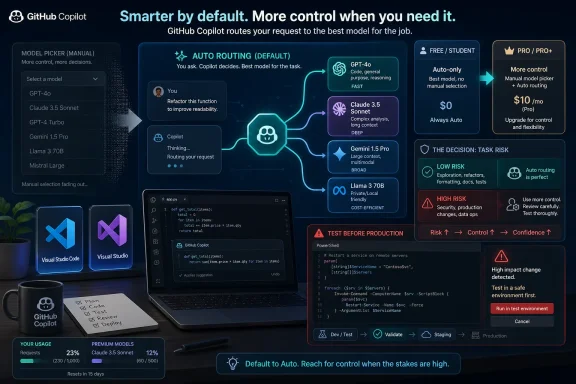
The immediate change is simple: Copilot Free and Student users no longer get manual model selection, and Auto is now the route through which model access is mediated. That means the product decides which available model handles a request, rather than the user selecting one from a picker.
For casual users, this may feel like less clutter. For technical users, it is a meaningful loss of control. Model selection was never just cosmetic; it let users decide whether a task needed a stronger reasoning model, a faster lightweight model, or a model whose behavior they had learned to trust.
GitHub’s individual plans page still positions Free as limited access, while Pro and Pro+ remain the tiers associated with broader usage allowances and more control. That makes the new boundary easier to understand: Free is for access, paid plans are for control and capacity.
The sharper point is that this was not a one-off surprise. GitHub had already been tightening student-plan model access in stages, including the April 27, 2026 removal of GPT-5.3-Codex from the picker. The June 24 shift confirms the direction: students and free users are being nudged into a managed experience, not a choose-your-own-model workshop.
Free users should also stay put if they use Copilot as a convenience layer rather than a core development dependency. If Copilot is mostly autocompletion, boilerplate generation, and quick explanations, Auto may be enough. The best test is not whether you miss a dropdown; it is whether the answers get worse for your actual workload.
Working developers should be more skeptical. If Copilot is already embedded in your daily workflow, the inability to choose a model can affect consistency, troubleshooting, and team guidance. A developer who knows that one model is better at refactoring C# while another is better at explaining a cryptic TypeScript build error loses a practical lever.
Sysadmins and IT pros sit somewhere in the middle. For PowerShell snippets, log parsing, registry guidance, YAML cleanup, or explaining Windows event messages, Auto may be fine. But for scripts that touch identity, deployment, backups, endpoint security, or production configuration, model opacity becomes a governance issue.
That is a defensible product strategy. Most people do not want to become procurement analysts for neural networks before asking why their unit test fails. Auto is the natural interface for a mainstream AI coding assistant.
But WindowsForum readers are not “most people” in the consumer-software sense. They are often the people asked to explain why a tool behaved differently this week than last week. When a model picker disappears, the support story changes: you can no longer say, “Use this model for this task,” because the product may not expose that choice.
This is where Auto shifts from convenience to policy. If GitHub decides the model, then the user’s control surface moves away from model choice and toward plan choice, usage tier, organization settings, and billing. That is a much bigger change than a UI simplification.
That era appears to be narrowing. The April 27 removal of GPT-5.3-Codex from the student picker was an early signal, and the June 24 move to Auto-only completes the practical shift for model selection. Student access is still valuable, but it should no longer be understood as a near-Pro experience with an education label.
That distinction matters for computer science classes and bootcamps. If an instructor says “use Copilot Student and choose a specific model,” that guidance is now stale. Assignments and labs should be written around Copilot behavior in general, not around a guaranteed picker state.
For students entering internships, the lesson is also useful. Corporate Copilot access may offer different controls than a student account, and the habits learned on Student may not map perfectly to the workplace. The safest habit is to validate code, document assumptions, and avoid treating the model name as a guarantee of quality.
The mistake is expecting Free to behave like a model-comparison environment. If you want to test how one model handles a security-sensitive PowerShell script versus another, Free is no longer the right place to do that. Auto abstracts away the very thing you are trying to measure.
That does not make Free useless. It makes Free a default lane. You ask for help, Copilot decides how to route the request, and you decide whether the answer is good enough.
The healthiest way to use Free now is to build a small personal benchmark. Try the same kinds of tasks you actually care about: a PowerShell function, a C# refactor, a Bash script under WSL, a GitHub Actions workflow, a failing unit test, or an explanation of a Windows event log entry. If Auto performs well enough across those tasks, there is no reason to pay just to recover a control you rarely used.
That does not mean everyone should upgrade. A paid plan is wasteful if you mostly accept inline completions and rarely care which model answers chat prompts. But it becomes easier to justify when the model is part of your workflow rather than a hidden implementation detail.
The cleanest upgrade trigger is repeatability. If you need to reproduce a result, document a workflow, teach others how to get similar output, or compare answers across models, Auto-only access is a problem. The same is true if you have learned that a particular model is better for your language, framework, or debugging style.
There is also a psychological factor. Some users are comfortable with managed intelligence; others want visible knobs. If you are the kind of Windows user who checks driver versions, audits Group Policy changes, and reads release notes before patching, losing model selection will probably bother you more than GitHub expects.
For Windows developers, the ecosystem is broader than Copilot inside one editor. Some users want tight GitHub integration, pull-request awareness, and low-friction IDE support. Others want explicit model selection, prompt reproducibility, or the ability to route sensitive work through a separate approved platform.
Enterprises should be especially careful here. A developer personally upgrading to regain model choice may solve an individual annoyance while creating a procurement, compliance, or data-governance problem. If your company has rules about source code exposure, AI tools, or approved vendors, the correct answer is not “buy whatever restores the dropdown.”
WindowsForum has tracked this broader arc before, from Copilot’s free-plan expansion to richer agent-style development features and prior plan restrictions. The pattern is now clear enough to say plainly: AI coding assistants are becoming subscription products with managed capacity, not static feature bundles.
That uncertainty may not matter for a weekend project. It matters a lot in a team workflow. If one developer gets a different class of answer than another and neither can control the model, debugging the assistant becomes harder.
There is also a training cost. Teams that teach developers “use this prompt with this model” will need to revise guidance toward outcomes: inspect the diff, run tests, check dependencies, confirm security assumptions, and never paste AI-generated code into production without review. That was always good advice, but Auto-only access makes it unavoidable.
This is especially true for Windows administration tasks. AI-generated PowerShell can be helpful, but it can also be dangerously confident. If Auto gives you a plausible script touching users, groups, services, registry paths, firewall rules, or scheduled tasks, the correct response is still to test in a safe environment before running it anywhere important.
Once model use maps to cost, the platform has an incentive to manage routing. Auto lets GitHub decide when a more expensive model is justified and when a cheaper or more available one is sufficient. For paid users, that can be framed as efficiency; for free users, it becomes the condition of access.
This does not make GitHub uniquely cynical. Every AI platform is wrestling with the same problem: users want the best model all the time, but providers need to control cost and capacity. The difference is that developer tools sit directly inside production workflows, so abstraction has consequences.
The model picker was a tiny piece of UI with an outsized symbolic role. It told users they were choosing the engine. Auto tells users the service is choosing the engine for them.
The first move is inventory, not panic. Find out who uses Copilot, which plan they use, and whether model choice is part of their workflow. If nobody can name a case where manual selection mattered, Auto-only access is probably a non-event.
The second move is policy clarity. Decide whether developers may use personal Copilot accounts on company code, whether paid individual upgrades are allowed, and whether organizational Copilot plans are preferred. The removal of model selection from Free and Student is a good moment to clean up ambiguous AI-tool rules.
The third move is workflow testing. Pick a few representative tasks — code review assistance, test generation, documentation, PowerShell automation, dependency updates — and evaluate whether Auto produces acceptable results. If it does, the cheapest and least disruptive path is to leave users where they are.
If it is a requirement, Free and Student no longer fit. If it is a preference, run your own tasks through Auto for a week or two and see whether the output meaningfully degrades. If it is only a habit, save the money.
The user most likely to benefit from upgrading is not necessarily the heaviest user. It is the user whose work depends on selecting a known model for a known job. A student writing toy programs may use Copilot constantly and still be fine on Auto; a sysadmin generating one sensitive automation script a week may need more control.
The uncomfortable truth is that many users will not know which group they are in until Auto fails them. That is why the decision should be made around task risk, not identity. “I am a student” or “I am a free user” is less important than “What happens if the assistant gives me a weaker answer?”
That is the real decision guide hiding underneath what looks like a product-settings change. GitHub is not merely moving a button around; it is moving free and student users away from model choice as a user-facing control. For WindowsForum readers, especially developers and admins who live inside Visual Studio Code, Visual Studio, GitHub, PowerShell, WSL, and enterprise repos, the question is no longer “Which model should I pick?” It is “Is Auto good enough for the work I actually do?”
 GitHub Turns Model Choice Into a Paid Boundary
The immediate change is simple: Copilot Free and Student users no longer get manual model selection, and Auto is now the route through which model access is mediated. That means the product decides which available model handles a request, rather than the user selecting one from a picker.For casual users, this may feel like less clutter. For technical users, it is a meaningful loss of control. Model selection was never just cosmetic; it let users decide whether a task needed a stronger reasoning model, a faster lightweight model, or a model whose behavior they had learned to trust.
GitHub’s individual plans page still positions Free as limited access, while Pro and Pro+ remain the tiers associated with broader usage allowances and more control. That makes the new boundary easier to understand: Free is for access, paid plans are for control and capacity.
The sharper point is that this was not a one-off surprise. GitHub had already been tightening student-plan model access in stages, including the April 27, 2026 removal of GPT-5.3-Codex from the picker. The June 24 shift confirms the direction: students and free users are being nudged into a managed experience, not a choose-your-own-model workshop.
The Verdict Is Different for Students, Hobbyists, and Working Developers
Students should usually stay on Copilot Student unless their coursework, research, or internship work depends on repeatable model behavior. Free access still has value when the goal is to learn syntax, explore APIs, generate tests, or get unstuck on small projects. The loss of manual selection matters less when the assignment is “learn React” or “write a Python script” than when the assignment is “compare model performance across identical prompts.”Free users should also stay put if they use Copilot as a convenience layer rather than a core development dependency. If Copilot is mostly autocompletion, boilerplate generation, and quick explanations, Auto may be enough. The best test is not whether you miss a dropdown; it is whether the answers get worse for your actual workload.
Working developers should be more skeptical. If Copilot is already embedded in your daily workflow, the inability to choose a model can affect consistency, troubleshooting, and team guidance. A developer who knows that one model is better at refactoring C# while another is better at explaining a cryptic TypeScript build error loses a practical lever.
Sysadmins and IT pros sit somewhere in the middle. For PowerShell snippets, log parsing, registry guidance, YAML cleanup, or explaining Windows event messages, Auto may be fine. But for scripts that touch identity, deployment, backups, endpoint security, or production configuration, model opacity becomes a governance issue.
Auto Is a Convenience Feature Until It Becomes a Policy
GitHub’s Auto direction makes sense from the platform side. Routing requests automatically lets Copilot balance cost, capacity, latency, and model availability without asking users to understand the differences between every model in the menu. Microsoft’s Visual Studio Blog has already framed auto model selection as a way to reduce rate-limit pressure, improve response behavior, and route users to an appropriate model without requiring manual choice.That is a defensible product strategy. Most people do not want to become procurement analysts for neural networks before asking why their unit test fails. Auto is the natural interface for a mainstream AI coding assistant.
But WindowsForum readers are not “most people” in the consumer-software sense. They are often the people asked to explain why a tool behaved differently this week than last week. When a model picker disappears, the support story changes: you can no longer say, “Use this model for this task,” because the product may not expose that choice.
This is where Auto shifts from convenience to policy. If GitHub decides the model, then the user’s control surface moves away from model choice and toward plan choice, usage tier, organization settings, and billing. That is a much bigger change than a UI simplification.
The Student Plan Is No Longer a Quiet Pro Substitute
The student-plan angle matters because GitHub’s education benefits have long been a gateway into professional developer workflows. Students learned not only Git, pull requests, and CI, but also the habits of modern AI-assisted coding. Manual model selection gave technically curious students a way to understand how different models behaved on the same codebase.That era appears to be narrowing. The April 27 removal of GPT-5.3-Codex from the student picker was an early signal, and the June 24 move to Auto-only completes the practical shift for model selection. Student access is still valuable, but it should no longer be understood as a near-Pro experience with an education label.
That distinction matters for computer science classes and bootcamps. If an instructor says “use Copilot Student and choose a specific model,” that guidance is now stale. Assignments and labs should be written around Copilot behavior in general, not around a guaranteed picker state.
For students entering internships, the lesson is also useful. Corporate Copilot access may offer different controls than a student account, and the habits learned on Student may not map perfectly to the workplace. The safest habit is to validate code, document assumptions, and avoid treating the model name as a guarantee of quality.
Free Still Works If You Treat It Like a Smart Default, Not a Lab Bench
Copilot Free remains attractive for hobby projects, first-time users, and Windows enthusiasts who want AI help without another subscription. If your use case is “help me write a small script,” “explain this error,” or “suggest a regex,” the removal of model selection may be annoying but not decisive.The mistake is expecting Free to behave like a model-comparison environment. If you want to test how one model handles a security-sensitive PowerShell script versus another, Free is no longer the right place to do that. Auto abstracts away the very thing you are trying to measure.
That does not make Free useless. It makes Free a default lane. You ask for help, Copilot decides how to route the request, and you decide whether the answer is good enough.
The healthiest way to use Free now is to build a small personal benchmark. Try the same kinds of tasks you actually care about: a PowerShell function, a C# refactor, a Bash script under WSL, a GitHub Actions workflow, a failing unit test, or an explanation of a Windows event log entry. If Auto performs well enough across those tasks, there is no reason to pay just to recover a control you rarely used.
Pro Becomes the Tier for People Who Notice the Difference
Copilot Pro and Pro+ now have a clearer job to do. They are not simply “more Copilot”; they are the plans to consider when control, allowance, and predictability matter. GitHub’s own plan positioning still separates Free’s limited access from the broader control and usage allowances of paid individual tiers.That does not mean everyone should upgrade. A paid plan is wasteful if you mostly accept inline completions and rarely care which model answers chat prompts. But it becomes easier to justify when the model is part of your workflow rather than a hidden implementation detail.
The cleanest upgrade trigger is repeatability. If you need to reproduce a result, document a workflow, teach others how to get similar output, or compare answers across models, Auto-only access is a problem. The same is true if you have learned that a particular model is better for your language, framework, or debugging style.
There is also a psychological factor. Some users are comfortable with managed intelligence; others want visible knobs. If you are the kind of Windows user who checks driver versions, audits Group Policy changes, and reads release notes before patching, losing model selection will probably bother you more than GitHub expects.
Another Tool May Be the Right Upgrade
The upgrade path does not have to mean Copilot Pro. If your primary need is model control, another AI coding tool may be a better fit depending on its current model access, pricing, editor integration, and data-handling terms. The point is not brand loyalty; it is matching the tool to the control surface you require.For Windows developers, the ecosystem is broader than Copilot inside one editor. Some users want tight GitHub integration, pull-request awareness, and low-friction IDE support. Others want explicit model selection, prompt reproducibility, or the ability to route sensitive work through a separate approved platform.
Enterprises should be especially careful here. A developer personally upgrading to regain model choice may solve an individual annoyance while creating a procurement, compliance, or data-governance problem. If your company has rules about source code exposure, AI tools, or approved vendors, the correct answer is not “buy whatever restores the dropdown.”
WindowsForum has tracked this broader arc before, from Copilot’s free-plan expansion to richer agent-style development features and prior plan restrictions. The pattern is now clear enough to say plainly: AI coding assistants are becoming subscription products with managed capacity, not static feature bundles.
The Real Cost Is Not the Subscription Fee
The obvious cost of upgrading is money. The less obvious cost of staying is uncertainty. If Auto changes its routing behavior, if available models shift, or if usage allocation changes, free and student users may have fewer ways to adapt.That uncertainty may not matter for a weekend project. It matters a lot in a team workflow. If one developer gets a different class of answer than another and neither can control the model, debugging the assistant becomes harder.
There is also a training cost. Teams that teach developers “use this prompt with this model” will need to revise guidance toward outcomes: inspect the diff, run tests, check dependencies, confirm security assumptions, and never paste AI-generated code into production without review. That was always good advice, but Auto-only access makes it unavoidable.
This is especially true for Windows administration tasks. AI-generated PowerShell can be helpful, but it can also be dangerously confident. If Auto gives you a plausible script touching users, groups, services, registry paths, firewall rules, or scheduled tasks, the correct response is still to test in a safe environment before running it anywhere important.
The Billing Direction Points Away From the Old Picker
The current product direction points toward usage-based billing and flex-style allocation across Copilot plans, not expanded manual model choice for everyone. That matters because it tells us how to interpret the June 24 change. This is not merely about simplifying the UI for beginners; it aligns with a future where access is governed by allowance, routing, and plan economics.Once model use maps to cost, the platform has an incentive to manage routing. Auto lets GitHub decide when a more expensive model is justified and when a cheaper or more available one is sufficient. For paid users, that can be framed as efficiency; for free users, it becomes the condition of access.
This does not make GitHub uniquely cynical. Every AI platform is wrestling with the same problem: users want the best model all the time, but providers need to control cost and capacity. The difference is that developer tools sit directly inside production workflows, so abstraction has consequences.
The model picker was a tiny piece of UI with an outsized symbolic role. It told users they were choosing the engine. Auto tells users the service is choosing the engine for them.
Admins Should Rewrite Guidance Before Users Rewrite Habits
IT departments should not wait for frustration tickets to accumulate. If developers in your organization use personal Free or Student accounts for learning, prototypes, or side projects that influence work habits, the model-selection change is worth acknowledging in internal guidance.The first move is inventory, not panic. Find out who uses Copilot, which plan they use, and whether model choice is part of their workflow. If nobody can name a case where manual selection mattered, Auto-only access is probably a non-event.
The second move is policy clarity. Decide whether developers may use personal Copilot accounts on company code, whether paid individual upgrades are allowed, and whether organizational Copilot plans are preferred. The removal of model selection from Free and Student is a good moment to clean up ambiguous AI-tool rules.
The third move is workflow testing. Pick a few representative tasks — code review assistance, test generation, documentation, PowerShell automation, dependency updates — and evaluate whether Auto produces acceptable results. If it does, the cheapest and least disruptive path is to leave users where they are.
The Decision Tree Is Shorter Than GitHub’s Plan Page
For all the AI branding and plan terminology, the decision comes down to a few practical tests. You do not need to predict GitHub’s entire roadmap. You need to decide whether model choice is a requirement, a preference, or just a habit.If it is a requirement, Free and Student no longer fit. If it is a preference, run your own tasks through Auto for a week or two and see whether the output meaningfully degrades. If it is only a habit, save the money.
The user most likely to benefit from upgrading is not necessarily the heaviest user. It is the user whose work depends on selecting a known model for a known job. A student writing toy programs may use Copilot constantly and still be fine on Auto; a sysadmin generating one sensitive automation script a week may need more control.
The uncomfortable truth is that many users will not know which group they are in until Auto fails them. That is why the decision should be made around task risk, not identity. “I am a student” or “I am a free user” is less important than “What happens if the assistant gives me a weaker answer?”
The Copilot Choice Windows Users Should Make This Week
The practical move is to audit your own Copilot usage before paying for anything. Treat June 24, 2026 as the line after which Free and Student are Auto-first experiences, then decide whether that matches your work.- Stay on Copilot Free or Student if you use AI assistance for learning, examples, explanations, boilerplate, and low-risk personal projects.
- Upgrade to Copilot Pro or Pro+ if manual model selection, higher usage allowances, and broader control are part of how you get reliable work done.
- Consider another tool if your main requirement is explicit model control rather than GitHub integration.
- Do not use personal Free or Student accounts as the basis for team standards that require a specific model.
- Test Auto against your real workloads before changing plans, because the only meaningful benchmark is the code and administration work you actually perform.
- Treat AI-generated scripts for Windows administration as untrusted drafts until they are reviewed, tested, and understood.
References
- Primary source: devblogs.microsoft.com
Introducing Copilot auto model selection (preview) - Visual Studio Blog
Learn how auto model selection (preview) streamlines your experience by automatically choosing the best model for each request.devblogs.microsoft.com - Independent coverage: docs.github.com
About individual GitHub Copilot plans and benefits - GitHub Docs
GitHub offers several Copilot plans for individual developers, each with different features, model access, and usage limits to support a wide range of coding needs. docs.github.com
- Independent coverage: github.com
GitHub Copilot · Plans & pricing · GitHub
GitHub Copilot works alongside you directly in your editor, suggesting whole lines or entire functions for you. github.com
- Independent coverage: github.blog
Changes to model selection for Free and Student plans - GitHub Changelog
Copilot Free and Student plans will now use Copilot auto model selection as the default and only model selection experience. Auto dynamically selects the best model for each task, removing…github.blog
- Independent coverage: roboin.io
GitHub Copilot student discount no longer allows selecting GPT-5.4 or Claude, with some models limited to Auto mode only amid plan reorganization - Roboin Blog
On March 12, 2026, GitHub announced that, in conjunction with a reorganization of GitHub Copilot's free plan for students, some premium models such as Claude Opus, Claude Sonnet, and GPT-5.4 will no longer be available for selection. This became clear through an official GitHub community... roboin.io
- Independent coverage: theoncetimes.com
GitHub Copilot Pulls Premium Models from Free Student Plan | The Once Times
Students lose manual access to top AI models. GitHub says it's about sustainability. Not everyone is buying it.theoncetimes.com
- Primary source: WindowsForum
Microsoft Copilot Users Get Free Access to Advanced OpenAI o1 Model | Windows Forum
Big news in the AI space: If you're a user of Microsoft's Copilot, you're about to hit the jackpot. Starting now, all Copilot users — yes, all of them —...windowsforum.com
