

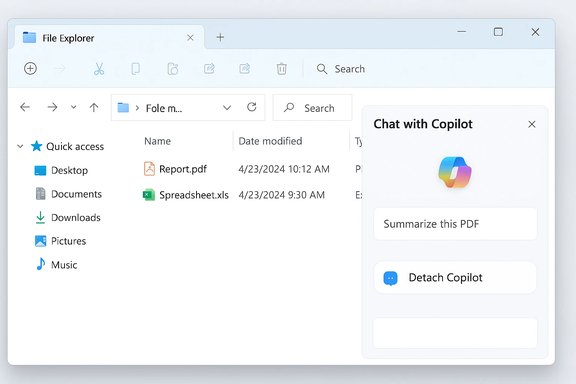
Microsoft’s in‑Explorer Copilot experiment has moved from rumor to tangible preview artifacts: hidden UI strings and inert controls in recent Windows Insider builds point to a “Chat with Copilot” entry embedded directly in File Explorer, paired with a “Detach Copilot” affordance that implies a docked, detachable chat pane where users can ask natural‑language questions about selected files. d alongside a conservative, admin‑facing Group Policy that can remove the consumer Copilot app on managed devices under narrow conditions, showing Microsoft is balancing broader feature experiments with enterprise controls.
File Explorer is the most immediate interface millions of Windows users touch every day. StatCounter’s global desktop data places Windows as the dominant desktop OS with roughly a 70%+ share, underscoring why Microsoft would prioritize bringing Copilot into the file management surface rather than confining it to a separate app. Microsoft’s Copilot strategy for Windows has steadily shifted from a standalone sidebar to a multi‑surface assistant: the Copilot app, taskbar composer, right‑click “Ask Copilot” actions in File Explorer, and Microsoft 365 Copilot integrations. Recent Insider build artifacts in the 26220.x family — specifically cumulative drops in the 26220.75xx series — now contain resource keys and hover hotspot strings that map to in‑Explorer controls such as AppAssistantLaunch (“Chat wesources.AppAssistantDetachLabel (“Detach Copilot”), suggesting a prototype for a docked chat surface.
Microsoft’s official Windows Insider posts and Copilot documentation already describe file search capabilities (supporting .docx, .xlsx, .pptx, .txt, .pdf, .json) and Copilot Vision**, which can analyze shared app windows or images; these public statements make the in‑Explorer experiments a natural extension of existing Copilot abilities.
Potential day‑to‑day benefits:
Microsoft’s next moves will tell the story: whether in‑Explorer Copilot becomes a quietly powerful assistant that appears when asked, or another omnipresent UI occupant that users and admins must immediately learn to manage.
Source: findarticles.com Microsoft Tests Copilot Inside File Explorer
 Background / Overview
File Explorer is the most immediate interface millions of Windows users touch every day. StatCounter’s global desktop data places Windows as the dominant desktop OS with roughly a 70%+ share, underscoring why Microsoft would prioritize bringing Copilot into the file management surface rather than confining it to a separate app. Microsoft’s Copilot strategy for Windows has steadily shifted from a standalone sidebar to a multi‑surface assistant: the Copilot app, taskbar composer, right‑click “Ask Copilot” actions in File Explorer, and Microsoft 365 Copilot integrations. Recent Insider build artifacts in the 26220.x family — specifically cumulative drops in the 26220.75xx series — now contain resource keys and hover hotspot strings that map to in‑Explorer controls such as AppAssistantLaunch (“Chat wesources.AppAssistantDetachLabel (“Detach Copilot”), suggesting a prototype for a docked chat surface.Microsoft’s official Windows Insider posts and Copilot documentation already describe file search capabilities (supporting .docx, .xlsx, .pptx, .txt, .pdf, .json) and Copilot Vision**, which can analyze shared app windows or images; these public statements make the in‑Explorer experiments a natural extension of existing Copilot abilities.
What the experimental File Explorer Copilot shows in preview builds
The visible evidence and what it implies
- Hidden UI strings and inert hotspots were discovered inside FileExplorerExtensions resources in Inidentified with the 26220.x family. The strings explicitly reference “Chat with Copilot” and “Detach Copilot”, and investigators reported a faint, hover‑only hotspot near the Explorer navigation bar.
- The presence of a Detach labggestive: it implies an initial, attached pane (a sidebar or preview‑pane style) that can be popped out to a floating window for extended conversations or multitasking.
- These elements are resource artifacts — inert placeholders included in preview binaries — rather than user‑facing functionality enabled for all Insiders. Microsoft frequently ships ahead of server‑side flags, so these artifacts are strong signals of intent but not a guarantee of final UI, telemetry behavior, or rollout timing.
Likely UX patterns based on current artifacts and Copilot precedents
If Microsoft ships an in‑Explorer Copilot similar to the preview artifacts, expected behaviors include:- A docked chat pane or Details/Preview‑pane replacement that updates context as users select files or folders.
- Quick, file‑centric prompts such as “Summarize this PDF,” “Extract tables from this spreadsheet,” or “What changed between these two versions?” with one‑click follow‑through actions (export summary to Word, copy extracted table to Excel).
- Multimodal support leveraging Copilot Vision for imagests previewed in Explorer.
- A Detach control to pop the conversation into a separate floater for extended work across folders.
What this could actually do for users (practical capabilities)
A built‑in Copilot button in File Explorer would change the economics of many small but frequent tasks. Instead of opening an application, waiting for large files to load, and hunting for the right section, users could get actionable results instantly from their file manager.Potential day‑to‑day benefits:
- Rapid triage: Summarize long PDFs or slide decks without launching Reader or PowerPoint.
- Extraction: Pull tables or contact lists from documents and paste them into Excel or Outlook with minimal clicks.
- Batch operations via natural language: “Rename invoices from January to include ‘Q1’ and add the date format YYYY‑MM‑DD” executed as a single operation.
- Context‑aware drafting for Microsoft 365 customers: requests that pull from Microsoft Gr this draft to last week’s version” or “Find all Q4 invoices from Marketing and prepare a summary email.”
Microsoft’s enterprise counterbalance: admin controls and policy
Microsoft shipped a narrowly scoped Group Policy in Windows Insider Build 26220.7535 (KB5072046) named RemoveMicrosoftCopilotApp, allowing IT admins on Pro, Enterprise, and Education SKUs to one‑time uninstall the consumer Copilot app for users who meet specific conditions. The policy deliberately requires all of the following:- Both Microsoft 365 Copilot and the consumer Microsoft Copilot app are installed on the device.
- The consumer Copilot app was not installed by the user (i.e., provisioned by OEM or tenant).
- The consumer Copilot app has not been launched in the last 28 days.
Early reactions and the UX balancing act
Enthusiasm
Many testers and productivity‑minded users welcome the promise of in‑place AI assistance. Folding summarization, quick extraction, and one‑click exports into File Explorer reduces context switching and could save hours across organizations where document triage is routine. When the asd unobtrusive*, it will likely become one of the most used Copilot entry points.Concern
The main user concerns cluster around:- Interface clutter and cognitive load: Insider testers already reported UI duplication (two Copilot prompts on the taskbar) and worry that Copilot could become omnipresent across system chrome. The risk is that frequent affordances degrade discoverability and overwhelm users rather than help them.
- Privacy and data flow: deeper integration into File Explorer means Copilot will have pathways to process file contents. While Microsoft’s Copilot documentation describes permission toggles for File Search and the Copilot settings that govern what the assistant can access, the precise data flow for in‑Explorer operations (local vs cloud processing,ins partially opaque and must be explained clearly in the final release.
- Enterprise governance parity: organizations that have disabled Copilot in the taskbar or limited context‑menu actions will expect consistent behavior for any new File Explorer button. Admins will demand clarity on how policies map to in‑Explorer affordances and whether those controls are exposed to Intune and MDM.
Privacy, security, and compliance — the real questions
An in‑Explorer Copilot introduces three overlapping policy areas that matter to IT and privacy teams:- Consent and visibility
- Users must have clear, actionable controls to allow Copilot to read or analyze files. Microsoft’s Copilot settings already expose File Search and File Read permissions, but an in‑Explorer feature will need explicit, contextual consent prompts and visible indicators when cont.
- Where processing happens
- Some Copilot capabilities can run on‑device (Copilot+ PCs leveraging NPU acceleration), while others rely on cloud models. The final architecture for in‑Explorer flows — which operations are local, which are routed to Microsoft servers, and how tenant grounding via Microsoft Graph is applied — remains partially unconfirmed in the preview artifacts and will be important to document. Treat processing‑location claims as tentative until Microsoft’s release notes clarify them.
- Auditability and enterprise controls
- For regulated environments, audit trails and tenant‑bounded reasoning are essential. Microsoft says tenant boundaries and compliance controls apply to Microsoft 365 Copilot experiences; admins will expect equivalent governance for any in‑Explorer Copilot that can access corporate data. The RemoveMicrosoftCopilotApp policy is a step toward admin control, but it is conservative and not a blanket removal mechanism.
- Reviewing Copilot permission controls and se policies.
- Testing the RemoveMicrosoftCopilotApp policy in a pilot to understand its one‑time uninstall semantics.
- Combining uninstall policies with AppLocker / Intune app restrictions if a persistent block is required.
UX and performance tradeoffs
Embedding Copilot into File Explorer raises implementation tradeoffs Microsoft will need to manage carefully:- Responsiveness vs richness: A truly interactive chat pane that analyzes large files must avoid blocking or slowing navigation. Microsoft can mitigate this by caching lightweight metadata, performing incremental parsing, or offloading heavy processing.
- Discoverability vs intrusion: The hover‑only hotspot found in previews suggests Microsoft is experimenting with subtle placement to avoid clutter. That’s smart, but discoverability for power users must still be balanced — hidden affordances risk discoverability, while prominent buttons risk noise.
- Cross‑app continuity: A detach option implies multi‑window workflows. Ensuring conversations maintain context when detached and when files are moved or renamed will be a key quality bar.
Recommendations for administrators and power users
- For administrators preparing for in‑Explorer Copilot:
- Test Build 26220.x preview packages in a controlled lab and validate the Group Policy behavior (RemoveMicrosoftCopilotApp) to understand the one‑time uninstall semantics.
- Define a policy stack: use the new Group Policy in combination with AppLocker / Intune application restrictions if you require a durable prevention mechanism.
- Update security and privacy guidance for employees: document how Copilot permissions work and when files may be processed locally vs in the cloud.
- For power users and IT pros:
- Use Insider channels to trial the UX and provide direct feedback through the Copilot app’s feedback tools; Microsoft uses Insider telemetry and feedback to refine affordances.
- Keep copies of sensitive files in access‑controlled locations (e.g., segmented OneDrive containers) and review Copilot permission settings before enabling file search or in‑Explorer features.
- If you prioritize minimal UI clutter, look for settings that defer activation (opt‑in) or hide new toolbar affordances until feature flags are polished.
What Microsoft needs to clarify before general availability
- A definitive mapping of in‑Explorer Copilot capabilities to Microsoft 365 licensing (which actions require a Microsoft 365 Copilot subscription vs those available to the free Copilot app).
- A clear, user‑facing privacy model detailing when data is processed locally, when it travels to Microsoft cloud services, and what logs/telemetry are produced for tenant admins.
- Admin governance parity so that any in‑Explorer affordance respects the same controls used to manage Copilot in other surfaces (taskbar, context menus, Copilot app).
- PerfX conventions to prevent the assistant from becoming intrusive or slowing down common file operations.
What to watch next
- Watch Windows Insider release notes and Microsoft’s Windows Blog for explicit announcements that convert the resource strings and inemented, enabled features. The Windows Insider blog has already described file search and Copilot Vision rollouts, which establishes a clear path for Explorer‑centric experiments to become real features.
- Track cumulative updates in the 26220.x family (the KB numbers visible in preview drops — for example, KB5072043 and KB5072046) for changes to string resources, policy names, and admin guidance. Community reporting has tied experimental artifacts to those packages, but exact KBs can shift across iterative previews.
- For enterprises, pilot both the new Group Policy and practical governance workflows now so you understand the policy’s scope and limitations before a broader consumer rollout.
Final assessment: promise balanced by responsibility
Embedding Copilot into File Explorer is a logical next step for Microsoft’s “Copilot everywhere” al productivity gains — faster triage, in‑place summarization, natural‑language batch ops — are real and useful for both consumers and enterprises. The technical artifacts discovered in Insider builds and Microsoft’s own documentation about file search and Copilot Vision make the pathway from experiment to feature plausible and credible. However, there are real risks: privacy ambiguity, governance gaps, and UX bloat. Microsoft has begun to address governance with the RemoveMicrosoftCopilotApp policy, but that control is intentionally conservative and not a universal solution for organizations seeking to block Copilot altogether. Administrators should assume more nuance is coming and prepare layered controls rather than relying on a single policy toggle. In short: the in‑Explorer Copilot experiment is a high‑value productivity idea executed at a high‑risk interface. If Microsoft ships it with clear consent, transparent processing boundaries, robust admin controls, and careful UX restraint, it could become one of the most useful Copilot touchpoints on Windows. If it ships without those guardrails, expect a proportional backlash from privacy‑conscious users, enterprises, and power users demanding an “off” switch they can rely on.Microsoft’s next moves will tell the story: whether in‑Explorer Copilot becomes a quietly powerful assistant that appears when asked, or another omnipresent UI occupant that users and admins must immediately learn to manage.
Source: findarticles.com Microsoft Tests Copilot Inside File Explorer
