

Microsoft added Roadmap ID 566702 on June 29, 2026, saying Copilot in PowerPoint will bring natural-language document editing to Microsoft 365 Copilot Premium users in the DoD government cloud, with general availability planned for September 2026 on desktop and web. The feature sounds like a routine parity update, but it is better understood as another step in Microsoft’s attempt to make Copilot not a sidebar, but the editing surface itself. For government tenants, that distinction matters because PowerPoint is where policy, procurement, briefings, training, and executive decision-making are often compressed into a few persuasive slides. The promise is faster deck work; the risk is that AI-generated polish can make weak assumptions look more authoritative than they are.
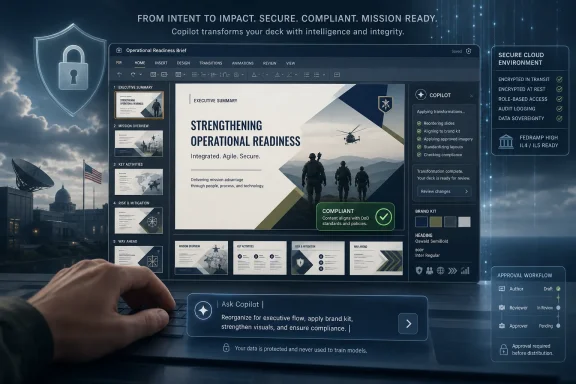
The new roadmap entry is framed around a simple idea: users can ask Copilot in PowerPoint to create, edit, and refine presentations inside an existing deck. That includes generating slides, updating content, improving layouts, polishing design, and preserving formatting, structure, and branding. Microsoft also says Copilot can connect to a brand kit to apply templates, insert approved images, and check brand compliance.
That is not merely “help me write a slide.” It is a deeper claim: Copilot should understand the presentation as an object with hierarchy, design rules, audience, and organizational identity. A PowerPoint file is not a Word document chopped into rectangles; it is an argument staged visually. If Copilot can edit the deck while respecting its structure, Microsoft is trying to turn PowerPoint into a semi-agentic workspace where the user directs intent and the software performs increasingly complex production work.
The government-cloud placement raises the stakes. DoD availability is not a cosmetic SKU expansion. It implies Microsoft believes the capability can be delivered inside one of its most restricted Microsoft 365 environments, where data residency, tenant isolation, compliance posture, and administrative controls are much more than procurement checkboxes.
The September 2026 date should still be read as a roadmap estimate, not a ship-day guarantee. Microsoft 365 roadmap items move, split, and occasionally arrive with narrower scope than their marketing descriptions suggest. But the placement of this item in “In development” tells agencies and contractors that Microsoft is preparing to bring the richer PowerPoint Copilot editing model into a cloud environment where new AI features often arrive later than in commercial tenants.
But with Copilot, the lag is now part of the product story. Microsoft is not just porting features into government clouds; it is trying to prove that its AI layer can become normal enterprise software even under stricter rules. A feature like Copilot editing in PowerPoint is useful precisely because it touches sensitive work product: draft plans, internal strategy, acquisition briefings, after-action reports, training decks, leadership updates, and budget narratives.
That makes government-cloud parity both attractive and uncomfortable. The attractiveness is obvious. If commercial organizations can accelerate the tedious work of turning raw material into executive-ready presentations, agencies and defense organizations will want the same productivity gains. The discomfort comes from the fact that decks are often where nuance gets simplified, uncertainty gets hidden, and institutional language becomes policy momentum.
Microsoft’s pitch is that Copilot operates within the customer’s Microsoft 365 boundary and respects existing permissions. That is the necessary baseline, not the end of the discussion. The operational question for admins is not only whether Copilot can access a file, but whether the organization is ready for users to delegate document transformation to a model that may reshape emphasis, ordering, tone, and visual hierarchy.
In other words, the road to government AI adoption does not run through chatbots alone. It runs through ordinary Office files. PowerPoint may be one of the most consequential places for that transition because it is the format of persuasion inside bureaucracies.
A bland paragraph in a chat window invites skepticism. A polished presentation with clean templates, approved imagery, and consistent formatting travels differently through an organization. It looks official before anyone has interrogated whether its assumptions are sound.
That is why brand-kit integration matters. At one level, it solves a mundane business problem: people make ugly slides, misuse templates, and grab images from wherever they can find them. If Copilot can insert approved assets and check compliance, communications teams and program offices may see fewer off-brand decks circulating through leadership meetings.
At another level, branded AI output can blur accountability. A slide that looks like it came from the official communications machine may have started as a vague prompt from a rushed analyst. The template can become a kind of authority laundering, where organizational polish gives model-generated phrasing more weight than it deserves.
This is not a reason to reject the feature. It is a reason to govern it like a publishing tool, not a novelty. The more Copilot can do inside PowerPoint, the more agencies will need conventions around review, provenance, and acceptable use.
That workflow consumes enormous time in government and enterprise settings. Much of it is not high creativity; it is translation. A meeting transcript becomes a status deck. A policy memo becomes training material. A spreadsheet becomes a leadership update. A technical finding becomes a briefing that non-specialists can understand.
Copilot is well suited to that middle layer, where the task is neither pure authorship nor pure formatting. The user knows what needs to be communicated but does not want to spend two hours wrestling with slide balance, hierarchy, and phrasing. If Microsoft can make the model useful without mangling formatting or hallucinating unsupported claims, the productivity case is real.
The phrase “preserving your formatting, structure, and branding” is doing a lot of work in the roadmap description. Anyone who has used AI-assisted document tools knows that the failure mode is often not dramatic hallucination but subtle breakage. A slide gets rewritten with a tone that no longer fits. A carefully aligned layout shifts. A chart loses context. A template rule is ignored.
For PowerPoint users, trust will be earned less by Copilot’s ability to produce a first draft and more by its ability to edit an existing deck without making a mess. The difference between “create a presentation” and “edit this presentation correctly” is the difference between a toy and a tool.
Licensing is the first obvious gate. The roadmap says the feature is available to Microsoft 365 Copilot Premium users. That phrasing matters because Microsoft has spent the last few years making Copilot packaging more layered, with distinctions between Copilot Chat, Microsoft 365 Copilot, app-embedded experiences, and premium capabilities. Organizations should not assume that every user with access to a Copilot-branded interface will receive the same PowerPoint editing capabilities.
The second gate is data readiness. Copilot can only be as safe as the permissions, labels, retention rules, and information architecture surrounding it. If users already have overbroad access to SharePoint sites, Teams files, or legacy document libraries, AI can make that existing sprawl more visible and more operationally consequential.
The third gate is change management. PowerPoint is often used by people who do not think of themselves as content publishers. Program managers, analysts, engineers, supervisors, and contracting officers all build decks. If Copilot becomes a normal part of that workflow, training cannot stop at “write better prompts.” It has to address review discipline.
The fourth gate is auditability. Agencies will want to know not only whether Copilot was used, but how its use intersects with records management and decision support. A deck generated or heavily revised by AI may still be a record. Its status does not become less official because the drafting process was automated.
That is why natural-language editing is potentially more important than full-deck generation. A user can say, in effect, “turn this into three slides for a senior audience,” or “make this less technical,” or “update the deck with the latest project risks.” If the feature works as advertised, the user remains the director while Copilot handles the production pass.
This aligns with Microsoft’s broader Office strategy. The company is embedding AI where workers already spend time rather than asking them to move every task into a separate chatbot. The Copilot app may be the front door, but Word, Excel, PowerPoint, Outlook, Teams, and SharePoint are the rooms where work actually happens.
PowerPoint is especially important because it sits at the boundary between knowledge work and executive decision-making. A spreadsheet can be accurate and still fail to persuade. A memo can be thorough and still go unread. A deck is designed to move through meetings, and in many organizations, meetings are where priorities become action.
That gives Microsoft a powerful wedge. If Copilot can shorten the path from messy source material to usable presentation, it becomes part of the organization’s tempo. Once that happens, removing it starts to feel like slowing down work rather than cutting an optional AI feature.
These are not science-fiction failures. They are normal editorial failures accelerated by automation. The danger is not that Copilot becomes malicious; it is that it becomes helpful in the wrong direction.
PowerPoint magnifies this because slides reward compression. A nuanced paragraph becomes three bullets. A risk register becomes a heat map. A disputed interpretation becomes a clean narrative arc. Humans already do this, of course, but AI can do it faster and at larger scale.
For DoD and government users, that means review processes should focus on transformation, not just generation. If Copilot edits a slide, reviewers need to compare the revised deck against source material, not merely scan the final output for obvious weirdness. The polished deck is the end of the pipeline; the risk often enters earlier.
Microsoft’s brand-compliance pitch may also create a false sense of completeness. A deck can be perfectly branded and still substantively wrong. Communications governance and knowledge governance are related, but they are not the same thing.
A PowerPoint user with advanced Copilot editing may experience the app differently from a user without it. One user starts from a blank slide and template gallery. Another starts from an instruction: “Create a briefing from these notes and make it match last quarter’s executive deck.” That is not a minor add-on. It is a different relationship with the software.
For government organizations, this complicates standardization. Agencies often care deeply about who has which tools, both for cost control and procedural consistency. If only some users can perform AI-assisted deck editing, workflows may bifurcate. Teams with premium licenses may produce more polished material faster, while others rely on older processes.
That may be acceptable, but it should be intentional. Microsoft’s economic incentive is to make the premium tier feel indispensable. Customer organizations need to decide where that indispensability is worth paying for and where it creates dependency.
There is also a cultural dimension. If AI-assisted presentations become the norm at senior levels, workers without access may be judged against output standards they cannot easily match. The tool becomes invisible precisely when its effects become expected.
PowerPoint editing can expose that debt in subtle ways. If a user asks Copilot to update a deck with information from accessible files, the model may surface material the user technically can read but organizationally should not rely on for that purpose. That is not a Copilot-specific flaw; it is a governance flaw made easier to operationalize.
The correct response is not panic. It is preparation. Agencies should review sensitivity labels, overshared repositories, guest access, inactive Teams, and legacy SharePoint permissions before Copilot becomes deeply embedded in presentation workflows. AI does not create bad access hygiene, but it rewards or punishes it more quickly.
There is a second boundary, too: the boundary between internal draft and external communication. A presentation built for an internal meeting may later be adapted for contractors, partner agencies, or public release. Copilot can accelerate adaptation, but it can also carry forward assumptions or language that belonged only in the original context.
That is why administrators and records managers should be in the same conversation as communications teams. Copilot in PowerPoint is not just an endpoint feature. It touches content lifecycle, approval routing, retention, and release review.
That is where government work lives. Most agencies do not need AI to invent strategy out of thin air. They need help converting work already done into formats other humans can absorb.
In that sense, PowerPoint Copilot is less about creativity than throughput. It offers a way to reduce the friction between analysis and communication. For overworked teams, that may be enough.
But boring workflows can become mission-critical workflows. If users begin to trust Copilot for routine deck edits, they may gradually rely on it for more consequential transformations. The governance model should assume that adoption will creep from low-risk formatting tasks to higher-risk synthesis tasks.
The safest starting point is to define acceptable lanes. Let Copilot help with structure, tone, and layout where source material is known and reviewed. Be more cautious when asking it to infer strategy, summarize contested evidence, or generate recommendations from incomplete inputs.
Admins should watch the Microsoft 365 admin center, roadmap updates, and service documentation for details closer to release. Roadmap descriptions are intentionally compressed, and the real rollout experience often depends on tenant settings, licensing enforcement, client version, regional availability, and feature flags. Desktop and web support also does not guarantee identical behavior on day one.
The key planning mistake would be to wait until the feature appears in the ribbon. By then, the organizational conversation will already be late. Users will experiment first and ask governance questions afterward.
A better approach is to treat this roadmap item as a signal. Microsoft is moving richer Copilot editing into PowerPoint for one of its most restricted cloud environments. That means agencies should decide now what kinds of presentation work can be AI-assisted, which roles should receive premium access, and how review standards should change.
This does not require a 200-page policy. It requires a clear operational stance. Users need to know when Copilot is encouraged, when it is allowed with review, and when it is inappropriate.
That bundle is best understood as a shift from AI as a writing helper to AI as a document production layer. It could save real time for government users who live inside briefings and recurring status decks. It could also make it easier for unverified synthesis to appear polished, official, and ready for leadership consumption.
The operational lesson is simple enough to state and hard enough to implement:
 Microsoft Moves Copilot From Assistant to Slide Editor
The new roadmap entry is framed around a simple idea: users can ask Copilot in PowerPoint to create, edit, and refine presentations inside an existing deck. That includes generating slides, updating content, improving layouts, polishing design, and preserving formatting, structure, and branding. Microsoft also says Copilot can connect to a brand kit to apply templates, insert approved images, and check brand compliance.That is not merely “help me write a slide.” It is a deeper claim: Copilot should understand the presentation as an object with hierarchy, design rules, audience, and organizational identity. A PowerPoint file is not a Word document chopped into rectangles; it is an argument staged visually. If Copilot can edit the deck while respecting its structure, Microsoft is trying to turn PowerPoint into a semi-agentic workspace where the user directs intent and the software performs increasingly complex production work.
The government-cloud placement raises the stakes. DoD availability is not a cosmetic SKU expansion. It implies Microsoft believes the capability can be delivered inside one of its most restricted Microsoft 365 environments, where data residency, tenant isolation, compliance posture, and administrative controls are much more than procurement checkboxes.
The September 2026 date should still be read as a roadmap estimate, not a ship-day guarantee. Microsoft 365 roadmap items move, split, and occasionally arrive with narrower scope than their marketing descriptions suggest. But the placement of this item in “In development” tells agencies and contractors that Microsoft is preparing to bring the richer PowerPoint Copilot editing model into a cloud environment where new AI features often arrive later than in commercial tenants.
The Government Cloud Lag Is Becoming a Product Strategy
For years, government cloud users have been conditioned to expect a delay. Commercial Microsoft 365 gets the flashy demos first; GCC, GCC High, and DoD get the controlled rollout later. That lag has usually been explained as a compliance tax, and in many cases that explanation is fair.But with Copilot, the lag is now part of the product story. Microsoft is not just porting features into government clouds; it is trying to prove that its AI layer can become normal enterprise software even under stricter rules. A feature like Copilot editing in PowerPoint is useful precisely because it touches sensitive work product: draft plans, internal strategy, acquisition briefings, after-action reports, training decks, leadership updates, and budget narratives.
That makes government-cloud parity both attractive and uncomfortable. The attractiveness is obvious. If commercial organizations can accelerate the tedious work of turning raw material into executive-ready presentations, agencies and defense organizations will want the same productivity gains. The discomfort comes from the fact that decks are often where nuance gets simplified, uncertainty gets hidden, and institutional language becomes policy momentum.
Microsoft’s pitch is that Copilot operates within the customer’s Microsoft 365 boundary and respects existing permissions. That is the necessary baseline, not the end of the discussion. The operational question for admins is not only whether Copilot can access a file, but whether the organization is ready for users to delegate document transformation to a model that may reshape emphasis, ordering, tone, and visual hierarchy.
In other words, the road to government AI adoption does not run through chatbots alone. It runs through ordinary Office files. PowerPoint may be one of the most consequential places for that transition because it is the format of persuasion inside bureaucracies.
PowerPoint Is Where AI Polish Can Become Institutional Voice
Microsoft’s emphasis on layout, design, and brand compliance is not incidental. Many organizations have already discovered that generative AI is less dangerous when it is obviously rough. The real governance challenge begins when AI output looks finished.A bland paragraph in a chat window invites skepticism. A polished presentation with clean templates, approved imagery, and consistent formatting travels differently through an organization. It looks official before anyone has interrogated whether its assumptions are sound.
That is why brand-kit integration matters. At one level, it solves a mundane business problem: people make ugly slides, misuse templates, and grab images from wherever they can find them. If Copilot can insert approved assets and check compliance, communications teams and program offices may see fewer off-brand decks circulating through leadership meetings.
At another level, branded AI output can blur accountability. A slide that looks like it came from the official communications machine may have started as a vague prompt from a rushed analyst. The template can become a kind of authority laundering, where organizational polish gives model-generated phrasing more weight than it deserves.
This is not a reason to reject the feature. It is a reason to govern it like a publishing tool, not a novelty. The more Copilot can do inside PowerPoint, the more agencies will need conventions around review, provenance, and acceptable use.
Microsoft Is Selling Workflow Compression, Not Just Creativity
The most practical value of Copilot in PowerPoint is not that it can invent clever slide titles. It is that it may compress a familiar workflow: read source material, identify the narrative, structure the deck, format the slides, adjust visuals, rewrite for the audience, and make the whole thing look like it belongs to the organization.That workflow consumes enormous time in government and enterprise settings. Much of it is not high creativity; it is translation. A meeting transcript becomes a status deck. A policy memo becomes training material. A spreadsheet becomes a leadership update. A technical finding becomes a briefing that non-specialists can understand.
Copilot is well suited to that middle layer, where the task is neither pure authorship nor pure formatting. The user knows what needs to be communicated but does not want to spend two hours wrestling with slide balance, hierarchy, and phrasing. If Microsoft can make the model useful without mangling formatting or hallucinating unsupported claims, the productivity case is real.
The phrase “preserving your formatting, structure, and branding” is doing a lot of work in the roadmap description. Anyone who has used AI-assisted document tools knows that the failure mode is often not dramatic hallucination but subtle breakage. A slide gets rewritten with a tone that no longer fits. A carefully aligned layout shifts. A chart loses context. A template rule is ignored.
For PowerPoint users, trust will be earned less by Copilot’s ability to produce a first draft and more by its ability to edit an existing deck without making a mess. The difference between “create a presentation” and “edit this presentation correctly” is the difference between a toy and a tool.
DoD Availability Forces the Admin Conversation Earlier
Because the roadmap item targets DoD, administrators should not treat it as a distant productivity feature owned by end users. The arrival of richer Office-app Copilot capabilities changes the questions IT has to ask before rollout.Licensing is the first obvious gate. The roadmap says the feature is available to Microsoft 365 Copilot Premium users. That phrasing matters because Microsoft has spent the last few years making Copilot packaging more layered, with distinctions between Copilot Chat, Microsoft 365 Copilot, app-embedded experiences, and premium capabilities. Organizations should not assume that every user with access to a Copilot-branded interface will receive the same PowerPoint editing capabilities.
The second gate is data readiness. Copilot can only be as safe as the permissions, labels, retention rules, and information architecture surrounding it. If users already have overbroad access to SharePoint sites, Teams files, or legacy document libraries, AI can make that existing sprawl more visible and more operationally consequential.
The third gate is change management. PowerPoint is often used by people who do not think of themselves as content publishers. Program managers, analysts, engineers, supervisors, and contracting officers all build decks. If Copilot becomes a normal part of that workflow, training cannot stop at “write better prompts.” It has to address review discipline.
The fourth gate is auditability. Agencies will want to know not only whether Copilot was used, but how its use intersects with records management and decision support. A deck generated or heavily revised by AI may still be a record. Its status does not become less official because the drafting process was automated.
The Real Competition Is the Blank Slide
Microsoft’s strongest argument for Copilot in PowerPoint is that the blank slide is a terrible interface for many workers. It asks users to make design, structure, and editorial decisions before they have clarified the message. Most people do not want to create presentations; they want to communicate something and then survive the review meeting.That is why natural-language editing is potentially more important than full-deck generation. A user can say, in effect, “turn this into three slides for a senior audience,” or “make this less technical,” or “update the deck with the latest project risks.” If the feature works as advertised, the user remains the director while Copilot handles the production pass.
This aligns with Microsoft’s broader Office strategy. The company is embedding AI where workers already spend time rather than asking them to move every task into a separate chatbot. The Copilot app may be the front door, but Word, Excel, PowerPoint, Outlook, Teams, and SharePoint are the rooms where work actually happens.
PowerPoint is especially important because it sits at the boundary between knowledge work and executive decision-making. A spreadsheet can be accurate and still fail to persuade. A memo can be thorough and still go unread. A deck is designed to move through meetings, and in many organizations, meetings are where priorities become action.
That gives Microsoft a powerful wedge. If Copilot can shorten the path from messy source material to usable presentation, it becomes part of the organization’s tempo. Once that happens, removing it starts to feel like slowing down work rather than cutting an optional AI feature.
The Compliance Story Will Be Tested by Ordinary Mistakes
Government customers will rightly focus on compliance, but the most common problems may be less exotic. Copilot might over-summarize caveats. It might make a recommendation sound stronger than the source material supports. It might recast tentative findings into confident executive language. It might insert a brand-approved image that is visually appropriate but contextually misleading.These are not science-fiction failures. They are normal editorial failures accelerated by automation. The danger is not that Copilot becomes malicious; it is that it becomes helpful in the wrong direction.
PowerPoint magnifies this because slides reward compression. A nuanced paragraph becomes three bullets. A risk register becomes a heat map. A disputed interpretation becomes a clean narrative arc. Humans already do this, of course, but AI can do it faster and at larger scale.
For DoD and government users, that means review processes should focus on transformation, not just generation. If Copilot edits a slide, reviewers need to compare the revised deck against source material, not merely scan the final output for obvious weirdness. The polished deck is the end of the pipeline; the risk often enters earlier.
Microsoft’s brand-compliance pitch may also create a false sense of completeness. A deck can be perfectly branded and still substantively wrong. Communications governance and knowledge governance are related, but they are not the same thing.
Premium Copilot Turns Office Into a Tiered Experience
The roadmap’s “Microsoft 365 Copilot Premium” language points to a broader shift: Office is becoming more meaningfully tiered by AI capability. For decades, the differences between Office plans mattered, but the core experience of writing a document, building a spreadsheet, or assembling a presentation was broadly recognizable across tiers. Copilot is changing that.A PowerPoint user with advanced Copilot editing may experience the app differently from a user without it. One user starts from a blank slide and template gallery. Another starts from an instruction: “Create a briefing from these notes and make it match last quarter’s executive deck.” That is not a minor add-on. It is a different relationship with the software.
For government organizations, this complicates standardization. Agencies often care deeply about who has which tools, both for cost control and procedural consistency. If only some users can perform AI-assisted deck editing, workflows may bifurcate. Teams with premium licenses may produce more polished material faster, while others rely on older processes.
That may be acceptable, but it should be intentional. Microsoft’s economic incentive is to make the premium tier feel indispensable. Customer organizations need to decide where that indispensability is worth paying for and where it creates dependency.
There is also a cultural dimension. If AI-assisted presentations become the norm at senior levels, workers without access may be judged against output standards they cannot easily match. The tool becomes invisible precisely when its effects become expected.
PowerPoint Copilot Is Also a Security Boundary Test
Every embedded Copilot feature is a test of Microsoft 365’s permission model. The official promise is that Copilot respects user permissions and tenant boundaries. The practical concern is that many organizations have spent years accumulating permission debt.PowerPoint editing can expose that debt in subtle ways. If a user asks Copilot to update a deck with information from accessible files, the model may surface material the user technically can read but organizationally should not rely on for that purpose. That is not a Copilot-specific flaw; it is a governance flaw made easier to operationalize.
The correct response is not panic. It is preparation. Agencies should review sensitivity labels, overshared repositories, guest access, inactive Teams, and legacy SharePoint permissions before Copilot becomes deeply embedded in presentation workflows. AI does not create bad access hygiene, but it rewards or punishes it more quickly.
There is a second boundary, too: the boundary between internal draft and external communication. A presentation built for an internal meeting may later be adapted for contractors, partner agencies, or public release. Copilot can accelerate adaptation, but it can also carry forward assumptions or language that belonged only in the original context.
That is why administrators and records managers should be in the same conversation as communications teams. Copilot in PowerPoint is not just an endpoint feature. It touches content lifecycle, approval routing, retention, and release review.
The Best Use Cases Are Boring, Which Is Why They Matter
The highest-value use cases for this feature will not be the dramatic ones in launch demos. They will be ordinary: turning a long project update into a clean briefing, reformatting a training deck, aligning slides with a new template, shortening a presentation for a 15-minute slot, or adjusting tone for a leadership audience.That is where government work lives. Most agencies do not need AI to invent strategy out of thin air. They need help converting work already done into formats other humans can absorb.
In that sense, PowerPoint Copilot is less about creativity than throughput. It offers a way to reduce the friction between analysis and communication. For overworked teams, that may be enough.
But boring workflows can become mission-critical workflows. If users begin to trust Copilot for routine deck edits, they may gradually rely on it for more consequential transformations. The governance model should assume that adoption will creep from low-risk formatting tasks to higher-risk synthesis tasks.
The safest starting point is to define acceptable lanes. Let Copilot help with structure, tone, and layout where source material is known and reviewed. Be more cautious when asking it to infer strategy, summarize contested evidence, or generate recommendations from incomplete inputs.
The Calendar Gives Agencies Just Enough Time to Be Deliberate
A September 2026 general availability target gives DoD tenants and adjacent contractors a planning window, but not a long one. In Microsoft 365 terms, three months can vanish quickly, especially when licensing, policy, training, and governance teams all need a say.Admins should watch the Microsoft 365 admin center, roadmap updates, and service documentation for details closer to release. Roadmap descriptions are intentionally compressed, and the real rollout experience often depends on tenant settings, licensing enforcement, client version, regional availability, and feature flags. Desktop and web support also does not guarantee identical behavior on day one.
The key planning mistake would be to wait until the feature appears in the ribbon. By then, the organizational conversation will already be late. Users will experiment first and ask governance questions afterward.
A better approach is to treat this roadmap item as a signal. Microsoft is moving richer Copilot editing into PowerPoint for one of its most restricted cloud environments. That means agencies should decide now what kinds of presentation work can be AI-assisted, which roles should receive premium access, and how review standards should change.
This does not require a 200-page policy. It requires a clear operational stance. Users need to know when Copilot is encouraged, when it is allowed with review, and when it is inappropriate.
The September Slide Deck Will Test More Than PowerPoint
The concrete details are straightforward, but their implications are not. Microsoft is targeting Copilot-powered PowerPoint editing for DoD tenants in September 2026, with support planned across desktop and web for Microsoft 365 Copilot Premium users. The feature promises natural-language creation, editing, layout improvement, design polish, brand-kit support, approved imagery, and brand-compliance checking.That bundle is best understood as a shift from AI as a writing helper to AI as a document production layer. It could save real time for government users who live inside briefings and recurring status decks. It could also make it easier for unverified synthesis to appear polished, official, and ready for leadership consumption.
The operational lesson is simple enough to state and hard enough to implement:
- Agencies should treat Copilot in PowerPoint as a publishing and decision-support tool, not merely a convenience feature.
- Administrators should confirm licensing, tenant controls, and client readiness before assuming the September 2026 rollout will reach every user the same way.
- Security teams should review permission hygiene before AI-assisted editing makes overshared content easier to find and reuse.
- Communications and records teams should define how AI-assisted decks fit into review, retention, branding, and release processes.
- Users should be trained to verify source material after Copilot edits a presentation, because polished slides can hide weak evidence.
- Microsoft’s roadmap date should be treated as a planning signal rather than a contractual delivery promise.
References
- Primary source: Microsoft 365 Roadmap
Published: 2026-06-29T23:02:39.0286478Z
Microsoft 365 Roadmap | Microsoft 365
The Microsoft 365 Roadmap lists updates that are currently planned for applicable subscribers. Check here for more information on the status of new features and updates.www.microsoft.com
- Official source: learn.microsoft.com
Understand Microsoft U.S. government cloud environments for Microsoft 365 and Microsoft 365 Copilot | Microsoft Learn
Get an overview of how Microsoft government clouds evolved, why different government cloud environments exist, when to use each environment, and how Microsoft 365 and Microsoft 365 Copilot differ across government cloud subscriptions.learn.microsoft.com - Official source: adoption.microsoft.com
Microsoft 365 Copilot for US Government – Microsoft Adoption
Microsoft 365 Copilot for US Government leverages large language models (LLMs) with your organization’s data to enhance productivity for government entities. It integrates seamlessly with Microsoft 365 apps like Word, Excel, PowerPoint, Outlook, and Teams, offering real-time intelligent...adoption.microsoft.com - Official source: blogs.microsoft.com
Accelerating AI adoption for the US government - The Official Microsoft Blog
Today, Microsoft and the US General Services Administration (GSA) announced a comprehensive agreement to bring a suite of productivity, cloud and AI services, including Microsoft 365 Copilot at no cost for up to 12 months for millions of existing Microsoft G5 users, to help agencies rapidly...blogs.microsoft.com - Official source: news.microsoft.com
- Related coverage: windowscentral.com
Microsoft 365 is paywalling most of Copilot in its Office apps | Windows Central
Commercial customers will soon need a Microsoft 365 Copilot license to use Copilot Chat in Word, Excel, PowerPoint, and OneNote.www.windowscentral.com
- Official source: cdn-dynmedia-1.microsoft.com
- Related coverage: tomsguide.com
Microsoft Office is getting a major AI overhaul — here are all the new updates coming soon | Tom's Guide
Copilot is unveiling a host of new features for Microsoft Copilot. Here's everything new that is on its way.www.tomsguide.com
