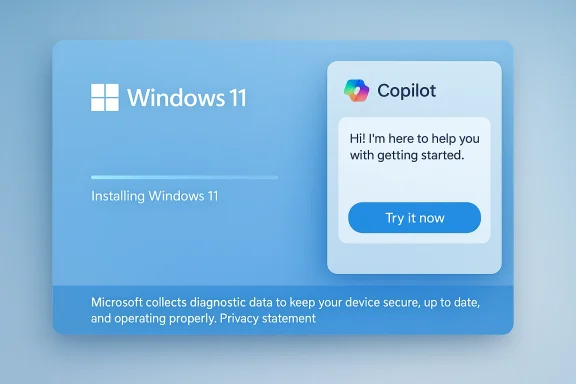
Microsoft has quietly added an interactive Copilot trial into the Windows 11 Out‑of‑Box Experience (OOBE) that can appear while the installer downloads and applies updates — letting new users “Try now” and open the full Copilot chat interface during setup without signing in to a Microsoft account.
The Windows Out‑of‑Box Experience (OOBE) is the guided setup flow users see the first time a PC boots after installation. It handles language selection, region, Wi‑Fi, account configuration and, increasingly, promotional panels and onboarding nudges. When an internet connection is available during OOBE, Windows will often pause the visible flow to check for and apply installer‑time updates — these can include day‑one firmware patches, cumulative or servicing packages that bring the installer up to date, and feature enablement packages used to activate hidden functionality before first sign‑in.
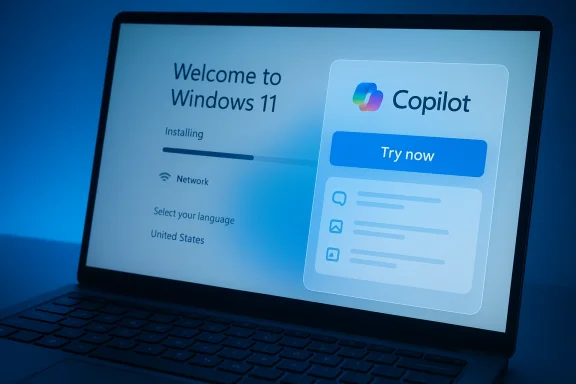
Historically, OOBE has also been a place where Microsoft surfaces offers for OneDrive and Microsoft 365 trials; the new twist is that the company is now experimenting with an interactive Copilot sandbox during that same update pause. The feature has been reported and demonstrated in recent installs: screenshots and first‑hand descriptions show a Copilot panel with a visible “Try now” button, with the Windows installation progress visible beneath it.
A few practical details reported from testers and early observers:
But the change also amplifies the existing tension in modern Windows setup flows: the balance between useful onboarding and commercialized, telemetry‑heavy first impressions. OOBE is not merely a tutorial; it sets defaults that cascade into privacy, security and long‑term habits. Any feature that leverages that moment must be accompanied by clear disclosures, configurable controls for enterprise customers, and robust, public privacy guarantees for anonymous sessions. Those safeguards are the missing pieces that will determine whether this experiment is perceived as thoughtful product design or an intrusive marketing nudge.
If Microsoft wants Copilot to win trust as a platform feature rather than a persistent annoyance, the company should:
In the end, the feature is a clear example of how platform owners are turning onboarding into a strategic surface: a place for discovery, trials and product nudges. That can be good for adoption and user education — but only if the company doing the nudging also meets users halfway with transparent policies and practical controls. The weeks and months ahead should tell whether Microsoft treats this as a helpful trial tool that respects user choice, or as another persistent nudge in an OOBE that many already find too crowded.
Source: Windows Latest Microsoft is using Windows 11 setup time to get you to try Copilot when you install certain updates
 Background / Overview
The Windows Out‑of‑Box Experience (OOBE) is the guided setup flow users see the first time a PC boots after installation. It handles language selection, region, Wi‑Fi, account configuration and, increasingly, promotional panels and onboarding nudges. When an internet connection is available during OOBE, Windows will often pause the visible flow to check for and apply installer‑time updates — these can include day‑one firmware patches, cumulative or servicing packages that bring the installer up to date, and feature enablement packages used to activate hidden functionality before first sign‑in.Historically, OOBE has also been a place where Microsoft surfaces offers for OneDrive and Microsoft 365 trials; the new twist is that the company is now experimenting with an interactive Copilot sandbox during that same update pause. The feature has been reported and demonstrated in recent installs: screenshots and first‑hand descriptions show a Copilot panel with a visible “Try now” button, with the Windows installation progress visible beneath it.
What changed: Copilot inside OOBE update pauses
The core change is simple but important in placement and intent: when the installer determines that OOBE must download and apply an update before completing setup, the OOBE UI can surface a Copilot trial affordance. Selecting “Try now” opens a Copilot chat pane inside the setup environment, providing the familiar chat interface users see on the desktop — text chat, generative image options where enabled, and the usual left‑hand feature icons — while the background update continues to install. This is not the default behavior during a normal, offline Windows install; it appears only in the specific context where OOBE has initiated an installer‑time update.A few practical details reported from testers and early observers:
- The Copilot session is available before sign‑in, because OOBE checks for updates prior to account setup. That means you can interact with Copilot without first creating or signing in to a Microsoft account.
- The Copilot interface appears to be the same web‑wrapped Copilot app experience users encounter on the desktop; it supports conversation, prompts for image generation, and the basic Copilot toolset accessible in an anonymous session.
- When the update completes, you can return to the rest of OOBE and finish setup; Copilot can remain open through the transition until you choose to back out and complete the device restart.
How the flow works (step‑by‑step)
- Start OOBE: language, keyboard, region and other initial prompts are shown as normal.
- OOBE checks Windows Update for installer‑time packages; if one is found, OOBE begins the download and apply cycle.
- While the installer shows progress for update download and installation, the OOBE UI may surface a small promotional/interactive panel that includes a “Try now” button for Copilot.
- Clicking “Try now” opens the Copilot chat pane inside the OOBE session. The user can interact anonymously for that session.
- The update continues in the background; when it finishes, OOBE resumes and the device completes the first sign‑in and restart sequence. Users can, if they choose, continue using Copilot after OOBE completes.
Why Microsoft likely did this: product and commercial logic
Embedding Copilot into OOBE during update pauses aligns with several predictable product and business goals:- Captured attention window: OOBE update downloads can take several minutes — sometimes significantly longer on constrained networks — creating a captive moment where new users have time to experiment. Offering an interactive trial in that window reduces discovery friction.
- Low‑friction trial: Allowing an anonymous session without forcing an MSA sign‑in lowers barriers. Users can see Copilot’s capabilities without creating accounts or changing settings. That design choice increases the chance of a positive first impression.
- Product discovery during onboarding: Demonstrating features during the earliest moments of ownership increases the chance users adopt Copilot regularly once they reach the desktop. Early exposure tends to flatten the learning curve and reduces later support load.
- Marketing and ecosystem lock‑in: Copilot adoption benefits Microsoft’s broader ecosystem — cloud services, Microsoft 365 integrations and the Copilot+ hardware story. Nudging uptake at OOBE is a logical commercial lever.
- Telemetry and signals: OOBE trials provide early feedback on usage patterns: how many users try Copilot during setup, what prompts they use, and whether the experience aids or harms overall onboarding metrics. Those telemetry signals are valuable for product iteration.
The user experience: what you’ll see and what you can do
Reports and screenshots show OOBE’s Copilot trial offering behaves like a sandboxed Copilot session inside the OOBE UI. Key practical points for users:- No account required for the demo: Because updates are checked and applied before sign‑in, the demo can run without an MSA. That reduces friction but also raises privacy questions about anonymous cloud processing.
- Familiar Copilot features: The chat pane includes the left‑hand feature icons, supports text conversation and image generation where enabled, and otherwise mirrors the desktop Copilot web wrapper in look and feel.
- Installer progress remains visible: The update progress bar stays on the screen beneath the Copilot pane, so users can see how much longer the setup will take while they interact.
- Session scope and persistence: The OOBE session is temporary. Without signing in, conversation history cannot be tied to a persistent user profile, although the server‑side handling of those sessions is not fully public. This suggests the demo experience is intended as a transient trial rather than a personalised Copilot experience.
Privacy, telemetry and data handling — critical analysis
Embedding a cloud‑powered assistant into a pre‑sign‑in setup flow raises several privacy and telemetry questions that Microsoft has not fully detailed in public materials available to independent observers. The major concerns are straightforward:- What data is collected during anonymous sessions? Even if a user interacts anonymously, Copilot relies on cloud processing. It is unclear what transient logs, prompts or telemetry the service retains and for how long, whether any device identifiers are associated with that data, and whether the data is used to personalize subsequent sessions once a user signs in later. These are material questions because OOBE is a sensitive first‑use context where users may be less likely to scrutinize permissions.
- Consent and comprehension: The OOBE flow has become dense with choices and offers. There is a risk that users — eager to finish setup — will click through the Copilot demo without reading how their interactions may be collected or used. That consent‑clarity problem is well documented for other onboarding nudges and remains relevant here.
- Telemetry and retention policies: Public documentation about Copilot’s server‑side retention windows and the linkage between anonymous OOBE sessions and later account‑bound data is limited. Without explicit, easy‑to‑read disclosures, the anonymity of OOBE interactions cannot be guaranteed from a privacy auditing perspective. We flag those claims as currently unverifiable without Microsoft’s explicit disclosure.
- Edge cases for sensitive content: OOBE occurs before a user configures disk encryption or enterprise controls. If a user pastes or asks about sensitive information in the Copilot demo — credentials, passkeys, or private documents — that content will be processed by the cloud. Good design would warn or block certain inputs in this context; early reports do not confirm such protections. This is an important risk vector to audit.
Enterprise and deployment implications
For IT administrators and device builders, the OOBE Copilot experiment intersects with already complex OOBE update behavior and provisioning logistics.- Installer‑time updates affect provisioning windows: Devices that download multi‑gigabyte OOBE packages during first boot can take substantially longer to reach the desktop. Organizations that image or stage large fleets must account for this additional time or else use caching/distribution points to avoid heavy internet egress. Microsoft’s documentation and community tests show that some OOBE patches include localized resource bundles and CloudExperienceHost updates, which are applied only when the installer has network access.
- Autopilot and token expiry risks: Long OOBE update windows can interfere with zero‑touch provisioning flows where enrollment tokens expire. Admins should pilot and adjust token lifetimes and consider staged rollout planning.
- Network and caching strategy: Large organizations should consider delivering OOBE packages via local distribution points, branch cache, or other WAN‑optimization techniques to reduce setup time and avoid providing a captive window where Copilot trials appear unpredictably across a fleet.
- Policy control and gating: Enterprises that do not want Copilot surfaced at OOBE — either for privacy, bandwidth or policy reasons — will need Microsoft‑documented controls. As of the current reporting, distinct Copilot behaviors and entry points for managed vs consumer devices exist, but admins should verify and test the enforcement mechanisms in their environment.
Historical comparison: Cortana and user sentiment
Microsoft previously used OOBE as a surface to introduce assistants and services — notably Cortana appeared prominently in Windows 10’s setup and early‑use experiences. That earlier exercise was controversial and often disliked by users, though the scale of backlash varied. The new Copilot experiment is similar in spirit — introducing a built‑in assistant at the earliest moment — but different in that Copilot is a cloud‑backed, multimodal system with perimeter reach into many apps and services. Given the broader debate about AI on the desktop, it is likely that Copilot in OOBE will be polarizing: appreciated by users who want to try an assistant immediately, and disliked by those who view it as an upsell or an intrusive default.Risks, trade‑offs and unanswered questions
No single feature decision is purely beneficial. The OOBE Copilot integration surfaces several clear trade‑offs:- Longer perceived setup time vs engagement: Showing an interactive experience in the middle of an update may reduce perceived waiting time for some users, but it also formalizes a route to market inside a flow that used to be simple and brief. For users who want a quick, privacy‑minimal setup, this feels like unnecessary friction.
- Privacy vs discovery: Anonymous demos improve trial uptake but risk collecting sensitive prompts during a context when users are least attentive to permissions. Without clear server‑side controls, retention windows and linkage policies, users may be uncomfortable.
- Commercial nudging vs user autonomy: OOBE is increasingly a sales and discovery surface for subscriptions and services. Adding Copilot to that mix strengthens Microsoft’s ability to nudge users toward its assistant ecosystem — valuable from a business standpoint, but likely to fuel pushback from privacy advocates and some customer segments.
- Operational unpredictability for admins: If Copilot trials appear unpredictably across hardware and locales depending on server flags and entitlement checks, admins must work harder to document and control the user experience during mass deployments.
Practical recommendations
For consumers- If you prefer a minimal, private setup: perform OOBE offline (skip network connection) and apply updates after you reach the desktop. This prevents OOBE from downloading installer‑time packages and thereby avoids the Copilot demo during setup.
- Read the on‑screen disclosures carefully before interacting with Copilot in OOBE. Treat it as a cloud demo — don't input passwords, passkeys, or other sensitive secrets.
- Pilot OOBE images with a small set of devices, observe how installer‑time packages behave on your network, and measure provisioning windows. Adjust Autopilot token lifetimes if necessary.
- Use local distribution or caching to avoid heavy egress and to keep provisioning times predictable.
- Validate whether your management policies (MDM, group policy, or provisioning tooling) can suppress or control Copilot exposure during OOBE if that is a requirement for your fleet.
- Ask Microsoft for explicit, easy‑to‑find documentation that explains what is collected by Copilot during anonymous OOBE sessions, how long the data is retained, and whether it is ever linked to a device or account. If those details are lacking, treat the feature as a potential privacy risk.
Final verdict: intriguing convenience, legitimate concerns
Microsoft’s decision to offer a Copilot trial during OOBE updates is a clever product move: it exploits an idle moment to demonstrate a flagship feature, reduces trial friction, and increases the chance of adoption. For many users — especially those who want to explore AI on a new device — that convenience will feel helpful and immediate.But the change also amplifies the existing tension in modern Windows setup flows: the balance between useful onboarding and commercialized, telemetry‑heavy first impressions. OOBE is not merely a tutorial; it sets defaults that cascade into privacy, security and long‑term habits. Any feature that leverages that moment must be accompanied by clear disclosures, configurable controls for enterprise customers, and robust, public privacy guarantees for anonymous sessions. Those safeguards are the missing pieces that will determine whether this experiment is perceived as thoughtful product design or an intrusive marketing nudge.
If Microsoft wants Copilot to win trust as a platform feature rather than a persistent annoyance, the company should:
- Publish transparent privacy and telemetry documentation for OOBE Copilot demos;
- Provide enterprise controls to suppress or manage Copilot exposure during provisioning; and
- Make it easy for consumers to opt out or to run OOBE without network access if they prefer a minimal, privacy‑focused setup.
In the end, the feature is a clear example of how platform owners are turning onboarding into a strategic surface: a place for discovery, trials and product nudges. That can be good for adoption and user education — but only if the company doing the nudging also meets users halfway with transparent policies and practical controls. The weeks and months ahead should tell whether Microsoft treats this as a helpful trial tool that respects user choice, or as another persistent nudge in an OOBE that many already find too crowded.
Source: Windows Latest Microsoft is using Windows 11 setup time to get you to try Copilot when you install certain updates