

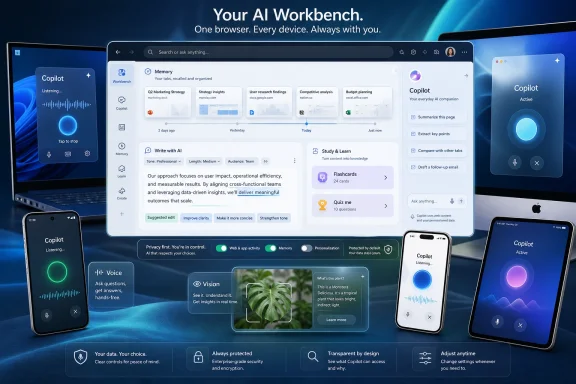
Microsoft announced on May 13, 2026, that it is rolling new Copilot-powered Edge features across Windows, Mac, Android, iPhone, and iPad, while retiring the separate Copilot Mode branding and moving those AI experiences directly into the browser. The change is less a retreat from AI than a normalization of it. Edge is no longer being pitched as a browser with an assistant bolted on; Microsoft wants it understood as a browser whose memory, tab awareness, writing tools, study features, voice controls, and mobile camera-like assistance are part of the default surface. That is a meaningful shift for users, and an even bigger one for administrators who have spent the last two years trying to decide where Copilot ends and the browser begins.
The headline move is that Copilot Mode is going away, at least as a distinct product concept. That sounds, at first blush, like Microsoft is backing off from one of the more aggressive AI browser experiments it has tested in Edge. It is not.
What Microsoft is doing instead is collapsing the distinction between “normal Edge” and “AI Edge.” Copilot’s browser-aware capabilities are being distributed into the everyday browser experience, including the new tab page, tab workflows, writing surfaces, history-based recall, and mobile browsing. The separate mode was useful as a preview flag and a marketing container; it was never likely to remain the long-term shape of the product.
That matters because modes create psychological boundaries. A mode tells users they have entered a special environment, with different expectations and perhaps different risks. Removing the mode makes the technology feel ambient, which is exactly what Microsoft has been trying to do across Windows, Microsoft 365, Bing, and Copilot itself.
This is the company’s broader Copilot strategy in miniature. Microsoft is no longer simply trying to convince people to open a chatbot. It is trying to make the chatbot an interpreter for everything users already do.
That is a bigger architectural change than it may appear. The browser has always been a container for web activity, but it has traditionally been a passive one. It remembers history, cookies, passwords, sessions, collections, and sync state, but it does not normally interpret those artifacts into a narrative of what the user is trying to accomplish.
Copilot Journeys pushes Edge in the other direction. The feature groups browsing activity into task-oriented cards, summarizes the work in progress, and suggests a next step. Microsoft’s own support material says Journeys can use page titles, URLs, page content, dwell time, navigation context, and Copilot chats when enabled, while excluding some categories such as InPrivate and Guest browsing, sensitive sites, personal information, and certain sensitive topics.
The pitch is straightforward: people do not browse in single-page sessions anymore. They research travel, diagnose problems, compare laptops, read documentation, plan home projects, and jump between devices. A browser that can reconstruct those abandoned threads may be genuinely useful.
The catch is equally straightforward: the same feature that makes the browser feel smart also makes it feel watchful. A useful memory layer requires context, and context in a browser is intimate by default.
The new mobile features bring Copilot Vision and Voice into Edge on Android, iPhone, and iPad. In practical terms, Microsoft wants users to share what they are seeing, talk through pages or tasks, ask questions, receive explanations, and move through decisions without typing. The company says the mobile app will display a clear visual cue when Copilot is active, including when it is listening, helping, or taking action.
That visual cue is not a minor detail. If Microsoft wants people to let an assistant observe their browsing context, the system needs to make state visible. Users need to know when the assistant is dormant, when it is listening, and when it is acting. The browser cannot become a black box with a microphone.
The mobile expansion also hints at where Microsoft thinks the browser market is heading. The old browser war was about rendering engines, extensions, performance, and default placement. The next one is about who owns the user’s task context across screens.
This is where the update will likely win over some ordinary users. Summarizing a dense page, turning study material into flashcards, or rewriting an awkward paragraph are not speculative agentic fantasies. They are the everyday jobs people already hand to AI tools, often through copy-and-paste workflows.
Putting those tools directly into Edge reduces friction. It also keeps the user inside Microsoft’s stack. A student researching a topic, a worker drafting an email in a web app, or a commuter trying to consume an article by audio all become Edge use cases rather than generic web use cases.
There is a competitive logic here. Google is embedding Gemini into Chrome-adjacent surfaces and Android. Apple is threading Apple Intelligence through Safari, Mail, and system services more cautiously. Perplexity, Arc’s remains, and other AI-first browser efforts have argued that the browser should understand user intent, not merely display pages. Microsoft’s answer is to use Edge as the place where Copilot watches the web become work.
Those details are important, but they do not end the discussion. The central privacy question is no longer whether Edge has an AI button. It is whether users and administrators can understand the data flows well enough to make informed decisions.
The browser is an unusually sensitive place to introduce memory. Browsing history can reveal health concerns, finances, legal problems, job searches, relationships, political interests, religious questions, and workplace projects. Even if sensitive categories are filtered, the residue of normal browsing can still paint a detailed picture of a person’s life.
Microsoft’s challenge is that it wants to sell Copilot as contextual and helpful while assuring users that context is bounded and controllable. That is a hard balance. If Copilot knows too little, it becomes a sidebar chatbot with better branding. If it knows enough to be truly useful, users will reasonably ask who else can infer from that knowledge, where it is stored, how long it persists, and which enterprise controls govern it.
For IT departments, the question is governance. Edge is already a managed browser in many organizations, and Microsoft has spent years positioning it as the enterprise-friendly choice for Windows fleets. Once Copilot becomes part of the browser fabric, admins must think about policy, compliance, data residency, auditability, training exposure, and user confusion.
The browser is also where personal and work identities often collide. A user may be signed into a corporate profile for work apps, a personal Microsoft account for Copilot features, and multiple SaaS tools in the same day. Even with profile separation and policy controls, the user experience can blur boundaries faster than documentation can explain them.
This is why Microsoft’s enterprise messaging will matter as much as the consumer demo. If Copilot in Edge is easy to manage, disable, scope, or audit, organizations may treat it as another controllable productivity layer. If the controls feel scattered or the branding changes faster than policy documentation, admins will see it as yet another AI surface arriving before the governance model has settled.
This is a familiar Microsoft pattern. Features often arrive as branded experiments, preview programs, or toggleable experiences. If they survive, they sink into the platform and become infrastructure. The branding gets quieter while the integration gets deeper.
That move will please some users and annoy others. People who disliked Copilot Mode may feel that Microsoft has removed the signpost while keeping the road. People who liked it may appreciate that they no longer need to switch mental contexts. Either way, the direction is clear.
Edge is not becoming less Copilot-centric. It is becoming more subtly Copilot-centric.
Edge’s advantage is that browsers are naturally context-rich. If AI belongs anywhere, it arguably belongs where users are already collecting information, comparing sources, filling forms, drafting text, and making decisions. The browser can supply the context that standalone chatbots lack.
But that advantage cuts both ways. Browser AI must be better than novelty. It has to save time without getting in the way, summarize without flattening nuance, write without producing corporate mush, and remember without seeming creepy. The bar is higher because the browser is already central to daily work.
Microsoft’s strongest argument is that these tools reduce friction in tasks people already perform. Its weakest argument is any implication that users simply need more Copilot everywhere. The distinction will decide whether this update feels like product evolution or another layer of Microsoft AI sprawl.
The concrete takeaways are narrower than the marketing and more important than the branding:
The question is no longer only which browser displays the page. It is which browser users trust to interpret the page, remember the task, write the response, summarize the research, speak the article aloud, and eventually take action. That is a more powerful role than rendering HTML, and it explains why Microsoft is moving quickly.
Edge has struggled for years with a reputation problem. It is technically strong, fast enough, secure enough, and deeply manageable, yet many users still experience it as the browser Windows keeps recommending a little too eagerly. Copilot gives Microsoft a chance to change that story, but only if the features are good enough to feel chosen rather than imposed.
The retirement of Copilot Mode is therefore less an ending than a signal. Microsoft is done presenting AI browsing as a side experiment. The next phase is quieter, broader, and harder to avoid: Edge as a browser that assumes the web is not just something you visit, but something an assistant can continuously help you make sense of.
Source: Thurrott.com Microsoft Updates Edge on Desktop and Mobile
 Microsoft Stops Treating AI as a Mode
The headline move is that Copilot Mode is going away, at least as a distinct product concept. That sounds, at first blush, like Microsoft is backing off from one of the more aggressive AI browser experiments it has tested in Edge. It is not.What Microsoft is doing instead is collapsing the distinction between “normal Edge” and “AI Edge.” Copilot’s browser-aware capabilities are being distributed into the everyday browser experience, including the new tab page, tab workflows, writing surfaces, history-based recall, and mobile browsing. The separate mode was useful as a preview flag and a marketing container; it was never likely to remain the long-term shape of the product.
That matters because modes create psychological boundaries. A mode tells users they have entered a special environment, with different expectations and perhaps different risks. Removing the mode makes the technology feel ambient, which is exactly what Microsoft has been trying to do across Windows, Microsoft 365, Bing, and Copilot itself.
This is the company’s broader Copilot strategy in miniature. Microsoft is no longer simply trying to convince people to open a chatbot. It is trying to make the chatbot an interpreter for everything users already do.
The Browser Is Becoming the Memory Layer
The most consequential part of the update is not the redesigned new tab page or the mobile expansion, though both are visible. It is the expansion of Copilot’s ability to reason across tabs, browsing history, past chats, and what Microsoft describes as long-term memory.That is a bigger architectural change than it may appear. The browser has always been a container for web activity, but it has traditionally been a passive one. It remembers history, cookies, passwords, sessions, collections, and sync state, but it does not normally interpret those artifacts into a narrative of what the user is trying to accomplish.
Copilot Journeys pushes Edge in the other direction. The feature groups browsing activity into task-oriented cards, summarizes the work in progress, and suggests a next step. Microsoft’s own support material says Journeys can use page titles, URLs, page content, dwell time, navigation context, and Copilot chats when enabled, while excluding some categories such as InPrivate and Guest browsing, sensitive sites, personal information, and certain sensitive topics.
The pitch is straightforward: people do not browse in single-page sessions anymore. They research travel, diagnose problems, compare laptops, read documentation, plan home projects, and jump between devices. A browser that can reconstruct those abandoned threads may be genuinely useful.
The catch is equally straightforward: the same feature that makes the browser feel smart also makes it feel watchful. A useful memory layer requires context, and context in a browser is intimate by default.
Edge Mobile Finally Gets the Full Copilot Treatment
Microsoft’s update is also a mobile story, and that may be where the company’s browser ambitions become clearest. Edge on desktop has long been the main staging ground for Copilot experiments. Mobile Edge has had Copilot integration, but it has not been the equal participant Microsoft is now describing.The new mobile features bring Copilot Vision and Voice into Edge on Android, iPhone, and iPad. In practical terms, Microsoft wants users to share what they are seeing, talk through pages or tasks, ask questions, receive explanations, and move through decisions without typing. The company says the mobile app will display a clear visual cue when Copilot is active, including when it is listening, helping, or taking action.
That visual cue is not a minor detail. If Microsoft wants people to let an assistant observe their browsing context, the system needs to make state visible. Users need to know when the assistant is dormant, when it is listening, and when it is acting. The browser cannot become a black box with a microphone.
The mobile expansion also hints at where Microsoft thinks the browser market is heading. The old browser war was about rendering engines, extensions, performance, and default placement. The next one is about who owns the user’s task context across screens.
Productivity Features Turn Edge Into a Workbench
The productivity additions are the easiest to understand because they map to familiar use cases. Edge is getting a Study and Learn mode with guided sessions and interactive quizzes. Copilot can generate quizzes, flashcards, and guided learning sessions. A Writing assistant can help draft text or rewrite it for clarity and tone. Any tab can be turned into an audio podcast, allowing users to listen to page content instead of reading it.This is where the update will likely win over some ordinary users. Summarizing a dense page, turning study material into flashcards, or rewriting an awkward paragraph are not speculative agentic fantasies. They are the everyday jobs people already hand to AI tools, often through copy-and-paste workflows.
Putting those tools directly into Edge reduces friction. It also keeps the user inside Microsoft’s stack. A student researching a topic, a worker drafting an email in a web app, or a commuter trying to consume an article by audio all become Edge use cases rather than generic web use cases.
There is a competitive logic here. Google is embedding Gemini into Chrome-adjacent surfaces and Android. Apple is threading Apple Intelligence through Safari, Mail, and system services more cautiously. Perplexity, Arc’s remains, and other AI-first browser efforts have argued that the browser should understand user intent, not merely display pages. Microsoft’s answer is to use Edge as the place where Copilot watches the web become work.
The Privacy Story Is Now the Product Story
Microsoft’s documentation tries to draw lines around what Copilot-powered Edge features can access and how users can disable them. Journeys, for example, is described as not being on by default, and Microsoft says turning it off stops collection and deletes the data collected for that feature. The company also says some non-sensitive content may be sent to Microsoft services to create summaries and cards, while promising that this data is not used to train AI models or for advertising.Those details are important, but they do not end the discussion. The central privacy question is no longer whether Edge has an AI button. It is whether users and administrators can understand the data flows well enough to make informed decisions.
The browser is an unusually sensitive place to introduce memory. Browsing history can reveal health concerns, finances, legal problems, job searches, relationships, political interests, religious questions, and workplace projects. Even if sensitive categories are filtered, the residue of normal browsing can still paint a detailed picture of a person’s life.
Microsoft’s challenge is that it wants to sell Copilot as contextual and helpful while assuring users that context is bounded and controllable. That is a hard balance. If Copilot knows too little, it becomes a sidebar chatbot with better branding. If it knows enough to be truly useful, users will reasonably ask who else can infer from that knowledge, where it is stored, how long it persists, and which enterprise controls govern it.
Administrators Will Read This Differently Than Consumers
For home users, the question is mostly preference. Do you want a browser that remembers what you were doing and helps you resume it? Do you want AI writing and study tools embedded into the place where you read, research, and shop? Do you trust the controls?For IT departments, the question is governance. Edge is already a managed browser in many organizations, and Microsoft has spent years positioning it as the enterprise-friendly choice for Windows fleets. Once Copilot becomes part of the browser fabric, admins must think about policy, compliance, data residency, auditability, training exposure, and user confusion.
The browser is also where personal and work identities often collide. A user may be signed into a corporate profile for work apps, a personal Microsoft account for Copilot features, and multiple SaaS tools in the same day. Even with profile separation and policy controls, the user experience can blur boundaries faster than documentation can explain them.
This is why Microsoft’s enterprise messaging will matter as much as the consumer demo. If Copilot in Edge is easy to manage, disable, scope, or audit, organizations may treat it as another controllable productivity layer. If the controls feel scattered or the branding changes faster than policy documentation, admins will see it as yet another AI surface arriving before the governance model has settled.
The End of Copilot Mode Is a Branding Retreat, Not a Product Retreat
There is an irony in Microsoft retiring Copilot Mode just as Copilot becomes more important to Edge. The name disappears because the concept has outlived its usefulness. Microsoft does not want users to think they must choose between a conventional browser and an AI browser; it wants Edge to be the AI browser by default, even if individual features remain configurable.This is a familiar Microsoft pattern. Features often arrive as branded experiments, preview programs, or toggleable experiences. If they survive, they sink into the platform and become infrastructure. The branding gets quieter while the integration gets deeper.
That move will please some users and annoy others. People who disliked Copilot Mode may feel that Microsoft has removed the signpost while keeping the road. People who liked it may appreciate that they no longer need to switch mental contexts. Either way, the direction is clear.
Edge is not becoming less Copilot-centric. It is becoming more subtly Copilot-centric.
Microsoft Is Betting That Convenience Beats Browser Fatigue
The risk for Microsoft is not that users reject every AI feature. The risk is that users grow tired of AI appearing in every corner of the interface, especially when features feel promotional rather than practical. Windows users have already seen Copilot icons, sidebars, app integrations, rewritten menus, and shifting entry points. The fatigue is real.Edge’s advantage is that browsers are naturally context-rich. If AI belongs anywhere, it arguably belongs where users are already collecting information, comparing sources, filling forms, drafting text, and making decisions. The browser can supply the context that standalone chatbots lack.
But that advantage cuts both ways. Browser AI must be better than novelty. It has to save time without getting in the way, summarize without flattening nuance, write without producing corporate mush, and remember without seeming creepy. The bar is higher because the browser is already central to daily work.
Microsoft’s strongest argument is that these tools reduce friction in tasks people already perform. Its weakest argument is any implication that users simply need more Copilot everywhere. The distinction will decide whether this update feels like product evolution or another layer of Microsoft AI sprawl.
The New Edge Deal Users Are Being Asked to Accept
Microsoft’s Edge update is not just a feature drop; it is a new bargain. The browser gets more helpful as it gets more context. Users get more automation if they grant more permission. Administrators get more productivity potential if they accept more policy complexity.The concrete takeaways are narrower than the marketing and more important than the branding:
- Microsoft is retiring Copilot Mode as a separate Edge experience, but Copilot capabilities are being integrated more deeply into the browser rather than removed.
- Copilot in Edge can now work across multiple tabs and, when enabled, use browsing history, past chats, and memory to provide more personalized assistance.
- Copilot Journeys is becoming broadly available across desktop and mobile, turning browsing activity into task-based summaries and suggested next steps.
- Edge mobile is gaining Copilot Vision and Voice features so users can talk through what they see and receive contextual help on phones and tablets.
- New study, writing, quiz, flashcard, and audio-podcast features make Edge more like a productivity workbench than a conventional web browser.
- Privacy controls, enterprise policies, and visible activity indicators will determine whether these features feel empowering or intrusive.
The Browser War Moves From Defaults to Delegation
For two decades, browser competition has often been discussed in terms of defaults: which browser ships with the operating system, which search engine sits in the address bar, which app opens when a user clicks a link. Microsoft still cares deeply about those defaults, as every Windows user knows. But the AI browser era shifts the contest from defaults to delegation.The question is no longer only which browser displays the page. It is which browser users trust to interpret the page, remember the task, write the response, summarize the research, speak the article aloud, and eventually take action. That is a more powerful role than rendering HTML, and it explains why Microsoft is moving quickly.
Edge has struggled for years with a reputation problem. It is technically strong, fast enough, secure enough, and deeply manageable, yet many users still experience it as the browser Windows keeps recommending a little too eagerly. Copilot gives Microsoft a chance to change that story, but only if the features are good enough to feel chosen rather than imposed.
The retirement of Copilot Mode is therefore less an ending than a signal. Microsoft is done presenting AI browsing as a side experiment. The next phase is quieter, broader, and harder to avoid: Edge as a browser that assumes the web is not just something you visit, but something an assistant can continuously help you make sense of.
Source: Thurrott.com Microsoft Updates Edge on Desktop and Mobile
