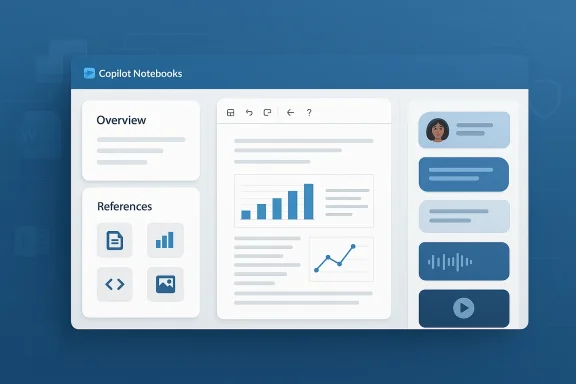
Microsoft's Copilot Notebooks has received a sweeping visual and interaction redesign in the latest staged update, a change that reshapes how research, project context, and source material are gathered and surfaced inside Microsoft 365 Copilot—and it arrives with both clear productivity upside and practical hazards for administrators and knowledge workers alike. erview
Copilot Notebooks launched as Microsoft’s attempt to give users a persistent, AI-aware workspace: a place to collect Copilot chats, files, meeting notes, and external references into a single notebook that Copilot can read, summarize, and reason over. The official guidance and documentation for Copilot Notebooks were most recently updated in late February 2026, underscoring that the feature is intentionally tied to Microsoft 365 licensing and to a SharePoint or OneDrive storage backend for notebook content. This matters for both availability and governance in enterprise tenants.
Over the past year Microsoft has iterated Notebooks frequently—adding summaries, better referencing, and mobile parity—and the newest redesign is the most visible of those changes. Microsoft’s product notes and internal community commentary describe the goal as turning scattered research into a concise “overview” that helps teams get up to speed in seconds. That objective is reflected in what’s shipping: a redesigned navigation model, a and an AI-generated overview landing card that synthesizes notebook content automatically.
The update introduces several interlocking UI and interaction changes intended to speed discovery and reduce context switching.
That said, the redesign brings predictable governance, discoverability, and operganizations must manage. The most important work for IT and security teams is not preventing the redesign—that will arrive whether you like it or not—but preparing tenants so the feature becomes an accelerant, not a liability.
The update marks another clear step in Microsoft’s strategy to bake Copilot into everything users touch—mail, files, meetings, and now notebooks. For teams that get the governance right, Notebooks’ redesign will be a net positive; for those that don’t, it’s a fast route to noisy summaries and accidental exposure. Either way, this release is worth attention from product owners, security teams, and anyone who relies on shared knowledge to get work done.
Source: Neowin Copilot Notebooks get big redesign in latest update
Copilot Notebooks launched as Microsoft’s attempt to give users a persistent, AI-aware workspace: a place to collect Copilot chats, files, meeting notes, and external references into a single notebook that Copilot can read, summarize, and reason over. The official guidance and documentation for Copilot Notebooks were most recently updated in late February 2026, underscoring that the feature is intentionally tied to Microsoft 365 licensing and to a SharePoint or OneDrive storage backend for notebook content. This matters for both availability and governance in enterprise tenants.
Over the past year Microsoft has iterated Notebooks frequently—adding summaries, better referencing, and mobile parity—and the newest redesign is the most visible of those changes. Microsoft’s product notes and internal community commentary describe the goal as turning scattered research into a concise “overview” that helps teams get up to speed in seconds. That objective is reflected in what’s shipping: a redesigned navigation model, a and an AI-generated overview landing card that synthesizes notebook content automatically.
 What changed — the visible redesign
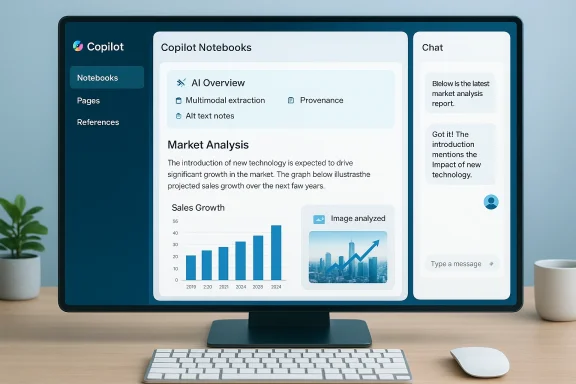
The update introduces several interlocking UI and interaction changes intended to speed discovery and reduce context switching.- Left-hand persistent notebook navigation. Notebooks, Pages, and References now appear inft rail so users can switch context quickly without losing place in an open chat or page. This reorientation prioritizes project structure over chat session lists.
- Right-side persistent chat pane. Instead of chat displacing content, the chat pane now “rides” to the right of the notebook canvasersation visible while you read or edit pages. Microsoft and early testers describe this as a move toward a two-column, research-first layout.
- Overview landing card (AI summaries). When you open a notebook the top-level landing experience surfaces an automatically generated overview: a compressed synthesis of references, key points, action ixt steps. This card uses Copilot’s summarization engine to create an instant project brief. Microsoft started rolling summary features to Notebooks in March and has been iterating the model and presentation since.
- Tighter integration of references and pages. Attachments, linked files from OneDrive/SharePoint, Copilot Pages, and inline references are surfaced more prominently and can be added to the overview dynamically. That reduces the manual effort to gather source material.
- Multimodal extraction and quick insights. Add an image, chart, or diagram to a prompt and Copilot extracts text, explains trends, and surfaces alt text or accessibility notes automatically—accelerating analysis workflows for visual content. This capability is referenced in recent Microsoft release notes as part of Copilot’s expanded document handling.
Why the redesign matters: productivity and cognitive load
At a high level the redesign aims to solve two chroniise knowledge work: context loss and scattered sources.- Faster context switching. By keeping the notebook structure and the chat visible simultaneously, Copilot Notebooks reduces the cognitive cost of switching between reading and asking clarifying questions. That can be a real time-saver in meeting prep, research triage, and cross-team handoffs.
- Fewer friction points for research synthesis. The AI-generated overview reduces the time needed to assemble a topline brief from multiple documents, which is valuable to product managers, analysts, and client-facing professionals. Microsoft’s release notes highlight improved summarization and richer document referencing as explicit design goals.
- Better handling of multimodal inputs. Research is rarely pure text; charts, screenshots, and diagrams are the norm. Automating the extraction of text and alt descriptions from images helps accessibility and speeds review cycles.
Technical and governance specifics you should verify now
If you’re an admin, architect, or an IT leader planning a rollout, these are the claims and specs to verify and document before broad deployment:- Licensing prerequisites. Copilot Notebooks requires a Microsoft 365 Copilot license plus a OneDrive or SharePoint storage plan for creating notebooks. Confirm who in your organization has the required SKU and whether you need to purchase or reassign licenses.
- Storage and retention policies. Notebooks are stored in the tenant’s OneDrive/SharePoint. That means your existing retention, DLP, and eDiscovery policies will apply—but you should verify exact repository paths and whether summary content is cached elsewhere. Microsoft’s onboarding documentation explicitly ties Notebooks to tenant storage.
- Modeling and inference details. Microsoft’s Copilot release notes indicate the service routes queries to(and in recent updates Copilot Chat began using GPT-5 as the default in some channels). Confirm which model is used for Notebooks in your tenant and whether that influences throughput, cost, or data residency. These model-level changes have been documented in Microsoft’s release notes.
- Auditability and action logging. Ask whether the summary generation, reference additions, and Copilot actions are logged to your tenant’s audit logs and to whatce what data the AI used to produce outputs.
- Rollout cadence and feature flags. Microsoft is rolling this update in stages—some tenants and insiders see it before others. Plan a pilot cohort and monitor feedback channels. Community threads indicate the update is being flighted gradually and that reactions vary by tenant.
Community and early-adopter reactions: wins and pain points
The redesign has been visible in tenant previews and Insider channels, and the community reaction has been mixed.- Positive responses praise the faster navigation and the usefulness of the automatic overviews when starting on a new project. Several internal community posts and Microsoft channels describe a win for knowledge work.
- At the same time, early user reports have flagged regressions and discoverability issues. Reddit threads and tenant reports describe confusion around where Pages now live inside the notebook, trouble finding older chat history, and layout changes that break established workflows for power users who relied on the previous linear chat model. Those complaints show up in multiple community forums.
- Inside Microsoft-insider and tenant threads, some testers reported a temporary drop in perceived usability—buttons moving, unexpected navigation behaviors, and missing shortcuts—which Microsoft often addresses in follow-up flights. Community-sourced posts show the product team is iterating rapidly, but that impatience and friction are real for teams that depend on predictable interfaces.
Security, privacy, and compliance: concrete concerns
A more AI-centric notebook raises a predictable set of governance questions.- Data surface expansion. By encouraging users to pull in files and images, Notebooks increases the number of content items that can be used in model inferences. While those files remain in tenant nce layer can reference them to generate summaries. Admins should confirm whether the inference layer transmits data outside tenant boundaries and what safeguards ensure data residency and encryption in transit and at rest. Microsoft documentation ties Notebooks to tenant storage and notes licensing and storage requirements; however, admins should ask Microsoft support or their account team for explicit data flow diagrams for their region and tenant.
- Unintended sharing via summaries. Automatic overviews can include extracted content or paraphrases that, if misconfigured, might surface confidential details to broader groups. Ensure sharing defaissions are controlled and that users understand how to mark sensitive content. This is a practical governance failure mode — automatic summarization working well can still accidentally broaden exposure of restricted content.
- Model hallucination and provenance. Summaries are powerful, but generative systems sometimes hallucinate facts or misattribute content. For compliance-heavy work (e.g., legal, regulated research), require that Copilot users include provenance checks—explicit links to referenced documents—before acting on a notebook’s synthesized recommendations. Microsoft’s product notes emphasize reference linking, but product teams and admins must enforce provenance workflows.
- Logging and audit trails. Ensure Copilot and Notebooks actions are included in tenant audit logs and that DLP rules can trigger on sensitive content added to notebooks. Ask Microsoft support for clarity about what is logged and for how long. The absence of clear auditability is one of the most serious potential governance gaps.
Action checklist for IT and security teams (recommended)
- Pilot in a controlled group (3–6 teams) and gather workflow telemetry over 2–4 weeks.
- Map notebook storage: confirm OneDrive/SharePoint repositories and update retention/DLP rules to explicitly include notebook artefacts.
- Validate data flows: request a data flow diagram from your Microsoft account team showing whether and where notebook content is processed outside your tenant region.
- Train users: publish short guidance explaining how the Overview is generated, how to check provenance, and how to mark sensitive sources.
- Configure sharing defaults: set new Notebooks to private by default and require explicit sharing for cross-team collaboration.
- Monitor community feedback channels: keep a short list of known issues and check Microsoft’s release notes for fixes.
UX trade-offs and long-term implications
There are a few strategic trade-offs to consider beyond immediate rollout concerns.- From chat-first to canvas-first. The new layout signals Microsoft’s intent to position Notebooks as a project canvas rather than a conversational playground. That’s better for knowledge assembly, but it may reduce the immediacy of casual chat-style discovery that some users prefer. Teams that rely on linear conversation logs for auditability or collaboration may need to adapt processes.
- Consolidation of knowledge tools. Microsoft is clearly pushing toward integrating Copilot capabilities across O apps, and the OS itself. Notebooks’ richer canvas fits that strategy, but it also centralizes risk and control in a single, high-value surface. Administrators who already struggle with governaps now have another critical surface to manage.
- Competition with specialized notebook products. Computational-resear such as NotebookLM-style experiments have pushed more expressive canvases for research. Microsoft’s redesign closes gaps in the productivity space—if Notebooks continue maturing, they could replace multiple point tools for many teams. That could reduce tool sprawl but also increase lock-in.
Known issues and what to watch for
Early reports and community threads have highlighted concrete, actionable problems you should monitor in your pilot:- Discoverability regressions. Some testers report difficulty locating Pages and historical chats after the redesign; train users on the new left-hand navigation and collect precise feedback about missing flows.
- Performance and rendering bugs. Any major UI rewrite can reveal rendering or interaction regressions across browsers and clients. Test on the set of browsers and devices your teams use.
- Inconsistent rollout behavior. Because the redesign is staged, not all users in a tenant may see the same UI at the same time, which can complicate training and support. Plan for dual-state support during the transition window.
- User frustration and helpdesk load. Expect a sight spike in helpdesk tickets during the first two weeks of a tenant-wide rollout. Prepare bite-sized training and a short FAQ to reduce the support burden. Community threads show immediate negative reactions from power users who depended on prior shortcuts.
Conclusions and editorial assessment
Microsoft’s Copilot Notebooks redesign is a meaningful step toward turning generative AI from a reactive assistant into a proactive knowledge management surface. The new layout—persistent navigation, a right-side chat pane, and an AI-generated overview—addresses real productivity problems for teams that regularly synthesize multi-source research and brief stakeholders.That said, the redesign brings predictable governance, discoverability, and operganizations must manage. The most important work for IT and security teams is not preventing the redesign—that will arrive whether you like it or not—but preparing tenants so the feature becomes an accelerant, not a liability.
- For knowledge workers, the redesign can shave minutes to hours off research ramps and meeting prep.
- For admins, it requires careful licensing checks, storage policy validation, and clarity about data flows and logging.
- For compliance teams, the key priorities are controlling sharing defaults, validating model data residency, and enforcing provenance checks for AI-generated summaries.
The update marks another clear step in Microsoft’s strategy to bake Copilot into everything users touch—mail, files, meetings, and now notebooks. For teams that get the governance right, Notebooks’ redesign will be a net positive; for those that don’t, it’s a fast route to noisy summaries and accidental exposure. Either way, this release is worth attention from product owners, security teams, and anyone who relies on shared knowledge to get work done.
Source: Neowin Copilot Notebooks get big redesign in latest update