

Microsoft began rolling out Copilot Notebooks to Microsoft 365 Copilot Chat commercial and education users on June 11, 2026, expanding the AI workspace beyond full Microsoft 365 Copilot subscribers and into the Microsoft 365 Copilot app and OneNote for eligible work and school accounts. The move looks generous, but it is also strategic: Microsoft is trying to make Copilot feel less like a paid add-on and more like the default layer where Microsoft 365 work gets organized. Notebooks are not just another AI chat surface; they are Microsoft’s latest attempt to turn scattered files, conversations, and notes into durable project context. For IT teams, that makes this rollout both useful and uncomfortable.
The significance of Copilot Notebooks is not that Microsoft has invented a new place to ask an AI assistant questions. It is that the company is trying to change where work begins. Instead of opening Word, Outlook, Teams, OneNote, SharePoint, and a browser tab in some semi-chaotic loop, Microsoft wants users to assemble the source material first and let Copilot operate inside that curated bundle.
That is a meaningful shift. The first wave of workplace AI assistants was mostly reactive: summarize this meeting, rewrite this paragraph, explain this spreadsheet, draft this reply. Copilot Notebooks pushes toward a more persistent model, where the AI has a defined body of material and a recurring purpose. In Microsoft’s language, it is a focused workspace; in plain English, it is a project folder with an AI bolted into the lid.
That explains why the licensing change matters. Until now, Notebooks largely belonged to the paid Microsoft 365 Copilot world, where a user or organization had already bought into the premium promise of AI across the Office estate. By opening the feature to Copilot Chat users in commercial and education tenants, Microsoft is taking something that looked like a premium productivity construct and making it part of the broader Microsoft 365 experience.
The company still has a paid tier to defend, and it is not pretending otherwise. Users with full Microsoft 365 Copilot licenses continue to receive more advanced AI capabilities and richer content creation options. But the boundary has moved. The free or included Copilot Chat experience is no longer merely a place to type prompts; it is becoming a place where teams can build shared, reusable context.
This rollout does not simplify that map. It makes one important part of it more accessible while preserving the distinction Microsoft needs for revenue. Copilot Chat users can create and collaborate in Notebooks, but Microsoft 365 Copilot subscribers still sit higher in the stack, especially when the workflow turns from understanding material to generating polished Office content from it.
That is not a minor distinction. In many organizations, the most expensive part of AI adoption is not the chat box; it is the promise that AI can transform existing corporate knowledge into usable output. A notebook that can gather files, notes, emails, and chats is valuable. A notebook that can become a polished document, deck, study guide, plan, or proposal with fewer manual steps is where Microsoft expects many customers to keep paying.
The practical effect is a familiar Microsoft pattern. The platform gives away enough capability to establish a habit, then reserves the highest-value automation for the paid tier. Windows users have seen this movie before with OneDrive storage, Teams features, Defender capabilities, and enterprise management knobs. Copilot Notebooks now joins that tradition.
That role is not simply note-taking. It is context management. In a workplace drowning in Teams messages, SharePoint links, meeting transcripts, email attachments, and half-finished drafts, OneNote’s old metaphor of a digital binder suddenly looks more relevant than quaint. Microsoft is effectively saying that the notebook is the right container for AI-assisted work because it can hold the mess before the final artifact exists.
This is also why the integration with the Microsoft 365 Copilot app matters. If Notebooks lived only inside OneNote, they would risk being perceived as a feature for people who already think in OneNote. By making them available through the Copilot app as well, Microsoft can present the notebook as part of the broader AI workflow rather than as an old Office app getting a shiny new button.
The synchronization between the Copilot app and OneNote is important because it gives Microsoft two doors into the same room. A student may enter through OneNote. A project manager may enter through the Microsoft 365 Copilot app. An analyst may arrive from a chat. If Microsoft can make the underlying notebook feel consistent across those entry points, it has a better chance of turning Copilot from an occasional helper into a daily workspace.
Copilot Notebooks gives users a place to collect that material and ask questions across it. That sounds obvious, but it addresses one of the biggest weaknesses of general-purpose AI chat: the model usually does not know what “this project” means unless the user repeatedly supplies the relevant documents or relies on broad organizational search. A notebook narrows the frame.
That narrowing is useful for quality as much as convenience. The more precisely a user defines the source material, the less Copilot has to infer from vague prompts or wander across irrelevant information. A notebook can become a boundary around the task. In enterprise AI, boundaries are not just administrative friction; they are often what make the output usable.
The risk, of course, is that shared context can become shared confusion. If a notebook contains outdated files, contradictory drafts, stale emails, or unvetted references, Copilot may summarize the mess with great confidence. The AI workspace is only as trustworthy as the material people put into it. Microsoft can improve the interface, but it cannot magically turn poor information hygiene into good judgment.
It is also an area where Microsoft needs to tread carefully. AI study tools can help students organize and review material, but they can also encourage shallow learning if users treat generated summaries as substitutes for reading. A mind map can reveal relationships, but it can also make a weak interpretation look authoritative. A study guide can be helpful, but it can also omit nuance or overemphasize whatever the source material happens to repeat.
For schools, the licensing expansion may create pressure from below. If students and faculty see Notebooks appear in familiar Microsoft tools, they will expect policy answers quickly: what content may be uploaded, how AI-generated study materials should be used, whether teachers can require or prohibit the feature, and how academic integrity rules apply. The rollout makes Copilot more available, but availability is not the same as governance.
That tension is not unique to Microsoft. Google, OpenAI, Anthropic, and education technology vendors are all pushing AI study and research tools into classrooms. Microsoft’s advantage is distribution. Its challenge is that distribution inside schools often precedes the institutional muscle needed to manage it.
Microsoft 365 administrators have already had to track Copilot Chat availability, in-app Copilot behavior, data access boundaries, Purview controls, SharePoint oversharing risks, Teams integration, Edge access, and the premium Microsoft 365 Copilot license. Notebooks adds a new layer: persistent AI workspaces that may combine multiple kinds of content and multiple collaborators.
That persistence changes the risk profile. A one-off prompt is transient from the user’s point of view, even if enterprise logging and retention policies apply behind the scenes. A notebook is a durable object. It can accumulate files, notes, generated summaries, and decisions over time. It can become operationally important without ever passing through the review processes that would apply to a formal SharePoint site, document library, or records-managed workspace.
Admins will need to think less about Copilot as a feature toggle and more about Copilot as an information architecture participant. Who owns a notebook? What happens when the creator leaves? Which retention policies apply? How visible are notebook contents to eDiscovery? Can sensitive files be pulled into notebooks casually? Are users trained to understand that Copilot’s answers reflect both permissions and the quality of selected content?
These are not reasons to block the feature outright. They are reasons to treat the rollout as a governance event rather than a productivity perk.
That advantage is particularly strong in organizations that have lived inside Microsoft 365 for years. Their institutional knowledge is scattered across Exchange mailboxes, Teams channels, SharePoint sites, OneDrive folders, Office files, and notebooks. Competitors can build excellent AI models, but they still need access to the corpus. Microsoft already has the corpus, the identity layer, the permissions model, and the productivity apps where the output is expected to land.
Copilot Notebooks is therefore less a standalone feature than a packaging strategy. It tells users: do not move your work to an AI tool; bring the AI tool to where your work already lives. That is a compelling argument, especially for companies that do not want employees pasting sensitive content into consumer chatbots.
But the same strength creates dependency. The more Copilot becomes the preferred way to interpret Microsoft 365 content, the harder it becomes for organizations to evaluate alternatives on equal terms. The notebook is not just a convenience layer. It is another strand tying workplace process to Microsoft’s cloud.
A long chat thread is a poor interface for complex work. It buries decisions, repeats context, and forces users to scroll through conversational sediment. Notebooks give Microsoft a way to break AI output into more structured forms: overviews, pages, guides, maps, summaries, and eventually drafts. The assistant becomes less like a person in a chat window and more like an engine that reshapes a workspace.
That is where the user experience will either prove itself or fail. If Notebooks become another place where generated content piles up without clear ownership, users will revert to their existing habits. If the interface helps them understand what material is included, what Copilot used, what changed, and what needs verification, the feature could become genuinely sticky.
The distinction matters because enterprise AI adoption has been held back not only by model quality, but by workflow ambiguity. Users often do not know when to use Copilot Chat, when to use Copilot inside Word, when to use Teams meeting summaries, when to use Loop or Pages, and when to stay in a conventional document. Copilot Notebooks may help by acting as a container for the messy middle of work. Or it may add one more container to an already crowded shelf.
That is a subtle behavioral change. For decades, Office trained people to think in file types. You wrote in Word, calculated in Excel, presented in PowerPoint, stored in SharePoint, discussed in Teams, and captured in OneNote. Copilot asks users to think in tasks and source material instead. The file type becomes an output choice rather than the starting point.
This is why Microsoft keeps pushing concepts like Pages, Notebooks, agents, and study tools. They are not merely features; they are bridges away from the old Office mental model. A user who gathers sources in a notebook, asks Copilot for an overview, turns that into a study guide, and then generates a draft document is working in a very different way from someone who opens Word and starts typing.
For Microsoft, that is the prize. If Copilot becomes the orchestration layer, the company can make Microsoft 365 feel more coherent while also justifying premium AI licenses. For users, the prize is less certain. A better workflow is welcome. A workflow that constantly nudges them toward paid capabilities, new interfaces, and unclear data boundaries will be met with suspicion.
Copilot generally operates within the permissions of the signed-in user, which is necessary but not sufficient. If a user has access to too much because SharePoint sites are overshared, inherited permissions are sloppy, or old document libraries were never cleaned up, Copilot can make that overexposure more visible. A notebook may intensify the effect by letting users combine materials that were technically accessible but never intended to be brought together.
This is not a new problem created by Notebooks. It is the old Microsoft 365 governance problem with an AI interface on top. The difference is speed. A user no longer needs to search across ten locations, skim documents, copy fragments, and assemble conclusions manually. Copilot can help compress that process, which is precisely why the feature is useful and precisely why governance matters.
Organizations that have already invested in sensitivity labels, data loss prevention, retention policies, access reviews, and SharePoint hygiene will be in a better position. Organizations that have treated Microsoft 365 permissions as an organic historical accident may find that Copilot makes the accident easier to discover.
That unevenness matters because AI features generate expectation faster than ordinary Office updates. If a colleague can create a notebook and another cannot, the help desk gets the ticket. If a teacher sees Study Guide and a student does not, the classroom workflow breaks. If a manager reads an announcement and assumes the feature is universally available the same day, admins have to explain Microsoft’s rollout vocabulary yet again.
There is also the issue of naming. Microsoft 365 Copilot, Copilot Chat, Copilot in OneNote, Copilot Notebooks, Copilot Pages, Study Guide, and the Microsoft 365 Copilot app are all related but not identical. The company’s branding may be internally logical, but users experience it as a fog of similar nouns. Notebooks could become one of the clearer Copilot concepts because the metaphor is familiar. Microsoft should resist burying that clarity under more branded subdivisions.
For WindowsForum readers, the practical advice is simple: expect a staged arrival, check tenant messaging and app availability before announcing internal support, and assume that licensing differences will continue to matter even when the same notebook can be shared across mixed-license teams.
It also gives users a healthier mental model. A notebook is not the final answer. It is a working space. It can contain drafts, references, contradictions, and notes. If users understand Copilot’s output as a synthesis of notebook material rather than as a truth machine, they may be more likely to verify, edit, and challenge the results.
That is where Microsoft’s product design should lean. The more visible the source material, the stronger the feature becomes. Users need to know what Copilot considered, what it ignored, where a summary came from, and when a generated mind map is an interpretation rather than a fact. The danger is not that Copilot will be useless. The danger is that it will be useful enough for people to stop checking it.
This is the central bargain of workplace AI in 2026. Microsoft can save users time by compressing information work, but compression always loses something. The notebook must help users see what was compressed.
For some organizations, this will become a low-friction pilot path. Instead of assigning expensive licenses broadly, admins can let users experiment with Notebooks and reserve full Microsoft 365 Copilot licenses for roles that need advanced creation features. That may make adoption more rational, especially in companies still trying to prove return on investment.
For others, the feature will create pressure to define policy faster than they had planned. Notebooks are collaborative, persistent, and grounded in business content. That makes them more consequential than a novelty chatbot. If the feature appears before governance guidance, users will invent their own practices.
The smartest organizations will treat this as a chance to shape behavior early. They will publish examples of appropriate notebook use, warn against dumping sensitive material into casual workspaces, clarify how licensing affects capabilities, and train users to verify AI-generated summaries and study materials. The least prepared organizations will wait until the first confusing or risky notebook becomes important.
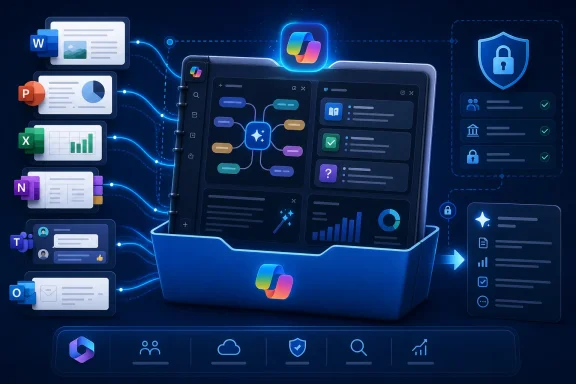 Microsoft Moves Copilot From the Side Panel Into the Project Folder
The significance of Copilot Notebooks is not that Microsoft has invented a new place to ask an AI assistant questions. It is that the company is trying to change where work begins. Instead of opening Word, Outlook, Teams, OneNote, SharePoint, and a browser tab in some semi-chaotic loop, Microsoft wants users to assemble the source material first and let Copilot operate inside that curated bundle.That is a meaningful shift. The first wave of workplace AI assistants was mostly reactive: summarize this meeting, rewrite this paragraph, explain this spreadsheet, draft this reply. Copilot Notebooks pushes toward a more persistent model, where the AI has a defined body of material and a recurring purpose. In Microsoft’s language, it is a focused workspace; in plain English, it is a project folder with an AI bolted into the lid.
That explains why the licensing change matters. Until now, Notebooks largely belonged to the paid Microsoft 365 Copilot world, where a user or organization had already bought into the premium promise of AI across the Office estate. By opening the feature to Copilot Chat users in commercial and education tenants, Microsoft is taking something that looked like a premium productivity construct and making it part of the broader Microsoft 365 experience.
The company still has a paid tier to defend, and it is not pretending otherwise. Users with full Microsoft 365 Copilot licenses continue to receive more advanced AI capabilities and richer content creation options. But the boundary has moved. The free or included Copilot Chat experience is no longer merely a place to type prompts; it is becoming a place where teams can build shared, reusable context.
The Paywall Did Not Disappear; It Became More Subtle
Microsoft’s AI licensing strategy has often felt like a moving target because it is one. Copilot began as a premium promise, then became a consumer brand, then a Windows button, then an enterprise assistant, then a family of overlapping chat, app, agent, and document experiences. The result is a product map that makes perfect sense on a Microsoft licensing slide and somewhat less sense to everyone else.This rollout does not simplify that map. It makes one important part of it more accessible while preserving the distinction Microsoft needs for revenue. Copilot Chat users can create and collaborate in Notebooks, but Microsoft 365 Copilot subscribers still sit higher in the stack, especially when the workflow turns from understanding material to generating polished Office content from it.
That is not a minor distinction. In many organizations, the most expensive part of AI adoption is not the chat box; it is the promise that AI can transform existing corporate knowledge into usable output. A notebook that can gather files, notes, emails, and chats is valuable. A notebook that can become a polished document, deck, study guide, plan, or proposal with fewer manual steps is where Microsoft expects many customers to keep paying.
The practical effect is a familiar Microsoft pattern. The platform gives away enough capability to establish a habit, then reserves the highest-value automation for the paid tier. Windows users have seen this movie before with OneDrive storage, Teams features, Defender capabilities, and enterprise management knobs. Copilot Notebooks now joins that tradition.
OneNote Becomes the Quiet Winner
OneNote has spent years occupying a strange position in Microsoft 365. It is beloved by some users, ignored by others, and perpetually under-explained by Microsoft compared with Word, Excel, PowerPoint, and Teams. Copilot Notebooks gives OneNote something it has often lacked: a clearer modern role.That role is not simply note-taking. It is context management. In a workplace drowning in Teams messages, SharePoint links, meeting transcripts, email attachments, and half-finished drafts, OneNote’s old metaphor of a digital binder suddenly looks more relevant than quaint. Microsoft is effectively saying that the notebook is the right container for AI-assisted work because it can hold the mess before the final artifact exists.
This is also why the integration with the Microsoft 365 Copilot app matters. If Notebooks lived only inside OneNote, they would risk being perceived as a feature for people who already think in OneNote. By making them available through the Copilot app as well, Microsoft can present the notebook as part of the broader AI workflow rather than as an old Office app getting a shiny new button.
The synchronization between the Copilot app and OneNote is important because it gives Microsoft two doors into the same room. A student may enter through OneNote. A project manager may enter through the Microsoft 365 Copilot app. An analyst may arrive from a chat. If Microsoft can make the underlying notebook feel consistent across those entry points, it has a better chance of turning Copilot from an occasional helper into a daily workspace.
Shared Context Is the Real Product
The pitch for Copilot Notebooks is easy to understand because every organization already has the problem it claims to solve. A project rarely lives in one file. A hiring process may have resumes, interview notes, calendar invites, emails, policy documents, and a slide deck. A product launch may have spreadsheets, customer research, meeting summaries, Teams discussions, and a draft announcement. A class or training program may have readings, lecture notes, assignments, and presentations.Copilot Notebooks gives users a place to collect that material and ask questions across it. That sounds obvious, but it addresses one of the biggest weaknesses of general-purpose AI chat: the model usually does not know what “this project” means unless the user repeatedly supplies the relevant documents or relies on broad organizational search. A notebook narrows the frame.
That narrowing is useful for quality as much as convenience. The more precisely a user defines the source material, the less Copilot has to infer from vague prompts or wander across irrelevant information. A notebook can become a boundary around the task. In enterprise AI, boundaries are not just administrative friction; they are often what make the output usable.
The risk, of course, is that shared context can become shared confusion. If a notebook contains outdated files, contradictory drafts, stale emails, or unvetted references, Copilot may summarize the mess with great confidence. The AI workspace is only as trustworthy as the material people put into it. Microsoft can improve the interface, but it cannot magically turn poor information hygiene into good judgment.
Education Is the Most Obvious Showcase, but Not the Safest One
The education angle is not an afterthought. Microsoft is explicitly positioning Study Guide and mind map features as part of the Copilot Notebooks experience, and the appeal is immediate. Students and educators already work with collections of notes, readings, slides, assignments, rubrics, and feedback. An AI tool that can generate study aids or visualize relationships between concepts is an easy demo.It is also an area where Microsoft needs to tread carefully. AI study tools can help students organize and review material, but they can also encourage shallow learning if users treat generated summaries as substitutes for reading. A mind map can reveal relationships, but it can also make a weak interpretation look authoritative. A study guide can be helpful, but it can also omit nuance or overemphasize whatever the source material happens to repeat.
For schools, the licensing expansion may create pressure from below. If students and faculty see Notebooks appear in familiar Microsoft tools, they will expect policy answers quickly: what content may be uploaded, how AI-generated study materials should be used, whether teachers can require or prohibit the feature, and how academic integrity rules apply. The rollout makes Copilot more available, but availability is not the same as governance.
That tension is not unique to Microsoft. Google, OpenAI, Anthropic, and education technology vendors are all pushing AI study and research tools into classrooms. Microsoft’s advantage is distribution. Its challenge is that distribution inside schools often precedes the institutional muscle needed to manage it.
Commercial IT Gets a New Adoption Problem
For business tenants, the biggest question may not be whether Copilot Notebooks is useful. It probably is, at least for many knowledge workers. The harder question is how to absorb yet another Copilot surface without creating a governance sprawl problem.Microsoft 365 administrators have already had to track Copilot Chat availability, in-app Copilot behavior, data access boundaries, Purview controls, SharePoint oversharing risks, Teams integration, Edge access, and the premium Microsoft 365 Copilot license. Notebooks adds a new layer: persistent AI workspaces that may combine multiple kinds of content and multiple collaborators.
That persistence changes the risk profile. A one-off prompt is transient from the user’s point of view, even if enterprise logging and retention policies apply behind the scenes. A notebook is a durable object. It can accumulate files, notes, generated summaries, and decisions over time. It can become operationally important without ever passing through the review processes that would apply to a formal SharePoint site, document library, or records-managed workspace.
Admins will need to think less about Copilot as a feature toggle and more about Copilot as an information architecture participant. Who owns a notebook? What happens when the creator leaves? Which retention policies apply? How visible are notebook contents to eDiscovery? Can sensitive files be pulled into notebooks casually? Are users trained to understand that Copilot’s answers reflect both permissions and the quality of selected content?
These are not reasons to block the feature outright. They are reasons to treat the rollout as a governance event rather than a productivity perk.
The File Types Tell the Story Microsoft Wants to Tell
Microsoft’s supported content list is revealing: Word documents, PowerPoint presentations, Excel spreadsheets, Outlook emails, OneNote pages, chats, links, and other Microsoft 365 material. This is the Microsoft Graph story made visible to ordinary users. The company’s advantage is not merely that it has an AI model; it is that it already hosts the workplace artifacts that AI needs to be useful.That advantage is particularly strong in organizations that have lived inside Microsoft 365 for years. Their institutional knowledge is scattered across Exchange mailboxes, Teams channels, SharePoint sites, OneDrive folders, Office files, and notebooks. Competitors can build excellent AI models, but they still need access to the corpus. Microsoft already has the corpus, the identity layer, the permissions model, and the productivity apps where the output is expected to land.
Copilot Notebooks is therefore less a standalone feature than a packaging strategy. It tells users: do not move your work to an AI tool; bring the AI tool to where your work already lives. That is a compelling argument, especially for companies that do not want employees pasting sensitive content into consumer chatbots.
But the same strength creates dependency. The more Copilot becomes the preferred way to interpret Microsoft 365 content, the harder it becomes for organizations to evaluate alternatives on equal terms. The notebook is not just a convenience layer. It is another strand tying workplace process to Microsoft’s cloud.
Mind Maps Are a Feature, but the Interface Is the Argument
AI-generated mind maps sound like a flourish, and in some cases they will be. Many knowledge workers have seen enough automatically generated diagrams to know that visual output can become decorative nonsense. Yet the inclusion of mind maps in Copilot Notebooks points to something important about Microsoft’s AI direction: the company knows chat alone is not enough.A long chat thread is a poor interface for complex work. It buries decisions, repeats context, and forces users to scroll through conversational sediment. Notebooks give Microsoft a way to break AI output into more structured forms: overviews, pages, guides, maps, summaries, and eventually drafts. The assistant becomes less like a person in a chat window and more like an engine that reshapes a workspace.
That is where the user experience will either prove itself or fail. If Notebooks become another place where generated content piles up without clear ownership, users will revert to their existing habits. If the interface helps them understand what material is included, what Copilot used, what changed, and what needs verification, the feature could become genuinely sticky.
The distinction matters because enterprise AI adoption has been held back not only by model quality, but by workflow ambiguity. Users often do not know when to use Copilot Chat, when to use Copilot inside Word, when to use Teams meeting summaries, when to use Loop or Pages, and when to stay in a conventional document. Copilot Notebooks may help by acting as a container for the messy middle of work. Or it may add one more container to an already crowded shelf.
Microsoft Is Still Training Users to Think in Copilot
The broader strategy is obvious: Microsoft wants Copilot to become the front end for Microsoft 365. Not the only front end, and not immediately, but increasingly the place where users ask, assemble, summarize, create, and route work. Notebooks fit that ambition because they teach users to start with Copilot-managed context rather than with a blank document.That is a subtle behavioral change. For decades, Office trained people to think in file types. You wrote in Word, calculated in Excel, presented in PowerPoint, stored in SharePoint, discussed in Teams, and captured in OneNote. Copilot asks users to think in tasks and source material instead. The file type becomes an output choice rather than the starting point.
This is why Microsoft keeps pushing concepts like Pages, Notebooks, agents, and study tools. They are not merely features; they are bridges away from the old Office mental model. A user who gathers sources in a notebook, asks Copilot for an overview, turns that into a study guide, and then generates a draft document is working in a very different way from someone who opens Word and starts typing.
For Microsoft, that is the prize. If Copilot becomes the orchestration layer, the company can make Microsoft 365 feel more coherent while also justifying premium AI licenses. For users, the prize is less certain. A better workflow is welcome. A workflow that constantly nudges them toward paid capabilities, new interfaces, and unclear data boundaries will be met with suspicion.
The Security Conversation Moves From Prompts to Workspaces
Security-minded readers should pay close attention to the workspace aspect of Copilot Notebooks. Much of the public AI risk debate still focuses on prompts: what users type, whether they paste secrets, and where model providers store data. In Microsoft 365 tenants, the more practical issue is often what the AI can see and how easily users can aggregate sensitive material into new contexts.Copilot generally operates within the permissions of the signed-in user, which is necessary but not sufficient. If a user has access to too much because SharePoint sites are overshared, inherited permissions are sloppy, or old document libraries were never cleaned up, Copilot can make that overexposure more visible. A notebook may intensify the effect by letting users combine materials that were technically accessible but never intended to be brought together.
This is not a new problem created by Notebooks. It is the old Microsoft 365 governance problem with an AI interface on top. The difference is speed. A user no longer needs to search across ten locations, skim documents, copy fragments, and assemble conclusions manually. Copilot can help compress that process, which is precisely why the feature is useful and precisely why governance matters.
Organizations that have already invested in sensitivity labels, data loss prevention, retention policies, access reviews, and SharePoint hygiene will be in a better position. Organizations that have treated Microsoft 365 permissions as an organic historical accident may find that Copilot makes the accident easier to discover.
The Rollout Will Feel Uneven Because Copilot Always Does
Microsoft says Copilot Notebooks is rolling out, which means many users will not see it immediately. That is normal for Microsoft 365, but it is also one of the reasons Copilot adoption feels messy on the ground. Two users in the same organization may see different buttons, different app behavior, and different licensing outcomes depending on tenant configuration, update channel, region, account type, and staged rollout timing.That unevenness matters because AI features generate expectation faster than ordinary Office updates. If a colleague can create a notebook and another cannot, the help desk gets the ticket. If a teacher sees Study Guide and a student does not, the classroom workflow breaks. If a manager reads an announcement and assumes the feature is universally available the same day, admins have to explain Microsoft’s rollout vocabulary yet again.
There is also the issue of naming. Microsoft 365 Copilot, Copilot Chat, Copilot in OneNote, Copilot Notebooks, Copilot Pages, Study Guide, and the Microsoft 365 Copilot app are all related but not identical. The company’s branding may be internally logical, but users experience it as a fog of similar nouns. Notebooks could become one of the clearer Copilot concepts because the metaphor is familiar. Microsoft should resist burying that clarity under more branded subdivisions.
For WindowsForum readers, the practical advice is simple: expect a staged arrival, check tenant messaging and app availability before announcing internal support, and assume that licensing differences will continue to matter even when the same notebook can be shared across mixed-license teams.
The Notebook Becomes Microsoft’s Most Honest Copilot Metaphor
The best thing about Copilot Notebooks is that it admits something the AI industry often tries to obscure: useful AI work needs context. Not magical context, not vibes, not a single clever prompt, but actual material gathered around a purpose. In that sense, the notebook metaphor is unusually honest.It also gives users a healthier mental model. A notebook is not the final answer. It is a working space. It can contain drafts, references, contradictions, and notes. If users understand Copilot’s output as a synthesis of notebook material rather than as a truth machine, they may be more likely to verify, edit, and challenge the results.
That is where Microsoft’s product design should lean. The more visible the source material, the stronger the feature becomes. Users need to know what Copilot considered, what it ignored, where a summary came from, and when a generated mind map is an interpretation rather than a fact. The danger is not that Copilot will be useless. The danger is that it will be useful enough for people to stop checking it.
This is the central bargain of workplace AI in 2026. Microsoft can save users time by compressing information work, but compression always loses something. The notebook must help users see what was compressed.
The Practical Shape of This Rollout Is Smaller Than the Hype and Bigger Than a Feature Drop
The immediate change is concrete: more Copilot Chat users in commercial and education environments will be able to create and use Copilot Notebooks through the Microsoft 365 Copilot app and OneNote. That alone is worth noting. But the strategic change is larger: Microsoft is expanding the base of users who can organize work around AI-ready context without buying the full premium Copilot license first.For some organizations, this will become a low-friction pilot path. Instead of assigning expensive licenses broadly, admins can let users experiment with Notebooks and reserve full Microsoft 365 Copilot licenses for roles that need advanced creation features. That may make adoption more rational, especially in companies still trying to prove return on investment.
For others, the feature will create pressure to define policy faster than they had planned. Notebooks are collaborative, persistent, and grounded in business content. That makes them more consequential than a novelty chatbot. If the feature appears before governance guidance, users will invent their own practices.
The smartest organizations will treat this as a chance to shape behavior early. They will publish examples of appropriate notebook use, warn against dumping sensitive material into casual workspaces, clarify how licensing affects capabilities, and train users to verify AI-generated summaries and study materials. The least prepared organizations will wait until the first confusing or risky notebook becomes important.
The Copilot Notebook Era Starts With Five Uncomfortable Truths
This rollout is useful precisely because it is not just another button in the ribbon. It changes who can build AI-grounded workspaces and how casually those workspaces may become part of daily Microsoft 365 life.- Copilot Notebooks is now rolling out beyond full Microsoft 365 Copilot subscribers to eligible Copilot Chat commercial and education users.
- The feature is available through both the Microsoft 365 Copilot app and OneNote, which makes it a cross-app workspace rather than a OneNote-only enhancement.
- Users can gather multiple forms of Microsoft 365 content in one notebook and ask Copilot to reason across that selected material.
- Microsoft 365 Copilot subscribers still retain premium capabilities, so the licensing wall has shifted rather than vanished.
- IT administrators should treat persistent AI notebooks as governed workspaces, not casual chat sessions.
- The education features, including Study Guide and mind maps, are promising but will require clear rules around verification, learning outcomes, and acceptable use.
References
- Primary source: Windows Report
Published: 2026-06-12T05:12:07.822574
Copilot Notebooks Are Now Available to Copilot Chat Users
Microsoft is rolling out Copilot Notebooks to Copilot Chat users, bringing shared AI workspaces and collaboration too windowsreport.com
- Official source: support.microsoft.com
What are Microsoft 365 Copilot Notebooks in OneNote? | Microsoft Support
Copilot Notebooks syncs your chats, docs, and decks in OneNote. Ask questions, get summaries, and stay focused with AI-powered notes.support.microsoft.com - Official source: techcommunity.microsoft.com
What’s New in Microsoft 365 Copilot | May 2026 | Microsoft Community Hub
Welcome to the May 2026 edition of What's New in Microsoft 365 Copilot! Every month, we highlight new features and enhancements to keep Microsoft 365 admins... techcommunity.microsoft.com
- Official source: learn.microsoft.com
Decide which Copilot is right for you | Microsoft Learn
Microsoft has several Copilot AI virtual assistants, including Microsoft 365 Copilot Chat, Microsoft 365 Copilot, Microsoft Copilot, Microsoft Security Copilot, GitHub Copilot, and Copilot Studio. Decide which Copilot is right for you and your organization. Which Copilot is right for me?learn.microsoft.com - Official source: microsoft.com
Your request has been blocked. This could be due to several reasons.
www.microsoft.com
- Related coverage: windowscentral.com
Microsoft 365 is paywalling most of Copilot in its Office apps | Windows Central
Commercial customers will soon need a Microsoft 365 Copilot license to use Copilot Chat in Word, Excel, PowerPoint, and OneNote.www.windowscentral.com
- Related coverage: techradar.com
Microsoft spent billions on Copilot, but only 3.3% of users are actually paying for the AI tools | TechRadar
Microsoft spent $37.5 billion on AI tools, with limited returns so farwww.techradar.com - Related coverage: pcgamer.com
Microsoft announces it will automatically install the Copilot AI app alongside desktop versions of 365 products like Word, Excel and PowerPoint this October—and it seems like there's no way for personal users to opt out | PC Gamer
Don't want it? Time to switch office suite providers, then.www.pcgamer.com
