

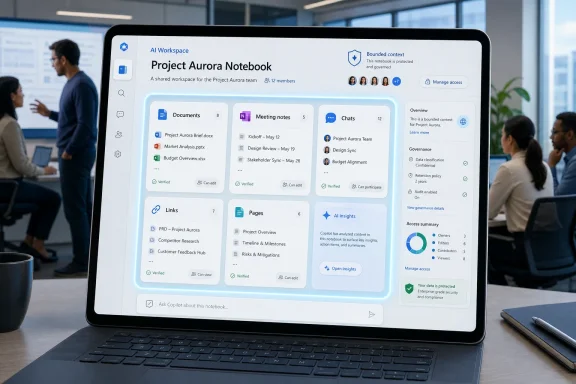
Microsoft is rolling out Copilot Notebooks to Copilot Chat users in eligible commercial and education Microsoft 365 tenants, giving teams a shared AI workspace where Copilot can reason over deliberately collected files, notes, chats, meeting material, links, and pages rather than the broader workplace graph. The move sounds like another feature shuffle in Microsoft’s ever-expanding Copilot estate, but it is more important than the branding suggests. Microsoft is trying to solve the problem that has quietly limited workplace AI adoption from the start: the model is only as useful as the context it can safely and predictably understand. Copilot Notebooks turns that context into something users can curate, share, and govern.
For the first wave of generative AI in the workplace, the pitch was breadth. Connect the assistant to mail, documents, meetings, calendars, chats, and the web, then ask it anything. That sounded like magic in demos, and sometimes it was; it also sounded like a permissions nightmare to every administrator who has ever inherited a decade of SharePoint sprawl.
Copilot Notebooks points in a different direction. Instead of assuming that more data is always better, Microsoft is giving users a container: a notebook that can hold the specific material relevant to a project, course, client, policy review, incident, or research thread. Copilot then works from that curated set, which makes the notebook less like a search box and more like a bounded workspace.
That shift matters because enterprise AI failures are often not failures of language generation. They are failures of scope. The assistant answers too broadly, misses the document the user had in mind, pulls in stale material, or sounds confident while blending sources that should never have been combined. A notebook does not eliminate those risks, but it gives users and admins a more legible place to start.
The result is a subtle but important inversion of Microsoft’s original Copilot promise. The early promise was that Copilot would know your work. The notebook-era promise is that users can tell Copilot which work matters right now.
Copilot Notebooks tries to make the room persistent. A project team can place its draft strategy deck, meeting notes, source documents, prior Copilot chats, links, and working pages into one notebook. The next prompt does not have to re-explain the assignment from scratch, because the notebook itself becomes part of the instruction.
That is especially valuable in commercial and education settings, where collaboration is rarely a single-user activity. A professor designing a course, a help desk team triaging recurring incidents, a finance group preparing forecasts, or a product team drafting a launch plan all face the same problem: they need the AI to reason from shared materials, not from each participant’s partial memory of the project.
This is why the rollout to Copilot Chat users is strategically bigger than a feature port. Microsoft is widening access to a workflow that was previously more closely associated with the paid Microsoft 365 Copilot experience and its deeper app integrations. If Copilot Chat is the broad on-ramp, Notebooks is the bridge between casual AI use and sustained AI-assisted work.
Copilot Notebooks does not simplify that map. In some ways, it adds another landmark. But it does make Copilot Chat feel less like the free sample at the edge of the enterprise suite and more like a usable workplace tool in its own right.
That distinction matters because Microsoft has been trying to seed Copilot habits across the Microsoft 365 base while still preserving upsell pressure for the premium Copilot license. Copilot Chat gives many work and school users access to an AI assistant with enterprise data protections, but the richer, app-embedded, graph-grounded experiences remain differentiated. Notebooks is a compromise: it gives broader users a more structured way to bring material to Copilot without necessarily granting the assistant full access to everything a paid Microsoft 365 Copilot seat can use.
Admins should therefore read the rollout less as generosity and more as product strategy. Microsoft wants Copilot to become the default AI interface for organizational work before rival tools become the place where employees assemble knowledge. Giving Copilot Chat users shared notebooks is a way to keep that work inside Microsoft 365.
For students, the appeal is obvious: summaries, study guides, explanations, quiz preparation, and help organizing research. For educators, the value may be even more practical. Course planning, lesson material, department documentation, policy drafts, and feedback workflows all benefit from an assistant that works from selected materials instead of roaming through unrelated institutional content.
But education also exposes the governance stakes. If AI becomes a shared layer over course content, institutions will need clearer norms around what students can upload, what instructors can rely on, how outputs are checked, and whether AI-generated study aids align with actual learning goals. A notebook can ground the assistant, but it cannot decide whether a shortcut has become a substitute for understanding.
Microsoft’s bet is that structure will make AI more acceptable in classrooms and campuses. That is plausible. A notebook built around approved course material is easier to defend than a student pasting fragments into a consumer chatbot. Still, the hard work will happen in policy, pedagogy, and training, not in the feature toggle.
That is not the same as truth. A grounded model can still misread, omit, overgeneralize, or produce a polished answer that papers over ambiguity. The fact that Copilot is working from notebook content should make answers more auditable, not automatically more trusted.
For IT departments, the governance question becomes more concrete. Who can create notebooks? Who can share them? What happens when a sensitive file is added? How do retention, eDiscovery, sensitivity labels, and tenant policies apply? What happens when a notebook outlives the project that created it?
Those questions are not reasons to avoid the feature. They are reasons to treat it like a new collaboration surface rather than a chat enhancement. The history of Microsoft 365 is full of tools that began as productivity boosters and later became information architecture problems. Teams channels, SharePoint sites, OneNote notebooks, Loop components, and now Copilot workspaces all invite the same challenge: users create faster than organizations govern.
But Microsoft’s more important competition may be the informal workaround. Employees already create ad hoc AI workspaces by uploading files to consumer tools, pasting meeting notes into web chatbots, forwarding documents to unauthorized services, or maintaining shadow knowledge bases outside sanctioned systems. Every one of those habits is a signal that workers want bounded context and reusable AI memory.
Copilot Notebooks is Microsoft’s attempt to pull that behavior back into the tenant. That is the enterprise logic: give users enough of the workflow they want inside a governed Microsoft 365 environment, and they have fewer reasons to improvise elsewhere.
The success of that strategy will depend less on whether Notebooks can produce impressive summaries and more on whether it feels frictionless. If adding sources is clumsy, if permissions are opaque, if citations are hard to inspect, or if users cannot understand why Copilot ignored a document, the shadow workflows will persist. Enterprise AI adoption is not won by policy alone; it is won by making the approved path the easiest path.
In a traditional chat session, knowledge is personal and ephemeral. One worker asks Copilot to summarize a meeting, another asks it to draft a status update, and a third asks it to compare proposals. Each interaction may be useful, but the intelligence is scattered. A notebook collects the material and creates continuity.
That continuity could change how teams document work. A project notebook might become the first stop for onboarding a new contributor, generating a weekly update, preparing a leadership brief, or checking whether a decision aligns with earlier notes. The AI becomes most useful not when it replaces documents, but when it sits atop a carefully maintained set of them.
The risk is that notebooks become yet another place where organizations store half-finished knowledge. A stale notebook may be worse than no notebook at all, because the assistant will speak with confidence from outdated context. Microsoft can provide the container, but teams will need habits around ownership, review, cleanup, and archival.
That is a notable retreat from the early idea of Copilot as a system-level Windows companion. The commercial and education story now centers on Entra-authenticated work accounts, Microsoft 365 data boundaries, admin controls, and productivity surfaces. The Copilot key on new keyboards may still be a physical reminder of Microsoft’s AI ambitions, but for organizations, the useful destination is increasingly the Microsoft 365 Copilot app rather than a consumer-flavored Windows sidebar.
This is probably the right architecture. Work AI needs identity, permissions, compliance, and tenant policy more than it needs a permanent spot beside the Start menu. A notebook that respects Microsoft 365 boundaries is more valuable to an IT department than a desktop assistant that blurs personal and organizational contexts.
Still, Microsoft’s messaging has to catch up. Users do not care which Copilot brand is technically responsible for a feature; they care whether the button opens the right experience for their account. The more Microsoft fragments Copilot naming, the more admins will need to explain what users actually have.
Users have to understand when to create a notebook instead of starting a normal chat. They have to know what material to add, how to keep it current, and how to interpret answers. Teams have to decide whether notebooks are personal scratchpads, shared project spaces, departmental knowledge hubs, or all three. Admins have to decide whether they are comfortable with the resulting sprawl.
That means rollout quality matters. A feature like this should not simply appear and hope for the best. Organizations that get value from Copilot Notebooks will likely pair it with templates, training, acceptable-use guidance, and examples tied to real workflows.
The most successful deployments will avoid treating notebooks as a magic accuracy switch. They will treat them as a context-management discipline. That is less glamorous than “AI workspace,” but it is closer to the truth.
 Microsoft Is Finally Treating Context as the Product
For the first wave of generative AI in the workplace, the pitch was breadth. Connect the assistant to mail, documents, meetings, calendars, chats, and the web, then ask it anything. That sounded like magic in demos, and sometimes it was; it also sounded like a permissions nightmare to every administrator who has ever inherited a decade of SharePoint sprawl.Copilot Notebooks points in a different direction. Instead of assuming that more data is always better, Microsoft is giving users a container: a notebook that can hold the specific material relevant to a project, course, client, policy review, incident, or research thread. Copilot then works from that curated set, which makes the notebook less like a search box and more like a bounded workspace.
That shift matters because enterprise AI failures are often not failures of language generation. They are failures of scope. The assistant answers too broadly, misses the document the user had in mind, pulls in stale material, or sounds confident while blending sources that should never have been combined. A notebook does not eliminate those risks, but it gives users and admins a more legible place to start.
The result is a subtle but important inversion of Microsoft’s original Copilot promise. The early promise was that Copilot would know your work. The notebook-era promise is that users can tell Copilot which work matters right now.
The Workspace Is the New Prompt
Prompts have become the folk wisdom of the AI boom. Workers are told to be specific, provide context, define roles, set tone, ask for step-by-step reasoning, and refine outputs over multiple turns. That advice is useful, but it also exposes the weakness of chat as a professional interface: every important conversation starts by rebuilding the room.Copilot Notebooks tries to make the room persistent. A project team can place its draft strategy deck, meeting notes, source documents, prior Copilot chats, links, and working pages into one notebook. The next prompt does not have to re-explain the assignment from scratch, because the notebook itself becomes part of the instruction.
That is especially valuable in commercial and education settings, where collaboration is rarely a single-user activity. A professor designing a course, a help desk team triaging recurring incidents, a finance group preparing forecasts, or a product team drafting a launch plan all face the same problem: they need the AI to reason from shared materials, not from each participant’s partial memory of the project.
This is why the rollout to Copilot Chat users is strategically bigger than a feature port. Microsoft is widening access to a workflow that was previously more closely associated with the paid Microsoft 365 Copilot experience and its deeper app integrations. If Copilot Chat is the broad on-ramp, Notebooks is the bridge between casual AI use and sustained AI-assisted work.
Microsoft’s Licensing Maze Gets a Little More Useful, Not Less Confusing
The Copilot brand remains a tangle. There is Microsoft Copilot for consumers, Microsoft 365 Copilot for paid workplace users, Copilot Chat for work and education, Copilot Studio for agents, Copilot in Windows, Copilot in Edge, and a trail of renamed or repositioned experiences behind them. Even well-informed IT departments sometimes need a map.Copilot Notebooks does not simplify that map. In some ways, it adds another landmark. But it does make Copilot Chat feel less like the free sample at the edge of the enterprise suite and more like a usable workplace tool in its own right.
That distinction matters because Microsoft has been trying to seed Copilot habits across the Microsoft 365 base while still preserving upsell pressure for the premium Copilot license. Copilot Chat gives many work and school users access to an AI assistant with enterprise data protections, but the richer, app-embedded, graph-grounded experiences remain differentiated. Notebooks is a compromise: it gives broader users a more structured way to bring material to Copilot without necessarily granting the assistant full access to everything a paid Microsoft 365 Copilot seat can use.
Admins should therefore read the rollout less as generosity and more as product strategy. Microsoft wants Copilot to become the default AI interface for organizational work before rival tools become the place where employees assemble knowledge. Giving Copilot Chat users shared notebooks is a way to keep that work inside Microsoft 365.
The Education Angle Is Not a Side Quest
The education rollout is not just a licensing footnote. Schools and universities are among the places where curated AI context makes the most immediate sense, because the knowledge boundary is often explicit. A class has readings, lecture notes, rubrics, assignments, research links, and study materials. A notebook can gather those artifacts in a way that is more disciplined than a general-purpose chatbot session.For students, the appeal is obvious: summaries, study guides, explanations, quiz preparation, and help organizing research. For educators, the value may be even more practical. Course planning, lesson material, department documentation, policy drafts, and feedback workflows all benefit from an assistant that works from selected materials instead of roaming through unrelated institutional content.
But education also exposes the governance stakes. If AI becomes a shared layer over course content, institutions will need clearer norms around what students can upload, what instructors can rely on, how outputs are checked, and whether AI-generated study aids align with actual learning goals. A notebook can ground the assistant, but it cannot decide whether a shortcut has become a substitute for understanding.
Microsoft’s bet is that structure will make AI more acceptable in classrooms and campuses. That is plausible. A notebook built around approved course material is easier to defend than a student pasting fragments into a consumer chatbot. Still, the hard work will happen in policy, pedagogy, and training, not in the feature toggle.
Curated AI Reduces Noise, but It Does Not Absolve Governance
The best argument for Copilot Notebooks is that curation reduces noise. If a notebook contains only the contract, the meeting transcript, the requirements document, and the current draft, Copilot has less opportunity to wander into irrelevant territory. The user can ask for a summary, a risk list, a briefing memo, or an action plan with a clearer expectation of what material is in bounds.That is not the same as truth. A grounded model can still misread, omit, overgeneralize, or produce a polished answer that papers over ambiguity. The fact that Copilot is working from notebook content should make answers more auditable, not automatically more trusted.
For IT departments, the governance question becomes more concrete. Who can create notebooks? Who can share them? What happens when a sensitive file is added? How do retention, eDiscovery, sensitivity labels, and tenant policies apply? What happens when a notebook outlives the project that created it?
Those questions are not reasons to avoid the feature. They are reasons to treat it like a new collaboration surface rather than a chat enhancement. The history of Microsoft 365 is full of tools that began as productivity boosters and later became information architecture problems. Teams channels, SharePoint sites, OneNote notebooks, Loop components, and now Copilot workspaces all invite the same challenge: users create faster than organizations govern.
The Real Rival Is Not Another Chatbot
It is tempting to compare Copilot Notebooks directly with Google’s NotebookLM, and the resemblance is obvious. Both products revolve around source-grounded AI workspaces where users collect material and ask the model to synthesize it. Both recognize that a blank chatbot is often the wrong interface for serious work.But Microsoft’s more important competition may be the informal workaround. Employees already create ad hoc AI workspaces by uploading files to consumer tools, pasting meeting notes into web chatbots, forwarding documents to unauthorized services, or maintaining shadow knowledge bases outside sanctioned systems. Every one of those habits is a signal that workers want bounded context and reusable AI memory.
Copilot Notebooks is Microsoft’s attempt to pull that behavior back into the tenant. That is the enterprise logic: give users enough of the workflow they want inside a governed Microsoft 365 environment, and they have fewer reasons to improvise elsewhere.
The success of that strategy will depend less on whether Notebooks can produce impressive summaries and more on whether it feels frictionless. If adding sources is clumsy, if permissions are opaque, if citations are hard to inspect, or if users cannot understand why Copilot ignored a document, the shadow workflows will persist. Enterprise AI adoption is not won by policy alone; it is won by making the approved path the easiest path.
The Feature’s Quiet Power Is Shared Memory
The most interesting part of Copilot Notebooks is not that Copilot can summarize a pile of files. It is that a group can maintain a shared AI context over time. That turns the assistant from a private productivity trick into a collaborative surface.In a traditional chat session, knowledge is personal and ephemeral. One worker asks Copilot to summarize a meeting, another asks it to draft a status update, and a third asks it to compare proposals. Each interaction may be useful, but the intelligence is scattered. A notebook collects the material and creates continuity.
That continuity could change how teams document work. A project notebook might become the first stop for onboarding a new contributor, generating a weekly update, preparing a leadership brief, or checking whether a decision aligns with earlier notes. The AI becomes most useful not when it replaces documents, but when it sits atop a carefully maintained set of them.
The risk is that notebooks become yet another place where organizations store half-finished knowledge. A stale notebook may be worse than no notebook at all, because the assistant will speak with confidence from outdated context. Microsoft can provide the container, but teams will need habits around ownership, review, cleanup, and archival.
Windows Users Will See the Benefit Through Microsoft 365, Not the OS
For Windows enthusiasts, this announcement also says something about the current state of Copilot on the desktop. Microsoft’s most serious workplace AI work is happening less as a Windows shell feature and more as a Microsoft 365 service that happens to be accessible from Windows, the web, mobile apps, Teams, OneNote, and the Microsoft 365 Copilot app.That is a notable retreat from the early idea of Copilot as a system-level Windows companion. The commercial and education story now centers on Entra-authenticated work accounts, Microsoft 365 data boundaries, admin controls, and productivity surfaces. The Copilot key on new keyboards may still be a physical reminder of Microsoft’s AI ambitions, but for organizations, the useful destination is increasingly the Microsoft 365 Copilot app rather than a consumer-flavored Windows sidebar.
This is probably the right architecture. Work AI needs identity, permissions, compliance, and tenant policy more than it needs a permanent spot beside the Start menu. A notebook that respects Microsoft 365 boundaries is more valuable to an IT department than a desktop assistant that blurs personal and organizational contexts.
Still, Microsoft’s messaging has to catch up. Users do not care which Copilot brand is technically responsible for a feature; they care whether the button opens the right experience for their account. The more Microsoft fragments Copilot naming, the more admins will need to explain what users actually have.
The Rollout Will Test Microsoft’s Favorite Enterprise Assumption
Microsoft often assumes that if a feature appears inside Microsoft 365, adoption will follow. That assumption is sometimes correct. But Copilot Notebooks asks for a behavioral change, not just a license assignment.Users have to understand when to create a notebook instead of starting a normal chat. They have to know what material to add, how to keep it current, and how to interpret answers. Teams have to decide whether notebooks are personal scratchpads, shared project spaces, departmental knowledge hubs, or all three. Admins have to decide whether they are comfortable with the resulting sprawl.
That means rollout quality matters. A feature like this should not simply appear and hope for the best. Organizations that get value from Copilot Notebooks will likely pair it with templates, training, acceptable-use guidance, and examples tied to real workflows.
The most successful deployments will avoid treating notebooks as a magic accuracy switch. They will treat them as a context-management discipline. That is less glamorous than “AI workspace,” but it is closer to the truth.
The Notebook Is Small, but the Shift Is Big
Microsoft’s Copilot Notebooks rollout is easy to summarize and harder to absorb. It gives Copilot Chat users in commercial and education tenants a way to build shared, curated workspaces for AI-assisted reasoning. The practical implications are broader than the feature name suggests.- Copilot Notebooks gives teams a bounded context for AI work instead of relying only on broad organizational search or repeated prompt setup.
- The rollout makes Copilot Chat more useful for everyday Microsoft 365 users who may not have the full premium Microsoft 365 Copilot experience.
- The feature is especially relevant for project work, education, research, planning, documentation, and recurring operational workflows.
- Curated context can improve relevance, but it does not remove the need to verify AI outputs against the underlying material.
- IT departments should treat notebooks as a governed collaboration surface, not merely as another chat feature.
- The biggest adoption challenge will be teaching users when a notebook is the right tool and how to maintain one over time.
References
- Primary source: thewincentral.com
Published: 2026-06-26T14:50:10.614868
Microsoft Copilot Notebooks Now Available in Copilot Chat - WinCentral
Microsoft is rolling out Copilot Notebooks to Copilot Chat for commercial and education users, enabling AI collaboration with shared workspaces. - Read in AI News on WinCentral thewincentral.com
- Related coverage: itpro.com
Copilot Cowork is now generally available: Everything you need to know, including pricing, usage limits, and new features | IT Pro
Microsoft has announced that Copilot Cowork is now generally available for users globally, following a beta period via the tech giant’s Frontier program.www.itpro.com - Official source: support.microsoft.com
How Microsoft 365 Copilot Notebooks works | Microsoft Support
Learn how Microsoft 365 Copilot Notebooks works. Copilot Notebooks is your AI-powered workspace that brings together all the content that matters to your task or project.support.microsoft.com - Official source: learn.microsoft.com
Overview of Microsoft 365 Copilot Chat | Microsoft Learn
Microsoft 365 Copilot Chat (formerly Microsoft Copilot) protects workplace AI-powered chats providing enterprise data protection to keep organizations safe.learn.microsoft.com - Official source: techcommunity.microsoft.com
Copilot Notebooks and Study guide now available to Copilot Chat users | Microsoft Community Hub
Every student knows the feeling: the test is coming, the materials are everywhere— and the hardest part is not finding information, it is knowing where to... techcommunity.microsoft.com
- Related coverage: windowsreport.com
Copilot Notebooks Are Now Available to Copilot Chat Users
Microsoft is rolling out Copilot Notebooks to Copilot Chat users, bringing shared AI workspaces and collaboration too windowsreport.com
- Official source: enablement.microsoft.com
Microsoft 365 Copilot Chat resources for education – Microsoft Adoption
Microsoft Copilot is your AI assistant for education, providing AI-powered chat for the web with commercial data protection at no additional cost. Copilot can save time for educators, staff, and higher education students to focus on what matters most. Copilot uses the latest AI models like GPT-4...enablement.microsoft.com - Related coverage: windowscentral.com
Microsoft 365 is paywalling most of Copilot in its Office apps | Windows Central
Commercial customers will soon need a Microsoft 365 Copilot license to use Copilot Chat in Word, Excel, PowerPoint, and OneNote.www.windowscentral.com - Related coverage: techradar.com
Microsoft spent billions on Copilot, but only 3.3% of users are actually paying for the AI tools | TechRadar
Microsoft spent $37.5 billion on AI tools, with limited returns so farwww.techradar.com - Related coverage: axios.com
Microsoft Copilot Checkout launches with Shopify, PayPal, Etsy, Stripe
Microsoft is pushing shopping — and checkout — directly into its Copilot assistant, the company announced Thursday.www.axios.com
- Related coverage: tomshardware.com
Microsoft offers a one-year free Microsoft 365 subscription to college students — eligible users get 50% off the monthly plan after the first year | Tom's Hardware
This promo will save you $100 for the first year of Microsoft 365.www.tomshardware.com - Official source: cdn-dynmedia-1.microsoft.com
- Related coverage: bpb-us-e1.wpmucdn.com
- Official source: microsoft.ai
