

Microsoft is expanding Copilot Notebooks and the Study Guide experience to Microsoft 365 Education A1, A3, and A5 users aged 13 and older, making the AI study workspace available through Copilot Chat for eligible schools and universities in June 2026. The move matters less because it adds another Copilot surface and more because it shifts Microsoft’s education AI pitch from “chatbot as helper” to “notebook as learning system.” If Copilot is going to become normal in classrooms, Microsoft needs it to feel less like a shortcut and more like infrastructure. This rollout is the company’s clearest attempt yet to make that argument.
The first wave of generative AI in education was messy because the interface was wrong. Students were handed blank chat boxes and told to ask better questions; teachers were handed policy headaches and told to innovate responsibly. That created a predictable split: power users found value, skeptics saw plagiarism machines, and everyone else had to decide whether a prompt window belonged anywhere near assessment.
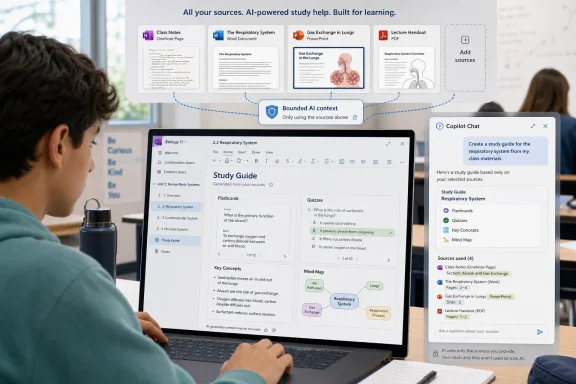
Copilot Notebooks is Microsoft’s attempt to tame that chaos by anchoring AI to a familiar object: the notebook. Instead of starting with an empty prompt, the user starts with class notes, Word documents, PowerPoint decks, PDFs, OneNote pages, and other learning materials. The AI is not presented as an all-knowing oracle but as a tool working from a defined pile of course content.
That framing is not cosmetic. In education, the difference between “ask the internet for an answer” and “work through the material your class is actually using” is the difference between cheating anxiety and instructional possibility. Microsoft is betting that schools will be more willing to permit AI when its context is visible, bounded, and tied to institutional content.
The expansion to A1, A3, and A5 customers also signals that Microsoft does not want these tools confined to premium pilots or showcase districts. A1 is the important tier here because it reaches far beyond well-funded IT departments. If the feature lands well, Copilot Notebooks could become one of the first AI tools many students encounter inside the sanctioned Microsoft 365 environment their school already manages.
For students, the appeal is obvious. A semester’s worth of notes, slides, handouts, and readings often becomes useful only after someone does the second-order work of organizing it. Study Guide promises to turn that mess into a navigable learning path without requiring the student to manually build one from scratch.
For educators, the promise is more complicated. On one hand, an AI-generated study guide can help students who never learned how to extract structure from course material. On the other, that same convenience risks outsourcing an essential cognitive skill: deciding what matters, how ideas connect, and where confusion begins. The product may help learners study, but it also changes what teachers need to teach about studying.
That is why this expansion should not be read as a simple productivity update. Microsoft is inserting itself into the mechanics of academic preparation. If Study Guide becomes widely used, the default act of reviewing for an exam may increasingly involve asking Microsoft’s AI to reshape the course into digestible artifacts.
That makes Copilot Notebooks more powerful than a standalone study app. A student does not need to export class materials into a separate service if those materials are already inside Microsoft 365. A teacher does not need to introduce another platform if the notebook appears in the workflow the institution has already approved.
This is the old Microsoft playbook, updated for AI. The company is not merely competing feature by feature; it is bundling intelligence into the surfaces where work already happens. In enterprise IT, that strategy turns Copilot into a productivity layer. In education, it turns Copilot into a learning layer.
The OneNote connection is especially important. OneNote has long occupied a strange place in Microsoft’s portfolio: beloved by some teachers and students, underappreciated by many administrators, and oddly resilient in classrooms that need flexible notebooks more than polished documents. Bringing Copilot Notebooks to all OneNote Education customers gives Microsoft a plausible path to revive OneNote’s relevance in the AI era.
But “included” does not mean “free” in any meaningful institutional sense. Schools still pay with administration, policy work, training time, support tickets, governance reviews, and the opportunity cost of adopting one vendor’s model of AI learning. Microsoft knows this, which is why bundling is so powerful: once the tool appears inside the familiar tenant, the default question shifts from procurement to enablement.
That is the quiet brilliance of the rollout. Microsoft does not need every district to launch a grand AI initiative. It needs students and teachers to discover that the sanctioned chat experience can now build a study guide from materials already in their notebook. Adoption can begin as a workflow convenience rather than a strategic transformation.
For IT administrators, this is where the work begins. Features that arrive broadly can quickly become expectations. Once students see Study Guide, the support conversation changes from “Should we buy an AI study tool?” to “Why can’t I access the AI study tool Microsoft says my license includes?”
Still, notebook grounding is not a magic seal of correctness. AI systems can misread emphasis, flatten nuance, invent connections, or overstate the importance of content that merely appears frequently. A study guide that looks clean and authoritative may still be incomplete, misleading, or simply misaligned with what the instructor expects students to master.
This creates a new kind of classroom literacy problem. Students will need to learn not only how to prompt Copilot, but how to interrogate its output. Does the summary reflect the lecture? Are the flashcards testing recall when the exam requires analysis? Did the mind map connect ideas because the course connects them, or because the model found a plausible pattern?
Teachers will need language for that. “Use AI responsibly” is too vague. The practical instruction is more specific: compare AI-generated study materials against the syllabus, the rubric, the assigned readings, and your own notes. Copilot can help build a map, but students still need to know when the map is wrong.
These are the kinds of features that make sense in education because learning is not only about producing answers. It is about building internal structure. A student who can see how a concept from week two connects to an assignment in week six is doing more than reviewing; they are forming a model of the subject.
The risk is that generated structure can become a substitute for earned structure. A mind map may look like comprehension even when the student has only consumed the diagram. A polished overview may make weak understanding feel stronger than it is. The very features that reduce friction can also reduce productive struggle.
That does not make them bad tools. It means they are best treated as starting points, not finished products. A generated mind map becomes educationally useful when students revise it, challenge it, annotate it, and explain it in their own words. Without that step, the feature risks becoming another attractive artifact that flatters the user without deepening learning.
That does not eliminate risk, but it changes its shape. Administrators can think in terms of tenant configuration, identity, permissions, OneDrive and SharePoint storage, and existing compliance workflows. For many IT departments, familiar governance is better than perfect novelty.
The age threshold matters too. Microsoft’s education framing puts these tools primarily in the hands of users aged 13 and older, aligning the rollout with secondary and higher education use cases rather than early childhood classrooms. That boundary will not settle every policy debate, but it gives schools a clearer starting point.
The biggest governance challenge may not be data leakage. It may be uneven adoption. Some teachers will embrace AI-generated study aids; others will ban them; many will land somewhere in the middle. Unless institutions set clear expectations, students will face a patchwork of rules that vary by class, department, and instructor tolerance.
That is precisely why Microsoft’s move matters. The company does not have to convince students that AI can help with studying. That argument has already been won in practice, whether educators like it or not. Microsoft has to convince schools that its version is safer, more manageable, and more closely tied to legitimate learning.
The competition will not stand still. Google has its own education footprint, OpenAI has broad mindshare, and specialized edtech companies can move faster on pedagogy-specific features. Microsoft’s challenge is to avoid turning Copilot Notebooks into another sprawling Microsoft 365 feature that is powerful in demos and uneven in daily use.
The history of Microsoft education products is full of capable tools that depended heavily on local champions. Teams for Education, OneNote Class Notebook, Learning Accelerators, and other classroom features can be transformative when deployed intentionally. They can also become clutter when teachers are handed them without time, training, or curriculum integration.
They will need to understand who is eligible, where the feature appears, what service plans are required, how OneDrive and SharePoint dependencies affect access, and what support paths exist when students cannot create or view notebooks. They will also need to communicate limits clearly because Copilot availability across Microsoft 365 is notoriously easy to misunderstand.
Licensing language is likely to create friction. Microsoft 365 Education A1, A3, and A5 users may have access to Copilot Chat, while full Microsoft 365 Copilot capabilities can still depend on tenant licensing and add-ons. Families, students, faculty, and administrators often hear “Copilot” as a single product, but Microsoft uses the name across a growing collection of experiences.
That ambiguity matters in support. A teacher may expect in-app Copilot across Word and PowerPoint because they saw Study Guide in a notebook. A student may expect a feature on mobile that is initially available elsewhere. A help desk may have to explain the difference between Copilot Chat, Copilot Notebooks, OneNote integration, and the broader Microsoft 365 Copilot license.
But good learning is not only the transformation of content into summaries. It involves retrieval practice, feedback, struggle, reflection, and application. A study guide can support those activities, but it cannot guarantee them. The design of the assignment still matters.
This is where educators will need to resist both panic and hype. Copilot Notebooks should not be treated as inherently corrupting, because students have always used tools to reorganize knowledge: highlighters, outlines, index cards, study groups, tutors, and search engines. But it should not be treated as inherently educational either, because generated convenience can conceal shallow engagement.
The best classroom uses may be those that make the AI output visible and debatable. Ask students to compare Copilot’s generated key concepts with their own. Ask them to identify what the Study Guide missed. Ask them to revise a mind map and defend the changes. In that model, AI becomes material for metacognition rather than a machine that quietly does the studying for them.
That is exactly the point. Microsoft’s education strategy is not to make AI spectacular; it is to make AI routine. Once a feature is built into the notebook, the study workflow, and the school account, it becomes less of an event and more of a habit.
This is how platforms win. They do not merely offer capabilities; they define defaults. If Microsoft can make “generate a study guide from my class notebook” feel like a normal part of Microsoft 365 Education, it will have done more than add a feature. It will have shaped student expectations about how learning software should behave.
There is a cultural risk in that normalization. Students may come to expect every body of material to arrive pre-digested by AI. Teachers may feel pressure to design around tools they did not choose. Institutions may adopt defaults before developing principles. The boring version of AI can be easier to deploy precisely because it asks fewer philosophical questions upfront.
 Microsoft Moves Copilot From the Chat Box to the School Binder
The first wave of generative AI in education was messy because the interface was wrong. Students were handed blank chat boxes and told to ask better questions; teachers were handed policy headaches and told to innovate responsibly. That created a predictable split: power users found value, skeptics saw plagiarism machines, and everyone else had to decide whether a prompt window belonged anywhere near assessment.Copilot Notebooks is Microsoft’s attempt to tame that chaos by anchoring AI to a familiar object: the notebook. Instead of starting with an empty prompt, the user starts with class notes, Word documents, PowerPoint decks, PDFs, OneNote pages, and other learning materials. The AI is not presented as an all-knowing oracle but as a tool working from a defined pile of course content.
That framing is not cosmetic. In education, the difference between “ask the internet for an answer” and “work through the material your class is actually using” is the difference between cheating anxiety and instructional possibility. Microsoft is betting that schools will be more willing to permit AI when its context is visible, bounded, and tied to institutional content.
The expansion to A1, A3, and A5 customers also signals that Microsoft does not want these tools confined to premium pilots or showcase districts. A1 is the important tier here because it reaches far beyond well-funded IT departments. If the feature lands well, Copilot Notebooks could become one of the first AI tools many students encounter inside the sanctioned Microsoft 365 environment their school already manages.
The Study Guide Is Where the Product Becomes a Classroom Argument
Study Guide is the sharper part of the announcement because it moves Copilot from passive summarizer to active study companion. Microsoft says the feature can analyze notebook content and produce structured study materials, including summaries, key concepts, flashcards, quizzes, fill-in-the-blank activities, and other review aids. That is not just document digestion; it is a bid to automate one of the most tedious parts of studying.For students, the appeal is obvious. A semester’s worth of notes, slides, handouts, and readings often becomes useful only after someone does the second-order work of organizing it. Study Guide promises to turn that mess into a navigable learning path without requiring the student to manually build one from scratch.
For educators, the promise is more complicated. On one hand, an AI-generated study guide can help students who never learned how to extract structure from course material. On the other, that same convenience risks outsourcing an essential cognitive skill: deciding what matters, how ideas connect, and where confusion begins. The product may help learners study, but it also changes what teachers need to teach about studying.
That is why this expansion should not be read as a simple productivity update. Microsoft is inserting itself into the mechanics of academic preparation. If Study Guide becomes widely used, the default act of reviewing for an exam may increasingly involve asking Microsoft’s AI to reshape the course into digestible artifacts.
Microsoft’s Real Advantage Is the Folder It Already Owns
Google, OpenAI, Anthropic, and a long list of edtech vendors can all build AI study tools. Microsoft’s advantage is not that Copilot can summarize a PDF. The advantage is that Microsoft already owns the productivity substrate in many schools: OneNote, Word, PowerPoint, Teams, OneDrive, SharePoint, and the identity system that governs access to them.That makes Copilot Notebooks more powerful than a standalone study app. A student does not need to export class materials into a separate service if those materials are already inside Microsoft 365. A teacher does not need to introduce another platform if the notebook appears in the workflow the institution has already approved.
This is the old Microsoft playbook, updated for AI. The company is not merely competing feature by feature; it is bundling intelligence into the surfaces where work already happens. In enterprise IT, that strategy turns Copilot into a productivity layer. In education, it turns Copilot into a learning layer.
The OneNote connection is especially important. OneNote has long occupied a strange place in Microsoft’s portfolio: beloved by some teachers and students, underappreciated by many administrators, and oddly resilient in classrooms that need flexible notebooks more than polished documents. Bringing Copilot Notebooks to all OneNote Education customers gives Microsoft a plausible path to revive OneNote’s relevance in the AI era.
“No Additional Cost” Is a Deployment Strategy, Not a Gift
Microsoft’s announcement emphasizes that eligible education users get Copilot Notebooks and Study Guide at no additional cost through Copilot Chat access. That line will matter to school leaders because budgets remain the most effective brake on AI adoption. A feature that arrives inside existing A1, A3, and A5 eligibility is easier to trial, easier to justify, and harder for competitors to displace.But “included” does not mean “free” in any meaningful institutional sense. Schools still pay with administration, policy work, training time, support tickets, governance reviews, and the opportunity cost of adopting one vendor’s model of AI learning. Microsoft knows this, which is why bundling is so powerful: once the tool appears inside the familiar tenant, the default question shifts from procurement to enablement.
That is the quiet brilliance of the rollout. Microsoft does not need every district to launch a grand AI initiative. It needs students and teachers to discover that the sanctioned chat experience can now build a study guide from materials already in their notebook. Adoption can begin as a workflow convenience rather than a strategic transformation.
For IT administrators, this is where the work begins. Features that arrive broadly can quickly become expectations. Once students see Study Guide, the support conversation changes from “Should we buy an AI study tool?” to “Why can’t I access the AI study tool Microsoft says my license includes?”
The Notebook Model Helps With Trust, but It Does Not Solve Accuracy
Grounding Copilot in notebook content is a meaningful improvement over open-ended chatbot use. It gives the AI a defined reference set, reduces the temptation to hallucinate from nowhere, and makes it easier for users to see what materials influenced the output. In an educational context, that is a serious design choice.Still, notebook grounding is not a magic seal of correctness. AI systems can misread emphasis, flatten nuance, invent connections, or overstate the importance of content that merely appears frequently. A study guide that looks clean and authoritative may still be incomplete, misleading, or simply misaligned with what the instructor expects students to master.
This creates a new kind of classroom literacy problem. Students will need to learn not only how to prompt Copilot, but how to interrogate its output. Does the summary reflect the lecture? Are the flashcards testing recall when the exam requires analysis? Did the mind map connect ideas because the course connects them, or because the model found a plausible pattern?
Teachers will need language for that. “Use AI responsibly” is too vague. The practical instruction is more specific: compare AI-generated study materials against the syllabus, the rubric, the assigned readings, and your own notes. Copilot can help build a map, but students still need to know when the map is wrong.
Mind Maps and Overview Pages Show Microsoft Chasing the Shape of Understanding
The Overview Page and Mind Maps features are Microsoft’s most visible attempt to make Copilot Notebooks feel less like a text generator. Overview Pages promise quick summaries, key takeaways, and high-level topic views. Mind Maps turn notebook content into visual relationships among concepts.These are the kinds of features that make sense in education because learning is not only about producing answers. It is about building internal structure. A student who can see how a concept from week two connects to an assignment in week six is doing more than reviewing; they are forming a model of the subject.
The risk is that generated structure can become a substitute for earned structure. A mind map may look like comprehension even when the student has only consumed the diagram. A polished overview may make weak understanding feel stronger than it is. The very features that reduce friction can also reduce productive struggle.
That does not make them bad tools. It means they are best treated as starting points, not finished products. A generated mind map becomes educationally useful when students revise it, challenge it, annotate it, and explain it in their own words. Without that step, the feature risks becoming another attractive artifact that flatters the user without deepening learning.
Schools Wanted AI Guardrails, and Microsoft Is Offering Familiar Ones
One reason Microsoft has an opening in education is that schools are wary of unmanaged AI services. Consumer chatbots can raise awkward questions about student data, age eligibility, retention, compliance, and whether sensitive material is leaving institutional control. Microsoft’s pitch is that Copilot in education operates inside the Microsoft 365 environment schools already govern.That does not eliminate risk, but it changes its shape. Administrators can think in terms of tenant configuration, identity, permissions, OneDrive and SharePoint storage, and existing compliance workflows. For many IT departments, familiar governance is better than perfect novelty.
The age threshold matters too. Microsoft’s education framing puts these tools primarily in the hands of users aged 13 and older, aligning the rollout with secondary and higher education use cases rather than early childhood classrooms. That boundary will not settle every policy debate, but it gives schools a clearer starting point.
The biggest governance challenge may not be data leakage. It may be uneven adoption. Some teachers will embrace AI-generated study aids; others will ban them; many will land somewhere in the middle. Unless institutions set clear expectations, students will face a patchwork of rules that vary by class, department, and instructor tolerance.
The Feature Lands in a Market That Is Already Crowded and Confused
Microsoft is not entering a blank market. AI study tools are everywhere: browser extensions, note-taking apps, tutoring bots, flashcard generators, PDF chat systems, and all-purpose assistants with education templates. Many students are already using them, with or without institutional approval.That is precisely why Microsoft’s move matters. The company does not have to convince students that AI can help with studying. That argument has already been won in practice, whether educators like it or not. Microsoft has to convince schools that its version is safer, more manageable, and more closely tied to legitimate learning.
The competition will not stand still. Google has its own education footprint, OpenAI has broad mindshare, and specialized edtech companies can move faster on pedagogy-specific features. Microsoft’s challenge is to avoid turning Copilot Notebooks into another sprawling Microsoft 365 feature that is powerful in demos and uneven in daily use.
The history of Microsoft education products is full of capable tools that depended heavily on local champions. Teams for Education, OneNote Class Notebook, Learning Accelerators, and other classroom features can be transformative when deployed intentionally. They can also become clutter when teachers are handed them without time, training, or curriculum integration.
The IT Department Becomes an Instructional Stakeholder Again
For WindowsForum readers, the hidden story is that education AI is not just a teaching-and-learning issue. It is an IT operations issue. When Microsoft expands Copilot features across broad education licensing, sysadmins become part of the instructional change whether or not they asked for the job.They will need to understand who is eligible, where the feature appears, what service plans are required, how OneDrive and SharePoint dependencies affect access, and what support paths exist when students cannot create or view notebooks. They will also need to communicate limits clearly because Copilot availability across Microsoft 365 is notoriously easy to misunderstand.
Licensing language is likely to create friction. Microsoft 365 Education A1, A3, and A5 users may have access to Copilot Chat, while full Microsoft 365 Copilot capabilities can still depend on tenant licensing and add-ons. Families, students, faculty, and administrators often hear “Copilot” as a single product, but Microsoft uses the name across a growing collection of experiences.
That ambiguity matters in support. A teacher may expect in-app Copilot across Word and PowerPoint because they saw Study Guide in a notebook. A student may expect a feature on mobile that is initially available elsewhere. A help desk may have to explain the difference between Copilot Chat, Copilot Notebooks, OneNote integration, and the broader Microsoft 365 Copilot license.
The Pedagogy Question Is Bigger Than the Feature List
The strongest version of Microsoft’s argument is that Copilot Notebooks can help students learn from their own materials. That is a better educational premise than generic answer generation. If a student uploads lecture notes, readings, and slides, then asks for a study guide, the resulting material is at least tethered to the course.But good learning is not only the transformation of content into summaries. It involves retrieval practice, feedback, struggle, reflection, and application. A study guide can support those activities, but it cannot guarantee them. The design of the assignment still matters.
This is where educators will need to resist both panic and hype. Copilot Notebooks should not be treated as inherently corrupting, because students have always used tools to reorganize knowledge: highlighters, outlines, index cards, study groups, tutors, and search engines. But it should not be treated as inherently educational either, because generated convenience can conceal shallow engagement.
The best classroom uses may be those that make the AI output visible and debatable. Ask students to compare Copilot’s generated key concepts with their own. Ask them to identify what the Study Guide missed. Ask them to revise a mind map and defend the changes. In that model, AI becomes material for metacognition rather than a machine that quietly does the studying for them.
Microsoft Is Normalizing AI by Making It Boring
The most consequential technology shifts often arrive disguised as convenience. Copilot Notebooks does not look radical in the way early generative AI demos did. It looks like a better notebook, a faster study guide, a smarter summary page, and a visual map of class materials.That is exactly the point. Microsoft’s education strategy is not to make AI spectacular; it is to make AI routine. Once a feature is built into the notebook, the study workflow, and the school account, it becomes less of an event and more of a habit.
This is how platforms win. They do not merely offer capabilities; they define defaults. If Microsoft can make “generate a study guide from my class notebook” feel like a normal part of Microsoft 365 Education, it will have done more than add a feature. It will have shaped student expectations about how learning software should behave.
There is a cultural risk in that normalization. Students may come to expect every body of material to arrive pre-digested by AI. Teachers may feel pressure to design around tools they did not choose. Institutions may adopt defaults before developing principles. The boring version of AI can be easier to deploy precisely because it asks fewer philosophical questions upfront.
The Classroom Notebook Now Carries the Platform War
Microsoft’s expansion of Copilot Notebooks and Study Guide is concrete enough to matter now, but its significance is strategic. Schools should treat the rollout as both an opportunity and a governance prompt.- Copilot Notebooks gives students and educators a bounded AI workspace built around materials they already use in Microsoft 365.
- Study Guide turns notebooks into generated review systems, with summaries, practice materials, and learning aids drawn from uploaded or referenced content.
- The expansion to A1, A3, and A5 education users lowers the adoption barrier, but it also increases the need for clear institutional policy and support.
- The OneNote and Microsoft 365 integration is Microsoft’s strongest advantage because it embeds AI into existing classroom workflows rather than requiring a separate edtech platform.
- The tools can support better studying only if students are taught to verify, revise, and challenge AI-generated outputs instead of treating them as finished truth.
- IT departments should expect licensing, eligibility, platform availability, and data-governance questions to arrive quickly as the rollout becomes visible to users.
References
- Primary source: thewincentral.com
Published: 2026-06-12T05:41:08.654778
Microsoft Expands Copilot Notebooks and Study Guide to All Education Users - WinCentral
Microsoft Copilot Notebooks and Study Guide are now available to all eligible Microsoft 365 Education users. - Read in AI News on WinCentral thewincentral.com
- Official source: support.microsoft.com
- Official source: microsoft.com
Learn about Microsoft 365 Copilot in Education | Microsoft Education
Discover how Microsoft 365 Copilot and Copilot Chat enhance teaching, boost productivity, and engage students as AI tools for teachers. Get started for free.www.microsoft.com
- Official source: learn.microsoft.com
Microsoft 365 Copilot addons for education - M365 Education | Microsoft Learn
Learn about Microsoft 365 Copilot addons for education and how they enhance the educational experience for educators and students.learn.microsoft.com - Official source: techcommunity.microsoft.com
Meet the updated Copilot Notebooks experience: Your home for understanding work, projects, and more | Microsoft Community Hub
Explore the updated Copilot Notebooks experience, now generally available for Microsoft 365 enterprise (Entra ID) users. techcommunity.microsoft.com
- Related coverage: educatorstechnology.com
Microsoft Copilot for Education: A Teacher's Complete Guide - Educators Technology
Microsoft Copilot for Education: A Teacher's Complete Guide (2026) Meta Description: Complete guide to Microsoft Copilot for Education. Learn about the Teach feature, Learning Accelerators, pricing, privacy, and how teachers are saving 9+ hours per week.www.educatorstechnology.com
- Official source: cdn-dynmedia-1.microsoft.com
