

LG owners across multiple forums this week reported waking up to a new tile on their TV home screens: Microsoft Copilot — installed by a recent webOS firmware update and, in many cases, presenting no obvious uninstall option. The backlash was immediate, focused, and predictable: users felt a feature had been forced onto hardware they already own, privacy and telemetry questions resurfaced, and simple expectations about removable apps were suddenly shattered.
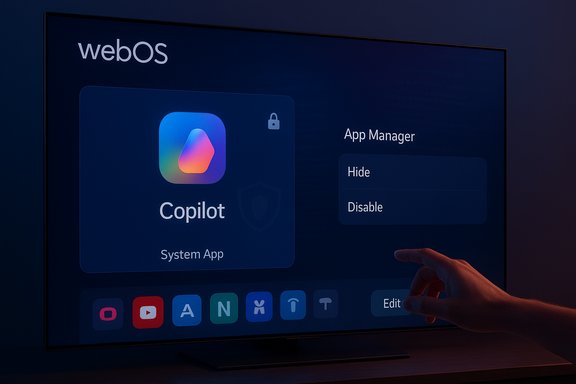
The arrival of Copilot on TVs wasn't a secret. Microsoft and major TV OEMs publicly signaled plans to bring the assistant to living‑room screens at CES and in product announcements for 2025 models, positioning Copilot as a conversational aid for content discovery, quick facts about what’s on screen, and richer, on‑screen cards. Samsung published a staged rollout for select 2025 TV and monitor models, and Microsoft confirmed its TV strategy in its Copilot communications. What changed this week was not the announcement but the distribution mechanism and the user experience: a number of LG owners report that a standard firmware‑over‑the‑air (FOTA) update delivered a visible Copilot tile to the webOS home screen and that, when opening the TV’s app management UI, there is no trash/uninstall affordance — only options to hide or disable. Community tests shared in forum threads show that in several cases a factory reset restores the tile, indicating the component may be delivered as a privileged system package or baked into the firmware image.
This matters because webOS is a Linux‑kernel‑based operating system that supports system‑level packages and firmware updates; LG can deliver deep platform changes via FOTA. That same platform design makes it straightforward for OEMs to ship system apps that are not removable via the standard Edit / App Manager flows.
The fix is straightforward: vendors must make AI features optional, default to privacy‑minimal settings, and publish clear removal instructions and data‑management controls. Owners can mitigate exposure now by disabling Live Plus, hiding the tile, avoiding account sign‑ins, or using external streamers. But longer term: transparent product design and respectful rollout mechanics are essential if AI is to regain trust on devices people own.
In the end, the Copilot‑on‑TV story is less about the technology and more about distribution ethics: adding intelligence to everyday devices is a natural evolution, but embedding that intelligence without clear consent or an easy exit undermines the user relationship. Vendors can salvage the moment — but only if they choose to honor consumer control, privacy‑minimized defaults, and straightforward opt‑outs as core product requirements.
Source: Windows Report Microsoft Copilot Automatically Installed on LG TVs with No Uninstall Option, Users Outraged
 Background / Overview
The arrival of Copilot on TVs wasn't a secret. Microsoft and major TV OEMs publicly signaled plans to bring the assistant to living‑room screens at CES and in product announcements for 2025 models, positioning Copilot as a conversational aid for content discovery, quick facts about what’s on screen, and richer, on‑screen cards. Samsung published a staged rollout for select 2025 TV and monitor models, and Microsoft confirmed its TV strategy in its Copilot communications. What changed this week was not the announcement but the distribution mechanism and the user experience: a number of LG owners report that a standard firmware‑over‑the‑air (FOTA) update delivered a visible Copilot tile to the webOS home screen and that, when opening the TV’s app management UI, there is no trash/uninstall affordance — only options to hide or disable. Community tests shared in forum threads show that in several cases a factory reset restores the tile, indicating the component may be delivered as a privileged system package or baked into the firmware image.This matters because webOS is a Linux‑kernel‑based operating system that supports system‑level packages and firmware updates; LG can deliver deep platform changes via FOTA. That same platform design makes it straightforward for OEMs to ship system apps that are not removable via the standard Edit / App Manager flows.
What owners are seeing, in plain terms
- After a routine or overnight firmware update, a Copilot tile appears in the apps row or the AI/assistant section of the webOS home screen.
- When users attempt to edit or remove the app via the normal UI, there is no uninstall/trash option; at best the app can be hidden from view.
- Several owners who tried a factory reset found Copilot reappeared after the reset — consistent with the package being a system‑level or firmware‑baked component rather than a user‑installable app.
Why this is triggering such a strong reaction
There are three overlapping sensitivities at play:- Device autonomy: Buyers expect the ability to remove optional software from hardware they purchased. A non‑removable assistant feels like forced software.
- Privacy and telemetry: LG’s webOS already includes Automatic Content Recognition (ACR) — commonly marketed as Live Plus — which can identify what’s on the screen to deliver contextual recommendations and ads. An assistant that benefits from ACR signals increases the perceived telemetry surface. Users worry Copilot plus Live Plus could raise the fidelity of profiling and personalization.
- Opaque updates: Firmware updates usually aim to fix bugs or add features, but surprise additions that alter telemetry or introduce new cloud‑connected agents undermine trust when they arrive without visible opt‑in flows or clear patch notes. Community posts and aggregated reporting emphasize the lack of vendor communication about the packaging model that made Copilot appear non‑removable.
Technical explanation — how an app can be non‑removable on a smart TV
Two well understood mechanisms explain the behavior users report:- Install as a privileged system package: The OEM installs the component outside the user app sandbox and flags it as a system app. In that case, the normal app manager UI may only permit hiding or disabling, not uninstalling.
- Bake the package into the firmware image: The app becomes part of the firmware that is restored on factory reset. Removing it would require reflashing older firmware or OEM developer tools.
What vendors publicly said — and what remains unconfirmed
- Microsoft and Samsung have published rollout details for Copilot on select 2025 Samsung TVs and smart monitors and described activation flows that include optional sign‑in for personalization. Those vendor materials confirm Copilot will be present on some 2025 models and accessible via the remote mic button or the homescreen.
- LG promoted an AI‑forward webOS roadmap at CES — including an “AI Remote,” LLM‑backed search, and Copilot access among 2025 features — but did not publish a clear technical bulletin at the time community reports surfaced that explains whether Copilot was intentionally shipped as a system‑level package or as a user‑removable app for specific firmware builds. That omission is the central point of frustration and uncertainty.
Live Plus, ACR, and the privacy angle — how to think about the risks
LG’s Live Plus (ACR) is a feature designed to recognize content on screen and enable contextual services like recommendations and interactive promotions. It has been widely documented that Live Plus and related viewing‑information toggles can be used for personalization and advertising, and that users must dig through settings to opt out. An assistant like Copilot gains utility from content context, so the combination naturally raises concerns about expanded telemetry if defaults are permissive. Key risk vectors:- Expanded behavioral profiling: A Copilot that can correlate questions and viewing timestamps with ACR signals can produce richer profiles useful to advertisers or personalization engines.
- Account linkage: If users sign into a Microsoft account on TV to personalize Copilot, the assistant can potentially tie cross‑device preferences to a single identity.
- Opaque defaults: If Live Plus and ad personalization toggles are enabled by default, users who do not proactively opt out will produce signals that the assistant can consume.
What owners can do right now — practical mitigations (ranked)
Each of these steps reduces exposure. Some are low friction; others impair convenience or features.- Turn off Live Plus (ACR) and ad personalization
- Path (menu names vary by model): Settings > All Settings > General > System > Additional Settings > Live Plus. Also opt out of Viewing Information, Interest‑Based Ads, and other data agreements where present. This reduces contextual signals Copilot could use.
- Hide the Copilot tile and avoid signing into Microsoft services
- Hiding removes the daily visibility and avoids tying the TV to a Microsoft account, which limits personalized memory and cross‑device signals.
- Keep the TV offline or block telemetry domains at the network level
- Disconnect Wi‑Fi/Ethernet to prevent cloud calls and remote updates. If you need the TV online for specific apps, consider using router‑level firewall rules or Pi‑hole to block known telemetry endpoints; this is effective but technically demanding and may break legitimate services.
- Use an external streaming device for daily apps
- Route streaming through Apple TV, Roku, Fire TV, or Nvidia Shield and use the TV strictly as a display. This sidesteps the webOS smart layer for everyday streaming but sacrifices integrated UX and some convenience.
- Factory reset — cautiously
- A reset can remove user‑level apps, but if the component is baked into the installed firmware image, a reset usually reintroduces the same image and the app returns. Use only as a diagnostic step and test carefully.
- Seek vendor clarity and document your case if you bought the TV with different promises
- If your device was sold with a guaranteed voice assistant and that feature was removed or replaced without notice (or replaced with a non‑removable alternative), pursue support, refunds, or retailer remedies where appropriate. Collect screenshots and correspondence.
The commercial case vendors used — and why it's believable
From a vendor perspective, embedding Copilot on TVs has clear product and commercial incentives:- Feature differentiation: With panel technology converging, software and AI experiences are powerful marketing levers.
- Content discovery: Copilot can aggregate search across streaming services and produce richer, on‑screen cards and recaps.
- Monetization: Better personalization can increase the value of home‑screen ad inventory and promotional placements.
- Ecosystem reach: For Microsoft, pushing Copilot beyond PCs and phones deepens brand presence and expands touchpoints for its services.
How manufacturers should respond to repair trust — a short checklist
- Make Copilot optional or trivially uninstallable: Ship as a user‑level app unless deep system integration is indispensable.
- Default to privacy‑minimal settings: ACR, ad personalization, and account‑linked personalization should be off until explicit opt‑in.
- Publish clear firmware change logs and discoverable opt‑out instructions: If a FOTA introduces a new app or service, update notes must clearly explain how to disable or remove it.
- Offer a device privacy dashboard and straightforward data deletion: Allow owners to view and purge any viewing/telemetry data collected.
- Use preview channels for contentious features: Stage rollouts in preview or opt‑in channels, gather feedback, then widen deployment.
Strengths of the Copilot‑on‑TV concept — where the UX could be genuinely valuable
- Natural language content discovery: Asking an assistant “What did she just say?” or “Who’s that actor?” and getting a spoiler‑safe recap or contextual card on the big screen can be genuinely useful.
- Group experiences: A living‑room assistant can be a shared, social UX for families — deciding what to watch or exploring trivia together.
- Accessibility: Copilot can help users with limited mobility or vision by summarizing content, searching, or controlling the TV conversationally.
- Cross‑device continuity: When done responsibly, account‑linking can allow preferences and watchlists to persist across devices.
Weaknesses and dangers — what to watch for
- Forced installs create backlash: Even small design choices (no obvious uninstall) become reputational landmines when applied to purchased hardware.
- Privacy creep if defaults are permissive: Telemetry and ACR provide powerful context; without strong opt‑outs this becomes a surveillance vector.
- Fragmented messaging between OEMs and partners: Consumers need clear, consistent vendor communication — technical silos and ambiguous patch notes create distrust.
- Regulatory exposure: Regions with strict consent requirements (EU, California) may treat opaque installs and confusing opt‑out flows as compliance failures.
What independent analysts and regulators should do next
- Conduct network and telemetry audits: Packet captures and third‑party analyses can confirm what data Copilot transmits and whether behavior differs from standard webOS flows.
- Demand vendor transparency: Regulators should insist on clear change logs, opt‑out processes, and data deletion mechanisms when vendors push system software that touches personal data.
- Consider consumer‑protection guidelines: When a device updates to include non‑removable third‑party services, rules could require an easy removal method or a clear opt‑in consent before activation.
Final assessment — promise, execution, and a narrow path forward
A conversational assistant on the TV is a defensible, even desirable, feature: it can boost discovery, accessibility, and group engagement. Microsoft, Samsung, and LG are all pursuing this vision for 2025 TV lines, and manufacturer materials demonstrate the concept’s product merits. The central failure in the current episode is execution and communication. Community evidence strongly supports the claim that some LG webOS owners received a Copilot tile via FOTA and that, in the UI, Copilot lacks a conventional uninstall path and can reappear after a reset — behavior consistent with a system‑level or firmware‑baked install. That delivery choice violated reasonable consumer expectations for control and clarity.The fix is straightforward: vendors must make AI features optional, default to privacy‑minimal settings, and publish clear removal instructions and data‑management controls. Owners can mitigate exposure now by disabling Live Plus, hiding the tile, avoiding account sign‑ins, or using external streamers. But longer term: transparent product design and respectful rollout mechanics are essential if AI is to regain trust on devices people own.
In the end, the Copilot‑on‑TV story is less about the technology and more about distribution ethics: adding intelligence to everyday devices is a natural evolution, but embedding that intelligence without clear consent or an easy exit undermines the user relationship. Vendors can salvage the moment — but only if they choose to honor consumer control, privacy‑minimized defaults, and straightforward opt‑outs as core product requirements.
Source: Windows Report Microsoft Copilot Automatically Installed on LG TVs with No Uninstall Option, Users Outraged
