

Microsoft’s Copilot is being updated with a refreshed screenshot and visual workflow that promises faster, context‑aware help — but the change revives a familiar debate: how do you give an assistant “sight” without surrendering control of highly sensitive on‑screen data? The new behavior, rolling into Windows Insiders in early March 2026, ties captured images and web links to individual Copilot conversations via a docked sidepane, and it leans heavily on per‑conversation permissions and optional autofill to create seamless workflows. Early previews and reporting paint the feature as a pragmatic productivity win, yet they also expose gaps in documentation and governance that could make accidental or systemic data exposure more likely. ]
Microsoft has spent the last two years folding Copilot across Windows, Edge, Xbox, and Microsoft 365 to make the assistant a first‑class productivity layer. That integration naturally extends into visual workflows: instead of copy/paste or manual transcription, an assistant that can process screenshots, read UI elements, extract text (OCR), and follow multi‑step instructions can save minutes — and sometimes hours — every day for power users, developers, support agents, and accessibility audiences. The latest Copilot app update (flighting to Insiders on March 4, 2026) introduces a sidepane that renders clicked web lins inside the Copilot conversation, persisting those tabs as conversation artifacts for later reference.
Those productivity gains are obvious: instant extraction, summarization, and the option to “act” on visual content — whether that’s filling a form, extracting an invoice number, or pointing to where to click — are real conveniences. The new Copiexplicit: you hand the assistant a window or image and it operates within that conversation scope rather than roaming the desktop always‑on. That design decision is the main mitigation Microsoft is promoting and the primary reason the company is rolling the feature to Insiders first.
If Microsoft publishes comprehensive, machine‑readable retention guarantees; reuses audited platform vaulting for credentials; provides clear enterprise policy controls and SIEM hooks; and defaults to conservative telemetry and training settings, the feature can deliver substantial productivity and accessibility wins without repeating earlier missteps. Absent those commitments, the same convenience that makes this tool appealing will also expose users and organizations to accidental disclosure, legal surprise, and regulatory risk.
For readers who manage devices: treat the current Insider rollouts as an opportunity. Test in a controlled environment, demand the whitepaper and retention tables, and only enable autofill broadly when you’ve validated the vault architecture. For regular users: enjoy the time savings, but be mindful about sharing sensitive pages until you can confirm where that data goes and how long it sticks around. The assistant’s “sight” is powerful — and with power comes responsibility to document, default, and defend.
Source: Neowin Copilot is getting a new screenshot tool, hopefully without the privacy risks this time
 Background: why a screenshot tool matters now
Microsoft has spent the last two years folding Copilot across Windows, Edge, Xbox, and Microsoft 365 to make the assistant a first‑class productivity layer. That integration naturally extends into visual workflows: instead of copy/paste or manual transcription, an assistant that can process screenshots, read UI elements, extract text (OCR), and follow multi‑step instructions can save minutes — and sometimes hours — every day for power users, developers, support agents, and accessibility audiences. The latest Copilot app update (flighting to Insiders on March 4, 2026) introduces a sidepane that renders clicked web lins inside the Copilot conversation, persisting those tabs as conversation artifacts for later reference.Those productivity gains are obvious: instant extraction, summarization, and the option to “act” on visual content — whether that’s filling a form, extracting an invoice number, or pointing to where to click — are real conveniences. The new Copiexplicit: you hand the assistant a window or image and it operates within that conversation scope rather than roaming the desktop always‑on. That design decision is the main mitigation Microsoft is promoting and the primary reason the company is rolling the feature to Insiders first.
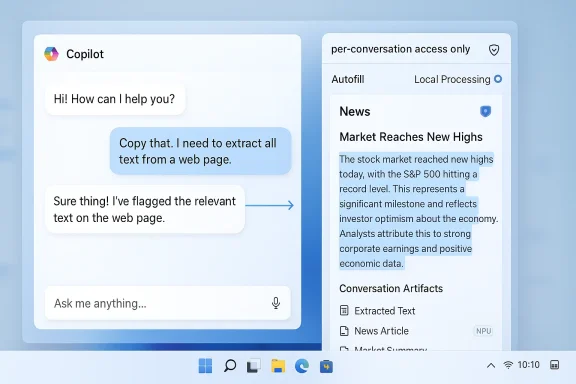
What’s changing: the new screenshot and sidepane behavior
Core user flows
- Click a link or capture a window from within a Copilot conversation; the content opens in a docked sidepane next to the chat.
- The sidepane is tied to the conversation — tabs and snapshots opened there can be saved as conversation artifacts.
- Copilot explicitly requests permission before reading or processing page content; permission is framed as per‑conversation rather than global browser access.
- Optional autofill can populate login fields inside the sidepane if users enable synced passwords and form data.
Technical architecture and processing loci
The update hints at two important architectural options that determine exposure:- Local on‑device inference (Copilot+ PCs with NPUs): image analysis and OCR can run on the local NPU to minimize cloud tressing: where on‑device resources are absent or for heavier models, screenshots may be sent to Microsoft services for analysis.
Why privacy concerns keep resurfacing
Visual access to a user’s desktop is inherently sensitive. Over the past year Microsoft has faced repeated scrutiny over three related features — Recall (periodic snapshots), Gaming Copilot (in‑overlay screenshot analysis), and taskbar “Share with Copilot” affordances — where the tension between convenience and data exposure repeatedly surfaced. Two threads explain the pattern:- Scope creep: a feature that starts as a single, user‑initiated capture can be misremembered (or mis‑implemented) as an “always‑on” camera for the desktop. Recall’s concept of periodic snapshots provoked particular alarm because the idea implies broad capture of chats, banking sessions, and other private interactions. Independent reporting and advocacy groups flagged scenario‑level abuse rc misuse.
- Defaults and discoverability: privacy problems rarely come from technical impossibility — they come from defaults and confusing UI. Past Copilot experiments showed how toggles exposed to opt‑in/opt‑out ambiguity and default telemetry settings can lead to unexpected uploads. Even if Microsoft later clarifies privacy rules, initial discoverability issues erode user trust.
What Microsoft (and the industry) have promised so far
- Permissioned, per‑conversation access rather than global “always‑on” vision. Microsoft frames the sidepane model as explicit and scoped.
- Screenshots captured by Gaming Copilot are used only during active Copilot sessions and are not used to train models, according to Microsoft statements during earlier Gaming Copilot controversy. Text and voice interactions may be used to improve models but screenshot images were separately excluded from training, per Microsoft clarifications. Multiple outlets covered that clarification.
- Local processing on Copilot+ PCs is emphasized as a privacy‑protective lever; the promise is that NPUs will be used where available to reduce cloud roundtrips. However, Microsoft has not published a comprehensive technical whitepaper detailing exactly which workloads are always local and which fall back to cloud inference.
Critical analysis: strengths, gaps, and real risks
Strengths — productivity and accessibility gains
- Faster, contextual workflows. Turning a screenshot into structured data (OCR, named‑entity extraction, links) eliminates repetitive copy/paste and transcription tasks.
- Improved accessibility. Users who rely on screen readdisabilities benefit when an assistant can parse and summarize complex visual pages.
- On‑device inference potential. Copilot+ PCs with NPUs offer a credible way to perform sensitive processing locally, which, if implemented widely, would materially reduce cloud exposure for regulated data.
- *Context persistence.pages to a conversation as saved tabs creates a reusable workspace that’s useful for long research tasks and technical support scenarios.
Gaps and unverifiable claims
- Retention semantics are murky. Microsoft has not yet published a clear retention table for conversation artifacts saved in the Copilot sidepane — how long is a snapshot retained locally, is it included in cloud backups, and can administrators enforce shorter retention? These are core enterprise concerns and remain under‑specified in current preview notes. Treat retention claims with caution until Microsoft publishes explicit timelines.
- Credential storage model unclear. The sidepane supports optional credential autofill. What vaulting mechanism does Copilot use? If it bypasses browser vaults or uses a separate store with weaker protections, the threat model changes substantially. This detail is not fully documented in the current Insider notes.
- Telemetry and training controls. Microsoft has repeatedly said screenshot images are not used for model training in certain features (e.g., Gaming Copilot), but public statements and UI toggles have at times been inconsistent or confusing. Independent tests and community captures previously revealed network activity related to Copilot features, prompting clarifications. Continued skepticism is warranted until telemetry is fully logged and documented. (techradar.com)
Concrete risks
- Accidental exposure from frictionless capture: a taskbar “Share with Copilot” affordance or one‑click sidepane capture can increase accidental uploads if confirmatory prompts and persistent visual indicators aren’t clear.
- Legal discovery surface expansion: if saved tabs or conversation artifacts are synced to the cloud and included in backups, sensitive content becomes discoverable in e‑discovery or subject to legal holds.
- Credential compromise: mixing saved page snapshots and optional autofill could expose credentials if the Copilot credential store is not hardware‑backed and does not reuse existing audited vaulting mechanisms.
- Enterprise governance gap: lack of centralized policy controls for Copilot features forces admins to apply brittle app‑orchestration workarounds (AppLocker, WDAC) instead of a deterministic policy surface.
- Reputational and regulatory risk: ambiguous defaults have already triggered regulatory and public backlash for Recall and Gaming Copilot; repeating those mistakes at scale would attract scrutiny from regulators and privactps://duo.com/decipher/privacy-security-concerns-mount-over-microsoft-recall-feature)
Recommendations: what Microsoft should publish and what IT teams should demand
What Microsoft should publish now
- A technical whitepaper laying out processing loci: which image analysis tasks run locally, which run in the cloud, and under what conditions transfers occur.
- A retention and telemetry table that lists every artifact type (screenshots, extracted text, saved tabs, autofill metadata), retention windows by default, exportability, and backup behavior.
- A credenton that states whether Copilot uses the platform’s Windows Credential Manager / Edge encrypted store, whether keys are hardware‑backed, and how key escrow or recovery works.
- A clear training/telemetry separation policy with UI‑visible toggles and a public statement that screenshot images are not used for model training unless users explicitly opt in, with an audit trail for consent.
- Enterprise policy controls via Group Policy and Intune, logs) that allow organizations to track Copilot visual captures and enforce compliance.
What enterprise IT and security teams should do now
- Test on Insiders in a lab that mirrors production, inspect telemetry and retention artifacts, and measure which network endpoints are contacted during image analysis.
- Treat credential autofill as a high‑risk toggle; disable organization‑wide until vault architecture is fully audited.
- Add Copilot feature exposure to acceptable use policies and employee training, especially in regulated environments.
- Enforce device hardening (AppLocker / WDAC) for unmanaged endpoints and monitor Copilot process behavior in endpoint telemetry systems.
What individual users should do
- Treat screenshot/autofill features as permissions to be carefully reviewed. Use the feature only with throwaway accounts to test behavior.
- Enable strong MFA on Microsoft accounts; consider hardware security keys when using Copilot on personal machines.
- UI — if a persistent indicator shows Copilot is viewing a window, use that visual cue to decide whether to share sensitive content.
How this stacks up against alternatives
Other platforms and third‑party utilities offer image‑aware assistants and OCR, but two differentiators matter for Microsoft’s approach:- Deep integration with Windows and Microsoft 365. That integration allows Copilot to stitch cross‑app context — emails, calendar, files — into a single assistant flow, delivering productivity wins that are harder for standalone tools to match.
- On‑device NPU leverage (Copilot+ PCs). Microsoft’s push to rely on NPUs for local inference is a technical advantage in privacy‑sensitive scenarios, provided the company follows through and documents exactly how local vs cloud inference is chosen.
Policy and regulatory considerations
The rollout of a screenshot‑capable assis the crosshairs of regulators and privacy advocates. Two angles matter:- Data sovereignty and compliance. Enterprises operating under GDPR, HIPAA, or sectoral data residency rules need determit image snippets will not leave jurisdictional boundaries or be captured in externally accessible backups.
- Consumer safety and misuse. Privacy experts have warned that Recall‑style continuous snapshotting could be misused by domestic abusers or insider threats unless strong consent and access controls are enforced. Authorities will expect explicit mitigations for foreseeable misuse.
What to watch next (short list)
- Microsoft’s promised documentation: watch for a technical whitepaper and an explicit retention/telemetry FAQ. If those appear, they will be the clearest signal of Microsoft’s intent to be transparent.
- Enterprise policy releases: arrival of consolidated Group Policy and Intune controls for Copilot features will tell us whether Microsoft built management tooling in parallel with user features.
- Community tests and network captures: independent researchers and security teams will continue to inspect traffic patterns; look for corroborated packet captures that reveal whether screenshots are uploaded by default or only on user action. Past community findings triggered public clarification for Gaming Copilot.
- The default behavior of autofill and training toggles: if these are enabled by default in wide builds, expect renewed scrutiny. If they are conservative (off by default) and clearly labeled, that will help rebuild trust.
Final verdict: useful — but only if Microsoft takes the hard steps
Microsoft’s new Copilot screenshot and sidepane model is a pragmatic, useful evolution for an assistant that’s meant to reduce friction in everyday computing. The design ction scoping, sidepane persistence, and local inference potential — are the right pieces to build toward a privacy‑respectful visual assistant. However, those pieces are only valuable if Microsoft closes critical documentation and governance gaps before broad distribution.If Microsoft publishes comprehensive, machine‑readable retention guarantees; reuses audited platform vaulting for credentials; provides clear enterprise policy controls and SIEM hooks; and defaults to conservative telemetry and training settings, the feature can deliver substantial productivity and accessibility wins without repeating earlier missteps. Absent those commitments, the same convenience that makes this tool appealing will also expose users and organizations to accidental disclosure, legal surprise, and regulatory risk.
For readers who manage devices: treat the current Insider rollouts as an opportunity. Test in a controlled environment, demand the whitepaper and retention tables, and only enable autofill broadly when you’ve validated the vault architecture. For regular users: enjoy the time savings, but be mindful about sharing sensitive pages until you can confirm where that data goes and how long it sticks around. The assistant’s “sight” is powerful — and with power comes responsibility to document, default, and defend.
Source: Neowin Copilot is getting a new screenshot tool, hopefully without the privacy risks this time
