

Microsoft’s Copilot+ PC features are missing from most Windows 11 machines because Microsoft tied many of its newest on-device AI tools to specific hardware: a supported processor with an NPU rated at 40 TOPS or higher, 16GB of RAM, 256GB of storage, and Windows 11 version 24H2 or later. That is not a bug, a hidden setting, or a failed update. It is the beginning of a new hardware class inside the Windows ecosystem. The awkward part is that Microsoft is still selling “Windows 11” as one platform while the most visible AI features increasingly belong to a smaller, newer, and more expensive tier.
For decades, Windows users have understood upgrades as a software question. If the machine could install the latest version, it generally belonged to the same broad club as every other PC running that version. There were performance differences, of course, and some hardware-dependent features, but the operating system itself did not usually feel like it had a velvet rope inside it.
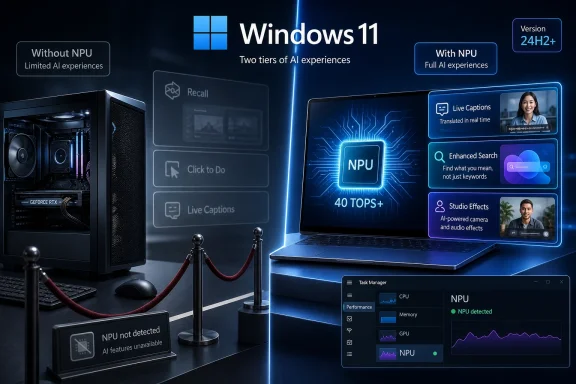
Copilot+ PCs change that bargain. Microsoft has not created a separate edition of Windows called “Windows AI” or “Windows 11 Plus,” but it has effectively created a class of machines that receive headline features other Windows 11 users simply do not see. Recall, Click to Do, AI-enhanced Windows Search, advanced Studio Effects, Cocreator-style experiences, and translated Live Captions all sit behind that gate.
The result is a strange consumer experience. A user can own a fast desktop with a high-end GPU, abundant RAM, and a processor that crushes office workloads, games, and creative apps, yet still fail the Copilot+ test. Meanwhile, a thin-and-light laptop with the right neural processing unit can unlock features the desktop never gets.
That is the central confusion: Microsoft’s AI gate is not about whether your PC is “powerful” in the old sense. It is about whether your PC has the specific kind of low-power AI accelerator Microsoft wants Windows to depend on next.
That distinction matters because Microsoft’s AI pitch is not merely “Windows can call a chatbot.” Cloud Copilot can already do that on almost anything with a browser. Copilot+ is about running more AI locally, with lower latency, less battery drain, and less dependence on Microsoft’s cloud infrastructure.
The 40 TOPS threshold is where the marketing becomes technical. TOPS means trillions of operations per second, a rough measure of AI accelerator throughput. Microsoft’s bar is not just “has an NPU,” but “has an NPU fast enough to qualify for this new Windows feature tier.”
That catches many recent PCs in the gap. Intel’s first Core Ultra generation brought NPUs to mainstream laptops, but those NPUs were well below the Copilot+ threshold. AMD’s earlier Ryzen AI chips had the same problem. They were real AI PCs in the broad industry sense, but they were not Copilot+ PCs in Microsoft’s stricter sense.
This is why a 2023 or 2024 premium laptop can feel unfairly orphaned. It may be fast, modern, and expensive. It may even have an NPU. But if that NPU does not meet Microsoft’s cutoff, Windows treats it as outside the Copilot+ circle.
Those families are not interchangeable with older processors from the same companies. A Core i7 from 2023 does not become eligible because it is an i7. A Ryzen 9 desktop chip does not qualify because it has excellent multi-core performance. A gaming tower with a huge Nvidia card does not qualify because its GPU can run AI models at high speed.
Microsoft’s choice here is deliberate. The company wants a predictable baseline for developers and for its own Windows experiences. A 40 TOPS NPU gives Microsoft a target it can optimize against, and a narrow set of processors reduces the chaos that usually comes with the Windows hardware universe.
That predictability has a cost. Windows has always thrived because it runs on almost everything. Copilot+ moves in the opposite direction: it says the best version of Windows AI only exists on machines Microsoft and its partners have blessed.
But Microsoft is optimizing for a different workload. Recall, semantic indexing, translation, webcam effects, and contextual actions are not supposed to behave like a game or a render job. They are meant to live quietly in the background, available all day, ideally without waking the fans or destroying battery life.
That explains the NPU requirement, even if it does not make every user happy. A GPU can do AI work, but it is not the low-power always-on engine Microsoft wants as the baseline for these features. On a desktop plugged into the wall, that argument feels weaker. On a laptop, it is much stronger.
The problem is that Microsoft is applying a laptop-first AI architecture to a Windows world that still includes desktops, workstations, mini PCs, gaming handhelds, and home-built towers. The company may be technically right about NPUs while still leaving many of its most loyal power users feeling like second-class citizens.
There is also a commercial incentive that should not be ignored. Copilot+ gives OEMs a new reason to sell PCs. After years of perfectly usable Windows 10 and Windows 11 machines aging more gracefully than manufacturers might prefer, “AI PC” is a convenient refresh-cycle slogan.
Microsoft originally announced Recall in 2024 with the kind of confidence that often precedes a retreat. Security researchers and privacy advocates quickly pointed out the obvious danger of storing a rich timeline of user activity, even locally. Microsoft delayed the feature, reworked its security model, and returned with stronger protections.
The revised Recall is opt-in, encrypted, tied to Windows Hello, and designed to keep snapshots local. Users can exclude apps and sites, pause capture, delete snapshots, and avoid some private browsing scenarios. Those changes matter. They are not cosmetic.
But the original controversy left a mark because it revealed the stakes of Microsoft’s AI direction. Once the operating system starts observing more of what users do in order to help them later, security design becomes existential. “It runs locally” is reassuring only if local storage, authentication, exclusion rules, and abuse resistance all hold up under pressure.
Recall also shows why Microsoft wants strict hardware requirements. Features this sensitive depend not just on AI acceleration, but on a broader trust story involving device security, encryption, virtualization-based protections, and identity checks. Whether users accept that story is another matter.
This may end up being more important than Recall because it feels less invasive. It does not require users to accept a persistent memory of their activity. It offers help at the moment of intent, when the user selects something and asks Windows to do something useful with it.
That is the AI feature shape most likely to survive user skepticism. People may hesitate to let Windows remember everything. They are more likely to accept a tool that acts on something they deliberately highlight.
Still, Click to Do reinforces the same hardware divide. On unsupported PCs, the feature is not merely slower. It generally is not offered. Microsoft is not presenting Copilot+ as a degraded experience on older machines; it is presenting it as a separate entitlement.
Windows Studio Effects also fits this category. Background blur, eye contact correction, voice focus, and lighting adjustments are not glamorous, but they improve the daily reality of remote work. Some camera effects exist outside Copilot+ depending on hardware, but the richer on-device pipeline belongs to the AI PC push.
AI-enhanced Windows Search may be the sleeper feature. Searching for files by description instead of exact filename is exactly the sort of mundane improvement that could become indispensable if Microsoft executes it well. Users do not want to manage file names like database administrators. They want to type “the spreadsheet with the blue chart from the budget meeting” and get the right result.
Paint Cocreator and image-generation features are more mixed. They are fun, occasionally useful, and easy to demo, but they are not the reason most people should buy a new computer. They are proof points for the platform rather than essential utilities.
This is where Microsoft’s story is both stronger and weaker than the marketing suggests. The AI layer is real. Some pieces are useful. But the feature set is not yet so transformative that a healthy two-year-old laptop suddenly belongs in the recycling bin.
That leads users into the familiar ritual of troubleshooting the wrong thing. They check Windows Update. They reinstall apps from the Microsoft Store. They hunt for optional features. They wonder whether they are in the wrong region or on the wrong Microsoft account.
Sometimes those things do matter. Copilot+ features generally require Windows 11 version 24H2 or later, and Microsoft often rolls features out gradually. Region, language, device class, and staged deployment rings can all delay availability. A supported PC may not receive every feature on day one.
But for most missing AI features, the answer is more basic. If the PC does not have a supported 40 TOPS NPU, the switch will never appear through ordinary channels. There is no driver package that turns an old CPU into a Copilot+ processor. There is no BIOS update that creates an NPU out of firmware.
The fastest check is Task Manager. If the Performance tab shows an NPU, the machine has one. If it does not, that is usually the end of the story. The next check is
That is part of Windows culture, and there is nothing wrong with curiosity. The PC has always invited users to pry open doors the vendor would rather keep closed. If someone wants to test an unsupported feature on a spare machine, the worst outcome may simply be wasted time and a broken build.
Daily-driver advice is different. AI features that depend on local models may run poorly when shoved onto a CPU. Battery life can suffer. Updates can remove the workaround. Cloud entitlement checks can shut down features that local flags briefly exposed.
Recall is especially poor territory for casual bypassing. Its value depends on security guarantees that are easy to weaken when users try to defeat the platform checks. A hacked Recall-like setup that captures sensitive information without Microsoft’s intended protections is not a clever upgrade. It is a liability with a search box.
The larger point is that unsupported hacks do not change Microsoft’s product direction. They prove that some code paths can run elsewhere. They do not make older PCs part of the Copilot+ platform.
For students and casual users, the AI features are still mostly a bonus. Battery life, display quality, keyboard comfort, repairability, price, and app compatibility matter more. A browser-heavy user does not become dramatically more productive because Windows can semantically index local files.
Office workers, researchers, journalists, and frequent meeting participants have a stronger case. Live Captions, translation, Click to Do, and improved search can reduce friction in daily work. These are not science-fiction features, but small conveniences compound when they appear dozens of times a week.
Developers and creators should be more cautious. Many professional creative tools still lean heavily on the GPU, CPU, and memory bandwidth rather than the Windows NPU feature layer. A Copilot+ laptop may be excellent for mobility and AI-assisted workflows while still being the wrong replacement for a workstation.
Gamers are in the strangest position. Auto Super Resolution and other AI graphics ideas may become interesting, especially for handhelds and efficient laptops. But most gaming buyers should still prioritize GPU performance, display quality, cooling, driver support, and game compatibility over a Copilot+ badge.
Arm-based Copilot+ machines deserve a separate footnote in the buyer’s mind. Compatibility is much better than in earlier Windows on Arm eras, and emulation has improved considerably. But niche utilities, older games, drivers, VPN clients, security tools, and specialist hardware software can still be traps. The badge does not repeal the need to check your actual apps.
That does not mean enterprises will reject Copilot+ outright. Many will eventually want local AI acceleration because it can reduce cloud dependency, improve responsiveness, and support privacy-sensitive workflows. On-device inference has a real place in regulated environments if it is governed correctly.
But businesses move more slowly than keynote narratives. They need administrative controls, auditability, documented data flows, lifecycle guarantees, and clear off switches. They need to know whether a captured screen can include confidential client data, source code, patient information, or privileged sessions. They need to know what happens when a laptop is lost, reassigned, subpoenaed, or compromised.
Microsoft has added controls and security requirements precisely because these questions are unavoidable. Still, the enterprise adoption curve will likely be uneven. Accessibility and translation features may be embraced faster than persistent activity memory. Search improvements may be easier to approve than snapshot histories.
The irony is that the most technically sophisticated buyers may be the slowest to trust the most ambitious features. That is not anti-AI sentiment. It is operational realism.
The difference is that Microsoft is doing this inside Windows, a platform whose identity has always been backward compatibility. Users are accustomed to old software running on new Windows and new Windows running on old-ish hardware. Copilot+ complicates that identity by making the operating system’s most promoted experiences dependent on silicon most users do not have.
Over time, the distinction may fade. As NPUs become standard across Intel, AMD, and Qualcomm processors, the Copilot+ badge may become less exotic. A few replacement cycles from now, 40 TOPS may look like an early baseline rather than a premium feature. Developers may begin to treat local AI acceleration the way they now treat webcams, TPMs, or hardware video decode: not universal forever, but common enough to build around.
For now, though, Microsoft is asking users to believe in a future that is only partially here. The best Copilot+ features are useful, but not indispensable. The controversial ones are still earning trust. The ecosystem around local Windows AI is still forming.
That makes skepticism rational. It also makes dismissal premature. The PC did need a new local-compute story for the AI era, and the NPU is a plausible foundation. Microsoft’s challenge is proving that this foundation improves Windows rather than merely segmenting it.
If you are troubleshooting a missing AI feature, the answer is usually not hidden in a settings page. It is printed in the processor spec sheet.
 Microsoft Has Turned Windows 11 Into a Two-Speed Platform
For decades, Windows users have understood upgrades as a software question. If the machine could install the latest version, it generally belonged to the same broad club as every other PC running that version. There were performance differences, of course, and some hardware-dependent features, but the operating system itself did not usually feel like it had a velvet rope inside it.Copilot+ PCs change that bargain. Microsoft has not created a separate edition of Windows called “Windows AI” or “Windows 11 Plus,” but it has effectively created a class of machines that receive headline features other Windows 11 users simply do not see. Recall, Click to Do, AI-enhanced Windows Search, advanced Studio Effects, Cocreator-style experiences, and translated Live Captions all sit behind that gate.
The result is a strange consumer experience. A user can own a fast desktop with a high-end GPU, abundant RAM, and a processor that crushes office workloads, games, and creative apps, yet still fail the Copilot+ test. Meanwhile, a thin-and-light laptop with the right neural processing unit can unlock features the desktop never gets.
That is the central confusion: Microsoft’s AI gate is not about whether your PC is “powerful” in the old sense. It is about whether your PC has the specific kind of low-power AI accelerator Microsoft wants Windows to depend on next.
The NPU Is the New Windows Requirement That Users Never Asked to Understand
The heart of the Copilot+ requirement is the NPU, or neural processing unit. A CPU remains the general-purpose engine of the PC. A GPU remains the graphics and parallel-compute monster. The NPU is narrower: it is designed to run machine-learning workloads efficiently, especially the smaller local models that can operate continuously without turning a laptop into a hand warmer.That distinction matters because Microsoft’s AI pitch is not merely “Windows can call a chatbot.” Cloud Copilot can already do that on almost anything with a browser. Copilot+ is about running more AI locally, with lower latency, less battery drain, and less dependence on Microsoft’s cloud infrastructure.
The 40 TOPS threshold is where the marketing becomes technical. TOPS means trillions of operations per second, a rough measure of AI accelerator throughput. Microsoft’s bar is not just “has an NPU,” but “has an NPU fast enough to qualify for this new Windows feature tier.”
That catches many recent PCs in the gap. Intel’s first Core Ultra generation brought NPUs to mainstream laptops, but those NPUs were well below the Copilot+ threshold. AMD’s earlier Ryzen AI chips had the same problem. They were real AI PCs in the broad industry sense, but they were not Copilot+ PCs in Microsoft’s stricter sense.
This is why a 2023 or 2024 premium laptop can feel unfairly orphaned. It may be fast, modern, and expensive. It may even have an NPU. But if that NPU does not meet Microsoft’s cutoff, Windows treats it as outside the Copilot+ circle.
The Badge Is Really a Processor Allowlist
Microsoft’s Copilot+ badge is built around a short list of approved silicon families. The first wave centered on Qualcomm’s Snapdragon X series, which gave Microsoft the battery-life story it had long wanted for Windows on Arm. Intel followed with Core Ultra 200V, better known by its Lunar Lake codename. AMD followed with Ryzen AI 300.Those families are not interchangeable with older processors from the same companies. A Core i7 from 2023 does not become eligible because it is an i7. A Ryzen 9 desktop chip does not qualify because it has excellent multi-core performance. A gaming tower with a huge Nvidia card does not qualify because its GPU can run AI models at high speed.
Microsoft’s choice here is deliberate. The company wants a predictable baseline for developers and for its own Windows experiences. A 40 TOPS NPU gives Microsoft a target it can optimize against, and a narrow set of processors reduces the chaos that usually comes with the Windows hardware universe.
That predictability has a cost. Windows has always thrived because it runs on almost everything. Copilot+ moves in the opposite direction: it says the best version of Windows AI only exists on machines Microsoft and its partners have blessed.
A Powerful GPU Is Not the Loophole Gamers Think It Is
The most emotionally satisfying objection comes from desktop users: if a graphics card can run large AI workloads, why can’t it run these Windows features? A modern GeForce RTX card can perform vast amounts of matrix math. For raw AI throughput, a high-end GPU can embarrass a laptop NPU.But Microsoft is optimizing for a different workload. Recall, semantic indexing, translation, webcam effects, and contextual actions are not supposed to behave like a game or a render job. They are meant to live quietly in the background, available all day, ideally without waking the fans or destroying battery life.
That explains the NPU requirement, even if it does not make every user happy. A GPU can do AI work, but it is not the low-power always-on engine Microsoft wants as the baseline for these features. On a desktop plugged into the wall, that argument feels weaker. On a laptop, it is much stronger.
The problem is that Microsoft is applying a laptop-first AI architecture to a Windows world that still includes desktops, workstations, mini PCs, gaming handhelds, and home-built towers. The company may be technically right about NPUs while still leaving many of its most loyal power users feeling like second-class citizens.
There is also a commercial incentive that should not be ignored. Copilot+ gives OEMs a new reason to sell PCs. After years of perfectly usable Windows 10 and Windows 11 machines aging more gracefully than manufacturers might prefer, “AI PC” is a convenient refresh-cycle slogan.
Recall Became the Symbol Because It Was the Scariest Feature
No Copilot+ feature has defined this split more than Recall. The idea is simple and unnerving: Windows periodically captures snapshots of what you have been doing so you can later search your past activity in plain language. The promise is a photographic memory for your PC. The fear is a searchable archive of everything sensitive that ever crossed your screen.Microsoft originally announced Recall in 2024 with the kind of confidence that often precedes a retreat. Security researchers and privacy advocates quickly pointed out the obvious danger of storing a rich timeline of user activity, even locally. Microsoft delayed the feature, reworked its security model, and returned with stronger protections.
The revised Recall is opt-in, encrypted, tied to Windows Hello, and designed to keep snapshots local. Users can exclude apps and sites, pause capture, delete snapshots, and avoid some private browsing scenarios. Those changes matter. They are not cosmetic.
But the original controversy left a mark because it revealed the stakes of Microsoft’s AI direction. Once the operating system starts observing more of what users do in order to help them later, security design becomes existential. “It runs locally” is reassuring only if local storage, authentication, exclusion rules, and abuse resistance all hold up under pressure.
Recall also shows why Microsoft wants strict hardware requirements. Features this sensitive depend not just on AI acceleration, but on a broader trust story involving device security, encryption, virtualization-based protections, and identity checks. Whether users accept that story is another matter.
Click to Do Is the More Practical Version of the Same Bet
If Recall is the controversial symbol, Click to Do is the more immediately understandable utility. It lets users act on visible content: summarize text, rewrite a passage, identify objects, work with images, or send context into Copilot-like workflows. In spirit, it is Microsoft’s answer to the growing expectation that a computer should understand what is on screen, not just what is inside a single app.This may end up being more important than Recall because it feels less invasive. It does not require users to accept a persistent memory of their activity. It offers help at the moment of intent, when the user selects something and asks Windows to do something useful with it.
That is the AI feature shape most likely to survive user skepticism. People may hesitate to let Windows remember everything. They are more likely to accept a tool that acts on something they deliberately highlight.
Still, Click to Do reinforces the same hardware divide. On unsupported PCs, the feature is not merely slower. It generally is not offered. Microsoft is not presenting Copilot+ as a degraded experience on older machines; it is presenting it as a separate entitlement.
The Useful Features Are Often the Least Flashy
The most compelling Copilot+ experiences are not necessarily the ones that make the best keynote demos. Live Captions with translation, for example, is a genuinely meaningful feature for accessibility, travel, education, and multilingual work. Real-time local translation can change a meeting, a lecture, or a video call in ways that are practical rather than theatrical.Windows Studio Effects also fits this category. Background blur, eye contact correction, voice focus, and lighting adjustments are not glamorous, but they improve the daily reality of remote work. Some camera effects exist outside Copilot+ depending on hardware, but the richer on-device pipeline belongs to the AI PC push.
AI-enhanced Windows Search may be the sleeper feature. Searching for files by description instead of exact filename is exactly the sort of mundane improvement that could become indispensable if Microsoft executes it well. Users do not want to manage file names like database administrators. They want to type “the spreadsheet with the blue chart from the budget meeting” and get the right result.
Paint Cocreator and image-generation features are more mixed. They are fun, occasionally useful, and easy to demo, but they are not the reason most people should buy a new computer. They are proof points for the platform rather than essential utilities.
This is where Microsoft’s story is both stronger and weaker than the marketing suggests. The AI layer is real. Some pieces are useful. But the feature set is not yet so transformative that a healthy two-year-old laptop suddenly belongs in the recycling bin.
Windows Update Cannot Install Hardware That Is Not There
For ordinary users, the most frustrating part of this transition is silence. Windows does not always explain that a missing feature is missing because the machine fails the Copilot+ requirement. The menu simply is not there. The toggle does not appear. The app behaves as though the advertised future of Windows exists somewhere else.That leads users into the familiar ritual of troubleshooting the wrong thing. They check Windows Update. They reinstall apps from the Microsoft Store. They hunt for optional features. They wonder whether they are in the wrong region or on the wrong Microsoft account.
Sometimes those things do matter. Copilot+ features generally require Windows 11 version 24H2 or later, and Microsoft often rolls features out gradually. Region, language, device class, and staged deployment rings can all delay availability. A supported PC may not receive every feature on day one.
But for most missing AI features, the answer is more basic. If the PC does not have a supported 40 TOPS NPU, the switch will never appear through ordinary channels. There is no driver package that turns an old CPU into a Copilot+ processor. There is no BIOS update that creates an NPU out of firmware.
The fastest check is Task Manager. If the Performance tab shows an NPU, the machine has one. If it does not, that is usually the end of the story. The next check is
winver, which confirms whether Windows 11 is on 24H2 or later. The final check is the processor model itself, because not every NPU-equipped chip qualifies.The Hack Scene Can Flip Flags, But It Cannot Change the Platform
As with almost every Windows feature gate, enthusiasts have found ways to experiment. ViVeTool, registry edits, Insider builds, and unsupported configuration tricks can expose features early or make pieces of the Copilot+ experience appear on machines Microsoft does not officially support.That is part of Windows culture, and there is nothing wrong with curiosity. The PC has always invited users to pry open doors the vendor would rather keep closed. If someone wants to test an unsupported feature on a spare machine, the worst outcome may simply be wasted time and a broken build.
Daily-driver advice is different. AI features that depend on local models may run poorly when shoved onto a CPU. Battery life can suffer. Updates can remove the workaround. Cloud entitlement checks can shut down features that local flags briefly exposed.
Recall is especially poor territory for casual bypassing. Its value depends on security guarantees that are easy to weaken when users try to defeat the platform checks. A hacked Recall-like setup that captures sensitive information without Microsoft’s intended protections is not a clever upgrade. It is a liability with a search box.
The larger point is that unsupported hacks do not change Microsoft’s product direction. They prove that some code paths can run elsewhere. They do not make older PCs part of the Copilot+ platform.
The Upgrade Case Is Strongest When the Laptop Was Already Due
The honest buying advice is less exciting than the AI PC banners: do not upgrade only because Recall or Click to Do is missing. Upgrade if the machine you already have is old, slow, has poor battery life, or no longer meets your workload. Treat Copilot+ as a factor in the replacement decision, not as a reason to manufacture one.For students and casual users, the AI features are still mostly a bonus. Battery life, display quality, keyboard comfort, repairability, price, and app compatibility matter more. A browser-heavy user does not become dramatically more productive because Windows can semantically index local files.
Office workers, researchers, journalists, and frequent meeting participants have a stronger case. Live Captions, translation, Click to Do, and improved search can reduce friction in daily work. These are not science-fiction features, but small conveniences compound when they appear dozens of times a week.
Developers and creators should be more cautious. Many professional creative tools still lean heavily on the GPU, CPU, and memory bandwidth rather than the Windows NPU feature layer. A Copilot+ laptop may be excellent for mobility and AI-assisted workflows while still being the wrong replacement for a workstation.
Gamers are in the strangest position. Auto Super Resolution and other AI graphics ideas may become interesting, especially for handhelds and efficient laptops. But most gaming buyers should still prioritize GPU performance, display quality, cooling, driver support, and game compatibility over a Copilot+ badge.
Arm-based Copilot+ machines deserve a separate footnote in the buyer’s mind. Compatibility is much better than in earlier Windows on Arm eras, and emulation has improved considerably. But niche utilities, older games, drivers, VPN clients, security tools, and specialist hardware software can still be traps. The badge does not repeal the need to check your actual apps.
Enterprises Will Read Copilot+ as a Governance Problem First
Home users see missing features. IT departments see policy surface area. A feature like Recall is not just a productivity tool inside a managed fleet; it is a retention, privacy, discovery, compliance, and incident-response question wearing a friendly consumer name.That does not mean enterprises will reject Copilot+ outright. Many will eventually want local AI acceleration because it can reduce cloud dependency, improve responsiveness, and support privacy-sensitive workflows. On-device inference has a real place in regulated environments if it is governed correctly.
But businesses move more slowly than keynote narratives. They need administrative controls, auditability, documented data flows, lifecycle guarantees, and clear off switches. They need to know whether a captured screen can include confidential client data, source code, patient information, or privileged sessions. They need to know what happens when a laptop is lost, reassigned, subpoenaed, or compromised.
Microsoft has added controls and security requirements precisely because these questions are unavoidable. Still, the enterprise adoption curve will likely be uneven. Accessibility and translation features may be embraced faster than persistent activity memory. Search improvements may be easier to approve than snapshot histories.
The irony is that the most technically sophisticated buyers may be the slowest to trust the most ambitious features. That is not anti-AI sentiment. It is operational realism.
Microsoft’s AI PC Strategy Is Early, But the Direction Is Locked In
The current Copilot+ gap feels abrupt because Microsoft is moving before the software value fully justifies the hardware line. That is not unusual in platform shifts. Hardware capability often arrives before the killer app, and vendors use early features to seed the market.The difference is that Microsoft is doing this inside Windows, a platform whose identity has always been backward compatibility. Users are accustomed to old software running on new Windows and new Windows running on old-ish hardware. Copilot+ complicates that identity by making the operating system’s most promoted experiences dependent on silicon most users do not have.
Over time, the distinction may fade. As NPUs become standard across Intel, AMD, and Qualcomm processors, the Copilot+ badge may become less exotic. A few replacement cycles from now, 40 TOPS may look like an early baseline rather than a premium feature. Developers may begin to treat local AI acceleration the way they now treat webcams, TPMs, or hardware video decode: not universal forever, but common enough to build around.
For now, though, Microsoft is asking users to believe in a future that is only partially here. The best Copilot+ features are useful, but not indispensable. The controversial ones are still earning trust. The ecosystem around local Windows AI is still forming.
That makes skepticism rational. It also makes dismissal premature. The PC did need a new local-compute story for the AI era, and the NPU is a plausible foundation. Microsoft’s challenge is proving that this foundation improves Windows rather than merely segmenting it.
The Copilot+ Gate Is the Message Microsoft Has Been Soft-Pedaling
The practical lesson is not complicated, but it is easy to miss under the branding. A Windows 11 PC without the right NPU is not broken. It is simply outside Microsoft’s current AI hardware tier. That tier is defined by silicon first, Windows version second, and feature rollout timing third.If you are troubleshooting a missing AI feature, the answer is usually not hidden in a settings page. It is printed in the processor spec sheet.
- A Copilot+ PC needs a supported processor with an NPU rated at 40 TOPS or higher, not merely a fast CPU or powerful GPU.
- Windows 11 version 24H2 or later is necessary, but it does not unlock Copilot+ features on unsupported hardware.
- Older Intel Core Ultra and AMD Ryzen AI chips may include NPUs while still falling below Microsoft’s Copilot+ threshold.
- Recall, Click to Do, enhanced local search, advanced Studio Effects, and translated Live Captions are the main Windows experiences shaped by this new hardware gate.
- Workarounds may expose pieces of the experience, but they are unstable, unsupported, and especially risky for security-sensitive features.
- Most users should buy a Copilot+ PC when they already need a new laptop, not because a missing AI menu has made their current PC obsolete.
References
- Primary source: H2S Media
Published: Mon, 18 May 2026 15:31:54 GMT
Why Your Windows 11 PC Doesn't Get AI Features - H2S Media
Your Windows 11 PC missing Recall, Click to Do, or Cocreator? It's not a bug. It's the 40 TOPS NPU rule behind Copilot+ PCs. Here's what that meanswww.how2shout.com - Official source: microsoft.com
Shop High-Performance Laptops, Computers, PCs, and Tablets | Microsoft Windows
Shop high-performance laptops, PCs, and tablets built for multitasking, advanced AI capabilities, powerful graphics, and all-day performance. Explore premium, high-spec Windows devices.www.microsoft.com - Official source: learn.microsoft.com
Copilot+ PCs developer guide | Microsoft Learn
Developer guide for Windows Copilot+ PCs.learn.microsoft.com - Official source: support.microsoft.com
Use live captions to better understand audio | Microsoft Support
Learn how to use live captionssupport.microsoft.com - Related coverage: windowscentral.com
Microsoft Copilot+ PC guide: What it is, features, how to access it, and PC requirements, and everything you need to know | Windows Central
Microsoft Copilot+ has been announced for upcoming AI PCs, but what exactly is it? Here's everything you need to know.www.windowscentral.com - Related coverage: tomshardware.com
Copilot+ PCs: All we know about the AI-ready laptops and exclusive Windows features | Tom's Hardware
Microsoft's shiny new AI innovations for the laptop spacewww.tomshardware.com
- Related coverage: hothardware.com
Microsoft Expands Snapdragon's Exclusive Copilot+ Features To AMD And Intel PCs | HotHardware
Whatever exclusivity agreement Qualcomm had with Microsoft for its Copilot+ initiative is now over, for the most part, with many features now available on Copilot+ PCs powered by AMD and Intel.hothardware.com
- Official source: news.microsoft.com
