

Microsoft’s KB5090940 is an April 2026 Windows Update package for Copilot+ PCs that installs Image Transform AI component version 1.2604.515.0 on Windows 11 version 24H2 and 25H2 devices with the latest cumulative update already in place. It is a small entry in Microsoft Support, but it points to a much larger shift in how Windows is being serviced. The operating system is no longer just receiving drivers, security fixes, and shell tweaks; it is receiving model updates. That changes what “keeping Windows current” means for home users, OEMs, and IT departments alike.
KB5090940 is not the kind of update that makes a splash in the Start menu. It does not advertise a new app, redesign the taskbar, or introduce a headline Copilot button. Instead, it updates a component that sits beneath Windows experiences such as AI-assisted image editing, object removal, and background reconstruction.
That is precisely why it matters. Microsoft’s Copilot+ strategy depends less on one chat interface than on a growing collection of local AI components that Windows can call when an app needs image understanding, image generation, semantic analysis, or a small language model. The visible feature is the magic eraser; the durable platform decision is the model pipeline underneath it.
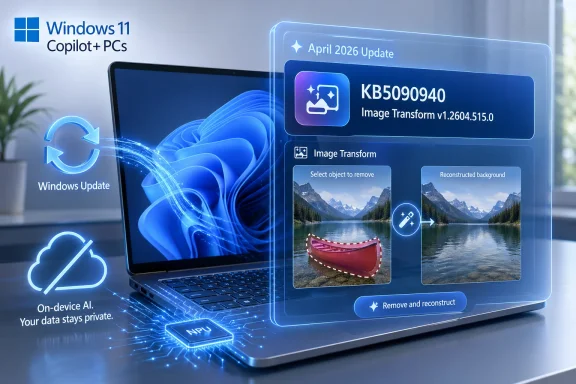
Image Transform is one piece of that pipeline. Microsoft describes it as the Windows AI component that enables on-device image editing and visual transformation, including erasing selected foreground objects and generating background content to fill the removed area. In plainer English: it is the part of Windows that lets supported apps remove something from an image and convincingly patch the scene without shipping the image to a cloud service.
That last clause is the sales pitch Microsoft has been trying to make since Copilot+ PCs arrived. If the PC has a sufficiently capable neural processing unit, Microsoft can push more inference onto the device. That means lower latency, fewer round trips to servers, and a cleaner privacy story for workflows involving personal photos, business imagery, screenshots, and visual documents.
That is the whole public changelog, and it is not enough to satisfy anyone who administers machines for a living. “Includes improvements” is the language of modern platform maintenance, but it conceals the most interesting questions: improved quality, improved speed, improved memory usage, improved safety behavior, improved compatibility with newer app builds, or improved model output?
Still, the absence of detail is itself revealing. Microsoft is treating these AI components more like continually serviced platform assets than like traditional Windows features with long, discrete release notes. In the old Windows world, a feature shipped, perhaps received fixes, and then waited for the next big release train. In the Copilot+ world, the component behind a feature can be revised independently as the model, runtime, and app layer evolve.
That gives Microsoft more room to improve AI experiences quickly. It also gives administrators a new class of update to understand. A machine can be fully patched from a security perspective and still be behind on the local AI stack that determines how Paint, Photos, Click to Do, or future Windows experiences behave.
The dividing line is the NPU. Microsoft’s Copilot+ requirements center on a neural processing unit capable of more than 40 trillion operations per second, along with modern memory and storage baselines. That threshold was not chosen merely for marketing. It lets Microsoft assume that certain classes of AI work can run locally without wrecking battery life or making the whole system feel sluggish.
KB5090940 reinforces that boundary. The update is not for every Windows 11 PC. It is for Copilot+ PCs only. A powerful gaming desktop with a large discrete GPU may be far more capable in raw compute, but Microsoft’s local Windows AI experiences are organized around a predictable NPU target and an OS-managed component model.
That distinction will continue to annoy enthusiasts. It is easy to understand why: a desktop RTX card can run circles around an NPU in many AI workloads. But Microsoft is optimizing for a mass-market PC baseline, not for hobbyist flexibility. The NPU gives Windows a low-power, always-available inference engine that laptop vendors can ship consistently and that Microsoft can target without turning every AI feature into a hardware negotiation.
But image transformation is also a safe proving ground for Microsoft’s broader Windows AI architecture. It exercises local models, NPUs, app integration, privacy promises, and update delivery without forcing users into the more controversial territory of continuous screen analysis or productivity-agent automation. If Microsoft can make local image tools reliable, fast, and boringly maintained, it can extend the same servicing pattern elsewhere.
The company’s Copilot+ feature list already points in that direction. Paint and Photos get image creation, restyling, and editing. Windows search gains semantic indexing. Click to Do interprets what is on screen and offers actions. Recall, still the most contentious member of the family, depends on locally analyzed snapshots and strict controls to earn back trust after its rocky debut.
The common thread is that Windows is becoming a broker for AI capabilities. Apps do not merely call their own bundled models; they can lean on Windows-provided components, updated through Microsoft’s servicing channels, accelerated by hardware Microsoft has blessed, and governed by policies Microsoft can expose to administrators.
For personal photos, that distinction matters. For businesses, it matters more. A law firm touching up discovery images, a school working with student materials, a hospital communications team editing internal photography, or a government office handling sensitive screenshots will all ask the same question: where did the data go?
On-device inference gives Microsoft a stronger answer. The file can remain local while the model does its work on the NPU. The user gets the result without sending the original image across the internet merely to remove a background object.
But that privacy story only holds if the local stack remains trustworthy and current. AI models are software artifacts. They have bugs, quality regressions, edge cases, and occasionally safety implications. A local model that produces bad fills, mishandles certain content, or interacts poorly with an app update still needs to be serviced. KB5090940 is one example of how Microsoft intends to do that: quietly, automatically, and outside the drama of a major Windows release.
That will make update history more important and more confusing. Users looking under Settings, Windows Update, and Update history may now see entries such as “Image Transform” alongside cumulative updates and driver packages. For enthusiasts, this is a breadcrumb trail. For ordinary users, it is another cryptic line item. For administrators, it is evidence that the PC’s AI capability is not a static property of the hardware purchase.
The prerequisite is also telling. Microsoft says the latest cumulative update for Windows 11 version 24H2 or 25H2 must be installed. That ties the AI component layer back to the OS servicing baseline. If the monthly Windows foundation is out of date, the model component does not stand alone.
This is the shape of Windows servicing in the AI PC era: cumulative OS updates establish the platform contract, component updates refresh the AI capability, and app updates expose the experience. When all three are aligned, the user sees a feature. When one is out of sync, the user sees a missing button, a failed action, or a help article that reads like a scavenger hunt.
Microsoft has made progress in documenting AI components as a class, including release history pages that list component names, availability dates, versions, and KB articles. That is useful plumbing. It is not yet the kind of change narrative administrators are accustomed to receiving for security updates, browser policies, or major Windows features.
The risk is not necessarily catastrophic. An Image Transform update is unlikely to break payroll. But organizations increasingly use screenshots, images, visual documentation, scanned materials, and design assets in regulated workflows. If Windows tools begin offering AI transformations by default, IT and compliance teams will need clear answers about what is installed, who can use it, and how outputs should be labeled or governed.
There is also the matter of reproducibility. Traditional image editing already has this issue, but generative fill makes it sharper. If a user removes an object from an image and Windows fills the background, the output is synthetic. In many workflows that is harmless. In others, it is a documentation problem waiting to happen.
Microsoft is not alone here. Apple, Google, Adobe, and every major image platform are wrestling with the same tension. The better generative editing becomes, the more ordinary altered images look. The consumer market rewards seamlessness; the professional market needs provenance.
Windows sits awkwardly between those markets. It is the default environment for home users, schools, small businesses, enterprises, public agencies, and creative professionals. A Windows-level Image Transform component therefore carries more institutional weight than a novelty phone filter. It is not just a feature in an app; it is a capability Microsoft is baking into the PC platform.
That does not mean Microsoft should avoid shipping it. It means the company should be more explicit about where AI transformations are available, how they are updated, and what signals exist for users or organizations that need to distinguish edited media from untouched originals.
KB5090940 inherits that confusion. The article says it applies to Copilot+ PCs and updates Image Transform. That is accurate, but users may reasonably ask whether it affects Copilot, Paint, Photos, Recall, Click to Do, or something else. The answer is that it services a component that Windows experiences can use, especially for local image transformation scenarios. That is a platform answer, not a consumer answer.
Microsoft has an opportunity here to tighten the taxonomy. Windows AI components should be explained as system capabilities, not as a fog of branded experiences. Image Transform, Image Processing, Image Creation, Semantic Analysis, Content Extraction, Phi Silica, and execution providers may not be household names, but they are meaningful building blocks.
A clearer model would help everyone. Users would understand why a Copilot+ PC gets updates that a non-Copilot+ PC does not. Developers would understand what capabilities Windows can provide. Administrators would understand what to inventory, allow, block, or test. Microsoft would spend less time explaining why a “Copilot” thing is not actually the same as the Copilot app.
This is consistent with the company’s broader “continuous innovation” posture. The Windows version number still matters for support, deployment, and platform baselines. But many visible changes now arrive through cumulative updates, Store updates, feature rollouts, and component packages. AI only accelerates that trend.
For IT, that makes version planning more subtle. Moving from 24H2 to 25H2 is not the only question. A 24H2 Copilot+ PC with current cumulative updates and AI components may be more capable than a nominally newer system that is behind on servicing. Conversely, a 25H2 deployment plan that ignores AI component policy is incomplete.
For enthusiasts, it means the old habit of asking “which Windows version has the feature?” is less useful. The better question is: does the device meet the Copilot+ hardware baseline, is the OS on a supported release, are the cumulative updates current, are the relevant AI components installed, and are the app versions new enough to expose the experience?
That stack is fragile in the way all platform stacks are fragile. The NPU needs drivers and execution providers. Windows needs to know which models apply. Apps need APIs and permissions. OEM images need the right baseline packages. Recovery media and out-of-box setup need to avoid leaving the user with a supposedly AI-capable machine that still has to download large model components before features work.
Microsoft’s AI model installation guidance for manufacturers underscores the point. AI models can be preinstalled or staged so that devices do not need to fetch everything during setup. That is a deeply unglamorous detail, but it is the difference between a polished first-run experience and a premium laptop that tells the buyer to wait while its advertised features materialize.
KB5090940 sits downstream of that factory process. Once the device is in the field, the same component ecosystem must keep moving. OEMs sell the Copilot+ badge, but Microsoft owns much of the ongoing feature reality through Windows Update.
That changes the economics of small AI-enabled apps. Instead of every developer bundling a model, writing hardware-specific acceleration paths, and explaining privacy behavior from scratch, Windows can provide common components and runtime services. That is the classic platform move: make the hard thing boring enough that developers build on top of it.
There are catches. Windows AI APIs will have packaging, versioning, hardware, and capability requirements. Developers will need to handle machines that lack Copilot+ hardware or have older components. Enterprises may disable certain features. The Store and app distribution model may matter more than traditional Win32 developers would like.
Even so, the direction is clear. If Microsoft succeeds, local AI on Windows will not be a set of isolated demos. It will be a substrate. Image Transform is one of the early pieces of that substrate, and its servicing cadence is a clue to how quickly Microsoft expects the ground to move.
But the quietness is part of the story. Microsoft wants AI model servicing to become ordinary. It wants users to accept that a Windows PC receives local model updates in the same mundane way it receives Defender intelligence or device drivers. It wants the platform to improve without asking users to understand every moving part.
That ordinariness is powerful. It is also where governance debates begin. If AI components are just updates, who approves them? If the output changes, who documents it? If a company wants Copilot+ hardware for battery life and video effects but not generative image editing, where is the clean control surface? If a school deploys these systems, how does it teach students the difference between editing and fabrication?
The answers will determine whether Copilot+ becomes a trusted Windows tier or a grab bag of impressive but poorly governed features. KB5090940 does not settle that debate. It merely shows the machinery starting to run.
The user-facing check is also simple. On a target device, open Settings, go to Windows Update, then Update history, and look for the April 2026 Image Transform entry associated with KB5090940. If it is not present, the first thing to verify is whether the machine is actually a Copilot+ PC and whether its cumulative updates are current.
The harder work comes after that. Organizations should decide whether these component entries become part of normal endpoint inventory. Help desks should learn that missing Copilot+ image features may involve OS version, app version, hardware qualification, policy, or AI component state. Documentation teams should stop treating AI features as app-only capabilities.
That is the operational lesson hiding inside the support note. The model is now part of the managed PC.
Source: Microsoft Support KB5090940: Image Transform AI component update (version 1.2604.515.0) - Microsoft Support
 Microsoft Is Turning AI Into a Serviced Windows Subsystem
KB5090940 is not the kind of update that makes a splash in the Start menu. It does not advertise a new app, redesign the taskbar, or introduce a headline Copilot button. Instead, it updates a component that sits beneath Windows experiences such as AI-assisted image editing, object removal, and background reconstruction.That is precisely why it matters. Microsoft’s Copilot+ strategy depends less on one chat interface than on a growing collection of local AI components that Windows can call when an app needs image understanding, image generation, semantic analysis, or a small language model. The visible feature is the magic eraser; the durable platform decision is the model pipeline underneath it.
Image Transform is one piece of that pipeline. Microsoft describes it as the Windows AI component that enables on-device image editing and visual transformation, including erasing selected foreground objects and generating background content to fill the removed area. In plainer English: it is the part of Windows that lets supported apps remove something from an image and convincingly patch the scene without shipping the image to a cloud service.
That last clause is the sales pitch Microsoft has been trying to make since Copilot+ PCs arrived. If the PC has a sufficiently capable neural processing unit, Microsoft can push more inference onto the device. That means lower latency, fewer round trips to servers, and a cleaner privacy story for workflows involving personal photos, business imagery, screenshots, and visual documents.
The Boring KB Article Is the Strategy
The KB page for this update is almost aggressively terse. It says the update applies only to Copilot+ PCs, covers Windows 11 version 24H2 and 25H2, requires the latest cumulative update, installs automatically through Windows Update, and replaces the earlier KB5084174 package. The update history entry users should see is “2026-04 Image Transform version 1.2604.515.0 (KB5090940).”That is the whole public changelog, and it is not enough to satisfy anyone who administers machines for a living. “Includes improvements” is the language of modern platform maintenance, but it conceals the most interesting questions: improved quality, improved speed, improved memory usage, improved safety behavior, improved compatibility with newer app builds, or improved model output?
Still, the absence of detail is itself revealing. Microsoft is treating these AI components more like continually serviced platform assets than like traditional Windows features with long, discrete release notes. In the old Windows world, a feature shipped, perhaps received fixes, and then waited for the next big release train. In the Copilot+ world, the component behind a feature can be revised independently as the model, runtime, and app layer evolve.
That gives Microsoft more room to improve AI experiences quickly. It also gives administrators a new class of update to understand. A machine can be fully patched from a security perspective and still be behind on the local AI stack that determines how Paint, Photos, Click to Do, or future Windows experiences behave.
Copilot+ PCs Are Becoming the Real Windows 11 Fork
Microsoft has been careful not to call Copilot+ a separate edition of Windows. It is not Windows 11 Pro AI Edition, and it is not a new SKU in the way Windows RT once was. But in practice, Copilot+ PCs are becoming a feature fork defined by silicon.The dividing line is the NPU. Microsoft’s Copilot+ requirements center on a neural processing unit capable of more than 40 trillion operations per second, along with modern memory and storage baselines. That threshold was not chosen merely for marketing. It lets Microsoft assume that certain classes of AI work can run locally without wrecking battery life or making the whole system feel sluggish.
KB5090940 reinforces that boundary. The update is not for every Windows 11 PC. It is for Copilot+ PCs only. A powerful gaming desktop with a large discrete GPU may be far more capable in raw compute, but Microsoft’s local Windows AI experiences are organized around a predictable NPU target and an OS-managed component model.
That distinction will continue to annoy enthusiasts. It is easy to understand why: a desktop RTX card can run circles around an NPU in many AI workloads. But Microsoft is optimizing for a mass-market PC baseline, not for hobbyist flexibility. The NPU gives Windows a low-power, always-available inference engine that laptop vendors can ship consistently and that Microsoft can target without turning every AI feature into a hardware negotiation.
Image Editing Is the Friendly Face of a Deeper Platform Bet
Object removal is a clever place to normalize on-device AI. It is useful, visual, and easy to understand. Select a person, a sign, a cable, or a distracting bit of clutter; let the model erase it; watch the background fill itself in. The feature feels like a consumer convenience rather than an infrastructure decision.But image transformation is also a safe proving ground for Microsoft’s broader Windows AI architecture. It exercises local models, NPUs, app integration, privacy promises, and update delivery without forcing users into the more controversial territory of continuous screen analysis or productivity-agent automation. If Microsoft can make local image tools reliable, fast, and boringly maintained, it can extend the same servicing pattern elsewhere.
The company’s Copilot+ feature list already points in that direction. Paint and Photos get image creation, restyling, and editing. Windows search gains semantic indexing. Click to Do interprets what is on screen and offers actions. Recall, still the most contentious member of the family, depends on locally analyzed snapshots and strict controls to earn back trust after its rocky debut.
The common thread is that Windows is becoming a broker for AI capabilities. Apps do not merely call their own bundled models; they can lean on Windows-provided components, updated through Microsoft’s servicing channels, accelerated by hardware Microsoft has blessed, and governed by policies Microsoft can expose to administrators.
The Privacy Pitch Depends on Local Maintenance
Microsoft’s language around Image Transform emphasizes that image data stays on the device. That is not a decorative detail. It is the heart of the Copilot+ argument, especially after years of cloud-first AI tools trained users and businesses to assume that “AI feature” means “upload your data somewhere.”For personal photos, that distinction matters. For businesses, it matters more. A law firm touching up discovery images, a school working with student materials, a hospital communications team editing internal photography, or a government office handling sensitive screenshots will all ask the same question: where did the data go?
On-device inference gives Microsoft a stronger answer. The file can remain local while the model does its work on the NPU. The user gets the result without sending the original image across the internet merely to remove a background object.
But that privacy story only holds if the local stack remains trustworthy and current. AI models are software artifacts. They have bugs, quality regressions, edge cases, and occasionally safety implications. A local model that produces bad fills, mishandles certain content, or interacts poorly with an app update still needs to be serviced. KB5090940 is one example of how Microsoft intends to do that: quietly, automatically, and outside the drama of a major Windows release.
Windows Update Is Now a Model Distribution System
Windows Update has always carried more than Windows. It distributes drivers, firmware, Defender intelligence, .NET updates, optional components, and Store-adjacent dependencies. But AI components add a new flavor to the mix because they can change user-visible behavior without looking like an app update or a classic OS feature update.That will make update history more important and more confusing. Users looking under Settings, Windows Update, and Update history may now see entries such as “Image Transform” alongside cumulative updates and driver packages. For enthusiasts, this is a breadcrumb trail. For ordinary users, it is another cryptic line item. For administrators, it is evidence that the PC’s AI capability is not a static property of the hardware purchase.
The prerequisite is also telling. Microsoft says the latest cumulative update for Windows 11 version 24H2 or 25H2 must be installed. That ties the AI component layer back to the OS servicing baseline. If the monthly Windows foundation is out of date, the model component does not stand alone.
This is the shape of Windows servicing in the AI PC era: cumulative OS updates establish the platform contract, component updates refresh the AI capability, and app updates expose the experience. When all three are aligned, the user sees a feature. When one is out of sync, the user sees a missing button, a failed action, or a help article that reads like a scavenger hunt.
IT Departments Will Want More Than “Improvements”
The enterprise problem with KB5090940 is not that it exists. It is that its public explanation is too thin for environments that document change. If an update can alter how local AI image editing works, organizations will want to know whether the change affects output quality, privacy behavior, storage footprint, compatibility, performance, or policy enforcement.Microsoft has made progress in documenting AI components as a class, including release history pages that list component names, availability dates, versions, and KB articles. That is useful plumbing. It is not yet the kind of change narrative administrators are accustomed to receiving for security updates, browser policies, or major Windows features.
The risk is not necessarily catastrophic. An Image Transform update is unlikely to break payroll. But organizations increasingly use screenshots, images, visual documentation, scanned materials, and design assets in regulated workflows. If Windows tools begin offering AI transformations by default, IT and compliance teams will need clear answers about what is installed, who can use it, and how outputs should be labeled or governed.
There is also the matter of reproducibility. Traditional image editing already has this issue, but generative fill makes it sharper. If a user removes an object from an image and Windows fills the background, the output is synthetic. In many workflows that is harmless. In others, it is a documentation problem waiting to happen.
The Consumer Feature Has a Chain of Custody Problem
Generative erase is delightful because it hides complexity. It also hides authorship. A patched image can look mundane enough that viewers may not realize any AI transformation occurred. That is useful for removing a photobomber from a vacation picture; it is less comfortable when the image is used as evidence, reporting material, inspection documentation, or workplace recordkeeping.Microsoft is not alone here. Apple, Google, Adobe, and every major image platform are wrestling with the same tension. The better generative editing becomes, the more ordinary altered images look. The consumer market rewards seamlessness; the professional market needs provenance.
Windows sits awkwardly between those markets. It is the default environment for home users, schools, small businesses, enterprises, public agencies, and creative professionals. A Windows-level Image Transform component therefore carries more institutional weight than a novelty phone filter. It is not just a feature in an app; it is a capability Microsoft is baking into the PC platform.
That does not mean Microsoft should avoid shipping it. It means the company should be more explicit about where AI transformations are available, how they are updated, and what signals exist for users or organizations that need to distinguish edited media from untouched originals.
Copilot Branding Still Muddy Waters Microsoft Needs Clear
One persistent problem is that Microsoft’s AI naming remains difficult even for people who follow Windows closely. Copilot is a chatbot and a brand. Copilot+ is a hardware class. Copilot+ PCs can run local AI experiences that are not necessarily the Copilot app. Some AI features use cloud services. Others run locally. Some are in Paint, some in Photos, some in Settings, some in File Explorer, some in Windows Search.KB5090940 inherits that confusion. The article says it applies to Copilot+ PCs and updates Image Transform. That is accurate, but users may reasonably ask whether it affects Copilot, Paint, Photos, Recall, Click to Do, or something else. The answer is that it services a component that Windows experiences can use, especially for local image transformation scenarios. That is a platform answer, not a consumer answer.
Microsoft has an opportunity here to tighten the taxonomy. Windows AI components should be explained as system capabilities, not as a fog of branded experiences. Image Transform, Image Processing, Image Creation, Semantic Analysis, Content Extraction, Phi Silica, and execution providers may not be household names, but they are meaningful building blocks.
A clearer model would help everyone. Users would understand why a Copilot+ PC gets updates that a non-Copilot+ PC does not. Developers would understand what capabilities Windows can provide. Administrators would understand what to inventory, allow, block, or test. Microsoft would spend less time explaining why a “Copilot” thing is not actually the same as the Copilot app.
The 24H2 and 25H2 Split Shows the New Normal
KB5090940 covers both Windows 11 version 24H2 and version 25H2. That matters because it suggests Microsoft wants the Copilot+ AI component layer to span successive Windows releases rather than being trapped inside one annual version.This is consistent with the company’s broader “continuous innovation” posture. The Windows version number still matters for support, deployment, and platform baselines. But many visible changes now arrive through cumulative updates, Store updates, feature rollouts, and component packages. AI only accelerates that trend.
For IT, that makes version planning more subtle. Moving from 24H2 to 25H2 is not the only question. A 24H2 Copilot+ PC with current cumulative updates and AI components may be more capable than a nominally newer system that is behind on servicing. Conversely, a 25H2 deployment plan that ignores AI component policy is incomplete.
For enthusiasts, it means the old habit of asking “which Windows version has the feature?” is less useful. The better question is: does the device meet the Copilot+ hardware baseline, is the OS on a supported release, are the cumulative updates current, are the relevant AI components installed, and are the app versions new enough to expose the experience?
OEMs Are Being Pulled Into the AI Servicing Loop
Copilot+ PCs are not just a Microsoft software story. They are also a hardware coordination exercise involving Qualcomm, Intel, AMD, OEM firmware teams, driver developers, and Microsoft’s own model packaging. The user sees a laptop. Windows sees a stack.That stack is fragile in the way all platform stacks are fragile. The NPU needs drivers and execution providers. Windows needs to know which models apply. Apps need APIs and permissions. OEM images need the right baseline packages. Recovery media and out-of-box setup need to avoid leaving the user with a supposedly AI-capable machine that still has to download large model components before features work.
Microsoft’s AI model installation guidance for manufacturers underscores the point. AI models can be preinstalled or staged so that devices do not need to fetch everything during setup. That is a deeply unglamorous detail, but it is the difference between a polished first-run experience and a premium laptop that tells the buyer to wait while its advertised features materialize.
KB5090940 sits downstream of that factory process. Once the device is in the field, the same component ecosystem must keep moving. OEMs sell the Copilot+ badge, but Microsoft owns much of the ongoing feature reality through Windows Update.
Developers Should Read This as a Platform Signal
The most interesting audience for KB5090940 may be Windows developers. Microsoft is not merely adding AI features to first-party apps; it is creating a set of OS-level AI capabilities that third-party applications can eventually target through Windows APIs and packaged model access.That changes the economics of small AI-enabled apps. Instead of every developer bundling a model, writing hardware-specific acceleration paths, and explaining privacy behavior from scratch, Windows can provide common components and runtime services. That is the classic platform move: make the hard thing boring enough that developers build on top of it.
There are catches. Windows AI APIs will have packaging, versioning, hardware, and capability requirements. Developers will need to handle machines that lack Copilot+ hardware or have older components. Enterprises may disable certain features. The Store and app distribution model may matter more than traditional Win32 developers would like.
Even so, the direction is clear. If Microsoft succeeds, local AI on Windows will not be a set of isolated demos. It will be a substrate. Image Transform is one of the early pieces of that substrate, and its servicing cadence is a clue to how quickly Microsoft expects the ground to move.
The Update Is Small Because the Bet Is Big
The temptation is to dismiss KB5090940 as another obscure support entry. Most users will never search for it. Many Copilot+ PC owners will receive it automatically and never know it exists. Even power users may only notice it while combing through update history.But the quietness is part of the story. Microsoft wants AI model servicing to become ordinary. It wants users to accept that a Windows PC receives local model updates in the same mundane way it receives Defender intelligence or device drivers. It wants the platform to improve without asking users to understand every moving part.
That ordinariness is powerful. It is also where governance debates begin. If AI components are just updates, who approves them? If the output changes, who documents it? If a company wants Copilot+ hardware for battery life and video effects but not generative image editing, where is the clean control surface? If a school deploys these systems, how does it teach students the difference between editing and fabrication?
The answers will determine whether Copilot+ becomes a trusted Windows tier or a grab bag of impressive but poorly governed features. KB5090940 does not settle that debate. It merely shows the machinery starting to run.
The Version Number Tells Admins Where to Look
For anyone managing or troubleshooting a Copilot+ PC, the practical details are straightforward. KB5090940 installs Image Transform version 1.2604.515.0. It applies to Windows 11 version 24H2 and 25H2. It requires the latest cumulative update for those releases. It is delivered automatically through Windows Update. It replaces KB5084174.The user-facing check is also simple. On a target device, open Settings, go to Windows Update, then Update history, and look for the April 2026 Image Transform entry associated with KB5090940. If it is not present, the first thing to verify is whether the machine is actually a Copilot+ PC and whether its cumulative updates are current.
The harder work comes after that. Organizations should decide whether these component entries become part of normal endpoint inventory. Help desks should learn that missing Copilot+ image features may involve OS version, app version, hardware qualification, policy, or AI component state. Documentation teams should stop treating AI features as app-only capabilities.
That is the operational lesson hiding inside the support note. The model is now part of the managed PC.
The April Image Transform Drop Makes Windows AI Less Optional
The concrete meaning of KB5090940 is narrow, but the direction of travel is broad.- KB5090940 updates the Image Transform AI component on Copilot+ PCs to version 1.2604.515.0 for Windows 11 version 24H2 and 25H2.
- The component supports local image transformation scenarios such as object removal and background reconstruction in Windows experiences and apps.
- The update arrives automatically through Windows Update and requires the latest cumulative update for the supported Windows release.
- The package replaces KB5084174, making it part of an ongoing AI component servicing chain rather than a one-off feature drop.
- Administrators should treat Windows AI components as inventory-worthy platform dependencies, not as invisible extras bundled with consumer apps.
- Microsoft’s privacy pitch for Copilot+ PCs depends on keeping local AI models current, explainable, and governable.
Source: Microsoft Support KB5090940: Image Transform AI component update (version 1.2604.515.0) - Microsoft Support
