

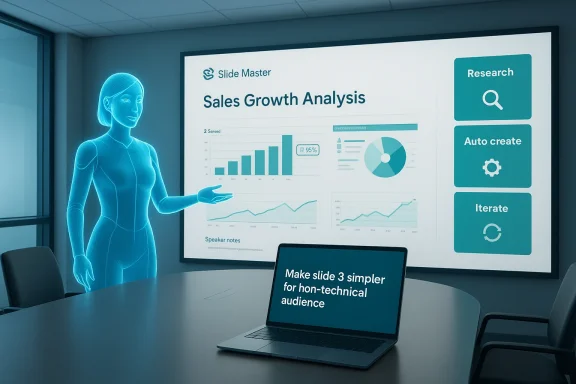
Microsoft’s latest demonstrations and customer-facing updates bring a simple but powerful idea into sharp relief: you can ask an AI to research a subject, auto-create a branded PowerPoint deck, and then iterate conversationally until the slides are presentation-ready. That end‑to‑end workflow — which Satya Nadella and Microsoft’s product teams have showcased in posts and demos this week — is not just incremental automation; it’s a new productivity pattern that combines agentic research, document synthesis, brand-aware formatting, and iterative human-in-the-loop refinement. The practical result is that the time-sink of building decks from scratch may be shifting from design and formatting work toward prompt design, verification, and governance.
Microsoft has been steadily embedding generative AI into Office for several years. The company positioned Microsoft 365 Copilot as a productivity layer that pulls together large language models, Microsoft Graph signals, and app‑level integrations to produce first drafts of documents — including PowerPoint slide decks — and then let users refine them. The feature set has moved from in‑pane chat helpers to agent modes and a chat‑first Office Agent that can perform multi‑step workflows: research, draft, apply templates, add visuals, and repeat. These capabilities have been discussed publicly since Microsoft’s Copilot announcements in 2023 and were expanded with a new push into “agentic” workflows in 2025–2026.
Microsoft’s recent product messaging — often demonstrated by senior executives — shows a specifically choreographed pattern:
This interplay — one-click generation followed by multi-turn human feedback — is what Microsoft calls a “vibe working” pattern: the AI does the heavy lifting, but humans steer, verify, and finalize.
If your organization is planning a Copilot rollout:
Adoption will be uneven. In small teams and low‑risk internal scenarios, Copilot’s auto‑create/iterate pattern will save time immediately. In regulated industries and customer‑facing contexts, the AI becomes a force multiplier only when paired with robust controls and human judgement. The headline — “research, auto‑create, iterate” — captures the promise. Delivering that promise responsibly is the operational challenge that follows.
Source: blockchain.news Microsoft Copilot for PowerPoint Shows Workflow Breakthrough: Research, Auto-Create Slides, and Iterate with AI | AI News Detail
 Background / Overview
Microsoft has been steadily embedding generative AI into Office for several years. The company positioned Microsoft 365 Copilot as a productivity layer that pulls together large language models, Microsoft Graph signals, and app‑level integrations to produce first drafts of documents — including PowerPoint slide decks — and then let users refine them. The feature set has moved from in‑pane chat helpers to agent modes and a chat‑first Office Agent that can perform multi‑step workflows: research, draft, apply templates, add visuals, and repeat. These capabilities have been discussed publicly since Microsoft’s Copilot announcements in 2023 and were expanded with a new push into “agentic” workflows in 2025–2026.Microsoft’s recent product messaging — often demonstrated by senior executives — shows a specifically choreographed pattern:
- Ask an agent to research a topic and summarize findings.
- Convert the research into an outline and auto-generate slides with speaker notes.
- Iterate by asking in plain English for changes (e.g., “add a slide with competitor market share” or “make slide 3 simpler for a non-technical audience”).
- Validate or augment outputs with enterprise data (SharePoint, Dynamics, internal databases) when governance and accuracy are required.
How the Copilot → PowerPoint workflow actually works
1. Agentic research: “Find me the facts”
The workflow usually begins in Copilot Chat or a Copilot Researcher agent. You provide a short brief — e.g., “Research the US electric-vehicle charging market 2021–2025 and list three growth drivers.” The agent performs multi‑turn retrieval:- It queries web sources and indexed enterprise data.
- It consolidates facts, extracts figures, and suggests graphs or data tables.
- It surfaces citations and source snippets so users can verify claims before insertion into slides.
2. Auto‑create: “Make a 10‑slide deck”
Once research completes, the Office Agent can convert the structured research into slides. The generation step includes:- An outline (titles, key bullets).
- Speaker notes (1–2 sentences per slide).
- Visual suggestions: charts derived from numerical findings, suggested images, or generated visuals that match the deck’s tone.
- Brand and template application: Copilot reads the Slide Master or tenant branding settings and applies corporate fonts, colors, and logo placement.
3. Iterate: “Make it shorter, cite the data, and add a market chart”
Iteration happens conversationally. You ask Copilot to refine language, change the audience level, add supporting data visualizations, or recombine slides. The agent responds within the file: it modifies slide content, suggests alternative visuals, or injects follow‑up research to fill gaps. The multi‑turn design means you can micro‑edit or request wholesale rewrites without leaving the deck.This interplay — one-click generation followed by multi-turn human feedback — is what Microsoft calls a “vibe working” pattern: the AI does the heavy lifting, but humans steer, verify, and finalize.
Why this matters: Productivity, economics, and competitive positioning
- Time savings: Generating a first draft of a deck in minutes rather than hours removes repetitive formatting and research aggregation work, translating to tangible time savings for knowledge workers who face heavy meeting and preparation loads. Microsoft’s Work Trend Index documents sustained increases in meeting volume and time spent on “work about work,” supporting the business case for automation.
- Economic scale: Analyst firms estimate very large economic upside from generative AI. McKinsey modeled generative AI’s potential at roughly $2.6–$4.4 trillion annually across use cases; Gartner and other consultancies project meaningful automation of knowledge tasks in the near term. Those macro forecasts frame Copilot’s slide‑generation workflow as one of many productivity multipliers enterprises will monetize.
- Market reach and lock‑in: Integrating generative AI inside the world’s dominant productivity suite offers Microsoft a strong distribution advantage. Organizations already standardizing on Microsoft 365 can adopt Copilot features with fewer integration hurdles than a third‑party tool. That advantage matters both for enterprise buyers and for Microsoft’s licensing strategy (consumer Copilot Pro vs. Microsoft 365 Copilot tiers).
Technical underpinnings and practical limits
Models, retrieval, and multimodal composition
The system pairs large language models with retrieval systems and connectors to enterprise sources. For numeric data, Copilot can programmatically create charts from tabular results (Excel, Power BI, or built-in visualization engines). For imagery, it can recommend or generate visuals that match a slide’s message. The agent architecture is multi‑model and — in many enterprise deployments — multi‑vendor, allowing administrators to choose different backend models for different workloads.Why human oversight remains essential
Generative models are probabilistic. They produce plausible text, but plausibility is not the same as accuracy. In practice, Copilot’s slide generation can:- Omit fine print or caveats present in the source.
- Synthesize numbers incorrectly if source data is inconsistent.
- Produce visuals that look right but misrepresent aggregated metrics.
Practical use cases across industries
- Sales and marketing: Rapidly produce customer‑tailored pitch decks and update them with the latest metrics before calls. Early adopters report faster go‑to‑market cycles and more A/B testing of messaging. (Impact varies by how well org data is integrated.)
- Consulting and professional services: Create client-ready proposals and iterate on tone and scope during calls. The time saved on document prep compounds across billable hours.
- Education and training: Instructors can auto-generate lesson slides from syllabi or research summaries, then refine them for different class levels. Careful verification is required to avoid passing along errors.
- Internal decision-making: Teams can convert meeting notes into sliding narratives and follow up with deeper research tasks, reducing the time between idea and stakeholder presentation.
Governance, privacy and compliance: the unavoidable checklist
Deploying a research-to‑deck workflow at scale raises thorny governance questions. Practical IT checklists should include:- Data residency and encryption: Ensure connectors to SharePoint, OneDrive, and other stores respect tenant controls and encryption-at-rest/in-transit policies.
- Access controls and consent: Limit what internal and external data Copilot can access when producing slides that may be shared outside the organization.
- Auditing and provenance: Keep an auditable trail of sources Copilot used during research and generation, so legal teams can verify claims when required.
- Regulatory compliance: The EU AI Act establishes phased compliance dates and rules around high‑risk systems; organizations operating in Europe should map Copilot use cases against the Act’s risk categories and plan documentation and impact assessments accordingly. (Note: the AI Act entered into force with staggered enforcement dates; many obligations for “high‑risk” applications phase in through 2026–2027.)
- Data minimization and classification: Prevent the agent from exfiltrating protected health information, regulated financial data, or other controlled content to models or services that lack contractual safeguards.
Strengths and practical benefits
- Speed and repeatability: Generating consistent, branded decks in minutes reduces manual formatting and alignment work across teams. This is especially valuable for large organizations that must adhere to strict brand standards.
- Democratization of design: Non-designers can produce visually credible slides quickly; PowerPoint’s Slide Master and Copilot’s brand awareness reduce reliance on scarce design resources.
- Conversational iteration: The ability to refine content in plain English without manual edits accelerates the authoring loop and makes versioning more fluid.
- Integration with enterprise data: Copilot’s connectors can surface internal research, CRM metrics, and Power BI visuals to make decks factual and context-aware when configured properly.
Risks, failure modes, and mitigation strategies
- Hallucinations and factual drift
- Risk: The model invents data, misattributes statistics, or miscomputes aggregates.
- Mitigation: Require provenance checks; use the Researcher agent’s citations; gate all external-facing decks with human review and a mandatory “verify sources” checklist.
- Over-reliance and atrophy of critical thinking
- Risk: Teams may accept polished AI outputs without scrutiny, eroding domain expertise.
- Mitigation: Preserve a reviewer role; train users on prompt design and fact-check routines; label AI-generated content when appropriate.
- Data leakage and regulatory exposure
- Risk: Sensitive enterprise data could be used in model prompts or inadvertently exposed in auto-generated content.
- Mitigation: Use tenant-level protections, disable external web research for sensitive workloads, and run formal Data Protection Impact Assessments (DPIAs) where required by law.
- Brand and compliance drift
- Risk: Generated slides violate legal disclaimers, regulatory copy, or approved messaging.
- Mitigation: Integrate approved content libraries, enforce Slide Master templates, and create governance rules in Copilot Studio for allowed phrasing.
- Operational brittleness
- Risk: Early adopters report unpredictable behavior on complex prompts or when attempting advanced formatting; iterative runs may degrade layout fidelity on some clients.
- Mitigation: Test across client platforms (desktop, web, mobile), and include fallback manual processes for critical presentations. Community reports indicate variability across devices and versions, so pilot broadly before enterprise rollout.
Licensing, cost signals, and what IT buyers should know
Microsoft offers several Copilot licensing models: consumer Copilot Pro (an individual subscription introduced at $20/month), and enterprise Microsoft 365 Copilot SKUs for organizations (business‑grade offerings with different per‑user price points and tenant governance features). IT teams must evaluate not only per‑seat cost but also expected productivity uplift, training needs, and governance overhead. In many deployments, the true cost lies in onboarding, policy design, and quality‑control workflows rather than license fees alone.If your organization is planning a Copilot rollout:
- Map use cases to risk categories (internal-only docs vs. public presentations).
- Pilot with a few teams and measure time saved and error rates.
- Build workforce training on prompt engineering and verification best practices.
- Integrate DLP and governance before scaling.
Adoption reality: hype versus day‑to‑day experience
Public demos and executive posts show glossy workflows; user forums and early deployments reveal a more pragmatic picture. Real customers report that Copilot accelerates first drafts and ideation, but the quality of final decks depends on input quality, model tuning, and enterprise data integration. In many cases, users still need to curate visuals, recheck numbers, and reformat outputs to meet corporate standards. Community threads and internal pilot notes repeatedly underscore that Copilot is best used as a collaborator — a productivity scaffold — not as an autopilot for final delivery.What IT leaders should do now
- Run a short governance sprint: classify slide-generation use cases, set DLP rules, and define escalation paths for suspicious outputs.
- Design verification playbooks: a lightweight checklist that every auto-generated deck must pass before external distribution.
- Train users: short workshops on prompt best practices, reading citations, and spotting plausible-sounding errors.
- Measure outcomes: track time-to-first-draft, review time saved, and error correction rates across pilot groups. Use that data to calculate ROI and refine licensing buys.
The near-term outlook: iterating the AI that iterates
The research→deck→iterate workflow is a natural place for further innovation:- Better grounding: tighter model retrieval loops that attach stronger provenance and allow role-based source whitelists will reduce hallucinations.
- Domain-specialized agents: verticalized agents (e.g., medical, legal, financial) will provide safer, more accurate slide content for regulated sectors.
- Co-authoring analytics: systems that track how many edits are human vs. AI could help compliance teams and measure trust in outputs.
- Offline/on-device capabilities: as model footprints shrink and on-device inference improves, some teams may prefer local-only agents to limit data flow to cloud services.
Conclusion: an operational shift, not a one‑click miracle
Microsoft’s Copilot-enabled PowerPoint workflow marks a step change in how knowledge work is composed: AI can research, draft, and refine slide decks far faster than manual processes. The practical value is real — and the productivity gains can be substantial — but realizing them requires thoughtful governance, human verification, and realistic expectations. Enterprises that treat Copilot as a collaborative assistant and invest in the people and processes around it will unlock faster cycle times, better storytelling, and clearer decision-making. Organizations that skip verification, ignore governance, or assume outputs are authoritative will expose themselves to avoidable risk.Adoption will be uneven. In small teams and low‑risk internal scenarios, Copilot’s auto‑create/iterate pattern will save time immediately. In regulated industries and customer‑facing contexts, the AI becomes a force multiplier only when paired with robust controls and human judgement. The headline — “research, auto‑create, iterate” — captures the promise. Delivering that promise responsibly is the operational challenge that follows.
Source: blockchain.news Microsoft Copilot for PowerPoint Shows Workflow Breakthrough: Research, Auto-Create Slides, and Iterate with AI | AI News Detail
