

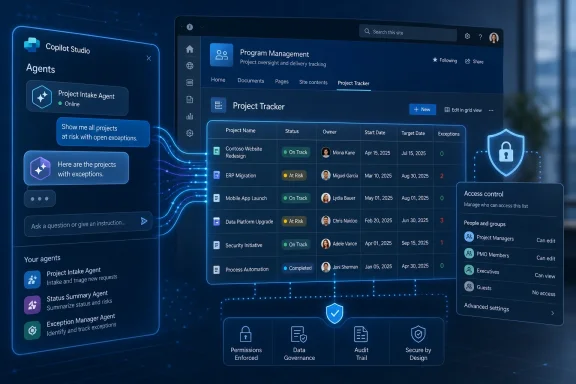
Microsoft added Microsoft 365 Roadmap item 566859 on July 7, 2026, saying Copilot Studio agents will be able to use SharePoint lists as knowledge sources in preview in July 2026 and reach general availability in September 2026. The feature sounds modest, almost clerical, until you consider where a great deal of Microsoft 365 business data actually lives. This is not merely another connector checkbox; it is Microsoft admitting that enterprise AI cannot live on documents alone. If Copilot Studio agents are going to answer operational questions, they need access to the rows, columns, statuses, owners, dates, and exceptions that run the business.
That is the real importance of the roadmap entry. Microsoft’s own description frames the feature around tasks, inventory, customers, and operations, which is another way of saying that Copilot Studio is moving closer to the messy middle of enterprise work. SharePoint lists have long been the “good enough database” of Microsoft 365: not glamorous, not always beautifully governed, but everywhere. Bringing them natively into Copilot Studio gives Microsoft’s agent story a more credible path from demo-friendly summarization toward actual business execution.
For the last two years, the public face of Copilot has been document-heavy. It summarizes Teams meetings, drafts Word documents, scans email threads, and pulls signals from files in SharePoint and OneDrive. That is useful, but it is not how many internal workflows are actually tracked. The status of a shipment, the owner of a support escalation, the next inspection date for a facility, or the approved vendor list is often sitting in a Microsoft List backed by SharePoint.
That matters because structured business data behaves differently from prose. A policy document can tell an agent what the vacation rules are; a list can tell it who is out next week, which requests are pending, and which manager owns the approval. A procedure manual explains how inventory should be handled; a list says what is actually in stock. The difference is the difference between general knowledge and operational awareness.
Microsoft’s roadmap language is careful. It says customers can “ground AI responses” in up-to-date, business-critical data without manual movement or complex integrations. That is exactly the phrase enterprise buyers want to hear, because the alternative has usually meant exporting lists, building Power Automate flows, creating Dataverse tables, wiring Graph calls, or paying for custom retrieval infrastructure. Native support lowers the activation energy.
The catch is that lowering the activation energy also raises the governance burden. SharePoint lists are useful precisely because business users can create and modify them quickly. That same flexibility can produce duplicated fields, inconsistent statuses, stale rows, broken lookup columns, and permissions inherited from sites nobody has audited in years. Copilot Studio will not magically turn a chaotic list into a trustworthy system of record.
IT pros know the pattern. A department needs to track assets, approvals, vendors, incidents, onboarding tasks, contract renewals, or field inspections. A full application would take too long. A spreadsheet is too fragile. A SharePoint list becomes the compromise, then the compromise becomes the process, and the process becomes business-critical before anyone writes it down as such.
That is why this Copilot Studio feature has more strategic weight than its narrow wording suggests. If agents can reason over SharePoint list data, they can answer questions that previously required either a human who knew where the list was or a custom app that queried it. “Which open customer escalations have no owner?” is not a document question. “Which laptops are assigned to employees who left last month?” is not a file-search question. These are list-shaped questions.
Microsoft Learn documentation for Copilot Studio already describes SharePoint lists as tabular data that can be used by agents as a knowledge source, with the agent connecting to current data and using the user’s SharePoint credentials. That implementation detail is central. Microsoft is not pitching a one-time ingestion path where stale copies are dumped into an AI index; it is positioning lists as live enterprise context.
The architecture implication is simple: Copilot Studio wants to sit closer to the data people already use, rather than forcing every business process into a purpose-built AI repository. That is pragmatic Microsoft. It is also a bet that organizations will prefer incremental AI adoption inside familiar Microsoft 365 boundaries over grand data-platform rewrites.
That distinction matters for agent behavior. When an agent reads a policy document, it can summarize, explain, or cite general rules. When it reads a list, it may be expected to compare values, filter rows, identify missing data, infer priorities, or recommend action. The user expectation shifts from “tell me what this says” to “tell me what I should do.”
This is where Copilot Studio becomes more interesting and more dangerous. An agent grounded in a customer issues list might help a support manager identify unresolved cases that are older than 48 hours. The same agent might produce misleading confidence if fields are incomplete, date formats are inconsistent, or the list uses a status taxonomy that only one team understands. Structured data looks authoritative even when its maintenance is sloppy.
Microsoft’s roadmap language leans on accuracy and context awareness, and that is fair as far as it goes. A native list connection should be more accurate than forcing users to describe the data manually or exporting it into a disconnected file. But accuracy is not just a function of connector quality. It is also a function of list design, permission boundaries, metadata hygiene, and user expectations.
The term grounding should not be read as a magic spell. Grounding gives the model something to anchor on; it does not guarantee that the anchor is clean, complete, or interpreted correctly. For IT teams, the work starts before the first agent is published.
Real-time grounding is valuable because list data often changes frequently. A stale HR policy may be inconvenient; a stale operations list can cause immediate mistakes. If an agent tells a warehouse supervisor that an item is available when it was reserved ten minutes earlier, the failure is not academic. The closer AI gets to operational workflows, the less tolerance users have for stale context.
But real-time access also means live mistakes propagate quickly. If a user accidentally changes a field, deletes rows, or mislabels a status, the agent may reflect that bad data immediately. Traditional reporting systems often have a data pipeline, a refresh schedule, or a validation layer between operational entry and executive visibility. A Copilot agent connected directly to SharePoint lists may shorten that distance dramatically.
That has benefits. It also means administrators should think carefully about which lists deserve agent access. Not every list that is useful to a team is ready to become a conversational data source. Lists with unclear ownership, ad hoc columns, overloaded fields, or permissive editing rights may produce answers that are technically grounded but operationally unreliable.
In other words, the feature shifts some of the burden from integration engineering to information architecture. Microsoft is reducing the need to move data. It is not removing the need to govern it.
Permission trimming is essential because SharePoint lists often contain mixed-sensitivity data. A project tracker may include confidential vendors. An asset list may expose device assignments. A customer operations list may include account names, renewal risks, or internal notes. If an agent can answer across that data, it must respect the same access boundaries users already have.
The good news is that Microsoft has a mature permission model to lean on. The bad news is that SharePoint permissions are only as clean as the tenant they live in. In many organizations, inheritance has been broken for years, owners have changed roles, broad groups have accumulated access, and “temporary” sharing exceptions have become permanent.
Copilot makes those old mistakes more visible. A user who technically had access to a list but never knew where to find it might now discover its contents through a conversational agent. That is not a Copilot-specific security bypass; it is a usability layer revealing existing authorization decisions. For auditors and admins, that distinction may not reduce the urgency.
This is the familiar Microsoft 365 Copilot governance story in a more operational form. AI does not merely create new risk; it compresses the distance between permissions and discoverability. SharePoint list support in Copilot Studio will reward tenants that have invested in access hygiene and punish those that treated SharePoint as a bottomless shared drive with columns.
The row guidance is particularly important. Microsoft’s documentation warns that very large lists can affect quality and latency, and the quotas page lays out limits involving total lists and rows. This is not a replacement for a data warehouse, a transactional application, or a carefully modeled Dataverse environment. It is a way to make common structured Microsoft 365 data available to agents without forcing every team into heavier infrastructure.
That distinction should guide expectations. If your list tracks 600 facilities, 2,000 assets, or 5,000 customer onboarding tasks, the feature may be exactly the right fit. If your “list” is a sprawling pseudo-database with complex lookups, attachments, overloaded columns, and six years of historical rows, you may be asking Copilot Studio to do what a proper application architecture should handle.
The lack of support for reasoning over attachments in list columns is also worth noting. Many teams use list items as containers for supporting files, photos, PDFs, or approvals. If the agent can reason over the row but not the attachment contents, users may get a partial picture. That is not a deal-breaker, but it needs to be explained before rollout.
The same goes for list views. Business users often rely on views to define what matters: open items, my tasks, overdue renewals, high-risk vendors. If the agent does not treat a specific view as the knowledge source, makers need to design lists and descriptions carefully so the agent understands the intended context. Otherwise, conversational convenience may blur distinctions the business built into the interface.
SharePoint list support narrows that gap. A maker building an IT asset assistant can point it at a device inventory list. A facilities team can ground an agent in inspection schedules. A sales operations team can connect a territory assignment list. A project management office can expose portfolio status without creating a bespoke dashboard for every question.
This is where Microsoft’s low-code and AI strategies overlap. Power Platform already taught organizations to tolerate, and sometimes celebrate, departmental solutions built close to the business. Copilot Studio adds a conversational layer to that model. SharePoint lists are the natural bridge because they are already the structured substrate of many low-code workflows.
There is a danger, however, in treating this as a pure maker empowerment story. The easier it becomes to connect agents to business data, the more likely organizations are to see agent sprawl. Ten teams may build ten agents over similar lists with inconsistent instructions, names, security assumptions, and answer quality. The problem will not be that Copilot Studio is too hard; it may be that it is easy enough to distribute risk.
That is why enterprise IT should not wait until September general availability to develop patterns. Preview periods are not just for checking whether a feature works. They are for deciding which data sources are suitable, what naming conventions agents should use, who approves publication, and how answer quality is tested before employees rely on it.
Microsoft’s advantage is distribution. SharePoint, Teams, Outlook, Office, Entra ID, Power Platform, and Microsoft Graph give it a dense enterprise surface area. The company does not need to persuade customers to move all their operational data into a new AI-native platform if it can make existing Microsoft 365 data usable by agents. SharePoint list support is a small but telling example of that strategy.
Competitors can point to stronger developer tooling, cleaner retrieval architectures, or more model flexibility. Microsoft can point to the fact that the project tracker, procurement list, and field operations log are already in the tenant. In many organizations, proximity wins. The best AI tool is often the one that can safely reach the data without a six-month integration project.
Still, Microsoft’s advantage comes with baggage. SharePoint is ubiquitous, but it is also unevenly governed. Power Platform is flexible, but it can generate shadow IT. Copilot Studio is approachable, but agent behavior can be difficult for non-experts to evaluate rigorously. The same installed base that gives Microsoft leverage also gives it messy real-world edge cases.
That is why this roadmap entry should be read as part of Microsoft’s broader agentic push, not as an isolated SharePoint feature. The company wants Copilot agents to become workplace interfaces for data and action. To get there, it has to make them fluent not only in documents and meetings, but in the structured lists that quietly run departments.
The first question is not “Can Copilot read this list?” It is “Should employees trust an agent’s answer based on this list?” That shifts evaluation from connector functionality to business reliability. If the answer depends on fields that are optional, inconsistently maintained, or only meaningful to a small group, the agent may disappoint even if the integration performs exactly as designed.
Administrators should also review permissions before connecting lists. This is tedious work, but it is the kind of tedious work that prevents awkward surprises. If a list contains data that would be uncomfortable to surface through a conversational interface, its permissions and content model deserve scrutiny before an agent makes it more discoverable.
Makers should pay attention to descriptions as well. Microsoft’s documentation emphasizes that detailed knowledge-source descriptions help generative orchestration. That may sound like UI guidance, but it is really an authoring discipline. A list named “Tracker” with a vague description is asking the agent to infer too much. A list described as “current open facilities maintenance requests, including priority, assigned technician, building, due date, and completion status” gives the system a much better fighting chance.
Finally, preview testing should include adversarial questions. Ask for filtered results. Ask about missing data. Ask questions that should be denied by permissions. Ask for summaries that cross multiple fields. Ask what changed recently, if the list supports that scenario. The point is not to prove the demo works; it is to discover where users might overtrust the answer.
Once agents can reason over list data, users will expect them to act on it. They will want to update a status, assign an owner, create a follow-up task, trigger an approval, or notify a team. Some of that can already be built through Power Platform patterns, but native knowledge support makes the read side more accessible and makes action-oriented scenarios easier to imagine.
That future will force sharper distinctions between answer, recommendation, and action. An agent that says “these five assets are overdue for inspection” is one thing. An agent that schedules inspections or escalates noncompliance is another. SharePoint lists are often close to business process, and business process is where AI governance becomes concrete.
The best version of this feature will make Copilot Studio feel less like a chatbot builder and more like an interface layer for everyday operations. The worst version will create confident agents over poorly maintained lists and leave IT to explain why “grounded” did not mean “correct.” Both outcomes are plausible, and the difference will depend less on Microsoft’s marketing than on tenant governance, maker discipline, and realistic rollout plans.
Microsoft’s roadmap dates also matter because they give organizations a short runway. Preview in July 2026 means testing is imminent, and September 2026 general availability means production decisions could arrive quickly. That is a fast cycle for a feature that may touch sensitive operational data.
That is the real importance of the roadmap entry. Microsoft’s own description frames the feature around tasks, inventory, customers, and operations, which is another way of saying that Copilot Studio is moving closer to the messy middle of enterprise work. SharePoint lists have long been the “good enough database” of Microsoft 365: not glamorous, not always beautifully governed, but everywhere. Bringing them natively into Copilot Studio gives Microsoft’s agent story a more credible path from demo-friendly summarization toward actual business execution.
 Microsoft’s Agent Pitch Finally Meets the Spreadsheet-Shaped Enterprise
For the last two years, the public face of Copilot has been document-heavy. It summarizes Teams meetings, drafts Word documents, scans email threads, and pulls signals from files in SharePoint and OneDrive. That is useful, but it is not how many internal workflows are actually tracked. The status of a shipment, the owner of a support escalation, the next inspection date for a facility, or the approved vendor list is often sitting in a Microsoft List backed by SharePoint.That matters because structured business data behaves differently from prose. A policy document can tell an agent what the vacation rules are; a list can tell it who is out next week, which requests are pending, and which manager owns the approval. A procedure manual explains how inventory should be handled; a list says what is actually in stock. The difference is the difference between general knowledge and operational awareness.
Microsoft’s roadmap language is careful. It says customers can “ground AI responses” in up-to-date, business-critical data without manual movement or complex integrations. That is exactly the phrase enterprise buyers want to hear, because the alternative has usually meant exporting lists, building Power Automate flows, creating Dataverse tables, wiring Graph calls, or paying for custom retrieval infrastructure. Native support lowers the activation energy.
The catch is that lowering the activation energy also raises the governance burden. SharePoint lists are useful precisely because business users can create and modify them quickly. That same flexibility can produce duplicated fields, inconsistent statuses, stale rows, broken lookup columns, and permissions inherited from sites nobody has audited in years. Copilot Studio will not magically turn a chaotic list into a trustworthy system of record.
SharePoint Lists Were Always Databases Wearing Business Casual
Microsoft Lists and SharePoint lists occupy an odd place in the Microsoft 365 stack. They are not SQL Server, not Dataverse, and not Excel, though they borrow some of the habits and expectations of all three. They are approachable enough for department-level teams and structured enough to support real workflow. That combination is why they became so common.IT pros know the pattern. A department needs to track assets, approvals, vendors, incidents, onboarding tasks, contract renewals, or field inspections. A full application would take too long. A spreadsheet is too fragile. A SharePoint list becomes the compromise, then the compromise becomes the process, and the process becomes business-critical before anyone writes it down as such.
That is why this Copilot Studio feature has more strategic weight than its narrow wording suggests. If agents can reason over SharePoint list data, they can answer questions that previously required either a human who knew where the list was or a custom app that queried it. “Which open customer escalations have no owner?” is not a document question. “Which laptops are assigned to employees who left last month?” is not a file-search question. These are list-shaped questions.
Microsoft Learn documentation for Copilot Studio already describes SharePoint lists as tabular data that can be used by agents as a knowledge source, with the agent connecting to current data and using the user’s SharePoint credentials. That implementation detail is central. Microsoft is not pitching a one-time ingestion path where stale copies are dumped into an AI index; it is positioning lists as live enterprise context.
The architecture implication is simple: Copilot Studio wants to sit closer to the data people already use, rather than forcing every business process into a purpose-built AI repository. That is pragmatic Microsoft. It is also a bet that organizations will prefer incremental AI adoption inside familiar Microsoft 365 boundaries over grand data-platform rewrites.
The Word “Knowledge” Is Doing Too Much Work
Microsoft calls SharePoint lists a knowledge source, but that term can obscure what is really happening. A list is not knowledge in the same way a help article or policy manual is knowledge. It is state. It is a snapshot of work, ownership, inventory, compliance, risk, and exception handling.That distinction matters for agent behavior. When an agent reads a policy document, it can summarize, explain, or cite general rules. When it reads a list, it may be expected to compare values, filter rows, identify missing data, infer priorities, or recommend action. The user expectation shifts from “tell me what this says” to “tell me what I should do.”
This is where Copilot Studio becomes more interesting and more dangerous. An agent grounded in a customer issues list might help a support manager identify unresolved cases that are older than 48 hours. The same agent might produce misleading confidence if fields are incomplete, date formats are inconsistent, or the list uses a status taxonomy that only one team understands. Structured data looks authoritative even when its maintenance is sloppy.
Microsoft’s roadmap language leans on accuracy and context awareness, and that is fair as far as it goes. A native list connection should be more accurate than forcing users to describe the data manually or exporting it into a disconnected file. But accuracy is not just a function of connector quality. It is also a function of list design, permission boundaries, metadata hygiene, and user expectations.
The term grounding should not be read as a magic spell. Grounding gives the model something to anchor on; it does not guarantee that the anchor is clean, complete, or interpreted correctly. For IT teams, the work starts before the first agent is published.
Real-Time Access Changes the Risk Model
The most important technical promise is not simply that Copilot Studio can read SharePoint lists. It is that the connection is described in Microsoft’s documentation as real-time, using current data for queries and reasoning. That is a meaningful distinction from content ingestion models that refresh every few hours or depend on copied data.Real-time grounding is valuable because list data often changes frequently. A stale HR policy may be inconvenient; a stale operations list can cause immediate mistakes. If an agent tells a warehouse supervisor that an item is available when it was reserved ten minutes earlier, the failure is not academic. The closer AI gets to operational workflows, the less tolerance users have for stale context.
But real-time access also means live mistakes propagate quickly. If a user accidentally changes a field, deletes rows, or mislabels a status, the agent may reflect that bad data immediately. Traditional reporting systems often have a data pipeline, a refresh schedule, or a validation layer between operational entry and executive visibility. A Copilot agent connected directly to SharePoint lists may shorten that distance dramatically.
That has benefits. It also means administrators should think carefully about which lists deserve agent access. Not every list that is useful to a team is ready to become a conversational data source. Lists with unclear ownership, ad hoc columns, overloaded fields, or permissive editing rights may produce answers that are technically grounded but operationally unreliable.
In other words, the feature shifts some of the burden from integration engineering to information architecture. Microsoft is reducing the need to move data. It is not removing the need to govern it.
Permissions Are the Feature’s Quiet Center of Gravity
Microsoft’s documentation says users are authenticated with their SharePoint credentials before the agent provides a response, and published agents using generative answers make calls on behalf of the user chatting with the agent. That is exactly how this should work. Anything else would be an enterprise security problem waiting to happen.Permission trimming is essential because SharePoint lists often contain mixed-sensitivity data. A project tracker may include confidential vendors. An asset list may expose device assignments. A customer operations list may include account names, renewal risks, or internal notes. If an agent can answer across that data, it must respect the same access boundaries users already have.
The good news is that Microsoft has a mature permission model to lean on. The bad news is that SharePoint permissions are only as clean as the tenant they live in. In many organizations, inheritance has been broken for years, owners have changed roles, broad groups have accumulated access, and “temporary” sharing exceptions have become permanent.
Copilot makes those old mistakes more visible. A user who technically had access to a list but never knew where to find it might now discover its contents through a conversational agent. That is not a Copilot-specific security bypass; it is a usability layer revealing existing authorization decisions. For auditors and admins, that distinction may not reduce the urgency.
This is the familiar Microsoft 365 Copilot governance story in a more operational form. AI does not merely create new risk; it compresses the distance between permissions and discoverability. SharePoint list support in Copilot Studio will reward tenants that have invested in access hygiene and punish those that treated SharePoint as a bottomless shared drive with columns.
The Limits Tell Us What Microsoft Is Really Shipping
The official Copilot Studio limits are revealing. Microsoft’s documentation says SharePoint list support has practical boundaries, including limits around the number of lists, row counts, attachment handling, list views, lookup columns, and guest-user scenarios. Those constraints are not embarrassing; they are the shape of a feature being productized for common business use rather than arbitrary enterprise-scale analytics.The row guidance is particularly important. Microsoft’s documentation warns that very large lists can affect quality and latency, and the quotas page lays out limits involving total lists and rows. This is not a replacement for a data warehouse, a transactional application, or a carefully modeled Dataverse environment. It is a way to make common structured Microsoft 365 data available to agents without forcing every team into heavier infrastructure.
That distinction should guide expectations. If your list tracks 600 facilities, 2,000 assets, or 5,000 customer onboarding tasks, the feature may be exactly the right fit. If your “list” is a sprawling pseudo-database with complex lookups, attachments, overloaded columns, and six years of historical rows, you may be asking Copilot Studio to do what a proper application architecture should handle.
The lack of support for reasoning over attachments in list columns is also worth noting. Many teams use list items as containers for supporting files, photos, PDFs, or approvals. If the agent can reason over the row but not the attachment contents, users may get a partial picture. That is not a deal-breaker, but it needs to be explained before rollout.
The same goes for list views. Business users often rely on views to define what matters: open items, my tasks, overdue renewals, high-risk vendors. If the agent does not treat a specific view as the knowledge source, makers need to design lists and descriptions carefully so the agent understands the intended context. Otherwise, conversational convenience may blur distinctions the business built into the interface.
Copilot Studio Becomes More Useful by Becoming Less Abstract
Copilot Studio’s strongest pitch has always been that business users and makers can build agents without starting from scratch as developers. The challenge has been that useful agents need useful context. A friendly natural-language interface is not enough if the agent cannot reach the systems where work lives.SharePoint list support narrows that gap. A maker building an IT asset assistant can point it at a device inventory list. A facilities team can ground an agent in inspection schedules. A sales operations team can connect a territory assignment list. A project management office can expose portfolio status without creating a bespoke dashboard for every question.
This is where Microsoft’s low-code and AI strategies overlap. Power Platform already taught organizations to tolerate, and sometimes celebrate, departmental solutions built close to the business. Copilot Studio adds a conversational layer to that model. SharePoint lists are the natural bridge because they are already the structured substrate of many low-code workflows.
There is a danger, however, in treating this as a pure maker empowerment story. The easier it becomes to connect agents to business data, the more likely organizations are to see agent sprawl. Ten teams may build ten agents over similar lists with inconsistent instructions, names, security assumptions, and answer quality. The problem will not be that Copilot Studio is too hard; it may be that it is easy enough to distribute risk.
That is why enterprise IT should not wait until September general availability to develop patterns. Preview periods are not just for checking whether a feature works. They are for deciding which data sources are suitable, what naming conventions agents should use, who approves publication, and how answer quality is tested before employees rely on it.
The SharePoint Connection Is Also a Competitive Signal
Microsoft is not building Copilot Studio in a vacuum. Every enterprise AI platform is trying to solve the same problem: how to connect large language models to company data without creating a security and compliance disaster. The market has moved beyond generic chatbots. The contest is now about grounded agents that can operate inside the systems people already use.Microsoft’s advantage is distribution. SharePoint, Teams, Outlook, Office, Entra ID, Power Platform, and Microsoft Graph give it a dense enterprise surface area. The company does not need to persuade customers to move all their operational data into a new AI-native platform if it can make existing Microsoft 365 data usable by agents. SharePoint list support is a small but telling example of that strategy.
Competitors can point to stronger developer tooling, cleaner retrieval architectures, or more model flexibility. Microsoft can point to the fact that the project tracker, procurement list, and field operations log are already in the tenant. In many organizations, proximity wins. The best AI tool is often the one that can safely reach the data without a six-month integration project.
Still, Microsoft’s advantage comes with baggage. SharePoint is ubiquitous, but it is also unevenly governed. Power Platform is flexible, but it can generate shadow IT. Copilot Studio is approachable, but agent behavior can be difficult for non-experts to evaluate rigorously. The same installed base that gives Microsoft leverage also gives it messy real-world edge cases.
That is why this roadmap entry should be read as part of Microsoft’s broader agentic push, not as an isolated SharePoint feature. The company wants Copilot agents to become workplace interfaces for data and action. To get there, it has to make them fluent not only in documents and meetings, but in the structured lists that quietly run departments.
The Admin Work Starts Before the Preview Button Appears
Organizations interested in the July preview should resist the temptation to begin with the shiniest use case. The best first pilots will be narrow, well-owned, and easy to validate. A clean task list with clear fields and active owners is a better candidate than a mission-critical operations list whose meaning depends on tribal knowledge.The first question is not “Can Copilot read this list?” It is “Should employees trust an agent’s answer based on this list?” That shifts evaluation from connector functionality to business reliability. If the answer depends on fields that are optional, inconsistently maintained, or only meaningful to a small group, the agent may disappoint even if the integration performs exactly as designed.
Administrators should also review permissions before connecting lists. This is tedious work, but it is the kind of tedious work that prevents awkward surprises. If a list contains data that would be uncomfortable to surface through a conversational interface, its permissions and content model deserve scrutiny before an agent makes it more discoverable.
Makers should pay attention to descriptions as well. Microsoft’s documentation emphasizes that detailed knowledge-source descriptions help generative orchestration. That may sound like UI guidance, but it is really an authoring discipline. A list named “Tracker” with a vague description is asking the agent to infer too much. A list described as “current open facilities maintenance requests, including priority, assigned technician, building, due date, and completion status” gives the system a much better fighting chance.
Finally, preview testing should include adversarial questions. Ask for filtered results. Ask about missing data. Ask questions that should be denied by permissions. Ask for summaries that cross multiple fields. Ask what changed recently, if the list supports that scenario. The point is not to prove the demo works; it is to discover where users might overtrust the answer.
The Small Roadmap Item That Says Where Microsoft 365 Is Going
The significance of SharePoint lists in Copilot Studio is not that Microsoft discovered structured data in 2026. It is that the company is steadily folding more of Microsoft 365’s work substrate into the agent layer. Files were the obvious beginning. Lists are the more revealing next step.Once agents can reason over list data, users will expect them to act on it. They will want to update a status, assign an owner, create a follow-up task, trigger an approval, or notify a team. Some of that can already be built through Power Platform patterns, but native knowledge support makes the read side more accessible and makes action-oriented scenarios easier to imagine.
That future will force sharper distinctions between answer, recommendation, and action. An agent that says “these five assets are overdue for inspection” is one thing. An agent that schedules inspections or escalates noncompliance is another. SharePoint lists are often close to business process, and business process is where AI governance becomes concrete.
The best version of this feature will make Copilot Studio feel less like a chatbot builder and more like an interface layer for everyday operations. The worst version will create confident agents over poorly maintained lists and leave IT to explain why “grounded” did not mean “correct.” Both outcomes are plausible, and the difference will depend less on Microsoft’s marketing than on tenant governance, maker discipline, and realistic rollout plans.
Microsoft’s roadmap dates also matter because they give organizations a short runway. Preview in July 2026 means testing is imminent, and September 2026 general availability means production decisions could arrive quickly. That is a fast cycle for a feature that may touch sensitive operational data.
The Lists That Deserve Agents Are the Lists That Already Deserve Governance
The practical lesson is not to connect everything. It is to identify the lists that are already treated as reliable sources of business truth, then use Copilot Studio to make them more accessible. If a list is not trusted today, adding an agent will not make it trustworthy tomorrow.- Organizations should begin with small, actively maintained SharePoint lists whose fields, owners, and permissions are already well understood.
- IT teams should review list permissions before enabling agent access, because Copilot can make previously obscure but technically accessible data much easier to discover.
- Makers should write precise knowledge-source descriptions so Copilot Studio understands what each list represents and when it should be used.
- Business owners should test answer quality against real operational questions, not just simple lookup prompts that make every demo look good.
- Large or complex lists with heavy lookup usage, attachments, or inconsistent metadata should be treated as candidates for cleanup or redesign before agent rollout.
- Preview deployments should document failure modes, including stale assumptions, missing fields, permission denials, and cases where the agent answers too broadly.
References
- Primary source: Microsoft 365 Roadmap
Published: 2026-07-07T23:01:01.6729014Z
Microsoft 365 Roadmap | Microsoft 365
The Microsoft 365 Roadmap lists updates that are currently planned for applicable subscribers. Check here for more information on the status of new features and updates.www.microsoft.com
- Official source: learn.microsoft.com
Microsoft 365 Roadmap | Microsoft 365
The Microsoft 365 Roadmap lists updates that are currently planned for applicable subscribers. Check here for more information on the status of new features and updates.learn.microsoft.com
- Official source: devblogs.microsoft.com
SharePoint Framework (SPFx) roadmap update – July 2026 - Microsoft 365 Developer Blog
June celebrates the announcement of upcoming SharePoint Copilot Apps, ships the quality-focused SPFx 1.23.2 release, and shares the roadmap for the AI era - shaped by your feedback.devblogs.microsoft.com - Official source: adoption.microsoft.com
- Official source: cdn-dynmedia-1.microsoft.com
- Related coverage: m365maps.com
