

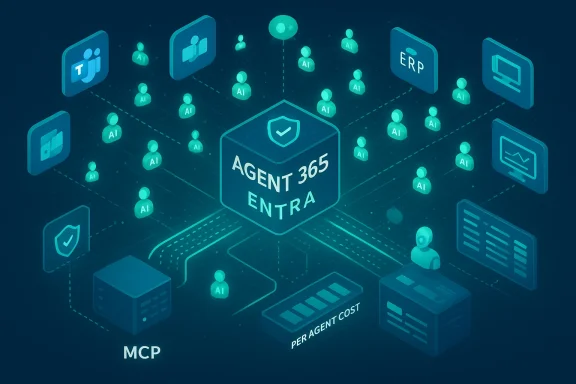
Microsoft’s Copilot effort has quietly passed a hinge point: what began as a conversational assistant that answered prompts has become a platform for autonomous digital coworkers—agents that watch, act, and coordinate without a human pulling the trigger each time. This is not incremental product evolution; it is a structural shift in how enterprise software will be used and governed. Over the last 12–18 months Microsoft has stitched together three capabilities—Copilot Studio’s agent-building surface, a cross-tenant governance/control plane (Agent 365 and Entra Agent IDs), and a standards-backed integration layer (Model Context Protocol)—that together let organizations create fleets of agents that can be triggered by events, operate across legacy and modern stacks, and be managed like first-class identities. The result: AI that no longer merely generates text on demand but executes business processes as a persistent background actor.
The move to agentic AI replaces a user-initiated, chat-first interaction model with an event-driven, autonomous execution model. Microsoft and other vendors now let you define a goal, declare permitted tools and data sources, and attach policy and identity at the agent level. From there the agent decides what steps are needed and carries them out—either end-to-end or up to defined approval gates.
This platformized approach rests on a handful of concrete technical and commercial shifts that shipped in 2024–2025 and have expanded since:
This is not magic; it is a blend of browser/desktop automation primitives, screenshot-based verification, and LLM-guided decisioning to recover from UI drift. But from a business perspective it collapses the barrier to automation for legacy applications: if an agent can operate the UI like a human, you can automate end-to-end workflows without replacing systems.
That said, the precise model families and performance characteristics vary across vendors and regions, and some claims about the latest model iterations and their capabilities remain fast-moving; organizations must test models in their own contexts.
Microsoft has already introduced consumption-based PAYGO meters and prepaid credit packs for Copilot agents. This shift opens the door to new billing units—agent runs, actions executed, or outcomes delivered—and invites packaging ideas like “digital labor credits.” However, terms such as “digital labor credits” used in industry commentary are not yet a standardized offering across vendors and should be considered experimental marketing terminology rather than an established market contract.
The upshot: finance teams will need new cost models. Chargebacks, departmental meters, and per-agent budgets will become operational necessities to prevent “runaway” consumption.
Microsoft’s scale advantage—its installed base across productivity apps—creates a distribution moat: agents built in Copilot Studio can integrate with corporate knowledge stored across Exchange, SharePoint, and Teams, and be surfaced inside the very apps employees use daily. Salesforce counters with tight CRM integration and industry-focused agent libraries. The competition is less about model quality alone and more about who owns the workflow and the data path between humans, systems, and agentic computation.
Mitigations include admin consent policies, strict conditional access, MFA on elevated flows, consent review processes, aggressive monitoring of app registrations, and integration with security tooling (Defender, Sentinel, Purview) to flag anomalous agent actions.
Effective guardrails include:
The hard problems ahead are trust and verification. Several industry voices are calling for “verified reasoning” primitives: mechanisms by which an agent can supply cross-checked evidence, proofs, or multi-source reconciliation before executing a high-value action. Expect:
Where Microsoft’s approach has been clever is in combining maker-friendly tooling (Copilot Studio), a governance control plane (Agent 365 + Entra), and integration standards (MCP). That combination reduces a major set of engineering barriers and accelerates adoption. But rapid adoption also amplifies risk: token theft attacks, misconfigured permissions, runaway consumption, and the erosion of on-the-job learning are not speculative—they have started appearing in industry reporting and security research.
Finally, not every claim circulating in vendor and marketing narratives is equally solid. Some phrases—digital labor credits, sweeping job-replacement statistics, or vendor-branded performance numbers—are marketing constructs or early-stage experiments and should be treated as hypotheses to be tested in your tenant, rather than settled industry facts.
For IT leaders the imperative is blunt: adopt with discipline. Build an inventory, assign identity and policy to every agent, govern consumption, and treat agent behavior as a first-class risk surface in your SOC. Those that combine the productivity gains with robust governance will turn a potentially chaotic wave of agent sprawl into a sustainable, strategic advantage—where your most productive “coworker” might not be a human, but a well-designed, well-governed autonomous agent.
Source: The Chronicle-Journal User
 Background / Overview
The move to agentic AI replaces a user-initiated, chat-first interaction model with an event-driven, autonomous execution model. Microsoft and other vendors now let you define a goal, declare permitted tools and data sources, and attach policy and identity at the agent level. From there the agent decides what steps are needed and carries them out—either end-to-end or up to defined approval gates.This platformized approach rests on a handful of concrete technical and commercial shifts that shipped in 2024–2025 and have expanded since:
- Copilot Studio became capable of building autonomous agents that respond to triggers and run in the background.
- Microsoft introduced the Model Context Protocol (MCP) into Copilot Studio to standardize how agents access external tools and knowledge servers.
- “Computer use” or UI automation capability lets agents operate graphical applications when no API exists.
- Agent-level identity and governance features—now bundled under the Agent 365 umbrella and tied to Entra and Purview—treat agents as auditable principals.
- Microsoft reported wide adoption: on its Q2 2025 earnings call the company stated that more than 160,000 organizations had used Copilot Studio and that customers had created hundreds of thousands of custom agents in a short period.
Technical anatomy: from prompts to generative actions
Copilot Studio: the maker surface
Copilot Studio is the low-code/no-code creator that makes agent-building accessible to non-developers and teams. It exposes:- A visual builder for flows and tasks.
- A tool registry where connectors, MCP servers, and UI automation actions are surfaced.
- Configurable triggers and orchestration modes (classic/topic-based or generative orchestration).
Model Context Protocol (MCP): a standard for tooling and data
One of the most consequential plumbing changes is the adoption and integration of the Model Context Protocol. MCP standardizes how an AI client (an agent host) can talk to private MCP servers that provide actions, resources, and prompts. For enterprise scenarios this matters:- You build an MCP server once for an internal system (ERP, CRM, data warehouse), secure it with standard OAuth flows, and any MCP-aware agent can call those tools.
- It reduces connector sprawl by replacing N×M bespoke integrations with a single, well-defined contract.
- Microsoft’s public Copilot Studio MCP support gives makers a marketplace of MCP-enabled connectors and tighter tracing/analytics for tool calls.
Computer Use (UI Automation): agents that “use” your apps
Historically the lack of modern APIs in many enterprise apps forced organizations to rely on fragile RPA scripts. Recent agent frameworks add computer-use capabilities: agents can inspect a GUI, click buttons, fill forms, and adapt if an element moves or a page layout changes.This is not magic; it is a blend of browser/desktop automation primitives, screenshot-based verification, and LLM-guided decisioning to recover from UI drift. But from a business perspective it collapses the barrier to automation for legacy applications: if an agent can operate the UI like a human, you can automate end-to-end workflows without replacing systems.
Deep reasoning & model choices
Modern agent platforms let designers pick orchestration models and runtime AI models tailored to the task. Microsoft has layered “deep reasoning” capabilities into agents and made higher-capacity reasoning models available inside Copilot Studio. The practical impact is that agents are better at long-range, multi-step planning: they can synthesize a situation, generate a plan with contingencies, ask clarifying questions when needed, and execute or escalate according to policy.That said, the precise model families and performance characteristics vary across vendors and regions, and some claims about the latest model iterations and their capabilities remain fast-moving; organizations must test models in their own contexts.
Business impact: productivity, licensing, and the economics of digital labor
From seat-based to outcome-based economics
A fundamental commercial tension is appearing: enterprise software has long been sold by seat or feature entitlement. Agents change the math because the value is in the outcome an agent produces, not in the human’s UI seat that viewed the result.Microsoft has already introduced consumption-based PAYGO meters and prepaid credit packs for Copilot agents. This shift opens the door to new billing units—agent runs, actions executed, or outcomes delivered—and invites packaging ideas like “digital labor credits.” However, terms such as “digital labor credits” used in industry commentary are not yet a standardized offering across vendors and should be considered experimental marketing terminology rather than an established market contract.
The upshot: finance teams will need new cost models. Chargebacks, departmental meters, and per-agent budgets will become operational necessities to prevent “runaway” consumption.
Where agents add immediate ROI
Teams adopting agents report gains in repeatable, low-judgment tasks:- Service desks: autonomous triage, routing, and case creation.
- Finance: auto-filing expense reports, matching invoices, and drafting POs for manager approval.
- HR: candidate triage, interview scheduling, and policy-compliant offer drafting.
- Supply chain: monitoring shipping statuses, researching alternatives, and generating procurement actions for review.
Competitive stakes: the Agent Wars
This isn’t just a Microsoft story. Salesforce, Amazon, Google, and specialist vendors have their own agent strategies. Salesforce’s Agentforce and subsequent product iterations explicitly position agents as “digital labor” for CRM-centric workflows, while Microsoft is competing by leveraging breadth—Copilot reaching into the Office/Teams/SharePoint surfaces that enterprises already use.Microsoft’s scale advantage—its installed base across productivity apps—creates a distribution moat: agents built in Copilot Studio can integrate with corporate knowledge stored across Exchange, SharePoint, and Teams, and be surfaced inside the very apps employees use daily. Salesforce counters with tight CRM integration and industry-focused agent libraries. The competition is less about model quality alone and more about who owns the workflow and the data path between humans, systems, and agentic computation.
Governance, security, and the risks of agent sprawl
The single greatest operational risk of autonomous agents is not a bad model but unmanaged agency. A fleet of thousands of agents acting asynchronously is an operational model we have not seen before at this scale.Agent identities and auditability
Microsoft’s Entra Agent ID and the Agent 365 control plane are direct responses to that risk. Treating agents like identities enables:- Fine-grained access controls and conditional access for agents.
- Lifecycle operations (sponsorship, provisioning, decommissioning).
- A single registry for discovery and auditing.
Common attack patterns and the “CoPhish” risk
Security researchers have demonstrated social-engineering vectors that exploit agent configuration and consent flows—what has been dubbed in some coverage as token theft attacks where attackers trick a tenant or user into granting OAuth permissions. The practical lesson is that agents expand the attack surface: an agent that can send email, open links, or call external tools is a powerful actor if it is hijacked.Mitigations include admin consent policies, strict conditional access, MFA on elevated flows, consent review processes, aggressive monitoring of app registrations, and integration with security tooling (Defender, Sentinel, Purview) to flag anomalous agent actions.
Hallucinations, agent drift, and compliance
Agents that can act produce a different class of hallucination: a model-generated but actionable change in transactional systems. If an agent decides an exception is acceptable and issues a payment or a procurement order, the consequences are real money lost or regulatory non-compliance. You cannot treat these failures as harmless conversational errors.Effective guardrails include:
- Structured human-in-the-loop checkpoints for high-risk actions.
- Policy-enforced decision boundaries (e.g., permit reassignments, but all payments over X require human approval).
- Verifiable evidence trails for every action: decision chain, inputs used, tools invoked, and artifacts produced.
- “Request for Information” or structured RFI patterns where agents pause and present a bounded form to reviewers.
Agent sprawl and lifecycle management
A typical large tenant can accumulate hundreds or thousands of agents—some created by central teams, some by federated business units, and some by low-code makers. Without lifecycle processes, organizations will face:- Shadow agents that sidestep governance.
- Cost overruns from orphaned agents running in the background.
- Compliance blind spots when agents access regulated data sources.
Labor market and organizational implications
Autonomous agents will displace some entry-level tasks and reshape first-job experiences. If agents handle triage, scheduling, basic reporting, and monitoring, where do new hires learn business processes? There are three likely adjustments:- Junior hires will need more mentorship and rotational “learning by observation” programs to surface complex domain knowledge that agents can’t easily replicate.
- Career ladders will shift to emphasize agent orchestration, tool-building, and policy design—roles that are a blend of ops, governance, and business analysis.
- Organizations may re-evaluate headcount composition: fewer seats for repetitive tasks, more for agent oversight, exception handling, and human judgment work.
Real-world limitations and failure modes
Autonomy is powerful but brittle when expectation mismatches occur. Common failure modes to watch for:- Edge cases in financial workflows where a model skips a regulatory check.
- Data staleness when agents ground decisions in outdated cached knowledge.
- Tool compatibility drift when a vendor changes an API or UI element (less likely with MCP but still possible for non-MCP integrations).
- Latency and reliability problems when agents coordinate many downstream systems in time-sensitive operations.
What CIOs and IT leaders should do now
Below is a pragmatic, prioritized checklist to prepare for agentic adoption.- Inventory and classification
- Create an agent registry: list owner, purpose, data access, and risk profile.
- Identify candidate processes for agentization: high-volume, repeatable, low-risk first.
- Identity and access
- Treat agents as identities: enforce Entra Agent IDs, conditional access, and least privilege.
- Require admin consent for agent-created app registrations.
- Cost management and governance
- Adopt consumption meters, per-agent budgets, and alerting to avoid runaway spend.
- Map agents to finance chargebacks or departmental budgets.
- Security monitoring
- Extend SOC playbooks to include agent actors and incorporate agent logs into SIEM.
- Test agent compromise scenarios and run tabletop exercises.
- Human-in-the-loop design
- Define approval gates for sensitive operations and instrument RFI-style review flows.
- Observability and explainability
- Require agents to log reasoning traces, inputs, and tool invocations.
- Keep a snapshot of the knowledge and model versions used to make high-value changes.
- Training and staffing
- Invest in retraining programs focused on agent design, orchestration, and governance.
- Re-skill junior roles toward agent supervision and exception handling.
The next frontier: multi-agent orchestration and verified reasoning
The obvious next step is agents that coordinate with other agents—dispatchers that allocate sub-tasks to specialized specialists (tax agent, payroll agent, audit agent) and synthesize outcomes into a holistic decision. This multi-agent orchestration is already an architectural pattern in early pilots and will become a formal design pattern for complex workflows by 2027.The hard problems ahead are trust and verification. Several industry voices are calling for “verified reasoning” primitives: mechanisms by which an agent can supply cross-checked evidence, proofs, or multi-source reconciliation before executing a high-value action. Expect:
- Formal verification gates for financial transfers.
- Cross-agent attestations where an agent must receive confirmations from multiple independent systems.
- Higher regulatory scrutiny for agents that touch customer funds, personal data, or safety-critical systems.
Balancing optimism with realism
Autonomous agents are not a magic pill. They will dramatically reduce friction for many workflows, but carry real operational and governance overheads. The vendor narrative frames agents as a productivity force-multiplier; the corporate reality will be a race between two things: the ability to operationalize agentic systems safely and the business imperative to capture the productivity upside before competitors do.Where Microsoft’s approach has been clever is in combining maker-friendly tooling (Copilot Studio), a governance control plane (Agent 365 + Entra), and integration standards (MCP). That combination reduces a major set of engineering barriers and accelerates adoption. But rapid adoption also amplifies risk: token theft attacks, misconfigured permissions, runaway consumption, and the erosion of on-the-job learning are not speculative—they have started appearing in industry reporting and security research.
Finally, not every claim circulating in vendor and marketing narratives is equally solid. Some phrases—digital labor credits, sweeping job-replacement statistics, or vendor-branded performance numbers—are marketing constructs or early-stage experiments and should be treated as hypotheses to be tested in your tenant, rather than settled industry facts.
Conclusion
The transition from chat-first copilots to autonomous, event-driven agents marks a generational shift in enterprise computing. It rewrites the interface between humans and software: agents will increasingly do work rather than only help you write about it. That change will compress time-to-value for automation, democratize integration through standards, and shift the center of gravity in enterprise governance from individual users to agent fleets.For IT leaders the imperative is blunt: adopt with discipline. Build an inventory, assign identity and policy to every agent, govern consumption, and treat agent behavior as a first-class risk surface in your SOC. Those that combine the productivity gains with robust governance will turn a potentially chaotic wave of agent sprawl into a sustainable, strategic advantage—where your most productive “coworker” might not be a human, but a well-designed, well-governed autonomous agent.
Source: The Chronicle-Journal User
