

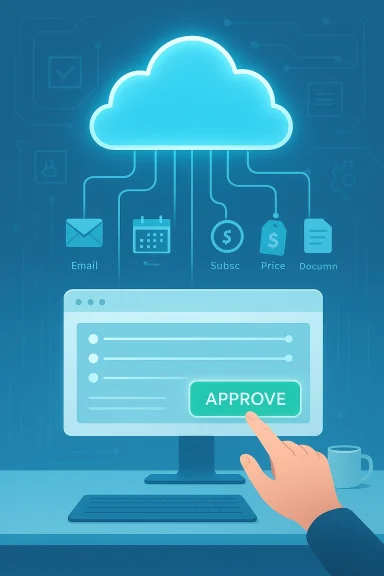
Microsoft has quietly pushed Copilot from the realm of suggestions and drafts into a new category: an AI that actually gets things done for you. With the research-preview rollout of Copilot Tasks, Microsoft is testing a cloud-hosted, browser-driven agent that accepts plain‑English goals, maps multi‑step workflows, and executes them on a schedule — booking appointments, cancelling subscriptions, composing and sending messages only after getting your OK, and monitoring prices or listings over time. Early reporting and Microsoft’s own product framing all show a deliberate shift from passive assistance to background automation with human oversight. s://www.theverge.com/tech/885741/microsoft-copilot-tasks-ai)
Microsoft has been evolving Copilot from a chat-first assistant into a layered productivity platform for more than a year. The company’s strategy has moved in stages: embed Copilot across Windows, Office, Edge and cloud services; add connectors to personal inboxes and drives; and then introduce agentic features inside Office apps that can plan, iterate, and export finished artifacts. Copilot Tasks is the next step in that trajectory — an agent that doesn’t just draft the email or show you a plan, but spins up its own compute and browser, performs the necessary web and application interactions, and delivers a completion report when the job is done. Early previews are deliberately limited while Microsoft tests reliability, safety controls, and the human‑t prevents true “autopilot” behavior.
The idea behind Copilot’s shift — sometimes called “vibe working” internally — is simple: reduce multi‑step busywork by letting an agent coordinate across services for you. This follows a broader industry trend toward agentic AI: competitors and peers are launching similar capabilities (OpenAI’s Operator, Anthropic’s browser agents, Google’s auto‑browse experiments), and Microsoft’s approach positions Copilot to leverage deep integration with Microsoft 365, Edge, and Windows. Early coverage underscores that Copilot Tasks runs in a controlled cloud environment to keep your device free while it works.
But the feature’s promise comes with non‑trivial responsibilities. The centralization of execution in Microsoft’s cloud, the need for cross‑service credentials, and the open web’s security complexities require careful guardrails. The early preview’s emphasis on confirmations, reporting, and limited access is encouraging — but real safety will be proven in long‑term usage, adverse‑scenario testing, and the enterprise governance controls Microsoft provides.
If you’re evaluating Copilot Tasks: be excited about what it can save you, but insist on demonstrable safety, logging, and consent mechanisms before letting it touch anything that can charge a card or permanently change contractual relationships. In the meantime, testers should take advantage of Microsoft’s preview to shape those defaults — because the agentic assistants that get adopted widely will be those that balance utility with auditable, comprehensible control.
Microsoft’s research preview moves a distinct needle: it shows AI moving from suggestion to execution. How quickly it becomes a safe, enterprise‑grade tool depends less on model performance and more on governance: clear consent flows, least‑privilege connectors, robust prompt‑injection defenses, and transparent logging. For Windows users and administrators, Copilot Tasks is worth watching — and for those who join the waitlist, worth testing under strict rules that preserve control while exploring the productivity upside.
Source: Digital Trends Microsoft’s new Copilot Tasks finally does the work for you
 Background
Microsoft has been evolving Copilot from a chat-first assistant into a layered productivity platform for more than a year. The company’s strategy has moved in stages: embed Copilot across Windows, Office, Edge and cloud services; add connectors to personal inboxes and drives; and then introduce agentic features inside Office apps that can plan, iterate, and export finished artifacts. Copilot Tasks is the next step in that trajectory — an agent that doesn’t just draft the email or show you a plan, but spins up its own compute and browser, performs the necessary web and application interactions, and delivers a completion report when the job is done. Early previews are deliberately limited while Microsoft tests reliability, safety controls, and the human‑t prevents true “autopilot” behavior.The idea behind Copilot’s shift — sometimes called “vibe working” internally — is simple: reduce multi‑step busywork by letting an agent coordinate across services for you. This follows a broader industry trend toward agentic AI: competitors and peers are launching similar capabilities (OpenAI’s Operator, Anthropic’s browser agents, Google’s auto‑browse experiments), and Microsoft’s approach positions Copilot to leverage deep integration with Microsoft 365, Edge, and Windows. Early coverage underscores that Copilot Tasks runs in a controlled cloud environment to keep your device free while it works.
What Copilot Tasks can do — real examples
Microsoft and press previews present Copilot Tasks by example rather than technical minutiae, because its value proposition is practical: hand off chores you’d normally do across sites and apps. Typical scenarios shown to early testers and described in coverage include:- Email triage: surface urgent messages each evening, draft short replies, and queue them for your approval.
- Subscription cleanup: identify newsletters or recurring services you don’t use and unsubscribe on your behalf (with confirmation).
- Apartment hunts: scan listings on a schedule, surface matches weekly, and book showings when you want to view them.
- Job hunting: monitor job boards for matches, tailor a resume and cover letter per listing, and pre-fill application forms up to the point of submission.
- Presentation and document work: convert emails, attachments, or images into a slide deck or draft a PowerPoint from a syllabus and schedule study time.
- Sgistics: track hotel or airfare prices and rebook when rates drop; find venues, send invites, and collect RSVPs for events.
- Car shopping: scan used-car listings, contact sellers or dealerships, and book test-drive appointments.
How it works (high level)
Understanding the architecture clarifies both the promise and the risk. Copilot Tasks operates by:- Accepting a plain‑English instruction from the user describing the desired outcome.
- Decomposing that goal into a multi‑step plan (research, authentication, form‑fill, booking, email draft).
- Spinning up an isolated cloud compute instance and a browser environment that performs the steps across web pages and services.
- Reporting progress and asking for confirmations when the task reaches consequential points (payments, outbound messages, authenticated actions).
- Delivering a final report and artifacts (documents, calendar events, receipts) and optionally repeating the workflow on a schedule.
Why this shift matters: productivity and user experience
The shift from answer to execution changes the user relationship with an assistant. Instead of returning a to‑do list item (“Here’s how to unsubscribe”), Copilot can perform the sequence and return a completion confirmation. That represents:- Time saved on repetitive, low‑value tasks.
- Fewer context switches between tabs and apps.
- The ability to delegate scheduled monitoring tasks that previously would require manual checking.
- Straightforward, natural‑language delegation instead of scripting or manual workflows.
Strengths and notable design choices
- Human‑in‑the‑loop confirmations: Microsoft emphasizes that Copilot asks for explicit approvals before any action with significant consequences (payments, outbound messages). That reduces accidental expenditures or embarrassing broadcasts.
- Isolated cloud execution: Running tasks in a dedicated cloud “computer” prevents unnecessary local access, which can simplify the user device footprint and centralize observability and controls.
- Cross‑service coordination: Tight integration with Microsoft 365 and connectors to Gmail, calendars, and cloud drives means Copilot can assemble richer context and produce more useful outputs than single‑site agents.
- Recurring and scheduled workflows: Automating monitoring tasks (price drops, new listings, inbox triage) turns repetitive vigilance into a scalable service.
- Auditability and reporting: The model returns progress updates and completion reports, which are essential for user trust and troubleshooting when an automation misbehaves.
Risks, unknowns, and attack surface
No technology that controls web interactions is risk‑free. Copilot Tasks’ power creates several clear risk vectors that both individual users and IT teams must evaluate:- Prompt‑injection and web automation attacks: Any agent that interprets web content and fills forms can be misled by malicious pages that attempt to change the agent’s plan. Browsing automation must include robust prompt‑injection defenses and site‑level restrictions. Anthropic and other developer previews have emphasized permission controls and site blocking for similar agents — a blueprint Microsoft must match or exceed.
- Account compromise and credential use: To act on your behalf, Copilot may need permissioned access to email, calendars, and accounts. How those credentials are granted, stored, and scoped matters. If connectors are too broad, one misconfiguration could expose multiple services. Microsoft’s transparency notes and early guidance stress opt‑ins and the ability to revoke access, but enterprise deployments will demand stricter controls and audit trails.
- Spending and contractual commitments: Even with approval gates, the UX around consent matters. A confusing prompt could allow an agent to initiate payments or accept terms. Organizations will want spend ceilings, dual approvals, or an enterprise policy that forbids financial actions without human confirmation in a separate channel.
- Hallucination and erroneous actions: Agents can misinterpret context and take inappropriate actions (booking the wrong time, contacting the wrong person, unsubscribing a necessary service). The cost of errors ranges from embarrassing to materially damaging, so Copilot’s verification and rollback tools matter.
- Privacy and data retention: Centralized execution means Microsoft logs tasks and web interactions in the cloud. How long those logs persist, how they are used for product improvement, and whether they are accessible to enterprise administrators or legal processes must be clearly documented. Microsoft’s transparency resources are a start, but enterprises will demand contractual CLAs and compliance mappings.
Comparison with other agentic systems
Copilot Tasks arrives into an already competitive and rapidly iterating field of agentic AI:- OpenAI’s Agent Mode and Operator experiments demonstrate browser control and automation via hosted agents.
- Anthropic’s Chrome agent and other browser plugins emphasize tight site permissions, explicit blocking lists, and staged rollouts to reduce safety incidents.
- Google and other players are experimenting with “auto‑browse” and autonomous assistants integrated into the browser.
What IT teams and power users should consider now
For IT and security leaders evaluating Copilot Tasks for pilots or rollouts, here are practical considerations and steps:- Start in a controlled pilot
- Limit initial use to non‑critical workflows (e.g., price monitoring, listing aggregation).
- Enforce strict connector scoping and use test accounts where possible.
- Review and enforce authentication flows
- Prefer tokenized, least‑privilege access and short refresh lifetimes.
- Document revocation steps and test them.
- Require explicit multi‑party confirmations for financial or contractual actions
- Configure enterprise policy so any payment or contract acceptance requires a human double‑approval.
- Audit and logging
- Ensure Copilot’s completion reports and action logs are available to enterprise SIEM and auditing workflows.
- Define retention policies and data use limits for logs created by Copilot Tasks.
- Red‑team the automation
- Run threat modeling and prompt‑injection tests against common vendor sites and internal tools the agent will access.
- Update incident response playbooks
- Add an “agent misaction” playbook that includes remediation steps, credential rotation, and notification procedures.
- Train end users
- Teach users to recognize confirmation prompts, check the agent’s summarized plan before approval, and revoke connectors when not needed.
User guidance: how to try Copilot Tasks safely
If you’re an individual tester or a Windows user curious about the waitlist preview, follow these practical rules:- Use Copilot Tasks first for low‑risk, non‑monetary chores (calendar organization, price monitoring, draft generation).
- Always inspect the agent’s proposed plan before granting approval, and never approve payments from a prompt you don’t fully understand.
- Revoke connectors when you no longer need them and use disposable test accounts for initial trials.
- Keep a local record of changes suggested or made by the agent (calendar events created, emails sent) so you can quickly identify unintended actions.
- Report surprising behavior through Microsoft’s feedback channels; early preview feedback is what shapes safer defaults for production.
The commercialization puzzle: availability, pricing, and enterprise models
Microsoft has framed Copilot Tasks as a research preview with a limited tester cohort and a public waitlist. The company’s public messaging underscores the preview’s experimental nature: Microsoft wants real‑world feedback before wider release. What remains unclear in the announcement window is how Microsoft will price and license agentic features, whether certain capabilities will require a Microsoft 365 subscription tier, and how enterprise controls will be packaged for admins. Early reporting recommends treating the preview as an evaluation opportunity rather than a deployment signal, because SLAs, compliance attestations, and billing models are typically decided later in the product lifecycle.Verdict: why Copilot Tasks is important — and why cautious optimism is the right reaction
Copilotuct‑design step: turning an assistant into an actual worker. For users, that means fewer mundane chores and more time for creative or high‑impact work. For Microsoft, it is a natural extension of Copilot’s role across Windows and Microsoft 365. For the industry, it marks an acceleration of agentic AI into everyday productivity tooling.But the feature’s promise comes with non‑trivial responsibilities. The centralization of execution in Microsoft’s cloud, the need for cross‑service credentials, and the open web’s security complexities require careful guardrails. The early preview’s emphasis on confirmations, reporting, and limited access is encouraging — but real safety will be proven in long‑term usage, adverse‑scenario testing, and the enterprise governance controls Microsoft provides.
If you’re evaluating Copilot Tasks: be excited about what it can save you, but insist on demonstrable safety, logging, and consent mechanisms before letting it touch anything that can charge a card or permanently change contractual relationships. In the meantime, testers should take advantage of Microsoft’s preview to shape those defaults — because the agentic assistants that get adopted widely will be those that balance utility with auditable, comprehensible control.
Microsoft’s research preview moves a distinct needle: it shows AI moving from suggestion to execution. How quickly it becomes a safe, enterprise‑grade tool depends less on model performance and more on governance: clear consent flows, least‑privilege connectors, robust prompt‑injection defenses, and transparent logging. For Windows users and administrators, Copilot Tasks is worth watching — and for those who join the waitlist, worth testing under strict rules that preserve control while exploring the productivity upside.
Source: Digital Trends Microsoft’s new Copilot Tasks finally does the work for you
