

Microsoft’s next phase for Copilot is less a conversational novelty and more a pragmatic shift: Copilot Tasks promises to be an always‑available, cloud‑powered AI agent that does work for you — composing and sending emails, building study plans, generating editable Office deliverables, and orchestrating multi‑step workflows — all from natural language prompts.
Microsoft has been steadily moving Copilot from a Q&A sidebar into a system‑level productivity surface across Windows and Microsoft 365. Over the past year the company expanded Copilot’s reach — adding vision and voice modes, Connectors to cloud accounts, and document export flows — and the evolution toward “agentic” features has been explicit: Copilot is being positioned to act on a user’s behalf, not just respond to them.
The recent coverage and executive teasers position Copilot Tasks as the next concrete step in that trajectory: an agent interface where users can “just ask for what you need,” and the AI will assemble, schedule, or send the deliverable — using cloud compute and account Connectors when explicitly permitted. Early reporting and company previews indicate the feature will be opt‑in and tied to Microsoft’s broader Copilot agent ecosystem.
That said, the market will judge implementations on safety, latency, trust, and compliance — areas where newer entrants or smaller specialist vendors can differentiate with lightweight, privacy‑first agents or stronger explainability.
Equity and bias also matter: if Copilot automates hiring outreach or student assessments, biased model outputs could amplify discrimination at scale. Rigorous testing, diverse evaluation sets, and human oversight are non‑negotiable in high‑stakes domains.
However, the net value delivered will depend entirely on the execution of security, privacy, and governance guarantees. Enterprises and privacy‑conscious users should demand specific answers about consent UX, token lifecycle, audit logs, and human‑in‑the‑loop controls before they enable agentic automation broadly. Until Microsoft publishes detailed technical and compliance documentation, claims about safety and governance should be treated with cautious optimism rather than assumed.
But transformative capability brings commensurate responsibility. The product’s success hinges on how Microsoft addresses consent, credential security, auditability, and error prevention. Organizations evaluating Copilot Tasks should pilot carefully, apply least‑privilege principles, require human approvals for high‑risk actions, and press for enterprise‑grade documentation and controls before scaling the feature widely. In short: the technology is promising — pragmatic in concept, powerful in potential — but its real value will be realized only when trust, governance, and transparency are baked into the agentic experience.
Source: Benzinga 'Just Ask For What You Need:' Mustafa Suleyman Teases Microsoft's Copilot Tasks As AI That Automates Emails, Study Plans And More - Microsoft (NASDAQ:MSFT)
Source: ekhbary.com Microsoft Unveils Copilot Tasks: Your Cloud-Powered AI Agent for Automated Productivity
Source: 디지털투데이 Microsoft unveils Copilot Tasks as it evolves from chat app to action app
 Background
Microsoft has been steadily moving Copilot from a Q&A sidebar into a system‑level productivity surface across Windows and Microsoft 365. Over the past year the company expanded Copilot’s reach — adding vision and voice modes, Connectors to cloud accounts, and document export flows — and the evolution toward “agentic” features has been explicit: Copilot is being positioned to act on a user’s behalf, not just respond to them.The recent coverage and executive teasers position Copilot Tasks as the next concrete step in that trajectory: an agent interface where users can “just ask for what you need,” and the AI will assemble, schedule, or send the deliverable — using cloud compute and account Connectors when explicitly permitted. Early reporting and company previews indicate the feature will be opt‑in and tied to Microsoft’s broader Copilot agent ecosystem.
What is Copilot Tasks?
A short definition
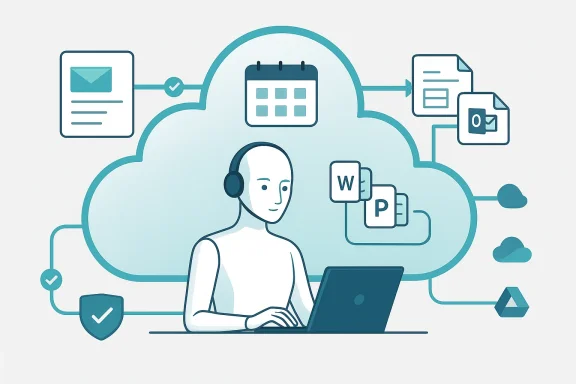
Copilot Tasks is being framed as a cloud‑powered agent that translates short natural language requests into multi‑step actions. Instead of returning a text answer, the agent can:- Draft and send emails on your behalf.
- Create structured study plans and schedules.
- Build and export editable Office artifacts (Word, Excel, PowerPoint).
- Run multi‑step workflows that may involve calendar invites, file creation, and cross‑account data retrieval — subject to user consent.
How it differs from existing Copilot features
Copilot started as a helpful chat companion and has gradually acquired the ability to access data, create documents, and operate inside apps. Copilot Tasks shifts the emphasis from conversational assistance to agentic action: the AI is expected to execute operations (send, schedule, format, export) rather than merely advise. This is a meaningful product pivot that reframes Copilot as an automation surface embedded in your productivity stack.How Copilot Tasks works (technical overview)
Cloud‑first agent execution
Early descriptions emphasize that Copilot Tasks will run primarily in Microsoft’s cloud infrastructure. That design choice enables:- Larger model footprints and longer context windows than are practical on-device.
- Persistent background execution for long‑running tasks.
- Centralized orchestration of cross‑service operations (mail, calendar, files).
Connectors and explicit consent
A core enabler is Connectors — opt‑in links between Copilot and personal or enterprise accounts (Outlook, OneDrive, Gmail, Google Drive, Google Calendar, and contacts). With explicit consent, the agent can surface relevant emails, files, and calendar entries to include in task execution or to use as source material for drafting. Microsoft’s rollout strategy to Insiders suggests these Connectors will be gated behind clear permissions and likely multi‑step opt‑in flows.Export to editable formats
One practical friction Microsoft is removing is the gap between an AI output and a sharable deliverable. Copilot Tasks — like recent Copilot updates — will be able to output directly into editable Office files (Word .docx, Excel .xlsx, PowerPoint .pptx) and PDF exports, enabling a “ask and deliver” experience where the agent produces ready‑to‑share artifacts with minimal manual work.Agent orchestration and guardrails
While public reporting focuses on functionality, the architecture implicitly includes orchestration layers and guardrails: task planning, step sequencing, approval prompts, and audit trails. These are necessary for both user control and enterprise governance, and early previews hint that Microsoft intends the agent to operate inside a monitored, revocable permission model rather than with carte blanche access.Use cases: Where Copilot Tasks will have immediate impact
Copilot Tasks is not a theoretical play; the teased scenarios map to widely felt productivity gaps.1) Email automation and follow‑ups
Users will be able to ask Copilot to draft and send emails, summarize threads, and schedule follow‑ups. For busy professionals, this reduces repetitive drafting time and ensures consistency in routine communications. In contexts like sales outreach or help desks, agentic email automation can materially speed workflows.2) Personalized study and learning plans
Students and lifelong learners can ask the agent to assemble study schedules, curate reading lists from linked files, and produce structured plans with milestones. This combines content summarization, calendar scheduling, and document creation in one fluent request.3) Rapid document creation
From status reports to pitch decks, users will be able to ask Copilot Tasks to generate polished Office artifacts based on data pulled from emails, documents, or the web (subject to connector permissions). The immediate benefit is moving from brainstorm to deliverable with fewer manual steps.4) Multistep workflows and errands
The agentic model enables more complex workflows: extract invoice data, create a spreadsheet, send a notification to a team, and schedule a review — all from a single prompt. For knowledge workers and small teams, that orchestration can replace tedious hand‑offs and scripting.Verification of key claims
Because this development affects user data and workflows, it’s crucial to verify the most important technical claims against multiple independent reports in the provided material.- Claim: Copilot can export directly into Word, Excel, PowerPoint, and PDF. Confirmed across product preview snippets and reporting on the recent Copilot on Windows update.
- Claim: Copilot Tasks relies on opt‑in Connectors for Outlook, OneDrive, Gmail, and Google Drive. Verified by multiple previews describing Connectors and opt‑in account linking in the Insider rollout.
- Claim: Microsoft positions Copilot Tasks as cloud‑powered and agentic. Confirmed by executive teases and product descriptions emphasizing cloud execution and long‑running task capabilities.
Strengths and notable opportunities
1) Real productivity gains from end‑to‑end automation
The most immediate strength is practical: Copilot Tasks closes the loop between idea and deliverable. Replacing multi‑step manual work with single‑prompt automation is a force multiplier for individual and team productivity.2) Integration across ecosystems
By supporting both Microsoft accounts and popular consumer clouds (Gmail, Google Drive), Microsoft reduces cross‑platform friction and makes the agent useful in mixed environments — an important pragmatic win for adoption.3) Opt‑in permission model (as described)
Early signals indicate Microsoft is building the Connectors behind an explicit opt‑in consent model and that document creation/export requires explicit actions. These design choices, if enforced consistently, raise the bar for user control relative to stealthy background scanning.4) Enterprise governance potential
Because the agent runs in Microsoft’s cloud and integrates with M365, enterprises can — in theory — apply existing compliance tools and retention policies to Copilot Tasks workflows. That pathway to governance is a necessary ingredient for commercial adoption.Risks, limitations, and the hard questions
The promise of automation brings systemic risks that must be addressed: privacy, security, hallucination, misuse, and compliance.1) Data exposure risk and consent friction
Linking email and drive accounts to a cloud agent commoditizes access. Even with opt‑in, the vectors for accidental data exposure or excessive privilege are real. Users may grant broad access to expedite tasks, creating persistent permissions that outlive their intended scope. Microsoft will need transparent, revocable, and fine‑grained consent controls; the previews do not yet detail these controls. Treat claims about permission safety as provisional until Microsoft publishes exact UI/UX flows and policy behaviors.2) Hallucination and incorrect actions
When an agent drafts and sends an email or modifies a document, incorrect outputs can have real consequences — missed commitments, incorrect financials, or reputational harm. The industry term “hallucination” (AI confidently producing false statements) applies as much to agentic operations as to generated text. The safe model is to require review steps for high‑risk actions and to keep comprehensive audit trails. Public previews have not fully explained the human‑in‑the‑loop guardrails for outbound actions.3) Credential handling and stored secrets
If Copilot uses delegated access tokens to act across Gmail and Outlook, protecting those tokens and limiting their scope is essential. Enterprises will demand clarity on token lifetimes, revocation, and whether tokens are stored, cached, or re‑requested for each action. The available materials do not provide cryptographic or lifecycle details; this remains an open verification item.4) Compliance, legal, and sectoral constraints
Highly regulated sectors (finance, healthcare, legal) may find agentic automation problematic without deterministic audit trails and explainability. For example, an AI agent drafting legal communications could create authentic‑appearing but legally unsound statements. Microsoft will have to offer enterprise controls, policy enforcement, and possibly model‑explainability features to satisfy compliance teams.5) UX pitfalls: over‑automation vs. user control
There is a delicate UX balance: too much automation and users lose oversight; too many confirmations and the feature becomes sluggish. The early teasers suggest Microsoft is aware of this trade‑off, but the implementation details (confirm prompts, undo flows, and visibility into background tasks) will determine user trust and adoption rates.Enterprise and IT governance implications
For IT leaders, Copilot Tasks raises several operational questions that must be planned now.Policy and access controls
- Define acceptable use policies for agentic actions.
- Create role‑based guardrails: who can allow Connectors, who can permit outbound sends, and which data classes are off‑limits.
- Ensure integration with existing identity and access management (IAM) systems and conditional access policies.
Compliance and auditability
- Require immutable audit logs for all agent‑initiated actions.
- Maintain versioned artifacts for every document the agent creates or edits.
- Establish clear retention and eDiscovery handling for AI‑generated artifacts.
Incident response
- Plan for credential revocation workflows if a connector is compromised.
- Train IR teams to investigate AI‑initiated communications and to distinguish between human and agent actions quickly.
Procurement and licensing
- Expect differentiated licensing tiers (consumer vs. business vs. Copilot+ hardware), and budget for potential premium pricing for low‑latency or on‑device variants. Microsoft’s broader Copilot roadmap has hinted at hardware tiers and enterprise variants; procure accordingly.
Recommendations for users and administrators
If you’re evaluating Copilot Tasks for personal or enterprise use, consider the following pragmatic steps.- Start in controlled pilots. Test with noncritical workflows and collect real metrics on accuracy, time saved, and error rates.
- Apply the principle of least privilege to Connectors. Grant the minimum scope necessary and use short‑lived tokens where possible.
- Require human approval for any outbound or financially consequential tasks. Build review gates into workflows.
- Instrument logs and retention now. Make sure agent activity is discoverable by compliance tools.
- Train users on prompt design and known failure modes to reduce hallucinations and unintended actions.
Competitive and market context
Microsoft’s Copilot strategy is part of a broader industry move toward agentic AI. The company’s advantage is ecosystem breadth: Windows, Office, Edge, Azure identity, and Microsoft 365 provide natural integration points that rival players lack at the same scale. By enabling Copilot to create Office documents and connect to both Microsoft and consumer clouds, Microsoft is lowering adoption friction for real‑world users who live in hybrid environments.That said, the market will judge implementations on safety, latency, trust, and compliance — areas where newer entrants or smaller specialist vendors can differentiate with lightweight, privacy‑first agents or stronger explainability.
What we still don’t know (open verification items)
- Exact model sizes, inference locations (cloud vs. client hybrid), and latency guarantees for different tiers.
- The cryptographic details of how Connectors store and refresh credentials.
- Concrete human‑in‑the‑loop UX patterns for high‑risk outbound actions (required approvals, undo windows, and confirmation thresholds).
- Pricing and licensing boundaries for consumer versus enterprise Copilot Tasks use.
The ethics and social angle
Agentic AI changes responsibility flows. When an AI acts on a user’s behalf, questions arise: Who is accountable when a Copilot Task sends a misleading email or when an agent overlooks a legal constraint in a document? Microsoft and adopters must clarify responsibility chains, documented approvals, and remediation paths.Equity and bias also matter: if Copilot automates hiring outreach or student assessments, biased model outputs could amplify discrimination at scale. Rigorous testing, diverse evaluation sets, and human oversight are non‑negotiable in high‑stakes domains.
Final assessment: pragmatic promise with conditional trust
Copilot Tasks represents a sensible, pragmatic advance in AI productivity tooling: it moves beyond suggestion to execution, and that potential will be transformative for routine professional work. The immediate strengths are clear: fewer manual steps, faster deliverables, and seamless export to Office formats. Early signals also show Microsoft balancing openness (support for Google consumer services) with centralized control via cloud orchestration and opt‑in Connectors.However, the net value delivered will depend entirely on the execution of security, privacy, and governance guarantees. Enterprises and privacy‑conscious users should demand specific answers about consent UX, token lifecycle, audit logs, and human‑in‑the‑loop controls before they enable agentic automation broadly. Until Microsoft publishes detailed technical and compliance documentation, claims about safety and governance should be treated with cautious optimism rather than assumed.
Conclusion
Copilot Tasks is the clearest expression yet of Microsoft’s shift from chat to action: an agent‑first approach that promises to automate emails, study plans, and multi‑step workflows while creating ready‑to‑use Office artifacts. The concept aligns with how users actually work — they want results, not just answers — and Microsoft’s deep integration across Windows and Microsoft 365 gives the company a path to meaningful impact.But transformative capability brings commensurate responsibility. The product’s success hinges on how Microsoft addresses consent, credential security, auditability, and error prevention. Organizations evaluating Copilot Tasks should pilot carefully, apply least‑privilege principles, require human approvals for high‑risk actions, and press for enterprise‑grade documentation and controls before scaling the feature widely. In short: the technology is promising — pragmatic in concept, powerful in potential — but its real value will be realized only when trust, governance, and transparency are baked into the agentic experience.
Source: Benzinga 'Just Ask For What You Need:' Mustafa Suleyman Teases Microsoft's Copilot Tasks As AI That Automates Emails, Study Plans And More - Microsoft (NASDAQ:MSFT)
Source: ekhbary.com Microsoft Unveils Copilot Tasks: Your Cloud-Powered AI Agent for Automated Productivity
Source: 디지털투데이 Microsoft unveils Copilot Tasks as it evolves from chat app to action app
