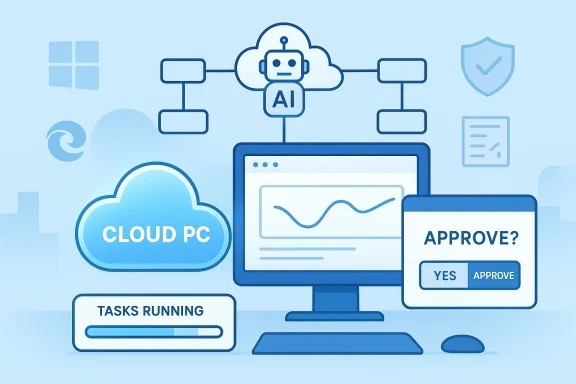
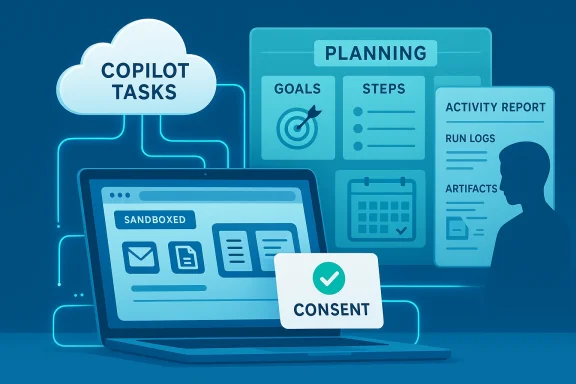
Microsoft’s Copilot has taken a decisive step beyond chat: with the new Copilot Tasks research preview, the company is offering an agentic AI that will plan, act, and return results on multi‑step work you describe in plain English — and you can now join a public waitlist to try it.
For more than two years Microsoft has incrementally shifted Copilot from an assistant that answers questions into a platform that can operate across apps and services. That evolution — from Copilot Chat to Actions, Agent Builder, and Copilot Studio — set the technical and policy groundwork for a more autonomous capability: Copilot Tasks. Microsoft describes Tasks as a feature that accepts a natural‑language goal, creates a plan, and then executes that plan using a controlled browsing and app orchestration environment while keeping the user in control of meaningful decisions like spending or sending messages. The company opened a limited research preview and a public waitlist on February 26, 2026.
Copilot Tasks represents a clear pivot: instead of answering a single prompt inside a chat, Copilot will now run longer‑running, conditional workflows in the background, coordinating between Microsoft 365 apps, web pages, and permitted connectors to produce outcomes — from scheduling recurring actions to generating documents, booking appointments, monitoring price changes, and following up on email threads. Early reporting and Microsoft’s own descriptions emphasize iterative proposals, consent gates, and an ability to pause or cancel operations mid‑flight.
If Microsoft nails the consent, auditing, and connector governance while keeping agent automation robust against the messy reality of the web, Copilot Tasks could be transformative. If not, organizations will face the familiar pattern of promising automation causing operational friction and security headaches.
For Windows and Microsoft 365 customers, the prudent posture is to test early, harden governance, and treat agentic AI as a new class of automation that requires the same discipline you apply to scripts, RPA, and scheduled jobs — plus a few extra guardrails for the unpredictability of generative models.
Source: Neowin Microsoft introduces Copilot Tasks, a new way to get things done using AI
 Background / Overview
For more than two years Microsoft has incrementally shifted Copilot from an assistant that answers questions into a platform that can operate across apps and services. That evolution — from Copilot Chat to Actions, Agent Builder, and Copilot Studio — set the technical and policy groundwork for a more autonomous capability: Copilot Tasks. Microsoft describes Tasks as a feature that accepts a natural‑language goal, creates a plan, and then executes that plan using a controlled browsing and app orchestration environment while keeping the user in control of meaningful decisions like spending or sending messages. The company opened a limited research preview and a public waitlist on February 26, 2026.Copilot Tasks represents a clear pivot: instead of answering a single prompt inside a chat, Copilot will now run longer‑running, conditional workflows in the background, coordinating between Microsoft 365 apps, web pages, and permitted connectors to produce outcomes — from scheduling recurring actions to generating documents, booking appointments, monitoring price changes, and following up on email threads. Early reporting and Microsoft’s own descriptions emphasize iterative proposals, consent gates, and an ability to pause or cancel operations mid‑flight.
How Copilot Tasks works — the mechanics and user flow
1. Describe a goal; Copilot builds a plan
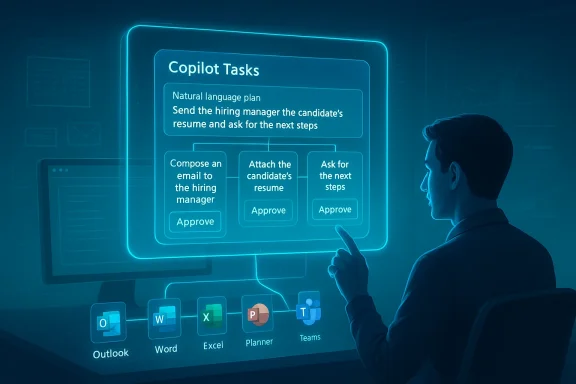
Users start with a natural‑language instruction — for example, “Organize a week of client visits in Boston, draft agendas, and book hotel rooms with flexible cancellation.” Copilot translates that goal into a multi‑step plan, breaking it into discrete actions such as checking calendars, proposing time windows, compiling draft agendas, comparing hotel rates, and preparing confirmation drafts for review. This plan is presented to the user for review and modification before execution.2. Controlled environment for execution
When the user approves the plan, Copilot spawns a contained execution environment: an agentic workspace with its own browser instance and compute sandbox. This environment is not your normal web browser tab; Microsoft says it’s a controlled context that can interact with sites and apps at the permissioned level required to complete tasks. The agent reports progress and can ask for clarifications as it works. Microsoft frames this as safety‑first: meaningful actions that affect finances, messages, or external systems require explicit consent before being executed.3. Connectors and app orchestration
Copilot Tasks uses connectors — similar to the existing Microsoft 365 connectors and the Model Context Protocol (MCP) approach — to access calendars, email, files, and third‑party services when the user authorizes them. With the right connectors enabled, Tasks can draft emails in Outlook, create or edit files in Word/Excel/PowerPoint, update Planner or To Do, and interact with web services for bookings or lookups. Microsoft’s Agent Builder tooling and Copilot Studio underpin this integration, allowing declarative agents and templates to be used as building blocks.4. Iteration and human oversight
A critical design point is that Copilot Tasks is iterative rather than fully autopilot. Copilot proposes a plan, the user refines it, and the agent executes steps while offering checkpoints for review. For any step that has material impact (spending money, sending messages to people, permanently deleting data), the system must ask for user confirmation before proceeding. That human‑in‑the‑loop model is central to Microsoft’s stated approach.What Copilot Tasks promises to automate (use cases)
- Recurring administrative workflows: nightly digests of urgent emails, automated customer follow‑ups, or subscription audits.
- Document production: create research briefs, draft slide decks from meeting notes, or generate standardized contract language.
- Scheduling and logistics: coordinate meeting series, book travel with timed pickups, and auto‑adjust plans after flight delays.
- Shopping and monitoring: watch product listings or hotel rates and rebook or purchase when thresholds are hit (with prior permissions).
- Data lookups and reporting: query spreadsheets and internal databases, produce reconciliations, and prepare executive summaries.
What’s new versus existing Copilot features
Copilot Chat vs. Copilot Actions vs. Copilot Tasks
- Copilot Chat (the conversational interface) answers questions and drafts content inside a chat window.
- Copilot Actions (previously announced features) allowed Copilot to perform discrete interactions with websites — e.g., booking a restaurant through partner integrations — usually in a foreground flow.
- Copilot Tasks moves to asynchronous, long‑running, multi‑step orchestration in a sandboxed environment and ties in broader app connectors and scheduled execution.
Technical underpinnings and governance features
Agent framework and Agent Builder
Copilot Tasks leverages the same agent frameworks Microsoft has been steadily rolling out: Agent Builder, Copilot Studio, and the Model Context Protocol. Agent Builder allows declarative agent creation either via natural language or manual configuration, and Copilot Studio provides the controls for enterprise knowledge sources and capability toggles (code interpreter, image generation, connectors). These are the plumbing that lets Copilot Tasks bind to internal data sources and execute multi‑step logic.Privacy, consent, and transparency
Microsoft has amplified its transparency notes for Copilot: the platform is built to disclose AI interactions, require sign‑offs for material actions, and give users controls to opt out of personalization or memory. For Tasks specifically, Microsoft states that spending and messaging actions require explicit confirmation, and admin controls exist for enterprise governance. Expect to see tenant‑level settings, permissions for connectors, and auditing through Microsoft Purview and the AI admin role introduced for Copilot governance. These governance knobs are crucial for enterprise adoption.Controlled browsing and compute
Early descriptions emphasize a separate, controlled browser and compute sandbox where web interactions happen. That design reduces the attack surface exposed to the user’s ordinary browser session and limits cross‑site contamination while allowing the agent to interact with web forms and services as needed. Microsoft’s documentation on Copilot Actions and Copilot Studio describes these sandboxed, permissioned execution environments in more general terms.Cross‑checking claims — what’s verified and what remains tentative
I verified major product claims across multiple, independent sources:- The public announcement and waitlist opening have been reported by major outlets including Windows Central and PureInfotech, and corroborated by Microsoft’s own product messaging and documentation for the agent platform. These independent reports align on the feature set and research‑preview status.
- The requirement for consent on material actions and the sandboxed execution model are consistently described in Microsoft’s transparency and product pages, and in coverage summarizing Microsoft’s demos. While Microsoft’s messaging emphasizes human control, the practical UX details (how many confirmation prompts, how granular permissions are, etc.) are yet to be observed at scale.
- Connections to Microsoft 365 workloads (Planner, Outlook, Teams, OneDrive) and the ability to generate Office files are supported by Microsoft support pages and release notes for Planner/Copilot integrations and Agent Builder documentation. These confirm that Copilot already has the integration surface to plausibly do the Tasks scenarios Microsoft shows.
- Microsoft’s demonstrations show a wide range of scenario coverage (shopping, independent web bookings, subscription cancellation). While the pieces exist — browser automation, connectors, and consent gates — the real‑world reliability of cross‑site automation (across diverse vendor websites and their changing UIs) is unproven outside controlled demos and the research preview. Until broader field testing occurs, claims about broad, dependable web automation should be treated with caution.
Security, privacy, and compliance: a deep dive for IT
Copilot Tasks amplifies the capabilities that enterprises have been wrestling with for years: automation that acts with agency requires new governance patterns. Below I outline the chief concerns and practical mitigations organizations should plan for.Key risks
- Unauthorized actions via connector compromise: if an agent can access a mailbox or calendar, a compromised agent or connector could be misused to send messages or approve transactions.
- Data exfiltration and over‑broad context usage: agents drawing on internal documents, chat transcripts, and external web pages create complex data flows that raise leakage risks.
- Inadvertent or mistaken financial commitments: automated purchase or booking flows that do not correctly ask for confirmation could create liabilities.
- Auditability and forensics: long‑running automated tasks must create reliable logs and explainable trails showing why an action was taken, what data was used, and when approvals were granted.
- Site fragility and brittle automation: web UI changes can break automation, causing agents to produce incorrect outcomes without immediate detection.
Mitigations and admin controls
- Enforce least privilege connectors: provision connectors only where necessary and require tenant admin review for new connectors. Microsoft’s emerging AI admin role and Copilot governance controls are designed to help here.
- Require two‑step approvals for financial/material actions: implement policy that any financial commitment triggers an elevated approval flow or a mandatory human review step.
- Enable Purview auditing and DLP: tie Copilot Tasks activities to Microsoft Purview (or equivalent) so data movement, external accesses, and generated artifacts are recorded and subject to DLP policies.
- Sandbox scope restrictions: limit agent scopes to non‑sensitive sites and pre‑approved domains when possible; block agents from accessing high‑risk external services unless explicitly approved.
- Implement monitoring and alerting: treat agent tasks as scheduled jobs — monitor their start/stop states, outcomes, and error rates; alert on unexpected retries or unusual spending patterns.
- Test and stage automations: require any new agent or Tasks plan to undergo a staging validation with synthetic data before permitting production runs.
Governance recommendations for policy and procurement teams
- Update acceptable use policies to explicitly cover AI agents and long‑running automations.
- Add Copilot‑specific controls to change‑management processes: new Copilot agents and Tasks plans should go through an approval workflow with security and legal reviews.
- Negotiate vendor SLAs for agent‑driven actions, including remediation and rollback clauses for erroneous automated transactions.
Developer and ISV implications
Copilot Tasks creates opportunity and complexity for developers and ISVs:- Platform extensibility: Agent Builder and Copilot Studio already allow makers to create declarative agents with knowledge grounding. For ISVs, publishing connectors and ensuring stable endpoints will be a competitive advantage.
- New integration patterns: vendors may need to publish machine‑friendly APIs or tidy up forms and flows to be robust to agent interactions.
- Testing and QA: ISVs must add automated test cases that simulate agent interactions (form filling, booking flows) since agents will effectively be another class of automated user.
- Marketplace and monetization: expect a surge in templates, prebuilt agents, and managed automation offerings built on top of Copilot Tasks.
Real‑world scenarios: short reads from the preview chatter
Early community discussion and forum threads show a mix of excitement and caution. Enthusiasts point out that Copilot Tasks could be the productivity multiplier everyone has been waiting for — turning long, repetitive sequences into single instructions — while IT professionals stress the need for robust admin controls and predictable billing behavior. Threads from enterprise and Windows communities also discuss how Copilot Tasks is the natural extension of earlier Copilot Actions and Planner automation features, and that the research preview will be essential for assessing how brittle or dependable the system is in messy, real‑world environments.UX expectations and what to look for in the preview
If you join the waitlist or follow the early releases, watch for:- How explicit and granular are the consent prompts for each action?
- The visibility and reliability of the agent’s activity log: can you see every step, inputs used, and the web interactions performed?
- Error handling and rollbacks: when a web form changes or a booking fails, does the agent notify you with actionable next steps?
- Rate‑limiting and cost transparency: will scheduled or recurring Tasks count against tenant quotas, and how are compute or connector costs shown?
- Integration with existing automation standards (Power Automate, Logic Apps): does Tasks complement or duplicate existing automation tooling?
Competitive and market context
Agentic AI is now a competitive battleground. Microsoft’s move with Copilot Tasks places it in direct competition with other agent and automation offerings that combine natural language prompting and background execution. GitHub’s Copilot coding agents and third‑party agent platforms have already shown how formalized agents can accelerate workflows; Microsoft’s differentiator is the deep, first‑party tie into Microsoft 365, Windows, and enterprise governance tooling. That vertical integration — combined with the agent and connector ecosystem — is what makes Copilot Tasks compelling for organizations already heavily invested in the Microsoft stack.Limitations and the case for cautious optimism
Copilot Tasks is promising, but there are clear limits today:- Web automation is inherently brittle: pages change, CAPTCHAs appear, and integrations can break. Robustness will come from well‑maintained connectors and fallback logic.
- Hallucination risk: when generating documents, drafting messages, or summarizing data, AI‑generated content can include inaccuracies. Human review remains essential.
- Data governance complexity: blending internal knowledge with public web sources creates complex compliance obligations for regulated industries.
- Operational transparency: enterprises will need clear, queryable logs and retention policies for agent actions — not just audit trails but explainable rationales for decisions.
Practical guidance: what I’d advise organizations to do now
- Join the waitlist and evaluate: sign up for the research preview and build test cases that emulate your common multi‑step workflows.
- Inventory connectors and sensitive data paths: know which services would be exposed to agents and lock down high‑risk connectors until controls mature.
- Update policies and training: ensure staff know that agent‑driven actions require review and that AI outputs are not authoritative without human sign‑off.
- Prepare monitoring: extend your operational telemetry to capture agent activity, success/failure rates, and unusual spending or external interactions.
- Coordinate with legal and compliance: ensure you have rules for automated communications, contract commitments, and data residency considerations.
Verdict — why this matters
Copilot Tasks is the most concrete signal yet that Microsoft is aiming to turn Copilot into an agentic productivity platform rather than only a conversational assistant. The combination of agent frameworks, connectors to Microsoft 365, and a controlled execution environment makes the feature plausible and potentially powerful for both consumer and enterprise users. At the same time, the shift to long‑running, autonomous workflows raises governance, auditability, and reliability questions that only real‑world use and rigorous admin controls can answer.If Microsoft nails the consent, auditing, and connector governance while keeping agent automation robust against the messy reality of the web, Copilot Tasks could be transformative. If not, organizations will face the familiar pattern of promising automation causing operational friction and security headaches.
For Windows and Microsoft 365 customers, the prudent posture is to test early, harden governance, and treat agentic AI as a new class of automation that requires the same discipline you apply to scripts, RPA, and scheduled jobs — plus a few extra guardrails for the unpredictability of generative models.
Conclusion
Copilot Tasks is a logical — and ambitious — next step in Microsoft’s Copilot roadmap: it moves AI out of the chat bubble and into the role of a background worker that can orchestrate apps, the web, and your Microsoft 365 data to get things done. The research preview and public waitlist open the door to hands‑on testing, but the feature’s real impact will hinge on Microsoft’s execution around transparency, permissions, logging, and reliability. For IT leaders, product teams, and developers, Copilot Tasks is an opportunity to rethink automation patterns — but it is also a reminder: agency demands accountability. Join the preview, design for governance, and prepare to treat AI agents like the powerful, auditable automation tools they are becoming.Source: Neowin Microsoft introduces Copilot Tasks, a new way to get things done using AI