

Copyparty arrives as the kind of quiet, focused tool that makes self-hosting feel practical again: a single-file Python web server that turns any spare drive into a resumable, deduplicating file server without the overhead of a full collaboration stack.
Appendix: verification checklist (what was confirmed)
Source: MakeUseOf Nextcloud didn’t expect competition like this
 Background
Why this matters to Windows and home-server users
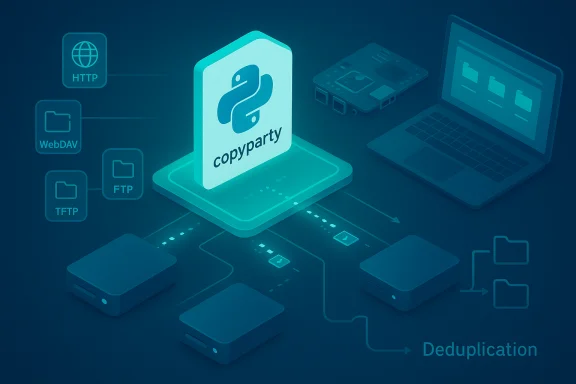
Self-hosting choices have split into two camps: heavyweight suites that replicate entire cloud ecosystems, and tiny utilities that solve one problem well. Nextcloud belongs to the former category — a mature, extensible platform that provides file sync, sharing, calendar, contacts, collaborative editing and an app ecosystem — and as such it expects a standard LAMP/LEMP-style stack with PHP and a database backend. That infrastructure can be overkill for users who simply want a fast, reliable file dropbox on a Raspberry Pi, an old laptop, or a Windows machine. Into that niche steps Copyparty: a portable, minimal file server distributed as a single Python file that advertises accelerated resumable uploads, deduplication, and multi-protocol access (HTTP/HTTPS, WebDAV, FTP/FTPS, TFTP) without mandatory dependencies. The project’s README and community posts confirm the single-file design and the broad protocol support that makes the server highly portable.What Copyparty actually is
A single-file server with a big feature list
At its core, Copyparty is:- A self-contained Python server (runnable with Python 2 or 3) packaged as one file for quick deployment.
- A web-based file browser and uploader with built-in media indexing, thumbnails, and optional on-the-fly compression.
- A multi-protocol endpoint that can expose the same files over WebDAV, FTP/FTPS, and even TFTP for legacy use.
How it runs everywhere
Because Copyparty’s only hard prerequisite is Python, you can run it on Linux, macOS, Windows, Android, and small SBCs like Raspberry Pi. The project documents Docker options and a read-only demo server, but the common pattern is: drop the single Python file into the root of the volume you want to share and start it. Community posts and the project page both emphasize this “drop-and-run” portability.What makes Copyparty different (and why that matters)
Chunked, parallelized, resumable uploads
One of Copyparty’s signature mechanisms is its accelerated upload mode: larger files are sliced into chunks that are uploaded in parallel over separate TCP connections. This makes a practical difference on high-latency or asymmetrical links where single-stream uploads can stall or be limited by TCP congestion control. The chunked approach also enables robust resumability and per-chunk integrity checks so interrupted transfers can resume cleanly. These capabilities are documented in the project README and corroborated by community reports from self-hosting forums. Why this is useful in practice:- Long-distance contributors and mobile uploaders benefit from faster effective throughput.
- Large media and dataset transfers are less likely to fail irrecoverably on flaky connections.
- Resumability reduces repeated re-uploads and saves bandwidth and time.
Deduplication, compression, and indexing
Copyparty supports file deduplication by creating symlinks, hardlinks or reflinks when identical content already exists on the server. It also offers optional on-the-fly compression and an indexer that enables fast searches by filename, size, date, and media metadata. Those are not trivial convenience features — they materially change how much disk space you use and how quickly you can find or offload content. The README explains the dedup options and trade-offs (notably the caution that editing deduplicated files can affect multiple logical copies).Protocol flexibility: WebUI plus legacy clients
The same dataset can be accessed via:- A modern browser UI for casual users,
- WebDAV for native OS mounts,
- FTP/FTPS for compatibility with existing clients,
- direct HTTP(s) and API-style endpoints for scripted or CLI usage.
Copyparty vs Nextcloud: picking the right tool
Feature and scope comparison
- Nextcloud is a full collaboration platform: file sync and sharing, calendar, contacts, collaborative document editing (Collabora, OnlyOffice), activity feeds, apps, integration with identity providers, and a mature desktop client ecosystem. It typically sits behind PHP + a database and has architecture recommendations that include caching layers, database tuning, and nontrivial hardware sizing for larger deployments. These are well-documented in Nextcloud’s admin documentation.
- Copyparty is intentionally narrow: a single-purpose file server optimized for fast, resumable transfers and low operational friction. It does not ship a calendar, mail, chat, built-in collaborative editors, or a heavy plugin ecosystem. That simplicity is the point: less surface area to manage and far lower baseline resource needs.
Resource and operational trade-offs
- Nextcloud deployments — especially production-grade instances for teams — commonly recommend tens of gigabytes of storage, a dedicated database, and several hundred megabytes to multiple gigabytes of RAM depending on users and enabled apps. The “stack” expectation increases maintenance and operational overhead (TLS, database backups, PHP updates, app compatibility).
- Copyparty will happily run on low-end hardware: a Raspberry Pi, a lightweight VPS, or a repurposed Windows laptop. There’s no mandatory database or PHP runtime to configure, and the single-file distribution model keeps updates and portability straightforward. That makes it ideal for single users, small teams, or scenarios where only file transfer is required.
Practical guidance: when to choose which
- Choose Nextcloud if:
- You need calendars, contacts, collaborative document editing, or a full app ecosystem.
- You want enterprise-grade user management, single-sign-on, and rich integrations.
- You accept the maintenance burden in exchange for a feature-rich platform.
- Choose Copyparty if:
- Your primary requirement is fast, reliable file exchange with resumability and dedup.
- You prefer minimal setup or you’re running on constrained hardware.
- You want to expose a simple upload/download interface for friends, clients, or remote contributors without running a heavy stack.
Security, privacy, and operational caveats
Authentication and access control
Copyparty uses a single configuration file for control and supports multiple user accounts and per-folder permission flags. Its permission model is deliberately simple and resembles UNIX-style permission flags more than modern cloud ACLs. That simplicity is an advantage for speed and predictability, but it requires care when granting write or delete rights. The GitHub docs detail the flag-based system and options for temporary password-protected shares.Transport security and TLS
Any server exposed to the internet must be configured for HTTPS and strong TLS ciphers. Copyparty supports HTTPS; the administrator is responsible for provisioning certificates (Let's Encrypt or equivalent) and for renewing them. Running the server behind a reverse proxy (Nginx or an edge device) is a common pattern to centralize TLS and firewall hardening. This is not unique to Copyparty — it’s standard operational hygiene for self-hosted services.Data integrity, dedup risks, and backups
Deduplication saves space but introduces potential gotchas: when deduplication uses hardlinks or reflinks, editing a deduplicated file can modify content in multiple logical locations. Copyparty’s documentation explicitly warns about this and offers symlink-based defaults and flags to control link behavior. Administrators should plan backup strategies that account for dedup behavior (for example, snapshot-capable filesystems or periodic full backups to avoid surprising data loss).Vulnerabilities and maintenance
Lightweight projects are not immune to security issues. Community discussion shows Copyparty has had some vulnerabilities reported and patched; one thread mentions a critical fix delivered within hours. While rapid patching is positive, users should still treat public exposure with caution: subscribe to the project’s issue tracker, run automated updates or package-controlled deployments (where available), and monitor for CVE-style reports. Do not treat “small” as “safe-by-default.”Real-world community experience
What self-hosters are saying
Community threads on Reddit and self-hosted directories repeatedly highlight Copyparty’s strengths for large file transfers and unreliable upload connections. Users praise chunked uploads, resumability, and the ability to preserve folder structure and timestamps when uploading entire directories. The server is recommended frequently as the “best option” when uploads are tens of gigabytes or more. At the same time, community posts identify feature gaps that matter to some deployments: there’s no built-in mail server integration, S3 backend, or enterprise LDAP/AD by default (some of those can be handled via plugins or external tooling). That reinforces the core message: Copyparty is a specialist, not a general-purpose collaboration platform.Benchmarks and claims about speed
Multiple users and blog posts claim Copyparty is noticeably faster than alternatives when uploading large files across difficult network conditions because of its parallel-chunking approach. The GitHub documentation and community statements support that mechanism. However, there is no widely published, controlled benchmark comparing Copyparty vs Nextcloud on identical hardware and identical network conditions that proves a universal performance advantage. The authoritative sources (project README, community experience, and a single editorial piece) give a strong signal—but the speed claim is situation-dependent and not an absolute fact. Readers should treat performance claims as empirically promising rather than universally guaranteed and run their own tests for mission-critical transfers.Deployment notes for Windows users
Quick-start: run without Docker
- Install Python (3.8+ recommended).
- Download the single-file Copyparty release from the project repository.
- Drop the file in the root of the drive you want to expose and run: python copyparty.py [options].
- Configure TLS (reverse proxy or direct cert provisioning) and set permission flags in the single config file.
Docker deployment
If you prefer containerization on Windows (WSL2 + Docker Desktop), there are Docker options described by the community. Docker adds isolation and simplifies upgrades, but it also changes file access semantics (bind mounts vs volume drivers) so pay attention to filesystem behavior for dedup/reflink features.Recommended production hardening checklist
- Enable HTTPS and strong TLS (use a reverse proxy or cert manager).
- Harden authentication and limit write/delete privileges for anonymous or public uploads.
- Schedule automated backups that account for dedup semantics.
- Subscribe to the project’s issue tracker and security announcements.
- Run an initial set of transfer tests (small, medium, very large) from representative remote clients to ensure chunking/resume behavior fits your use case.
Strengths, weaknesses, and risk summary
Strengths
- Simplicity and portability: single-file distribution, runs wherever Python runs.
- Large-file friendliness: chunked parallel uploads, resumability, integrity checks.
- Multi-protocol flexibility: WebUI, WebDAV, FTP/FTPS and more — useful for Windows network mounts or CLI automation.
- Space-saving options: configurable deduplication via symlinks/hardlinks/reflinks.
Weaknesses and risks
- Not a collaboration suite: no calendars, mail, or built-in collaborative editing — intentionally limited by design.
- Operational responsibility: exposed services need TLS, monitoring, and backup strategies like any self-hosted system.
- Dedup hazards: editing deduplicated files can have surprising effects if hardlinks/reflinks are used. Understand and test dedup behavior before enabling globally.
- Security maintenance: while the project has shown quick fixes, users must monitor vulnerabilities and patch promptly.
Conclusion: the right tool for the right job
Copyparty is a striking reminder that in self-hosting, “less” can be a compelling design choice. For users who want a fast, low-maintenance file server that excels at large, resumable transfers and can be thrown onto a Windows machine or Raspberry Pi in minutes, Copyparty is an excellent candidate. The project’s README and community reports back up the core technical claims — single-file portability, accelerated chunked uploads, deduplication and multi-protocol access — and many users report it performs precisely in the scenarios it was built for. That said, any claim that Copyparty “beats Nextcloud” requires qualification. Nextcloud’s broader feature set and enterprise integrations are in a different league — they solve different problems. If you need calendars, collaborative docs, or enterprise identity integration, Nextcloud remains the right choice. If you want a fast, forgettable file server that you set up once and use for large file exchange, Copyparty deserves serious consideration — and a spot in the toolkit of Windows users who value speed, simplicity, and minimal resource consumption.Appendix: verification checklist (what was confirmed)
- Copyparty is distributed as a single Python file and runs with Python 2 or 3.
- Copyparty implements accelerated chunked uploads, resumable transfers, and per-chunk integrity verification, per project docs and multiple community reports.
- Copyparty supports WebDAV, FTP/FTPS, HTTP(S) and other protocols; WebDAV mapping specifics for Windows are documented.
- Nextcloud is a full collaboration platform requiring PHP and a database in common deployments and has nontrivial recommended system sizing for production use.
Source: MakeUseOf Nextcloud didn’t expect competition like this
