

Microsoft has quietly pushed a set of targeted changes to Windows 11 that aim to reduce the memory cost of file searches and make File Explorer feel faster — but the gains are pragmatic and limited, and they come against a backdrop of surging memory prices and growing pressure on system resources from AI workloads.
Windows 11 has long carried a reputation for feature parity with Windows 10 but mixed performance on lower‑end hardware and in I/O‑heavy scenarios. Microsoft’s Windows Insider program is the delivery pipeline for experimental fixes and staged rollouts; the recent build in question is Windows 11 Insider Preview Build 26220.7523 (Dev & Beta channels), which notes a small but important change to how the Windows Search indexer handles duplicate work. At the same time, Microsoft is testing a separate File Explorer preload experiment (a different switch in recent preview builds) that keeps a warmed instance of Explorer resident in memory to lower cold‑start latency. That preload increases File Explorer’s idle memory footprint, a trade‑off Microsoft is explicitly exposing as optional while it gauges telemetry and user feedback. These changes land during a period when memory pricing and supply dynamics are exerting real pressure on PC makers and consumers. The broader memory market — driven by demand for high‑bandwidth memory (HBM) and server DRAM for AI training and inference — has tightened supply and pushed contract and spot pricing higher in 2025. Those macro pressures make even modest reductions in desktop RAM consumption noteworthy for gamers, OEMs, and users of compact systems.
Conclusion
Microsoft’s build 26220.* experiments are a practical example of platform hygiene: remove duplicate work, give users a toggle for speculative speedups, and validate with telemetry before committing at scale. For gamers, creators, and OEMs juggling rising memory costs and tight hardware budgets, these small gains can matter — but they must be evaluated in the context of cumulative OS changes and the volatile memory market that is reshaping the economics of PC configurations.
Source: eTeknix Microsoft Updates Windows 11 to Reduce RAM Usage and Free Up Memory
 Background
Windows 11 has long carried a reputation for feature parity with Windows 10 but mixed performance on lower‑end hardware and in I/O‑heavy scenarios. Microsoft’s Windows Insider program is the delivery pipeline for experimental fixes and staged rollouts; the recent build in question is Windows 11 Insider Preview Build 26220.7523 (Dev & Beta channels), which notes a small but important change to how the Windows Search indexer handles duplicate work. At the same time, Microsoft is testing a separate File Explorer preload experiment (a different switch in recent preview builds) that keeps a warmed instance of Explorer resident in memory to lower cold‑start latency. That preload increases File Explorer’s idle memory footprint, a trade‑off Microsoft is explicitly exposing as optional while it gauges telemetry and user feedback. These changes land during a period when memory pricing and supply dynamics are exerting real pressure on PC makers and consumers. The broader memory market — driven by demand for high‑bandwidth memory (HBM) and server DRAM for AI training and inference — has tightened supply and pushed contract and spot pricing higher in 2025. Those macro pressures make even modest reductions in desktop RAM consumption noteworthy for gamers, OEMs, and users of compact systems. What changed in Build 26220.7523: an overview
Deduplicated indexing: the engineering tweak explained
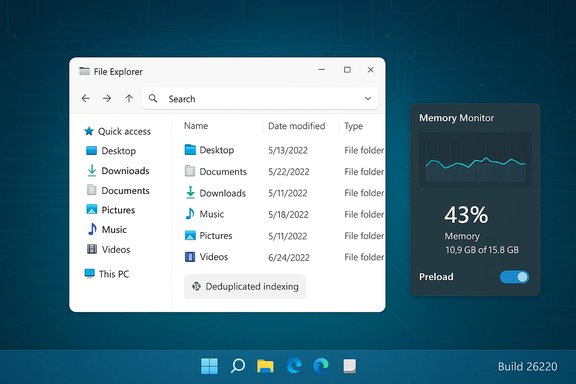
Microsoft’s release notes for Build 26220.7523 include the line: “Made some improvements to File Explorer search performance by eliminating duplicate file indexing operations.” That phrasing points to a backend optimization in the Windows Search indexer: the indexer will now attempt to canonicalize or coalesce identical work items so the same physical file object isn’t processed more than once concurrently. In practice, duplicate indexing previously happened when files were reachable via multiple logical paths (junctions, symlinks, transient mounts, OneDrive placeholder entries, mapped drives) or when different subsystems requested the same update. Deduplication reduces redundant disk reads, lowers worker thread churn, and avoids transient spikes in RAM and CPU while the indexer is actively updating or servicing a large search. This is explicitly framed by Microsoft as a staged experiment controlled by toggles so telemetry and user feedback can guide a wider rollout.File Explorer preloading: a separate experiment with different tradeoffs
Alongside indexer improvements, Microsoft has been trialing a preload option that keeps a warmed File Explorer process resident so Explorer opens faster on demand. Independent hands‑on testing shows this reduces perceived cold‑start time but doubles the idle memory used by Explorer in some test setups — from roughly the low‑30s of megabytes to the high‑60s (an increase of about 35 MB). That preload is optional and can be disabled via Folder Options while Microsoft evaluates the telemetry impact. The two experiments are complementary but potentially countervailing: deduplicated indexing reduces transient RAM pressure during searches and indexing, while preloading increases idle RAM used by Explorer to speed launches. The net effect on a particular machine depends on usage patterns, how much background indexing is active, and whether preload is enabled.UI cleanup and other small fixes
Build 26220.7523 also bundles other File Explorer refinements — context‑menu decluttering, fixes for white flash during navigation, and resilience improvements for system and secondary drives — all of which are part of Microsoft’s broader effort to tweak Explorer iteratively rather than rewrite it. These are low‑risk, incremental changes delivered through the Insider pipeline.Why these changes matter now
Memory is a scarce input for many users and OEMs
Large customers and hyperscalers are locking up advanced memory types (HBM and server DRAM), skewing supply and raising contract prices across DRAM and NAND. Industry trackers and market analysts documented meaningful upward movement in DRAM pricing through 2025, and vendors have publicly warned of component cost pressure for consumer hardware. That makes even modest reductions in desktop memory consumption strategically relevant for OEMs building thin laptops, mini‑PCs, and handheld gaming devices.Gaming and compact systems are especially sensitive
Gamers and users of compact Windows handhelds (like the ROG Ally family and co‑branded handhelds previewed with an Xbox‑oriented interface) benefit when the OS leaves more RAM free for games and game engines. Microsoft’s indexer deduplication can free up resources during heavy file‑system activity and searches, which helps when users multitask — for example, downloading assets, running overlays, or streaming while gaming. Device makers are also experimenting with OS variants and modes that minimize background work to prioritize performance and battery life on handhelds.The measurable effects: what hands‑on testing shows
Independent testing from community outlets and hands‑on reviewers paints a consistent picture:- Deduplicated indexing reduces transient CPU and I/O spikes during indexing and large searches, which in turn reduces short‑lived memory allocations and improves responsiveness in those windows. Users with multiple drives, mounted volumes, or cloud placeholders see the biggest wins.
- Preloading Explorer shortens the visible launch time on cold starts by a fraction of a second to around one second in many tests, but it increases Explorer’s idle memory use by roughly 30–40 MB in the measured scenarios. The improvement is most noticeable under heavy system load or on very low‑powered devices; on already fast systems the difference is more marginal.
- The two changes are delivered independently: you can see reduced transient spikes during indexing even when preloading is off, and you can enable preload independently of indexer deduplication (depending on how Microsoft stages the toggles in your Insider ring).
Cross‑checking the claims: verifications and caveats
- Build identity and release note: Microsoft’s official Windows Insider blog entry for the 26220.* stream confirms the phrasing about eliminating duplicate indexing operations and lists the change under File Explorer improvements. That provides the authoritative surface‑level confirmation of the engineering intent.
- Independent corroboration: multiple independent outlets and community test threads have reproduced or explained the change (WindowsLatest, Digital Trends, Windows Forum threads), describing it as an indexer‑side optimization that reduces redundant processing and transient memory use. This corroboration gives confidence the release note maps to real code changes rolling to Insiders.
- Preload memory numbers: hands‑on tests by WindowsLatest and others measured Explorer’s idle memory rising from ~32 MB to ~67 MB when the preload option is active. That magnitude of increase has been repeatedly reported and is consistent across several published tests. It is also documented as an experimental change users can disable.
- Market context for memory prices: market research firms and industry outlets (TrendForce, Tom’s Hardware, Reuters/FT coverage of DRAM market dynamics) report significant upward pressure on DRAM and HBM prices driven by AI server demand. These are independent, high‑level confirmations that memory has become a constrained and expensive input for PC builders. Exact percentages vary by report and timeframe; readers should treat specific spot/contract price figures as volatile and time‑sensitive.
- Staging and rollout: Microsoft explicitly characterizes these changes as staged experiments behind toggles for Insiders, meaning broader rollout timing and default state remain telemetry‑driven and not guaranteed. Claims that the change will "immediately" or universally reduce RAM usage for all users are therefore premature; the most accurate statement is that the indexer optimization is now being tested in Insider builds and may reach wider audiences after validation.
What this means for gamers, power users, and OEMs
Gamers
- More headroom when it matters: The indexer deduplication can reduce transient memory spikes while searching or when background indexing runs, which helps free up RAM for games during those windows. Low‑memory systems (8 GB and under) stand to benefit most.
- Preload tradeoff: If preload is enabled by default on a given machine, Explorer will use more idle RAM. For gamers who rarely open Explorer during active play, disabling preload yields strictly better memory availability for games. Microsoft provides the toggle to do this while it collects telemetry.
Power users and creators
- Faster search responsiveness on complex setups: Users who search across multiple mounted volumes, large NAS shares, or cloud‑backed folders should see fewer transient UI locks during broad searches and index updates. That improves interactive experience during multimedia workflows.
- Third‑party shell extensions remain a wild card: Explorer responsiveness is still affected by third‑party extensions, thumbnail handlers, and slow network storage; deduplication reduces indexer‑specific overhead but doesn’t remove these other factors.
OEMs and compact device makers
- Optimization matters more as memory costs rise: With contract DRAM prices and HBM demand pushing component costs, OEMs building thin laptops and handhelds have new incentive to tune the OS to minimize nonessential RAM use. Microsoft’s staged experiments signal a cooperative path: platform tweaks to reduce idle and transient memory use where feasible.
Risks, limitations, and what to watch for
- Staged experiments may flip or rollback. Because these changes are telemetered experiments, Microsoft can change default behavior based on feedback; early impressions may not reflect the eventual default shipped to consumers.
- Cumulative memory creep. Preloading, background AI agents, Copilot features, and other always‑on elements can cumulatively inflate idle memory usage. Each individual optimization may be small, but together they can reduce headroom on systems with constrained RAM. Users and OEMs need to watch aggregate effects.
- Edge cases with cloud placeholders and mounts. The indexer changes specifically target duplicate work items, but transient mounts, remapped drives, and flaky network storage can still trigger repeated indexing behavior if the canonicalization logic cannot reliably identify the same physical object. Those scenarios may require additional fixes.
- Measurement variability. Reported RAM numbers (for preload or transient reductions) are test‑bed dependent. Virtual machine tests, low‑RAM systems, and high‑end desktops will show materially different numbers. Treat specific MB figures as illustrative rather than universal.
Practical guidance: what users can do now
- Check Insider status and build: Insiders in the Dev/Beta channels can receive the 26220.* stream updates; general consumers will only see these changes if Microsoft chooses to roll them out broadly. Confirm your build in Settings > Windows Update > Windows Insider Program.
- Toggle Explorer preload off (if you want more free RAM):
- Open File Explorer.
- Go to Folder Options (View tab → Options).
- In Folder Options > View, find and uncheck “Enable window preloading for faster launch times” (the setting is experimental and appears in Insider builds where preload is staged). This restores the pre‑change idle RAM profile for Explorer.
- Monitor SearchIndexer behavior: Use Task Manager or Resource Monitor to observe transient SearchIndexer and Explorer memory/CPU spikes during heavy searches. If you have cloud‑backed folders, consider pausing sync during large indexing operations.
- Trim third‑party shell extensions and thumbnail handlers: These are frequent causes of Explorer delays unrelated to indexing; tools like ShellExView (third‑party) can help you identify and disable problematic extensions. (Note: third‑party tools are outside Microsoft’s scope and must be used at your own discretion.
- For OEMs and sysadmins: test these experiments on representative fleets before enabling them by default; the benefits are configuration dependent and can be outweighed by other always‑on features in imaging or corporate setups.
Strategic takeaways and final analysis
Microsoft’s deduplicated indexer is a pragmatic, low‑risk optimization that addresses a tangible and measurable inefficiency in how Windows Search has historically scheduled indexing work. It’s precisely the kind of surgical improvement that benefits real‑world user scenarios — large indexed sets, cloud placeholders, multi‑drive machines — without a major rearchitecture of File Explorer. Early independent testing and community reports corroborate the intended behavior, and the change is already visible in Insider release notes. That said, the broader conversation about Windows performance cannot be simplified to a single tweak. The preload experiment demonstrates the trade‑offs Microsoft must weigh: faster cold starts at the cost of higher idle memory. On heavily constrained machines or those trying to squeeze every megabyte for gaming, that trade‑off is nontrivial — but Microsoft has provided an opt‑out and is appropriately validating the feature via telemetry before committing to a default. Finally, the timing of these adjustments is meaningful. With memory pricing under pressure from AI infrastructure demand, even incremental system‑level RAM savings matter to OEMs and users building or buying compact gaming PCs and handhelds. The optimization signals a pragmatic approach: squeeze inefficiencies where they exist, let telemetry guide rollout, and keep per‑feature opt‑outs available for power users and constrained devices. But users should not interpret this as a cure‑all — larger architectural issues (shell extensions, UI framework overhead, and heavy background agents) remain addressable only through sustained engineering focus and, in some cases, broader design trade‑offs. In short: the new Windows 11 changes reduce needless work in the indexer and offer an optional preload that shortens startup latency. Both are defensible engineering moves that will help particular user groups; neither is a sweeping performance revolution. The net benefit for any individual will depend on device configuration, workload patterns, whether preload is enabled, and how many other always‑on features are active on the system.Conclusion
Microsoft’s build 26220.* experiments are a practical example of platform hygiene: remove duplicate work, give users a toggle for speculative speedups, and validate with telemetry before committing at scale. For gamers, creators, and OEMs juggling rising memory costs and tight hardware budgets, these small gains can matter — but they must be evaluated in the context of cumulative OS changes and the volatile memory market that is reshaping the economics of PC configurations.
Source: eTeknix Microsoft Updates Windows 11 to Reduce RAM Usage and Free Up Memory
