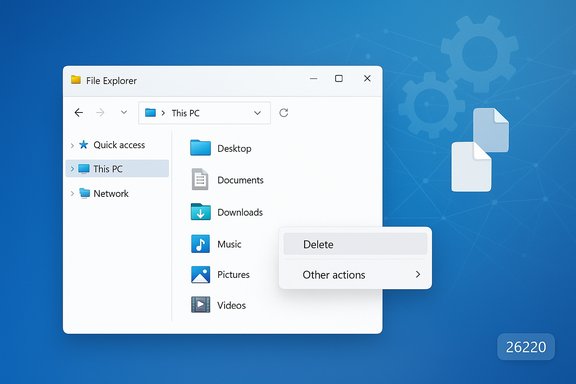
Microsoft’s latest Insider Preview changes to File Explorer are small in scope but carry outsized promise: by stopping redundant indexing work, Windows 11 can cut the transient memory and CPU spikes that have long plagued file searches, and the update also experiments with decluttering the right‑click menu to make everyday actions easier to find.
Microsoft released Windows 11 Insider Preview Build 26220.7523 with a short but significant note: the team “made some improvements to File Explorer search performance by eliminating duplicate file indexing operations.” The same build bundle also includes experiments that reorganize lesser‑used context‑menu commands into a submenu labelled either Manage file or Other actions depending on the test configuration. These changes are being validated in the Dev and Beta Insider rings and are arriving to selected Insider devices first, not yet to the general public.
The two changes — indexing deduplication and context‑menu decluttering — address different pain points. The indexing change targets a long‑running technical source of system load, while the menu changes target usability and discoverability. Both are incremental engineering moves rather than a platform overhaul, but they are precisely the kind of surgical fixes that produce noticeable daily improvements for many users.
The change in Build 26220.7523 is described as eliminating duplicate file indexing operations, which is a targeted fix: stop scheduling the same canonical file more than once, coalesce concurrent requests, and add checks around transient mounts and cloud placeholders to avoid needless reprocessing.
A key timeline detail to treat with caution: third‑party reporting has suggested a broader public rollout around late January or February, but that timeline is speculative unless Microsoft publishes a firm general‑availability schedule. Insider experiments are telemetry‑driven and staged; features that look ready in early Insider flights can be delayed, adjusted, or rolled back depending on feedback and compatibility data.
The menu declutter reduces menu noise for casual users, making the most common tasks more accessible without forcing users to learn new keyboard shortcuts.
Taken together, these are pragmatic, low‑risk changes that improve the perceived performance and usability of a core component of Windows.
The context‑menu experiment shows Microsoft is listening to real‑world usability concerns and responding with modest UI tweaks that preserve functionality while reducing noise.
Both changes are measured and incremental. They are likely to produce meaningful improvements for users on constrained hardware and make everyday file management cleaner. At the same time, administrators and power users should validate the behavior in representative environments, watch for edge cases involving symlinks and cloud placeholders, and treat third‑party integration as a potential source of regressions.
If you’re an Insider tester, measure before and after with the recommended tooling and report any anomalies. If you’re on production channels, expect a staged rollout in the months after Insider validation; treat community timeline estimates as provisional until Microsoft confirms a public availability date. Overall, these are the kind of quiet, well‑targeted fixes that make a mature operating system feel faster and more polished in ordinary use.
Source: Digital Trends Microsoft tests File Explorer search optimisation to reduce RAM usage in Windows 11
 Background
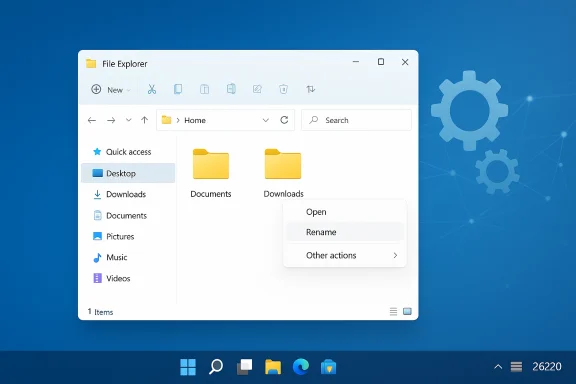
Microsoft released Windows 11 Insider Preview Build 26220.7523 with a short but significant note: the team “made some improvements to File Explorer search performance by eliminating duplicate file indexing operations.” The same build bundle also includes experiments that reorganize lesser‑used context‑menu commands into a submenu labelled either Manage file or Other actions depending on the test configuration. These changes are being validated in the Dev and Beta Insider rings and are arriving to selected Insider devices first, not yet to the general public.The two changes — indexing deduplication and context‑menu decluttering — address different pain points. The indexing change targets a long‑running technical source of system load, while the menu changes target usability and discoverability. Both are incremental engineering moves rather than a platform overhaul, but they are precisely the kind of surgical fixes that produce noticeable daily improvements for many users.
Overview of what changed
- Microsoft adjusted the Windows Search indexer so File Explorer searches avoid performing the same indexing operations more than once.
- The File Explorer UI is otherwise unchanged; Explorer continues to rely on the system Windows Search Indexer rather than an independent search engine.
- The right‑click (context) menu is being tested with a new submenu to hold rarely used verbs such as Copy as path, Compress to, and image rotation tools — a move meant to reduce top‑level clutter.
- These improvements are packaged in the 26220 family of Insider builds and are behind staged toggles while Microsoft monitors telemetry and user feedback.
Why duplicate indexing matters (technical primer)
File Explorer itself does not have a separate search engine; it queries the Windows Search Indexer — a system component that scans files, extracts metadata, and stores it to speed subsequent queries. Indexing is complicated by a few real‑world realities:- Many files and folders are reachable through multiple logical paths (reparse points, symlinks, or different mount points).
- External drives, network shares, and cloud placeholder APIs (e.g., OneDrive placeholder files) can appear and disappear, producing transient re‑enqueues of the same content.
- Concurrent changes, third‑party shell integrations, or misbehaving background processes can request indexing of the same targets repeatedly.
- The indexer runs background threads that coordinate work items; poor coalescing of those items can spawn redundant work at the same time.
The change in Build 26220.7523 is described as eliminating duplicate file indexing operations, which is a targeted fix: stop scheduling the same canonical file more than once, coalesce concurrent requests, and add checks around transient mounts and cloud placeholders to avoid needless reprocessing.
What users should realistically expect
This is an optimization, not a feature rewrite. The likely benefits are:- Reduced transient RAM usage during active indexing or when searches trigger index updates.
- Lower CPU and disk I/O spikes while the indexer performs background work.
- Faster search responsiveness in many scenarios because fewer competing indexer threads and less background work frees resources for queries.
- Slow searches on non‑indexed locations when you explicitly choose a full‑PC scan (for example, searching “This PC” without indexed locations enabled).
- Latency caused by network shares, NAS performance, or SMB issues — the indexer dupe fix helps local indexing mechanics but not network stack problems.
- Poor performance introduced by third‑party shell extensions or poorly written context‑menu handlers; those still need to be diagnosed and mitigated independently.
Cross‑checking the claim and timeline (verification and caveats)
Microsoft’s official Insider release notes for the 26220.7523 build explicitly mention the elimination of duplicate indexing operations as an improvement to File Explorer search performance. Independent reporting and community testing have confirmed the behavior in the 26220 family of builds and noted the simultaneous context‑menu experiments.A key timeline detail to treat with caution: third‑party reporting has suggested a broader public rollout around late January or February, but that timeline is speculative unless Microsoft publishes a firm general‑availability schedule. Insider experiments are telemetry‑driven and staged; features that look ready in early Insider flights can be delayed, adjusted, or rolled back depending on feedback and compatibility data.
Deep dive: how deduplication may be implemented (informed inference)
Microsoft’s release note is intentionally high level; the company rarely publishes low‑level implementation details in quick preview posts. Nevertheless, the engineering approaches most consistent with the symptom set are:- Canonicalization: determine a single canonical identifier for each file (based on volume ID + file ID rather than path strings) so the same file referenced from multiple paths is recognized as one object.
- Coalescing/proxy work items: if multiple requests touch the same canonical file within a short window, treat them as one indexing operation rather than multiple concurrent tasks.
- Defensive checks for cloud placeholders and reparse points: detect placeholder content and avoid re‑indexing metadata that hasn’t materially changed.
- Throttle and back off for volatile mounts: avoid re‑reading removable media immediately after they attach or detach.
The context‑menu declutter: usability and trade‑offs
Alongside the indexing work, Microsoft is testing grouping rarely used commands into a submenu. Typical items moved in trials include:- Copy as path
- Compress to (zip)
- Rotate left / Rotate right for images
- Set as desktop background
- Possibly other less‑invoked verbs
- Cleaner top‑level menu makes common actions more visible and reduces cognitive load.
- Less visual noise can speed workflows for users who only use a handful of context commands daily.
- Discoverability suffers for infrequent but occasionally critical tasks. Power users or admins who rely on keyboardless discovery may need to adapt.
- Third‑party shell extensions and context‑menu plugins need to play well with the new grouping; poorly designed extensions could still reintroduce clutter or cause placement oddities.
- Inconsistent naming across test configurations (Manage file vs Other actions) shows the design is still being validated; final naming and structure could change.
Risks, unknowns and what to watch for
- Indexing completeness edge cases
- Deduplication requires strong canonicalization. If the logic incorrectly treats separate files as the same entity because of path normalization errors, search coverage might temporarily omit items reachable only through alternate paths.
- Watch for missing results around symlinks, junctions, and multi‑mount configurations.
- Cloud placeholder interactions
- OneDrive and similar clients expose files as placeholders. If the indexer reduces checks too aggressively, it may miss updated metadata for these items.
- Verify that placeholder‑driven content still appears in queries after the update.
- Third‑party software interactions
- Antivirus, backup tools, and shell extensions may react to changed indexer behavior in unanticipated ways. Compatibility testing in managed environments is essential.
- Telemetry and enterprise privacy concerns
- Microsoft will use telemetry to validate experiments. Enterprises should confirm telemetry settings and data handling policies before broad Insider pilots to align with privacy and compliance requirements.
- Measurement variability
- Gains will vary by device profile. Machines with SSDs and abundant RAM may show minor improvements, while older HDD devices with limited memory will benefit more noticeably.
- Timeline uncertainty
- Insider testing does not guarantee a specific GA date. Organizations should plan pilots but not assume a specific release window until Microsoft publicly confirms rollout plans.
Practical guidance — how to evaluate the change (users and IT)
If you want to test the improvements before general release, follow a methodical approach.- Join the Windows Insider Program (Dev or Beta channel) on a non‑critical machine. Only devices enrolled in these rings will receive the experimental toggles.
- Record baseline behavior:
- Use Task Manager or Process Explorer to capture explorer.exe, SearchIndexer.exe (Search Indexer), and SearchProtocolHost.exe memory and CPU usage during typical searches.
- Use Performance Monitor counters for indexing: “Search Indexer\Indexing Total Items”, “Search Indexer\Indexing Rate”, and disk I/O counters for the indexer processes.
- Reproduce representative workloads:
- Search large image libraries, nested folder sets, or tens of thousands of Office documents to stress indexing and query paths.
- Test with cloud‑synced folders (OneDrive placeholder files) and external drives attached.
- Install the Insider build and repeat tests:
- Compare CPU, disk I/O and peak memory. Look for reduced spikes and fewer concurrent indexing threads.
- Validate correctness:
- Confirm search results are complete. Test queries that previously found corner‑case items reachable through junctions, symlinks or mapped drives.
- Monitor for regressions:
- Watch Event Viewer and the Search settings page for indexing state changes.
- If inconsistencies arise, file detailed Feedback Hub reports with reproduction steps.
- Process Explorer (Sysinternals)
- Windows Performance Recorder (WPR) + Windows Performance Analyzer (WPA)
- Procmon (use sparingly)
- Built‑in Indexing Options and Settings > Privacy & security > Searching Windows
Why this matters to everyday users
File Explorer is the most frequently used UI for many Windows users; even modest improvements to search latency and resource consumption compound into daily productivity gains. For people on memory‑constrained laptops or older hardware, eliminating duplicate indexing operations can make the machine feel more responsive during heavy search or indexing activity.The menu declutter reduces menu noise for casual users, making the most common tasks more accessible without forcing users to learn new keyboard shortcuts.
Taken together, these are pragmatic, low‑risk changes that improve the perceived performance and usability of a core component of Windows.
What this does not mean
- This is not a replacement of the Windows Search stack. The architecture (Explorer leveraging the Windows Search Indexer) remains intact.
- It is not a guarantee that every user will see a measurable improvement; results depend on workload, hardware profile, and software environment.
- It does not eliminate the need to manage third‑party shell extensions or to troubleshoot slow network storage — those are separate problems.
Recommendations for Microsoft and the community (forward view)
- Provide a short engineering blog post or a detailed support doc explaining how canonicalization is being implemented and the guardrails in place for symlinks and cloud placeholders. This would help enterprise admins and advanced users understand the trade‑offs.
- Offer a diagnostic flag or logging for Insiders that want to supply richer repro data when indexer behavior appears incorrect. Better diagnostics will speed triage of corner cases.
- Continue to monitor third‑party extension behaviors and publish guidance for extension authors to ensure smooth integration with the reordered context menu.
- When the feature moves toward general release, include an explicit changelog entry that explains the impact, how it was tested, and what admins should monitor.
Final assessment
This Insider Preview work is a classic example of surgical engineering: fix a specific inefficiency inside a shared system component instead of attempting a risky, broad rewrite. Eliminating duplicate indexing operations is an elegant approach to reduce wasted CPU, I/O, and RAM during searches; it benefits not only File Explorer but any system and app that relies on the Windows Search index.The context‑menu experiment shows Microsoft is listening to real‑world usability concerns and responding with modest UI tweaks that preserve functionality while reducing noise.
Both changes are measured and incremental. They are likely to produce meaningful improvements for users on constrained hardware and make everyday file management cleaner. At the same time, administrators and power users should validate the behavior in representative environments, watch for edge cases involving symlinks and cloud placeholders, and treat third‑party integration as a potential source of regressions.
If you’re an Insider tester, measure before and after with the recommended tooling and report any anomalies. If you’re on production channels, expect a staged rollout in the months after Insider validation; treat community timeline estimates as provisional until Microsoft confirms a public availability date. Overall, these are the kind of quiet, well‑targeted fixes that make a mature operating system feel faster and more polished in ordinary use.
Source: Digital Trends Microsoft tests File Explorer search optimisation to reduce RAM usage in Windows 11