

A year into the Adopt, Test, Monitor framework for CPA firms, the practical truth has hardened: some AI capabilities are ready for firm‑wide deployment, others are ripe for disciplined experimentation, and a small but influential set of agentic and domain‑specific technologies belong squarely in the “watch” bucket until governance, auditability and professional liability questions are resolved. The original framework gave firms a triage map; the 2026 update shows which lanes are now highways and which remain dirt roads — but the race for advantage is well and truly underway. a three‑bucket framework still matters
The CPA profession faces simultaneous pressures: client demand for faster deliverables, persistent staffing shortages in lower‑value work, and a proliferation of AI features across everyday productivity tools and specialized accounting systems. That combination makes a simple operational question urgent: which tools do you deploy now, which do you pilot, and which do you only monitor until governance and maturity improve?
This triage is no longer hypothetical. Many Microsoft‑centric firms have already adopted Copilot features and are layering them into daily workflows; others have invested in cleaning and organizing content in SharePoint so retrieval‑augmented workflows actually return reliable, auditable outputs. Those early moves materially affect the options you’ll have in 2026 — and how fast your firm can convert experimentation into revenue‑grade services.
Why that matters in practice: the reality of accounting work is not glamorous model benchmarks — it’s integration friction, permission mapping, and audit trails. Copilot’s advantage is that it runs where your data already lives, respects Microsoft 365 permissions, and provides administrative controls that let IT and compliance teams limit exposure. For most firms, the win is less about a marginally better language model and more about lowering workflow friction y use the assistant rather than bypass it for isolated tools.
Key deployment playbook (executive summary)
SharePoint is not a panacea, but it is the practical foundation for firms standardizing documents, metadata and access controls. Firms that succeed treat SharePoint as a program — not a settings toggle — investing in taxonomy design, retention policies, and consultant‑led overhauls to make content machine‑actionable. Practical SharePoint implementations provide:
Practical guardrails for agent rollout
Illustrative signals:
Testing these overlays gives firms a way to experiment with agentic automation while preserving governance and rollback options.
Firms that standardized their Microsoft tenant, invested in SharePoint hygiene, and built internal agents last year now enjoy compounding benefits: faster pilots with new vendors, deeper operational visibility, and the capacity to convert internal efficiency into client services. Firms still debating the first seat are at increasing disadvantage — they face higher change costs and narrower options when vendor windows tighten or pricing models evolve.
Adoption is a program, not a feature rollout: invest in taxonomy, human supervision roles, FinOps, and legal protections; pilot with measurable KPIs; and iterate. Do that, and AI will be an accelerant for advisory growth rather than a source of professional liability. The question for 2026 isn’t whether to start — it’s how fast you can build the foundations and run disciplined experiments without sacrificing the auditability and judgment the profession demands.
Source: Accounting Today Adopt, test, monitor 2026: AI recommendations for CPAs
The CPA profession faces simultaneous pressures: client demand for faster deliverables, persistent staffing shortages in lower‑value work, and a proliferation of AI features across everyday productivity tools and specialized accounting systems. That combination makes a simple operational question urgent: which tools do you deploy now, which do you pilot, and which do you only monitor until governance and maturity improve?
This triage is no longer hypothetical. Many Microsoft‑centric firms have already adopted Copilot features and are layering them into daily workflows; others have invested in cleaning and organizing content in SharePoint so retrieval‑augmented workflows actually return reliable, auditable outputs. Those early moves materially affect the options you’ll have in 2026 — and how fast your firm can convert experimentation into revenue‑grade services.
 Adopt: whatical, integrated, auditable
Microsoft Copilot: “good enough” at scale, and that matters
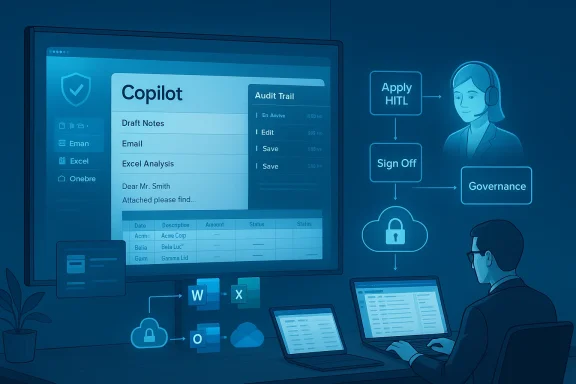
If your firm operates on Microsoft 365 — Outlook, Teams, Word, Excel, OneDrive and SharePoint — Copilot is not just another chatbot: it’s the productivity layer integrated with your identity, content and compliance controls. The vendor improvements in late 2025 and ongoing 2026 releases — from deeper tenant grounding to Copilot Studio and Agent Builder — make the platform deployable at scale for finance teams that prioritize governance over bleeding‑edge accuracy. Microsoft’s product messaging and feature sets emphasize tenant isolation, no‑train assurances (unless opted in), and governance capabilities that enterprises need for regulated work.Why that matters in practice: the reality of accounting work is not glamorous model benchmarks — it’s integration friction, permission mapping, and audit trails. Copilot’s advantage is that it runs where your data already lives, respects Microsoft 365 permissions, and provides administrative controls that let IT and compliance teams limit exposure. For most firms, the win is less about a marginally better language model and more about lowering workflow friction y use the assistant rather than bypass it for isolated tools.
Key deployment playbook (executive summary)
- Inventory Microsoft 365 licenses and confirm Copilot entitlements and tenant availability.
- Start with low‑risk, high‑value workflows (meeting notes, email drafting, first‑draft memos, Excel formula assistance) and require human verification for any deliverable that affects filings.
- Turn on tenant‑level protections, conditional access and DLP rules before allowing Copilot access to sensitive folders. Microsoft documentation explicitly recommends these guardrails.
SharePoint as the data foundation — unglamorous but indispensable
A decade of AI pilots has repeatedly shown the same bottleneck: generative assistants are only as useful as the data they can access and the quality of that data. Scattershot file stores, inconsistent naming, and absent metadata make retrieval‑augmented systems fragile and audit trails hard to build.SharePoint is not a panacea, but it is the practical foundation for firms standardizing documents, metadata and access controls. Firms that succeed treat SharePoint as a program — not a settings toggle — investing in taxonomy design, retention policies, and consultant‑led overhauls to make content machine‑actionable. Practical SharePoint implementations provide:
- Centralized document libraries with controlled access.
- Standardized naming schemes and metadata fields for client, engagement, period and tax topics.
- Versioning and retention that support audit trails for AI‑assisted outputs.
Copilot Studio and “light” agents: constrained automation you can trust
A year ago, agents were a curiosity; in 2026, “light” Copilot agents are a production option. Copilot Studio and the embedded Agent Builder let firms create custom assistants that:- Reference tenant files and knowledge sources,
- Execute defined multi‑step workflows,
- Pause for human sign‑off in human‑in‑the‑loop (HITL) patterns,
- Are governed centrally by admin controls.
Practical guardrails for agent rollout
- Start with a single use case (e.g., invoice triage, internal document summarization).
- Enforce human sign‑off for all outputs that would change a ledger or client filing.
- Monitor agent activity and apply conditional access, MFA and token‑consent review to prevent social‑engineering attacks. (Security advisories around Copilot Studio emphasize token‑phishing risks; treat this seriously.)
Test: high‑value categories that deserve focused experiments
AI‑native tax preparation automation: the “done‑for‑you” 1040s are arriving
The most consequential experiments for tax practices are not theoretical anymore: major vendor platforms and a raft of specialist vendors are rolling AI‑driven document extraction, autofil, and draft return generation into tax preparation workflows.Illustrative signals:
- Intuit and TurboTax expanded “done‑for‑you” autofill across common 1040 forms by integrating advanced document understanding and large‑model capabilities — a clear example of a mainstream vendor moving from assisted to automation features for routine returns.
- Practice‑focused products (for example, integrations from Filed and Canopy’s Smart Prep) automate extraction and map client documents to draft returns so firms review rather than key every field. These solutions explicitly position themselves to relieve firms of junior keying work during peak season.
- Specialist and boutique vendors are emerging with CPA‑centric automation for narrower tax cases (expat returns, simple Schedules), showing that vertical, domain‑aware automation is becoming realistic for high‑volume, low‑complexity work.
- Pilot on low‑complexity 1040 cohorts (W‑2 income, standard deduction, common credits), not complex Schedule C/SE or multi‑state carveouts.
- Measure: time to draft, number of human edits per return, exception rate, and downstream rework hours. Set a 30–60 day shadow window before production.
- Contractual musts: non‑training guarantees, data deletion clauses, and proof of SOC/ISO security posture. Vendors’ performance claims should be validated using your representative sample data.
Automated bookkeeping and Autonomous General Ledgers (AGLs)
“Automated bookkeeping” is no longer a single category — it’s a spectrum from ledger overlays that plug into QuickBooks/Xero to full AGL platforms that reimagine the ledger itself. Two vendor archetypes illustrate the range:- Overlay and automation specialists (e.g., Artifact) tout fast deployments that automate reconciliation and posting while leaving the firm’s ERP intact. These tools aim to introduce agentic capabilities without migration risk.
- AGL vendors (e.g., Digits) build a ledger that is natively AI‑driven and agent‑orchestrated, claiming large accuracy and speed improvements because the architecture is designed for continuous agentic workflows. These systems are more transformational but require careful migration and change‑management planning.
- Replicate vendor accuracy claims on three representative clients before procurement.
- Validate event‑level audit trails linking AI suggestions to the source document and reviewer sign‑offs.
- Start with overlay trials if migration risk is unacceptable — overlays often unlock value without ripping out core systems.
Agentic orchestration layers that ks
A particularly promising test category is vendors that provide agentic orchestration atop existing systems: they connect ERP, tax engines, and document stores, coordinating tasks and passing structured work items between humans and agents. These solutions present less of an existential migration problem — they multiply the value of existing investments by reducing context switching and automating coordination, not by replacing the ledger.Testing these overlays gives firms a way to experiment with agentic automation while preserving governance and rollback options.
Monitor: strategic opportunities you should watch for, not adopt yet
External‑facing AI assistants as revenue engines — promising but premature
The idea of selling AI‑powered advisory services directly to clients is compelling: an external assistant could provide recurring access to standardized advisory insights, self‑serve tax help, or fast financial snapshots. But two constraints remain:- Most firms are still working on internal adoption and governance. You need predictable internal capacity gains before you can credibly offer and support client‑facing AI services.
- Regulatory and liability questions loom for public‑facing AI in regulated advice domains. You must be able to prove deterministic provenance and human oversight to offer these services safely.
Frontier agentic autonomy and “fully autonomous” AIs
Truly autonomous agents that can file returns, pay bills, or post ledger entries without human checkpoints remain risky for professional practice. The technical capability is advancing fast, but regulatory frameworks, audit expectations and professional liability pressures are catching up more slowly. Until you have immutable provenance, deterministic evidence linking, and insurer/regulator comfort, these systems should stay in Monitor. Use pilots, but require human sign‑off for anything material.Governance, security and professional responsibility — the non‑negotiables
Adopting AI in an accounting firm is not a purely technical project; it’s a governance program. Practical guardrails include:- Require human verification for all client‑facing AI outputs and ledger writes.
- Insist on event‑level logs, immutable evidence chains, and versioning for any automated suggestion used in client deliverables.
- Demand contractual non‑training clauses, deletion and residency guarantees, and SOC 2 / ISO 27001 artifacts from vendors. Microsoft and other major vendors explicitly call out these protections as production prerequisites.
- Use NIST’s AI Risk Management Framework (AI RMF) or an equivalent to structure risk mapping, measurement and management across your AI program. The AI RMF provides a practical scaffold for governance and TEVV (test, evaluate, validate, verify).
- Unreviewed or autoposted ledger entries. Never permit write‑back without a human approval gate.
- Uncontrolled connectors and consent flows. Security researchers have demonstrated phishing vectors that exploit agent configuration flows; lock down third‑party consents and monitor app registrations.
- Vendor claims without representative testing. Marketing figures (99% accuracy, 5x productivity) are directional; require trial replication on your data. Artifact and Digits publish strong benchmarks, but those require skeptical verification in your environment.
Practical roadmap: how to move fast without breaking things
- F)
- Inventory systems, data locations and licenses. Map where client PII and core records reside.
- Clean the highest‑value SharePoint libraries (tax returns, engagement workpapers) and standardize metadata.
- Create an approved vendor registry and block uncontrolled public chatbots from client PII.
- Pilot (90–180 days)
- Run time‑boxed pilots in shadow mode (Copilot for draft memos, agent for invoice routing, Filed/Canopy for 1040 drafts).
- Measure time saved, human edits per output, exception rates and cost per saved hour. Use these KPIs to decide scale.
- Scale (6–12 months)
- Expand agents to role‑specific assistants (tax research copilots, AP triage agents) after governance checks pass.
- Invest in FinOps for AI: track model routing, agent usage, and per‑message meters to control costs.
- Update engagement letters and sign‑off policies to reflect AI‑assisted workflows and allocate responsibility clearly.
- )
- Convert capacity into advisory products: standardized AI‑augmented packages, subscription‑based insights, or client portals with guarded assistants. Only proceed once human oversight, audit trails and contractual protections are in place.
Strengths, risks and the competitive lens
Strengths- Immediate ROI opportunities in AP automation, bank reconciliation, and tax document extraction. These are measurable and often quick wins.
- Platform momentum: Microsoft’s integrated stack lowers workflow friction for firms already in the ecosystem. Copilot Studio, HITL features, and tenant controls are explicitly designed for enterprise adoption.
- A new vendor class that augments, rather than replaces, existing systems — ledger overlays and orchestration layers — reduces migration risk and accelerates adoption.
- Model errors, hallucinations and misattributions remain material threats in regulated work. Even domain‑tuned models make plausible but incorrect statements; human verification is mandatory.
- Security exposure through connectors and agent configuration flows — practical incidents demonstrate token‑phishing tactics against agent platforms. Enforce MFA, admin consent policies, and token audits.
- Over‑automation without training risks deskilling junior staff. Upskilling and role redesign (agent stewards, model verifiers) are essential to preserve judgment skills.
Firms that standardized their Microsoft tenant, invested in SharePoint hygiene, and built internal agents last year now enjoy compounding benefits: faster pilots with new vendors, deeper operational visibility, and the capacity to convert internal efficiency into client services. Firms still debating the first seat are at increasing disadvantage — they face higher change costs and narrower options when vendor windows tighten or pricing models evolve.
What to watch next (actionable signals)
- New Copilot Studio governance features and Agent 365 controls (monitor early access and admin dashboards). These define whether large rollouts remain safe.
- Vendor case studies that reproduce accuracy numbers on representative, non‑sanitized client data (not vendor datasets). Demand these before scaling.
- Regulatory guidance from professional bodies (AICPA, regional regulators) on acceptable evidence trails and disclosure when AI is used in client work — these will shape liability allocation. The NIST AI RMF remains a practical, voluntary scaffold for risk management in the near term.
Conclusion: the new question is how fast, not whether
The 2026 landscape vindicates the Adopt, Test, Monitor framing: some technologies are production‑ready when paired with governance (Copilot, SharePoint, constrained Copilot agents); others deserve methodical pilots (AI tax autofil, bookkeeping overlays, agentic orchestration); and a few remain strategic observables that will reward patience and technical readiness (fully autonomous agents, client‑facing assistants). The firms that moved decisively last year — implementing tenant‑grounded Copilot, cleaning their SharePoint stores, and running tight pilots with human‑in‑the‑loop controls — are now compounding advantages and positioned to experiment with AI‑native tax and bookkeeping vendors. Firms still debating the first seat are falling behind in ways that will be hard to reverse.Adoption is a program, not a feature rollout: invest in taxonomy, human supervision roles, FinOps, and legal protections; pilot with measurable KPIs; and iterate. Do that, and AI will be an accelerant for advisory growth rather than a source of professional liability. The question for 2026 isn’t whether to start — it’s how fast you can build the foundations and run disciplined experiments without sacrificing the auditability and judgment the profession demands.
Source: Accounting Today Adopt, test, monitor 2026: AI recommendations for CPAs
